Loading user projects
VI
VIBEFIX
This user has not added a bio yet.
Joined 7/11/2026
194
Projects
0
Iteration asks
0
Iterated
0
Likes
0
Saves
1517
Views
0
Comments

Showcase
Online
Financeclaudeminimax
Use Your Benefits
Stop leaving credit card perks on the table: track every benefit, credit, and enrollment across your cards, and see exactly what's still available this year.
Premium credit cards are a math problem most people lose. An $895 annual fee buys you $300 in hotel credits, $200 in airline fees, $200 in Uber Cash, $120 for Uber One — but only if you actually remember to use them before they expire. Use Your Benefits exists because the author was tired of leaving money on the table. The dashboard tells the whole story at a glance: Total Value $5,274.40 across your cards, Still Available $2,887+, and per-card breakdowns showing exactly what's used, what's pending, and what's been missed. Each benefit card — Hotel, Uber Cash, Uber One, Airline Fee — carries its own status (Pending, Excluded, Needs Enrollment) and a progress bar for the year's credits. The screenshot shows an American Express Platinum with $1,671.95 still available and 26 missed credits staring back at you. That "26 missed" number is the app's entire reason for existing. It's vibe-coded with Claude and MiniMax in OpenCode, built on Bun with React + Vite and Tailwind. The year switcher (2024/2025/2026) suggests it's designed for the long haul — benefits reset annually, and so does your memory of them. For anyone paying premium annual fees, this is the closest thing to a refund button. Note: This project is curated by the VibeFix editors from public sources. All rights belong to the original creator. --- ---
V@VIBEFIX
0
0
8
0

Showcase
Online
Entertainmentclaude-code
人生K线
输入出生信息,三秒生成你的人生 K 线图:八字排盘结合大运流年,把"人生关键阶段"画成一张可读的趋势图。
如果把人生画成 K 线图,会是什么样子?人生K线(lifekline.net)给出了一个认真的回答:输入性别、出生年月日时、出生城市,约三秒生成一张专属的"人生趋势图"——用八字排盘结合大运流年的计算,把传统命理变成一张现代人看得懂的可视化图表。 首页的文案很克制:"看清人生关键阶段,读懂下一步。"热门测算主题直接戳中当代焦虑:哪一年适合跳槽/创业?人生财富高峰在何年?感情走势与正缘年份?哪十年是人生巅峰大运?时辰选择细到子时、卯时、午时,公历农历可切换,还支持真太阳时校正——细节做到这个份上,看得出作者对命理不是玩票。 技术上这是个标准的现代 Web 应用:React + TypeScript + Vite,K 线图用 Canvas 绘制,部署在 Cloudflare Pages 上。据作者在 V2EX 原帖自述,整个项目用 Claude Code 两天写成。本地历法严谨测算、保护个人隐私是它主打的卖点,登录后免费生成趋势图,完整解读按积分解锁。 信则有、不信则无——但把玄学做成数据可视化,这个点子本身就值得一看。两天时间、一个人、一个 AI,这就是 vibe coding 时代的产品速度。 注:本项目由 VibeFix 编辑从公开渠道精选收录,版权归原作者所有。 --- ---
V@VIBEFIX
0
0
7
0
Showcase
Online
Education
Bitdrill
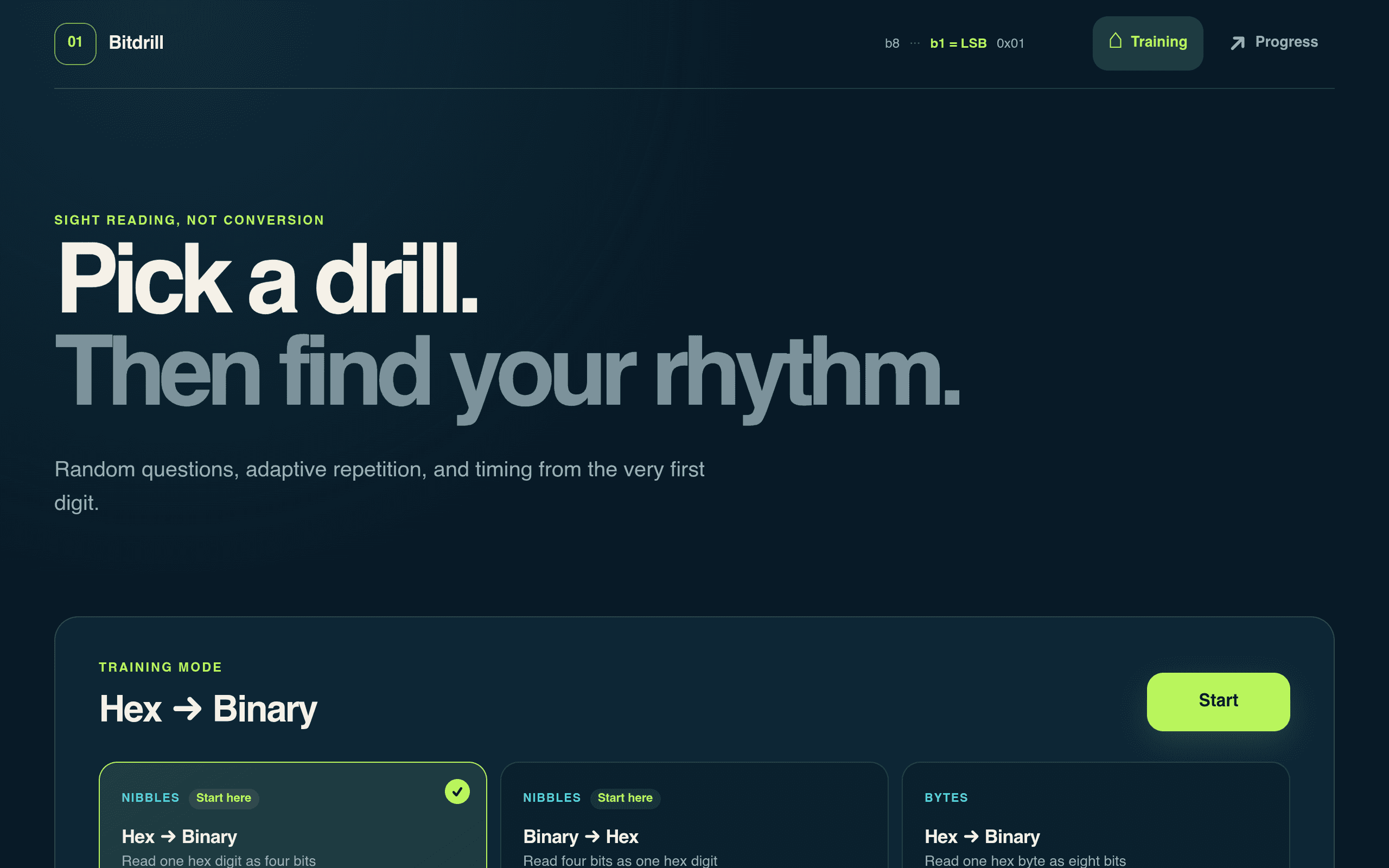
Sight-reading drills for hex and binary: random questions, adaptive repetition, and timing from the very first digit — train like a musician, but for bits.
Musicians have sight-reading drills. Bitdrill asks: why shouldn't programmers? It's a trainer for reading hexadecimal and binary at sight — not converting them with a calculator, but actually recognizing 0x3F the way a pianist recognizes a chord. The homepage makes the philosophy explicit: "SIGHT READING, NOT CONVERSION." The training is structured like music practice for a reason. You pick a drill — Hex → Binary, Binary → Hex, nibbles or full bytes — and the app throws random questions at you with adaptive repetition: the digits you fumble come back more often, the ones you've nailed fade into the background. Timing starts from the very first digit, because fluency is the whole point. A Progress tab tracks how your speed and accuracy evolve over sessions. Technically it's almost aggressively simple: no build step, no dependencies, no npm install — just static files on GitHub Pages. That minimalism is the point; there's nothing between you and the drill. And it's 100% vibe-coded, which feels appropriate for a tool whose entire job is building intuition through repetition rather than through theory. If you've ever stared at a hex dump and wished the numbers would just resolve into meaning the way words do on a page, this is the practice room. Note: This project is curated by the VibeFix editors from public sources. All rights belong to the original creator. --- ---
V@VIBEFIX
0
0
3
0
Showcase
Online
Financeclaude-code
It's a My Money!
A 100% vibe-coded Android expense tracker with a Mario wink: multi-currency accounts, budgets, and a cheerful dashboard that makes bookkeeping fun.
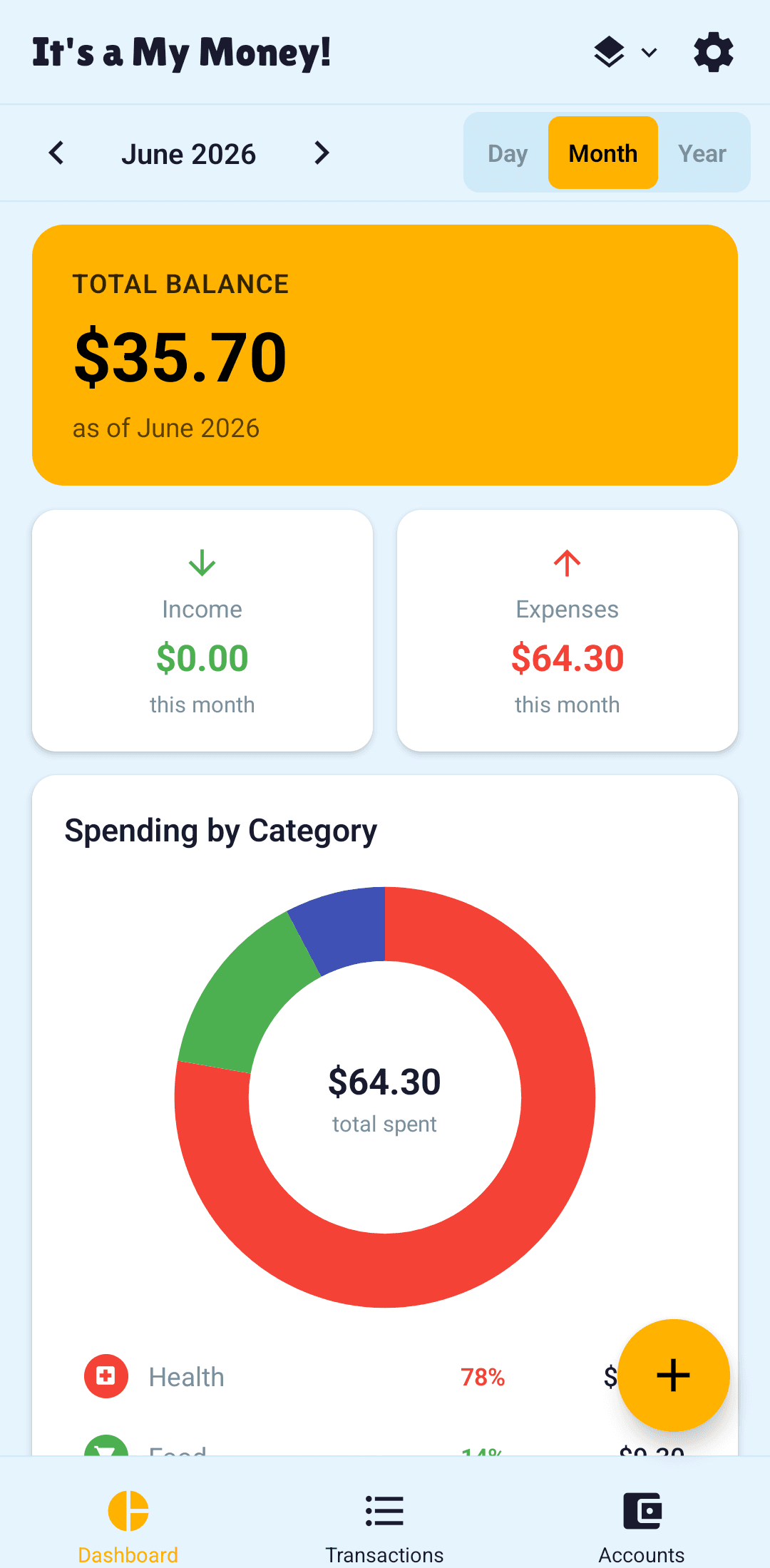
The name tells you everything about the tone: It's a My Money! — an Android expense tracker that borrows its energy from a certain plumber and refuses to make bookkeeping feel like homework. It's 100% vibe-coded with Claude Code, across 134 commits and 10 releases, which puts it firmly in "real maintained app" territory rather than weekend-demo land. The dashboard is the first thing you see and it's genuinely cheerful: a big amber total-balance card up top, income and expenses side by side with this month's numbers, and a "Spending by Category" donut chart that breaks down where the money actually went. Month navigation sits right in the header (the screenshot shows June 2026), with Day/Month/Year toggles for zooming in and out of your habits. Under the hood it's a serious little app: multi-currency accounts with cross-currency transfers, budgets, grouped transactions, and a theme picker for when you want the numbers in a different mood. Everything runs on Expo with expo-sqlite for local storage and Zustand for state — no cloud account required, your money data stays on your device. The README ships eight real screenshots in docs/screenshots/, which is how you know the author actually uses it. A finance app that doesn't lecture you, built entirely by describing what you want to an AI. The mushroom kingdom would approve of the accounting. Note: This project is curated by the VibeFix editors from public sources. All rights belong to the original creator. --- ---
V@VIBEFIX
0
0
5
0
Showcase
Online
Health & Fitnessclaude-code
Health Tracker
A privacy-first health tracker that lives in your browser: log a reading in five seconds, watch trends on sparklines, and know if you're in a healthy range.
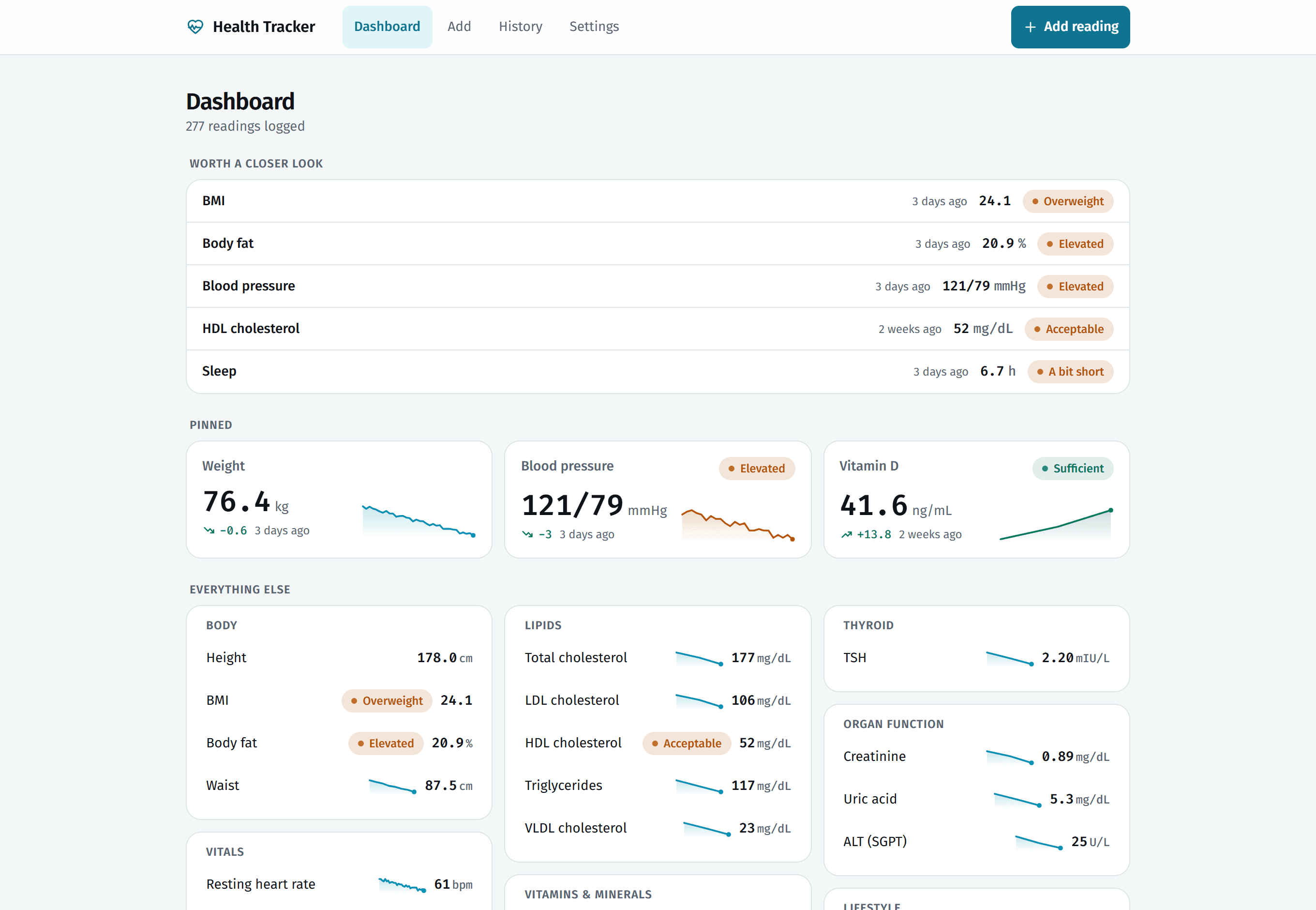
Most health apps want your account, your email, and your data on their servers before you can log a single number. Health Tracker goes the other way: no account, no server, no database. Your readings live in your browser and go nowhere unless you tell them to. The README's pitch is disarmingly simple — "Log a reading. See how it moves. Know whether it sits in a healthy range." Open it on your phone and you're logging in five seconds. The dashboard reads like a triage nurse's summary: a "worth a closer look" section surfaces the metrics that need attention — BMI flagged Overweight, blood pressure Elevated, sleep "a bit short" — each with plain-language status labels instead of raw numbers you're supposed to interpret yourself. Below that, pinned metric cards carry sparklines so you can see at a glance whether your weight is actually trending down or just had a good Tuesday. What makes it more than a spreadsheet is the range awareness. Every metric is judged against healthy ranges, and the app tells you where you stand in words a human understands. It follows your system theme, installs as a PWA so it sits on your home screen like a native app, and the whole thing is vibe-coded with Claude Code — badges for Next.js 15, React 19, TypeScript and Tailwind v4 line the top of the README like a spec sheet. For anyone who's ever thought "I should track my blood pressure" and then bounced off a signup wall, this is the version that finally removes the excuse. Note: This project is curated by the VibeFix editors from public sources. All rights belong to the original creator. --- ---
V@VIBEFIX
0
0
3
0

Showcase
Online
Developer Tools
Proof of Shipping
A GitHub Action that turns your real shipping activity — releases, merged PRs, latest delivery — into a live profile card. No server, no account.
GitHub profiles are full of contribution graphs, streaks and commit counters. They answer how much you code. Proof of Shipping answers a different question: what did you actually ship? It's a GitHub Action that analyzes your real public GitHub activity and generates a visual card showing published releases, merged pull requests, your latest delivery, and activity over a configurable period. The workflow runs inside GitHub Actions itself and updates an SVG stored in your profile repository. The card running on the author's own profile shows 7 merged PRs and the latest delivery from a real repository — and it's no mockup: "This isn't a mockup. The card is generated by the GitHub Action itself from my public activity." The origin story is the point. The author started with a simple thought — developers show how much they code, but what if they showed what they actually ship? — and the whole thing went "Idea → AI-assisted coding → tests → real integration → release → GitHub Marketplace," with, in his own words, "a large part of the coding process" involving AI. Somewhere along the way, he writes, it stopped feeling like simple vibe coding and started requiring actual software engineering. MIT licensed, no external server, no account, no database — your data stays inside GitHub. Note: This project is curated by the VibeFix editors from public sources. All rights belong to the original creator.
V@VIBEFIX
0
0
8
0
Showcase
Online
Health & Fitnessclaude-code
Training Mode
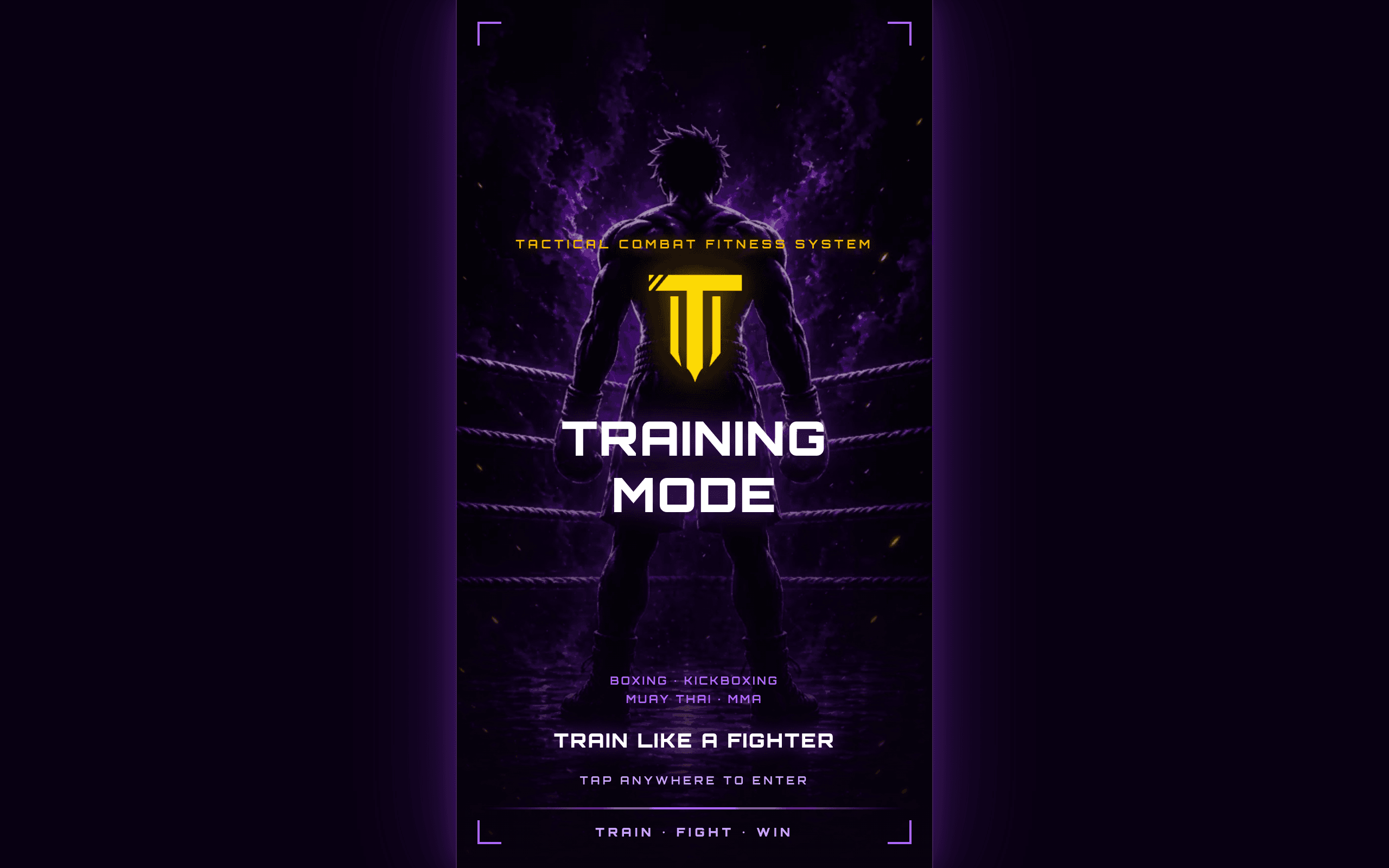
A combat-fitness app with voice-coached round timers for boxing, kickboxing, Muay Thai and MMA — plus workout builder, XP, streaks. Free beta.
Most workout apps are spreadsheets with a stopwatch. Training Mode is a tactical combat fitness system with the visual language of a fight night: "Train like a fighter." It has two halves. Fight Mode is voice-coached round timers across Boxing, Kickboxing, Muay Thai and MMA, with a Combo Coach that calls strike combinations at your pace and a Practice Mode for guided breakdowns of strikes, defense and footwork. Fit Mode is the gym half: a Workout Builder where you pick target muscles on a glowing anatomy body map, generate a workout, swap exercises, edit sets/reps/rest and save named routines; a voice-guided player that counts reps out loud on an adjustable cadence; Quick Mission round-based workouts; Combat Conditioning crossover modes; and cardio finishers — timed runs, intervals, Tabata — bolted onto any session. Progression is everywhere: every session earns XP, levels and ranks from Rookie to Champion, with an evolving avatar, daily streaks, a "Today's Bout" mission, trophies and one-tap share cards. Under the hood it's a single Expo / React Native Web codebase exported as an installable PWA with an offline app shell — and all progress stays on-device in localStorage, so there's no account to create. The author built the beta with Claude Code; the paywall is dormant during beta, so everything is currently free. The last code activity was about two months ago, but the app itself is live and playable at apptrainingmode.com. Note: This project is curated by the VibeFix editors from public sources. All rights belong to the original creator.
V@VIBEFIX
0
0
9
0
Showcase
Online
Educationclaude-code
Still True
A Next.js knowledge base that keeps itself honest: facts as sourced claims that supersede or contradict each other, so you can watch the truth change.
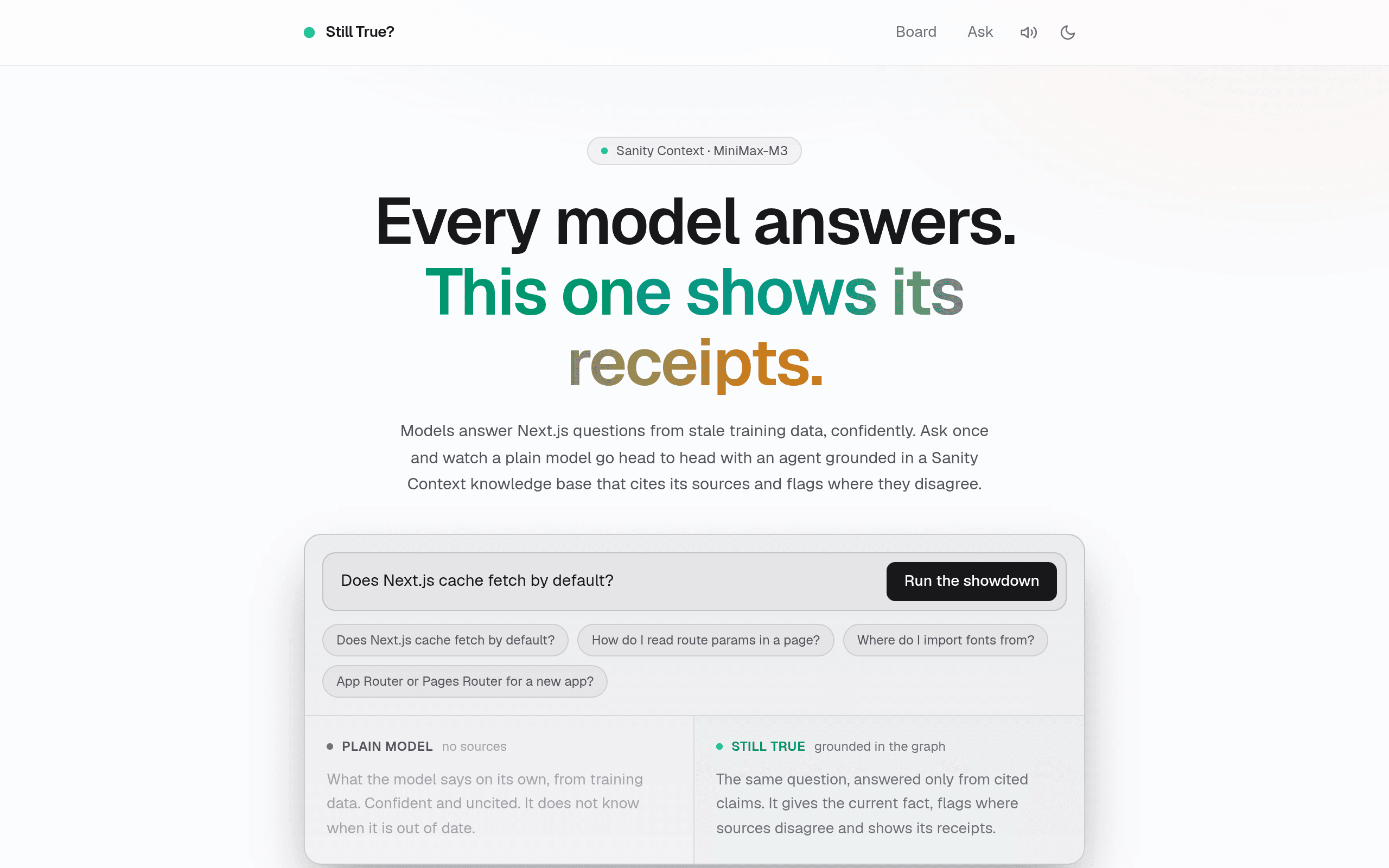
AI models answer confidently from stale training data. Ask a plain model whether Next.js caches fetch by default and you'll get an answer — the question is whether it's still true. Still True is built around that doubt: a knowledge base where facts are stored as claims tied to sources, connected by typed relationships. One claim can supersede another, or contradict it, and the relationship carries the reason it holds. The public board reads that graph and lays it out by topic. Current claims sit on top; superseded ones are dimmed and struck through; wherever two sources disagree, the conflict is shown side by side with an explanation. A time slider replays topics flipping as newer facts replace older ones, and an interactive contradiction graph maps every live disagreement as a node-and-edge diagram. The centerpiece is the showdown. Type a Next.js question and a plain model goes head to head with an agent grounded in the Sanity Context knowledge base — the plain model answers confidently from training data, while the grounded agent answers only from cited claims, shows its receipts, and flags where its own sources disagree. It's a Sanity Challenge entry with an unusually disciplined build process: "Built end to end with Claude Code: the Sanity schema, the Knowledge Base pipeline and the grounded agent were all generated and verified through it" — backed by 24 unit tests plus 4 end-to-end tests running in CI. Free, no login, and the public board is there to try today. Note: This project is curated by the VibeFix editors from public sources. All rights belong to the original creator.
V@VIBEFIX
0
0
7
0
Showcase
Online
Entertainmentclaude-code
GitBull
A fantasy stock exchange for GitHub developers: every dev has a live stock price from real activity — trade them in a 3D candlestick market.
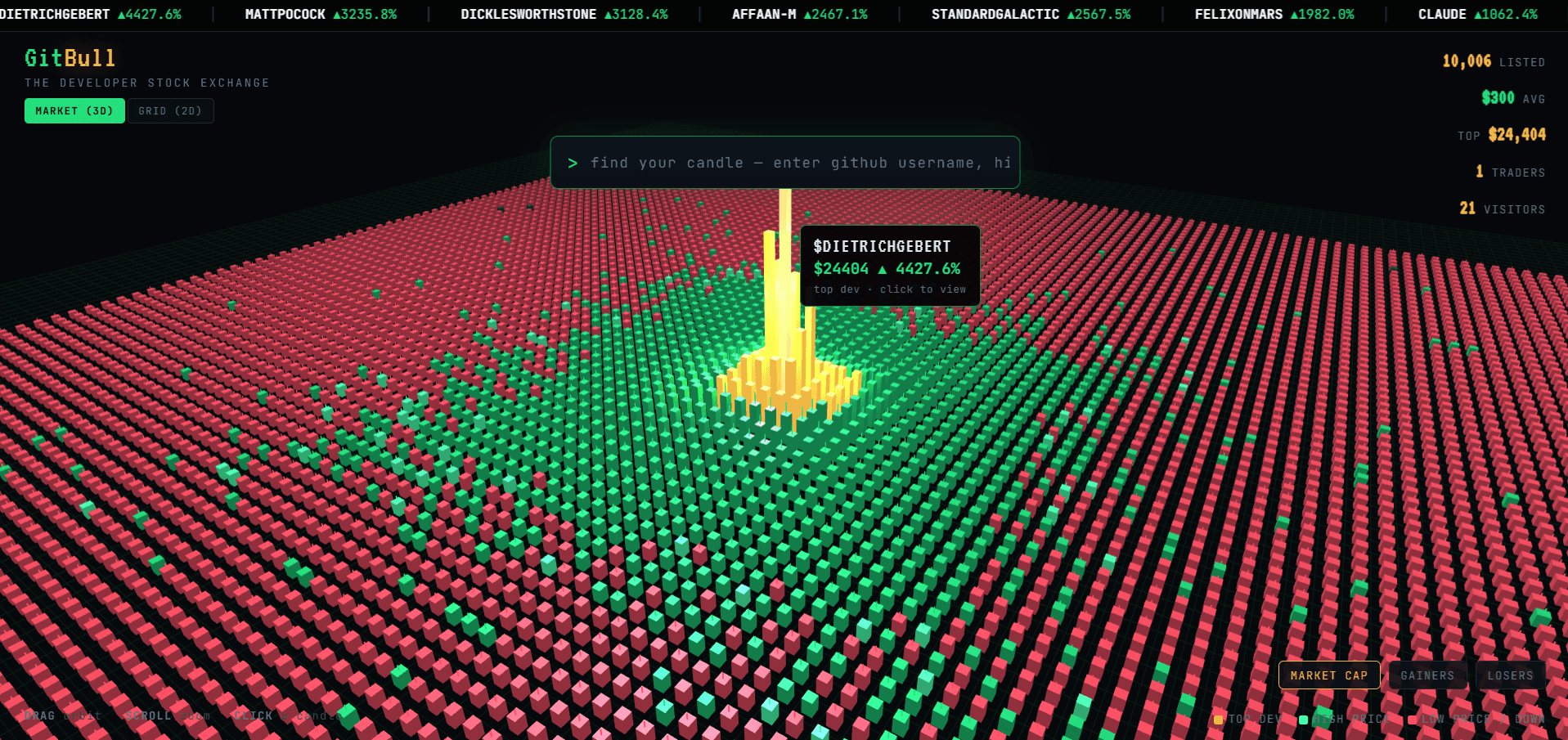
Every developer has a number in their head: stars, followers, contribution streaks. GitBull makes it official — a stock exchange where every GitHub developer has a live stock price, computed from their real GitHub activity. Search any username and you get a dev card with their price and weekly movement; buy and sell with virtual points on a market where 10,000 developers are listed. No real money — README is explicit about that. The market itself is the showpiece. Instead of a table, GitBull renders the whole exchange as a 3D candlestick field: every dot is a real developer, colored green or red by price movement, sized by price. Top devs tower over the field as golden candles — in the captured screenshot, $DIETRICHGEBERT sits at $24,404, up 4,427.6%. A ticker along the top tracks the day's biggest movers, and you can flip between the 3D market and a 2D grid, or type a username to find your own candle. The build story is unusually honest. From an idea in a notes app to a live product in about a week — solo, with Claude Code as the entire engineering team. The author even draws a line between demo and product: "This isn't a 'vibe-coded prototype that barely runs' — it's a real product, deployed, live, and playable today." A weekly cron keeps the market alive; a FastAPI backend computes prices from the GitHub API; Firebase handles auth and hosting. GitBull is free to play, and in the author's words it's proof that a single person with the right AI collaborator can ship what used to take a small team months. Note: This project is curated by the VibeFix editors from public sources. All rights belong to the original creator.
V@VIBEFIX
0
0
9
0

Showcase
Online
Entertainmentclaude-code
claude-code-pokemon
A Claude Code mod that puts a living pixel Pokémon world above your prompt — they react to your coding, earn XP, and evolve as you ship.
"Gotta code 'em all." Pokémon Journey for Claude Code is a mod that renders a tiny pixel world right above your Claude Code prompt — and it might be the most joyful thing installed in anyone's terminal this month. Your party of up to three Pokémon travels through meadows, hills, mountains, lakes and forests that follow your local clock: sunrise at dawn, drifting clouds by day, stars and fireflies after dark. The magic is that they react to your work with zero configuration. They hurry about while Claude is thinking, do a double-hop spin when a reply lands, erupt in confetti when tests pass or a commit lands, perform a battle-style faint when a build fails, squash flat during /compact, spawn little clones when Claude launches subagents, and doze off with floating Z's after five idle minutes. Even the spinner joins in — "Searching tall grass… (17m 46s · ↓ 12.3k tokens)". Underneath the whimsy is a real progression system: 905 Pokémon from Bulbasaur to Enamorus plus 424 alternate forms, XP earned from replies (+2), passing tests (+5) and commits (+10), evolution at the exact levels from the games with the classic flashing-silhouette animation, shinies at 1 in 32, a wild Pokémon wandering through every 10–20 minutes, and a full Pokédex tracking what you've seen. There's even an optional battle-HUD status line showing your model as a nametag, tokens as EXP, and remaining context as an HP bar. The author — a Pokémon fan since childhood — built it exactly the way the product feels: "mostly in claude code, just described what i wanted in plain english like 'make them react when tests fail'". Claude wrote the mod, the 122 tests, and the docs. Unofficial fan project, free and open source. Note: This project is curated by the VibeFix editors from public sources. All rights belong to the original creator.
V@VIBEFIX
0
0
10
0
Showcase
Online
Developer Toolsclaude-code
video-lens
A Claude Code skill that measures video frame-by-frame on your Mac — animation timing as CSS, scene cuts, transcripts — nothing uploaded.
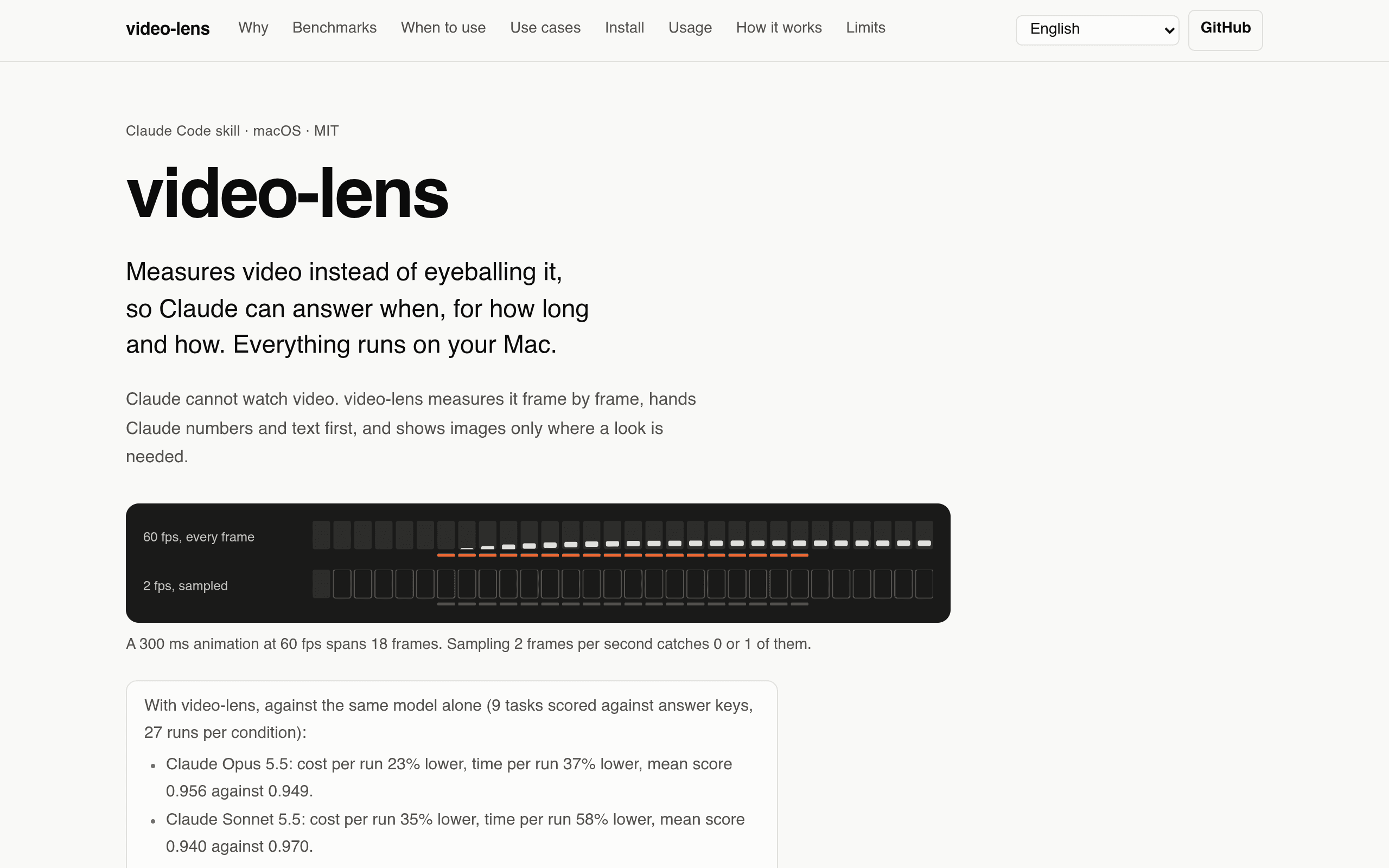
Claude cannot watch video. That single limitation spawns a whole category of hacks — sampling frames, uploading to transcription APIs, eyeballing timestamps. video-lens takes the opposite approach: it measures the video on your Mac, frame by frame, and hands Claude numbers and text first, images only where a look is actually needed. Ask it to analyze a screen recording and you get UI motion as data: start time, duration, easing curve (named or cubic-bezier), stagger and travel of each animated element — measured to the frame and written out as CSS you can paste. Ask about a talk and you get scene cuts, keyframes, Korean and English on-screen text via macOS Vision, and a speech transcript with audio/video sync, all timestamped. Everything runs locally — ffmpeg, OpenCV, Apple on-device speech, whisper.cpp — nothing is uploaded, which also makes it the right tool for private meetings. What elevates this above a weekend script is the author's testing discipline: 9 tasks scored against answer keys, 27 runs per condition, published with raw data. A 300 ms toast animation rendered from real CSS measured 298 ms with the exact cubic-bezier curve. Against the model alone, Claude Opus 5.5 runs cost 23% less and finished 37% faster; Sonnet 5.5 saved 35% cost and 58% time. And the build story is the site's thesis in miniature — spec, Python analysis, Swift helpers, 60 synthetic test clips and the whole benchmark harness written with Claude Code on Opus 5.5, the human choosing what to track and verifying against answer keys. Install is two commands in Claude Code (/plugin marketplace add Junhan2/video-lens), macOS only, MIT licensed, with a nine-language docs site carrying interactive benchmark charts. Note: This project is curated by the VibeFix editors from public sources. All rights belong to the original creator. ---
V@VIBEFIX
0
0
9
0

Showcase
Online
Developer Toolscursorclaude
LogPhase
A multi-agent swarm harness that turns sprawling codebases into evidence-linked executive summaries.
AI now writes code at machine speed, and LogPhase's homepage opens with the thesis of our era: "The code is a byproduct. The real program lives in the people who understand it." LogPhase is a desktop app — macOS and Windows — that helps you build that understanding just as fast. It orchestrates dozens of AI agents, context analyzers, and deep-search workers as a multi-agent "swarm", then lets you point workspaces at a codebase and get back an executive summary of every pull request, with evidence links into the actual code. The visual signature is the city map: your repository rendered as districts and towers — services are districts, files are towers, user journeys are trails. A pull request stops being a wall of diffs and becomes three user journeys drawn step by step, with the affected steps popping up with code attached. Drill down into methods, call graphs, go-to-definition, all generated inside the app. The most human detail: it is built by a solo developer in Berlin who is dogfooding the AI-coding era in the most literal way — the site says it was "made by a solo dev with Cursor + Claude", written "in a cave of prompts, caffeine, and GPU fans". Pricing is indie-friendly: a free tier with 5 chats a month, $9/user/month Pro, $29/user/month Expert, one month free from first launch with no signup and no card. Note: This project is curated by the VibeFix editors from public sources. All rights belong to the original creator. ---
V@VIBEFIX
0
0
7
0
Showcase
Online
Health & Fitnessclaude-code
Brain Bed
A macOS menu-bar app that scores your "Brain Fry Index" from AI coding sessions and force-locks your keyboard for meditation breaks.
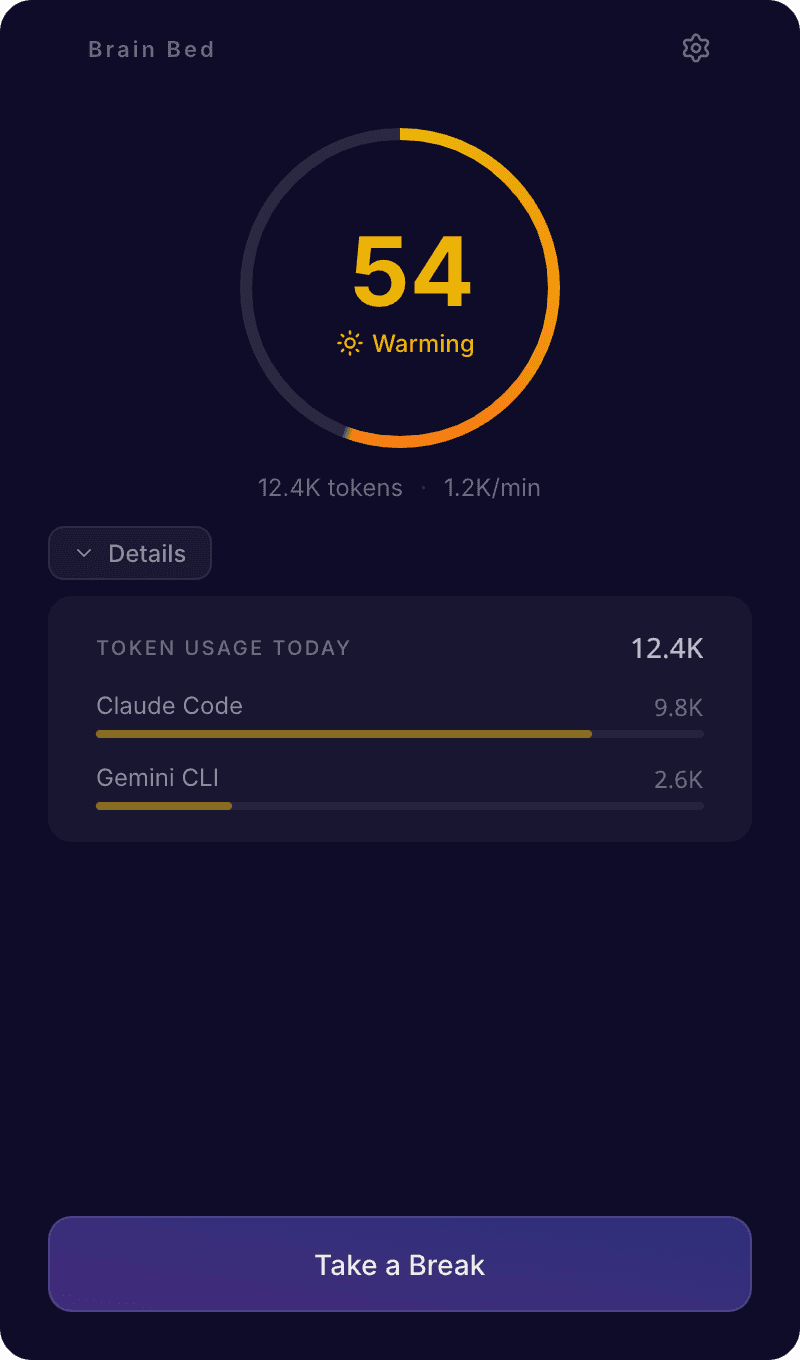
If you have ever looked up from Claude Code to realize four hours have passed — dry eyes, aching shoulders, no memory of what you were building — you have met Brain Fry. AI removed the natural pauses from coding: no waiting for builds, no staring at the ceiling. Just prompt, judge, prompt, judge, at machine speed. Brain Bed is a macOS menu-bar app built for exactly that moment: it reads your local CLI session files (Claude Code, Gemini CLI, Codex CLI — no cloud, no API keys, nothing leaves your machine) and computes a real-time Brain Fry Index from 0 to 100. The index is not a gimmick. It weights five signals: message velocity (prompts per minute, 55%), context switching between projects, concurrent active sessions, token throughput, and late-night work. Stages run Calm → Warming → Heating → Brain Fry. When things heat up, exponential-backoff alerts warn you that your judgment is degrading — before you approve the diff you didn't read. And when the index spikes, Brain Bed takes the choice away: it locks your keyboard and takes over your screen with a breathing circle, classical music, and a deck of real-world activity cards — walk, stretch, tea, tidy your desk. The author tried timers and Pomodoro first and cheated at all of them, so the app is deliberately un-cheatable, with only a hold-to-exit emergency button. The build story is pure vibe coding: the author shipped it in one session with Claude Code (Electron + React + Three.js + Web Audio + SQLite), code-signed and notarized by Apple, distributed free as an open-source DMG from GitHub Releases. It is also a sharp commentary on our moment — the same tools that fry your brain are the ones you used to build the cure. Note: This project is curated by the VibeFix editors from public sources. All rights belong to the original creator. ---
V@VIBEFIX
0
0
5
0
Showcase
Online
Productivity
slides
A self-hosted markdown slide-deck editor in one Rust binary: live reveal.js preview, an MCP endpoint, and an in-app agent with review-mode changesets.
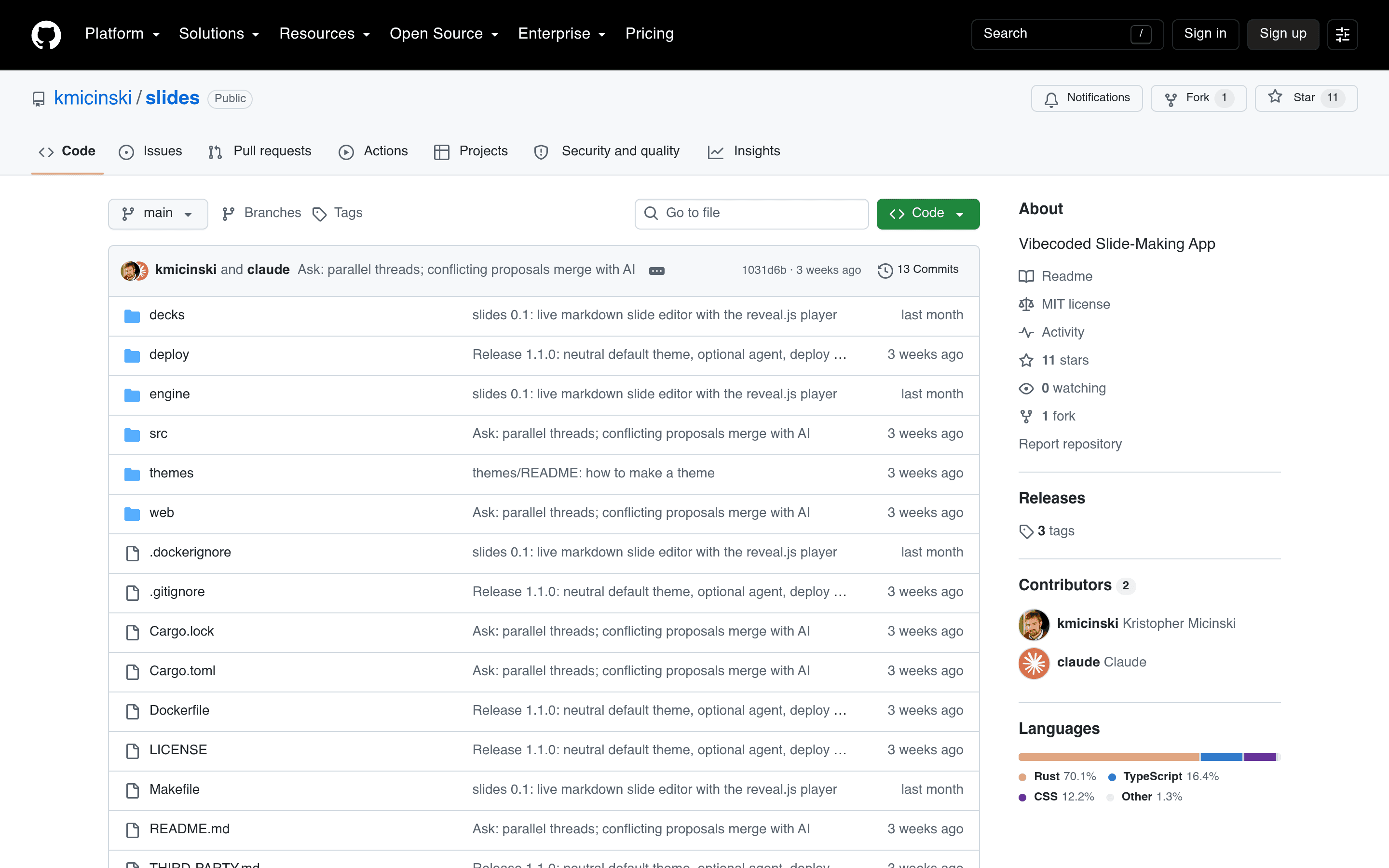
slides is a hosted editor for markdown slide decks with an unusual guarantee: what you see while typing is exactly the reveal.js player your audience opens. One Rust binary renders the markdown server-side (pulldown-cmark for prose, KaTeX for math — so formulas never pop in after the slide appears), and the preview iframe receives positional patches over WebSocket, swapping changed slide bodies in place so the preview never flickers. Rendering a 2,000-line deck takes milliseconds, so every keystroke re-renders everything — no incremental bookkeeping to get wrong. The author verified parity slide-by-slide across 818 existing course slides. The tool-facing design is where it gets interesting. There's a full HTTP API plus a JSON-RPC MCP endpoint, so a Claude Code session on another machine can drive decks programmatically: list decks, replace slides by position, fetch assets, even cut regions out of PDFs into PNGs. Tool edits arrive as *proposals* grouped into changesets that the author accepts or rejects slide-by-slide, with conflicts (two writers touching the same slide) resolved by merging with AI. And the ✦ Ask tab opens a chat with an in-app agent — a headless `claude -p` run whose only tools are the server's own MCP endpoint — so you can say "add three slides after slide 14" and review the result as a diff. The repo description says it all: "Vibecoded Slide-Making App." A PL professor's course tooling, rebuilt as a single binary with agent-native editing, review workflows, and three deploy recipes (TLS-only, basic auth, Authelia) in `deploy/`. Note on the screenshot: slides is a self-hosted Docker app with no public demo and no product shots in the README, so the repo page stands in as the last-resort image per our screenshot rules — the project itself is verified live and actively developed. Note: This project is curated by the VibeFix editors from public sources. All rights belong to the original creator.
V@VIBEFIX
0
0
10
0
Showcase
Online
Entertainment
Daily Doodle
A drawing-prompt spinner for beating the blank page: nine categories, Beginner/Advanced modes, retro synth sounds — by someone who last coded HTML in 2000.
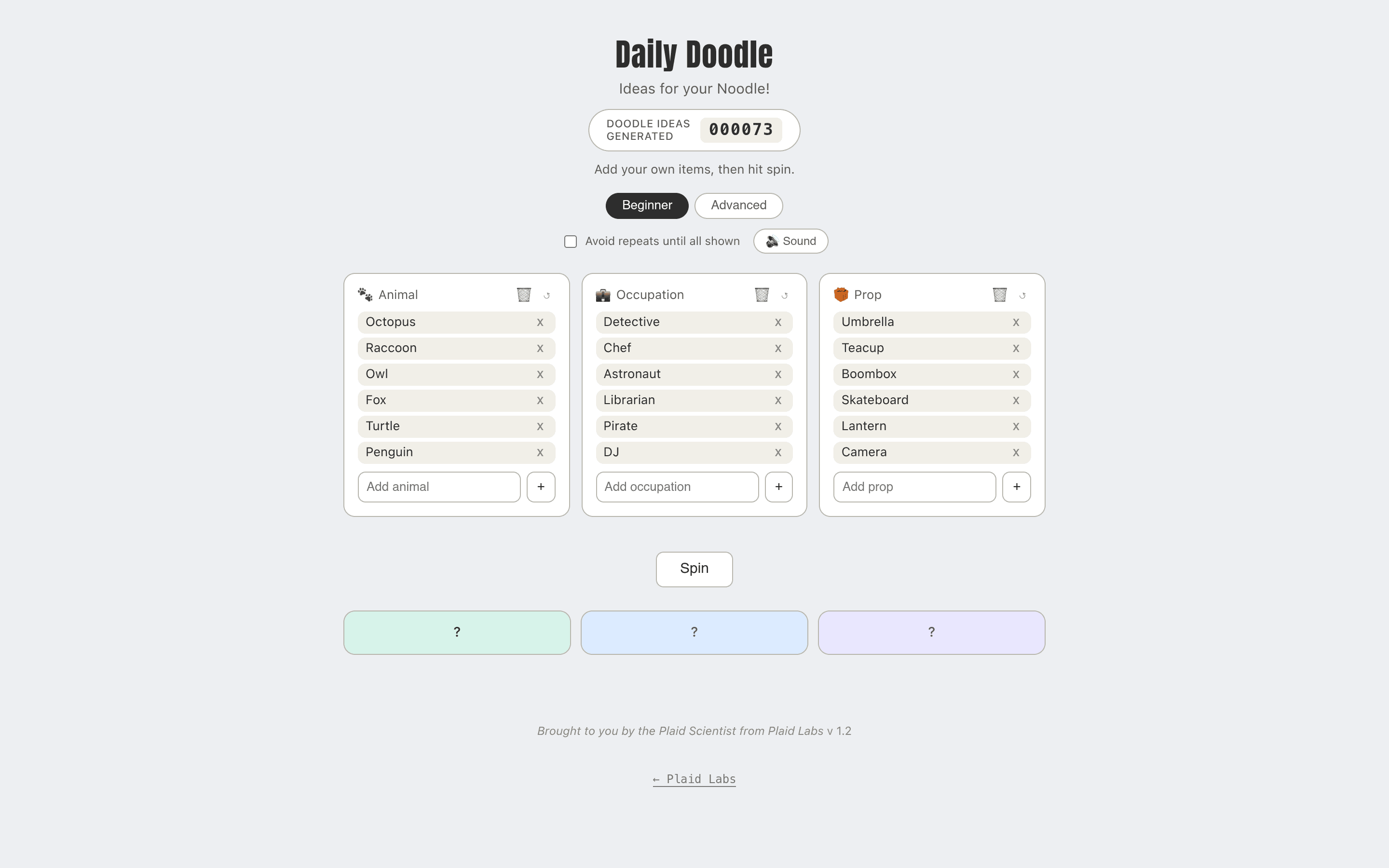
Daily Doodle exists to answer the question every artist dreads: what should I draw today? Pick which categories you want in play, hit spin, and it mashes them together into something like "a Pencil Anime-style drawing of a Detective Octopus wearing a Hoodie, with a Boombox, riding a Scooter, looking Happy, in the Woods." Nine categories — Animal, Occupation, Prop, Vehicle, Style, Medium, Outfit, Mood, Setting — all toggleable and fully editable: add your own items, clear a category, or restore the starter list. No two spins land the same. The details show it was built to actually get used. Beginner mode keeps just the original three categories with nothing to configure; Advanced unlocks all nine with individual toggles. A live counter backed by Firebase tracks total spins across everyone. Retro sound effects — a boop-boop-boop while spinning, a tada on landing — are synthesized entirely with the Web Audio API, so there's no audio file to load or license. An "avoid repeats until all shown" option, a copy button for shareable text, and a recent-doodles list round it out. The backstory is the best part. The author, Andy, took web design in high school "in the year 2000, when it was all about learning HTML tags" — that was the most coding he'd ever done. After a friend's dinner-table dare ("you really should try vibe coding"), he built the whole thing by editing a single `index.html` directly in the GitHub web UI, at one point copy-pasting full HTML files because he wasn't sure how GitHub Desktop worked. It's hosted free on GitHub Pages and costs nothing to run. Proof that the blank page — and the blank code editor — are both beatable. Note: This project is curated by the VibeFix editors from public sources. All rights belong to the original creator.
V@VIBEFIX
0
0
9
0
Showcase
Online
Educationcursor
Mot
A career exploration app on 1,016 O*NET occupations: chat with an explorer, mock interviews, RIASEC quiz — built in Cursor's agent mode.
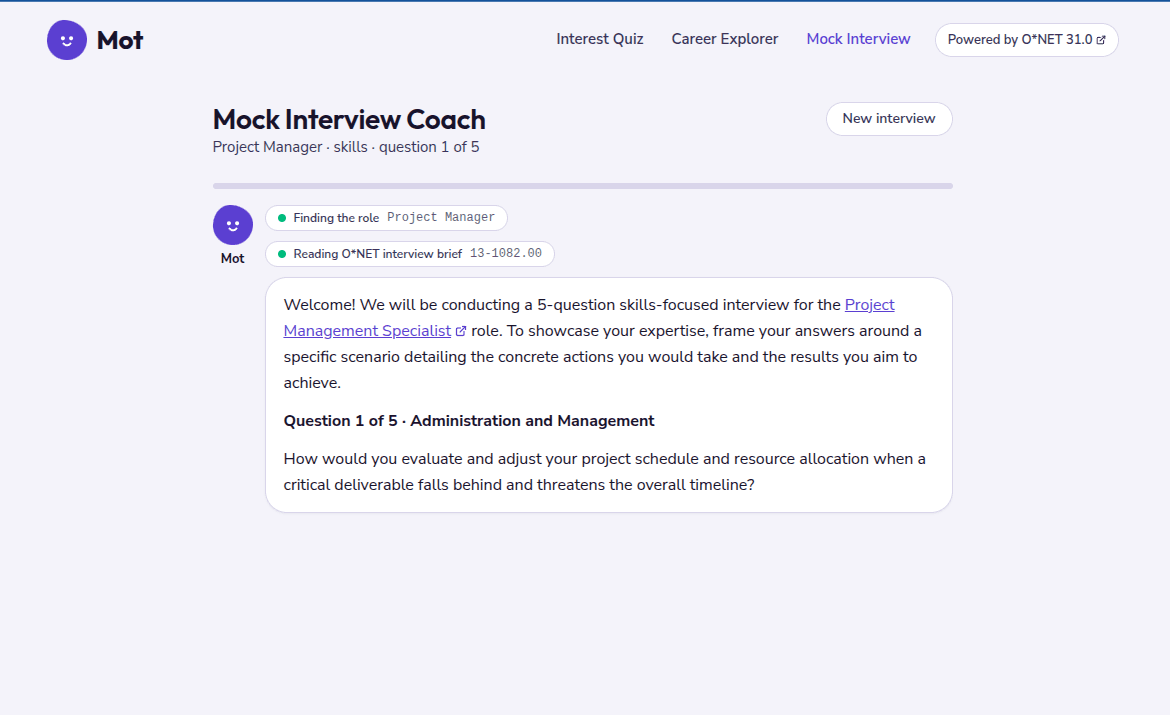
Mot is a career assistant that answers with real occupational data instead of guesswork. It's built on O*NET 31.0, the U.S. Department of Labor's database of about 1,000 occupations, and it has three tools: a Career Explorer for chatting about careers, bookmarking and comparing occupations; a Mock Interview Coach that grades your practice answers against O*NET's own examples of each skill level; and an Interest Quiz based on the RIASEC model, matched against every occupation. The mascot — "a cross between Meta's Muse and OpenAI's Dots, made casual so it feels like a friend" — even got blinking-eyes animation after several rounds of prompts. What elevates Mot beyond a chatbot demo is the half you don't see. Everything except the Astro front end and the Node agent service lives in Sanity: 1,500+ O*NET documents, coaching guides, quiz submissions, two review workflows, a knowledge base, MCP endpoints, and a weekly function that classifies chat transcripts. Career counselors write interview coaching guides in Sanity Studio, and a guide only reaches the AI coach after another counselor reviews it through a gated workflow. User-submitted career quizzes go through Draft → Ready to Review → In Review → Approved, with "Approve and publish" as a single custom action. The author's build log is one of the most honest vibe-coding write-ups around: 47 agent chats and ~80 commits across four repos from September 19 to October 2, "I wrote very little code by hand." He documents what worked (an `AGENTS.md` in every repo listing cross-repo contracts), what didn't (vague taste prompts took four rounds; prompts naming the exact DOM element landed first try), and the bug the model couldn't see (a CORS failure in a workflow plugin's ACL request, found by opening DevTools himself). "When the model starts generating theories instead of evidence, give it evidence" — that's a line worth quoting. Note: This project is curated by the VibeFix editors from public sources. All rights belong to the original creator.
V@VIBEFIX
0
0
8
0
Showcase
Online
Lifestyleclaude-code
Cookable
Tell it what's in your kitchen; it tells you what you can cook tonight — plus swaps for whatever you're missing. Empty repo to installable app in six days.
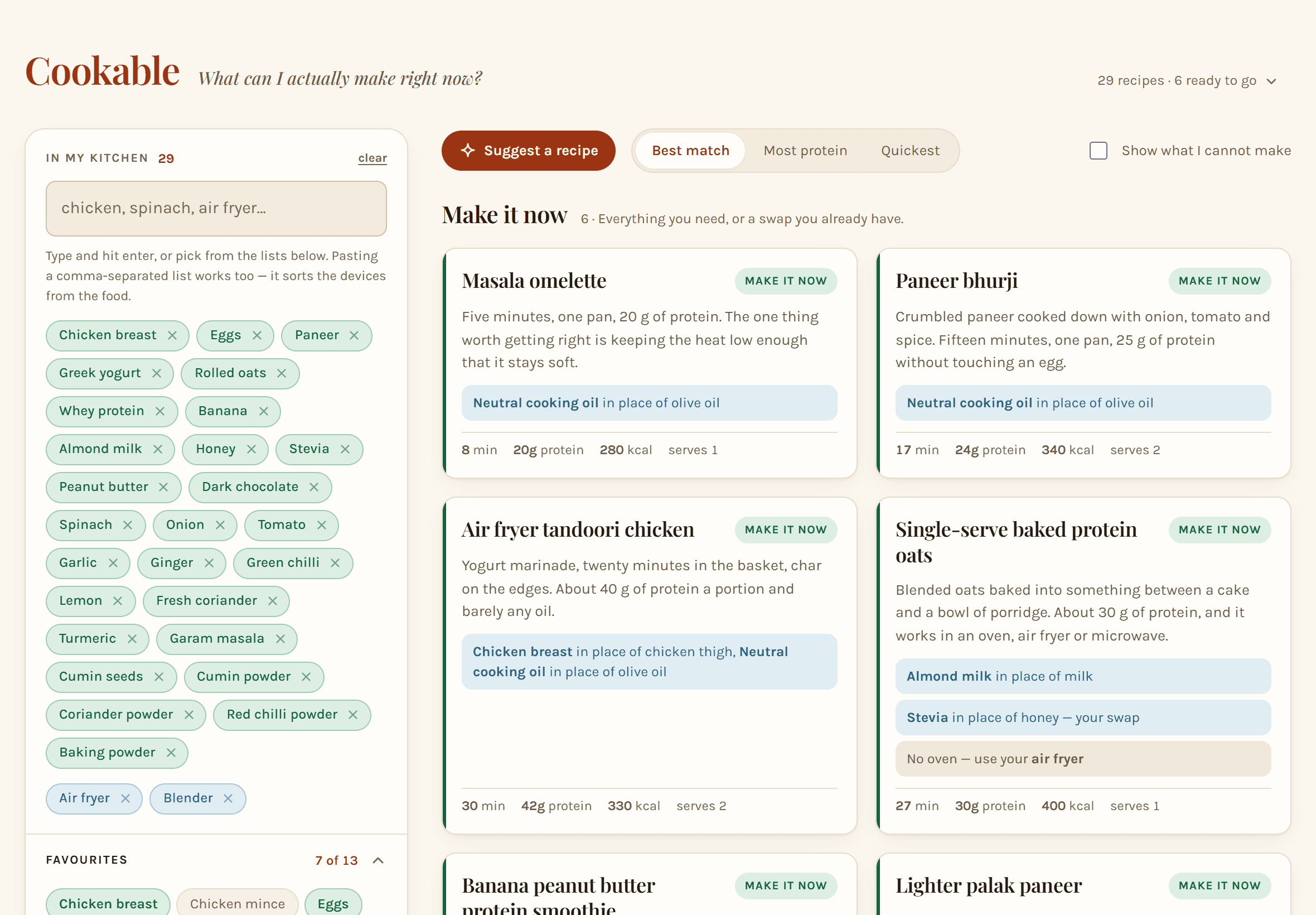
Most recipe apps start from a recipe and send you to the shops. Cookable starts from what you already have. You type what's in your kitchen — `dahi`, `jeera`, `atta`, `shimla mirch`, `kadai`, `mixie`, `2 large onions`, or just paste a whole list — and it checks every recipe line by line. Each recipe lands on one of four shelves: "Make it now," "One or two things short," "A few things short," or "Not without a shop." When something's missing, it doesn't just shrug — it looks for what you could use instead, with the amount, and a warning when the stand-in can't do the whole job. The swap engine has opinions, which is what makes it trustworthy. It will happily swap the oil in paneer bhurji but will never swap the paneer. No oven? It tells you to use the air fryer about 20°C cooler and check 20–25% sooner. Every recipe shows protein, calories, fibre, and added sugar; sugar and honey get swapped out whenever there's a way. It installs like an app, works offline, has no account and no server — your kitchen stays in your browser. The build story is the real showpiece. Per the README: "from an empty repository to an installable app in six days," one pull request at a time, with a `CLAUDE.md` that explains *why* each convention exists, slash commands like `/add-recipe` for repetitive jobs, and a validator as the safety net. The author even documents the method so you can borrow it: write one sentence about what the app is for, let Claude Code build a first version, and whenever you catch yourself making the same correction twice, put it in `CLAUDE.md`. A working recipe app and a working recipe for vibe coding, in the same repo. Note: This project is curated by the VibeFix editors from public sources. All rights belong to the original creator.
V@VIBEFIX
0
0
7
0
Showcase
Online
Educationclaude-code
bit-dojo
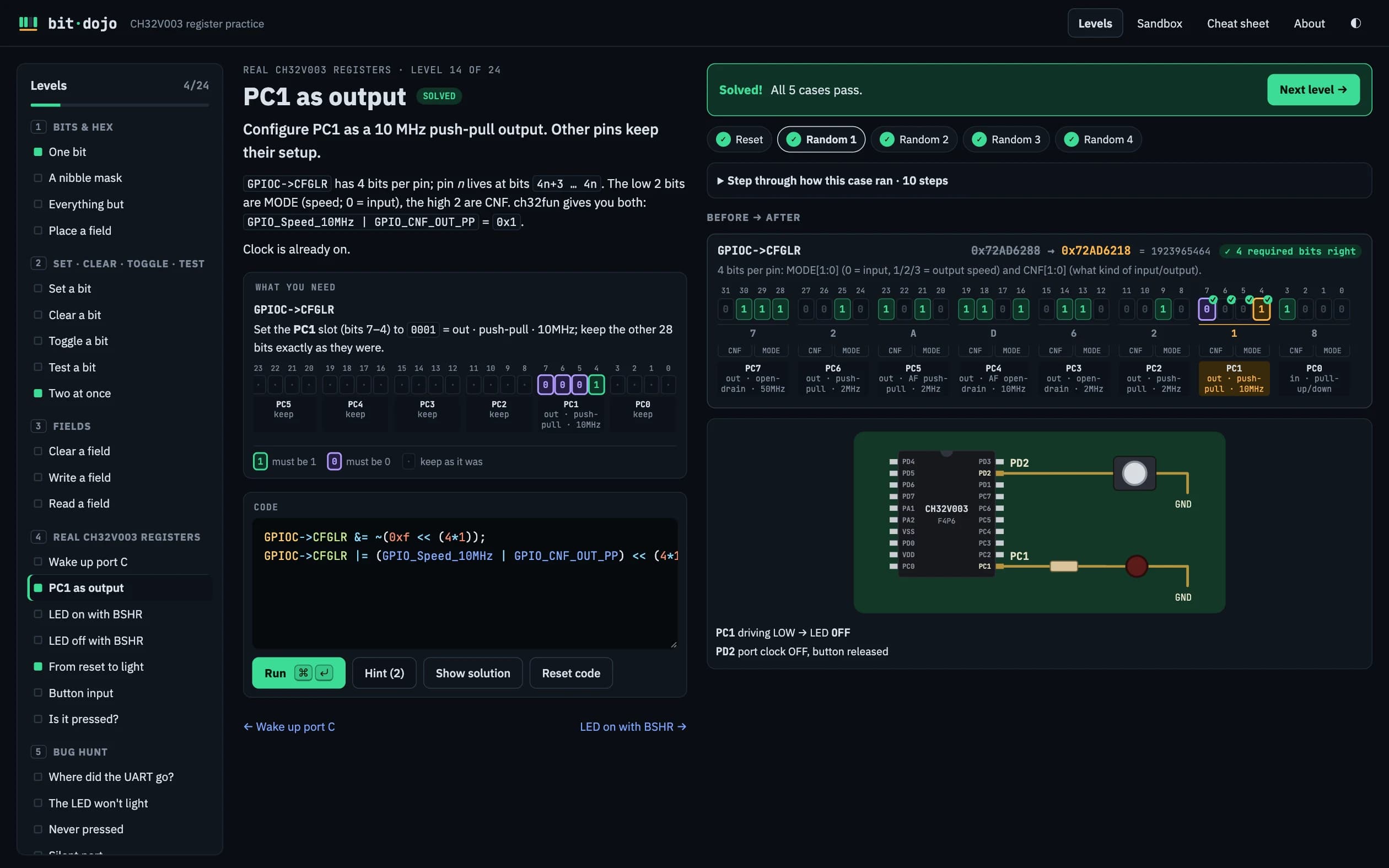
Learn embedded bitwise tricks by writing real register code for a simulated CH32V003 — 24 levels, step-by-step visualizer, sandbox. Vibe-coded with Claude Code.
bit-dojo teaches one of the most intimidating corners of programming — bitwise register manipulation in embedded C — by letting you poke a simulated CH32V003 RISC-V microcontroller directly in the browser. You type real register code like `GPIOC->CFGLR |= (GPIO_Speed_10MHz | GPIO_CNF_OUT_PP) << (4*1);`, and the app runs it against a chip model, showing every bit before and after. When your code is actually right, an LED on pin PC1 lights up. That feedback loop — type bits, watch hardware respond — is worth a thousand textbook diagrams. The curriculum is substantial: 24 levels across 5 chapters, from bits and hex through set/clear/toggle/test, multi-bit fields, real CH32V003 registers (RCC clock enables, GPIO configuration, BSHR set/reset), and finally a bug-hunt chapter where you fix classic embedded mistakes like clobbering a register with `=` instead of `|=`. Each level runs your code against randomized starting states, so solutions that only work for one lucky value fail. A step-by-step visualizer animates every operator in binary, and a sandbox mode lets you run live loops with `Delay_Ms()` against the whole simulated chip, button input included. The README's build note is unusually transparent: "The C interpreter, the chip simulator, all 24 levels, the step-by-step visualizer, the tests, the logo and this README were written by Claude Code. @e-labInnovations directed it through conversation: the ideas, the feedback, and every 'that pin is wrong, look again'." A C-subset interpreter with correct precedence and undefined-behavior detection, plus a cycle-accurate-ish peripheral model, specified into existence through conversation — and the whole thing plays in your browser at bit-dojo.elabins.com. Note: This project is curated by the VibeFix editors from public sources. All rights belong to the original creator.
V@VIBEFIX
0
0
7
0
Showcase
Online
Games
VGC Reporter
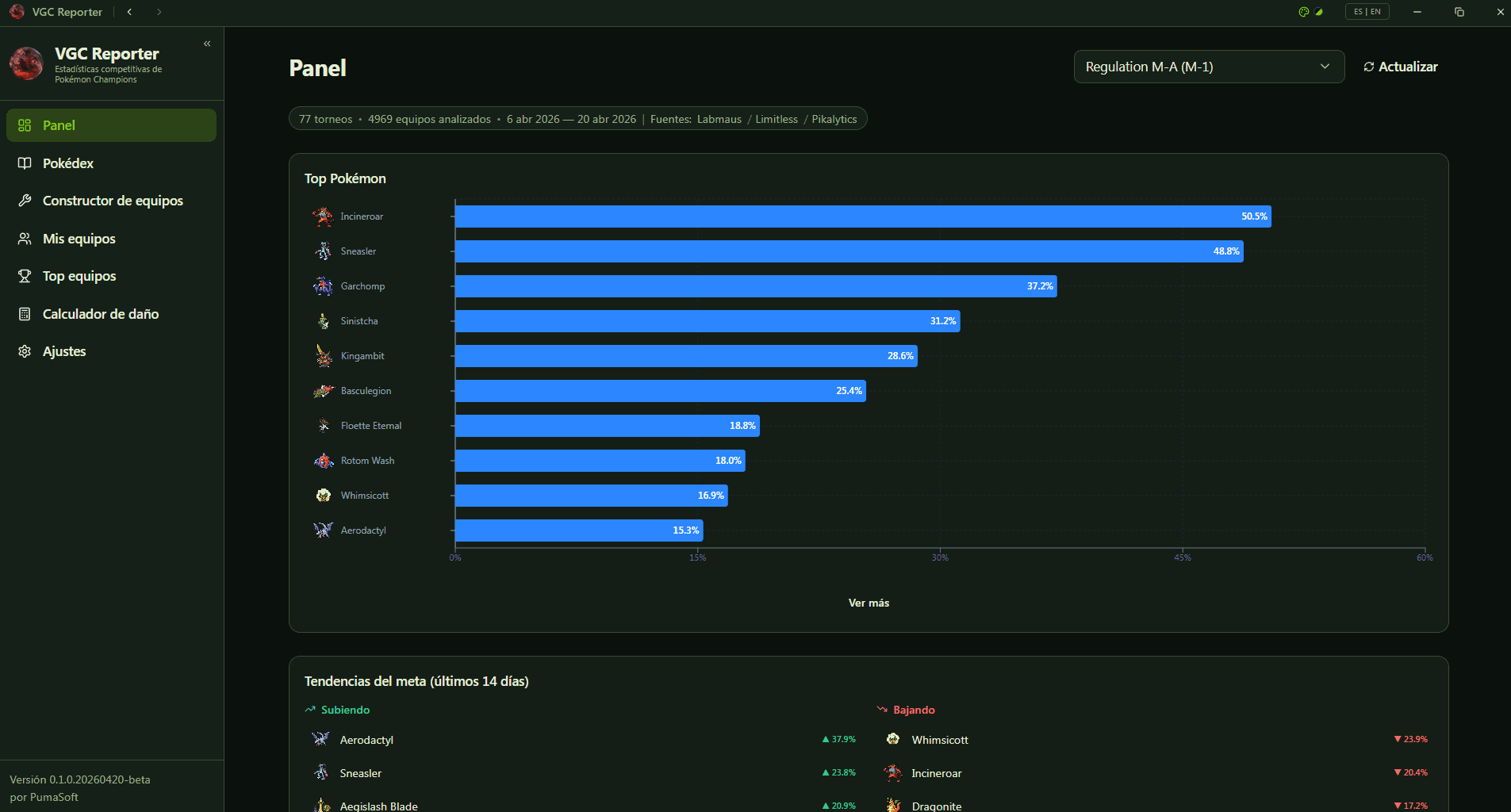
A desktop app for Pokémon Champions VGC competitors: tournament stats, team builder, and damage calculator — "built with pure, hardcore vibe-code."
VGC Reporter is built for a very specific audience: competitive Pokémon players preparing for Pokémon Champions tournaments. Its README doesn't hedge — "Built with pure, hardcore vibe-code" — and the commit history backs up the seriousness: 261 commits and 19 releases of a real desktop application with installers for Windows, macOS, Linux, and Android. The app aggregates competitive data from sources like LabMaus, Limitless, and Pikalytics, then presents it the way a tournament player thinks: top Pokémon usage charts (Incineroar at 50.5%, Sneasler at 48.8% in the captured dashboard), meta trends over the last 14 days with risers and fallers, a team builder, your own saved teams, and a damage calculator. It's the full pre-tournament ritual in one window, with a Rust backend (tokio, rusqlite) doing the heavy lifting behind a React 19 + Tauri 2.4 frontend. What stands out is how un-toy-like it is. Vibe-coded projects often get dismissed as demos, but VGC Reporter ships signed installers across four platforms, caches Pokédex data for offline use, and serves a community that cares deeply about correctness — competitive players will notice wrong damage numbers instantly. "Hardcore vibe-code" turns out to be an accurate label. Note: This project is curated by the VibeFix editors from public sources. All rights belong to the original creator.
V@VIBEFIX
0
0
5
0
Showcase
Online
Productivity
VMark
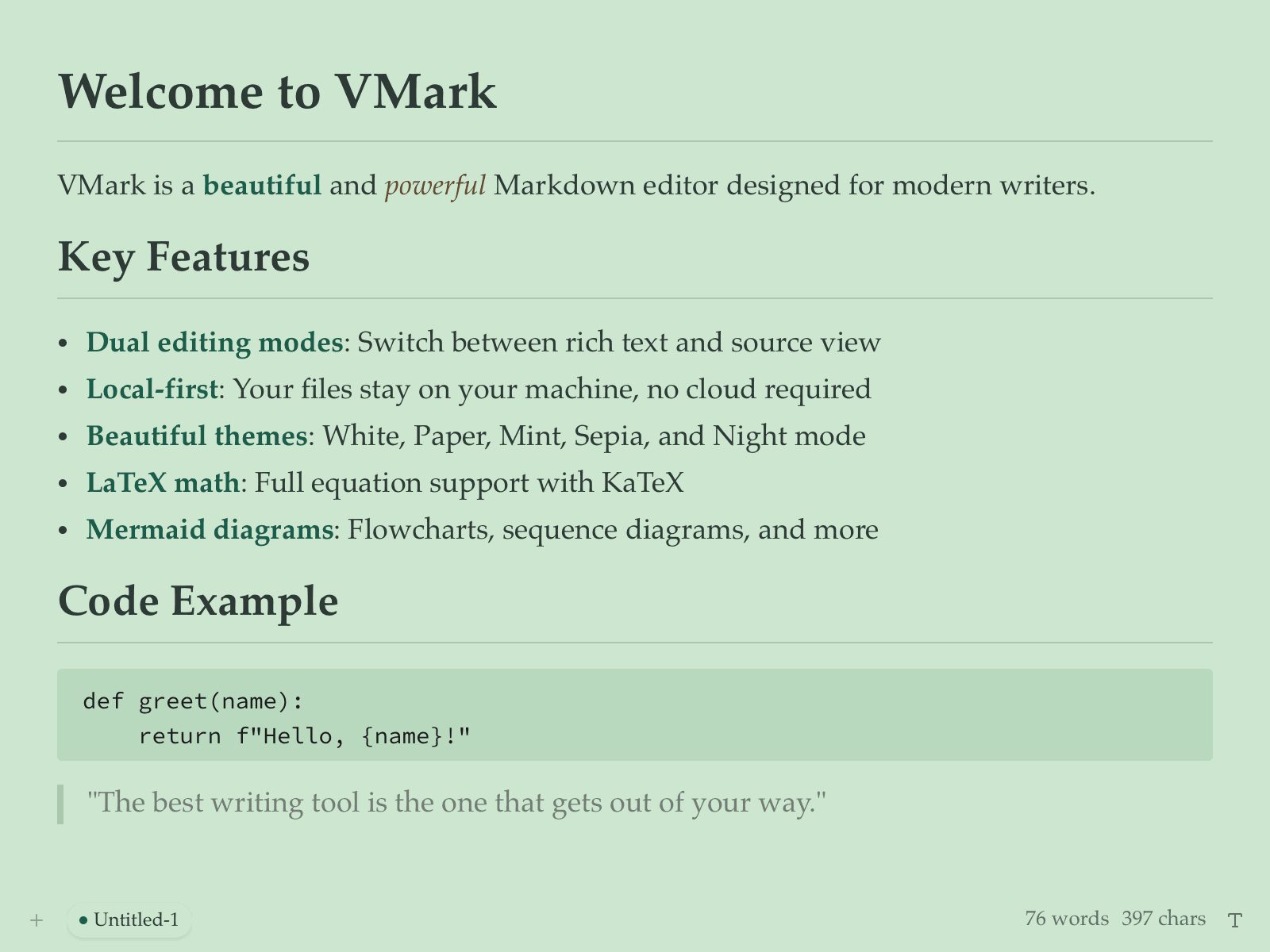
A local-first Markdown editor with MCP support: dual editing modes, LaTeX math, Mermaid diagrams, beautiful themes — written entirely by AI.
VMark is a Markdown editor for people who write in Markdown all day and are tired of editors that either look dated or phone home. Its README makes the vibe-coding claim plainly: "vibe-coded — written entirely by AI under human supervision." The result is a polished Tauri v2 desktop app (Rust backend, React 19 frontend) that feels like it had a design team: dual editing modes (rich text and source), local-first files, LaTeX math via KaTeX, Mermaid diagrams, code blocks with CodeMirror 6, and a set of genuinely attractive themes — White, Paper, Mint, Sepia, Night. The MCP support is the forward-looking part. VMark can expose itself to AI coding agents through the Model Context Protocol, which means your notes and documents become context your agents can actually read and work with. For a Markdown editor in 2026, that's the right bet: the editor isn't just where you write, it's where your AI collaborators meet your thinking. There's also a lovely bit of recursion in the repo: it ships ready-made configuration for Claude Code, Codex CLI, and Gemini CLI, so the AI-written editor is set up to be extended by AI coding tools. A serious, daily-driver-grade writing app, openly AI-built, with the receipts in the README. Note: This project is curated by the VibeFix editors from public sources. All rights belong to the original creator.
V@VIBEFIX
0
0
7
0