A $7 Board Gives AI Hands on a Real iPhone: ESP32 as Fake USB Keyboard, AirPlay as Eyes
Developer Henry Yuan's open-source ESP32-iPhone-Agent (Oct 15) gives an AI agent control of a stock iPhone with a $7 ESP32-S3 board: AirPlay mirroring as eyes, a fake USB mouse-and-keyboard as hands, no jailbreak, no developer account, no cloud APIs in the demo. We break down the four-step pipeline, what it can't do, and three judgments for vibe coders on the 'outboard' route to computer use.
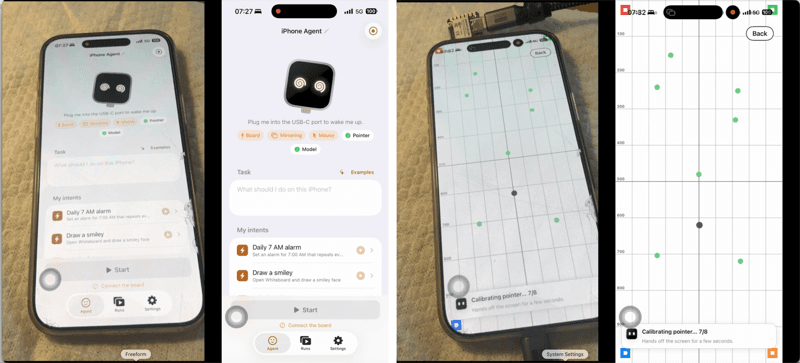
Want an AI agent to operate your iPhone? You used to have three options: jailbreak it, pay for an Apple developer account (certificates expiring every seven days), or wait politely for Apple to open an API. On October 11, developer Henry Yuan posted a demo on X that bypassed all three: a roughly $7 ESP32-S3 board, plugged into the iPhone's charging port, lets an AI tap, swipe and type on a stock, non-jailbroken phone. No Mac, no developer mode — and the demo didn't even use cloud APIs. The vision model ran on two NVIDIA DGX Spark machines on his local network.
Digital Trends covered it in full on October 15, Hackaday tore down the technical details on October 14, and the GitHub repo (onehumanbeing/esp32-iphone-agent, MIT license) gained thousands of stars within a week. This isn't a concept video — it's open-source, reproducible engineering. For agent builders, its significance goes far beyond "playing with a phone": it proves the "vision + peripheral" outboard route can bypass any platform's software blockade.
1. How it works: eyes and hands are separate

The design philosophy is "treat the AI as a person with eyes and hands who can't get inside the system." Eyes and hands are two fully independent channels:
Eyes: AirPlay mirroring. The iPhone mirrors its screen to a computer via AirPlay (received by the open-source UxPlay), then a GStreamer pipeline extracts the video as JPEG frames fed to a vision-language model. The model looks at the current screen and decides the next move: tap here, swipe there, type this. After acting, it looks again to confirm the screen actually changed — a visual feedback loop.
Hands: an ESP32-S3 pretending to be a keyboard and mouse. The board plugs into the iPhone's charging port (USB-C models connect directly; Lightning models need a camera adapter; power comes from the phone itself), and to iOS it looks like an ordinary USB mouse and keyboard — "to the phone, it is just a familiar accessory." With iOS AssistiveTouch enabled, mouse clicks become taps and dragging becomes swiping. The keyboard handles typing.
Yuan's two demo examples sound unambitious: setting a daily repeating alarm, drawing a smiley face in a whiteboard app. But Digital Trends nailed the key point: the agent works through the phone's interface itself, with no per-app integration needed. Alarm app, whiteboard app, system settings — to the agent they're all just pixels on a screen. No API required.
The hardware list is almost absurdly plain: the tested board is a Seeed Studio XIAO ESP32S3, about $7. On software, model configuration supports any OpenAI-compatible endpoint (vLLM, SGLang, llama.cpp, Ollama — anything accepting image inputs). Yuan's own local setup ran Qwen3.8-Flash-Next-NVFP4 across two DGX Spark systems at roughly 1.3 seconds per action and 2 seconds per planning step with thinking mode disabled — note those numbers describe his specific configuration, not typical performance.
A newer version goes further: the agent runs inside an iPhone app, the board receives the mirrored screen directly, and no computer is needed during operation (initial setup still requires a Mac with Xcode; the original computer-based version remains available). The repo includes a web interface (port 8890 by default) where tasks are entered from a browser, with manual controls and an emergency stop button — the author clearly understands what this thing is capable of.
2. Why this is an "outboard" route
To grasp the project's value, understand what it bypasses. iPhone automation previously only had "establishment" routes: Xcode plus developer certificates (expiring every seven days, renew until your heart breaks), or outright jailbreaking (losing on both security and stability). Both share one trait: they go through Apple's permission system.
Yuan's approach is extra-institutional: it requests no system permissions, calls no private APIs, installs no profiles. It exploits two fully legitimate capabilities Apple itself provides — AirPlay screen mirroring (Apple's own first-party feature) and USB HID peripherals (an industry-standard protocol). Apple can't "block" it without dropping USB keyboard and mouse support — which would mean war with every accessibility user and peripheral maker on earth.
The idea has precedent: early Raspberry Pi KVM-over-IP rigs and "robotic fingers" for servers all followed "if the software layer won't let me in, I'll come in through the physical layer." But combined with vision-language models, ESP32-iPhone-Agent may be the first to make it general-purpose: earlier outboard hacks could only run fixed scripts; now the outboard device is backed by a model that can read interfaces, so in principle any app is operable.
Interestingly, it mirrors another story we're publishing today (websites shutting out AI agents) in reverse: websites can close doors at the software layer, but the physical layer always has a back door. When platforms block agents with CAPTCHAs, device fingerprints and login walls, someone will always route around through the places you can't block — this time, a $7 microcontroller.
3. Technical deep dive: the four-step pipeline Hackaday extracted
Hackaday's October 14 teardown reduced the system to four steps, each built from off-the-shelf open-source parts that combine into something new:
Step one: get the screen. The iPhone mirrors over AirPlay; the computer catches it with UxPlay, the open-source AirPlay receiver. The subtle brilliance: AirPlay is Apple's official protocol over the local network, needing nothing beyond pairing — what your Apple TV can do, your Linux laptop can do.
Step two: pixels become data. A GStreamer pipeline extracts the video stream as JPEG frames for the agent. No fancy video understanding here — just frame-by-frame screenshots. Vision-language models are natively trained for "looking at pictures and talking about them," and UI screens happen to be among their favorite image types: buttons, input fields and icons are high-contrast, highly structured visuals.
Step three: the model decides. Screenshots go in; atomic actions come out — "tap (x, y)" or "type this text." In Yuan's demo the model ran locally (Qwen3.8-Flash-Next, 2×DGX Spark with tensor parallelism), "everything stays on my LAN" — a line worth underlining: screen contents never leave the local network, a choice that's both about privacy and about speed (one fewer round trip over the public internet).
Step four: the board acts. Decisions become USB HID packets the ESP32-S3 sends to the iPhone. iOS AssistiveTouch translates "mouse events" into "touch events": click becomes tap, drag becomes swipe. There's a calibration step, since mirrored-screen coordinates must align with touch coordinates — the "Calibrating pointer…7/8" in the repo's screenshots is exactly that.
Four steps complete one perception-decision-action loop. Developer reception was direct: it hit Hacker News the day it launched (October 15) and the repo gained thousands of stars in a week. The most upvoted class of comment wasn't "cool" but "I can finally automate testing of our company's iOS app" — real demand is always more honest than demos.
4. Boundaries: what it can't do
Three cold showers, all acknowledged by the author and the reporting:
First, iOS has "visual exclusion zones." Passcode entry, Apple Pay and DRM-protected video never appear in the mirrored feed — Apple strips them at the system level. Lock the phone and mirroring stops; the agent goes blind instantly (so auto-lock must be disabled during tasks). Keyboard input is currently ASCII-only — no Chinese or Japanese input. Landscape apps aren't supported yet. In other words, everything Apple deems "high sensitivity" is unreachable via this outboard route — which is good news: the core defenses hold.
Second, speed and reliability are still demo-grade. A few seconds per step; a multi-step task takes a long while. The reporting is explicit: "the examples show individual tasks working, but they don't establish reliability across every app." Misjudgments by the vision model (tapping the wrong lookalike button, acting before loading finishes) are endemic to this class of system — the emergency stop button's very existence states the author's expectations.
Third, AssistiveTouch calibration is manual labor. Pointer alignment needs a calibration step; change the tracking speed and you recalibrate. For now it's better suited to "fixed rig, fixed tasks" than grab-and-go use.
5. Three judgments for vibe coders
First, "computer use" is forking into two routes, and vibe coders should know both. One is the "establishment" route: OpenAI's Operator, GitHub Copilot's computer use (public preview October 1), via official APIs and accessibility interfaces — polished, but constrained everywhere by platforms. The other is the "outboard" route: physical hacks like the ESP32, needing nobody's permission, but crude, slow and self-hosted. Short term: consumer products take the first route; research, automation testing, and the things "Apple will never open up" only have the second. Yuan's project cut the second route's cost to $7 plus an open-source repo — that number is itself the news.
Second, the agent's "hands" are escaping the "software integration" assumption. We used to assume agent-operates-phone means calling APIs; this project proves it can also mean looking at the screen and simulating fingers. Once that paradigm holds, every "legacy system with no API" (remember the no-API legacy software Copilot's computer use targets?) becomes a potential agent target. For vibe coders doing enterprise automation, that's worth writing down: the client's 20-year-old GUI system may not need protocol reverse-engineering — a $7 outboard hack could be cheaper.
Third, watch how the "visual exclusion zones" move. Apple excluding passcodes and payments from mirroring is this route's current safety rail. But the rail's position is Apple's unilateral decision — it can expand (blacking out banking apps too) or shrink. Anyone building on this should treat "waking up to find a new black rectangle in the mirror" as an architectural risk in the design, not as a surprise.
6. Choosing your route: which of the three fits you
Line up every approach in this article and three routes stand clearly apart. The choice comes down to three questions: do you want to go through Apple's permission system? Do you want to build your own hardware? Are your tasks fixed scenarios or ad-hoc?
Route one: the establishment — official APIs and accessibility interfaces. Examples: OpenAI's Operator, GitHub Copilot's computer use (public preview since October 1). Pros: polished, out-of-the-box, worry-free compliance. Cost: constrained by platforms everywhere — capabilities Apple won't open stay closed, and your product shakes whenever policy tightens. Best for consumer products and automation within what Apple allows.
Route two: developer mode — Xcode plus certificates. Pros: direct device connection, full capabilities. Cost: certificates expire every seven days (renew until your heart breaks), and you're still living inside Apple's permission system. Good for short-term device debugging and internal testing; bad for long-running unattended setups.
Route three: the outboard hack — "extra-institutional" builds like the ESP32. Pros: needs nobody's approval, costs $7, routes around every software blockade. Cost: crude and slow (seconds per step), self-assembled hardware and calibration, and you must accept iOS's "visual exclusion zones." Fits three scenarios: automation testing (the top HN comment wasn't kidding), security research, and the things "Apple will never open up."
The one-line selection rule: check the compliance boundary first, then the task shape. If the official route works, don't touch the outboard hack — lower maintenance and policy risk. If the official route is blocked and tasks are fixed (fixed rig, fixed flow), the $7 hack may be the cheapest solution in the room. In between? Validate demand with developer mode first, then decide whether the hardware is worth it.
Repo: github.com/onehumanbeing/esp32-iphone-agent (MIT). If you have an ESP32-S3 and a spare iPhone, you can reproduce it this weekend — disable auto-lock first, and keep the emergency stop handy.
Comments (0)
Sources
Related articles
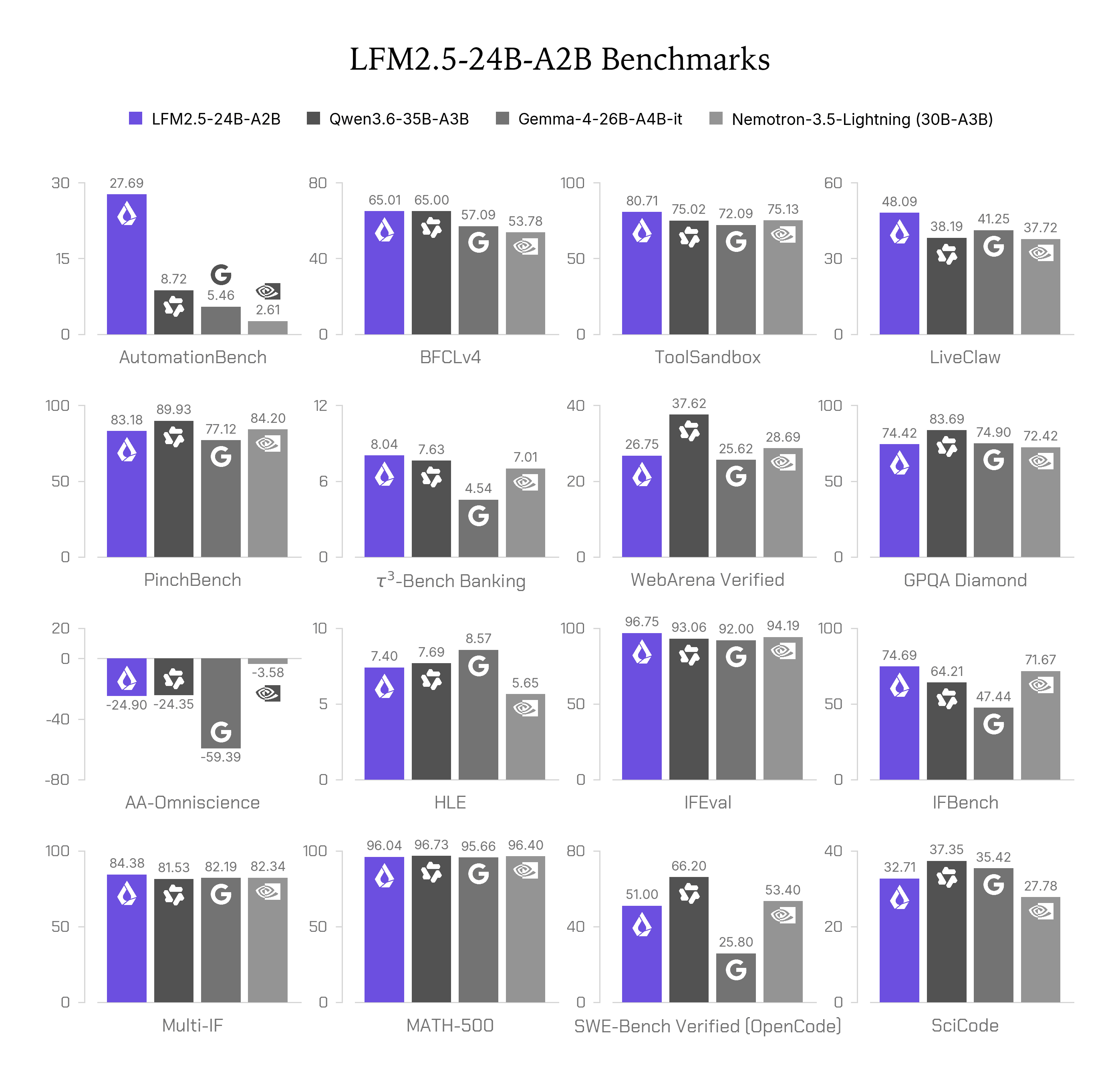
On October 13, Liquid AI released LFM2.5-24B-A2B: an open-weight 24B MoE with ~2B active parameters per token, built for fast on-device agents. Its real story is the training recipe — agentic RL inside real harnesses like OpenCode, Pi, OpenClaw and Hermes Agent. We break down the five-stage post-training, the 16 vendor-run benchmarks (strong on tool use and instruction following, weak on knowledge-heavy coding), and who should actually deploy it.
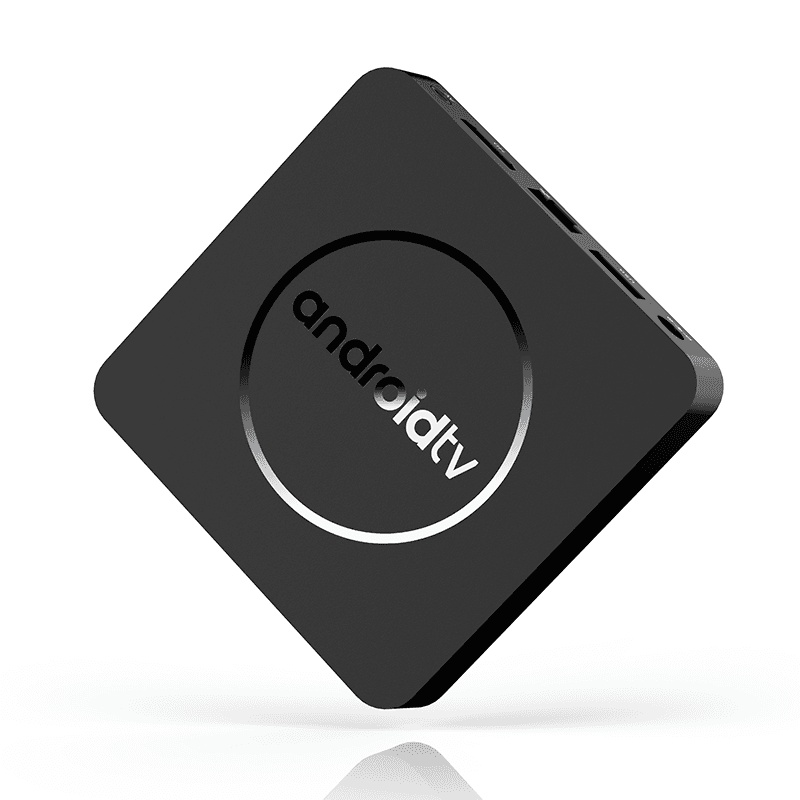
Anthropic's Frontier Red Team (Oct 12) ran a 26B model across 15 $55 Android TV boxes at 0.39 tokens/s, and projects small models will reach GLM-5.2's replication level by end of 2026. We separate what was measured from what is projected, explain the ECI math, the upper-bound caveat, and what it means for agent sandboxes — contrasted with the real CyberXero attack.
CVE-2026-111322 (Oct 15): Archon's /api/* control API ships with no authentication and binds to 0.0.0.0 by default — CVSS 9.8. Anyone on your network can message your coding agent and have it run arbitrary host commands with bypassPermissions. No patch as of Oct 16. We explain the bug, why agent tools keep failing at secure-by-default, and a three-step self-check.