Deep Linking for Vibe Projects: Universal Links, App Links, and Deferred Routing
A tapped https link should skip the browser and land in your app. Link-type picks, five devilish iOS AASA details, Android's #1 fingerprint killer, verification-file hosting, smart landing pages, post-FDL deferred deep linking, China-ecosystem specifics, and a 10-item test checklist.
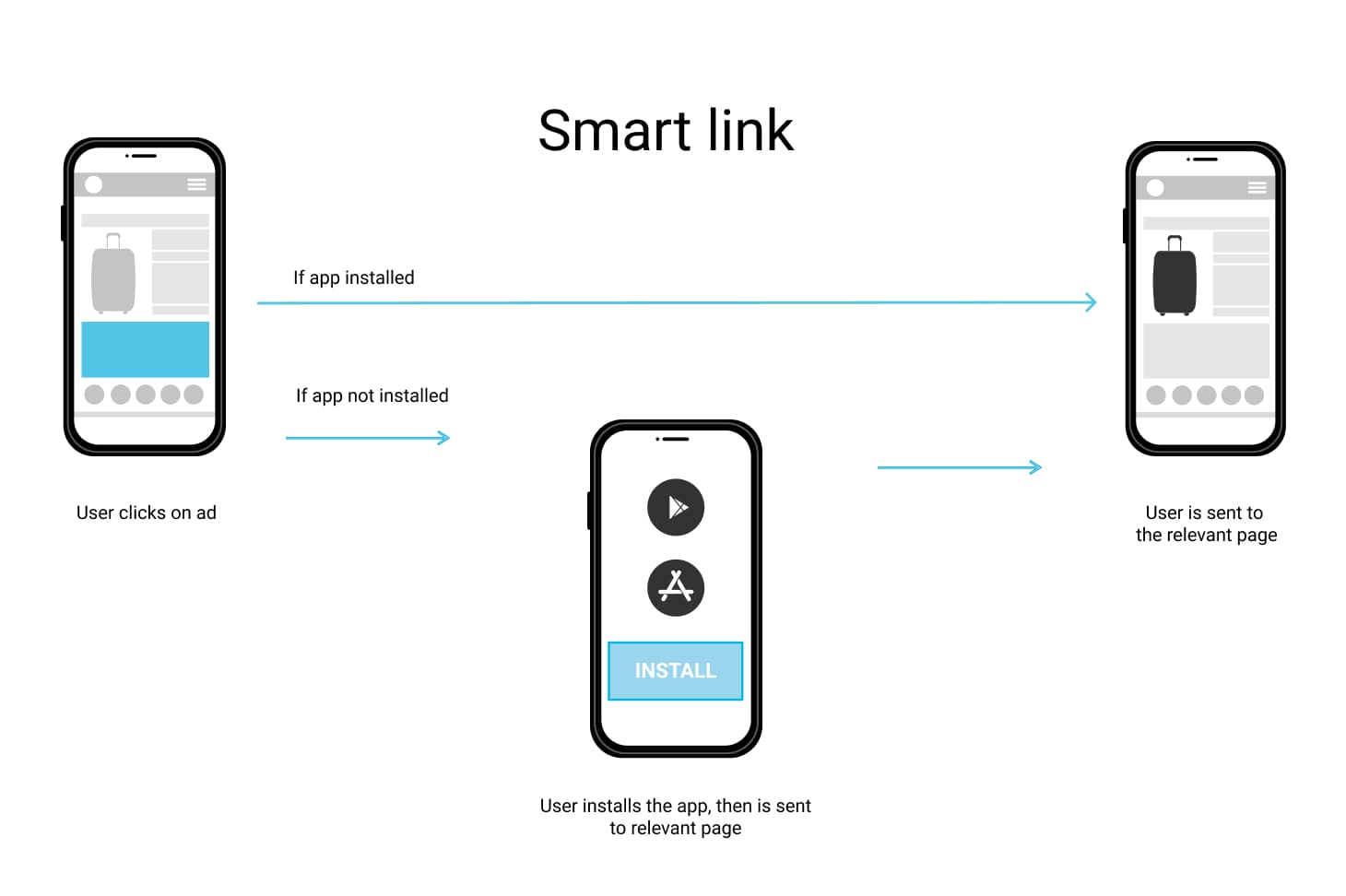
Three boundaries first, so this guide doesn't collide with others on the site: this article does not cover app-store review and rejection appeals — see the Mobile App Store Launch Guide; it does not cover share-link permissions, expiry, and revocation — that's the Share Links Guide; and it does not cover QR-code generation, redemption, and analytics — see the QR Code Ecosystem Guide. This guide answers one concrete question: when a user taps an https link, how does the phone skip the browser and open your app directly on the right screen?
Deep linking is the technical foundation of "share-driven growth": invite links, marketing landing pages, push-notification jumps — it's all deep links underneath. The four classic failure scenes in vibe projects: using a custom scheme (myapp://) and getting hijacked by another app that claimed the same scheme; configuring Universal Links for weeks on iOS with no redirect, only to find the AASA file had a .json suffix; Android redirect working on the test device but only showing a chooser dialog on users' phones — nobody told you about Android 12's tightened verification; and Firebase Dynamic Links shutting down, turning every page.link into a 404 overnight and zeroing the invite funnel. This guide walks the battle-tested order: the three link types, iOS in practice, Android in practice, server-side domain setup, route and parameter design, deferred deep links, the China ecosystem special, and a testing/debugging checklist. The big picture first:

1. The Three Link Types: Don't Start with Universal Links Blindly
Many developers open with "I need Universal Links," but there are three link types solving completely different problems — pick wrong and you'll redo the work:
| Custom Scheme (myapp://) | iOS Universal Links | Android App Links | |
|---|---|---|---|
| Essence | Private protocol declared by the app, zero verification | https links + domain-ownership verification | https links + domain-ownership verification |
| Security | Anyone can claim the same scheme — hijackable | Only the domain owner can associate an app — hijack-proof | Only the domain owner can associate an app — hijack-proof |
| UX | Errors outright when not installed, no graceful fallback | Falls back to the web page when not installed | Falls back to the web page when not installed |
| Use for | In-app navigation, dev debugging | All external marketing / share links | All external marketing / share links |
The decision table is blunt: marketing links and user-to-user invite links always use Universal Links / App Links — they're domain-verified (no hijacking) and degrade gracefully to web when the app isn't installed; in-app navigation (e.g., an H5 page opening a native screen) can use custom schemes — simple and direct; dev debugging is easiest with custom schemes, no domain verification files needed. A typical vibe-project mistake is "use custom schemes for all sharing to save effort" — then a malicious app hijacks the scheme at scale and your invite links open a knockoff. Fixing that means replacing every link in the wild; adopting Universal Links early is the cheap option.
One piece of 2026 context you must know: Firebase Dynamic Links shut down on 2025-08-25 — every page.link short link now returns 404 and the SDK is removed. If your setup was copied from an old tutorial, or you inherited a 2024-era project, grep for page.link remnants first — section 6's migration plan is written for you.
2. iOS Universal Links in Practice: Five Devilish AASA Details
The principle in one sentence: when iOS sees a tapped https link whose domain is in the app's associated-domains list, it fetches a JSON file from /.well-known/apple-app-site-association on that domain to verify "this domain really allows this app to handle these paths" — only then does it open the app directly. Five devilish details; get one wrong and nothing redirects, and iOS won't tell you which:
Detail 1: no .json suffix on the filename. The path must be https://example.com/.well-known/apple-app-site-association — not apple-app-site-association.json. The highest failure rate of all five — intuition says JSON files need suffixes, Apple's spec says otherwise.
Detail 2: HTTPS only, and Content-Type must be application/json. Even with perfect content, a text/plain response header means iOS rejects the file. Many static hosts set Content-Type by extension — and this file has no extension, so it trips constantly. Set the header explicitly in Nginx / Next.js (see section 4).
Detail 3: appID is TeamID.BundleID. TeamID is the 10-character team identifier from Apple Developer — not the app name:
{
  "applinks": {
    "apps": [],
    "details": [
      {
        "appID": "ABCDE12345.com.example.myapp",
        "components": [
          { "/": "/invite/*", "comment": "invite links open in app" },
          { "/": "/p/*", "comment": "content pages open in app" },
          { "/": "/admin/*", "exclude": true, "comment": "don't take over admin paths" }
        ]
      }
    ]
  }
}
Detail 4: components matching rules. Modern AASA uses components (legacy paths still works, but new projects should use components). Rules match in order: /invite/* is a wildcard, exclude: true excludes. Matching is case-sensitive — /Invite/abc won't match /invite/*. Query strings and fragments after ?/# don't participate in path matching by default; if your routing depends on query params (e.g., /?page=invite&code=abc), declare them explicitly with "?": { "code": "*" } in components.
Detail 5: declare Associated Domains in Xcode. Add the Associated Domains capability under Signing & Capabilities with entries like applinks:example.com (no https://, no path). Subdomains need individual entries: applinks:example.com doesn't cover m.example.com — add a separate entry, and host a separate AASA file under m.example.com too.
The in-app entry point is one line in SwiftUI:
// SwiftUI: after OS verification passes, the URL lands here
struct MyApp: App {
  var body: some Scene {
    WindowGroup {
      ContentView()
        .onOpenURL { url in
          // url = https://example.com/invite/abc123
          DeepLinkRouter.shared.handle(url) // parse path → invite screen, consume code
        }
    }
  }
}
Finally, the Universal Link fallback: if a user once tapped "open in browser" on the Safari banner for your domain, iOS remembers — that domain's links always open in Safari until the user long-presses a link and picks "Open in app." That's OS behavior, not your bug — but document it in your FAQ, or support will drown in "I tapped the link but the app didn't open" tickets.
3. Android App Links in Practice: Wrong Fingerprints Are the #1 Killer
Android mirrors iOS: when the system sees a tapped https link whose domain is declared with autoVerify in the app's intent-filter, it fetches https://example.com/.well-known/assetlinks.json to verify "this app (package name + signing fingerprint) is authorized by the domain owner" — only then does it open the app directly.
The verification file:
[{
  "relation": ["delegate_permission/common.handle_all_urls"],
  "target": {
    "namespace": "android_app",
    "package_name": "com.example.myapp",
    "sha256_cert_fingerprints": ["AB:CD:EF:12:34:56:78:90:AB:CD:EF:12:34:56:78:90:AB:CD:EF:12:34:56:78:90:AB:CD:EF:12"]
  }
}]
The AndroidManifest declaration:
<activity android:name=".DeepLinkActivity" android:exported="true">
  <intent-filter android:autoVerify="true">
    <action android:name="android.intent.action.VIEW" />
    <category android:name="android.intent.category.DEFAULT" />
    <category android:name="android.intent.category.BROWSABLE" />
    <data android:scheme="https" android:host="example.com" />
  </intent-filter>
</activity>
Three hard-won points:
- Never omit
android:autoVerify="true". Without it, the system never fetches assetlinks.json, and every tap shows the "open with which app" chooser. Many Stack Overflow intent-filter snippets lack this line. - Debug and release signing fingerprints differ — the #1 cause of death. Your debug keystore signs dev builds; if assetlinks.json carries the release fingerprint (or vice versa), you get "works on the dev phone, broken in production." The fix: put both fingerprints in the
sha256_cert_fingerprintsarray — it's an array for exactly this reason. Get fingerprints viakeytool -list -v -keystore your.keystore, look for the SHA256 line. - Android 12+ tightened verification. Since Android 12, unverified domains no longer auto-open — the system only shows the app chooser. The old era of "misconfigured but usable, just an extra dialog" is over; misconfigured now means broken. Worse, once a user picks "browser" in the chooser, the system remembers and won't even show the dialog next time.
Multi-flavor / multi-package-name projects beware: every package name (including .debug / .staging suffixes) needs its own target entry in assetlinks.json, or give test environments their own domain. Don't expect one entry to cover all variants.
4. Domain & Server Side: Hosting the Two Verification Files
Both verification files are plain static files, but hosting has four server-side requirements — miss one and sections 2–3 are wasted:
- Don't let app routes swallow
/.well-known. In Next.js,/.well-known/assetlinks.jsoncan be intercepted by an App Router catch-all. Fix withrewritespointing these paths at static files underpublic/.well-known/, or just drop the files inpublic/.well-known/and let Next.js serve them statically. After deploying, curl both URLs first — confirm you get file content, not a 404 page or your homepage HTML. - Content-Type must be right. The extensionless AASA file must return
application/json. Set it explicitly innext.config.js:
// next.config.js
async headers() {
  return [
    {
      source: '/.well-known/apple-app-site-association',
      headers: [
        { key: 'Content-Type', value: 'application/json' },
        { key: 'Cache-Control', value: 'no-store' },
      ],
    },
    {
      source: '/.well-known/assetlinks.json',
      headers: [{ key: 'Cache-Control', value: 'no-store' }],
    },
  ];
}- Don't let the CDN cache these files. A subtle but lethal trap: you update the AASA file (say, adding a path), the CDN keeps serving the stale copy, iOS fetches the old file, and the new path never redirects. Serve both verification files with
Cache-Control: no-store— traffic is negligible, caching buys nothing. - Force HTTP→HTTPS; declare each subdomain. Verification requests only go over HTTPS, so site-wide HTTP→HTTPS redirect is a prerequisite. And
example.comvswww.example.comare two different domains to Apple/Google — each needs its own AASA/assetlinks.json copy, and the app must declare each. When choosing your share-link domain, use exactly one everywhere — never mix.
5. Route & Parameter Design: The Path Is the Contract
Once verification works, route design decides the experience. The core principle: the path is the contract — the app and the web share one route table. https://example.com/invite/abc123 opens the invite landing page in a browser and the invite native screen in the app, with identical path semantics. Benefits: share links are deep links by nature — no dual mapping to maintain — and SEO and app indexing reuse the same URLs.
Three routing practices: first, paths locate resources, query strings carry one-shot params: /p/:id locates content, /invite/:code locates an invite; query holds only tracking params like utm_source plus signatures. Second, sign query params against tampering: invite codes and discount amounts must not travel naked — the full HMAC + expiry scheme lives in the Share Links Guide's parameter-signing section (not repeated here); remember "deep links deliver, signatures establish trust." Third, version-aware routing: when an old app version meets an unknown path, degrade gracefully to the home screen instead of a blank page — resolve failures to home + a toast like "Update the app to view this content."
Then the not-installed branch: the smart landing page. The user has no app; the tap lands on an interstitial that dispatches by User-Agent:
// smart landing page core (SSR or plain frontend)
const ua = navigator.userAgent;
if (/iPhone|iPad|iPod/.test(ua)) {
  location.href = 'https://apps.apple.com/app/id123456789'; // App Store
} else if (/Android/.test(ua)) {
  location.href = 'https://play.google.com/store/apps/details?id=com.example.myapp';
} else {
  location.href = 'https://example.com/invite/abc123'; // desktop: web version directly
}
Three advanced requirements for the landing page: keep it light — it's a transit page; the redirect decision must complete within a second of first paint, no carousels; offer a "view web version" escape hatch — don't force everyone to install; many people just want a peek; carry the original link params to the store — after install, first launch must restore context. That's the deferred-deep-link problem of the next section, and the landing page must persist the params before redirecting (see section 6's self-hosted approach).
6. Deferred Deep Links: Life After the FDL Shutdown
Deferred deep linking solves the most painful scenario: the user has no app, taps an invite link → lands in the app store → installs → launches for the first time — how does the app know which invite link started it all? Without deferred deep links, invite attribution breaks and referral rewards can't be issued.
The background first, because it drives your choice: Firebase Dynamic Links shut down on 2025-08-25; page.link links now 404 across the board. If you're still on FDL, migration is mandatory, not optional. Three replacement routes:
| Route | Examples | Cost | Best for |
|---|---|---|---|
| Third-party attribution suites | Branch, AppsFlyer OneLink, Adjust | Usage-based; pricey at scale | Growth products with ad spend & attribution needs |
| Self-hosted | install referrer + device-fingerprint matching | 2–3 dev days, near-zero marginal cost | Vibe projects with <500 daily installs (the vast majority) |
| Native direct (no deferral) | Pure Universal Links / App Links | Zero | Projects needing content deep-linking only, no invite attribution |
The decision line is clear: under ~500 daily installs, self-hosted is fully sufficient — don't rush to pay Branch. Self-hosting works in two steps: first, when the user hits the smart landing page, the server logs a "click event" — { IP, UA, timestamp, link params, generated click_id } — and stores click_id in a cookie/localStorage; second, on first launch after install, the app reports an "install event" (IP, UA, timestamp, store source), and the server fuzzy-matches it against click events on "IP + UA + time window (e.g., within 1 hour)" — a hit delivers the original link params to the app, completing attribution.
But be honest about the self-hosted route's accuracy ceiling and privacy boundaries — where most people stumble: on accuracy, multiple users behind one Wi-Fi share IP and similar UAs, so matches can cross — self-hosted suits "invite attribution" where small error rates are tolerable, not "pay-per-attribution" settlement. On privacy, iOS 14.5+ ATT and Android's Privacy Sandbox keep tightening device identifiers — don't touch strong identifiers like IDFA/IMEI; "IP + UA + time window" weak matching is the compliance ceiling. Also, Android's Play Install Referrer API is the officially recommended attribution channel (the Play Store passes the referrer through to the app on install) — use it when available; it's an order of magnitude more accurate than fingerprint matching.
Migration checklist (for projects still on FDL): first, sweep code and databases for page.link links and list them all; second, stand up the Universal Links / App Links verification chain (sections 2–3); third, pick third-party or self-hosted to restore deferred attribution; fourth, 301-redirect old links to equivalent paths under the new domain — don't just 404 them; printed QR codes and circulated links are still out there.
7. China Ecosystem Special: "Won't Open in WeChat" Is Not Your Bug
If your users are in China, this section is mandatory — because there, deep linking's biggest enemy isn't technology, it's super-app walled gardens.
WeChat / QQ in-app browsers block system-level Universal Link and App Link redirects. When a user taps your https link in a WeChat chat, it opens in WeChat's built-in browser — iOS/Android OS-level domain verification never fires, no matter how perfectly you configured it. That's a platform restriction, not your bug. The standard fix is an "open in browser" guide page: when the UA detects MicroMessenger/QQ, don't redirect to the app store — show a guide page with an arrow animation telling users "tap ··· top-right, choose Open in Browser." One extra step, but currently the only reliable path. Make the copy blunt: "Not opening in WeChat is normal — 10 seconds following this diagram fixes it." Blaming the platform actually reduces user frustration.
App-store distribution has Chinese characteristics too: Yingyongbao (Tencent) / Huawei AppGallery support direct-reach params. When the smart landing page dispatches by UA, domestic Android users should go to Yingyongbao or Huawei AppGallery (by phone brand), not Google Play (unavailable in China). Both markets support custom params in download links as a supplementary attribution channel — check each market's open-platform docs for exact formats, which change slightly year to year.
WeCom / DingTalk share cards are another trap: their crawlers (which generate card titles and thumbnails) have their own fetch and cache policies — a freshly launched page shared there may show "link unavailable" or a stale title. Fix: render OG tags (og:title, og:image) server-side, not via client JS; after changing titles, use the platforms' "refresh share card" tools (or append a random query param) to bust the cache.
Finally, domain anti-blocking and QR generation belong to the QR Code Ecosystem Guide — this article covers only "after the tap" routing. But one thing to decide early: separate your share domain from your main domain — use a short domain like go.example.com for share redirects, so a WeChat block doesn't take down your main site. Basic ops for share-driven growth in China; decide it during domain planning.
8. Testing & Debugging Checklist: 10 Items
Deep-link debugging is a "superstition disaster zone" — the chain spans DNS, CDN, and the OS, and a cache at any layer can make your fix "not take effect." Work this list top to bottom:
- iOS Notes-app test: paste the link into Notes, long-press — if "Open in XXX app" appears, Universal Links work. Fastest smoke test; no builds, no TestFlight.
- Direct AASA check:
curl -v https://example.com/.well-known/apple-app-site-association— confirm three things: 200 (not a 404 page returning 200), Content-Type application/json, and the content is your latest version. - Check for CDN-cached AASA: if curl returns stale content, inspect CDN cache rules and confirm both verification files are no-store. iOS caches AASA on its own schedule (fetched at install/update) — after editing the file, delete and reinstall the app to force a refetch. The most common cause of "I changed the file but the phone still behaves old."
- swcutil verification: macOS ships
swcutilto inspect OS-side domain association, e.g.,swcutil verify -d example.com. If the OS side shows unassociated, the problem is the file or signing — not your app code. - Android adb direct test:
adb shell am start -a android.intent.action.VIEW -d "https://example.com/invite/abc123"— watch whether it opens the app directly, shows the chooser, or lands in the browser. The three outcomes map to: verified / verification failed (or missing autoVerify) / not handled at all. - Digital Asset Links online check: Google's official verification API — open the constructed URL in a browser:
Onlyhttps://digitalassetlinks.googleapis.com/v1/assetlinks:check?source.android_app.package_name=com.example.myapp&source.android_app.certificate.sha256_fingerprint=AB:CD:EF:...&relation=delegate_permission/common.handle_all_urls&target.web.site=https://example.com{"linked": true}means the server side is fully OK. - Debug/release fingerprint cross-check: run the adb test with both debug and release builds; confirm both fingerprints are in assetlinks.json. Testing only debug builds is self-deception.
- WeChat/QQ in-app browser test: tap the link in WeChat on a real device; confirm the "open in browser" guide page appears — not a blank screen or error. Emulators lack the WeChat environment; real device only.
- Three production metrics: tap → direct-app-open success rate, web-fallback rate, deferred-attribution match rate. A sudden fallback-rate spike almost always means an AASA/assetlinks problem (e.g., HTTPS config changed after cert renewal); a dropping attribution match rate means the IP-matching logic or referrer passthrough broke.
- Pre-launch 10-point review: AASA has no .json suffix ✓; Content-Type correct ✓; TeamID in appID correct ✓; components casing ✓; Associated Domains declared one by one ✓; assetlinks.json includes debug+release fingerprints ✓; intent-filter has autoVerify ✓; CDN doesn't cache verification files ✓; subdomains each host a copy ✓; old page.link URLs 301-redirect ✓.
Final judgment: deep linking is a "configuration over code" feature — the in-app routing handler is under 100 lines; the real work lives in the AASA file's five details, Android fingerprints, and CDN caching. Vibe projects' biggest advantage here is being small and maneuverable: get domain planning, short-domain separation, and fingerprint management right from the start per this checklist, and you won't redo it when users scale. Redoing it later (replacing every link, 301-ing old ones, migrating store params) costs ten times doing it right the first time. Spend an afternoon getting verification green, then talk growth.
Comments (0)
Related articles

Bots scraping your content, images, and product data around the clock? From Cloudflare's four-layer detection and JA3/JA4 fingerprints to signed URLs, watermark forensics, and an ROI checklist — a costed anti-scraping playbook for small site owners.

Web Speech API vs cloud ASR, speechSynthesis vs cloud TTS, a four-stage latency budget for VAD-ASR-LLM-TTS pipelines, barge-in, cost math, and degradation chains — with a runnable browser voice-input demo.

From 'coffee near me' to live courier tracking: store WGS84, convert for GCJ-02/BD-09 at render, query nearby in two phases (geohash coarse + precise distance), pick a map SDK by compliance first, cache reverse-geocoding by geohash, and treat precise location as sensitive personal data from collection time.