Beyond Upload: Building an Image Processing Pipeline for Vibe Projects
Upload is only the beginning. Build a six-stage image pipeline with sharp — validation, EXIF auto-orient, three sizes, WebP/AVIF dual formats, bottom-right watermarks — and hold five security red lines from pixel bombs to the sharp 0.35.5 version floor.
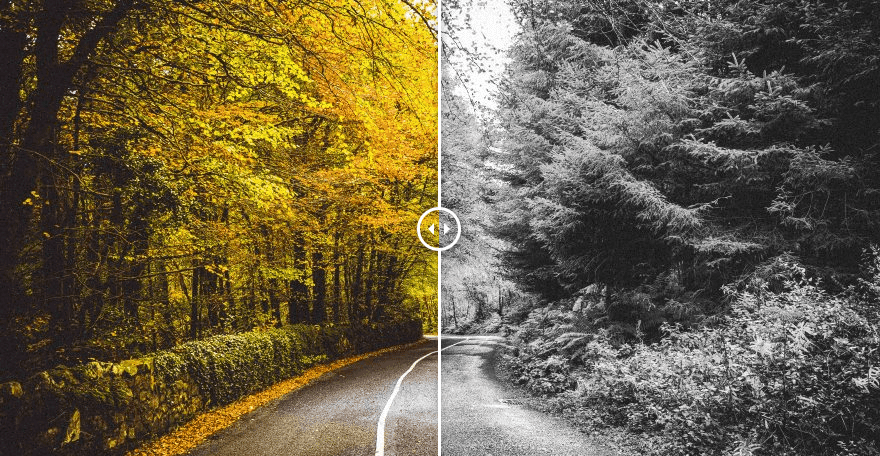
Three boundary lines first, so you don't finish reading and realize you're in the wrong theater: this guide does not cover how files get uploaded (that's the File Upload Guide's territory: chunking, resumable uploads, signed direct uploads all live there); it does not cover where images are stored or how a CDN distributes them (see the File Storage & CDN Guide); it does not cover video transcoding (see the Video Processing Pipeline Guide). It answers exactly one question: after the original file lands on disk, how do you cut three size variants, emit WebP/AVIF, stamp a watermark that doesn't cover faces, and stop EXIF from rotating your images sideways.
Why does this deserve its own guide? Because in vibe coding workflows, the image upload feature is usually the first module that "looks done": the form picks files, the progress bar moves, the image displays — so you declare victory. Three months later, the bill and the complaints arrive together: a 12 MB phone original gets shoved straight into a list page and first paint takes 8 seconds; a vertically shot photo renders sideways on the detail page; marketing asks for a brand watermark and you discover stamping text on the original covers people's faces; and one fine morning a security advisory tells you your image library has an RCE. Upload is only the beginning — the real engineering hides in "after it lands".
This guide is for solo teams and indie developers building upload/display features for vibe projects, mostly Next.js / Node full-stack, with no dedicated backend engineer. Everything revolves around one shippable pipeline: validate → auto-orient → multi-size → multi-format → watermark → persist. Each section ends with a decision table or checklist, and every code snippet is runnable Node + sharp. sharp is the tool choice throughout — not because it's fashionable, but because it processes via libvips streaming with a fraction of the memory of old-school "load the whole bitmap" tools like ImageMagick / GraphicsMagick. On serverless and per-request billing, that translates directly into money.
1. Pipeline Overview: The Journey of an Uploaded Image
The most important idea in this guide: model "image processing" as a pipeline, not as utility functions scattered everywhere. One uploaded original passes through six stages from disk to displayable; each stage does exactly one thing, so when something fails you know exactly where:
- Validate: MIME allowlist, file-size cap, pixel-count cap. Note the order — the pixel check must happen before any decoding (see §6 on decompression bombs). This is a security red line, not a performance tweak.
- Auto-orient: rotate pixels per the EXIF Orientation tag, then remove the tag. The easiest step to forget and the most visible when forgotten (see §3).
- Multi-size: cut three variants from the original. This guide recommends thumb 256px, card 768px, hero 1600px (by long edge); rationale in §2.
- Multi-format: emit WebP for every size and AVIF for hero only, keeping JPEG as fallback. The bandwidth math is in §4.
- Watermark: brand visibility, not anti-theft (anti-scraping is the Watermark & Anti-Scraping Guide's job — division of labor in §5).
- Persist: write all variants at once under
{id}_{w}x{h}.{fmt}names and store metadata in the database.

With the pipeline fixed, the first engineering decision is: when do these six stages run? Three mainstream modes, no silver bullet, each with its own cost of choosing wrong:
| Mode | When users see images | Complexity | Fits | Biggest trap |
|---|---|---|---|---|
| Synchronous in-request transcode inside the upload handler | All sizes available the moment upload finishes | Lowest — one function | MVPs with a few hundred DAU, internal tools | Large images stall the response; serverless timeouts (typically 10–30s caps); queues up under concurrency |
| Async queue upload enqueues a job, background worker transcodes | Seconds-to-minutes delay, needs a state machine | Medium (queue + state + fallback) | Normal production; the default choice for solo teams | You must build "processing" UI states and failure fallbacks (§7), or users think the upload vanished |
| On-demand realtime imgproxy / thumbor style: crop on request, then cache | Slow on first hit, fast on cache hit | Low (adopt a service) | Long-tail size combinations, many CDN edge nodes | Unsigned URLs equal an open image-processing proxy waiting to be abused; get the billing model right |
Judgment call for solo teams: default to the async queue. In-request sync is fine for the MVP phase, but sooner or later a 20 MB phone original will time out your handler; on-demand cropping is lovely, but designing URL signing and cache keys is a guide-sized topic on its own. All code samples below assume a queue-worker context, but the logic works in all three modes.
Finally, give "processing complete" an acceptance definition you can actually test, or future-you will argue with present-you. Write it into your job state machine: done means every file across three sizes × two formats is persisted and reachable via CDN, and metadata (dimensions, format, hash) is in the database. Any missing variant marks the job partially complete and routes to §7's fallback logic — never fake success.
2. sharp in Practice: Three Sizes and Quality Trade-offs
First, why sharp. The Node ecosystem's old guard is ImageMagick, GraphicsMagick, and sharp. The first two are CLI wrappers: spawn a process per job, shuttle files around, hold the full bitmap in memory. sharp sits on libvips and streams the pipeline, typically using a fraction of the memory and running 4–5× faster (the classic comparison from the libvips docs — treat the multiplier as order-of-magnitude, it varies by image and machine). For vibe projects this means: transcoding a phone original inside a 512 MB serverless function, sharp survives, IM gets OOM-killed. The selection verdict in one sentence: in 2026, Node image processing defaults to sharp, no debate.
The three recommended sizes — thumb 256, card 768, hero 1600 (long edge, pixels) — aren't pulled from thin air; each maps to a display scenario:
- thumb 256: list thumbnails, avatars, search results. 256px wide covers a 128-CSS-pixel slot on 2× screens — enough for nearly every list; smaller (e.g. 128) looks soft on hidpi, larger defeats the point of a bandwidth-saving thumbnail.
- card 768: cards, feeds, article illustrations. This is the workhorse size where users actually consume content — full-bleed on mobile, comfortable in desktop cards.
- hero 1600: detail-page hero, lightbox, share-poster base. 1600 is the balance point of "barely enough full-bleed on desktop, explosively large beyond"; if the original is smaller than 1600, don't upscale (see
withoutEnlargementbelow).
The core code, with three details to note: parameterless rotate() for auto-orient (§3), withoutEnlargement: true so small images aren't blurred by upscaling, and the "probe pixels with metadata() first" ordering (§6):
import sharp from "sharp";

const MAX_PIXELS = 50_000_000; // 50-megapixel red line, see §6

const SIZES = [
  { name: "thumb", width: 256 },
  { name: "card",  width: 768 },
  { name: "hero",  width: 1600 },
];

async function render(input, { width, format, quality }) {
  let p = sharp(input)
    .rotate() // no args: auto-orient from EXIF, must precede any format conversion
    .resize({ width, withoutEnlargement: true });
  if (format === "webp") p = p.webp({ quality });
  if (format === "avif") p = p.avif({ quality, effort: 4 });
  if (format === "jpeg") p = p.jpeg({ quality, mozjpeg: true });
  return p.toBuffer();
}

export async function processImage(input /* Buffer */, id) {
  const probe = await sharp(input).metadata(); // metadata only, no pixel decode
  if ((probe.width ?? 0) * (probe.height ?? 0) > MAX_PIXELS) {
    throw new Error(`image too large: ${probe.width}x${probe.height}`);
  }
  const out = {};
  for (const { name, width } of SIZES) {
    out[name] = {
      webp: await render(input, { width, format: "webp", quality: 75 }),
      // AVIF encodes 5–10× slower — pre-generate for hero only (see §4)
      ...(name === "hero"
        ? { avif: await render(input, { width, format: "avif", quality: 50 }) }
        : {}),
      jpeg: await render(input, { width, format: "jpeg", quality: 80 }),
    };
  }
  return out; // caller persists as {id}_{w}x{h}.{fmt} (see §7)
}
sharp's resize fit option is the second classic trap. The default fit: "cover" (scale to fill, center-crop the overflow) is fine for landscapes but can decapitate faces in avatar/product shots. The trade-off table:
| fit | Behavior | Fits | Trap |
|---|---|---|---|
cover (default) | Fills the box, crops overflow | Landscapes, banners, covers | Center crop may cut faces/subjects |
contain | Keeps everything, letterboxes | Product shots, document-like images | Letterbox bars need frontend background coordination |
fill | Stretches to exact size | Almost never | Distortion is instantly visible |
inside / outside | Fit by smaller/larger edge | "Long edge ≤ N" scenarios | Output size varies — cache keys must carry actual dimensions |
If your scenario involves faces, sharp's resize accepts position: "attention" (saliency-heuristic smart crop that tries to keep "interesting" regions). Better than nothing, but don't mistake it for face detection — it doesn't know what a face is, it just guesses where the information is. For business-critical images like user avatars, let users crop at upload time with a frontend cropper instead of hoping the server guesses right. That's a product design problem, not a parameter problem.
Suggested quality starting points (blind-test baselines, not universal truths):
| Format | Starting quality | Notes |
|---|---|---|
| JPEG (mozjpeg) | 80 | Enable mozjpeg: true for smaller files at equal quality; blind-test baseline for portraits/products |
| WebP | 75 | Roughly 15–25% smaller than JPEG at equal perceived quality (measured data in §4) |
| AVIF | 50 | AVIF 50 ≈ JPEG 75–80 perceptually; start effort at 4 and test upward. The author did not independently benchmark AVIF — blind-test your own samples |
Methodology beats numbers: there is no universally correct quality value. The right approach is 10–20 representative images from your own site (portraits, products, screenshots, landscapes), exporting several quality rungs, blind-testing "which one is unacceptable" with filenames hidden, and picking one rung above "just acceptable". Screenshots (flat colors + text) are a special case: lossy compression halos around text edges, so prefer PNG or WebP lossless for those instead of cranking quality down.
3. The EXIF Orientation Trap: Why Phone Photos Land Sideways on Your Site
One of the most frequent and most bewildering complaints in vibe projects: "I shot it vertically — why is it sideways on the website?" The root cause isn't your code, it's phone makers cutting corners: the sensor always records pixels horizontally, then writes an EXIF Orientation tag telling viewers "rotate on display". The common vertical shot maps to Orientation = 6 (display rotated 90° clockwise).
Browser behavior is split: opening the JPEG original directly, modern browsers read the tag and rotate correctly; but once your pipeline touches the image (sharp strips EXIF by default), the tag is gone while the pixels are still stored sideways — and the image renders sideways. Worse, <img>, CSS backgrounds, canvas, and different browsers never agreed on this tag in the first place — relying on EXIF Orientation for display means betting that every link in the chain plays by the rules, and experience says one of them won't.
There is exactly one correct fix: physically rotate the pixels at the pipeline entrance and remove the tag, so every downstream stage sees clean pixels that are already upright with no tag. sharp does it in one line:
sharp(input).rotate() // no args: auto-orient from EXIF Orientation, and strip the tag
Per sharp's official docs (the api-operation section): parameterless rotate() reads the EXIF Orientation tag, rotates to the correct orientation automatically, and removes the tag from output. Pass an angle and it rotates by that angle without consulting the tag. Remember the distinction: no arguments = "fix it for me", an argument = "do what I say".
The ordering iron law: auto-orient must happen before any format conversion. WebP's EXIF orientation support is inconsistent across browsers (there's a dedicated cross-browser test page proving it, and the uncertainty persists) — convert to WebP first and hope the tag works, and you've just moved the trap from JPEG to WebP. In §2's code, .rotate() sits right after sharp(input) and before .resize() for exactly this reason. Recommended pipeline shape: metadata() first (grab the pixel-bomb check from §6 for free), then orient:
const probe = await sharp(input).metadata();
console.log(probe.orientation); // 1–8; 6 is the classic phone vertical shot
// then: sharp(input).rotate().resize(...) — orient first, convert later
Full table of the 8 EXIF Orientation values (cover all of them in your regression set — checklist item 12 in §8):
| Value | Meaning | Equivalent operation |
|---|---|---|
| 1 | Normal | None |
| 2 | Mirrored horizontally | Left-right flip |
| 3 | Rotated 180° | Upside down |
| 4 | Mirrored vertically | Top-bottom flip |
| 5 | 90° clockwise, then horizontal flip | Transpose family |
| 6 | 90° clockwise (the classic phone vertical shot) | Rotate right 90° |
| 7 | 90° clockwise, then vertical flip | Transpose family |
| 8 | 90° counter-clockwise | Rotate left 90° |
Section checkpoint: ① parameterless rotate() at the pipeline entrance; ② placed before the first format conversion; ③ regression set includes all 8 orientations. Three yeses and this trap is filled.
4. Modern Formats in Practice: How Much Bandwidth WebP/AVIF Really Save
"WebP saves 30% bandwidth" — hear it, don't quote it. Savings depend on your images (photos vs. screenshots), your quality settings, and what you use as the baseline. This guide won't hand you a universal number; it hands you a reproducible comparison method, plus one honestly-labeled set of measured sample numbers from the author.
The method (10 minutes to run): take 10–20 representative originals from your site; for each, export JPEG q80 (baseline), WebP q75, AVIF q50; record sizes; then blind-test to confirm all three rungs look acceptable. Savings = 1 − new-format size / JPEG baseline size. Two caveats: ① fix the baseline (don't use JPEG q95 as the denominator — that makes everything look like a miracle); ② measure screenshots as a separate group, their compression behavior is nothing like photos.
Author's measured sample (sample: one 880×456 photo, PNG original 274,524 bytes; tool: Pillow 10.2.0; single-sample illustration, not a universal claim):
| Format / quality | Size (bytes) | vs. JPEG q80 |
|---|---|---|
| JPEG q80 (baseline) | 168,307 | — |
| JPEG q70 | 145,746 | −13% |
| WebP q80 | 160,102 | −5% |
| WebP q75 | 138,202 | −18% |
| WebP q60 | 119,684 | −29% |
AVIF was not independently benchmarked for this guide (the author's environment lacked an AVIF encoder). Public comparisons from the community and vendors commonly cite "30–50% smaller than JPEG at equal perceived quality" — treat that as hearsay until you re-run the method above on your own samples and write the result into your tech spec. The opinion stands regardless: even if AVIF only saves 20%, it's worth it for image-heavy sites — done the smart way (see "hero only" below).
Formats decided, next is the fallback chain: not every browser eats AVIF, and hardcoding one format abandons part of your audience. Two mainstream approaches:
Approach A: <picture> with multiple <source> (declarative frontend; the default recommendation):
<picture>
  <source srcset="/img/abc_1600x900.avif" type="image/avif" />
  <source srcset="/img/abc_1600x900.webp" type="image/webp" />
  <img src="/img/abc_1600x900.jpg" alt="Product photo" loading="lazy" />
</picture>
Approach B: server-side Accept-header content negotiation (for APIs that return raw image bytes):
// Node middleware sketch
const accept = req.headers.accept || "";
const fmt = accept.includes("image/avif") ? "avif"
  : accept.includes("image/webp") ? "webp" : "jpeg";
res.setHeader("Vary", "Accept"); // critical: let the CDN cache per Accept value
res.sendFile(`/img/abc_1600x900.${fmt}`);
Decision guidance: page rendering → Approach A, simple, cacheable, CDN-friendly. Only reach for B when you run a "one URL returns an image" API (OG images, dynamic poster endpoints) — and never forget Vary: Accept, or the CDN will serve cached AVIF to browsers that can't decode it.
The AVIF trade-off is this section's most practical judgment: AVIF encodes 5–10× slower than WebP (order-of-magnitude feel, not a precise benchmark) — pre-generating it for every size will roast your queue workers. The pragmatic solo-team strategy: pre-generate AVIF for hero images only; thumbs and cards get WebP + JPEG. Rationale: hero images are individually large (big absolute savings) and few per piece of content (usually one); thumbnails are already tiny, so AVIF's marginal savings aren't worth the CPU. In sharp, effort controls encode time (0 fastest, 9 slowest) — start at 4, stop when the blind test passes.
One last safety switch, parked in this section because it's format-adjacent: sharp.block() disables specific libvips loaders. During the CVE-2026-84383 window, if you couldn't upgrade sharp, one line killed HEIF/AVIF decoding as a tourniquet (details in §6):
import sharp from "sharp";
// Tourniquet, not cure: block HEIF/AVIF loading (AVIF *encoding* still works,
// but inputs containing HEIF get rejected)
sharp.block({ operation: ["VipsForeignLoadHeif"] });
Section checkpoint: ① ran the comparison table on your own samples; ② at least one fallback approach shipped; ③ AVIF limited to hero; ④ Vary: Accept in place (if using Approach B).
5. Watermarks: Brand Visibility That Doesn't Cover Faces
Division of labor first, to avoid colliding with the sibling guide: the site already has a Watermark & Anti-Scraping Guide covering theft and scraping prevention — invisible watermarks, rate limiting, hotlink protection, all aimed at making scrapers miserable. This guide covers brand visibility — a visible © line or logo, aimed at keeping your name on images that get shared. Complementary, not overlapping.
Selection first, text vs. image watermarks:
| Text watermark | Image watermark (logo) | |
|---|---|---|
| Implementation | Server-generated SVG text, composited on top | Transparent-background logo PNG, scaled proportionally, composited |
| Pros | Zero assets, dynamic copy possible (username, date) | Best brand consistency, designer-controlled |
| Cons | Font rendering depends on server fonts; mind CJK/Latin mixing | Logo needs multi-size management; separate light/dark variants |
| Fits | UGC communities ("© username"), MVP phase | Products with brand guidelines, photography/design sites |
The default answer for solo teams: ship the text watermark first. No designer handoff for logo cuts, no asset versioning — one SVG template runs. Swap in the image watermark when the brand stabilizes; the composite slot in the pipeline doesn't move.
sharp's composite supports nine-position placement via gravity — the complete vocabulary for watermark positioning:
| gravity | Position | Watermark suitability |
|---|---|---|
northwest / north / northeast | top-left / top-center / top-right | Top half usually holds the subject (faces, sky) — use cautiously |
west / center / east | middle-left / center / middle-right | Center is the "anti-theft" billboard slot — not for brand visibility |
southwest / south / southeast | bottom-left / bottom-center / bottom-right | Bottom-right is the default answer: end of the reading path, lowest subject probability |
"Don't cover the face" is this section's practical core — four techniques in order of importance:
- Default to bottom-right (
gravity: "southeast") with margins (bake padding into the watermark SVG, or compute the offset at composite time). - Low opacity: text
fill-opacityaround 0.5–0.6 — legible without shouting. Never full-opacity white: it clumps on light images and looks like a sticker on dark ones. - Scale type with the image: font size ≈ image width / 28 (empirical coefficient) — auto-shrinks on thumbs, auto-grows on heroes. A hardcoded 24px eats a quarter of a 256px thumbnail.
- Only watermark what's worth it: no watermark on thumbs (too small to read, hurts recognition); cards optional; hero always. Watermarking is a brand tax — don't levy it on every image.
Runnable text-watermark code (note: this SVG is a server-generated trusted template — a completely different beast from user-uploaded SVG, whose risks are in §6; escape any user-supplied copy as XML):
import sharp from "sharp";
function escapeXml(s) {
return s.replace(/&/g, "&").replace(/</g, "<")
.replace(/>/g, ">").replace(/"/g, """);
}
function textWatermark(text, width) {
const fontSize = Math.max(12, Math.round(width / 28)); // scale type with image
const pad = Math.round(fontSize * 0.8);
const svg =
`<svg width="${width}" height="${fontSize * 2 + pad}">` +
`<text x="${width - pad}" y="${fontSize + pad / 2}" text-anchor="end" ` +
`font-family="sans-serif" font-size="${fontSize}" ` +
`fill="white" fill-opacity="0.55">${escapeXml(text)}</text></svg>`;
return Buffer.from(svg);
}
export async function addWatermark(input, { text, width }) {
return sharp(input)
.rotate()
.resize({ width, withoutEnlargement: true })
.composite([{
input: textWatermark(text, width),
gravity: "southeast", // bottom-right: the default answer
}])
.toBuffer();
}
Section checkpoint: ① watermark copy XML-escaped; ② type scales with image size, not hardcoded; ③ thumbs exempt; ④ responsibilities split clearly with the Watermark & Anti-Scraping Guide (visibility here, theft-prevention there).
6. Security Red Lines: Image Processing Is Attack Surface
October 2026's security events taught everyone building image features a lesson: image processing is attack surface. On October 14, Next.js shipped an out-of-band security update fixing CVE-2026-96889 — an SVG remote code execution via the image optimization API (CVSS 9.5), rooted in a use-after-free in librsvg underneath sharp, affecting Next.js 10.0.0–15.5.27 and 16.0.0–16.4.0, fixed in 15.5.28 / 16.4.1. Note the attack chain: an attacker uploads a crafted SVG, your sharp decodes it, memory corruption happens — no login required, no line of your code wrong, just a vulnerable image library in the tree.
This section is the red-line checklist, ordered tourniquet-first:
Red line 1: sharp must be ≥ 0.35.5. CVE-2026-84383, disclosed September 2026, is a heap buffer overflow in libheif under sharp (CVSS 3.1 up to 9.8) — a crafted HEIF/AVIF file can yield remote code execution; it affects sharp < 0.35.4 (fixed via libheif 1.23.2 / sharp 0.35.4+). October's SVG incident (CVE-2026-96889) then required sharp ≥ 0.35.5 (which bundles librsvg 2.63.2). So the practical floor is 0.35.5, covering both CVEs at once. Verification commands:
npm ls sharp        # the actually installed version, not the ^0.35.0 in package.json
npm audit           # a stale lockfile pins you to a vulnerable 0.34.x
The classic failure: package.json says "sharp": "^0.35.0" but package-lock.json was generated three months ago and pins 0.34.x — npm ci installs whatever the lockfile says. Fix: regenerate the lock or npm update sharp, then confirm with npm ls sharp.
If you genuinely can't upgrade yet (base image constraints, native build issues), sharp ships a tourniquet — sharp.block() disables specific libvips loaders outright:
import sharp from "sharp";
// Tourniquet, not cure: refuse to load HEIF/AVIF — breaks CVE-2026-84383's chain
// Cost: user-uploaded HEIC/AVIF gets rejected; surface that in the product UX
sharp.block({ operation: ["VipsForeignLoadHeif"] });
Note this is only a tourniquet: it blocks the HEIF/AVIF chain, not the librsvg one. Upgrading is the cure; block buys you time.
Red line 2: decompression bombs must be stopped before decoding. An attacker can craft an image that is tiny on disk but enormous when decoded (e.g. a PNG declaring 100000×100000 pixels in a few dozen KB) — one decode and your memory explodes. Defense is all about ordering: metadata() first to read dimensions (it doesn't decode pixels, near-zero cost); reject over-limit pixel counts; never enter resize. That's the MAX_PIXELS check in §2's code:
const MAX_PIXELS = 50_000_000; // 50 megapixels: blocks crafted gigapixel images; tune to your business
const probe = await sharp(input).metadata();
if ((probe.width ?? 0) * (probe.height ?? 0) > MAX_PIXELS) {
  throw new Error("image too large");
}
50 megapixels isn't a standard, it's a starting point: normal phone photos (12–50 MP) pass, maliciously crafted hundred-megapixel images get blocked. Tune it — avatar scenarios can go as low as 12 MP.
Red line 3: user-uploaded SVG is rejected by default. After CVE-2026-96889, the posture on SVG should be: keep image/svg+xml out of the upload allowlist unless the business truly needs it. If it does (design-tool sites), two paths: ① sandbox-rasterize to PNG — let sharp rasterize the SVG to PNG before it enters the pipeline (sharp ≥ 0.35.5's librsvg fixes the known UAF, but "SVG is Turing-complete XML" hasn't changed — defense in depth is cheap); ② strict XML sanitization (strip scripts, external references, event attributes). Don't confuse the two SVGs: §5's watermark SVG is a server-generated trusted template; user-uploaded SVG is untrusted input. The watermark using SVG is no excuse to relax on uploads.
Red line 4: filename sanitization and a MIME allowlist. Upload filenames are never trustworthy: ../../../etc/passwd path traversal, double extensions like .jpg.php, Unicode homoglyph tricks. The fix: all persisted filenames are server-generated (§7's naming scheme is immune by construction); the original filename is stored as metadata for display only. Trust magic bytes for MIME type, never the extension or the client-declared Content-Type. sharp's metadata().format reads magic bytes — reliable.
Red line 5: CSP img-src. On image display pages, restrict the Content Security Policy's img-src to your own domains and CDN domains — not * for convenience. This doesn't fix image-processing bugs; it's defense in depth against content injection where image URLs are user-controlled. Cheap to do, do it.
Section checkpoint (tick each before launch): ① npm ls sharp ≥ 0.35.5; ② pixel-bomb check after metadata(), before any decode; ③ SVG uploads rejected by default (or sandboxed to PNG); ④ persisted filenames server-generated; ⑤ MIME from magic bytes.
7. Naming, Caching, and Fallbacks: Keep the CDN and Future-You Happy
Multi-variant naming is a small thing, but a good scheme makes CDN caching and 3 a.m. debugging much smoother. Recommended convention:
{id}_{w}x{h}.{fmt}
// examples:
//   b7f2c1_256x144.webp    dimensions are the ACTUAL post-orient output size
//   b7f2c1_1600x900.avif
//   b7f2c1_1600x900.jpg    fallback
Three design reasons: ① cache keys are naturally unique — size and format live in the filename, so the CDN needs no fancy vary rules (except Approach B from §4, which must set Vary: Accept); ② immutability — the same id + spec always maps to the same bytes; reprocessing mints a new id (or version suffix), so the CDN can cache long with confidence; ③ readability — at 3 a.m. the filename alone tells you which image and which variant, no database lookup.
Note {w}x{h} uses the actual post-orient output dimensions, not the original's. A vertical shot swaps width/height after orientation; naming it with the original dimensions plants confusion for future debugging. Filename generation code:
async function persistVariant(buffer, { id, width, format }) {
  const meta = await sharp(buffer).metadata(); // read actual output dimensions
  const key = `${id}_${meta.width}x${meta.height}.${format}`;
  await storage.put(key, buffer); // storage SDK choice: the File Storage & CDN Guide
  return key;
}
(Which storage SDK and how the CDN is configured belong to the File Storage & CDN Guide — this guide defines naming only, no trespassing.)
Failure fallbacks. Solo teams have no on-call rotation, so fallbacks must be automatic — three layers:
| Failure point | Automatic fallback | User perception |
|---|---|---|
| Single queue-worker processing failure | Retry 3× with exponential backoff | None (image goes live slightly late) |
| Retries exhausted | Serve the original: publish the untouched original, frontend displays normally | Image visible, loads slower |
| Original itself corrupt (decode fails) | Mark failed, alert (email/chatbot), human intervenes | Upload-failed prompt, user retries |
"Serve the original" is the single most important line in the whole fallback design: processing is an optimization, not a precondition for correctness. If transcoding fails, users must at least see the original; a broken image icon is the real P0. Suggested state machine: pending → processing → ready | degraded (original served) | failed — the frontend renders degraded exactly like ready, with an internal flag so you can re-run processing later.
Section checkpoint: ① filenames carry actual output dimensions and format; ② same spec is immutable (reprocessing mints a new id); ③ failures fall back to serving the original instead of a bare 500.
8. Solo-Team Shipping Checklist (12 Items)
Condensing §§1–7 into one pre-launch list. Print it, tape it to the monitor, tick each box:
- Auto-orient: parameterless
rotate()at the pipeline entrance, before the first format conversion. - Three sizes: 256 / 768 / 1600 (long edge),
withoutEnlargement: true— never upscale small images. - Two formats: WebP for all three sizes, AVIF for hero only, JPEG fallback retained.
- Watermark: bottom-right + 0.5–0.6 opacity + type scaled to image; thumbs exempt; copy XML-escaped.
- Pixel cap:
metadata()reads dimensions first; over 50 megapixels (tune to your business) gets rejected before decoding. - Version red line:
npm ls sharpconfirms ≥ 0.35.5, lockfile verified too; if upgrade is blocked,sharp.block()as tourniquet. - Naming:
{id}_{w}x{h}.{fmt}with post-orient actual dimensions; same spec immutable. - Failure fallback: 3 retries → serve original (degraded) → alert for human review; processing is an optimization, not a correctness precondition.
- Timing metrics: record per-image processing time (p50/p99); tune AVIF
effortagainst this number, not gut feel. - Bandwidth cost math: run §4's comparison on your samples, convert "X% saved" into monthly CDN dollars — the only proof this pipeline earns its keep.
- Serverless bundle size: sharp ships native deps, tens of MB; use Lambda layers, and multi-stage Docker builds carrying only runtime packages — never the whole toolchain in the image.
- Regression image set: 8 EXIF orientation samples (all values 1–8) + 1 gigapixel bomb + 1 corrupt file + 1 SVG; run on every pipeline change, asserting correct orientation output, over-limit rejection, and fallback paths.
One closing judgment: the image pipeline is the classic "invisible early, expensive late" module in vibe projects. Skip it and you pay in CDN bills and complaints three months later; overbuild it and a solo team drowns in complexity. This guide's package — six-stage pipeline, async queue, three sizes × two formats, bottom-right watermark, five security red lines — is the "just enough" version. Get it running, then let item 10's dollar figure decide whether to invest more. Upload is only the beginning — but what's after the beginning deserves to be done right, once.
Comments (0)
Related articles

A customer pastes one line of script into their site, and your chat/booking/review component must run stably inside someone else's DOM: iframe + postMessage protocol, Shadow DOM style isolation, publishable keys with domain allowlists, version pins and performance budgets — the embeddable widget playbook.
Bots scraping your content, images, and product data around the clock? From Cloudflare's four-layer detection and JA3/JA4 fingerprints to signed URLs, watermark forensics, and an ROI checklist — a costed anti-scraping playbook for small site owners.
Errors are your most-called interface asset: RFC 9457 problem details, stable UPPER_SNAKE_CASE codes, an HTTP status decision table, i18n copy engineering, traceId propagation, frontend discriminated types, and agent-executable error contracts.