Dead on Launch? A Cold-Start Combat Manual for Vibe Project Launch Day
Most vibe projects don't die from being bad — they die from nobody knowing they launched. This combat manual covers the 14-point pre-launch checklist, a 24-hour T-day timeline with five action nodes, copy templates for Product Hunt / Show HN / X / Xiaohongshu, the warm-up arsenal (waitlist, build in public, KOL test list), comment-section combat scripts, a three-level traffic plan with Vercel/Cloudflare setups, and the five funnel numbers that decide whether to keep going.

The most common way vibe projects die isn't rotting away mid-development — it's sinking silently on launch day. You spent three weeks vibing a working product into existence with AI, bought the domain, got the deploy green, then posted a "finally launched 🎉" that earned 3 likes and one "so proud of you!" from your mom. End of story.
The problem isn't the product. It's that you treated "launch" as a single action: push the deploy button, done. Anyone who's actually run a cold start knows launch day is a 24-hour campaign with rhythm, ammunition, and contingency plans. Long-term growth runs on a flywheel — that's endurance. Launch day runs on detonation: firing everything you've stockpiled over weeks, in one organized day.
This playbook breaks "launch day" into seven executable modules: what to check before launch, what to do at every hour of the 24, how to write copy for four platforms, how to stockpile warm-up ammunition, how to fight in the comment sections, how not to crash when traffic hits, and which five numbers decide whether the product deserves more of your time. Follow it, and at least you won't die confused.
1. The 14-Point Pre-Launch Checklist
A brutal truth first: 80% of launch-day disasters aren't traffic problems — they're unfinished basics. Someone hits #3 on Product Hunt and the signup button 404s. Someone gets front-paged on Hacker News and the server dies in 20 minutes, with the comments filling up with "dead on arrival." Traffic is an amplifier, and it amplifies your bugs too.
Go through these 14 items one by one on the night of T-1. If any one fails, don't launch. It looks like a lot, but a solo dev can finish it in one evening:
| # | Check | Pass criteria |
|---|---|---|
| 1 | Mobile hero passes the 3-second test | Hand your phone to someone who's never seen the product. If they can't say what it does within 3 seconds, rewrite the hero copy. Don't launch. |
| 2 | Share image (og:image) | 1200×630, with product name and a one-liner. Paste the link into WeChat, X, and iMessage — preview renders correctly, no stretching, no black bars. |
| 3 | Full signup flow works end to end | Walk it yourself from landing page to signup to first use. Under 2 minutes total, zero "try again later" moments. |
| 4 | A demo viewable without login | People must see what the product looks like without registering: a public demo link, a 60-second recording, or a GIF — pick one. 70% of launch-day visitors won't sign up, but they will watch the demo. |
| 5 | Payment flow tested with real money | If there's anything paid: charge a real $1/¥1, then refund it. Confirm the webhook fires and the order status is correct. Never launch on "it should be fine." |
| 6 | Error monitoring is live | Sentry (or equivalent) wired up, alerts pushed to your phone. You can't stare at logs all day — monitoring has to find problems before you do. |
| 7 | Three core events instrumented | At minimum: visit, signup, activation (the aha moment). Without instrumentation, every number in Chapter 7 is fiction. |
| 8 | Survives 10x traffic | Run a load test with k6 or loader.io and confirm the core flow holds at 10x your normal concurrency. Details in Chapter 6. |
| 9 | Status page ready | A status page or a pinned-post template: "We're handling a traffic spike, expect recovery in X minutes." When things actually break, you won't have time to write it. |
| 10 | Welcome email arrives within 5 minutes | The first automated email after signup lands in the inbox (not spam) within 5 minutes, and does exactly one thing: tell the user where to click next. |
| 11 | A support channel with a human behind it | Email, Discord, or a chat group — pick one, and guarantee a reply within 1 hour on launch day. A feedback inbox nobody answers tells users "we don't care." |
| 12 | Honest pricing page | Free tier, paid price, cancellation policy — all on one page. The most-asked question on launch day is always "so is it free or not." Hiding the answer only earns you angry comments. |
| 13 | The legal trio | Privacy policy, terms of service, contact info. Even adapted from a template, they must exist. Getting screenshotted with "you don't even have a privacy policy?" is a bad look. |
| 14 | One-click rollback | Redeploy the previous version on Vercel, roll back to the last Docker tag — whatever your stack, you can cut production back to the last stable build within 15 minutes, and you've rehearsed it once. |
One iron rule: no new features on launch eve. That night you have exactly three jobs: check the boxes, fix crash-level bugs, sleep. Launch day needs a clear head — the "optimization" you ship at 3 AM will only create new crashes.
2. The 24-Hour Launch Day Timeline
The biggest cold-start mistake is blasting every platform at the same moment. Traffic peaks don't hit all platforms in the same timezone, and your energy can't fight four battles at once. Stagger it, wave by wave, like a tide.
First, the timeline. T-day is launch day; all times below are Beijing time (Product Hunt launches at 00:01 Pacific Time, and Show HN posts perform best on weekday evenings US Pacific — I'll flag both):
T-7 days: warm-up begins
One build-in-public post per day: what you built today, what broke, what's left. No "stay tuned" filler — post concrete things: screenshots, numbers, hard trade-offs. Put up the waitlist page and start collecting emails. Goal: 300–500 emails before T-day. That's your launch-day base traffic.
T-3 days: ammunition stocked
Send the waitlist its first teaser email: "We're launching on X — you're in the first batch." Send the KOL test list their "samples": a beta account, a one-paragraph intro, and the exact forwarding copy you hope they'll post on launch day (don't make them write it themselves — they don't have time).
T-1 day: materials frozen
All copy, screenshots, GIFs, and the demo video are final, in one folder. Product Hunt page filled in and scheduled. Show HN post drafted. A comment-section duty roster: who covers which platform at what hours — for a solo team that's you, but write the time blocks down, or you'll end up refreshing your phone for 24 hours straight.
T-day: five action nodes
| Node (Beijing time) | Action | Why this hour |
|---|---|---|
| 00:00 — Fire | Confirm the Product Hunt scheduled launch went live; post the first tweet of your X launch thread; email the waitlist "we're live" | PH launches at 00:01 Pacific, which is 15:00 Beijing time. Set the schedule ahead; at midnight you only confirm and send the email |
| 04:00 — First watch | Reply to the first wave of comments on PH and X; fix any crash-level bugs the monitors flag; glance at server load | The first comments decide whether a post lives or dies — someone must reply within an hour. Same with bugs: a crash on launch morning becomes a screenshot of a one-star review by afternoon |
| 08:00 — Spread | Post to Show HN; publish the Xiaohongshu note; drop the demo link into 2–3 relevant Discord/WeChat groups | 20:00 Beijing time is 04:00 Pacific — wait, do the math the other way: US Pacific weekday mornings are the golden window for Show HN, which is late night Beijing time. If you post around 23:00 Beijing time on a Tuesday, you land right in it. The rule of thumb: Show HN goes up late at Beijing night, PH goes up in the Beijing afternoon |
| 12:00 — Double down | Check morning numbers: which channel drove the most signups; post a "progress update" tweet ("12 hours in, XXX signups"); DM KOLs asking for the retweet | Noon is for extending the morning's momentum. Numbers look good? Post the numbers. Numbers look bad? Post "we fixed 3 bugs" — motion matters more than metrics |
| 20:00 — Close out | Final PH voting push (only hours left); post a "full data recap tomorrow" teaser; end the duty roster, go to sleep | PH rankings settle at Pacific midnight — votes in the final hours count the most. The recap teaser gives today's traffic a reason to come back tomorrow |
The core idea of this table is one sentence: don't fire all your ammunition at once. Five nodes, five chances to appear in people's feeds. Most people post to five platforms at T-day 00:00, run out of things to say by noon, and watch traffic die in the afternoon.
3. Copy Templates for Four Platforms
Every platform has its own dialect. Blasting one identical announcement everywhere is like wearing a suit to a night market — technically allowed, socially invisible. The four templates below are battle-tested; just swap in your product name and numbers.
1. Product Hunt: the headline formula
A PH headline isn't a slogan — it's an elevator pitch. Three formulas that keep working:
- Formula A (tools): "ProductName — turn X into Y." Example: "SheetMagic — turn Excel into a database." The verb must be concrete, and the Y must paint a picture.
- Formula B (efficiency): "ProductName — do X in Y." Example: "Mockly — API mocking in 30 seconds." Y must be a number. "Fast" doesn't count.
- Formula C (AI): "ProductName — the AI version of X." Example: "DocuMind — AI search for your Notion." Borrow a mature product's mental model, but follow it with your differentiation — or the comments will ask "why not just use Notion AI."
The tagline covers exactly one thing: what the user gets. Never lead with your tech. "Built on GPT-4" is a spec sheet, not a selling point.
Example: ShipLog — weekly retros in 5 minutes
Tagline: Connect your analytics tools and get an auto-generated product recap every week — indie devs never have to dig through dashboards manually again.
First comment (take the seat yourself, mandatory): Hey hunters! I'm Alex, solo team. I used to spend 2 hours every week manually writing retros, so I built ShipLog. Launching on Product Hunt today — the first 100 users get lifetime 50% off. One question for you: how do you do retros right now? Spreadsheets or pure vibes?
Note the ending: your first comment must close with a question. PH's algorithm counts comments, and if you don't open a topic, the section fills with "Congrats on the launch!" — which does nothing for ranking.
2. Show HN: the forbidden list
HN has the highest signal and the sharpest elbows on the internet, and the hardest rules. Three taboos — break one and your post sinks:
- Clickbait titles die: "Show HN: the AI product disrupting industry X" gets downvoted within 10 minutes. The correct posture is plain technical description: "Show HN: a 200-line static site generator I wrote in Rust."
- Marketing speak dies: the words "revolutionary," "world's first," or "empower" in the body instantly forfeit every technical reader's trust.
- No demo dies: pitching a concept with no link is like entering a cooking contest with only a menu. There must be something clickable.
The four-paragraph body: what I built (2 sentences) → how it works technically (3–5 sentences — this is the part HN readers actually read) → the link → a specific question for feedback (not "what do you think," but "what breaks in this design under X scenario").
Example: Show HN: Pasteboard – clipboard history search (macOS menu bar app)
Hi all, I built a little menu-bar utility for a very specific problem: macOS clipboard only remembers the last item, and I keep digging through terminal history for an API key I copied three days ago.
Technically: written in Swift, watches NSPasteboard's changeCount, stores history in SQLite, everything local, nothing uploaded. Indexed with FTS5 — 10k records search in under 50ms.
Download: [link], free, no account.
Question: it currently supports text and images only. Would file-type clipboard history be useful to you? I'm worried about database bloat.
See the pattern? HN rewards "specific" and "honest." 200 lines of code, 50ms, SQLite — the more concrete the numbers, the higher the trust.
3. X: the seven-tweet launch thread
One tweet can't explain a product, hence the thread. But a thread isn't your homepage copy chopped into seven pieces — it's a micro-story:
- Hook: the pain scenario, one line. "Last week I spent 2 hours writing my weekly report by hand again, so I built something."
- Pain, expanded: how bad the pain is, with a concrete story. Numbers, time, emotion.
- The product appears: screenshot or GIF. "Looks like this — one click, and the report writes itself."
- The single best feature: just one, don't get greedy. Second GIF.
- Behind the scenes: how you built it, how long it took, solo or team. Build-in-public readers love this.
- Pricing: free or paid, say it straight. Hide it and the comments will say it for you, unkindly.
- CTA: link plus one line asking for a repost. "Day one of launch — a repost would mean a lot 🙏"
Example (tweet 1): Day 47 of indie hacking: I'm never writing weekly reports by hand again.
For the past year, every Friday afternoon cost me 2 hours: open GA, Stripe, Sentry, copy numbers into Notion one by one. Then never look at them again.
So I built ShipLog: connect your data sources, and every Monday at 9 AM the recap is sitting in your inbox. 👇
(image: report screenshot)
Within 2 hours of posting, reply to tweet 1 with an "update": signup count, the most-asked question. Make the thread look alive.
4. Xiaohongshu: the "please be gentle" style
Xiaohongshu is the hidden goldmine for Chinese-speaking indie devs, but its dialect is the opposite of English platforms: it doesn't reward technical detail — it rewards sincerity, practical value, and persona.
The standard structure: title (pain point + number + suspense) → introduce yourself (solo team / side project / day X) → 3–5 real product screenshots (actual UI, never renders) → close with "please be gentle, picking 3 commenters for lifetime membership."
Example title: Day 60 of my side project — I built a tool that writes weekly reports automatically, please be gentle 🥺
Body: post-95s programmer, day 60 of indie hacking on the side. Last week reports kept me up till 2 AM, so in a fit of rage I vibe-coded a little tool with AI: connect GA and Stripe, auto-generate the recap every Monday.
It's still rough — only 3 data sources so far, please be gentle 🙏 Tell me in the comments which data source you want next; picking 3 people for lifetime membership!
(images: 5 real product screenshots, the last one showing the report in an inbox)
"Please be gentle" isn't an invitation to get flamed — it's a posture. Xiaohongshu users are allergic to corporate marketing and generous toward honest human sharing. The same product makes you a "founder" on PH and "a worker bee tortured by weekly reports" on Xiaohongshu. Get the persona right and the traffic follows.
4. The Warm-Up Arsenal: 70% of Launch-Day Traffic Comes From Before Launch
This is the most important chapter in the playbook, and the easiest to skip. People spend 100% of their energy on the product and 0% on warm-up, then wonder why nobody shows up on launch day. Memorize one number: in a healthy cold start, 70% of launch-day traffic comes from people you already gathered — the waitlist, readers of your build log, KOLs who tested early. Launching cold is launching naked.
Arsenal item 1: the waitlist
Don't just stick up an email input — that's a tombstone, not a list. An effective waitlist has three parts:
- Queue numbers: after signing up, show "You're #237 — the first 100 get priority access on launch day." Numbers create scarcity, scarcity creates sharing. People will forward your link just to jump 50 spots.
- Referral jumps: each invite moves you up 10 spots, with a personal invite link per user. It's the oldest Dropbox trick in the book, and it still works for small products — because with a small user base, every 10 referrals is visible.
- Build-log emails: one per week — what shipped, how many days to launch. 500 emails × 4 weeks = 2,000 brand touches. On launch day the "we're live" email can hit 40%+ open rates. Rule of thumb: every 100 real emails before launch ≈ 25–35 launch-day signups.
Arsenal item 2: the build-in-public serial
Starting at T-30, post 3–4 updates a week on a fixed rhythm. Mix them 3-2-1: 3 progress posts (what shipped + screenshot), 2 war stories (real bugs and fixes), 1 ask ("which interaction do you prefer, A or B?").
The ask-type posts perform best, because they turn spectators into participants. Someone who voted on your product decisions feels "this product is partly mine" — and their likelihood of sharing on launch day doubles. Pick one platform per language (X for English, Xiaohongshu/Jike for Chinese) and go deep; one platform done well beats four done shallowly.
Arsenal item 3: the KOL test list
Make a list of 20 people, ranked not by follower count but by relevance. A 5k-follower blogger who talks indie hacking daily is worth 10x a 500k-follower entertainment account. Criteria: posted 3+ times about your space in the last 30 days, with real discussion in the comments — not a moderated fan zone.
Outreach template (DM, never mass-send): "Hi, I'm XX, building [one-liner]. Launching next week. I saw your piece on [something specific they wrote] — would love for you to try the beta. No need to post anything publicly, feedback is plenty. I've set up a dedicated test account for you."
Three keys: reference something specific they wrote (proves it's not spam), don't ask for public endorsement (lowers the pressure), make it feel exclusive (a test account, not a public link). If 5 of the 20 actually try it and 2 share on launch day, the campaign paid for itself.
Do the math: 500 emails × 30% conversion = 150 signups; 1,000 build-in-public followers × 5% = 50; KOL shares driving 100 visits × 10% = 10. That's 200+ signups on day one — enough to contend for PH's top 10. That's what "70% comes from before launch" means: on launch day you harvest what you planted over the previous weeks.
5. The Comment-Section Combat Manual
On launch day, the comment section is your second product. Handle it well and skepticism turns into reputation; handle it badly and one screenshot gets you ratioed across three group chats. Principles first, scripts second.
What you must answer, what you must never answer
| Type | Example | Action |
|---|---|---|
| Must answer: bug reports | "Never got the verification email after signing up" | Reply within 1 hour, acknowledge, give a workaround, come back and update when fixed. Bug reporters are your best QA — don't chill their hearts |
| Must answer: paying / high-intent questions | "How much is the team plan? Do you support SSO?" | Highest priority. These people are your revenue — they decide whether the product survives |
| Must answer: public questions from KOLs | A big account @s you in the comments | Reply publicly and seriously. Their followers are watching — it's a free demo day |
| Never answer: personal attacks | "The author is obviously a clown" | Don't reply, don't delete (deletion gets screenshotted as "guilty conscience"), don't block. Let it sink |
| Never answer: competitor bait | "XXX is better, free and open source" | Never name-review a competitor. One line — "try them all, find what fits you best" — and walk away |
| Never answer: repeat spam | The same person copy-pasting the same complaint under five posts | Answer once with a link, then stop. Your time is worth more than winning a flame war |
Scripts for three nasty comment types
Bad reviews (the product genuinely has a problem): formula = own it + fix it + follow up. "You're right, we don't cover that scenario well (own). Logged it — shipping a fix this week (fix). I'll come back to this thread with an update when it's out (follow up)." Never argue "actually you could use it this way" — users want attitude, not tutorials. A well-handled bad review makes onlookers think "this team is solid."
Skepticism (motives / technical approach): e.g. "isn't this just a GPT wrapper," "how is privacy handled." Formula = facts, no debate. To the wrapper jab, describe the unglamorous work: "API calls are 20% of the work — the rest is data cleaning across sources, retry logic, and report templates, all visible in the demo." To privacy: give the mechanism, not slogans — "data lives in your own Supabase, we can't even see it; architecture diagram here [link]." Then stop. Don't chase three rounds of debate; the audience only needs to see you came prepared.
Freebie-seekers ("gimme the source code" / "can it be free" / "build me X feature"): formula = thanks + boundary + ladder. "Thanks for the love! Open-sourcing isn't on the roadmap (boundary), but the free tier covers personal use — give it a spin (ladder)." To "build me a feature": "Noted — we prioritize by votes; you can vote on the [feedback board link], popular ones ship first." Translate "do it for me" into "let's decide together" — no enemies made, no roadmap hijacked.
One final standing order: every public reply on launch day passes the screenshot test — before hitting send, ask: if this gets screenshotted to the last place I'd want it seen, am I still fine? Yes: send. No: rewrite.
6. Don't Crash When Traffic Arrives: The Three-Level Plan
A vibe project's stack is usually "AI-generated and it runs" — fine on a quiet day, exposed the moment launch traffic hits. Don't plan a rewrite on launch day; plan contingencies: how not to crash when traffic comes, and how to recover within 15 minutes if it does.
L1 — Staticize: make everything static that can be static
90% of launch-day traffic only looks at three pages: landing, pricing, docs. Pre-render those as pure static (Next.js export or ISR, images on a CDN) — they never touch the database and are theoretically infinitely scalable. Keep the dynamic parts (login, dashboard) as-is. At peak traffic, new users can at least see what you look like instead of a 502 page.
L2 — Rate limit: protect the writes
Reads survive on CDN; writes (signup, login, AI generation) survive on rate limiting. Configure before launch:
- Vercel quick setup: turn on Spend Management alerts in project settings with a cap you can stomach (say $50) so a serverless bill can't explode; set a conservative maxDuration on API routes so one slow request can't eat your concurrency.
- Cloudflare quick setup: one Rate Limiting rule — same IP hitting /register or /api/* more than 30 times a minute gets held for 60 seconds; a cache rule set to "cache everything" with Edge TTL at 1 hour. The free tier is enough — the point is configuring it before launch, not hunting for the button after the crash.
- Database: Supabase/Neon users — check that connection pooling is on. Serverless functions opening a fresh connection per request is fine normally and fatal at 500 concurrent requests — the #1 killer of vibe projects on launch day.
L3 — Degradation switches: protect the core, cut the branches
Bury two feature flags ahead of time (env vars are fine, you don't need LaunchDarkly):
- AI degradation: flip AI generation from "realtime" to "queue + email notification." Users accept waiting 10 minutes; they don't accept a spinner followed by a 500.
- Non-core features off: data export, third-party integrations, advanced filters — selling points on a normal day, liabilities at peak. One switch kills them, leaving only the "signup → core feature" path.
Degrading isn't embarrassing — it's professional. Users reading "high demand right now, generation jobs are queued, ~10 min wait" think you're popular; users staring at a 500 page think you're amateur. Same situation, the copy decides the reputation.
The last item of the plan is rehearsal: on T-1 evening, hit your core flow with 10x load via k6, and personally walk through "kill AI features → check the pages → turn them back on." A plan you've never rehearsed is no plan.
7. The Launch-Day Debrief: Five Numbers That Decide Whether to Continue
On the morning of T+1, close the dashboard, open a spreadsheet, compute five numbers. They decide whether this product deserves more of your time — note: "more of your time," not "success or failure." Launch-day data is for diagnosis, not sentencing.
The funnel: visit → signup → activation → lead capture → return
| Stage | How to compute | Healthy range for indie products | What below-range means |
|---|---|---|---|
| Visits (UV) | Deduplicated visitors | 500–2,000 on day one (with warm-up) | Warm-up underdelivered — see Chapter 4 |
| Signup conversion | Signups ÷ UV | 3%–8% | Landing page doesn't communicate value, or the signup flow is too long |
| Activation rate | Users reaching the aha moment ÷ signups | 20%–40% | The aha moment is too far from signup — onboarding needs a rebuild. The "aha moment" is the instant a user first feels the core value; it must be definable and instrumented |
| Lead capture rate | People leaving an email / joining the group / clicking "I want the paid plan" ÷ activated users | 10%–30% | Fun product, but nobody wants to leave contact info — the value isn't deep enough |
| Day-1 return (D1 retention) | Users back on day two ÷ day-one activated users | 10%–20% | A one-time toy. Below 10%, seriously consider whether this is a false need |
Split by channel: PH vs X vs Xiaohongshu conversion rates side by side. You'll find one channel with big volume and terrible quality — next time you'll know where your time-budget goes.
Three red lines: the stay-or-kill decision
Numbers diagnose; red lines decide. Seven days out, ask yourself three questions:
- Is anyone still using it? If D7 retention can't clear 5%, nothing is retaining anyone. Bug fixes won't save this — it's a demand-level problem.
- Would anyone pay? You don't need actual revenue, but you need 3–5 people explicitly saying "I'd pay for this." Zero means the value hasn't crossed the pay line.
- Do you still want to build it? The most underrated one. Indie hacking is a marathon; if the data looks good but the thought of maintaining it for a year gives you a headache, walk away early. Your time is the only non-renewable resource.
Two or more red lines tripped: archive it gracefully, publish the debrief (the debrief itself is traffic), start the next one. One tripped: fix specifically for a month, then look at the data again. None tripped: congratulations, you won the lottery — go all in on the growth flywheel.
The debrief doc template
No fancy slides — one doc, five sections:
- The five numbers (with channel splits)
- Three learnings (concrete ones: "Xiaohongshu converted 3x better than X," "Show HN traffic was the highest quality")
- The two nastiest bugs and their fix status
- The most surprising piece of user feedback
- Next week: do exactly one thing — ________ (only one; writing two means writing zero)
Publish the debrief — X, Jike, Xiaohongshu, everywhere. It's the warm-up ammunition for your next cold start (see Chapter 4). That's how the flywheel spins.
Closing: The Campaign Ends, the War Begins
Launch-day detonation and long-term growth are two different crafts: one is a campaign won with rhythm and ammunition, the other is farming won with compounding and patience. This playbook covers the former — so launch day doesn't kill you in confusion.
But don't misunderstand: good launch-day numbers don't mean the product made it. They prove exactly one thing — your distribution skills match your product. For the next 90 days the flywheel takes over: weekly debriefs, monthly features, turning those 200 day-one signups into 20 paying users. That's another playbook's story.
Now close this article and go check your 14 items. See you on T-day.
Related articles

You can't eliminate hallucinations, but you can design down their damage. A field guide for vibe builders: three kinds of user harm with real crash cases, a three-tier confidence UI, traceable citations, draft-badge and disclaimer rules, a correction loop with code and prompt templates, circuit breakers for medical/legal/financial red lines, a weekly 30-sample spot-check SOP, and an 8-item pre-launch checklist.

Vibe projects rarely die from missing features — they die in the first minute after signup. This field guide argues onboarding's job isn't to teach the product but to deliver the promised value fast: a Value Promise Canvas to find your Aha moment, a decision table for three onboarding patterns, 7 signup fields to cut, empty-state copy templates, a paste-ready 3-step React tour component on localStorage, 4 funnel metrics with event naming, and a 10-item pre-launch audit.
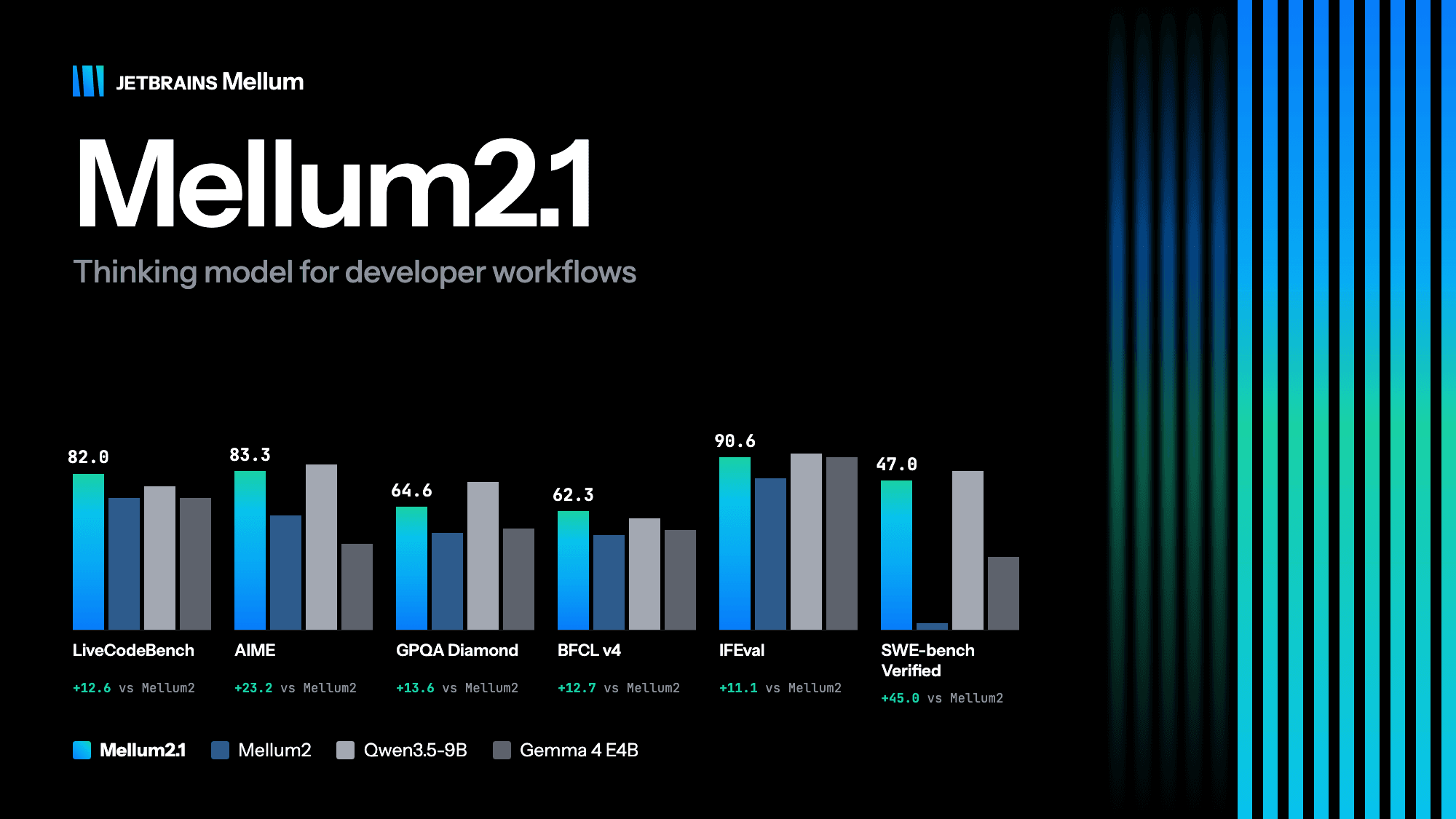
JetBrains has open-sourced Mellum 2.1, a 12B MoE model activating only 2.5B parameters per token. With its architecture unchanged since June, reinforcement learning in real environments lifted SWE-bench Verified from 2.0 to 47.0. Apache 2.0 licensed and self-hostable, it is positioned as the fast, cheap execution layer for coding agents — strong on coding and tool use, still trailing Qwen3.5-9B on the hardest agentic tasks.