From Solo to Team: Shipping an RBAC Permission Model in Your Vibe Project
A hands-on RBAC playbook for vibe coders: the minimum viable user-role-permission model, Prisma schema, the requireRole guard pattern, token invite flows, audit logs, six pitfalls I stepped in, and the checklist for evolving to multi-tenancy — with complete, runnable code.
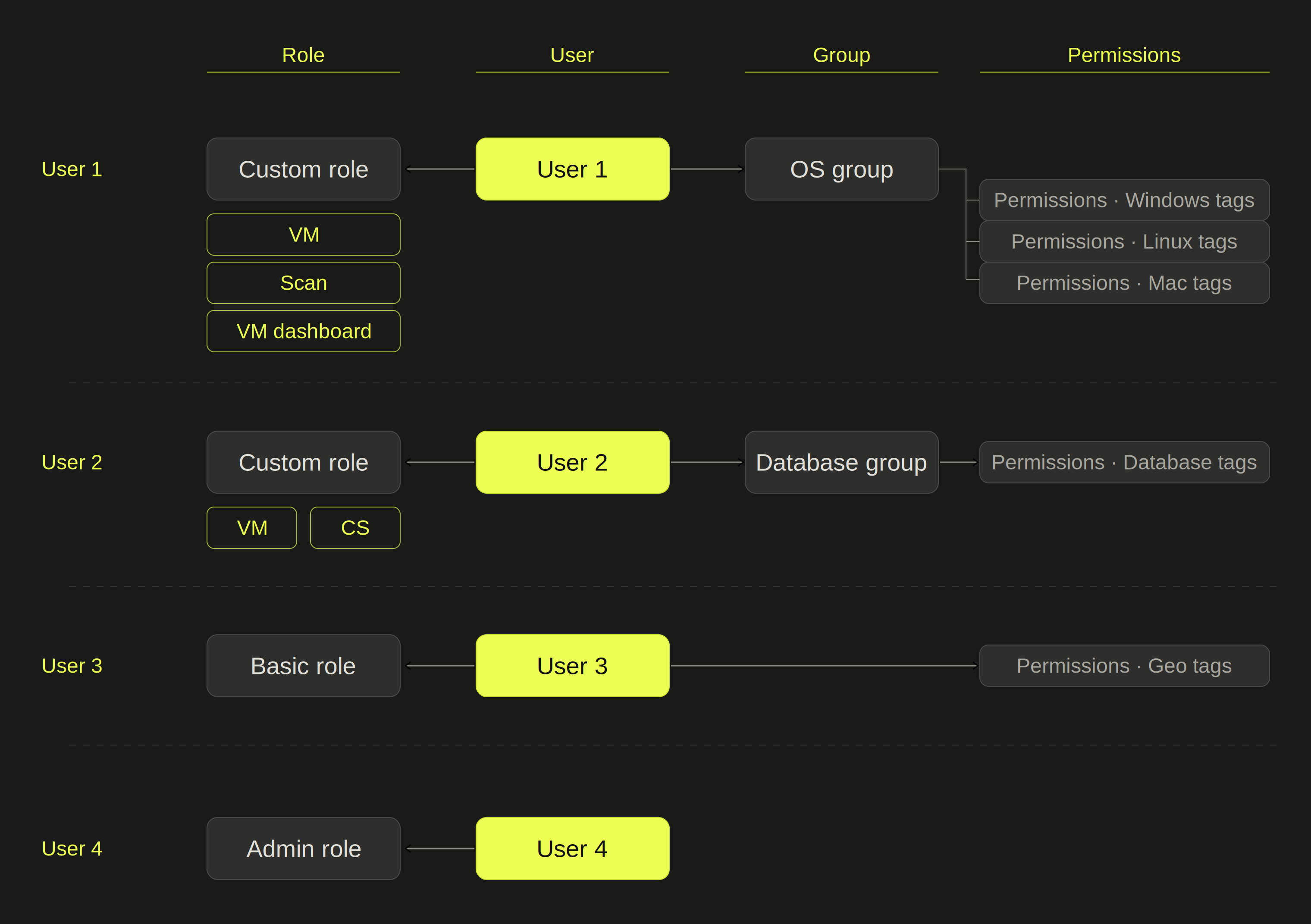
Why Your Happy Single-User App Will Eventually Make You Pay the Permissions Tuition
Most vibe projects start the same way: one person, one idea, one prompt. The project runs, and it feels great to use alone. Then three moments arrive, almost guaranteed, each trickier than the last.
Trigger one: you want to show the project to a friend. Not a screenshot — you want them to log in and click around. That's when you discover your codebase has no concept of "a second user" at all. Either everyone sees everything, or nobody uses it. So you write your first permission check, usually if (user.id === ownerId), scattered everywhere.
Trigger two: you want a team paid plan. A user asks, "Can our 5-person team use this together? Is there team pricing?" That's real money, so you say yes. Then you discover "a team" is not "5 accounts" — it's a group of people sharing one dataset, someone who can invite newcomers, someone who can only view, and a boss who needs to remove people at any time. Billing is the easy part; the hard part is the model of who is who and who can do what.
Trigger three: someone breaks your project. You gave a friend admin access to tweak a config, and they deleted three months of production data. Or more commonly: a former teammate left two months ago and their account is still active, and you never got around to revoking it. Pay that tuition once and you'll never forget permissions again.
I've paid all three tuitions. The conclusion is simple: RBAC (role-based access control) is the cheapest ticket from "toy" to "product" for a vibe project. It's not complicated — a minimum viable version takes half a day. But the devil is in the details, and this guide covers them all in one pass.
Upfront conclusion: for a personal project, reserve four roles (owner / admin / member / viewer) from day one, but you don't need to implement all of them at once. The only two things you truly must build are the "authorization guard" and "member management." Everything else (invite links, audit logs, multi-tenancy) gets added later via a checklist.
The Minimum Viable RBAC Model: Four Elements, Four Roles
RBAC can sound academic, but in practice you only need four elements:
- User: the person logging in.
- Role: a label like owner, admin, member, or viewer.
- Permission: a concrete action, e.g.
project:deleteormember:invite. - Resource: what the permission applies to, e.g. a project or a record.
The core idea: users don't hold permissions directly — users hold roles, and roles hold permissions. When you need to change "who can do what," you edit the role's permission definition, not every user one by one.
The Four-Role Design: Enough, and Argument-Proof
I've seen projects start with eight or nine roles (editor, moderator, billing_admin…) and forget the differences three months later. The minimum viable set is four:
| Role | Can | Cannot |
|---|---|---|
| owner | Everything, including deleting the project and transferring ownership | — |
| admin | Invite/remove members, change member roles (except owner), all business operations | Cannot delete the project, cannot touch the owner |
| member | Normal read/write business operations | Cannot manage members, cannot change project settings |
| viewer | Read-only | Cannot write or manage |
Why viewer instead of guest? Because "share a read-only link so a friend can take a look" is the most frequent trigger, and viewer makes that scenario work naturally. Why exactly one owner? Because stories of "two owners kicking each other" are far too common — ownership transfer must be an explicit, confirmed, standalone action (more on this in the pitfalls section).
When You Don't Need RBAC: The YAGNI Test
YAGNI (You Aren't Gonna Need It) applies here too. Skip RBAC if all of the following are true:
- The project is clearly for your own use only, with no sharing plans in the next three months;
- The data isn't sensitive — losing it wouldn't hurt;
- There are no paid plans.
Conversely, the moment any trigger fires (inviting collaborators, a team plan, sharing with a friend to look at), stop patching with if (user.id === ownerId) — once you have more than five such patches, maintaining them costs more than building RBAC. That's an empirical number, not theory.
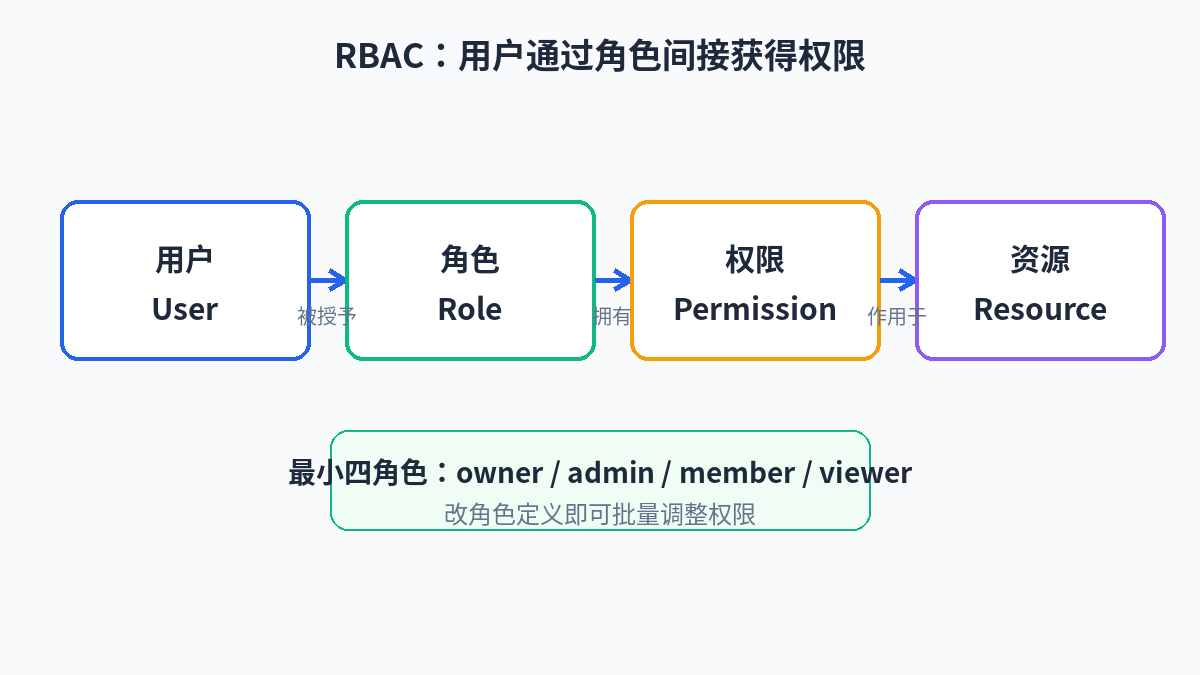 How the four RBAC elements relate: users gain permissions indirectly through roles, so editing a role definition adjusts permissions in bulk
Database Design: Membership/Role Tables in PostgreSQL + Prisma
The RBAC data model needs only two core tables: membership (who holds which role in which resource) and optionally audit_log. Don't start with a permission table and role-permission join tables — that's for enterprise systems with button-level granularity, which 99% of vibe projects never need. Use an enum for roles and a constant map in code for permissions: simple, readable, easy to change.
Below is a complete, runnable Prisma schema. Note the design decisions:
membershipuses a composite unique key(projectId, userId): one user can hold exactly one role per project, which structurally prevents "one person, two roles" dirty data.- Invitations get their own
invitationtable instead of a "pending" status inside membership: someone who hasn't accepted isn't a member yet, and mixing them would force every query to handle an extra state. invitation.tokenstores a hash, never plaintext: if the invite link leaks, the database holds no usable token.
// prisma/schema.prisma
generator client {
  provider = "prisma-client-js"
}

datasource db {
  provider = "postgresql"
  url      = env("DATABASE_URL")
}

enum ProjectRole {
  OWNER
  ADMIN
  MEMBER
  VIEWER
}

model User {
  id            String       @id @default(cuid())
  email         String       @unique
  name          String?
  memberships   Membership[]
  invitations   Invitation[] @relation("InvitedBy")
  createdAt     DateTime     @default(now())
}

model Project {
  id          String       @id @default(cuid())
  name        String
  memberships Membership[]
  invitations Invitation[]
  auditLogs   AuditLog[]
  createdAt   DateTime     @default(now())
}

model Membership {
  id        String      @id @default(cuid())
  projectId String
  userId    String
  role      ProjectRole @default(MEMBER)

  project Project @relation(fields: [projectId], references: [id], onDelete: Cascade)
  user    User    @relation(fields: [userId], references: [id], onDelete: Cascade)

  createdAt DateTime @default(now())
  updatedAt DateTime @updatedAt

  // One user holds exactly one role per project
  @@unique([projectId, userId])
  @@index([userId])
}

model Invitation {
  id        String      @id @default(cuid())
  projectId String
  email     String
  role      ProjectRole @default(MEMBER)
  // Store only the hash; plaintext appears only in the invite link
  tokenHash String      @unique
  expiresAt DateTime
  acceptedAt DateTime?
  revokedAt  DateTime?
  invitedById String

  project   Project @relation(fields: [projectId], references: [id], onDelete: Cascade)
  invitedBy User    @relation("InvitedBy", fields: [invitedById], references: [id])

  createdAt DateTime @default(now())

  @@index([projectId, email])
}

model AuditLog {
  id        String   @id @default(cuid())
  projectId String
  actorId   String   // who did it
  action    String   // MEMBER_INVITED / ROLE_CHANGED / MEMBER_REMOVED ...
  targetId  String?  // who/what was acted upon (user id)
  metadata  Json?    // before/after snapshot, e.g. { from: "MEMBER", to: "ADMIN" }
  createdAt DateTime @default(now())

  project Project @relation(fields: [projectId], references: [id], onDelete: Cascade)

  @@index([projectId, createdAt])
}
Run npx prisma migrate dev --name add-rbac to create the tables. This schema supports all the code below — no further changes needed.
Backend Authorization: The requireRole Pattern, Encapsulated Once, Used Everywhere
The biggest backend auth pitfall is scattering: every API route writes its own if checks, and nobody dares touch them six months later. The right approach is a single requireRole that every protected entry point goes through. The idea is simple: pass in the current request, a project id, and a minimum role; it returns the membership, or throws on failure (converted to 403 upstream).
First, define the role hierarchy. "Can an admin do member things?" is a classic RBAC question — the answer is yes, expressed as an ordered array so one line of code settles it:
// lib/permissions.ts
import { ProjectRole } from "@prisma/client";

// Role hierarchy: higher index = more power
export const ROLE_RANK: Record<ProjectRole, number> = {
  VIEWER: 0,
  MEMBER: 1,
  ADMIN: 2,
  OWNER: 3,
};

/** Does the current role satisfy the minimum role? (Higher roles inherit lower ones) */
export function roleAtLeast(role: ProjectRole, minimum: ProjectRole): boolean {
  return ROLE_RANK[role] >= ROLE_RANK[minimum];
}

// Role → permission-string map (use when you need fine-grained permissions;
// otherwise the role hierarchy alone is enough)
export const ROLE_PERMISSIONS: Record<ProjectRole, string[]> = {
  VIEWER: ["project:read"],
  MEMBER: ["project:read", "project:write"],
  ADMIN: ["project:read", "project:write", "member:invite", "member:manage", "settings:write"],
  OWNER: ["*"],
};

export function can(role: ProjectRole, permission: string): boolean {
  const perms = ROLE_PERMISSIONS[role];
  return perms.includes("*") || perms.includes(permission);
}
Then the core requireRole. It does three things: get the logged-in user, look up the membership, compare roles. Note it does not query a permission table — role-rank comparison is O(1), fast and simple:
// lib/authz.ts
import { prisma } from "@/lib/prisma";
import { getSessionUser } from "@/lib/session"; // your session wrapper, returns { id } or null
import { ProjectRole } from "@prisma/client";
import { roleAtLeast } from "./permissions";

export class ForbiddenError extends Error {
  status = 403;
  constructor(message = "Insufficient permissions") {
    super(message);
  }
}
export class UnauthorizedError extends Error {
  status = 401;
  constructor(message = "Please log in first") {
    super(message);
  }
}

export interface AuthContext {
  userId: string;
  projectId: string;
  role: ProjectRole;
}

/**
 * Authorization guard: requires the current user to hold at least
 * `minimum` role in the given project.
 * Returns the context (including role) on success; throws 401/403 on failure.
 */
export async function requireRole(
  projectId: string,
  minimum: ProjectRole
): Promise<AuthContext> {
  const session = await getSessionUser();
  if (!session) throw new UnauthorizedError();

  const membership = await prisma.membership.findUnique({
    where: { projectId_userId: { projectId, userId: session.id } },
  });
  if (!membership) throw new ForbiddenError("You are not a member of this project");

  if (!roleAtLeast(membership.role, minimum)) {
    throw new ForbiddenError(`This action requires ${minimum} role or higher`);
  }
  return { userId: session.id, projectId, role: membership.role };
}
API Route Guards: Three Lines to Plug In
With requireRole, guarding an API route is three lines: the guard plus a try/catch that maps errors to status codes. Build one shared error helper for all routes:
// app/api/projects/[projectId]/members/route.ts
import { NextRequest, NextResponse } from "next/server";
import { requireRole, ForbiddenError, UnauthorizedError } from "@/lib/authz";
import { prisma } from "@/lib/prisma";

function toErrorResponse(e: unknown) {
  if (e instanceof UnauthorizedError)
    return NextResponse.json({ error: e.message }, { status: 401 });
  if (e instanceof ForbiddenError)
    return NextResponse.json({ error: e.message }, { status: 403 });
  console.error(e);
  return NextResponse.json({ error: "Server error" }, { status: 500 });
}

// GET: member list — MEMBER and above
export async function GET(
  _req: NextRequest,
  { params }: { params: { projectId: string } }
) {
  try {
    const ctx = await requireRole(params.projectId, "MEMBER");
    const members = await prisma.membership.findMany({
      where: { projectId: ctx.projectId },
      include: { user: { select: { id: true, email: true, name: true } } },
      orderBy: { createdAt: "asc" },
    });
    return NextResponse.json({ members });
  } catch (e) {
    return toErrorResponse(e);
  }
}

// POST: invite a member — ADMIN and above
export async function POST(
  req: NextRequest,
  { params }: { params: { projectId: string } }
) {
  try {
    const ctx = await requireRole(params.projectId, "ADMIN");
    const { email, role } = await req.json();
    // invitation logic in the next section...
    return NextResponse.json({ ok: true });
  } catch (e) {
    return toErrorResponse(e);
  }
}
Server Action Authorization: Same Guard, Reused Directly
Server Actions have no route layer, but the authorization logic is identical — just call requireRole. Never skip auth because "Actions are server-side code": anyone in a browser can invoke your Actions directly:
// app/projects/[projectId]/actions.ts
"use server";
import { revalidatePath } from "next/cache";
import { requireRole } from "@/lib/authz";
import { prisma } from "@/lib/prisma";

export async function updateProjectName(projectId: string, name: string) {
  // Renaming requires MEMBER or above; a failed guard throws, the client catches and displays
  const ctx = await requireRole(projectId, "MEMBER");
  await prisma.project.update({
    where: { id: ctx.projectId },
    data: { name: name.trim().slice(0, 80) },
  });
  revalidatePath(`/projects/${projectId}`);
}
Middleware: Authentication Only, Never Role Checks
A common misconception is doing role checks in Next.js middleware. Don't. Middleware runs on the edge runtime — no database connection pool (Prisma on edge is a minefield), and querying membership on every request is wasteful. Middleware handles two things only: redirect unauthenticated users to login, let authenticated ones through. Role checks belong in routes/Actions via requireRole, where you have the full Node runtime and the database.
// middleware.ts
import { NextResponse } from "next/server";
import type { NextRequest } from "next/server";
export async function middleware(req: NextRequest) {
const sessionToken = req.cookies.get("session")?.value;
const isAuthPage = req.nextUrl.pathname.startsWith("/login");
// Session presence only — never roles
if (!sessionToken && !isAuthPage) {
return NextResponse.redirect(new URL("/login", req.url));
}
return NextResponse.next();
}
export const config = {
matcher: ["/projects/:path*", "/api/projects/:path*"],
};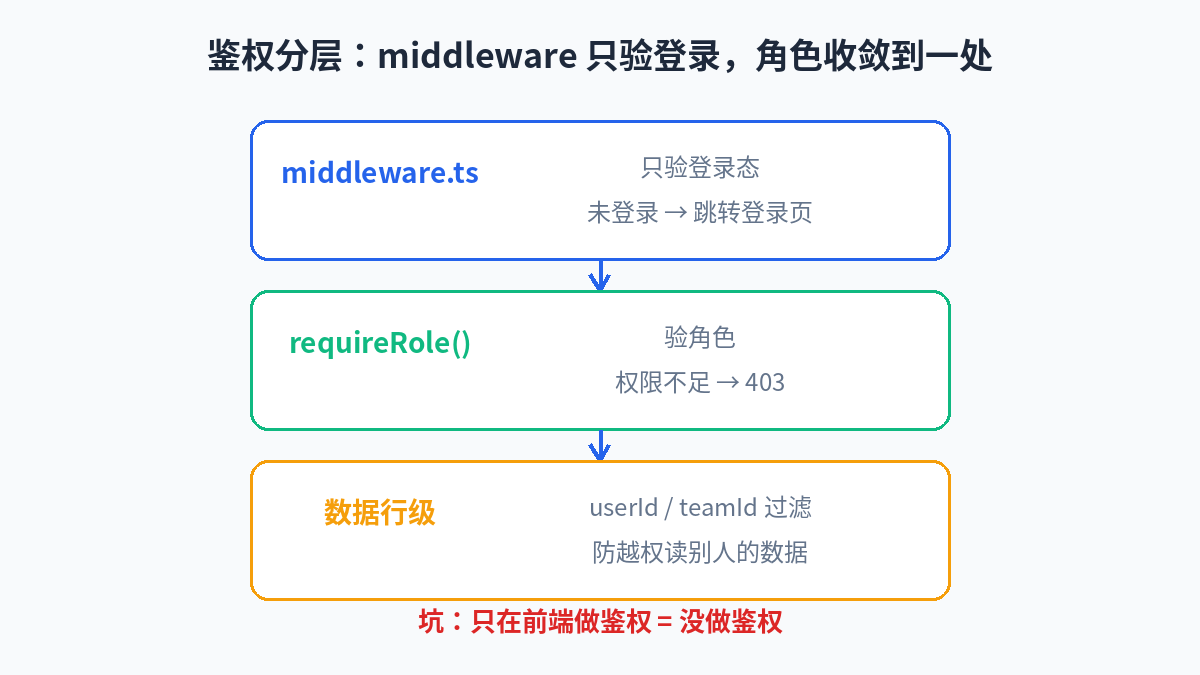 Authorization layers: middleware only verifies login state; role checks converge on requireRole
Frontend: Member Management UI and the Invitation Flow
Four Details That Make or Break Member Management UI
The member management page doesn't need to be fancy, but four details determine whether it's good:
- Use a dropdown for roles, but lock the owner's row. The owner can't be demoted or removed — disable both actions on the owner row and say so explicitly: "The owner cannot be changed; use ownership transfer." This blocks the most dangerous operations at the UI level.
- Confirm dangerous actions. Removing a member or demoting an admin needs a confirm dialog stating the consequence ("Removing revokes their access immediately").
- Show pending invitations in their own group with a "pending" badge and "resend / revoke" buttons. Users need to see at a glance who hasn't joined yet.
- Highlight the current user's own row ("you") and forbid self-demotion/removal — so an admin can't accidentally kick themselves out and leave the project unmanaged.
The Invitation Flow: Token Links + Expiry + Idempotency
The invitation flow is where RBAC implementations most easily grow security holes. The correct approach:
- Generate a 32-byte random token; plaintext appears only in the invite link, the database stores only the SHA-256 hash;
- Set an expiry (7 days is a good default);
- Be idempotent: if a valid, unexpired invitation already exists for that email, return the old link instead of creating a new record (so five rapid clicks don't send five emails);
- On acceptance, triple-check: the token hash matches, it hasn't expired, and it hasn't been revoked or used.
// lib/invitations.ts
import { randomBytes, createHash } from "crypto";
import { prisma } from "@/lib/prisma";
import { ProjectRole } from "@prisma/client";

const INVITE_TTL_MS = 7 * 24 * 60 * 60 * 1000; // 7 days

export function hashToken(token: string): string {
  return createHash("sha256").update(token).digest("hex");
}

/** Create an invitation (idempotent): reuse the existing link if one is still valid */
export async function createInvitation(opts: {
  projectId: string;
  email: string;
  role: ProjectRole;
  invitedById: string;
  baseUrl: string;
}) {
  const { projectId, email, role, invitedById, baseUrl } = opts;
  const normalizedEmail = email.trim().toLowerCase();

  // Idempotency: reuse an existing valid invitation
  const existing = await prisma.invitation.findFirst({
    where: {
      projectId,
      email: normalizedEmail,
      acceptedAt: null,
      revokedAt: null,
      expiresAt: { gt: new Date() },
    },
    orderBy: { createdAt: "desc" },
  });
  if (existing) {
    // Plaintext token is unrecoverable at this point — just return a "sent" marker.
    // Never store the plaintext token to make links reusable.
    return { reused: true, invitationId: existing.id };
  }

  // Already a member? Reject outright — no pointless invitation
  const alreadyMember = await prisma.membership.findFirst({
    where: {
      projectId,
      user: { email: normalizedEmail },
    },
  });
  if (alreadyMember) throw new Error("This user is already a project member");

  const token = randomBytes(32).toString("hex");
  const invitation = await prisma.invitation.create({
    data: {
      projectId,
      email: normalizedEmail,
      role,
      tokenHash: hashToken(token),
      expiresAt: new Date(Date.now() + INVITE_TTL_MS),
      invitedById,
    },
  });
  // TODO: send the email here, with link `${baseUrl}/invite/${token}`
  return { reused: false, invitationId: invitation.id, token };
}

/** Accept an invitation: token verification + expiry check + membership creation, atomically */
export async function acceptInvitation(token: string, userId: string) {
  const invitation = await prisma.invitation.findUnique({
    where: { tokenHash: hashToken(token) },
  });
  if (!invitation) throw new Error("Invalid invitation link");
  if (invitation.revokedAt) throw new Error("Invitation has been revoked");
  if (invitation.acceptedAt) throw new Error("Invitation has already been used");
  if (invitation.expiresAt < new Date()) throw new Error("Invitation has expired");

  await prisma.$transaction([
    // Accepting creates the membership; the composite unique key
    // guarantees re-acceptance can't produce dirty data
    prisma.membership.upsert({
      where: {
        projectId_userId: { projectId: invitation.projectId, userId },
      },
      update: {}, // already a member → no-op (idempotent)
      create: {
        projectId: invitation.projectId,
        userId,
        role: invitation.role,
      },
    }),
    prisma.invitation.update({
      where: { id: invitation.id },
      data: { acceptedAt: new Date() },
    }),
  ]);
  return invitation.projectId;
}
The Pending State Machine
An invitation's lifecycle has only four states — clearer as a diagram than in prose: pending → accepted, pending → revoked (inviter revokes), pending → expired (timeout, lazily evaluated: queries just check expiresAt, no cron job needed to sweep). Note expired never needs to be persisted — this is "lazy expiry": every query includes an expiresAt > now() condition, so expired rows are naturally invisible. If you want to save space, add a weekly cron that deletes records expired more than 30 days ago.
Permission-Change Auditing: A Minimal Audit Log
An audit log isn't a nice-to-have for later — it's the only source of truth when you get woken up at night. "Who demoted 张三 from admin to member?" "When was 李四 removed?" Without an audit log, those questions are unanswerable forever. The minimal implementation: write one row on every membership change, recording who (actor), what (action), whom (target), and the before/after (metadata).
The key design decision: audit logs are append-only — never updated, never deleted. Not even admins can delete audit records; otherwise auditing is meaningless. In practice: expose only a write path, no delete path.
// lib/audit.ts
import { prisma } from "@/lib/prisma";

export type AuditAction =
  | "MEMBER_INVITED"
  | "INVITATION_REVOKED"
  | "INVITATION_ACCEPTED"
  | "ROLE_CHANGED"
  | "MEMBER_REMOVED"
  | "OWNERSHIP_TRANSFERRED";

export async function writeAuditLog(opts: {
  projectId: string;
  actorId: string;
  action: AuditAction;
  targetId?: string;
  metadata?: Record<string, unknown>;
}) {
  await prisma.auditLog.create({ data: opts });
  // Note: no update/delete wrapper is provided — audit records are append-only
}

// Example: the full role-change flow, with auditing
export async function changeMemberRole(opts: {
  projectId: string;
  actorId: string;
  actorRole: "OWNER" | "ADMIN";
  targetUserId: string;
  newRole: "ADMIN" | "MEMBER" | "VIEWER";
}) {
  const { projectId, actorId, actorRole, targetUserId, newRole } = opts;

  const target = await prisma.membership.findUnique({
    where: { projectId_userId: { projectId, userId: targetUserId } },
  });
  if (!target) throw new Error("Target is not a project member");
  // Iron rule 1: nobody can touch the owner's role
  if (target.role === "OWNER") throw new Error("Cannot change the owner's role");
  // Iron rule 2: ownership transfer has its own dedicated flow
  if (newRole === "OWNER") throw new Error("Use the ownership transfer flow");
  // Iron rule 3: you can't change your own role (no accidental self-demotion)
  if (targetUserId === actorId) throw new Error("Cannot change your own role");

  const updated = await prisma.membership.update({
    where: { id: target.id },
    data: { role: newRole },
  });

  await writeAuditLog({
    projectId,
    actorId,
    action: "ROLE_CHANGED",
    targetId: targetUserId,
    metadata: { from: target.role, to: updated.role },
  });
  return updated;
}
Common Pitfalls: Six I've Stepped In For You
Pitfall 1: Authorizing Only on the Frontend
Hiding the "delete project" button from viewers doesn't stop viewers from deleting the project. A CSS tweak in devtools brings the button back; calling your API directly doesn't even need the button. Authorization is decided by the backend, always — frontend hiding is just UX. The test: turn off the frontend, curl your API as a viewer, and the delete endpoint should return 403. If it doesn't, your authorization is made of paper.
Pitfall 2: Hardcoded Roles Everywhere
The third time you write if (role === "admin" || role === "owner"), extract it into roleAtLeast(role, "ADMIN"). Hardcoding doesn't hurt when you write it — it hurts when you change it. Six months later you add a "billing" role and must find-and-replace 40 occurrences; miss one and you've shipped a privilege-escalation bug.
Pitfall 3: Stale Permission Caches
Caching membership in Redis or inside a JWT is common — and dangerous: you just demoted a troublemaker to viewer, but their token still says admin, so they keep deleting data for the next hour. Two fixes, pick one: short cache TTL (under 5 minutes), or actively invalidate the user's cache on role change (delete the Redis key / maintain a token version). My advice: vibe projects should just query the database every time. A membership lookup is a primary/unique-key query at the 1ms level — you don't need this cache. Add it the day you have a real performance problem, not before.
Pitfall 4: Removing a Member Without Revoking Their Tokens
You removed the member, but their login session is still valid — if your session check only verifies "user exists," they can keep using it (a missing membership would be caught by requireRole, but don't rely on that). The correct approach: revoke the user's sessions in the project context when removing them. Minimal implementation: store a tokenVersion in the session, bump it on removal, and old sessions die naturally.
// Remove a member: delete membership + bump tokenVersion to kill old sessions + audit
export async function removeMember(opts: {
  projectId: string;
  actorId: string;
  targetUserId: string;
}) {
  const { projectId, actorId, targetUserId } = opts;
  const target = await prisma.membership.findUnique({
    where: { projectId_userId: { projectId, userId: targetUserId } },
  });
  if (!target) throw new Error("Target is not a project member");
  if (target.role === "OWNER") throw new Error("Cannot remove the owner");
  if (targetUserId === actorId) throw new Error("Cannot remove yourself");

  await prisma.$transaction([
    prisma.membership.delete({ where: { id: target.id } }),
    // Invalidate all of the user's old sessions (session check compares tokenVersion)
    prisma.user.update({
      where: { id: targetUserId },
      data: { tokenVersion: { increment: 1 } },
    }),
    prisma.auditLog.create({
      data: {
        projectId,
        actorId,
        action: "MEMBER_REMOVED",
        targetId: targetUserId,
        metadata: { role: target.role },
      },
    }),
  ]);
}
(Add a tokenVersion Int @default(0) field to the User model and compare it during session validation.)
Pitfall 5: Treating Ownership Transfer as a Plain Update
Ownership transfer is the most dangerous operation and must satisfy all of these at once: ① only the current owner can initiate; ② the target must be an existing member; ③ it needs explicit confirmation (a dedicated danger zone in the UI, not a dropdown in the member list); ④ the transfer is atomic — demote the old owner to admin, promote the new owner, write the audit record, all in one transaction; any step failing rolls everything back. Written as a plain update, two rapid clicks can leave the project with two owners — or zero.
// Transfer ownership: atomic transaction, every step required
export async function transferOwnership(opts: {
  projectId: string;
  currentOwnerId: string;
  newOwnerId: string;
}) {
  const { projectId, currentOwnerId, newOwnerId } = opts;
  if (currentOwnerId === newOwnerId) throw new Error("Cannot transfer to yourself");

  const current = await prisma.membership.findUnique({
    where: { projectId_userId: { projectId, userId: currentOwnerId } },
  });
  if (!current || current.role !== "OWNER") throw new Error("Only the owner can transfer ownership");

  const target = await prisma.membership.findUnique({
    where: { projectId_userId: { projectId, userId: newOwnerId } },
  });
  if (!target) throw new Error("Transfer target must be a project member");

  await prisma.$transaction([
    prisma.membership.update({
      where: { id: current.id },
      data: { role: "ADMIN" }, // old owner becomes admin — not kicked out
    }),
    prisma.membership.update({
      where: { id: target.id },
      data: { role: "OWNER" },
    }),
    prisma.auditLog.create({
      data: {
        projectId,
        actorId: currentOwnerId,
        action: "OWNERSHIP_TRANSFERRED",
        targetId: newOwnerId,
        metadata: { from: currentOwnerId, to: newOwnerId },
      },
    }),
  ]);
}
Pitfall 6: Invite Links That Never Expire
I've seen too many projects with permanent invite links: /invite/abc123 still works a year later. Someone leaves, the link gets forwarded into a group chat, and anyone holding it can walk in. A 7-day expiry plus single use (mark acceptedAt on acceptance) — two lines of code that eliminate an entire class of incidents.
The Upgrade Path: An Evolution Checklist from Single-Project RBAC to Multi-Tenancy
When your users say "our company has 3 teams, each managing their own projects," single-project RBAC isn't enough — you need multi-tenancy (team/org isolation). The good news: if you built the model in this guide, the upgrade is smooth because the abstraction layers are already right. Here's the checklist:
- Introduce an Organization table: move the membership anchor from
projectIdtoorgId; roles become "roles within the organization." Projects belong to organizations, and permissions inherit: an org admin automatically holds admin over all its projects. - Add one more isolation layer to queries: every query goes from
where: { projectId }towhere: { project: { orgId } }. UpgraderequireRoletorequireOrgRole(orgId, minimum), with project-level guards doing a second check on top (e.g. private-project members). - Invitation granularity: invite links become org-level; accepting grants an org role, and org admins then assign specific project access.
- Tie into billing: multi-tenancy almost always arrives with per-seat pricing — the membership table is your billing source of truth (
count where orgId=X and role != VIEWER). Viewers usually don't count toward seats; hardcode that rule instead of leaving it as a verbal agreement with ops. - Upgrade auditing: add
orgIdto the audit log, and consider immutable storage (append-only table + revoke update/delete from the app's database role). - What not to do: don't create a set of tables per tenant (schema-per-tenant) unless compliance hard-requires it. Shared tables + an
orgIdcolumn + row-level isolation is the right choice for 99% of vibe projects, at an order of magnitude less operational cost.
When to evolve: the moment you catch yourself writing if-else special cases for "the second organization," it's time. Before that, single-project RBAC is completely sufficient — don't pre-worry.
Closing: Permissions Are Trust, Engineered
At the end of the day, RBAC isn't security technology — it's trust expressed in engineering. "I trust you to look, but not to delete" — saying that with a viewer role is ten thousand times more reliable than a verbal agreement. Vibe coders have speed on their side, but speed often means leaving the "people" problems for last. Permissions done right, early, means less tuition paid later.
Work through this guide in order: build the schema → permissions.ts + authz.ts → plug the guard into API routes → member management UI → invitation flow → audit log. One afternoon, and your project goes from "one person's toy" to "a product a team can use." The checklist will help you fill in the remaining pitfalls one by one.
Related articles

In 2026, APIs are increasingly called by agents, not humans. This guide dissects the five pillars of agent-friendly API design — contracts, error codes, idempotency keys, pagination, and machine credentials — through real cases from Stripe and GitHub, plus a ready-to-use checklist, OpenAPI quality scorecard, and self-test prompt template.
A waitlist is not a wishing well — it's a conversion funnel. This guide covers the four waitlist models and a decision table, a one-day Next.js + Supabase implementation (signup API, double opt-in, queue ranking, referral scoring), a week-by-week 30-day operating rhythm, anti-fraud tactics, five launch-day moves, metric thresholds for validation, and how to fix the classic failure of a long queue with nobody showing up.

Auth vendors raise prices, free tiers get killed, even big tech's own children get shut down. A solo team has no lawyers or procurement leverage — its only armor is grading every external dependency and writing a one-page escape plan for each critical one. Includes a ready-to-use triage matrix, plan template, 10 anti-lock-in selection questions, and dissections of the Parse, Heroku, and Auth0 blowups.