项目大厅

探索全部独立开发者项目与共创求助

当前筛选:大赏展示图片视频
大赏
已上线
图片视频claude-code

AfterFrame

Local-first photo library for Mac & Windows — browse, cull, edit and AI-annotate thousands of photos without leaving one app.

AfterFrame is a local-first photo workspace for photographers drowning in exported images: point it at folders scattered across drives and it unifies everything into one catalog you can browse, filter, rate, tag, and collect — while the originals stay exactly where they are. The demo library on its site shows 872 assets in one catalog; the app's own documentation screenshots show real working libraries of 5,562 assets with folder trees, EXIF panels, and AI annotation sidebars. Under the hood it's an Electron + React (Vite, Tailwind) desktop app with a Python sidecar process and a SQLite database living inside each .afcatalog bundle. Beyond browsing, it covers the full culling-to-delivery loop: crop with a proper aspect-ratio and transform panel, text overlays with depth effects, collage batches, camera-style frames (Canon, Hasselblad), people search, and video chapters. The AI features — style-transfer repaint and auto-annotation that generates captions, tags, and location guesses — run in bring-your-own-key mode, and a bundled MCP server lets Claude Code or any MCP client drive your library in natural language. The origin story is the point: the author states verbatim in the README that "this project was vibe-coded with Claude Code," and the commit history reads like an agentic-coding logbook — look-alike photo detection via perceptual hashing, an Electron Playwright e2e suite, and platform-specific builds (signed macOS .dmg, Windows installer) landing within days of each other. With 243 stars and commits shipping the same week it was scouted, it's one of the more serious open-source Lightroom alternatives to come out of the vibe-coding wave: downloads for macOS 12+ and Windows 10/11 are on the releases page, and there's a try-in-browser option on the site.
大赏
已上线
图片视频gpt-plusdeepseek-41

青梨相册

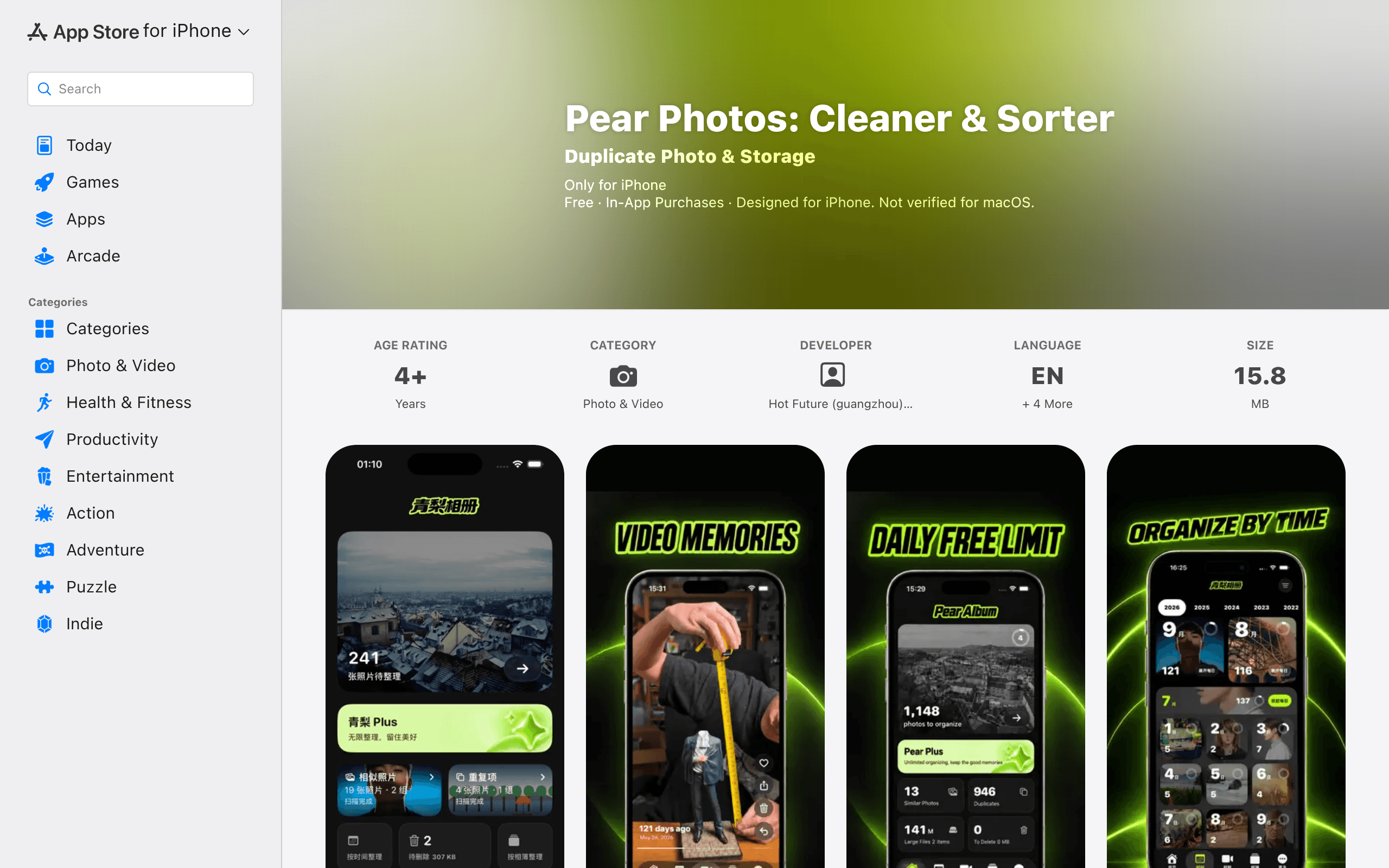
Vibe Coding 三个月做出的 iOS 相册清理 App:本地算法相似查重、按时间整理,已上架 App Store 持续迭代

青梨相册(英文名 Pear Photos: Cleaner & Sorter)是一款 iOS 照片清理 App:相似照片查重、按时间整理、视频回忆,查重在 iOS 本地完成。作者 lowfrontend 是 8 年大厂前端,Gap 三年后决定独立开发一年。他在 V2EX(2026-09-23)写道:"Vibe Coding 三个月出来的 iOS 产品"——三天就上线,之后一直在改 bug 加功能,"已经能平均每天 1 刀的收入了"。开发工具他交代得很实在:"我是一直用 GPT Plus 开发的……简单的活交给 WorkBuddy 的 DeepSeek 4.1"。 App 已上架 App Store(Photo & Video 类,4+,免费+IAP,v2.0.2),持续迭代中。截图为 App Store 官方预览图,展示真实 App 界面。

大赏
已上线
图片视频

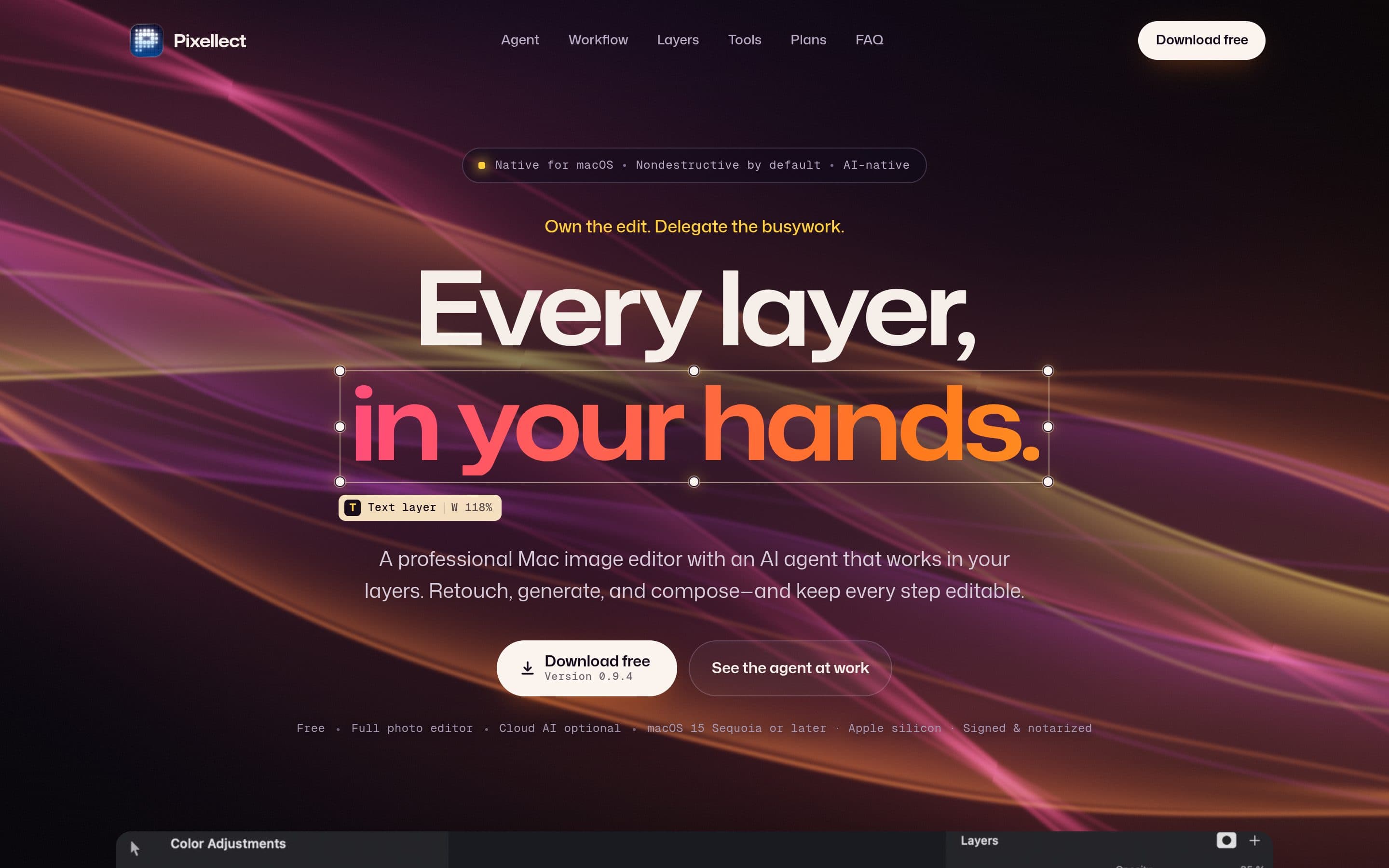
Pixellect

Free native macOS Photoshop-grade image editor with an AI agent that works inside your layers.

Pixellect is a free, native macOS image editor that aims at Photoshop-grade editing without the subscription: layers, brushes, effects and PSD import/export, non-destructive by default. What sets it apart is the built-in AI agent: it works directly inside your layers — retouching, generating and composing — while keeping every step editable. "Own the edit. Delegate the busywork." Author terhechte writes on Show HN: "For the past months I've been vibe-coding a free Photoshop editor for macOS (Native using Swift and a bit of Rust)." Version 0.9.4 is available as a free, signed and notarized download for Apple silicon (macOS 15 Sequoia or later), with optional cloud AI.

大赏
已上线
图片视频claude

ImgCutout

浏览器本地运行 AI 抠图模型、一键去背景导透明 PNG 的免费工具:开源 ormbg 经 WebAssembly 在 CPU 上运行(可选 WebGPU 加速),图片永不上传服务器,断网也能用。无需注册、无水印、无次数限制,还支持 100 张批量抠图、GIF 制作与证件照换底色。

ImgCutout 是一个完全在浏览器里运行的 AI 抠图工具:打开网页、拖入图片,一键去掉背景,导出透明底 PNG。它最大的特点是图片永不上传服务器——开源的 ormbg 语义分割模型通过 WebAssembly 直接跑在你的 CPU 上,设置里还能打开 WebGPU 加速;模型首次加载之后,哪怕断网也能继续抠图,隐私敏感的照片用起来更放心。 这个项目是作者 lijiang0327 的 vibe coding 作品。2026 年 10 月 9 日,他在 V2EX 介绍道:“整个项目的代码基本都是 Claude 写的,我主要负责提需求、定产品方向和测试。”AI 负责写代码,人负责定方向和验收——这正是 vibe coding 的标准打开方式,而 ImgCutout 是一个完成度相当高的实例。 用起来也足够傻瓜:把图片拖进网页,等模型跑完(普通照片一两秒),就能看到背景被干干净净地剥掉;满意的话直接下载透明 PNG,不满意可以在设置里换精度或开 WebGPU 重试。对独立开发者、小店主、自媒体来说,这是个随手可用的“抠图外包”——而且不花钱、不排队、不泄露原图。 功能亮点 批量抠图:一次处理多达 100 张图片,抠完一键打包 ZIP 下载,电商产品图、团队头像这类批量活效率拉满。 GIF 制作:除了静态图片,还能把短视频转成 GIF 动图,顺手解决表情包生产需求。 证件照换底色:抠出人物后可直接替换成证件照常用底色,省下一趟照相馆。 高精度模式:默认 8-bit 快速模式,设置里可切换 16-bit 全精度;卷发、宠物毛发、玻璃制品这些难抠的边缘处理得更细腻。官网 Example 库公开了 6 组真实案例的抠图效果和实测耗时数据,效果可以自己验证。 透明 PNG 导出:结果保留半透明边缘细节,方便拿去做二次合成。 免费,而且没有服务器成本 ImgCutout 完全免费:无需注册、没有水印、没有次数限制。因为所有计算都在用户本地完成,作者几乎没有服务器成本——这也是它能长期免费的原因。用得越多,作者越不亏,是个难得可持续的免费模式。

大赏
已上线
图片视频

Meridian

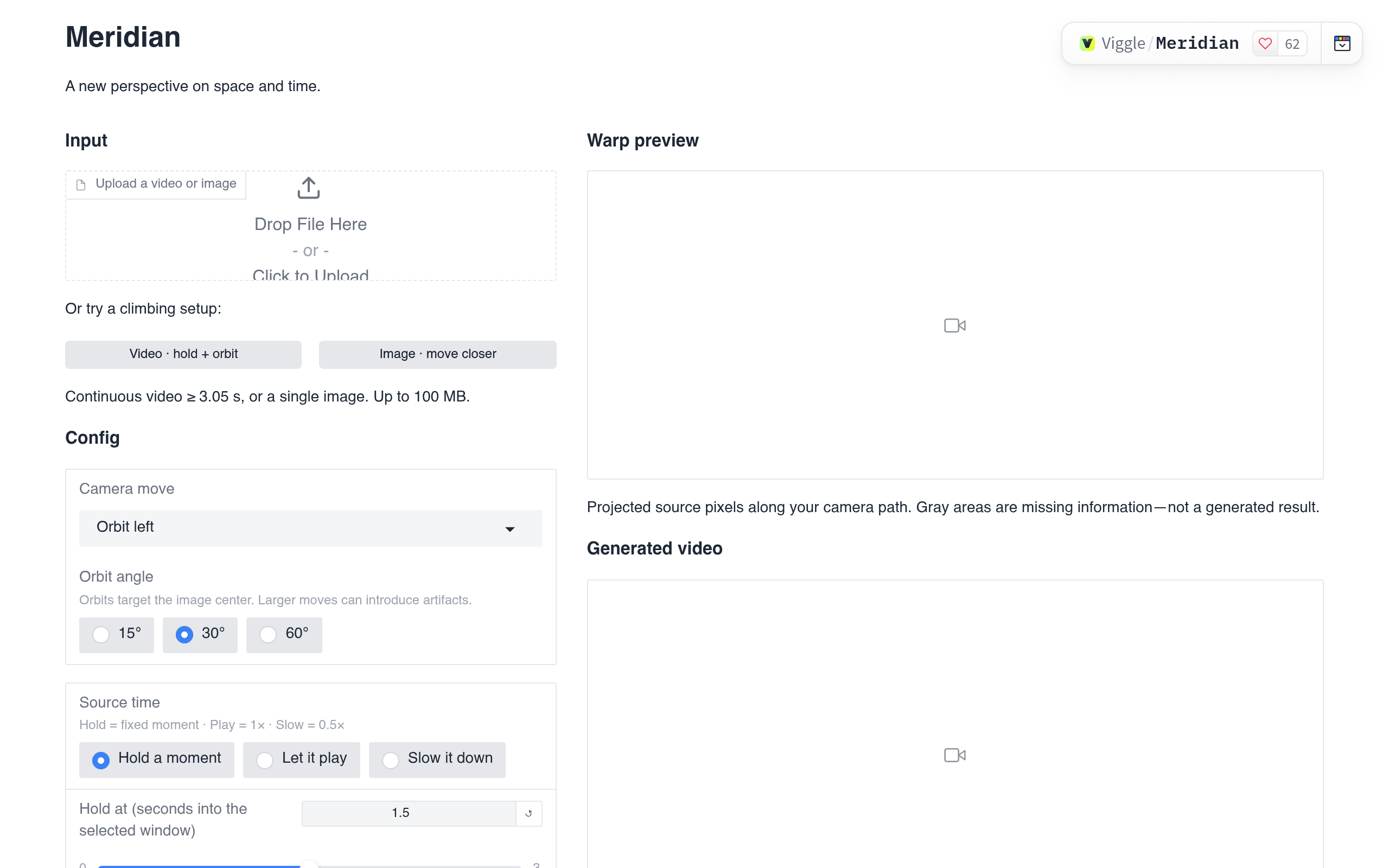
Viggle's geometry-guided video warp studio on Hugging Face: the demo frontend itself was vibe-coded.

Meridian is Viggle AI's geometry-guided video demo on Hugging Face Spaces: upload a video or image and warp it to a new perspective — orbit the camera, hold a moment, slow it down — then watch the projected source pixels become a generated video. The hosted Studio frontend is the demo vehicle for the Meridian model behind it. Viggle's own README for the Space is refreshingly honest about what you're looking at: "Early prototype. The Studio is a very basic, vibe-coded demo, not a production editor." — the vibe-coded claim covers the Studio demo frontend, not the model itself, and the copy here says so plainly.

大赏
已上线
图片视频gpt-6-astra

Photo Scrubber

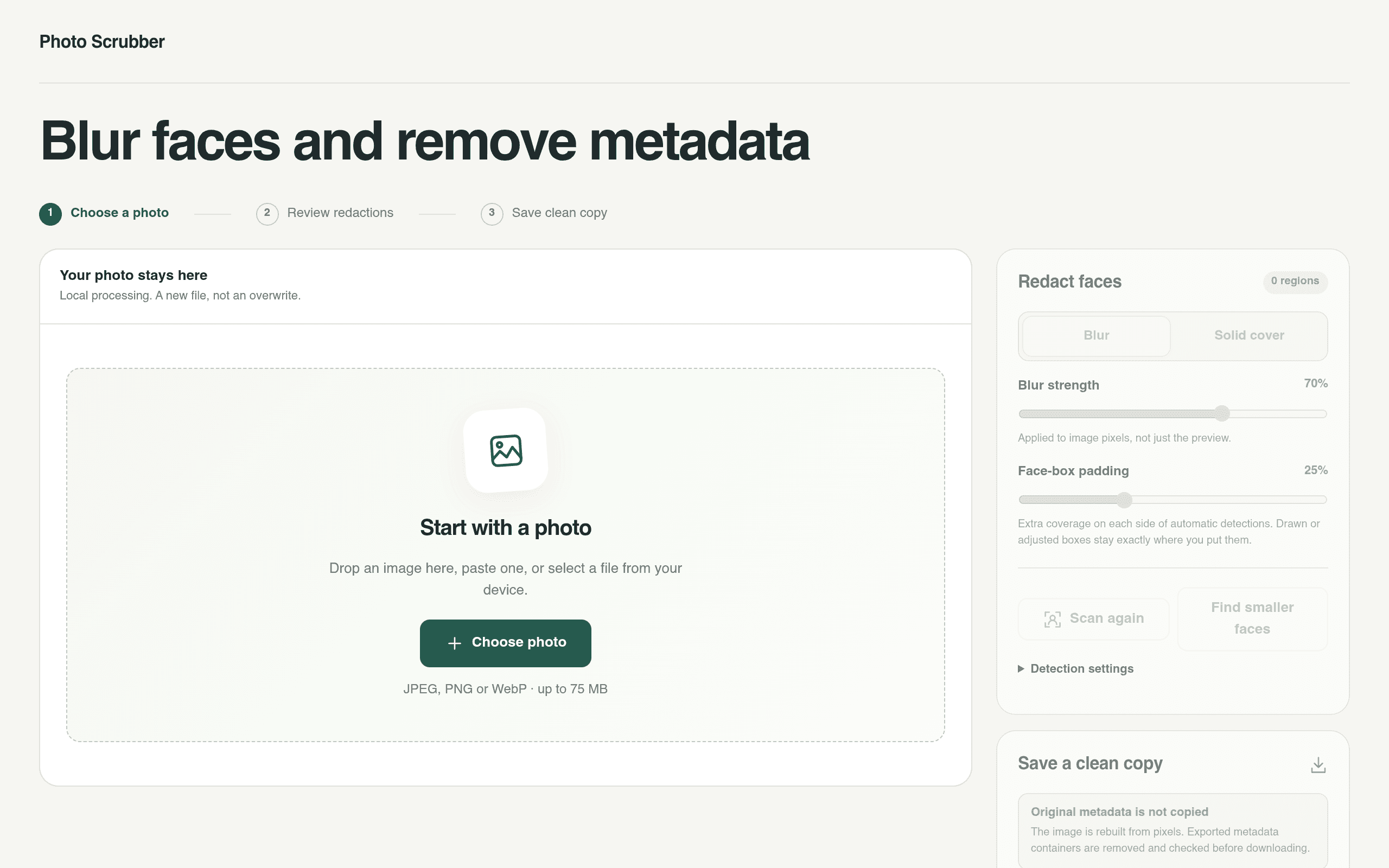
Blur faces and strip metadata locally in your browser — built with GPT-6 Astra

Photo Scrubber blurs faces and removes metadata from your photos — with everything happening locally in the browser, so your photo never leaves your machine. "I had GPT-6 Astra build this experimental tool that would identify faces and automatically blur them out," wrote Simon Willison, and the colophon marks it "photo-scrubber code / AI generated". Under the hood it runs Google MediaPipe (BlazeFace) compiled to WebAssembly for face detection, with adjustable blur strength, face-box padding, and manual redaction regions. The "Save a clean copy" step rebuilds the image from pixels so metadata containers are removed before download. Built September 29, 2026 — another of Willison's prompt-driven tools, and a genuinely useful privacy utility.

大赏
已上线
图片视频codex

Darkplug

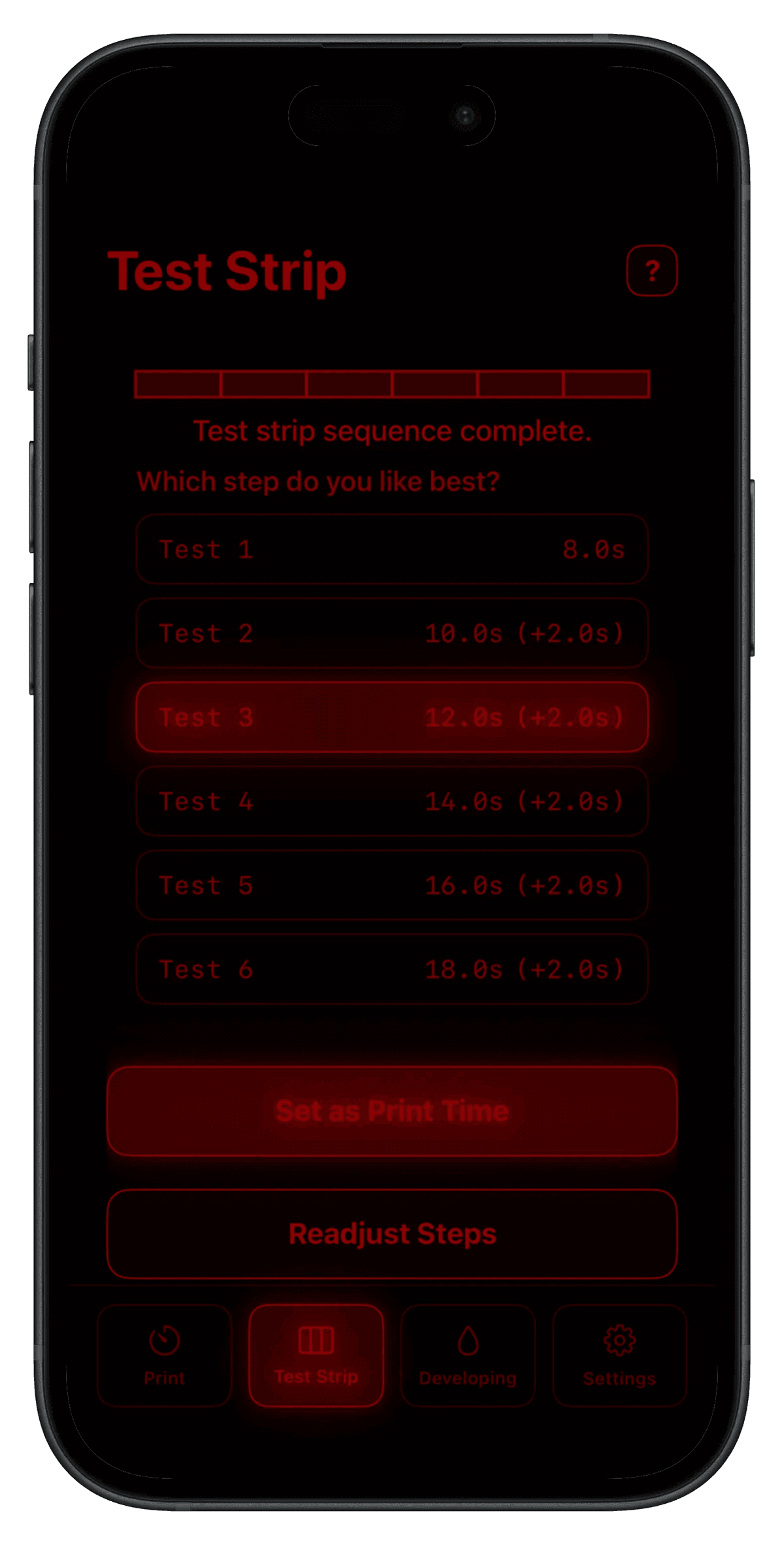
An iPhone darkroom enlarger timer with f-stop timing, guided test strips and a dodge & burn grid — fired over your local network via a smart plug

Darkplug is an iPhone darkroom timer that talks to your enlarger. It pairs with a Shelly smart plug on your local network, so the phone in your hand becomes the timer on the enlarger head — no cloud account, no hardware dongle, just a plug beside the enlarger. The craft is in the workflows, not just the countdown. Guided test strips run in seconds or f-stop increments and ask which step you liked best; a unique grid planner lets you design complex dodge & burn sequences before the paper is under the lens; split-grade printing and a guided paper-developing timer cover the rest of the session. Everything renders in a red-on-black interface that the author tested so it doesn't fog photo paper — the kind of domain detail you only get from someone who actually prints. The maker, Péter Szentkirályi, announced it on Hacker News on 2026-10-06 with a refreshingly honest disclaimer: "Fair warning: the app was blindly vibe coded using Codex and Xcode." Blind or not, the result is on the App Store now, with the advanced tools (f-stop timing, test strips, dodge & burn, split grade) unlocked as a one-time Darkplug+ purchase rather than a subscription. Hardware-adjacent, niche, genuinely useful software from prompts — this is the genre where vibe coding earns its keep. curated by the VibeFix editors