项目大厅

探索全部独立开发者项目与共创求助

当前筛选:大赏展示
大赏
已上线
工具claude-code

iContainer: native macOS manager for Apple Container workloads

A native macOS app for Apple Container workloads — containers, images, logs, stats and an interactive shell, plus on-device AI log analysis.

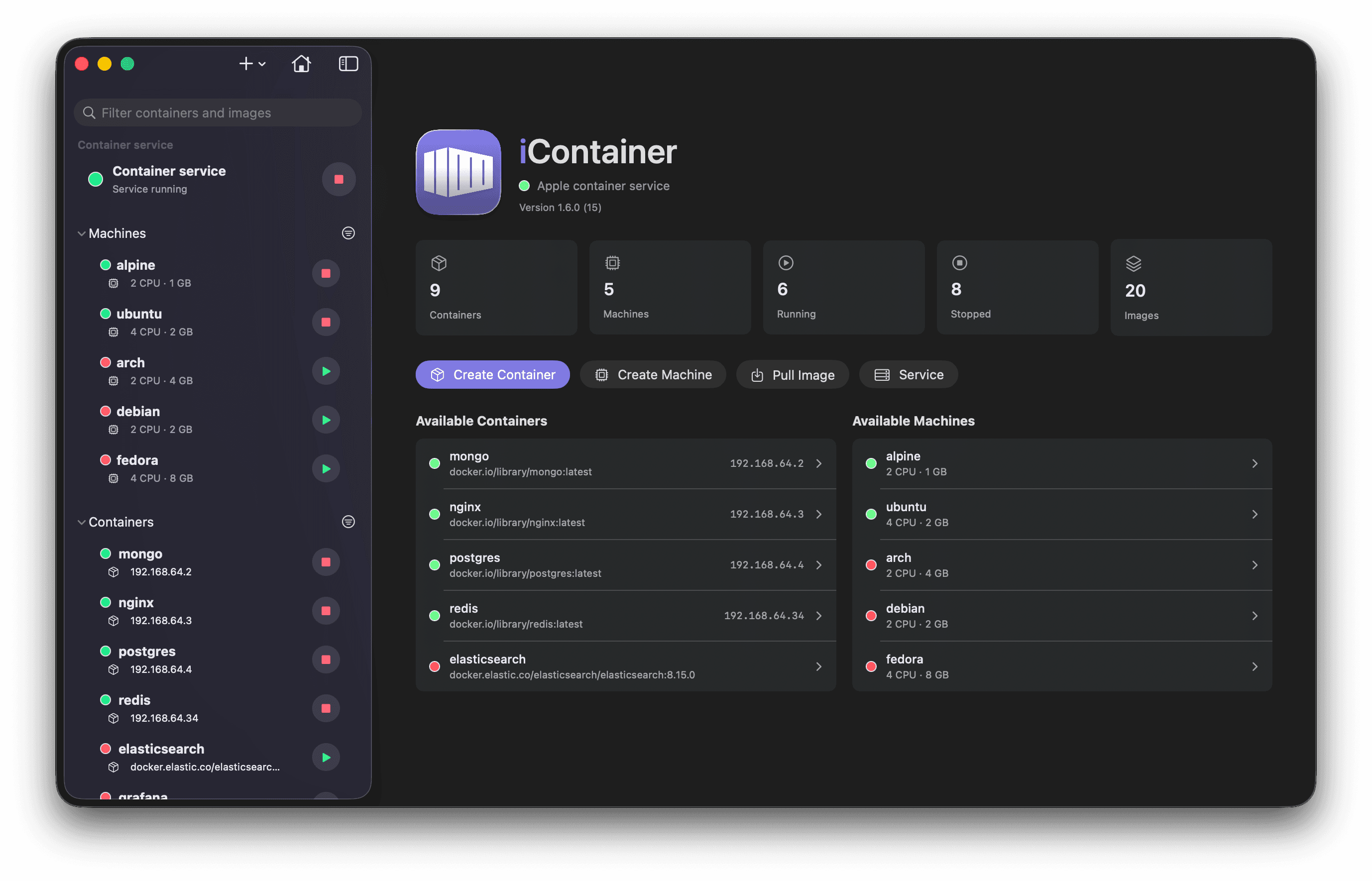
What it isiContainer is a native macOS app to manage Apple Container workloads — containers, images, logs, stats, and an interactive shell — built with SwiftUI on top of the official container CLI. It ships as a signed, notarized app with Sparkle auto-updates and a Homebrew tap, so it behaves like real shipping software, not a side project. Built with vibes, full disclosureThe README says it plainly: "Full disclosure: iContainer was vibe-coded — designed and written hand-in-hand with Claude Code." A "Vibe-coded with Claude Code" badge sits right under the title. The ideas, direction, and every "no, not like that" are human; a lot of the typing isn't — and the author is upfront that it's a hobby project on brand-new Apple tech: "read the code, kick the tires, and don't run it anywhere you'd cry about." Standout: on-device AI log analysisOne click on any container's or machine's Logs tab turns raw output into a concise diagnostic — health summary, quoted errors and warnings, likely cause, concrete next steps — streamed live. It runs on Apple's Foundation Models entirely on your Mac, so logs with their secrets and tokens never leave the device: no cloud, no API keys, no subscription. Plus Docker interop (import images, translate docker inspect configs into Apple Container settings) and a Docker Compose MVP. RequirementsmacOS 26 or later on Apple silicon, plus the Apple Container CLI. Apple Intelligence is optional — only needed for the on-device log analysis.
大赏
已上线
健康健身

LET: track your life, discover patterns

A cross-platform habit and life-event tracker — log workouts, sleep, mood and milestones offline, then spot patterns in your days.

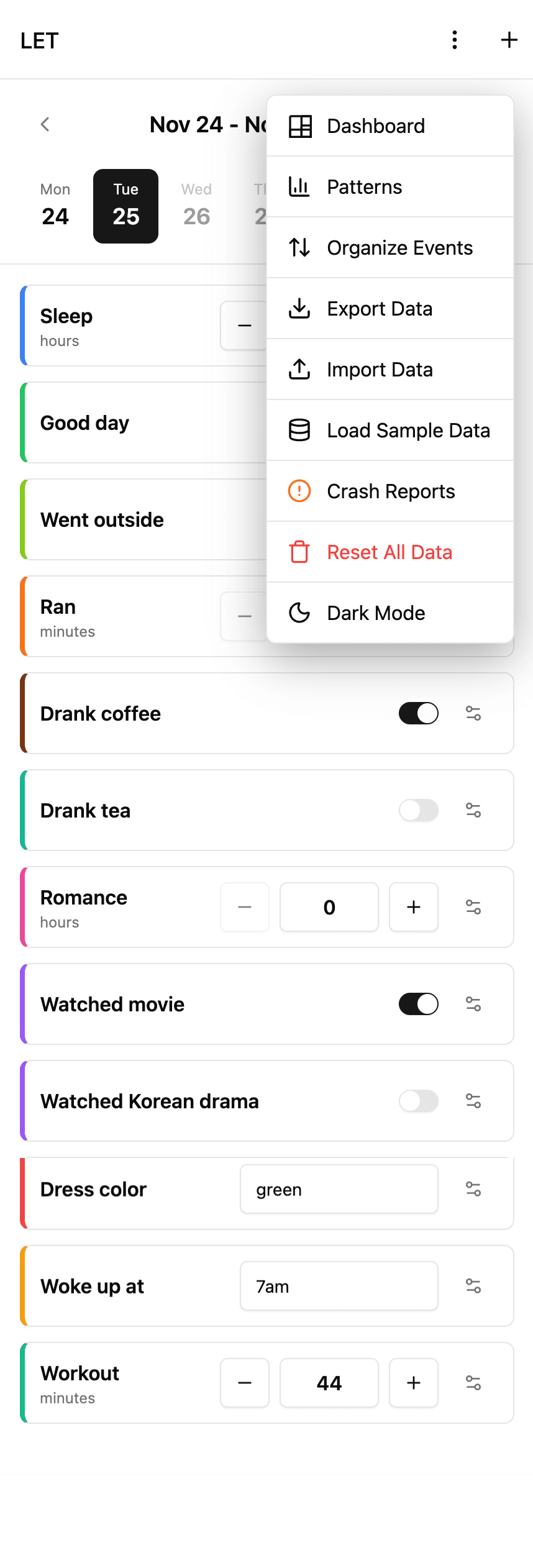
What it isLET (Life Events Tracker) is a simple yet powerful mobile app for tracking daily habits, life events, and discovering patterns in your daily life. Log exercise, meditation, reading, water intake, sleep hours, meals, mood, and important milestones — everything stays in a local SQLite database on your device. No cloud, no account. It runs on iOS, Android, and Web from one React Native + Expo codebase. Vibe-coded — the confessionThe author is refreshingly honest in the README: "I have to be honest with you. I vibe-coded this entire project." The confession goes on: "I didn't write a single line of code manually" — "I just talked to Claude (the AI, not some French guy)" — while mostly drinking tea and approving changes. The author notes this project started as a serious evaluation of whether React Native + Expo could deliver consistent UI across iOS, Android, and Web — and it shipped. Pattern analysis, offlineThe standout feature is the Patterns view: custom SVG charts that surface how your habits correlate over time. Week-based navigation with a calendar picker, dark/light mode, customizable event colors, JSON export/import, swipe gestures — and it all works offline on local SQLite. Who it's forSelf-quantifiers who want their data on-device; Expo developers looking for a real-world cross-platform reference; and skeptics who need one more proof that a full app can be built by describing it to an AI.

大赏
已上线
生活方式claude-code

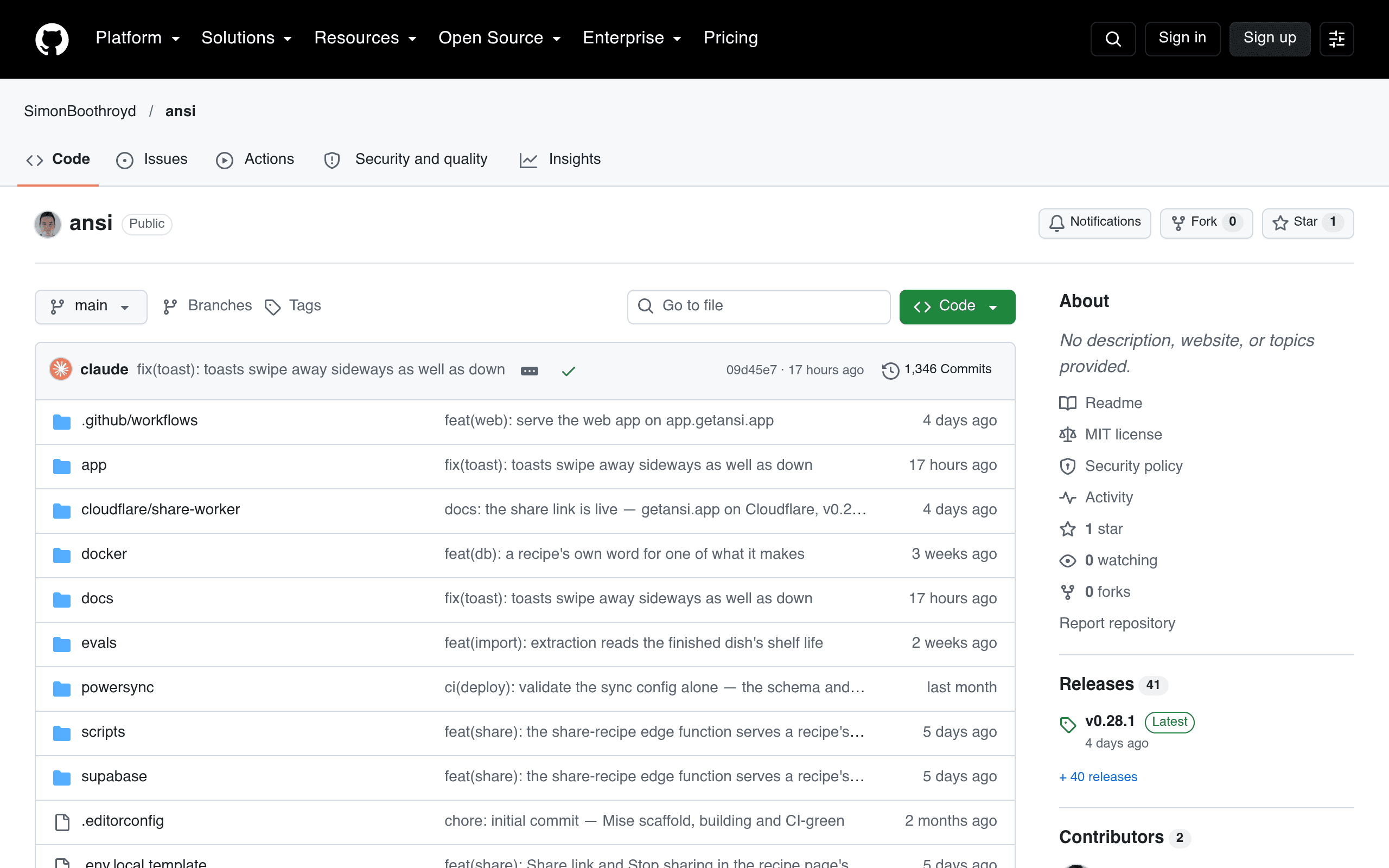
Ansi: offline-first meal planning for a two-person household

A shared, offline-first recipe and meal-planning app — plan the week you want to eat, and Ansi derives batch-cooking plans and a buy-once shopping list.

What it isAnsi (formerly Mise) is a shared, offline-first recipe and meal-planning app built for a two-person household — the author's own kitchen. You plan the week you want to eat; Ansi derives what to cook in batches (bounded by each dish's shelf life) and builds a shopping list that buys each ingredient only once. It runs a real household's kitchen every week — not a demo. Entirely vibe-coded, by the author's own accountThe README's "How this is built" section leads with it: "This project is entirely vibe-coded. Every line of application code, every test, migration, edge function and generated seed, and most of the prose under docs/, was written by AI coding agents (Claude Code)." The humans steer — product spec, decision records, execution plans, and design review on a real phone — while conventions like AGENTS.md and structural tests exist to keep agents honest across sessions. Offline-first architectureFlutter client with Forui components, Supabase backend (Postgres + Auth + Storage), and PowerSync for offline sync — the shopping list works even in a basement parking lot. The repo also ships a USDA nutrition seed pipeline, a recipe import/matching pipeline with its own eval harness, and local dev via Docker Compose. Who it's forCouples and small households tired of spreadsheet meal plans; developers curious what a serious spec-driven, agent-first workflow looks like end to end; and anyone who wants proof that vibe coding can run a real kitchen.

大赏
已上线
安全隐私claude-code

CrySence: face-aware webcam presence lock

A webcam presence lock for Windows that knows you from everyone else — soft dim when you leave, no-password return, hard lock on strangers.

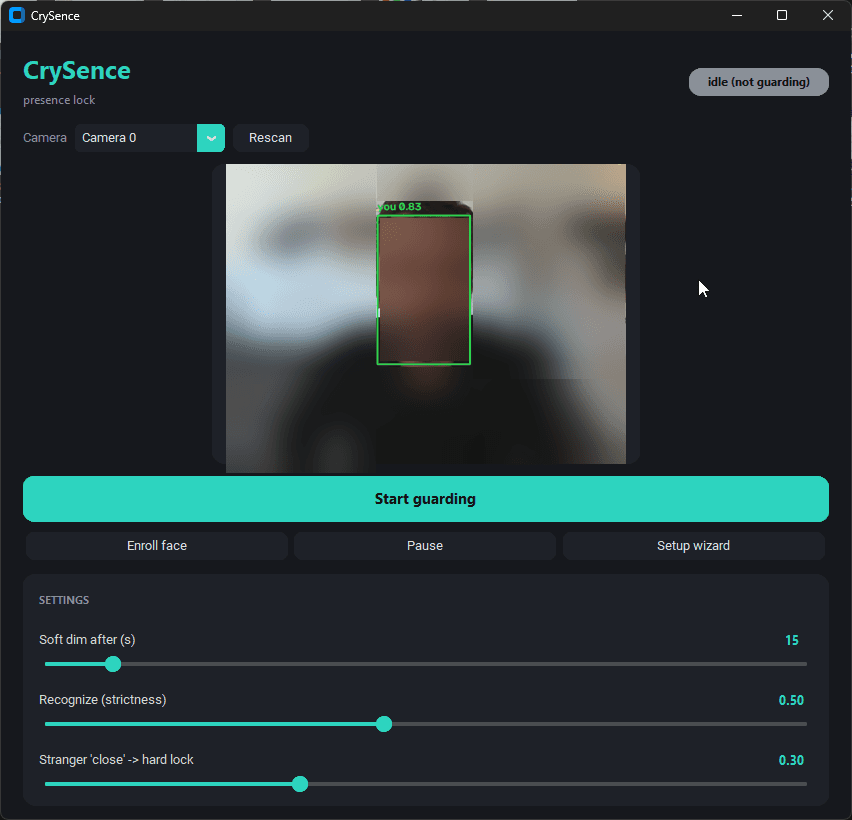
What it isCrySence is a webcam presence lock for Windows that knows you from everyone else. Walk away from your desk and a soft cover drops over the screen; sit back down and it recognizes your face and lifts itself — no password. If a stranger leans close to your screen, it hard-locks Windows, photographs the intruder, and alerts you. And it gets out of the way for video calls: when Teams, Zoom, or a browser call grabs your mic or camera, CrySence pauses and resumes afterwards. 100% local, auditableEverything runs on your machine — face detection (OpenCV YuNet), face recognition (SFace, local ONNX models), and intruder captures never leave your PC. No telemetry, no account, no network calls except the update check to GitHub and the alert channels you configure yourself (Windows toast always on, plus optional ntfy / SMTP / Telegram / Resend). Your face is stored only as a numeric embedding, never as images, and the author invites you to read the ~1,000 lines yourself before trusting the binary. vibe-coded, openlyThe author's own launch copy says it plainly: "I vibe-coded a webcam presence lock that knows me from everyone else" and "So I built one that locks based on whether you're actually there, with Claude Code over a few evenings. ~1,000 lines of Python, open source." Eleven releases through v0.3.7 (2026-09-25) show it wasn't a one-evening throwaway — the changelog reads like a real hardening story: memory leaks in camera drivers, emergency unlock via Ctrl+Alt+Shift+U, hourly update checks. Honest limitationsThe author puts the caveats up front, which we appreciate: the soft cover is privacy not security (Task Manager can kill it — the hard Windows lock is the real lock); no liveness detection yet (a good printed photo could pass 2D recognition); Windows only. Under the hoodTech stack per the author: Python (~1,000 lines), OpenCV YuNet + SFace for detection/recognition, CustomTkinter GUI with a first-run setup wizard, strictness sliders, camera picker and live preview. MIT licensed; run from source or grab the per-user installer from GitHub Releases (unsigned, so SmartScreen will warn — or run from source, which the author recommends). Who it's forAnyone who works in open offices, coworking spaces, or cafes; privacy-minded folks who like local-first software; and a great demo that vibe coding can produce real, working security tooling — with its limitations honestly disclosed.

大赏
已上线
社交社区claude-code

Vibrary: a live pixel library for vibe coders

A live pixel-art library where vibe coders sit together while their AI builds — only activity numbers ever leave your machine.

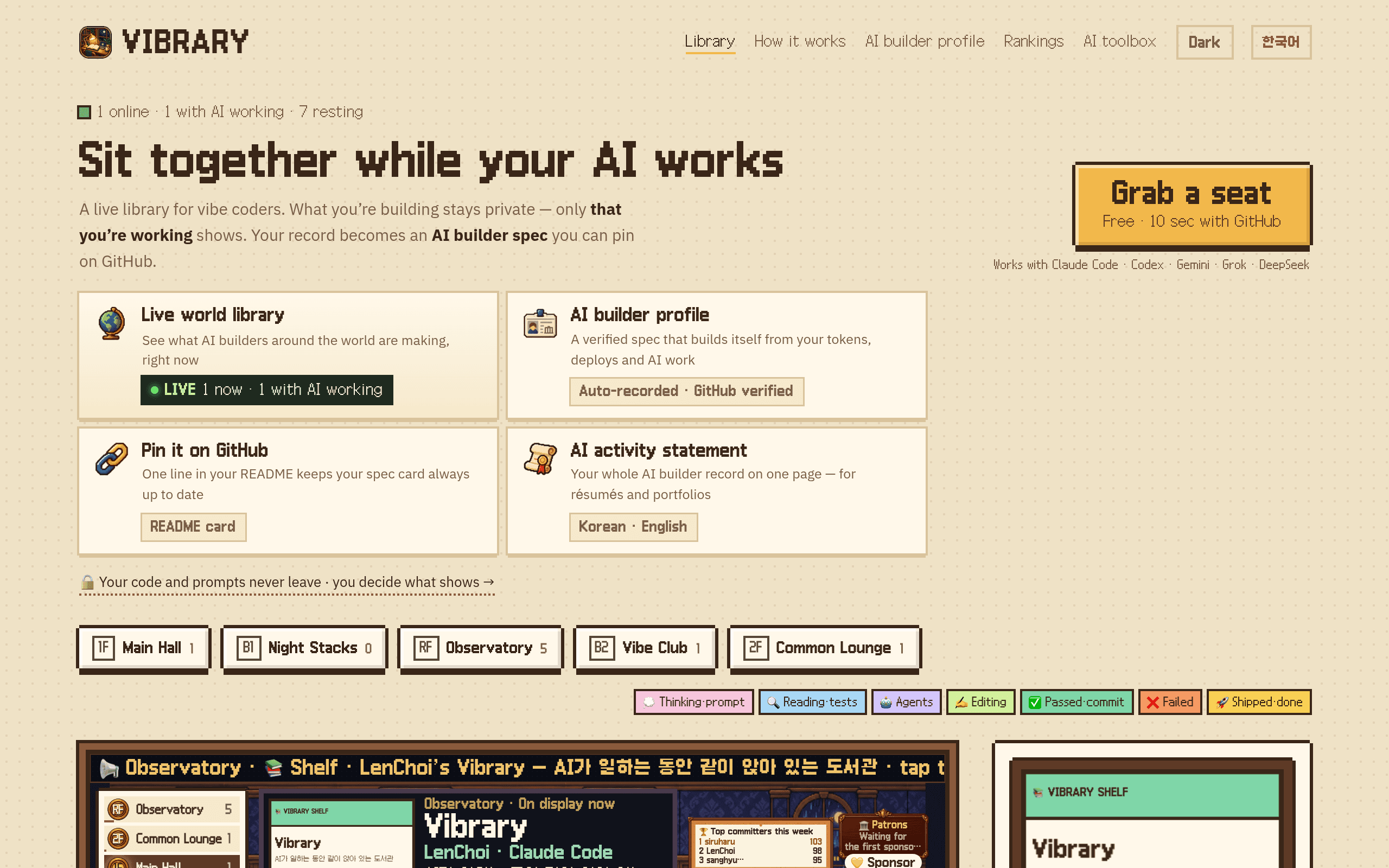
What it isVibrary is a live pixel-art library where vibe coders sit together. You install a small CLI (npm), grab a seat, and your pixel character takes a desk while Claude Code, Codex, Gemini CLI, Grok, or DeepSeek does the actual work on your machine. Speech bubbles over your character show what your AI is doing in real time — thinking through a prompt, editing files, running tests — and when someone deploys, the whole room applauds. It's the cozy coworking feeling of a late-night library, minus the commute. Privacy-first by designThe part that matters most: nothing you build ever leaves your machine. No prompts, no AI replies, no code, no file paths, no commands, no repo names. The CLI counts activity numbers locally (thinking, reading tests, editing, passed commits, shipped) and only those numbers are sent to the server, which you can verify in the CLI source. Your seat's visibility is entirely your choice, and the homepage even shows you exactly which fields go out. Built for buildersVibrary turns your coding activity into an AI builder profile: an automatically recorded, GitHub-verified spec card built from your tokens, deploys, and AI work. One line in your README keeps the card always up to date, and there are weekly leaderboards for the most active builders. It also has an AI toolbox directory and four-language support (including Korean and English). vibe-coded, honestlyThe author's dev.to post (2026-10-12) is the rare kind of evidence we like: "Almost all of the code was written with Claude Code; I did the planning, the pixel art direction and a lot of testing." He also admits upfront that "the real library is still small" — a work in progress growing with its community. When I checked, the room was alive: 1 online, 1 with AI working, 7 resting. Under the hoodTech stack per the author: Next.js, Supabase Realtime for the presence layer, and an ed25519-signed self-updating CLI. Runs on Windows/macOS/Linux via npm; the web library is free with GitHub login. Who it's forSolo developers who miss the energy of coding around other people; anyone curious to see live what AI builders around the world are shipping right now; and vibe coders who want a fun, verifiable record of their AI-assisted work.

大赏
已上线
音乐音频claude-code

Vocafy

A music player for listening to Vocaloid originals by producer, singer, or year — songs, not videos.

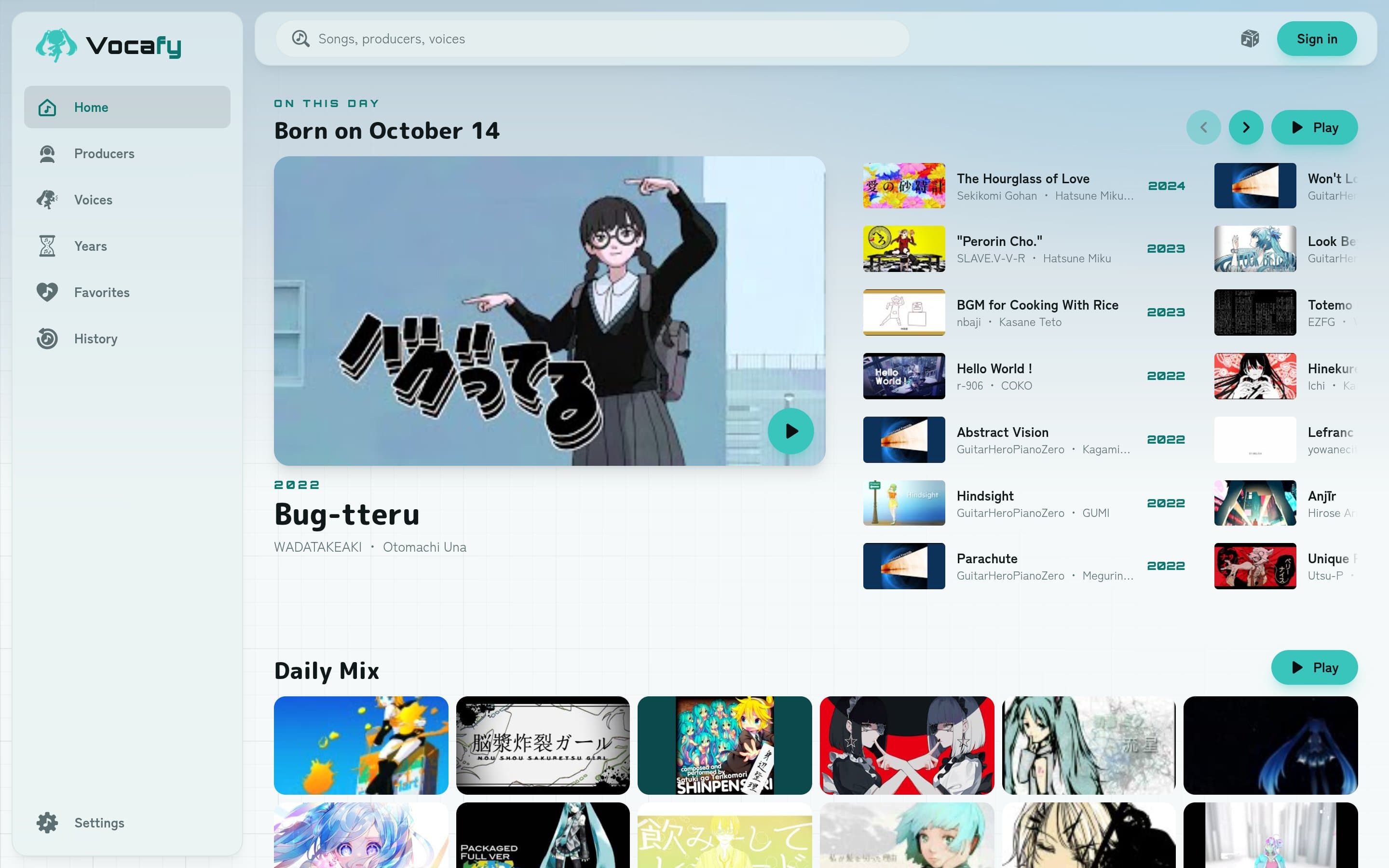
Vocafy is a music player built around one idea: listen to Vocaloid songs instead of watching videos. Pick tracks by producer (P主), voicebank singer or release year, and it plays the original YouTube / Niconico uploads — from Hatsune Miku classics to 2024 releases. The home page even has an "On this day" shelf and a Daily Mix. Author piro0919 writes on Show HN: "I built it together with Claude Code." A focused, listen-first player for the Vocaloid catalog, live and browsable right in the browser.

大赏
已上线
效率

Transnap

1MB 的 macOS 菜单栏翻译工具:基于系统 Translation 框架做纯本机翻译,复制即翻,无需 API Key。

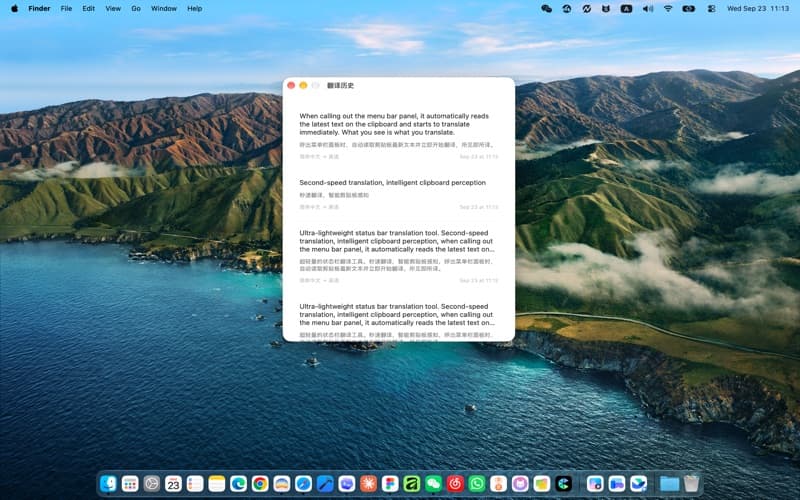
Transnap 是一款只有 1MB 大小的开源 macOS 菜单栏翻译工具,主打「复制即翻」。它基于苹果系统自带的 Translation 框架做纯本机翻译:唤出菜单栏面板时自动读取剪贴板最新文本并立即开始翻译,毫秒级响应,全程不联网、不需要配置任何 API Key。 功能包括:自动感知剪贴板、手动输入/粘贴、源语言与目标语言自动或手动选择、一键复制译文、SwiftData 本地保存翻译历史;默认全局快捷键 Command + Shift + C,可选双击复制快捷唤出。当前源码版本 v1.3(Build 55),已上架 App Store,完全免费,无会员无内购。 作者 deepsae 在 V2EX 分享时写道:因为找不到小巧快速的状态栏翻译软件,「我就 vibecoding 做了一个出来」,而自己多年产品用户体验背景保证了软件的设计和体验。仓库 17 stars,上线一天即有真实用户反馈。

大赏
已上线
生活方式claude-code

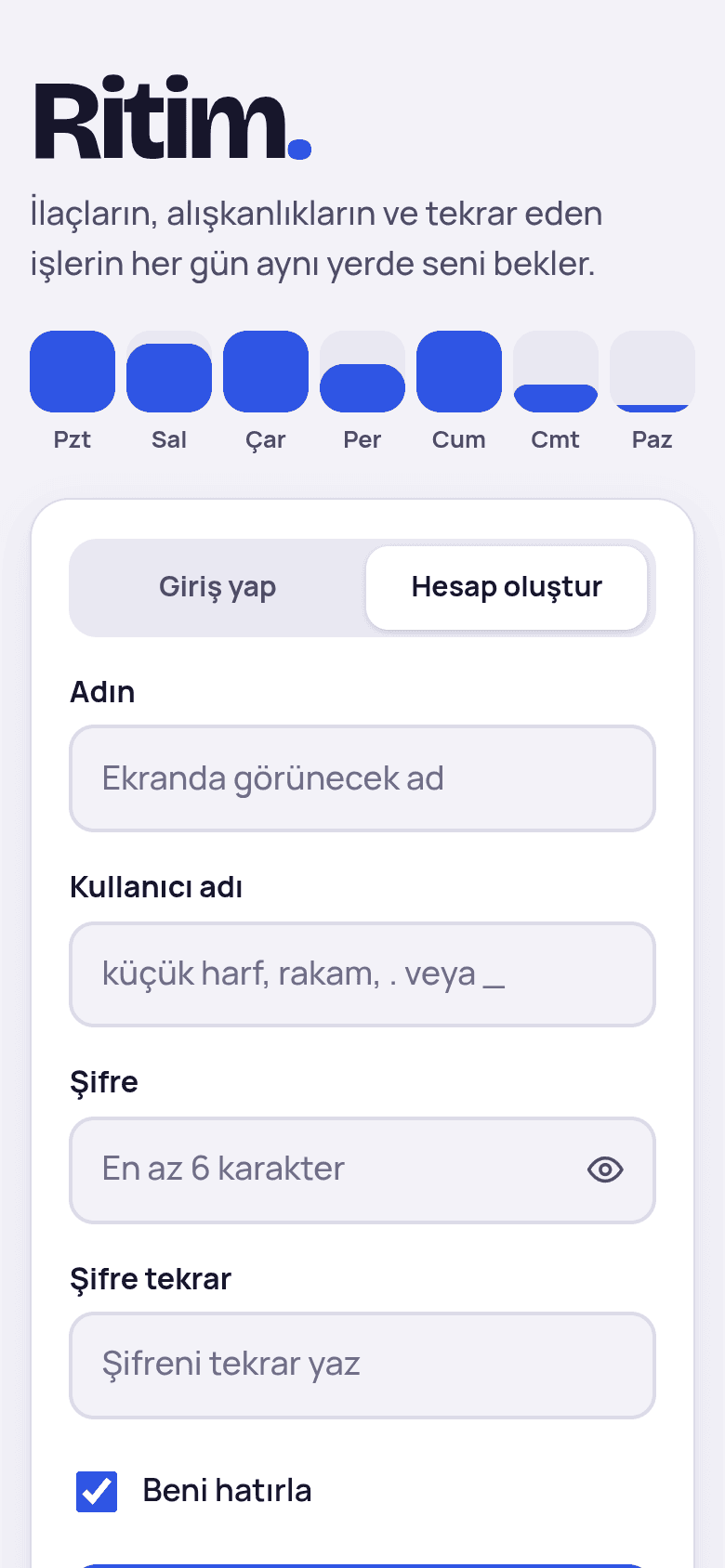
Ritim

Elderly-friendly recurring task & medication reminder tracker — big type, high contrast, offline-first PWA.

Ritim is a reminder tracker designed for elderly users: medications, habits and recurring chores, all waiting in the same place every day. Big type, high contrast and a single-screen flow make it usable without tech help. It is an offline-first PWA — it keeps working without a network — with an optional self-hostable sync server (Node.js + Express + better-sqlite3) for multi-device households. The whole project is vibe-coded: the author describes what they want in plain Turkish, and Anthropic's Claude, working in Claude Code, writes all the code, the visual design and the README. The author tests each version on their own phone and asks for changes — no code written or reviewed line by line by hand. A rare, honest documented case of a non-programmer shipping a real product with AI. Note: the project is small and new (2 GitHub stars) — presented as an indie experiment, not a mature product.

大赏
已上线
图片视频

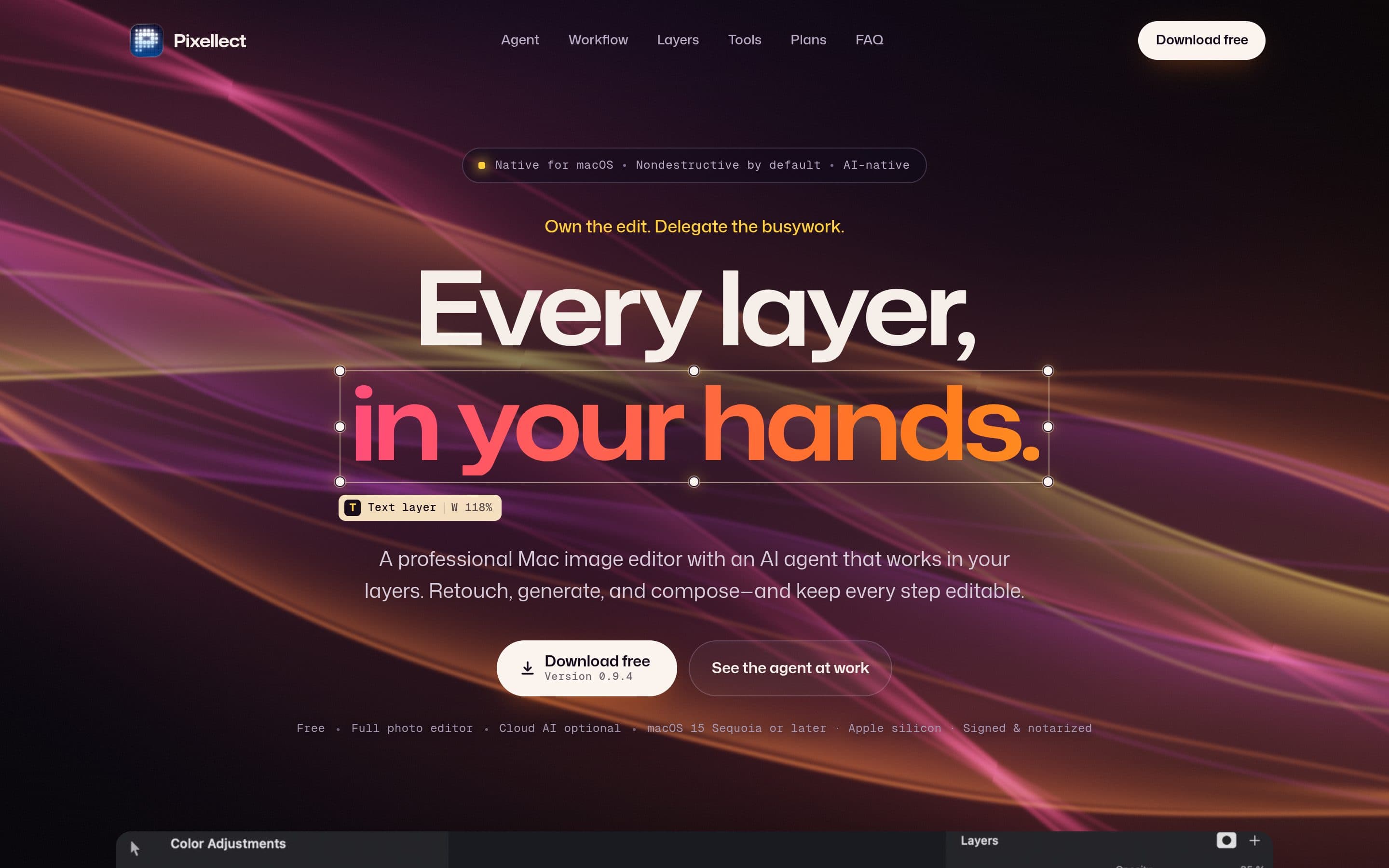
Pixellect

Free native macOS Photoshop-grade image editor with an AI agent that works inside your layers.

Pixellect is a free, native macOS image editor that aims at Photoshop-grade editing without the subscription: layers, brushes, effects and PSD import/export, non-destructive by default. What sets it apart is the built-in AI agent: it works directly inside your layers — retouching, generating and composing — while keeping every step editable. "Own the edit. Delegate the busywork." Author terhechte writes on Show HN: "For the past months I've been vibe-coding a free Photoshop editor for macOS (Native using Swift and a bit of Rust)." Version 0.9.4 is available as a free, signed and notarized download for Apple silicon (macOS 15 Sequoia or later), with optional cloud AI.

大赏
已上线
开发工具claude-code

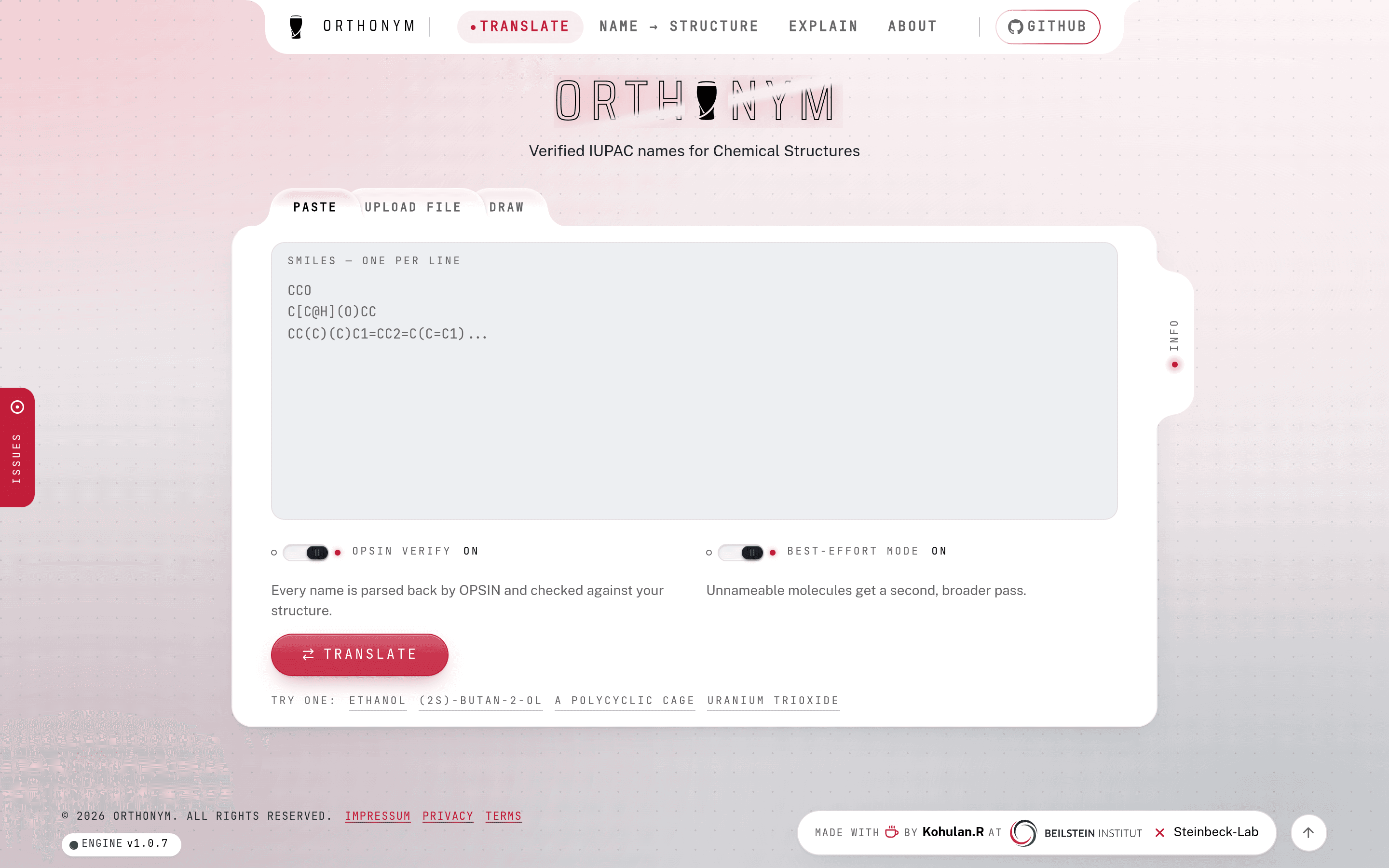
Orthonym

Free IUPAC name generator for chemical structures — paste SMILES, upload a file, or draw the molecule.

Orthonym turns chemical structures into verified IUPAC systematic names. Paste SMILES (one per line), upload a structure file, or draw the molecule right in the browser — every name is parsed back by OPSIN and checked against your structure, and unnameable molecules get a second, broader pass. The README documents the build process in a dedicated "How Orthonym was built" chapter: "Orthonym was built with Claude Code, under a fixed set of working rules." A rare documented case of an AI agent shipping a deterministic scientific-computing engine — with companion orthonym-skills for agent workflows. From the Steinbeck-Lab team; 8 GitHub stars, updated the day before this listing.

大赏
已上线
娱乐claude

Foldchiyomi

A Mihon manga-reader fork tuned for foldables — realistic finger-following page curl, rendered in real time.

Foldchiyomi is an unofficial fork of the Mihon manga reader, tuned for foldable phones and tablets: unfold your phone and you get a two-page spread; fold it and the cover screen goes back to a single page. The signature feature is the page curl — not a canned animation, but a page that rolls over under your finger in real time: pull from a corner and it folds diagonally, you see the back of the sheet, real shadows fall on the page beneath. It runs entirely on the GPU (WebGPU via Dawn) at your screen's full refresh rate. Double-tap a speech bubble and ArtCNN, a small on-device neural network for line art, lifts it off the page enlarged, Google-Play-Books style. Author GarrettKK writes in the README: "This fork was vibe-coded: the page curl and the packaging were written together with an AI coding assistant (Claude), then tested by hand on real devices." Signed APKs are published via GitHub Actions releases; 12 stars and counting.

大赏
已上线
工具claude-code

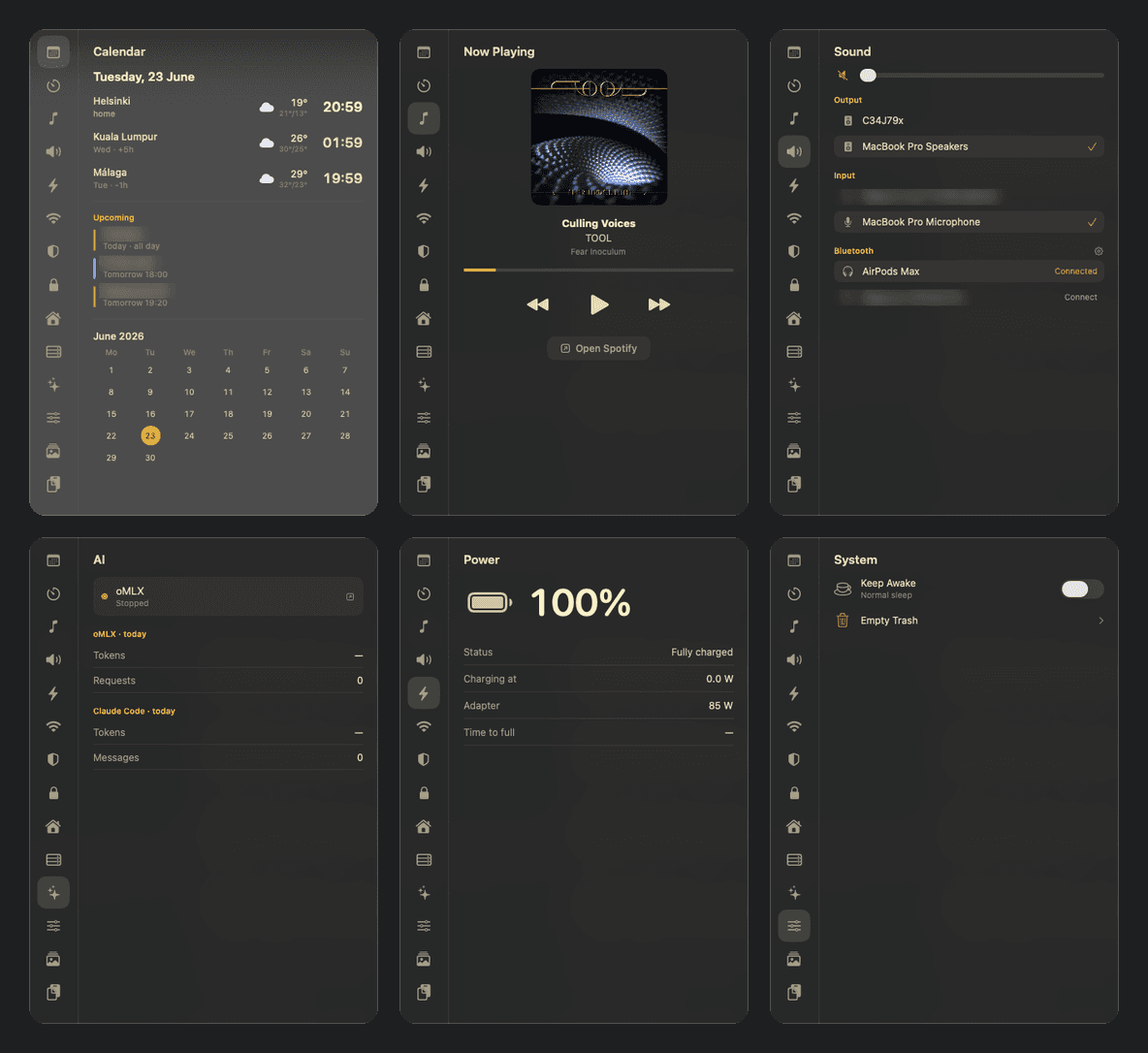
Kajo:macOS 下拉式 Gruvbox 控制中心

从 MacBook 刘海里弹出来的 Gruvbox 控制中心:日历、Spotify、声音、电源、剪贴板去追踪全在一页。作者 README 开头就写:100% vibe-coded,风险自负。

是什么Kajo 是一个 macOS 上的下拉式控制中心:一个半透明的 Gruvbox 主题小窗口,从 MacBook 的刘海里“弹”出来,里面用标签页收纳了你日常要看要点的所有东西——日历(带世界时钟、天气和日程)、计时器、Spotify 正在播放、声音(输出/输入设备、AirPods 左右耳和充电盒电量)、电源、网络(Wi-Fi 扫描连接、可复制的内外网 IP、网速测试)、系统(一键保持唤醒、清废纸篓)、表情包、剪贴板(带 URL 追踪参数清理,还能发到安卓)、货币换算(ECB 汇率,不用 API key)、工时记录,甚至还有 UniFi、Home Assistant、VPN 和本地大模型服务的状态页。 它致敬的是 Linux 圈的 Noctalia,但做在了 macOS 上。唤起方式也很“mac”:菜单栏图标、kajo://tab/calendar 这样的 URL scheme、全局快捷键都行。最妙的是它从刘海长出来的方式——Dynamic Island 风格:平时刘海两侧缩成两个“耳朵”,左边显示正在跑的工时计时,右边显示 Spotify 正在播的歌(带专辑封面和跳动的小节线);鼠标悬停刘海,弹出一排标签图标,点哪个就切到哪个标签页。 亮点这个项目的灵魂是“一个人的控制中心”。作者把自己每天要查的东西全塞进了一个窗口:几点有个会、赫尔辛基和吉隆坡现在几点、AirPods 还剩多少电、今天写了几个小时代码要不要记工时。工时(Hours)标签页甚至是个完整的小产品:秒表计时、按天记条目、打标签关联 Severa 项目,一键把一天的工时按 30 分钟取整上传到 Severa timesheet,顺手生成月度清单——自由职业者看了会心动。 细节密度极高:剪贴板标签页能一键剥掉链接里的 utm_ 追踪参数和电商追踪片段;终端(kajo://terminal)是个 Quake 式的下拉终端,⌘V 能直接把剪贴板里的图片粘进 Claude Code;刘海耳朵上还有个 Claude Code 会话状态小图标,黄色是忙、绿色是做完,点一下跳到终端。甚至连记事本(Scratch)都是从刘海滑下来的悬浮窗。 但作者在 README 里先把丑话说在前面:这是“personal tool, not a polished product”(个人工具,不是打磨过的产品)。部分标签页是为他自己家里的服务器准备的(UniFi、树莓派健康检查),没配好的在你电脑上就只显示一句“No config”。诚实得可爱。 vibe-coded 证据这是本轮证据最硬的项目之一。作者在 README 开头原话写着:“100% vibe-coded — use at your own risk. Built almost entirely by AI pair-programming (Claude Code).”后面还跟着“没有保修、没有保证,它可能会发脾气甚至吃掉你的配置,运行前请先读代码”。能把“这玩意儿可能吃掉你的配置”写进 README 的作者,证据可信度直接拉满。 更有意思的是,连安装方式都是 vibe 式的:README 里有个章节叫“用 Claude Code 安装(复制粘贴这段)”——一段超长的 prompt,你把它粘进 Claude Code,Claude 会一步步帮你在你的 Mac 上构建、签名、装到 /Applications、处理代码签名证书、改掉写死的作者家时区和城市、问你家里有没有 UniFi 再决定配哪些标签页。作者甚至替你想好了:Makefile 里的签名证书名是作者自己钥匙串里的,prompt 里会教你建一个同名的自签名证书,或者改成临时签名。 活跃度也没问题:仓库创建于 2026 年 6 月 25 日,76 个 commit,最近一次提交是 2026 年 10 月 13 日(侦察当天),版本迭代日志记到了 v0.35.4,一个仍在被主人天天打磨的自用工具。 技术实现技术栈是作者明确声明的:原生 Swift,SwiftUI/AppKit 混写。构建方式很“叛逆”:纯 swift build(SwiftPM,只有一个依赖 SwiftTerm)加一个 Makefile,全程不用 Xcode 工程。跑起来是一个 LSUIElement agent——Dock 栏里没有图标,干净。 架构上是一个文件一个标签页(Sources/*.swift),加上 Theme/Config/Panel/App 四块基础设施。配置走 ~/.config/kajo/ 下的 JSON(600 权限),内置的设置窗口提供带类型的表单和原始 JSON 两种编辑方式。进程间调用全靠 kajo:// URL scheme:kajo://tab/sound 切声音页,kajo://terminal 呼出终端,kajo://clip/clean 清追踪参数——Raycast、skhd、Hammerspoon 都能直接调。 那个从刘海弹出的动画是 SwiftUI spring 做的:窗口尺寸瞬间定好,面板用弹簧动画从刘海“长”出来;没刘海的屏幕就退化成菜单栏里的一颗黑色小药丸(virtual notch)。耳朵(island ears)的内容是事件驱动的,不是轮询——Spotify 耳朵靠通知,工时耳朵靠文件 watch,Claude 会话图标靠 hook 写的状态文件。作者在更新日志里为这些小毛病修了十几个版本(v0.33 到 v0.35 全是刘海和耳朵的打磨),看得出是真每天在用。 安装方式本身就是 vibe 宣言一般 macOS 工具的 README 写“下载 dmg 双击安装”,Kajo 的 README 写的是“打开这个仓库,让 Claude Code 帮你装”。那段复制粘贴 prompt 长达上百行:先检查 macOS 14+ 和命令行工具,再二选一处理代码签名(建一个叫“Kajo Self-Signed”的自签名证书,或者改成临时签名),然后 make install 装到 /Applications、注册 kajo:// scheme,接着问你用什么方式唤起(skhd、Hammerspoon、Raycast 还是菜单栏按钮),最后把写死的赫尔辛基/吉隆坡/马拉加三个城市换成你自己的城市。它甚至提醒你:示例配置里指向作者个人 AWS 的 remote 字段千万别照抄。一个把“怎么在你电脑上跑起来”都外包给 AI 的项目,100% vibe-coded 这句话就不是口号,是工作流。 适合谁适合三类人:一是 macOS 重度用户,尤其用 Raycast/sketchybar/skhd 的那批——Kajo 的 kajo:// scheme 能直接嵌进你现有的快捷键体系;二是 Gruvbox 配色爱好者,这个深棕底 + 蜜黄字的界面在 README 截图里相当耐看;三是对“AI 结对编程能做到什么程度”好奇的人:这是一个 76 commit、仍在迭代的真实自用软件,不是 demo,它证明了 Claude Code 不只能写小脚本,还能陪一个人把“每天用的工具”从 0 做到 1。 不适合谁也要说清楚:它不是开箱即用的 App Store 应用。在新 Mac 上跑起来要自己构建、自己搞定代码签名,部分功能(UniFi、Home Assistant、Severa 工时上传)需要你有对应的服务端。这正是作者那句“use at your own risk”的意思——但反过来说,愿意折腾的人,拿到的是一套完全按自己手型长的控制中心。

大赏
已上线
工具claude-code

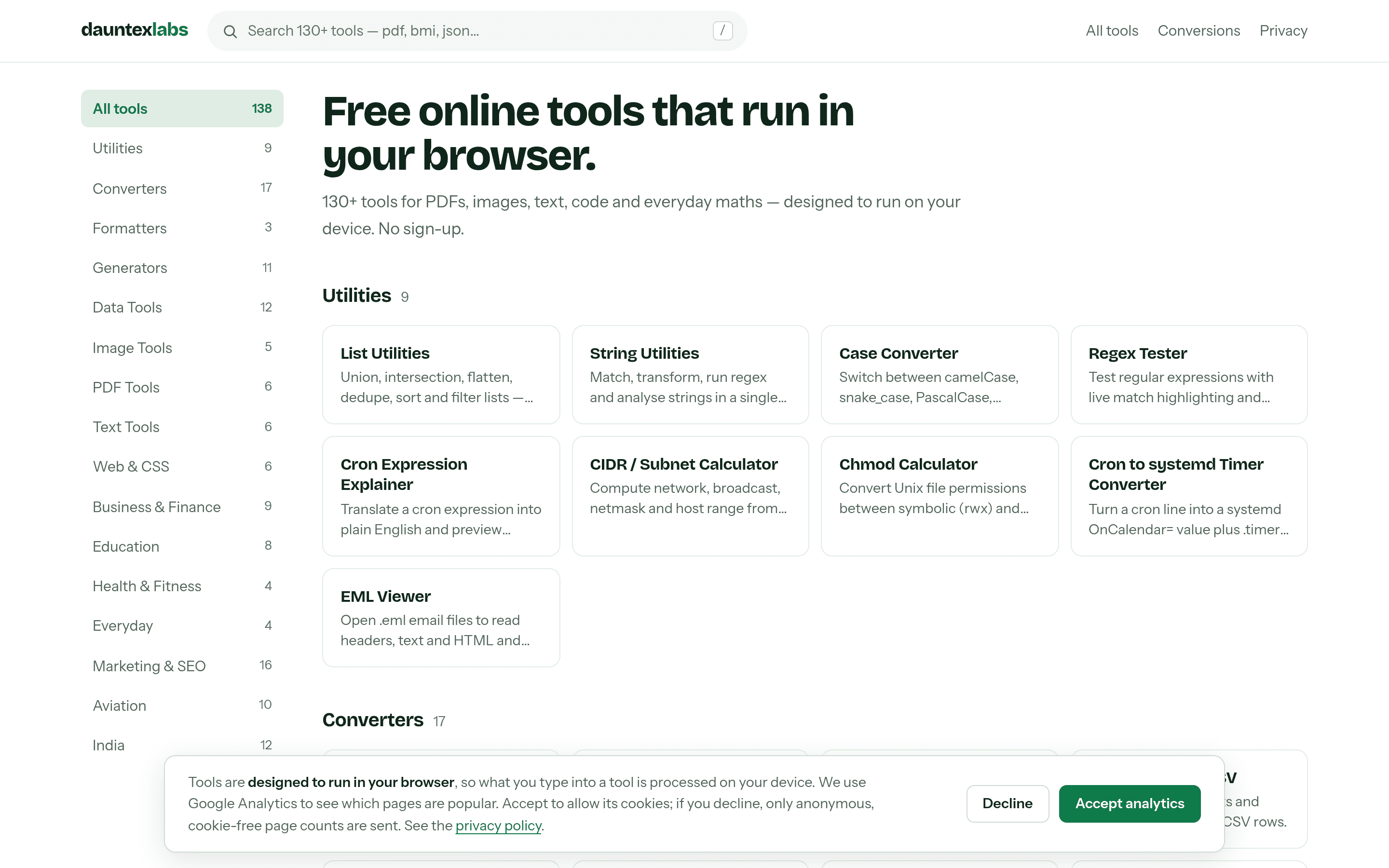
DauntexLabs:150 个纯前端小工具的瑞士军刀站

130 多个 PDF、图片、文本、代码工具全部跑在浏览器里,无后端、无上传;作者亲口承认“mostly vibe coded with Claude Code”,并用 1780 个测试给 vibe 加了护栏。

是什么DauntexLabs 是一个纯前端的在线小工具集合站:PDF 合并、图片转换、JSON 处理、二维码生成、密码生成器、正则测试、JWT 解码、VCF 转 CSV、飞行员用的侧风/密度高度计算器、印地语 Krutidev 旧字体转 Unicode 等等——首页目录里躺着 130 多个工具,作者的目标是 500 个。每个工具都是一页独立 HTML,打开即用,不用注册,也不用把你的文件传到任何服务器上。 这个站点的核心卖点就一句话:所有工具都在你的浏览器里跑完。想合并 PDF?文件只进你电脑的内存。想解码一个生产环境的 JWT token?粘贴进去,token 哪儿也不去。这对处理敏感文件的场景(银行对账单、联系人通讯录、私钥材料)是实实在在的价值,而不是一句营销口号。 亮点最有意思的不是工具数量,而是作者把“隐私优先”做成了一套测试,而不是一句承诺。每个工具都埋了一个“金丝雀字符串”:Playwright 测试会把这个唯一字符串喂给每个能吃文本或文件的工具,然后检查所有网络请求、URL、页面标题、localStorage、console——只要金丝雀出现在任何不该出现的地方,测试就挂。还有一层静态扫描:Vitest 会扫工具代码里的 fetch、XHR、WebSocket、sendBeacon 和 storage 写入,谁半夜手滑加了个网络调用,pre-push hook 直接拦下。最后还有 CSP 头做兜底,连跨域请求都被浏览器级拦截。 连作者自己都承认,绝对版的“数据永不离开设备”他不敢保证——你装的 9 个 Chrome 插件他可管不了。所以隐私页写的是“designed to run in your device”,再附上测试证据。这种诚实的分寸感,在工具站里很少见。 另一个细节:QR 码生成器里那些花里胡哨的“眼睛”样式,不是作者凭审美挑的——测试会用 jsQR 把生成的码反解一遍,只有真正能扫出来的样式才允许出现在 UI 里。哪个样式好看但扫不出来,哪个就下架。让测试替人做决定,是这个站贯穿始终的风格。 vibe-coded 证据作者在 2026 年 10 月 10 日的 dev.to 长文里亲口写道:“Confession: it's mostly vibe coded with Claude Code.”(坦白:这基本是跟 Claude Code 一起 vibe 出来的。)他还补了一句:大部分代码是 Claude Code 写的,不是我敲的,没必要装。 证据就摆在提交记录里:6 月 9 日第一次提交;6 月 20 日一天之内 68 个新工具、4 个 commit;10 月 7–8 日两天 59 个 commit,做完整站视觉改版加新工具扩充。作者自己说:我手写一天 68 个工具?不可能。但他也承认,光靠 vibe 会做出 150 个“微微有点坏”的工具,所以他给 vibe 上了三道保险:仓库根目录的 CLAUDE.md 规则文件(agent 每次会话必读:工具逻辑里禁 fetch、重库必须在点击处理器里动态 import、统一用共享 UI kit、共享 JS 体积卡在 105 KB 左右);大功能先写 spec 再写代码,6 份设计 spec 和 3 份实施计划都在 docs/superpowers/ 里;最后是约 1780 个 Vitest 测试当真正的 code reviewer——“我一天 review 不了 68 个工具,测试可以。” 作者的总结很到位:如果 AI 写代码,人就负责写“护栏”。规则文件、spec、测试,就是他这句话的三个注脚。 技术实现技术栈是作者明确声明的:Next.js 15,全静态导出(output: 'export'),一个工具就是一个纯 HTML 页面。选 Next 而不用纯 SPA 的唯一理由是 SEO:每个工具页都有独立的标题和描述。他还设了个 bundle 预算:共享首屏 JS 压在 105 KB 左右,每加十几个工具只涨约 1 KB。做法是:能用 Web API(crypto.subtle、Canvas)就不用库;MD5 这种 Web Crypto 不支持的就手写一个小实现;openpgp、pdf-lib、qrcode-generator 三个重库只允许在点击处理函数内部动态 import,绝不出现在顶层。 工具注册表也值得一提:lib/tools.ts 一个文件管全站——首页、搜索、分类筛选、每个工具页、sitemap.xml、robots.txt 全从这一个列表生成。加一个条目,页面、卡片、sitemap 行自动出现。 还有个反常识的运营故事:作者曾铺了 220 个单位换算页想吃 SEO,三个月 Search Console 数据是 2.08 万次展示、6 次点击、平均排名 76——“km to miles”这种词 Google 自己就有计算器小部件,根本打不过。于是他把那 220 页全部 noindex,转向没人做的长尾:飞行员的侧风计算、印度的 GSTIN 校验、Krutidev 转 Unicode。冷门字体的字符映射表还有条铁律:必须有两个独立来源对得上才发布,对不上的 Shivaji 字体转换器就挂着“维护中”不上线。错的转换器比没有更坏——这句话应该裱起来。 小众工具举例值得单独说说作者“往小众里钻”的那批工具。航空类有 10 个:侧风分量、风修正角、密度高度、真空速、METAR/TAF 解码——飞行学员和私人飞行员经常要算这些,市面上的现成工具要么收费要么难用。印度本地化有 12 个:GSTIN 税号校验、印度数字格式(lakh/crore)、Krutidev 等 legacy 印地语字体转 Unicode——印度很多政府和老办公室文档还停留在这些旧字体里,转换一直是个痛点。这些工具每个可能只有十几个用户,但对这十几个人来说是刚需。作者的原话是:没人需要,但有些人真的很需要。这种“广撒网不如打深井”的思路,恰恰是小团队对抗 Google 内置小部件的唯一活路。 适合谁适合三类人:一是每天跟 PDF、JSON、正则、二维码打交道的开发者和运营,把它当瑞士军刀书签收着;二是对“上传文件到陌生网站”有本能警惕的人——银行对账单、客户通讯录、生产 token,在这里处理确实更让人放心;三是对 vibe coding 工程化感兴趣的人:这个站是“AI 写代码 + 测试当 reviewer + 规则文件当记忆”的完整样本,仓库是公开的(github.com/jha-adrs/dauntexlabs),CLAUDE.md 和那 1780 个测试本身就是一份 vibe coding 实战教材。 要说缺点也有:工具多了难免有粗糙的,UI 是统一模板套出来的,谈不上精致。但免费、无广告、无需注册,冲着“文件不出本机”这一点,它值得一个书签位。

大赏
已上线
游戏claude-code

Brickbrag:浏览器里的多人砖块建造世界

无需下载、无需注册的 3D 多人砖块世界:盖房子、赛道竞速、开飞机、坐公交——一个用 Claude Code 写出的 GTA 式乐高乐园。

是什么Brickbrag 是一个直接跑在浏览器里的多人在线砖块建造世界。打开网址就能进,不用下载、不注册账号,手机和电脑都能玩。整个世界是一座完全由砖块搭起来的小城:中央广场立着一座彩虹色的大号字母 B,路牌指向赛道、机场、砖块商店和公交总站,往远走还有火山、雪山、海滩、峡谷和花田。 这个项目的来历本身就很有代表性。作者 neuling 在 2026 年 10 月 12 日把它发到 Show HN,开头就坦白:八天前他只是想为浏览器做一个安安静静的小砖块建造器,结果做着做着就失控了——最后变成了一个 GTA 式开放砖块世界:开车、乘公交、从机场起飞绕城飞行、赛道竞速、认领地块、和所有在线的人一砖一砖共同搭建。 新玩家进世界后,先经历一小段带指引的教程:在砖块商店里把口袋装满各色砖块,学会视角、走跳和放拆砖。教程还教你买地:去土地办公室买下一块属于自己的地皮,之后在那上面搭的房子别人拆不掉。这种"先教后建"的流程设计,对第一次接触建造类游戏的人非常友好。 世界观的密度也值得一提。四条公交线路各有目的地:花田、樱花林、峡谷和市区,终点站外是绵延的花田;火山地区夜晚有发光的熔岩湖,雪山、湖边棕榈滩、冬季针叶林各有自己的氛围。赛道起点除了圈速榜还有Hall of Fame,航空塔、咖啡馆、玻璃塔这些地标都带灯光效果——这些美术资产的精细度,让人很难相信它只用了八天。 怎么玩进去之后的操作非常直白。WASD 走路、鼠标看方向,空格跳(双击是二段跳);点一下放砖、右键收回,R 旋转砖块、C 换颜色,V 切换视角,E 上车或上飞机,L 看地块,T 聊天,Tab 看谁在线、送金币和砖块礼物,Esc 打开菜单。网站底部列出了完整的操作说明,第一次玩跟着自带教程走一遍就能上手。 玩法分三大块。第一块是建造:市中心和街道之外,世界上的绝大多数地方都可以随意搭,所有人都能一起建;想专心盖自己的房子,可以用游戏里的金币买下一块地,买下之后只有你能在这块地上放砖和拆砖。游戏里还内置了物理校验,搭出来的结构要符合砖块凸点的真实受力——太离谱的悬空造型会搭不稳,这一点被 HN 评论专门拎出来夸过。 第二块是载具:砖块商店旁边就是车行,挑一辆车直接开走;机场机库里停满了三轮小飞机,谁都能开上跑道起飞俯瞰全城;城里有四条机器人驾驶的公交线,分别开往花田、樱花林、峡谷和市区,坐一趟就是一趟观光。第三块是竞技:赛道起点有实时圈速榜,今天的最高纪录和名字都挂在上面,刷出最快单圈就能登顶,直到被别人超掉。 社交是它区别于单机版乐高的地方。你在城里遇到的每一个人都是真实玩家(除了那个从不迟到的机器人公交司机)。可以打招呼、聊天、互送金币和砖块,约朋友赛车,或者什么都不干,就坐在彩虹 B 下面看小镇的人来人往。官网首页实时显示在线人数,10 月 13 日实测时通常有十几个人同时在线。 vibe-coded 证据作者在 Show HN 首条评论里亲自交代了技术构成,原话如下: "Built with Claude Code (Opus 5.5), three.js, Node and SQLite." 同一条评论还透露了测试方式:"My 9-year-old was the main playtester."——首席测试员是他 9 岁的孩子。来源:https://news.ycombinator.com/item?id=50063042。HN 帖子下的互动也印证了项目的完成度:有人承认打开之后不知不觉玩了几个小时,有人把它形容成"乐高版第二人生",作者在评论区实时回复玩家的 bug 反馈(比如出商店会被卡进菜单的问题),更新迭代很快,10 月 13 日官网上线了包含 11 项新内容的新版本。 值得注意的是它的更新节奏。Show HN 发布后不到 24 小时,作者就已经修了一轮玩家在评论区提的 bug(比如 Mac 上触控板视角失效、买地后提示"no building here"的问题),10 月 13 日的更新又加了 11 项新内容。一个开发者加一个 AI 编程工具,能同时兼顾开发、客服和迭代,这是 vibe coding 最能打动独立开发者的地方:以前这种体量的多人 3D 项目,至少要一个小团队才能玩得转。 技术实现技术栈全部来自作者声明:3D 前端用 three.js,整座砖块小城、赛道、飞机和载具都是实时渲染的 3D 场景;后端是 Node;数据持久化用 SQLite。多人联机、物理校验、圈速榜、聊天和地块系统,都建立在这套轻量组合之上,典型的一人工作室式技术选型——没有任何游戏引擎或大厂基础设施,一个开发者加一个 AI 结对,就搭出了一个在线世界。 适合谁如果你玩过乐高或 Minecraft,但对安装客户端、注册账号、配服务器感到麻烦,Brickbrag 就是为你准备的:点开即玩的社交建造体验。适合想和朋友一起盖房子、赛道上飙一下午、或者只是开飞机看日落的人。对 vibe coding 感兴趣的人也可以把它当成一个参照物:八天时间,Claude Code 加一个创意,做出一款有真实在线玩家的 3D 多人游戏——这本身就是 AI 编程能力的一次公开演示。

大赏
已上线
设计创意opus-55

Figma Clone by Opus 5.5

A working Figma clone few-shotted by Opus 5.5 in 3 hours and 8 prompts — live collaboration, auto layout, files up to ~20,000 layers.

Figma Clone by Opus 5.5 is a working clone of Figma that the author had Anthropic's Opus 5.5 build in 3 hours from just 8 prompts. Behzad Haghgoo (founder of the Mana platform) has spent the past year benchmarking how capable vibe-coded apps are getting — and with this one, he says a chasm has been crossed: earlier vibe-coded apps merely resembled the real software, while this, to his eye as a casual Figma user, is indistinguishable from the real thing. What the clone does: Real design editor — layers panel, canvas, properties panel, frames and components, running live in the browser; Live collaboration — multi-user editing, like the real Figma; Auto layout, with support for files of around 20,000 layers; Benchmark report — the demo page ships the author's full "Figma Clone Report" with the build story and an "Open the editor" entry point. Vibe-coded evidence: the author's own Show HN post (2026-10-12, https://news.ycombinator.com/item?id=50060311) states that Opus 5.5 "few shotted a fully working Figma" for him with very little guidance — he basically just told it to reach feature parity. Full verbatim quote archived in evidence-figmaclone.md. Tech stack: not publicly declared by the author. AI tool: Opus 5.5. The demo runs on the author's own Mana platform. The Show HN thread reached 39 points within a day.

大赏
已上线
办公

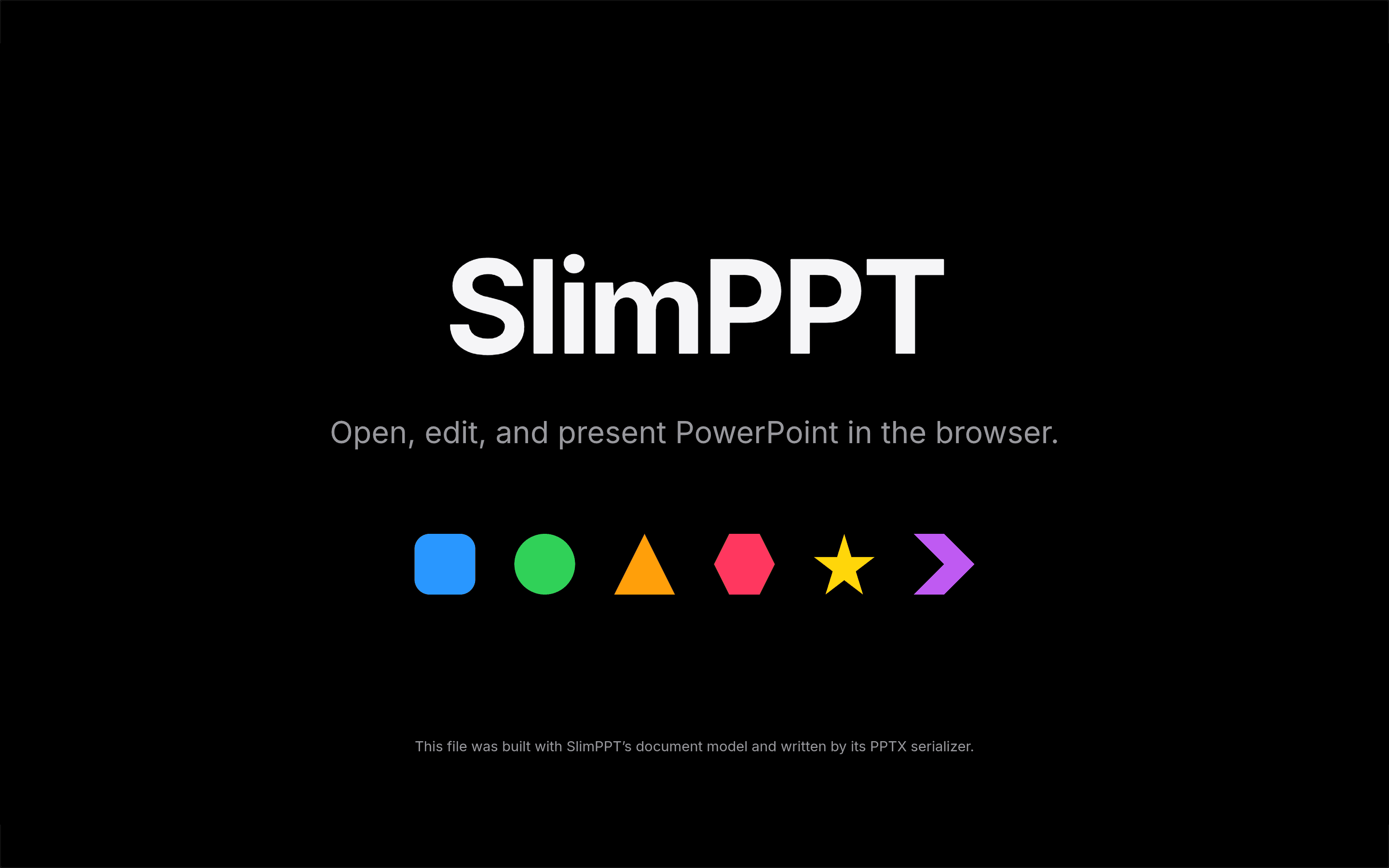
SlimPPT

在线 PPT 生成与演示平台:解析渲染现有 pptx 并保留大部分动画,隐私优先多数功能本地完成——AI 协助开发,beta 免费。

SlimPPT 是一个在线 PPT 生成与演示平台:支持现有 pptx 文件解析和渲染,并且保留了大部分动画——作者直言这块是最难的。设计上隐私优先,多数功能在本地就能做完。 核心能力: pptx 解析渲染:打开现有 pptx 文件,保留大部分动画; 隐私优先:多数功能本地完成,文件不外传; ppt 直播与协作:演示可直播、可协作。 作者 vibe-coded 证据:作者 irvinglove 在 V2EX(https://www.v2ex.com/t/1247909,2026-10-11)原话——“我们在 AI 的帮助下做了一个在线演示平台,支持 pptx 解析和渲染,并且保留了大部分动画(这块是最难的)”。站点 https://slimppt.com 在线可访问(2026-10-13 复核返回 200)。 技术栈:作者未公开声明。当前 beta 完全免费,大部分功能无需注册。

大赏
已上线
教育

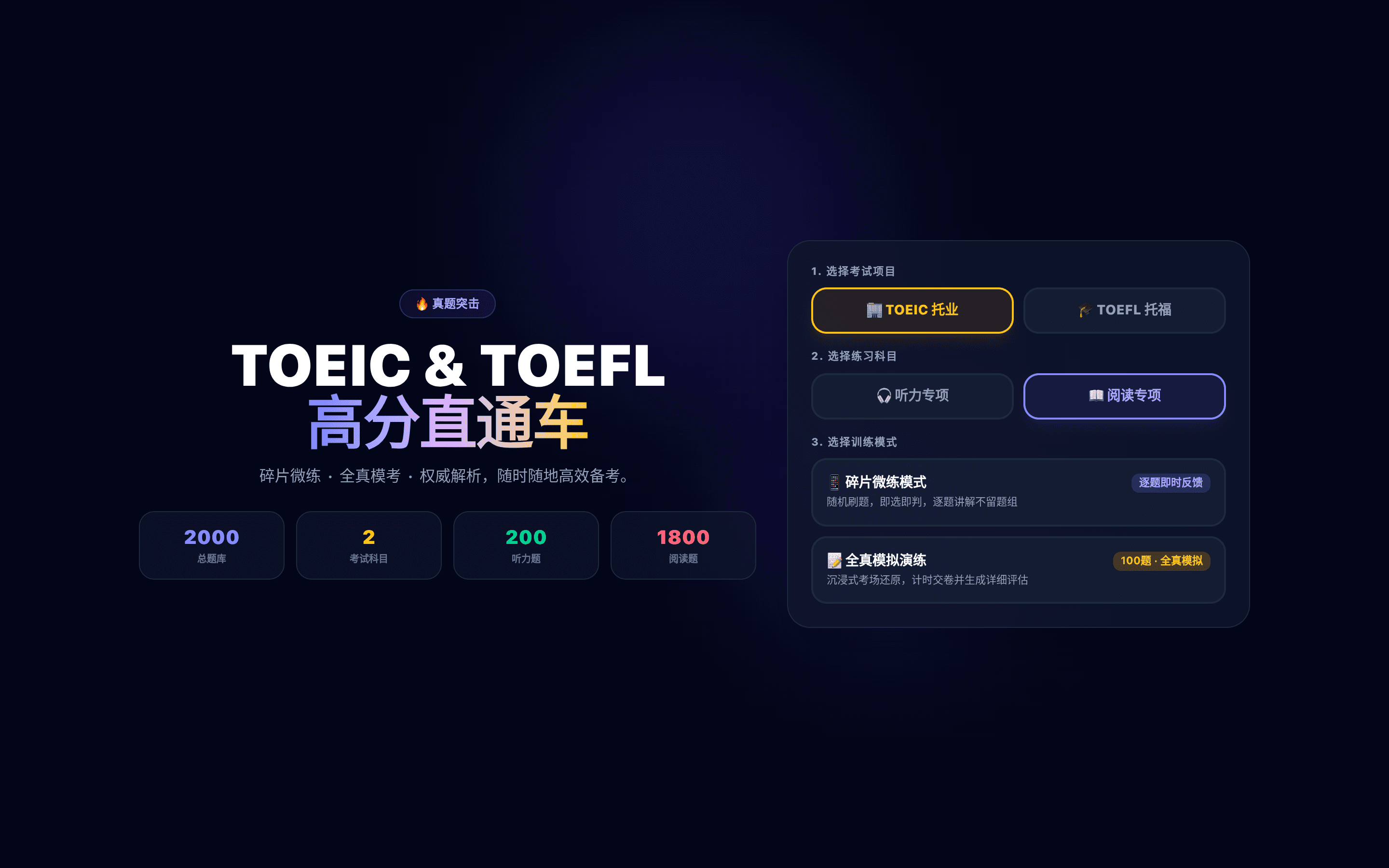
英语练题小站

TOEIC/托福备考小站:2000+ 题库,碎片化微练与全真模考,听力阅读专项、逐题即时反馈——作者边学英语边 Vibe 出来的练题工具。

英语练题小站(ep.shuxia.site)是一个 TOEIC / 托福备考小站:2000+ 总题库,支持考试项目—科目—模式三级选择,既可以做碎片化微练,也支持全真模考。听力、阅读专项练习,逐题即时反馈,适合每天抽几分钟刷题的备考生。 核心能力: 2000+ 题库:覆盖 TOEIC 与 TOEFL; 三级选择:考试项目—科目—练习模式,快速定位想练的部分; 专项与模考:听力/阅读专项微练 + 全真模考评估; 即时反馈:逐题对错与解析,做完即知道问题在哪。 作者 vibe-coded 证据:作者 lostab 在 V2EX(https://www.v2ex.com/t/1247838,2026-10-12)原话——“最近在学英语, Vibe 了一个练题的小东西”。站点 https://ep.shuxia.site 在线可访问(2026-10-13 复核返回 200)。 技术栈:作者未公开声明。闭源小站,免费使用。

大赏
已上线
商业claude

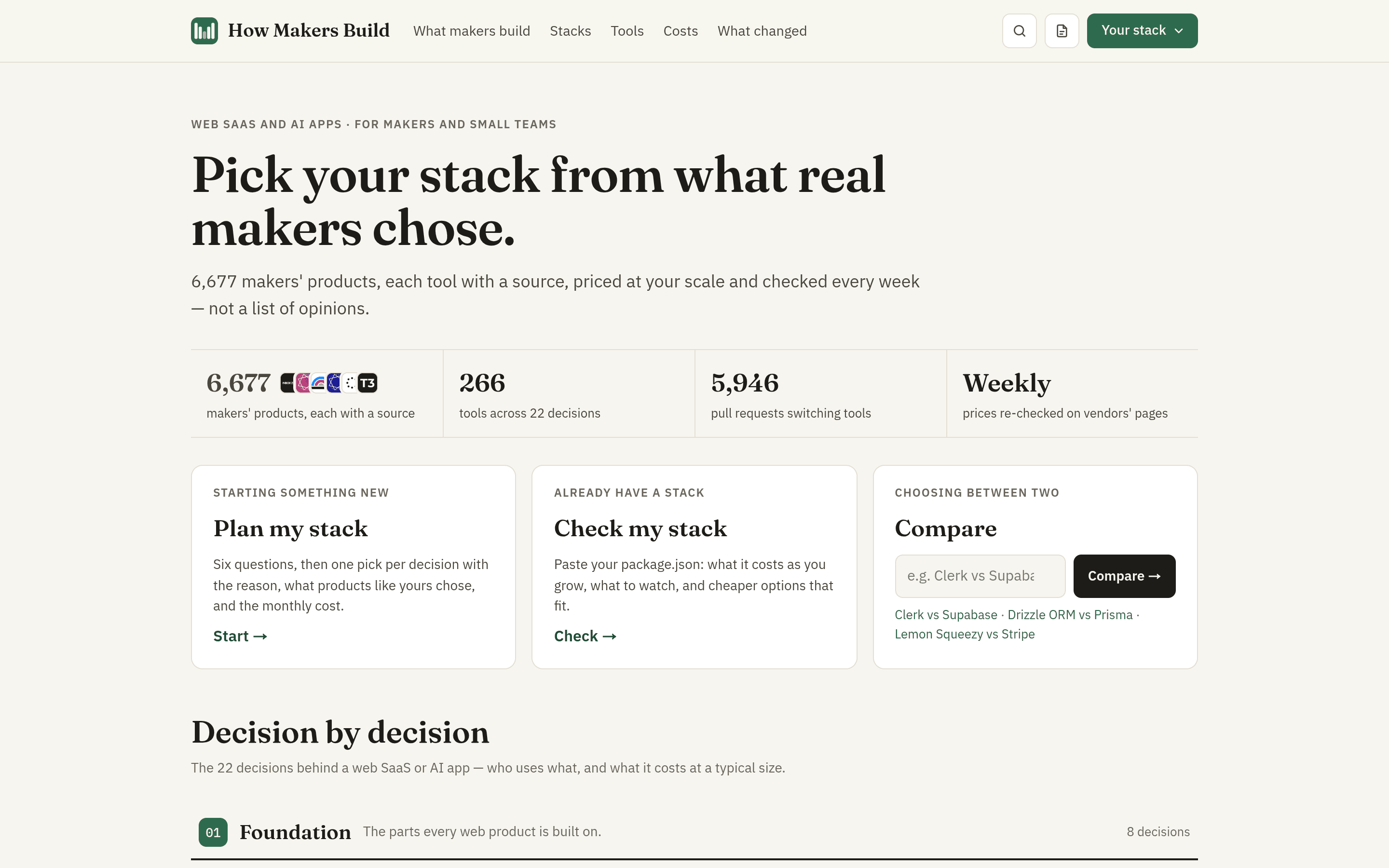
HowMakersBuild

独立产品技术栈情报站:6677+ 产品真实选型全链可核实证据,Plan my stack 选型推荐+价格计算器——作者用 Claude AI coding 搭起。

HowMakersBuild 是一个独立产品技术栈情报站:解决做 SaaS 或 AI 应用时选型的纠结——它收集 6677+ 独立产品实际在用什么工具,每条"谁在用什么"都链到可核实的证据源(产品自公布的子处理方清单、网站脚本与 DNS 记录、创始人原话、招聘帖、公开仓库依赖),覆盖 266 个工具、29k 条用法,每条都标了日期。 核心能力: Plan my stack:答几个问题(语言、用不用 AI、怎么收费),给出每个决策的推荐和理由,并算出从上线到 10 万用户各阶段的月账单; Check my stack:贴一个 package.json,看成本、更便宜的同类选择与坑点,还能生成给 AI 编程工具用的 AGENTS.md; 对比页:如 Supabase vs Firebase,从 GitHub PR 统计迁移方向; 价格计算器:用量增长后谁更便宜一算便知。 作者 vibe-coded 证据:作者 cobiao 在 V2EX(https://www.v2ex.com/t/1247980,2026-10-12)自述 stack 时原话——“先公布我自己的 stack 哈:Astro 静态站……另有一个 Node 写的 data pipeline……AI coding 用的 claude。” 技术栈:Astro / Cloudflare Pages / Node.js(作者声明)。AI 工具:Claude。网站 2026-10-11 在 Fazier 拿下日榜第一,目前英文版在线、中文版校对中。

大赏
已上线
开发工具claude-code

GHDash

Native macOS/iOS/terminal dashboard for your GitHub PRs, review requests and pending Actions runs — 100% vibe-coded with Claude Code.

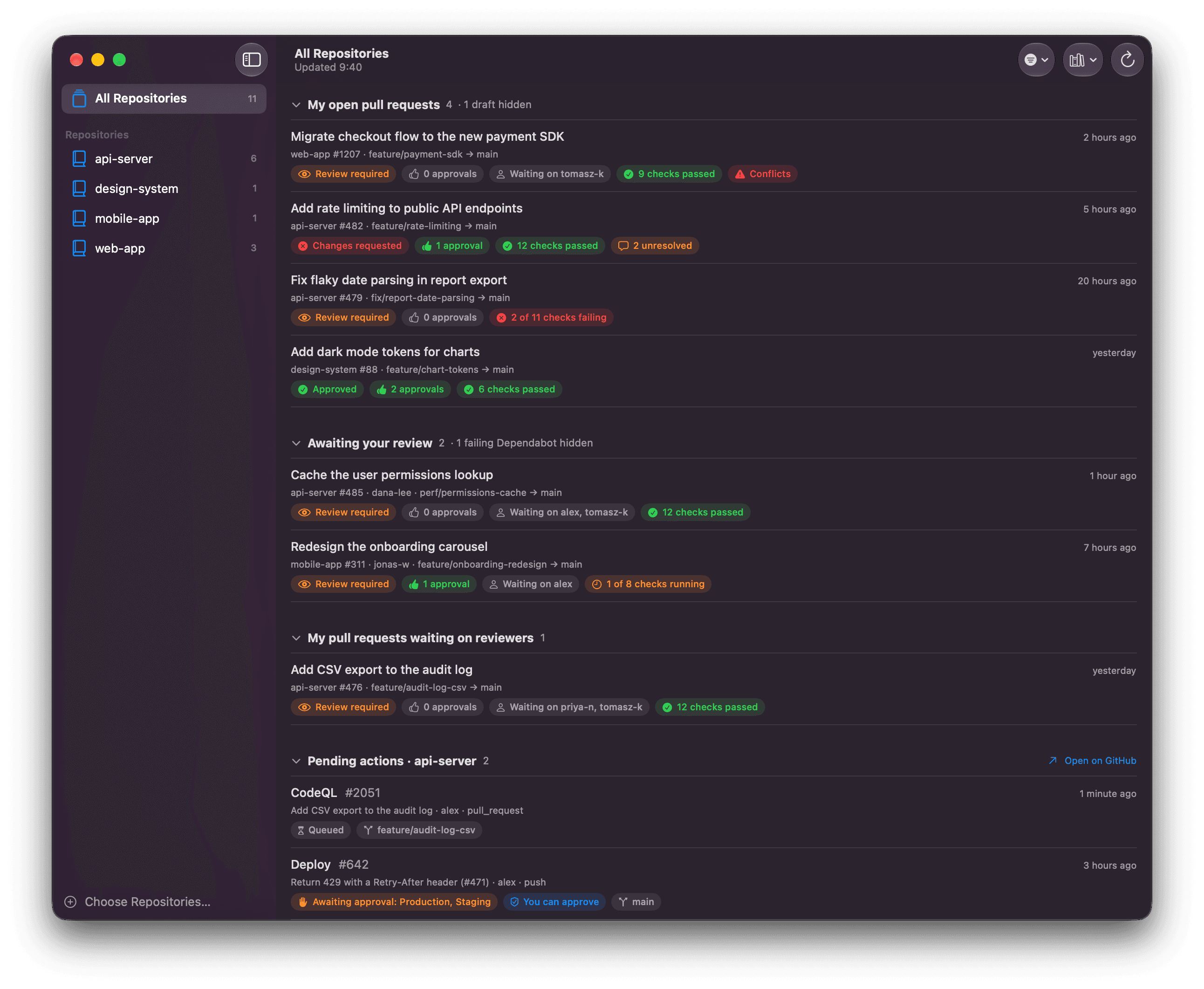
GHDash is a small native dashboard for your GitHub work across the repositories you choose. It ships as three apps sharing one data layer: a native macOS app, an iPhone/iPad app, and a terminal TUI (ghdash). The whole point is to show everything that's waiting for you, at a glance. What it shows: My open pull requests – with draft, review, approval, check, conflict and unresolved-thread status; Awaiting your review – PRs where your review is requested, plus Dependabot PRs nobody was asked to review; My pull requests waiting on reviewers – your PRs with nothing left for you to do; Pending actions – GitHub Actions runs not yet finished, including deployments awaiting approval. Every row opens the PR or workflow run on GitHub (the app itself is read-only). A sidebar scopes the dashboard to one repository with per-repo item counts; the Dock badge counts the things waiting on you; data refreshes every three minutes. The Mac app signs in through the GitHub CLI (gh auth token, storing no credentials itself), the iOS app uses a personal access token kept in the device Keychain, and a demo mode with made-up data lets you try everything without signing in. Vibe-coded evidence, verbatim from the author (README of https://github.com/markuspalme/gh-dash): "This project is 100% vibe-coded: all of the code was written by Claude Code from conversational prompts." The repository was created on 2026-10-02 and was still being pushed to on 2026-10-06 (17 commits). Tech stack (as stated by the author): SwiftUI views shared by the macOS and iOS apps; the terminal app built with TermKit. AI tool: Claude Code. Open source on GitHub (2 stars).

大赏
已上线
健康健身

称伴 ScaleMate

云麦体脂秤的蓝牙同步桥:称重后自动确认,经 Health Connect 写入 Google Health,Material 3 深色模式、中英双语,开源免费。

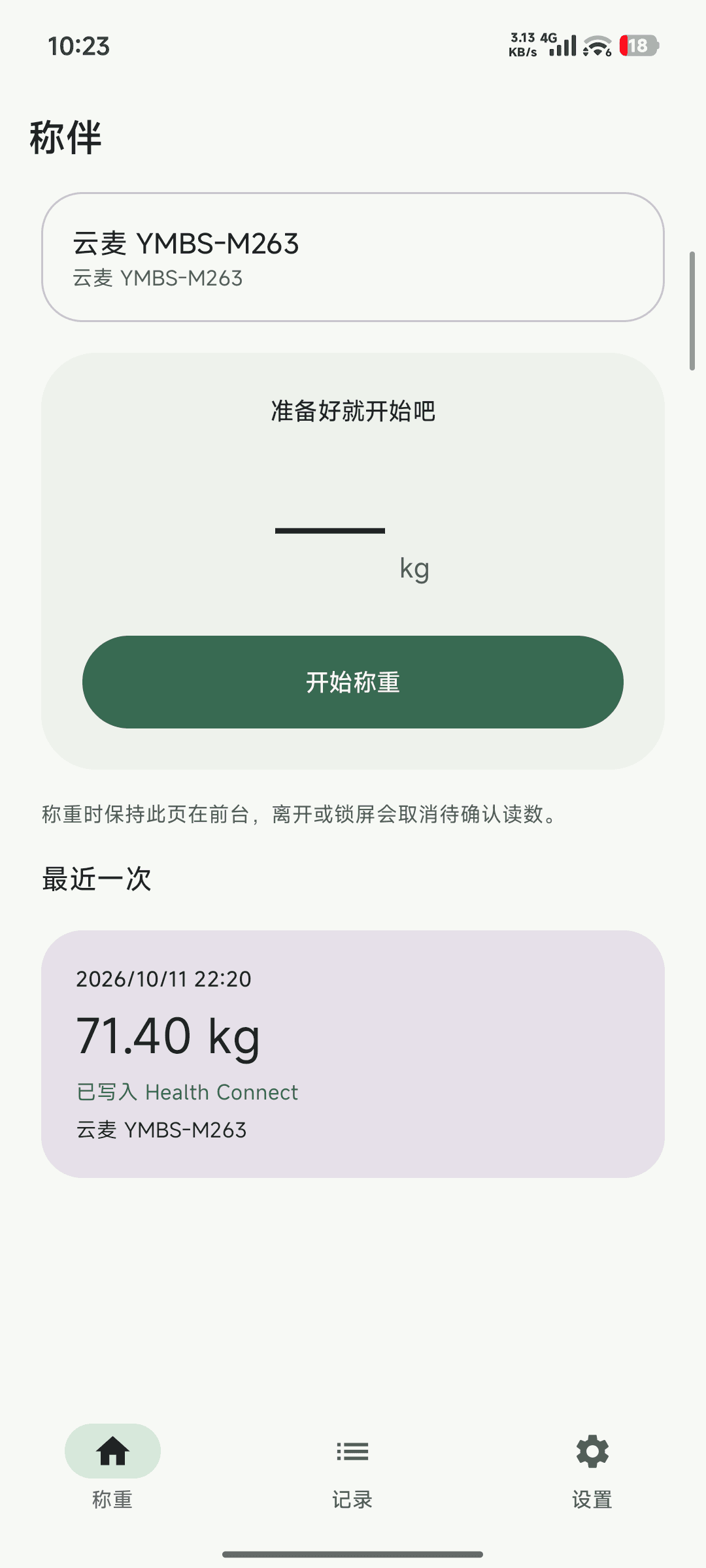
称伴 ScaleMate 是一款开源 Android 应用,解决一个很具体的问题:云麦智能体脂秤 3 SE 的数据无法自动同步到 Google Health,之前每次称完都要手动录入。作者周末用 Vibe 的方式写了这个 App——蓝牙连接体脂秤,称重读数经确认后通过 Health Connect 写入 Google Fit / Google Health,体脂秤“终于复活了”。 核心能力: 蓝牙直连体脂秤:适配云麦 YMBS-M263,称重时保持页面在前台即可自动读取; 自动写入 Health Connect:每次称重本地保存并同步到 Google Health,无需手动录入; 称重记录:历史记录按时间倒序排列,标注每次写入状态; Material 3 设计:深色模式、中英双语,界面干净现代。 作者 vibe-coded 证据:作者 rccoder 在 V2EX(https://www.v2ex.com/t/1248020,2026-10-12)原话——“于是周末 Vibe 了个 APP,把体脂秤数据同步到 Google Health,体脂秤终于复活了”。仓库 https://github.com/rccoder/ScaleMate 创建于 2026-10-11,当天持续 push,公开可访问。 技术栈:作者未公开声明(仓库语言显示 Kotlin,仅供参考)。开源免费。