项目大厅

探索全部独立开发者项目与共创求助

当前筛选:大赏展示
大赏
已上线
设计创意claude

Tellcut

AI 动效视频生成器:上传截图或一句话,生成 10–30 秒 1080p 动效视频;不满意处点时间线局部改、其余不动,版本可对比回退。

Tellcut 是一款 AI 动效视频工具:上传一张截图或写一句话,就能生成一段 10–30 秒的动效视频(1080p MP4)。它解决的是 AI 视频最痛的“改”的问题——想换一个字、把某个镜头放慢一点,传统方案要整条重新生成,改完别的地方还可能变样;在 Tellcut 里,不满意哪里,在时间线上点一下那一段、说要怎么改,就只改那一段,其他地方纹丝不动。 核心能力: 截图/一句话 → 动效视频:文字进场、画面切换、数字跳动等动效由代码逐帧写出,界面、文字、颜色原样“动”起来,截图里的字和按钮不会糊; 局部精准修改:在时间线上选中不满意的片段,用自然语言描述改法,只重绘该段; 版本管理:每次修改自动留版,可前后对比,改坏了随时回退; 多规格输出:16:9 / 9:16 / 1:1,10–30 秒,1080p MP4,主打 App 上线宣传、产品演示与广告投放。 作者 vibe-coded 证据:作者 zy199333210 在 V2EX(https://www.v2ex.com/t/1248246,2026-10-12)原话——“用 Claude Opus 5.5 做了个动效视频工具,哪里不满意只改哪里,不用整条重新生成”;正文写道:“前段时间 Claude Opus 5.5 出来,它写代码做动效很强……于是我把它做成了一个网页”。 技术栈:作者未公开声明。AI 工具:Claude(Claude Opus 5.5)。官网 https://tellcut.app(Studio / 定价 / 博客均在线)。

大赏
已上线
工具claude-code

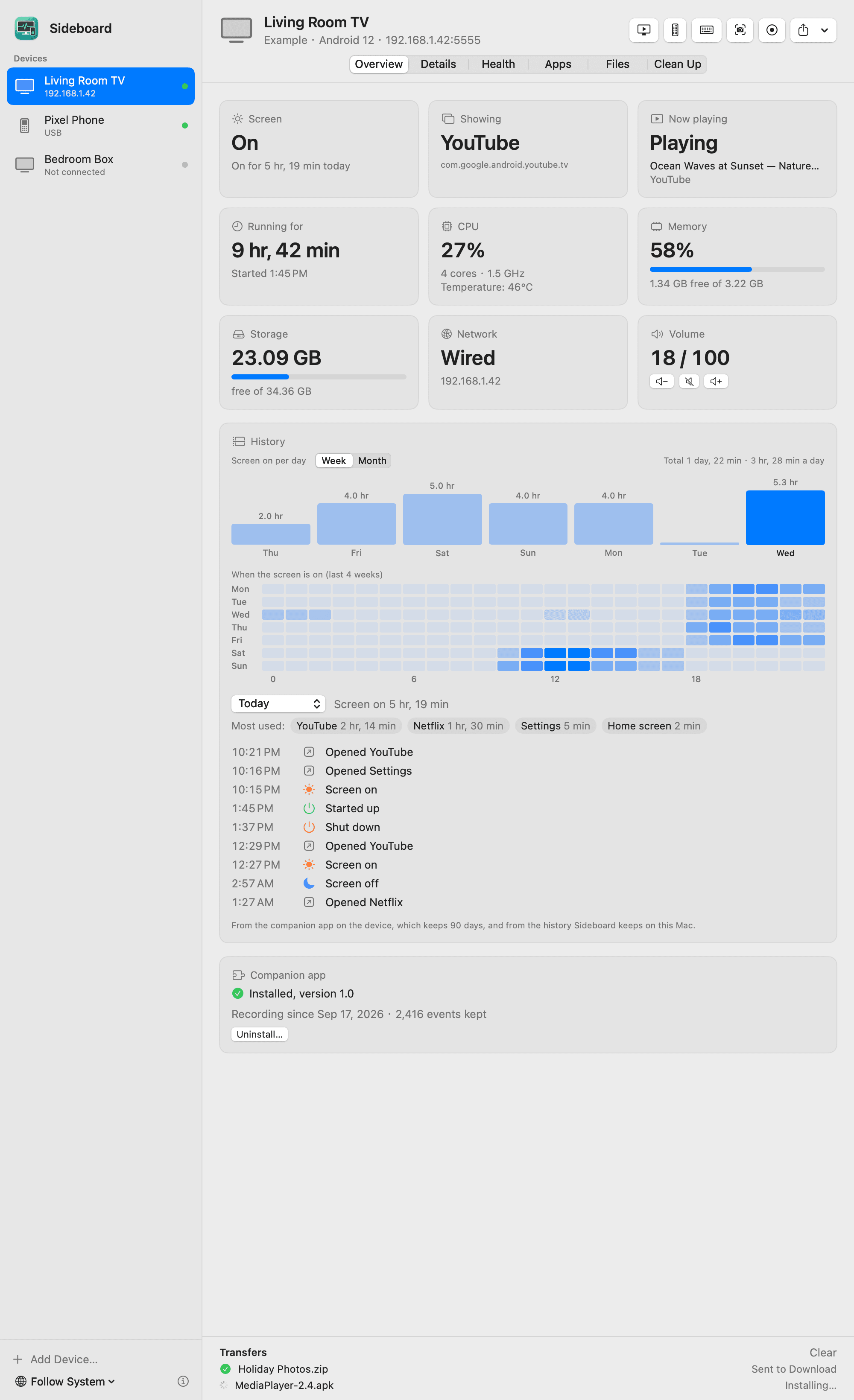
Sideboard

在 Mac 上用 adb 可视化管理安卓电视/手机/平板的开源应用:屏幕状态、功耗内存、24 小时开关机记录、实时投屏操控、文件互传。

Sideboard 是一个开源 Mac 应用:在 Mac 上通过 adb 可视化管理安卓电视、盒子、手机和平板。起因很生活化——作者用 adb 从安卓电视里读到了大量信息,但全藏在命令行里,于是“用 Claude Code 写了个 Mac App,把这些都摆出来”。 它能显示设备的屏幕状态、前台 App、正在播放的内容、运行时长、CPU/内存/存储/网络/温度;保留 24 小时开关机记录和按周/月的使用热力图;支持实时投屏操控、遥控器、截屏录屏、App 管理、文件互传;还能常驻菜单栏做异常告警。所有数据都不出 Mac,MIT 开源。 适合谁 家里有安卓电视/盒子、想知道它到底在干什么的人:孩子看电视看了多久、盒子为什么卡、半夜是不是自己亮了——Sideboard 把这些变成一张张卡片和一张热力图。对开发者来说,它也是一个 adb 可视化调试台:装包、传文件、看进程,一行命令都不用敲。 上手 GitHub 仓库 zhaoweijia1997/Sideboard,Mac App,设备端无需安装任何东西(可选装一个伴侣 App 获得更长的历史记录和应用图标)。README 里有完整的功能截图。

大赏
已上线
AI Agent

Artiface

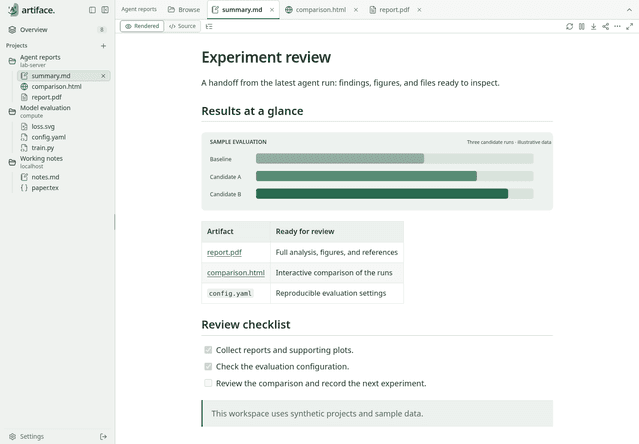
在浏览器里统一查看本地/远程服务器上 AI Agent 输出内容的自托管阅读器:md/html/pdf/代码多格式、多项目多标签页、夜间模式。

Artiface 是一个自托管的阅读器:在浏览器里统一查看本地或远程服务器上 AI Agent 输出的内容。作者的原话很直接——“基于(Vibe coding) Go 和 React,Apache 2.0”。一次部署,之后在网页上随时随地阅读 Agent 生成的报告、对比页和文件,不用再 SSH 进服务器翻目录。 它支持 md、html、pdf、图片、代码等多种格式渲染,多项目多标签页并列查看,还能看 Git 状态、自动刷新、有夜间模式。作者自述是自己先用了一个月、觉得顺手才开源出来的——这是一个先解决自己问题、再分享出来的工具。Docker Compose 一键部署,Apache 2.0 开源。 解决什么痛点 用 AI Agent 跑实验、做调研的人都有这个烦恼:Agent 在服务器上吐出一堆 summary.md、comparison.html、report.pdf,你得一个个 scp 下来或者进终端看。Artiface 把这些输出变成一个可浏览的工作台:左侧项目树、顶部标签页、正文渲染,配上“结果一览”式的卡片——等于给 Agent 的产出配了一个只读仪表盘。 上手 GitHub 仓库 i207M/artiface,Go + React,Docker Compose 部署。把 Agent 的输出目录指给它,打开浏览器就能看。

大赏
已上线
教育

微诗

2015 年的老牌诗词 App 沉寂十年后被作者和 AI agent 从零重写:每日一诗配山水、演唱版朗读、程序化山水诗笺可做壁纸。

微诗是一个 2015 年就上架的全唐诗/全宋词离线诗词 App。沉寂十年之后,2026 年 10 月作者宣布把它和 AI agent 一起从零重写了一遍——用的是 SwiftUI + WidgetKit,“旧代码一行没留”。App Store 的 7.2.0 版本(2026-10-02 更新)就是这次重写的成果,目前在架可下载。 重写版每天为你选一首诗:按节气与心境配一首,配一幅当天生成的山水;有演唱版逐句高亮朗读;还有“画屏”功能——把一首诗做成程序化的山水诗笺,可以存为壁纸、桌面组件或锁屏。基础功能完整免费,音乐生成部分按买断付费。作者在 V2EX 帖子里坦言这次重写按 API 价折算的 token 成本约 2 万美元,功能只用了几周就做齐——AI 负责写代码,人负责定方向和验收。 一个老 App 的 AI 重生 这不是从零做一个新 App,而是把一个有十年历史的老应用彻底推倒重来:UI、交互、功能全部重新设计,旧代码一行不留。对很多有老项目的独立开发者来说,微诗的这次重写是一个现成的参考样本——AI agent 能不能接手一个真实产品的完整重构?作者的答案是可以,而且几周内做完。 上手 iOS App Store 搜索“微诗”即可下载,离线可用。每天打开看一首配山水的诗,或者把画屏设成锁屏,让手机每天换一句诗。

大赏
已上线
工具claude-codecodex+3

Caspian

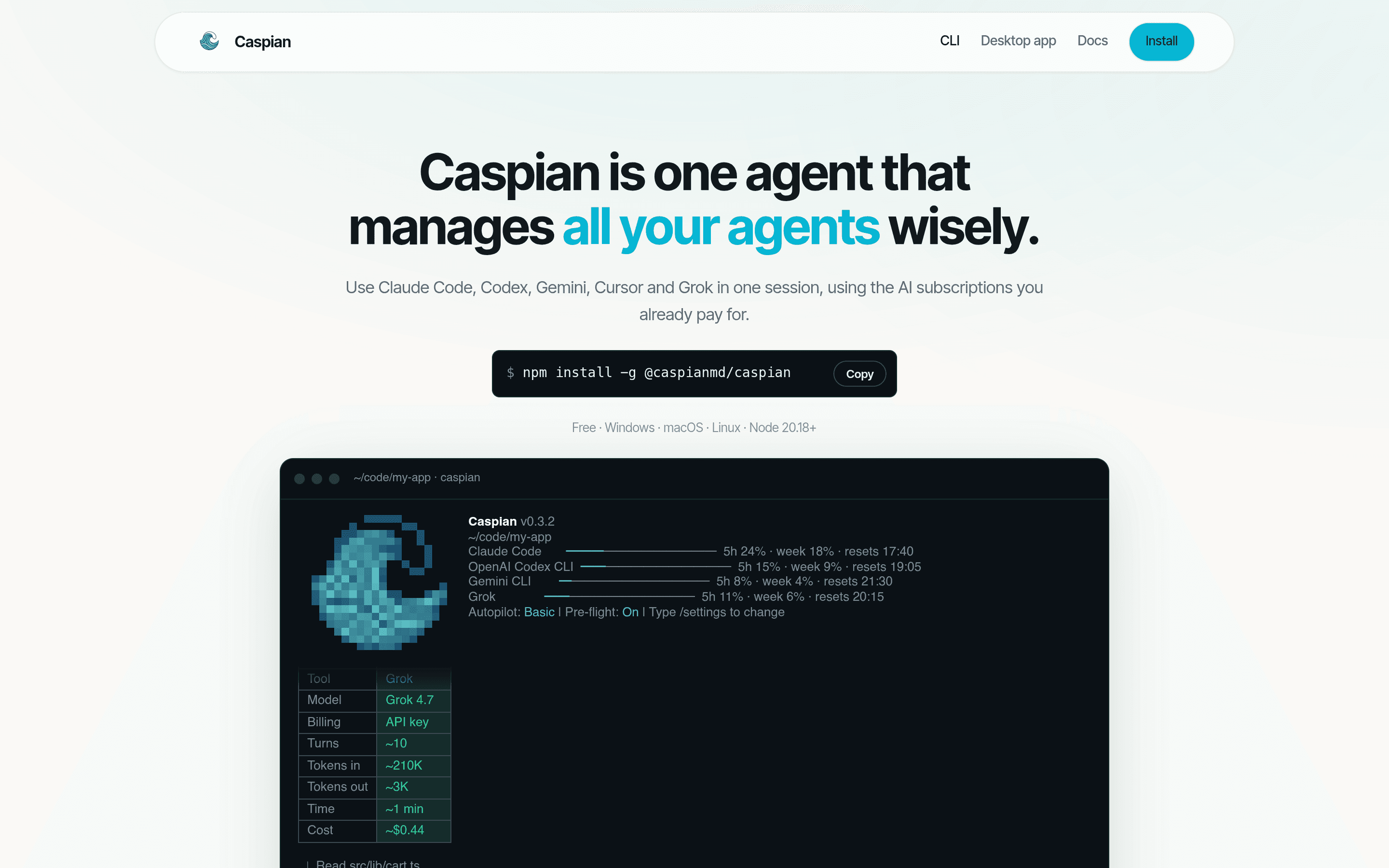
One agent to manage all your AI coding agents — Claude Code, Codex, Gemini, Cursor and Grok in a single session with pre-flight cost estimates.

Caspian is one agent that manages all your AI coding agents: it runs Claude Code, Codex, Gemini, Cursor and Grok in the background, routes each task to the cheapest or strongest model depending on difficulty, and keeps one shared memory file (.caspian/context.md) so context survives across tools. It ships as both a CLI (npm install -g @caspianmd/caspian) and a desktop app, free for Windows, macOS and Linux, requiring Node.js 20.18+. The pitch resonates with anyone who vibe-builds: the author's own Hacker News post opens "For someone who vibe builds almost all the time…" and describes building Caspian to manage the chaos of running several agents at once. Features include prompt refinement before a task runs, a pre-flight cost estimate for every run, usage analytics with live quota bars for each subscription, and email notifications when agents finish. Why it exists The vibe-coding workflow has a coordination problem: you pay for multiple AI subscriptions, each with its own quota, memory and CLI quirks, and you context-switch between them by hand. Caspian's answer is a single session layer on top: tell it what to do, it picks the right tool and model, shows you what it will cost before it starts, and writes a session brief you can review before anything is built. Built for the multi-agent reality The official screenshots show the real thing — a CLI dashboard with per-tool quota bars (Claude Code, OpenAI Codex CLI, Gemini CLI, Grok) and a desktop workbench that drafts project briefs from your agent sessions, listing what was asked, what was decided, and what files changed. It is a product made by and for people who build with AI agents all day.

大赏
已上线
金融财务

Ekselio

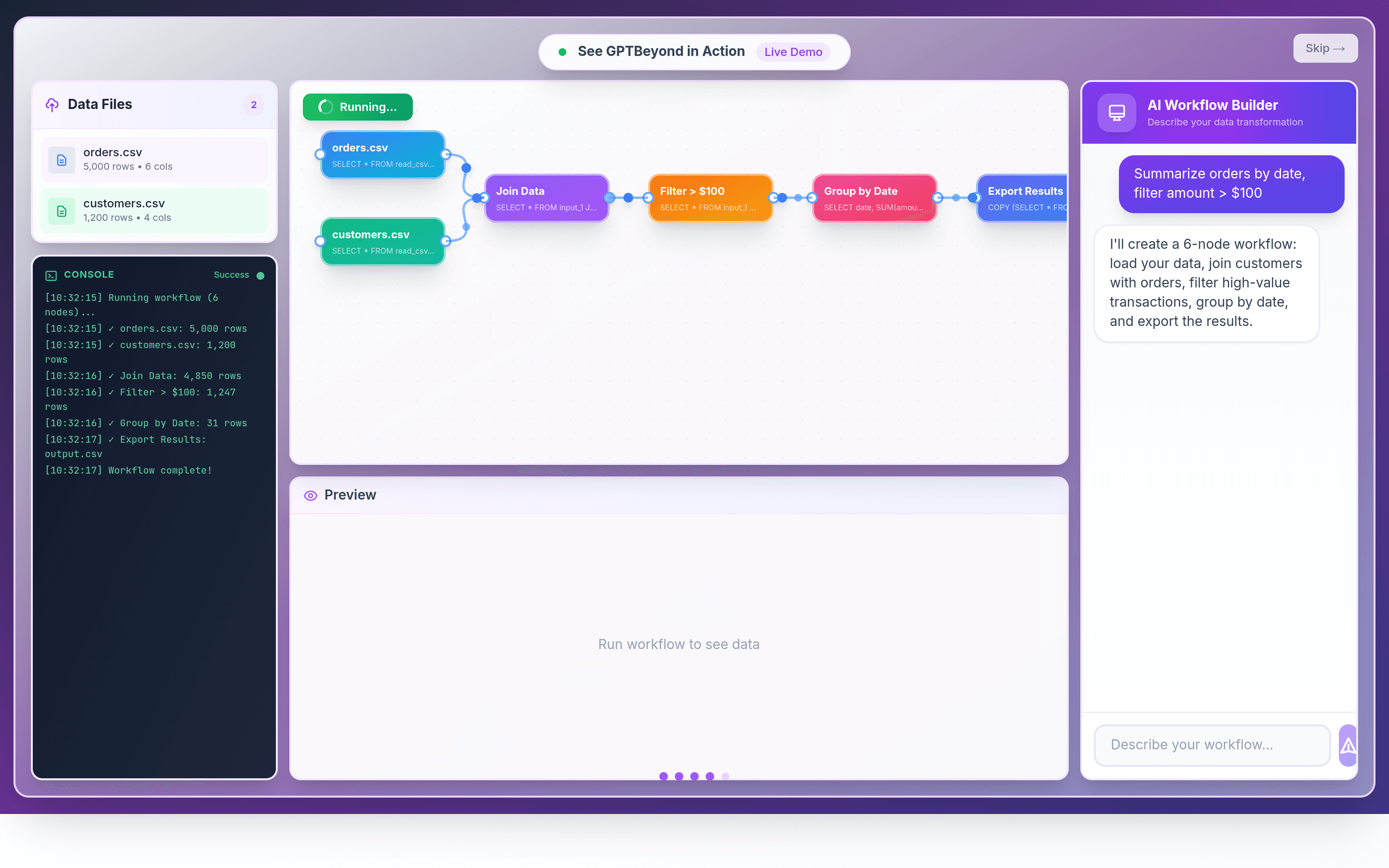
"Lovable for finance workflows": a local-first AI workflow orchestrator that runs financial data pipelines in your browser.

Ekselio is pitched as "Lovable for finance workflows" — a local-first AI workflow orchestrator built by a finance veteran, not a software engineer. You describe a data transformation in plain English, and its AI workflow builder compiles it into a visual pipeline: load CSVs, join customers with orders, filter high-value transactions, group by date, and export the results — all executed locally in your browser. The demo runs a full 6-node workflow on real data (5,000-row orders, 1,200-row customers) and completes it in seconds with a console that narrates every step. Workflows can be saved and re-run next month with one click — no token burn for the same job twice — and exports come as Excel data packs with M code, which keeps auditors happy. It plugs into QuickBooks and pulls from 800,000+ FRED macro-economic series plus stock data. Author kdautaj spent 20 years in finance and M&A before building Ekselio as a side project. On Hacker News he frames it explicitly against other vibe-coding tools: "Differently from other vibe coding tools, this is local first…" — the execution never leaves your machine, which is the whole point when the data is a company's financials. Why it stands out Most AI-for-finance products are thin chat wrappers over a spreadsheet. Ekselio's bet is the opposite: a durable, re-runnable workflow canvas where the LLM does the schema mapping once and the browser does the computation every month after. For finance operators who re-run the same close-the-books routines on a schedule, that split between AI setup and local execution is the right division of labor.

大赏
已上线
社交社区claude

Quaesito

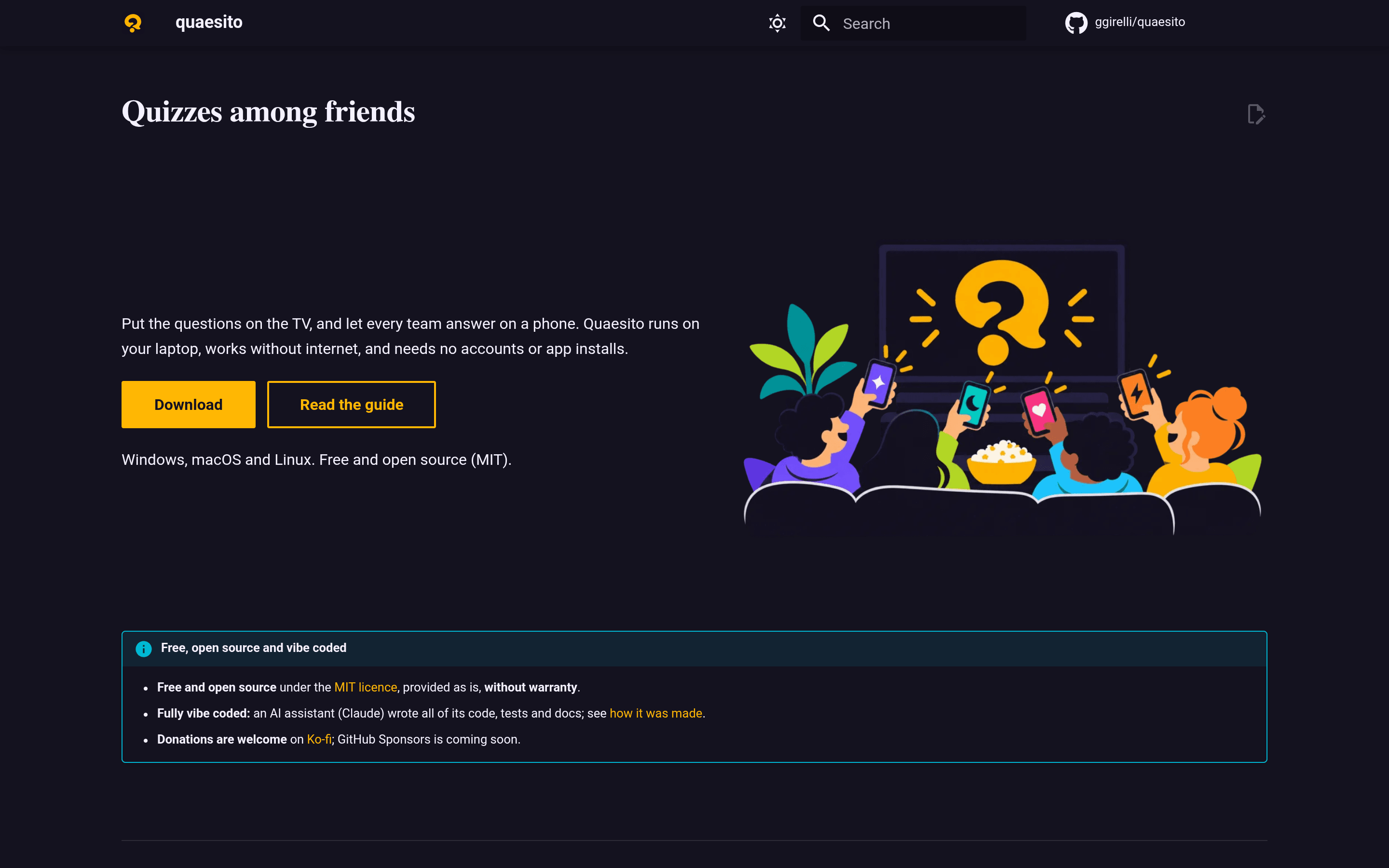
Self-hosted quiz-night party game: host questions on your laptop, friends answer by phone — no internet, no accounts, no app installs.

Quaesito is a self-hosted quiz-night party game: the host runs the quiz on their laptop's browser, the questions go up on the TV or projector, and friends join from their phones by scanning a QR code — teams, timed rounds, scoring, a live leaderboard and a winners' podium included. There is no internet requirement, no accounts, and no app to install. Question types cover text, images, video and audio rounds. In the author's own words, straight from the README: "Fully vibe coded: an AI assistant (Claude) wrote all of its code, tests and docs." The repository — created in October 2026 — already has 145 commits and 3 releases, so this is not a one-shot demo; it is being actively built out with Claude writing the tests and documentation alongside the code. How a game night works The host opens the laptop app and prepares a quiz deck; the board renders on the big screen while each team plays from a phone browser. Rounds are timed, scores roll in live, and the night ends with a podium animation — a full party format without a single install. Because everything runs locally, it works in cabins, basements and bars with dead Wi-Fi. Under the hood Quaesito is written in Rust with the Dioxus UI framework, ships as native binaries for Windows, macOS and Linux, and is released as free and open source under the MIT license. The documentation site even walks through exactly how it was made with AI assistance, making the repo a case study in what a fully vibe-coded codebase can look like when tests and docs are written too.

大赏
已上线
音乐音频claude-code

VoiceStudio

开源本地版 ElevenLabs:桌面端声音克隆、视频配音、听写转录全家桶,646 种语言、16 个 TTS 引擎,纯本机运行无账号无 API Key,GitHub 近 6 万 star。

VoiceStudio 是一个开源、完全本地运行的 ElevenLabs 平替:桌面应用,一次装好就能做声音克隆、声音设计、视频配音、实时听写、转录和有声书制作,覆盖 646 种语言。它最大的标签是“你的声音,你的机器”——所有推理都在本机完成(CUDA / Apple Silicon MPS / ROCm / CPU 自动检测),不需要 API Key、不需要注册账号、没有云端依赖,隐私敏感的音频工作流可以放心跑在本地。 这个项目是 AI 构建的典型代表:官方仓库 debpalash/VoiceStudio 的大量 PR 自带 “🤖 Generated with Claude Code” 标记,仓库内配有完整的 CLAUDE.md / AGENTS.md agent 协作规范,是 AI 深度参与开发的开源项目。项目 2026 年 4 月创建,已发布 42 个版本,目前在 GitHub 上收获近 6 万 star,社区相当活跃。 能做什么 声音克隆:给一段干净的参考录音,就能克隆出可用于配音的声音,内置演示声音开箱即用。 声音设计:用文字描述想要的音色,生成全新的声音。 视频配音:上传视频或粘贴 YouTube 链接,转录 → 翻译 → 按时间轴生成配音,一键把英文视频翻成西班牙语、中文、日语等多语言版本。 实时听写与转录:悬浮窗听写,会议、采访、灵感记录直接转文字。 有声书与批量任务:长文本分章节生成、批量配音,播客和自媒体的生产利器。 引擎与语言 内置 16 个 TTS 引擎、11 个 ASR 引擎,可在模型目录中一键切换(Ctrl/Cmd+E),646 种语言的实际覆盖取决于所选引擎。模型、声音、工程和输出默认全部保存在本机。 安装与平台 支持 macOS(Apple Silicon)、Windows 10/11、Linux,一行命令安装:curl -fsSL https://voicestudio.sh/install | sh,也有 dmg / exe / AppImage / deb 安装包和 Docker 部署方式。Intel Mac 只能跑 UI 界面,需要连接远程后端。 给开发者和 Agent 除了桌面应用,还提供本地 REST / SSE / WebSocket API、OpenAI 兼容的音频 API,以及 MCP Server——可以直接让 AI Agent 驱动它做配音和转录。官方还提供了 agent 安装指南,一句 prompt 就能让 Claude Code、Codex、Cursor 帮你装好并验证。 许可证 应用本体为 AGPL-3.0 开源(含商业使用的合规条件);下载的模型权重保留各自上游许可。注意:克隆他人声音请务必获得授权,负责任地使用。

大赏
已上线
音乐音频

Virtual Home Studio

A browser-based vinyl turntable simulator: drop in an MP3 or WAV and play it like a record — 33⅓/45/78 RPM, scratching, pitch control, all decoded locally.

Meet the VHS-42069, a fictional direct-drive turntable living in your browser. Virtual Home Studio is a full vinyl turntable simulator: drag an MP3 or WAV file onto the page and it becomes a record you can play, scratch, pitch-bend, and listen to — with the kind of analog ritual that usually costs four hundred dollars and a shelf full of shelving. The origin story is the best part, and it comes straight from the author: "This is 100% vibe coded and I did this because I didn't want to buy a turntable for my home lab lol." The site's hero line says it louder: "Why spend $449 on a turntable when you can vibe code one for $10?" It's the purest kind of indie project — a real itch, scratched with a prompt, shipped to GitHub Pages in about a day of commits. How it works Open the page, pick Local File from the source chooser (or drag a file anywhere onto the deck), and your audio is decoded and played entirely in your browser. The README is explicit: your music stays on your device — nothing is uploaded to any server. A bright blue glow in the empty state points you at where to begin, and the transport bar under the deck gives you Play, a seekable timeline, volume, and record management (Customize / Replace / Eject). What makes it sing Real turntable controls. 33⅓, 45, and 78 RPM — yes, 78, via the classic trick of pressing both speed buttons at once. Pitch fader with tempo range selector, Quartz lock to hold the nominal speed, and seven speed/pitch presets (plus Original to reset) where the physical fader visibly glides into place. Scratch and scrub. Drag the vinyl with the stylus down to scratch, drag the timeline to scrub, drag the tonearm to another groove or lift/lower the stylus with CUE. Play and Pause even reproduce the motor spin-up and slowdown of real hardware. A loving simulation of imperfection. This is where it gets nerdy in the best way: record condition from Mint to Poor adds clicks and crackle, wow/flutter sliders, off-center pressing simulation, surface texture, and cartridge character. You can tune exactly how worn your virtual record sounds. Make it yours. Eight turntable finishes (including Black, Red, and the default Silver), plus vinyl and label colors that persist through record changes in the session. Keyboard-first. A built-in "How to Play" visual cheat sheet documents every shortcut. Under the hood The author describes the stack simply: FastAPI serves plain HTML, CSS and JavaScript — there is no frontend build step. The hosted version on GitHub Pages is a static site (Python is only needed if you run the local dev server), and the repository ships with acceptance tests, DSP tests, and a reference document on hardware geometry and simulation assumptions. It was built in 19 commits over two days and released under MIT. Virtual Home Studio is a reminder of what vibe coding is genuinely good at: a small, joyful, physically-grounded toy that turns an ordinary evening of music listening into something you touch. If you've ever wondered what your MP3s would sound like with the needle dropped and the quartz locked, drop one in.

大赏
已上线
娱乐codexclaude-code

God's Eye View

Browser spy-satellite sim: live flights, ships, satellites, quakes, fires, CCTV on a photorealistic 3D Earth — voice-controlled, vibe-coded in 3 days with AI.

God's Eye View (formerly WorldView) is a spy-satellite simulator that runs in your browser — with one twist: every pixel of data is real. Built by Bilawal Sidhu, it layers live flights, ships, satellites, earthquakes, wildfires, and public cameras onto a photorealistic 3D Earth, all wrapped in a military-grade HUD with night vision, thermal imaging, and voice control. It has earned 51,857 GitHub stars, hit #1 on GitHub Trending (daily and weekly) in August 2026, and placed #8 Product of the Day on Product Hunt. In the author's own words: "This is WorldView. Satellite tracking, military flights, live CCTV, street traffic, night vision, and thermal, all vibe coded in 3 days with AI agents." He later explained on the Riley Brown podcast that he built it using the OpenClaw harness — "Pi driving Codex and Claude code" — letting AI agents write the bulk of the codebase in a single long weekend. Live layers on a real planet The globe is powered by CesiumJS with Google's Photorealistic 3D Tiles, so cities, terrain, and airports look startlingly real. On top of that world sit the live layers: Live flights — commercial and military aircraft tracked in real time, with the ability to jump between planes and ride along in a full cockpit view. Ships (AIS) — vessels plotted worldwide, plus labeled undersea cable routes drawn beneath the ocean surface. Satellites — track the ISS along its orbital path, follow SpaceX Starlink trains, or replay a Falcon 9 ascent curving into its projected orbit. Earthquakes & wildfires — natural events appear as they happen, with fires glowing as bright detection hotspots. Public CCTV cameras — dive from orbit into a live street camera, e.g. an Austin intersection projected right into the 3D scene. Global radio stations — the entire planet's radio layer can be summoned as another dimension of live data. Look like a spy The sensor-mode switcher is the star of the show: cycle between Normal, NVG night vision, FLIR thermal (including Ironbow palettes), and a retro CRT mode that makes the whole globe feel like a classified terminal. Everything is framed by a slick heads-up display with detection rings, tracking readouts, and "top secret" styling. Talk to the satellite Voice control, powered by the OpenAI Realtime API, is built into the experience. You can speak to annotate landmarks on the 3D city ("mark Zilker Park"), ask for spoken distance measurements across an airport, or request a walking route and then fly the generated path through the city. It's the closest thing to talking to a movie AI — except the map below is real. Go deeper For the curious: select any aircraft to resolve its recent flight path into stacked 3D loops above the terrain, inspect dense rows of retired planes at the boneyard, or drop from a full airport overhead down to individual taxiway traffic in Google 3D detail. With 817 commits, 4 releases, and active development still merging, the repo keeps growing. Under the hood JavaScript + Vite frontend, CesiumJS globe, Google Photorealistic 3D Tiles, and the OpenAI Realtime API for voice. Open source under the MIT license. Clone it, run it locally, and you own your own spy satellite — the data underneath was always public, and now the interface finally matches the fantasy. From viral build to open source God's Eye View first exploded as a TikTok-built side project — a "satellite tracking, military flights, live CCTV" demo that blew up tech Twitter and YouTube. Community demand pushed Sidhu to open-source it (the repo now carries an "open source reveal" trailer and a community survey), and the code quality turned out to be as serious as the visuals: CI-checked, MIT-licensed, and documented with an extensive media walkthrough. Reviewers and streamers keep coming back to one observation: the build quality doesn't look AI-generated at all — which is exactly the point of modern vibe coding when the harness, the prompts, and the review loop are all sharp. Try it There is no hosted demo — this is a developer toy first and foremost. Clone the repository, follow the README's API-key setup (Google 3D Tiles and data providers each need free keys), run it locally, and within minutes you're orbiting the real world with FLIR on and the ISS crossing overhead. Star it, fork it, and see how far three days of AI-agent coding can really go.

大赏
已上线
效率claude

whrss

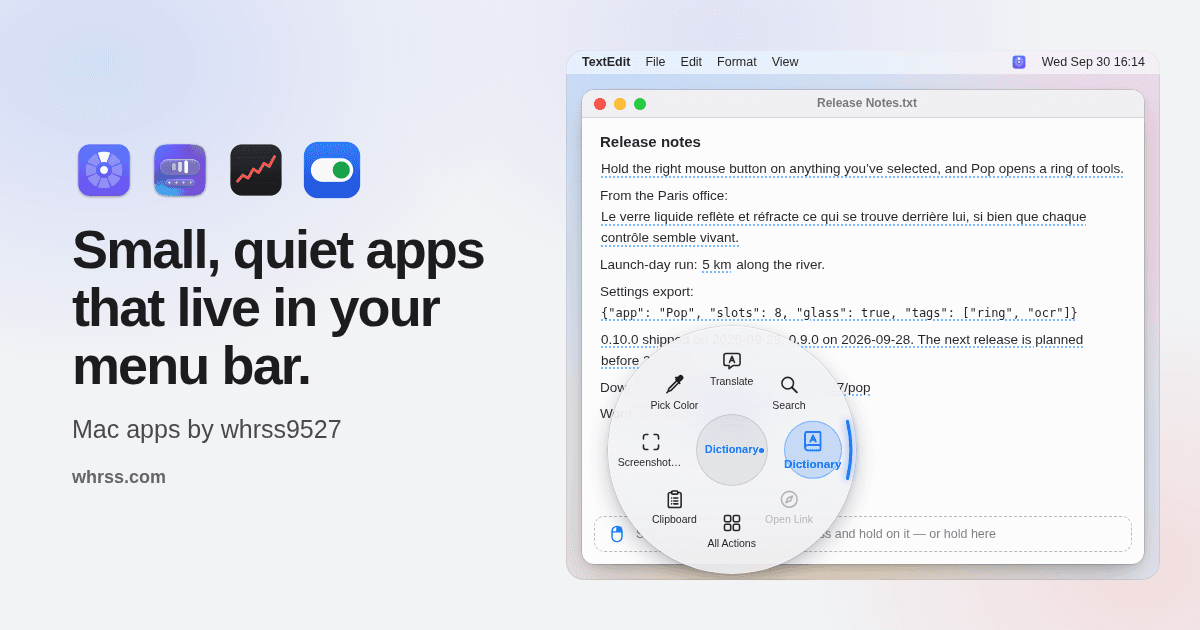
独立开发者用 Claude 一周「蹬」出的四个 macOS 菜单栏原生小工具:Pop 右键圆环工具箱、Meno 图标整理、Stox 股票行情、Proxi 代理一键切换。Swift 原生、签名公证、免费开源。

whrss 是独立开发者 whrss9527 为自己的 Mac 打造的菜单栏小工具四件套:Pop、Meno、Stox、Proxi。四个应用全部原生 Swift 编写,住在 macOS 菜单栏里,做一件事、做好一件事——长按右键唤出圆环工具箱、整理爆满的菜单栏图标、瞥一眼股票行情、一键切换代理。 四个应用,各管一摊 Pop —— 长按右键,圆环工具箱在指针旁边弹开。选中外文直接翻译、选中算式直接出结果,取色、截图、剪贴板历史、OCR 识字都在一个手势里,120+ 动作可自由排布,还支持自己写插件。 Meno —— 菜单栏图标收纳师。图标分成「可见 / 隐藏 / 仓库」三区,随叫随到;开会录屏前一键 Zen 模式,菜单栏瞬间清净。 Stox —— 菜单栏里的行情牌。A 股、港股、美股一眼扫过,持仓盈亏、价格提醒、iCloud 同步都有;不想让别人看见数字,右键图标一键隐藏。 Proxi —— 开发者的代理总开关。系统代理、终端、git、npm 一次全切,还支持按 Wi-Fi 自动切换,Charles / Proxyman / mitmproxy 用户也能直接用。 一周四个 App,靠的是「蹬」 这四个应用最有意思的不是功能,而是它们诞生的方式。作者在 V2EX 上分享时说: 「正好假期 Claude Max20X 的额度也用不完,就想着干脆自己蹬出来。」 「蹬」是社区里的黑话——让 Claude 写代码。一个假期、四款从零到上架的原生 macOS 应用,全部出自一人之手加一个 AI 结对编程伙伴。连 whrss.com 这个官网主页本身都是 AI 做的,作者的评价是:「还帮我做了个主页,还挺满意的哈哈。」 这恰恰是 vibe coding 最动人的地方:它不取代手艺,而是把一个人的手艺放大四倍。四个应用共享一套玻璃质感的设计语言,在 macOS 26 上还会变成 Liquid Glass;Universal 二进制同时支持 Apple Silicon 和 Intel;全部经过 Apple Developer ID 签名与公证,下载解压双击就能用,各应用还会自己检查 GitHub Releases 更新。 免费、开源、不打扰 四个应用全部 GPL-3.0 开源,代码在 GitHub 上公开可读、可自行编译。没有账号、没有统计、没有作者的服务器——数据只留在你的 Mac 或你自己的 iCloud 里。安装也省事,一行 Homebrew 搞定: brew install --cask whrss9527/tap/pop # meno / stox / proxi 同理 或者去官网 whrss.com 点下载按钮,直达各仓库的 GitHub Releases。Mac 用户如果正被杂乱的菜单栏困扰,或者一直想要一个趁手的右键工具箱,这一套值得装上试试——毕竟,它是某个人为自己趁手、顺手开源出来的东西。

大赏
已上线
内容媒体claude-code

SoloMCN

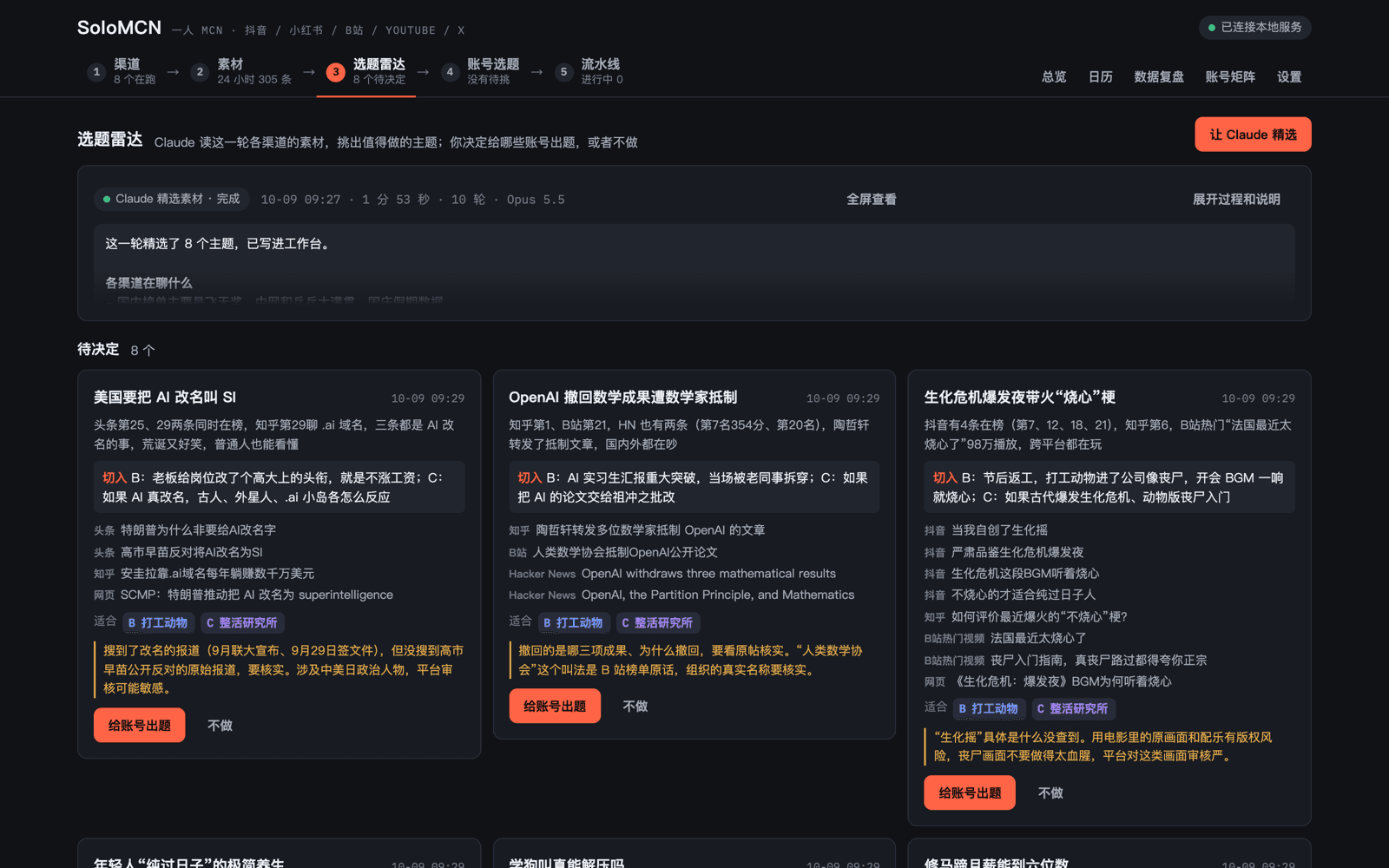
MIT 开源的“一人 MCN”工作台:不写死工作流,每个环节只给 Claude Code 一份中文“岗位说明”,让它自己找热点、做选题、写分镜、成片,一键发布到抖音/小红书/B 站/YouTube/X。作者全程只在“做哪个选题、成片行不行、发不发”三处拍板。四天 50 stars、6 releases。

SoloMCN 是一个 MIT 开源的“一人 MCN”工作台,让一个人就能运营多账号内容矩阵。它不搭固定工作流,而是把每个内容环节(找热点、选题、调研、写分镜、做成片)都写成一份中文“岗位说明”——也就是 Claude Code 的 skill——由 Claude Code 自己从全网热榜、推特和各平台找热点、做选题、查资料、写脚本、生成带配音与字幕的 MP4 成片,再一键发布到抖音、小红书、B 站、YouTube、X。工作台只负责给 Claude 递工具、给人留拍板的地方。 作者(illidanNe)在 V2EX 10 月 10 日的分享帖里说:“做了 SoloMCN:不搭工作流,每个环节只写一份中文的「岗位说明」(Claude Code 的 skill),工作台只负责给 Claude 递工具、给我留拍板的地方,剩下的让 Claude 自己想。” 他自述整个流程只在三处拍板:“做哪个选题、成片行不行、发不发。” 这正是它跟市面常见 Agent 视频工作流最大的区别——不是把每一步写死,而是让 Agent 自己想办法。 这种“岗位说明”模式带来三个实际好处。第一,改技能不用碰代码:想调整选题标准或文案口吻,直接改中文说明文档即可。第二,模型升级系统自动变强:skill 只是约束和工具清单,推理能力全吃 Claude Code 本身的进步。第三,每个环节都透明可审:调研环节会把核实过的信源、收集的截图素材都摆在面前,而不是黑盒。 功能上覆盖了完整的内容流水线:五步走的渠道→素材→选题雷达→账号选题→流水线视图;素材页聚合推特、抖音、微博热搜、B 站热搜、知乎热榜、百度热搜、头条热榜、B 站热门视频、Hacker News,24 小时滚动抓取并打热度分;选题雷达页列出候选主题,带跨平台热榜依据、切入角度建议和适配账号,一键“给账号出题”或“不做”;调研页展示 Claude 的核查结论(如实例中它真去核实了 OpenAI 数学手稿撤稿的数字,纠正了原始 722/719 的符号错误);分镜页支持“用本机视频”或“生成视频”,右键可插话调整;发布页点选平台后弹出 Chrome 窗口自动走完上传、填标题话题、设封面、点发布的全流程,发布成功后从创作者中心同步播放、点赞、评论、分享、涨粉数据回工作台,还有日历、数据复盘和账号矩阵视图。 技术栈按作者 README:macOS + Node.js 22.9+、Python 3.11+、PostgreSQL、ffmpeg、Chrome;前端是原生 HTML/CSS/JS,无构建步骤。仓库 2026-10-09 创建,截至 10 月 12 日已有 38 commits、50 stars、12 forks、6 releases,四天发了六个版本,迭代速度极快。作者明确 vibe-coding 且全部需求经 Claude Code 落地,对想学“skill 驱动 Agent”做法的人来说,这份仓库本身就是一份活教材。 值得注意的边界:发布用的是 Chrome 自动化操作创作者中心,账号安全和平台风控得自己掂量;截图里的真实工作台界面显示它确是一个能真实跑完“选题—调研—成片—发布”闭环的工具,而不是 demo 壳。如果你也想一人运营内容矩阵,值得 clone 下来跑一遍。

大赏
已上线
图片视频claude

ImgCutout

浏览器本地运行 AI 抠图模型、一键去背景导透明 PNG 的免费工具:开源 ormbg 经 WebAssembly 在 CPU 上运行(可选 WebGPU 加速),图片永不上传服务器,断网也能用。无需注册、无水印、无次数限制,还支持 100 张批量抠图、GIF 制作与证件照换底色。

ImgCutout 是一个完全在浏览器里运行的 AI 抠图工具:打开网页、拖入图片,一键去掉背景,导出透明底 PNG。它最大的特点是图片永不上传服务器——开源的 ormbg 语义分割模型通过 WebAssembly 直接跑在你的 CPU 上,设置里还能打开 WebGPU 加速;模型首次加载之后,哪怕断网也能继续抠图,隐私敏感的照片用起来更放心。 这个项目是作者 lijiang0327 的 vibe coding 作品。2026 年 10 月 9 日,他在 V2EX 介绍道:“整个项目的代码基本都是 Claude 写的,我主要负责提需求、定产品方向和测试。”AI 负责写代码,人负责定方向和验收——这正是 vibe coding 的标准打开方式,而 ImgCutout 是一个完成度相当高的实例。 用起来也足够傻瓜:把图片拖进网页,等模型跑完(普通照片一两秒),就能看到背景被干干净净地剥掉;满意的话直接下载透明 PNG,不满意可以在设置里换精度或开 WebGPU 重试。对独立开发者、小店主、自媒体来说,这是个随手可用的“抠图外包”——而且不花钱、不排队、不泄露原图。 功能亮点 批量抠图:一次处理多达 100 张图片,抠完一键打包 ZIP 下载,电商产品图、团队头像这类批量活效率拉满。 GIF 制作:除了静态图片,还能把短视频转成 GIF 动图,顺手解决表情包生产需求。 证件照换底色:抠出人物后可直接替换成证件照常用底色,省下一趟照相馆。 高精度模式:默认 8-bit 快速模式,设置里可切换 16-bit 全精度;卷发、宠物毛发、玻璃制品这些难抠的边缘处理得更细腻。官网 Example 库公开了 6 组真实案例的抠图效果和实测耗时数据,效果可以自己验证。 透明 PNG 导出:结果保留半透明边缘细节,方便拿去做二次合成。 免费,而且没有服务器成本 ImgCutout 完全免费:无需注册、没有水印、没有次数限制。因为所有计算都在用户本地完成,作者几乎没有服务器成本——这也是它能长期免费的原因。用得越多,作者越不亏,是个难得可持续的免费模式。

大赏
已上线
游戏codex

Kingshot Optimizer

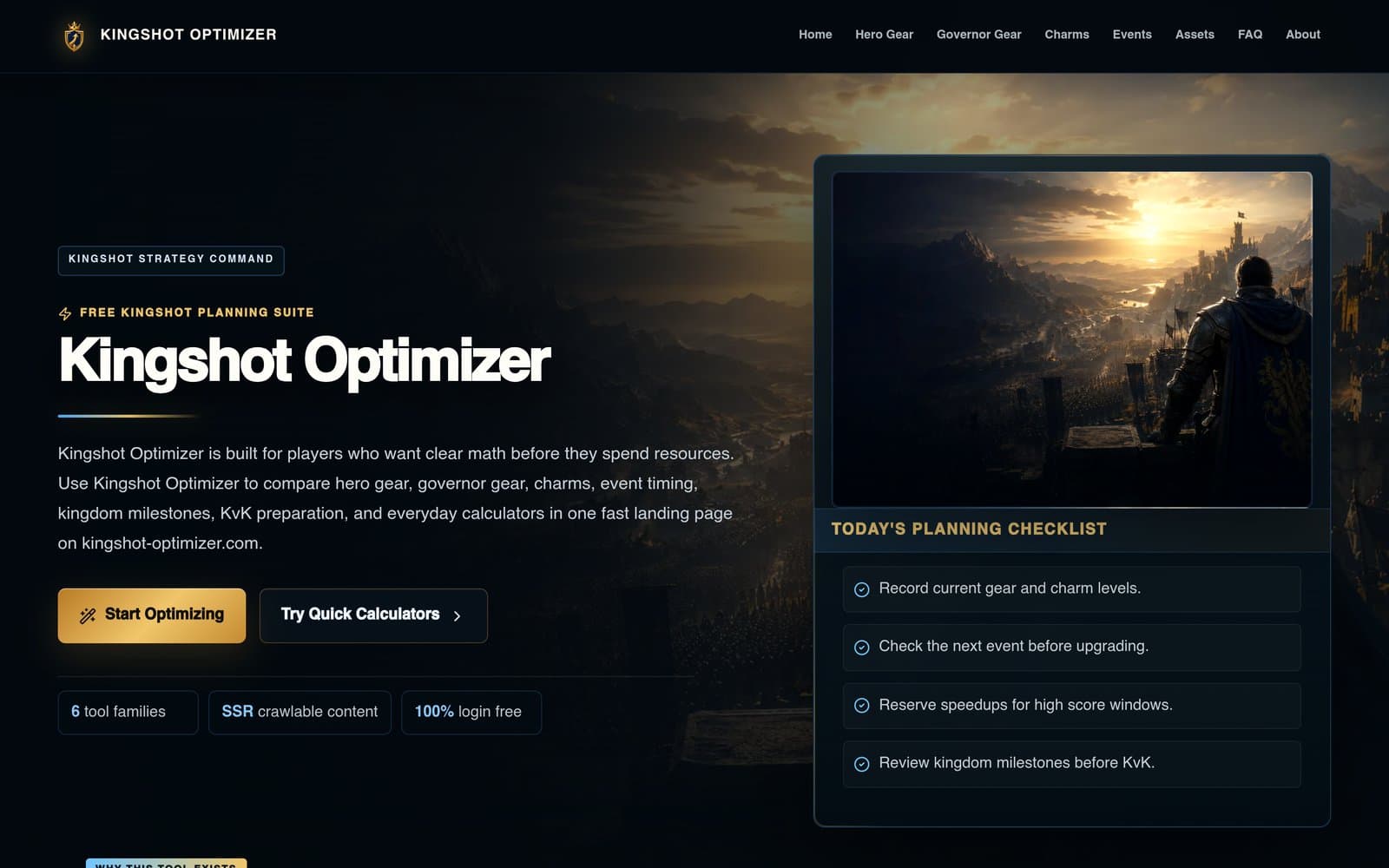
中文开发者用 Codex Pro 半天做出的 Kingshot 手游策略规划站:装备计算器、活动时间规划与完整 KvK 指南库。

Kingshot Optimizer 是面向 Kingshot 玩家的免费策略规划站,为作者 JsonChao 在 V2EX 首发,作者原话:「用 codex pro 半天时间做了 1 个游戏工具网站」。站点提供英雄装备 / 领主装备 / 护符升级计算器,Strongest Governor、Kingdom of Power、KvK 等活动时间规划,王国发展时间线,以及完整的新手 / 转服 / KvK 指南库,全站无需登录。 全站 SSR 渲染(Next.js),内容成体系(6 大工具家族 + 计算器 + 指南库),当前可访问且渲染正常。 诚实注记:独立粉丝项目,FAQ 明确声明非官方;原帖约 73 天前发布,但网站内容完整、持续可访问,符合发布标准。

大赏
已上线
开发工具codex

Finder Actions

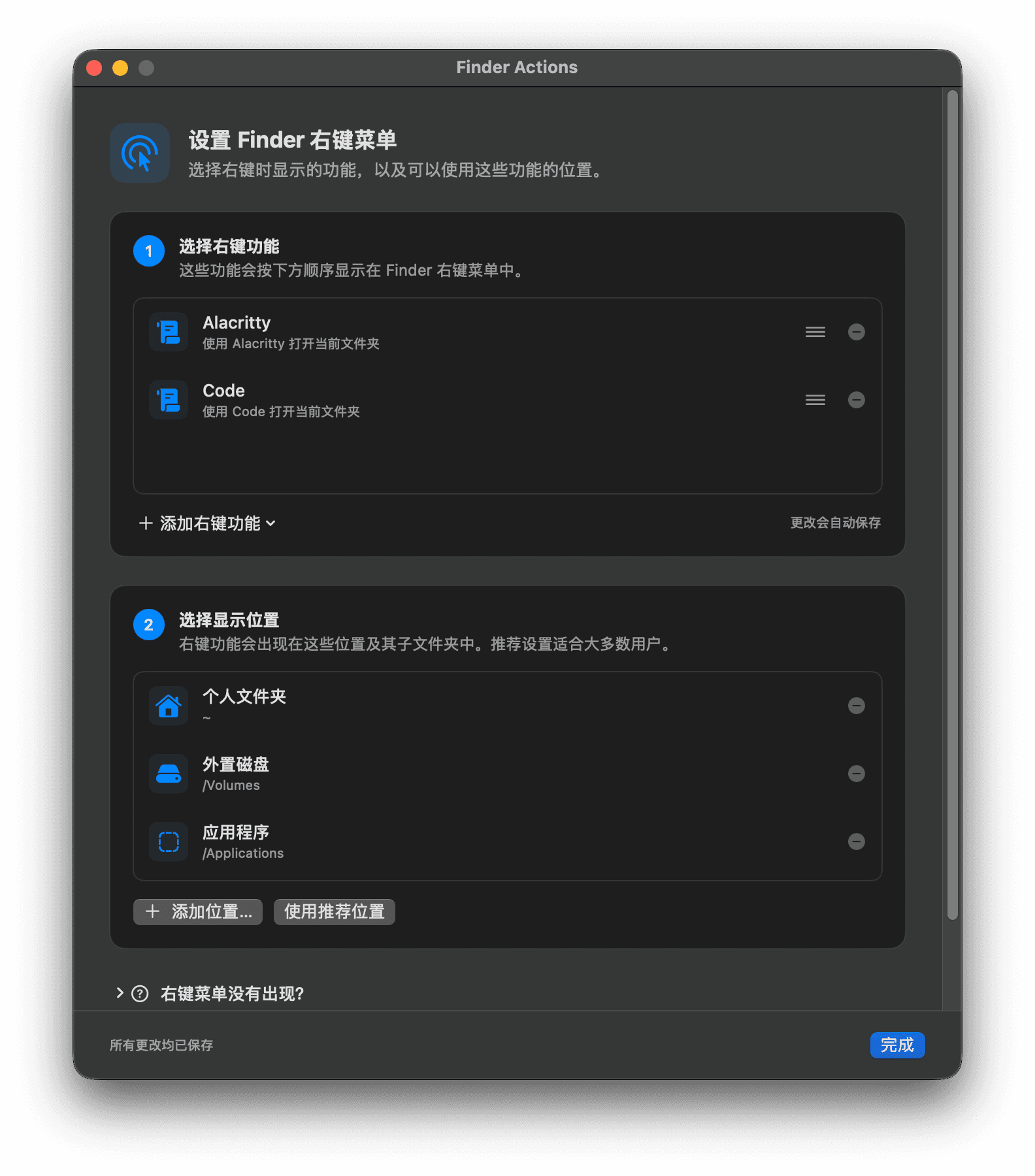
macOS Finder 原生右键扩展:右键一键在 Alacritty / VS Code 打开目录,支持自定义脚本,运维纯口述让 Codex 半天搓出。

Finder Actions 是一款 macOS Finder 原生右键扩展。在任意文件/文件夹上右键,即可一键在 Alacritty 或 VS Code 中打开当前目录;还支持自定义 shell 脚本动作(路径以 $1 传入)、拖动排序、生效目录控制、中英文切换。 作者 qvgz 本人是运维,不懂 Swift。他的原话:「试一试让 Codex 写,纯口述需求没看一行代码,半天做得有模有样。」项目用 Swift + SwiftUI 实现(作者 GitHub topics 标注 swift/swiftui/developer-tools),MIT 开源,Release 页可直接下载安装。 诚实注记:安装需 Ad-hoc 签名去隔离并在系统设置中启用 Finder 扩展,README 有完整说明;3 stars 的新工具,仍在持续迭代。

大赏
已上线
商业

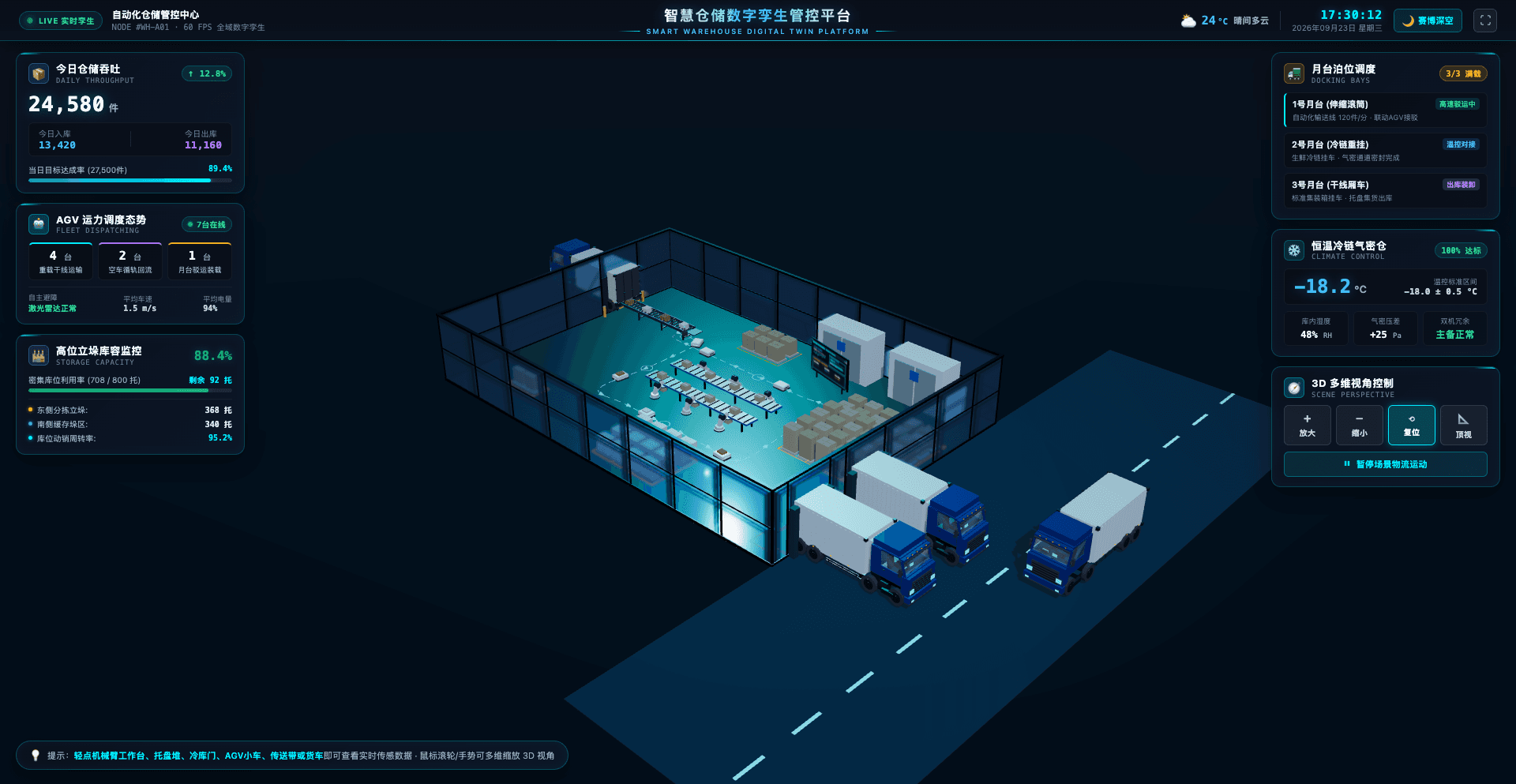
smart-warehouse 智慧仓储数字孪生平台

AI Vibe Coding 全流程驱动的 3D 智慧仓储数字孪生:AGV 搬运、自动化立库、冷链监控、赛博夜景与白昼展厅双主题。

smart-warehouse 是作者 Xxcool 用 AI Vibe Coding 全流程驱动开发的 3D 智慧仓储数字孪生管控平台:作者原话「AI 联动 Blender MCP 自动建模 + Vue 3 + Three.js」。平台用 Three.js 构建了一个工业级仓储 3D 沙盘:AGV 闭环物料搬运、自动化立库、冷链恒温监控、月台货车装卸四大场景全部在线运行;赛博夜景与白昼展厅双主题一键切换;左侧看板实时监控今日仓储吞吐(24,580 件)、AGV 运力调度、高位货架库容利用率(88.4%),点击机械臂/托盘/冷库门/AGV 小车等 3D 元素可查看实时传感器数据。 技术栈为 Vue 3.5 + Vite 5.4 + TypeScript 5.6 + Three.js r169,GitHub 开源。 诚实注记:AI 编码模型作者未具名(aiTools 留空);仓库 2026-10-08 仍有提交,demo 在线可直接体验。

大赏
已上线
开发工具ibm-bob-20claude-code

Neuro Symbolic Game Level Designer

Describe a level in one sentence: agents plan, algorithms build, validators check — a playable Flame level in about a minute.

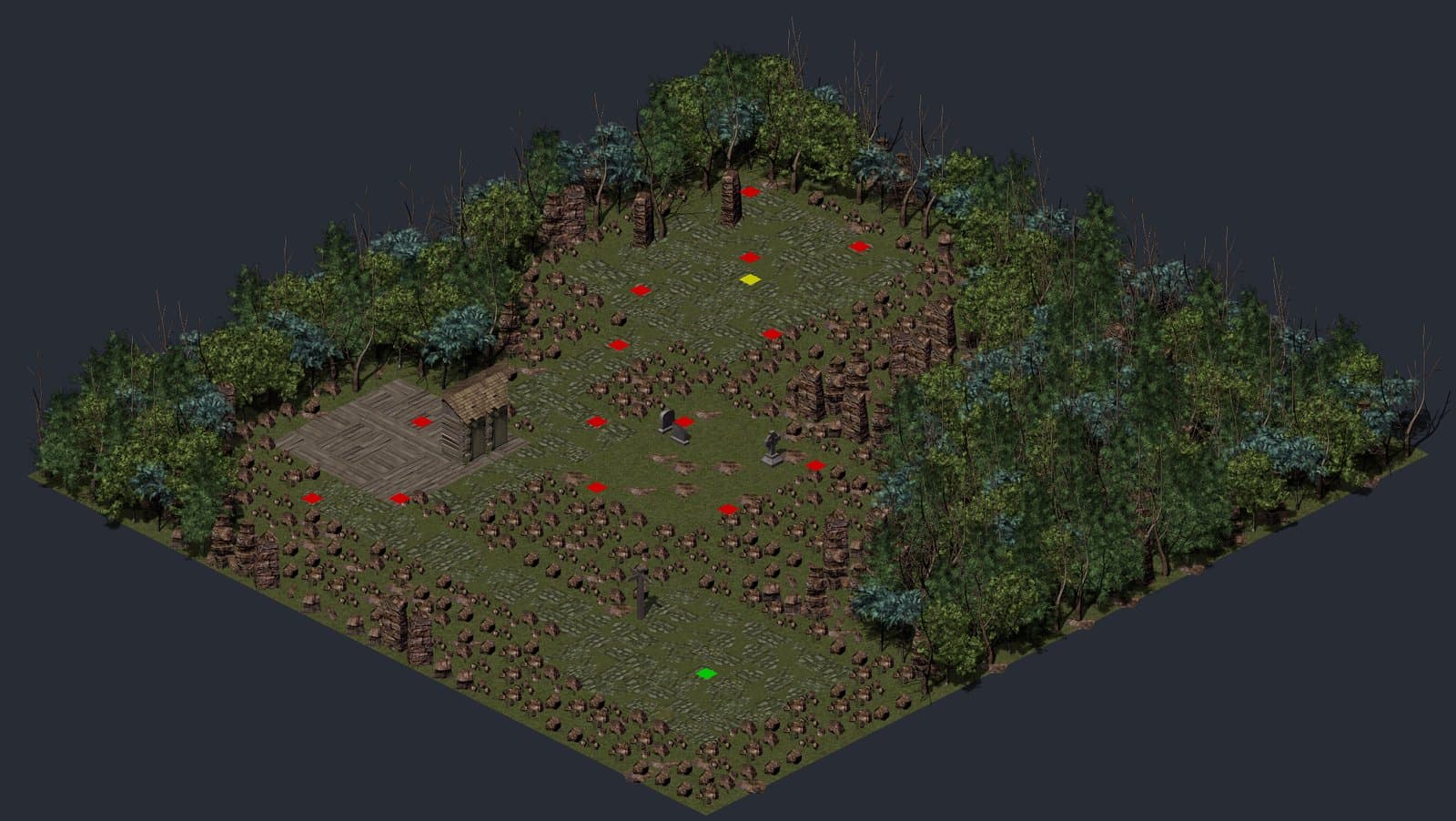
Neuro Symbolic Game Level Designer is a hybrid AI level-design tool built for an IBM Bob 2.0 hackathon. You describe a level in one sentence; a pipeline of agents plans it while classical algorithms build and verify it. The output is a complete, playable 2D isometric Flame game level — a Tiled map plus a typed Dart loader — with a six-check validation report covering spawn reachability, item placement and pathfinding. The author, raf-xtgt, describes the build on dev.to: "One orchestrator session wrote the architecture and a precise prompt for each task. A coding agent implemented each task, and I reviewed it with tests and browser checks. IBM Bob built the first five tasks… After my Bob credits ran out, I continued with Claude Code using the same workflow." Stack: Flutter web / Flame 1.38 frontend, Python + FastAPI + LangGraph backend, Gemini agents on Vertex AI, backend on Cloud Run. Honest note: it's a research-style hackathon project — the levels look charming, but game feel is still generator-grade.

大赏
已上线
设计创意claude

Editmamei

An MCP server that lets Claude drive your local Photoshop with plain-language instructions — real layered edits, not generation.

Editmamei is a pure MCP stdio server, written in Node, that lets an AI assistant drive the Photoshop on your own desktop with plain-language instructions. The assistant plans each edit from a single sentence; Photoshop executes it layer by layer with native adjustment layers, masks and filters — so what comes back is a real layered file you can keep editing by hand, not a flattened AI-generated image. The author describes it on the vibingtalk "Show us what you've created with Claude!" thread: "lets Claude use desktop Photoshop to edit, cut editing time massively. just edited 150 vacation pics in hours vs months before." A Go snippet engine generates the ExtendScript Photoshop actually runs; GIMP 3.2 support is in beta. Honest note: you need a local Photoshop installation, and grading quality ultimately depends on the model driving it.

大赏
已上线
游戏chatgpt

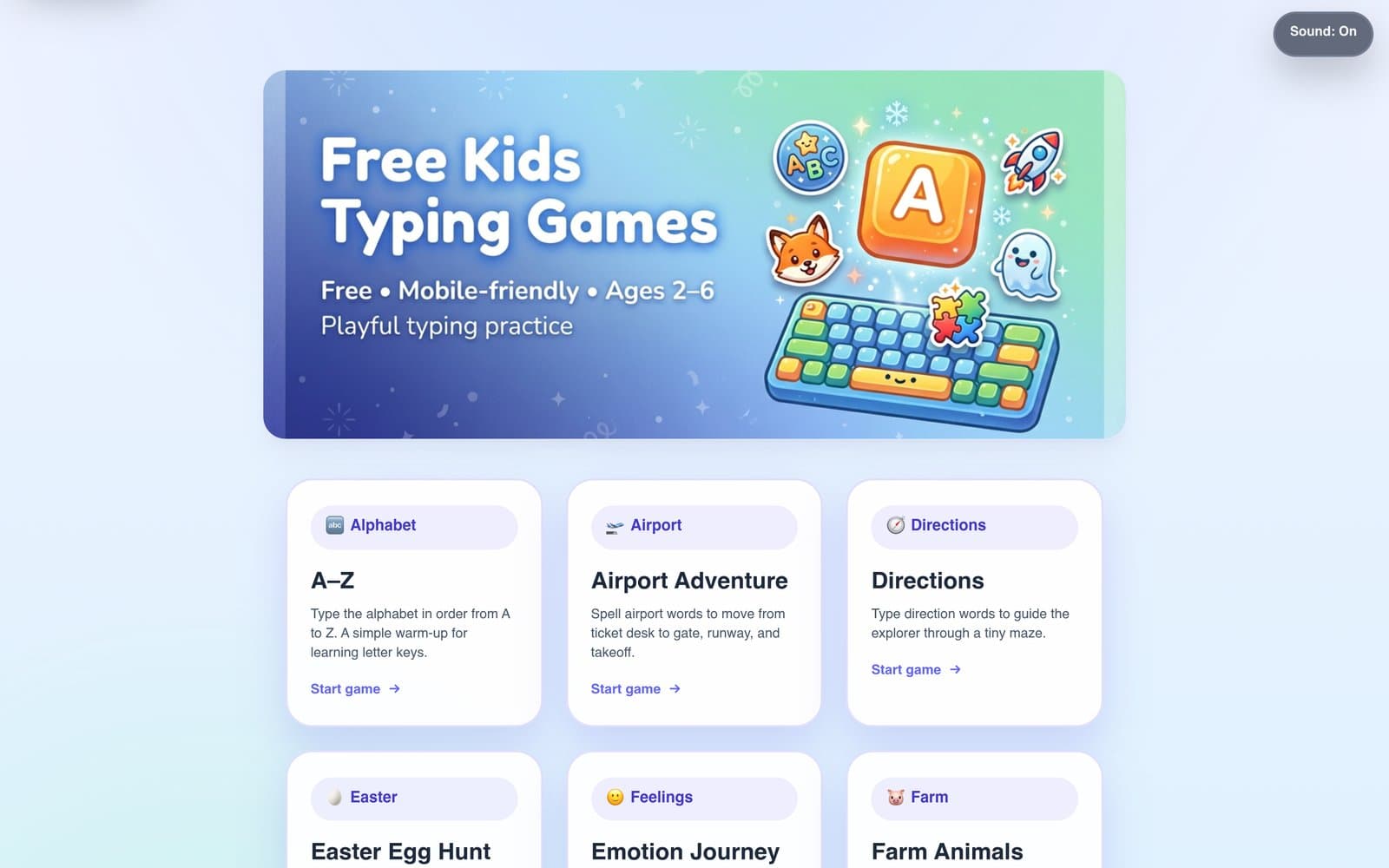
Free Kids Typing Games

22 free, ad-free typing mini-games for kids — graphics, sounds and even the CI pipelines were all vibe coded.

Free Kids Typing Games is a collection of 22 free, ad-free typing mini-games for kids aged 2–6, playable on phones and tablets. Titles include Airport Adventure, Phoneme Sound Lab and Rocket Run: each wraps a small typing skill — alphabet order, sight words, phoneme chunks — in a playful scene with sound and animation. The most striking part is how it was made. The author, Alan01252, writes on Show HN: "Everything here was 'vibe coded' to an extent, the graphics, sounds, art-work, even the github pipelines (and I used chatgpt to instruct me how to configure everything in AWS)." The site is a Hugo static build with Tailwind/PostCSS styling, deployed to S3/CloudFront via GitHub Actions. Honest note: the games are intentionally bite-sized for very young kids — not a full curriculum, but exactly what free playful typing practice should be.

大赏
已上线
生活方式claude-codecodex

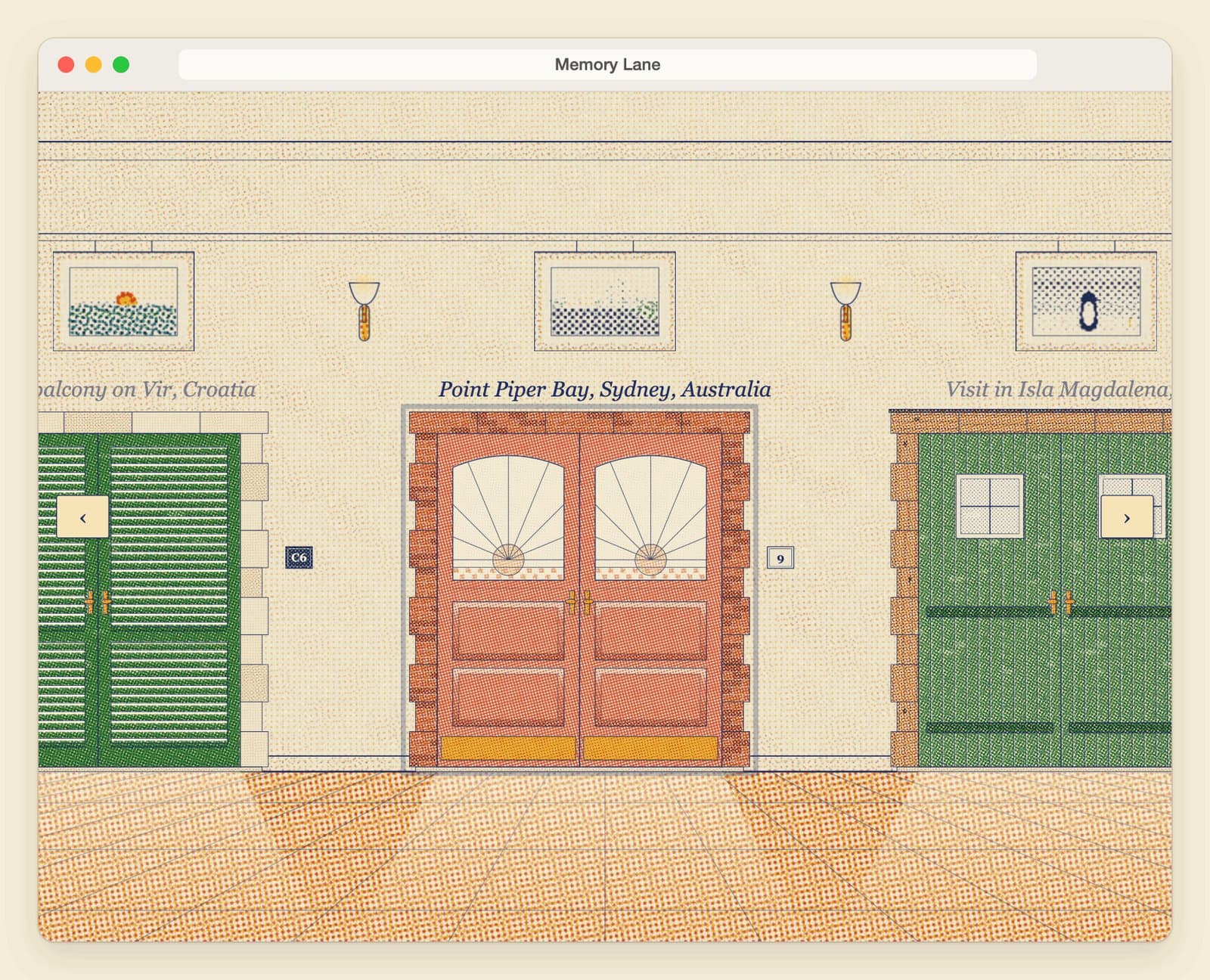
Memory Lane

A vibe-coded family memory lane: a hallway of doors, each opening onto a hand-drawn animated day — dawn, noon, sunset, night — looping forever.

"It is vibe coded, by someone with limited programming experience, for our family." That single README sentence is the whole pitch of Memory Lane (androszr/memory-lane, MIT, created September 24, 1 star): one small web page where a hallway of doors each opens onto a place the family loved. Every room is drawn in code like an old print — warm paper, soft dotted color — with its own clock running dawn to night on a slow loop, boats crossing the water, people coming and going, lamps on at dusk. The technical restraint is the charm: no build step, no libraries, no fonts, no images fetched, no network requests beyond its own files — Canvas 2D and a static page. The repo even ships assistant skills (.claude, .codex, .grok) including an add-memory walkthrough that turns your own photos into a new door. It works on phones (swipe the hallway, tap a door) and remembers nothing between visits. Verdict: the gentlest possible argument for vibe coding — a non-programmer built the thing their family actually opens. The published Vercel deploy is access-protected, so start from the GitHub repo and its README screenshots; serving it locally is one npm run serve away.