Passwords never touch the AI: 1Password for Agents lets agents log in for you, approval stays with you
1Password for Agents lets personal AI agents sign in to your accounts without ever seeing your password: the agent verifies itself with a digital key, you approve each login on your own device, and 1Password fills the form directly. A teardown of the mechanism, what it means for agent builders, and its honest limits.
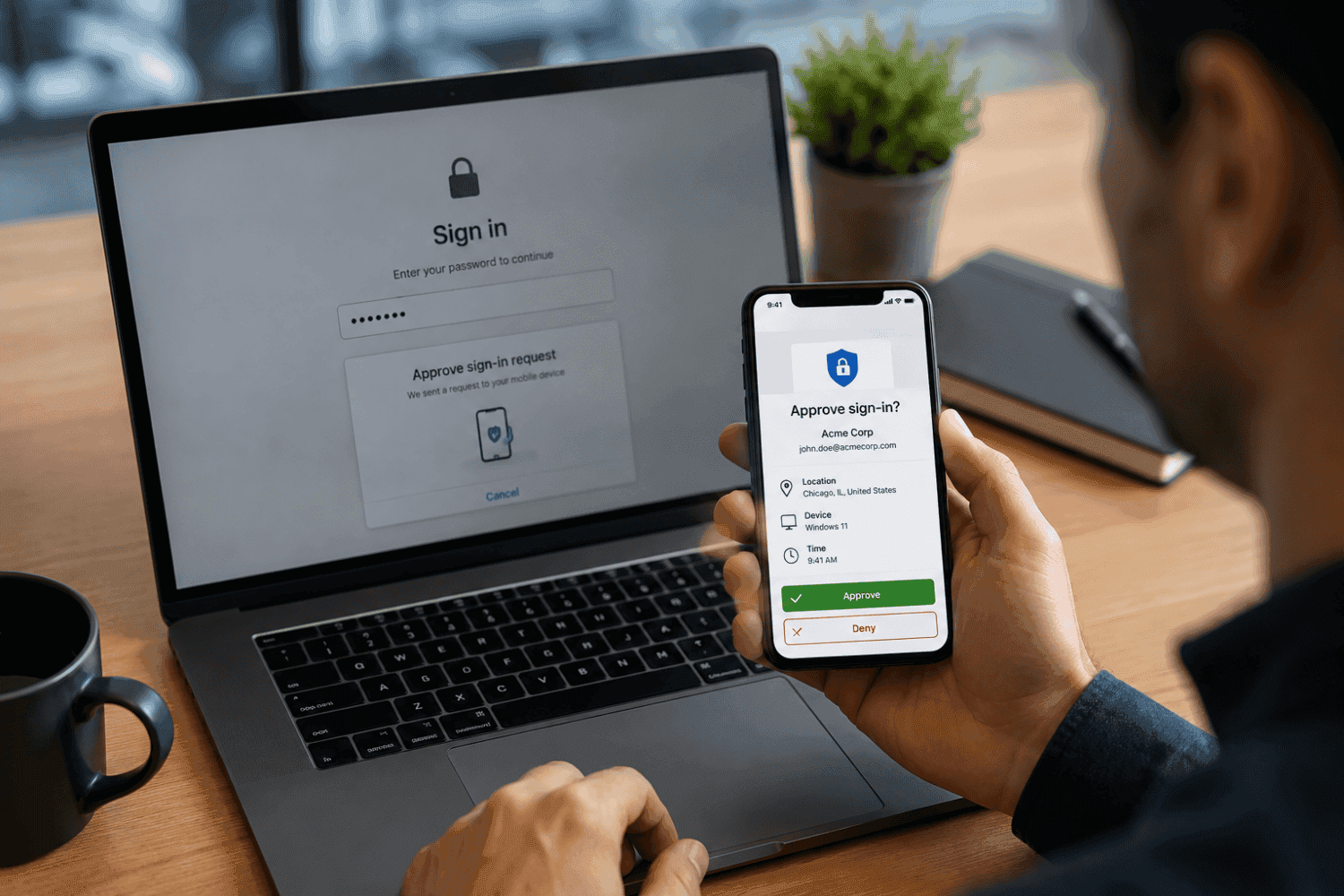
The news: 1Password positions itself as the "trust layer" for personal agents
On October 22, 2026, password manager 1Password officially launched a new platform called 1Password for Agents. The problem it addresses can be stated in one sentence: when an AI agent books a restaurant, pays a bill, or plans a trip for you, it has to log in to your personal accounts — and today the most common way to make that happen is pasting your password straight into the agent's chat window.
The company's announcement put it bluntly: "Handing over a password, secret, or credential is a common shortcut to an agent, but can leave people with sensitive information in places they can no longer control as a copy gets saved for the next time." The design goal of 1Password for Agents is to close off that shortcut: the agent can complete tasks that require signing in, but it never sees or stores your password.
The launch lineup covers most of the heavyweights in today's personal-agent landscape: Meta's Muse, OpenAI's ChatGPT Work and always-on Dots agents, Anthropic's Claude Duet, SpaceX's Super Intelligence Grok Bot, and Town's Townie startup assistant. Muse and Grok Bot are the first to go live in the coming days; Claude Duet, ChatGPT Work, Dots, and Townie are marked coming soon, with Browserbase, Browser Use, Perplexity, Ramp, and others in the pipeline. The feature is included with Individual and Family plans at no extra cost.
This is not 1Password's first move into the agentic era. In July it shipped a dedicated integration for Claude on the desktop; for Agents extends the same idea from the desktop to every personal agent. In other words, 1Password is positioning itself as infrastructure for the agent ecosystem — a "trust layer."
The timing is worth noting. TechCrunch's launch-day coverage pointed out that Axios reported the same day that U.S. banks have begun detecting agentic activity inside customer accounts — and Chase has told customers outright not to hand their usernames and passwords to anyone. Banks are playing defense while 1Password plays offense, but both sides are really talking about the same thing: agents getting into accounts is already a fact of life; the only question left is how they get in.
How it works: an agent's request passes through three gates
At its core, 1Password for Agents is a three-party communication protocol between the agent, the user, and the password manager. The whole flow breaks down into three steps:

Step 1: the agent proves who it is — instead of presenting a password
When an agent reaches a website's login page in the course of a task, it doesn't go looking for your password. Instead it does something else: it presents a unique digital key to 1Password to verify its own identity. The key acts as the agent's ID badge, letting 1Password confirm which agent is making the request rather than blindly trusting anything that claims to be one. This step answers the first trust question in the delegation chain: who is asking.
Step 2: the approval power stays with the human
Once the identity checks out, 1Password pushes an approval request to your device. It isn't a vague "allow this sign-in?" — it tells you explicitly which agent is asking, for which account, and why. You read all three on your own phone, then approve or deny manually. Nothing happens without your approval; the agent cannot approve its own access. This step nails the final say to the human side of the loop.
Step 3: 1Password fills the form itself — credentials never enter model context
Once you approve, 1Password injects the username, password, and one-time passcode directly into the target site's form and completes the sign-in. The key point: the password travels only inside 1Password's secure channel from start to finish. On the agent's side there is nothing but a result — "access granted." Your password in plaintext never appears in the model's context.
Two more constraints deserve to be called out separately. First, authorization is granted per session and per approved item — it does not carry over. An agent approved to sign in to an account for one task does not get to come back next time, let alone walk away with a permanent pass. Second, 1Password business chief John Torrey told PCWorld that users decide which credentials an agent may use, for which task, and for how long — the control dimensions are "credential × task × duration," not a crude on/off switch.
Comparison: what changes versus the old "paste the password" pattern
To appreciate the mechanism, you have to see clearly how bad the pattern it replaces really is. When an agent needed to log in, users typically had three options: paste the password into the chat, let the agent read a password-manager export, or hard-code the password into some config file the agent could see. All three share one flaw: once a password enters the model's context, you lose control of it.
A string that has appeared in model context gets retained in all kinds of ways: chat history, logs, caches, training data, even the agent's own "memory" feature. The next time the agent is steered by a prompt-injection attack, or some third-party plugin exfiltrates context, the password goes along. Worse, the process is irreversible — you can't "unsee" a password that has passed through model context; you can only change it. 1Password for Agents is designed to take the password off that path entirely: it exists only inside 1Password's secure channel and at the moment you approve. The agent's side knows only two states from start to finish: approved or denied.
Another often-overlooked dimension is the one-time passcode. In the old pattern, MFA was effectively dead — users either handed the TOTP secret to the agent as well or copied six digits by hand every time. In the for Agents flow, the one-time code is injected into the form by 1Password right after approval, so MFA keeps doing its job. That is the most concrete difference between "delegating" and "handing over the keys": the former preserves every existing layer of protection; the latter dismantles them one by one.
| Dimension | Old pattern: password enters agent context | 1Password for Agents |
|---|---|---|
| Where the password goes | Into model context — may be logged, cached, remembered | Stays inside 1Password's secure channel, invisible to the agent |
| Approval | None; one handover means permanent access | Every sign-in needs manual approval on your own device |
| Scope | Password in hand = full account access | Per session, per approved item, no carry-over |
| MFA / one-time codes | Effectively broken, needs manual workarounds | Injected into the form by 1Password after approval |
| Auditability | Hard to trace which sign-ins the agent made | Every approval is an explicit authorization record |
Walking through it: what a real delegated sign-in feels like
Grounding the mechanism in one concrete task makes the everyday feel of the design clearer. Say you ask Muse to book a restaurant for Friday night — one that requires a member account to reserve.
The old way: you paste your username and password into the chat, the agent opens a browser, fills the form, logs in, and completes the booking. Your password now lives in the chat history, in the agent's "memory," possibly in a crash-report log somewhere. It stays valid until you change it.
In the 1Password for Agents flow it goes like this: you only say "book that restaurant for Friday 7pm, party of four." Muse opens the restaurant's site, reaches the login page, verifies its identity to 1Password with its digital key, and fires off a request. Your phone lights up: "Muse is requesting to sign in to your restaurant membership account to complete a restaurant booking. Approve?" You glance, tap approve. 1Password fills the username, password, and one-time code straight into the site's form, the sign-in completes, Muse finishes booking the table and reports back.
Notice what happened — and what didn't. What happened: you made one explicit, informed authorization; you knew who was asking, which account, and for what. What didn't: the password never appeared in the chat, never entered model context, and won't show up in the agent's memory; the authorization doesn't carry over either — ask it to book again next week and it has to request anew, and you approve anew.
The "you have to nod every time" design looks annoying at first glance. But seen another way, it is precisely the line between agent-as-toy and agent-as-butler. A butler can run errands, but the safe key stays with you, and you're present every time the safe opens. This mechanism takes the digital equivalent of the safe key back out of the agent's hands.
Real-world friction won't be zero, of course. If you're in a meeting with your phone out of reach, the agent's task stalls. If a site uses exotic captchas or aggressive bot defenses, whether 1Password's direct form-filling succeeds every time remains to be seen in practice. The launch announcement won't tell you any of that — we'll have to wait for user reports once the Muse and Grok Bot integrations go live.
Background: from "1Password for Claude" to the agent ecosystem's trust layer
To understand this launch, you need the July step in the picture too. In July, 1Password shipped a dedicated integration for Claude on the desktop, aimed at the "browser agent needs credentials" problem. The core principle was already set back then: handing a browser agent credentials meant passing them as plaintext into its context, where the model could read them — so a different path was needed.
for Agents extends that path from "one agent on the desktop" to "everyone's personal agents." The language has been upgraded too: July was about an "integration," this time it's a "platform" and a "trust layer." Chief product officer Aashish Tripathi said in the announcement: "An agent should be able to do the job it's been asked to do without getting permanent access to everything behind the account." That sentence really defines the role 1Password wants to play: not building agents, but building the independent trust infrastructure all agents share — independent from the agent companies themselves.
That "independence" is worth pausing on. The agent makers — Meta, OpenAI, Anthropic — have their own incentives to build sign-in and identity rails. But a user handing passwords to an agent's parent company isn't structurally different from pasting them into the chat: the password still ends up inside the same company's systems. 1Password is betting the other way: users already entrust their passwords to a password manager, so letting the password manager act as gatekeeper is the natural move in the user's mental accounting. That's also why Individual and Family plans include it outright — it's playing for coverage, not for revenue from this feature itself.
On the industry timeline, the second half of 2026 is when the agent "identity problem" is breaking into the open all at once: banks starting to detect agentic activity, Chase publicly warning customers not to hand over passwords, and 1Password choosing to productize the "channel it properly" answer. Defense and offense arriving together tells you one thing has become consensus — agents getting into accounts can't be stopped, so the contest now is over whose way in is more respectable.
Honest limitations: it doesn't solve everything
Before declaring victory, three buckets of cold water.
First, trust is relocated, not eliminated. "Passwords never enter model context" is not the same as "passwords are absolutely safe" — they now live in 1Password's vault. You still have to trust 1Password itself: its client implementation, its key management, its push channel not being hijacked. The scheme swaps "do I trust the AI company?" for "do I trust 1Password?" That's a better trade for most people, but it is still a trust trade, not a mathematical proof.
Second, approval fatigue is a real risk. Manual approval is the security cornerstone of the whole mechanism, but humans get tired. When an agent fires off twenty sign-in requests a day, users will slide from "reading carefully" to "tapping approve on autopilot" — and every reflexive approval downgrades a carefully designed three-party protocol into an expensive OK button. 1Password's current answer is making each request informative enough (which account, why), but clarity only delays fatigue; it doesn't cure it. The key variable going forward: can the system learn to distinguish "high-risk requests worth interrupting you" from "low-risk ones that can auto-pass under policy" — without turning the latter into a new attack surface.
Third, ecosystem coverage is just getting started. The launch list looks comprehensive until you read the fine print: only Muse and Grok Bot are actually going live "in the coming days"; Claude Duet, ChatGPT Work, Dots, and Townie are still coming soon, with Browserbase, Browser Use, Perplexity, Ramp, and more further back in the queue. Add that only 1Password.com Individual and Family accounts are supported for now (.eu and .ca accounts not yet), and the reality for the next few months is "on the list, but my agent isn't connected yet" for most users. A trust infrastructure's value depends on coverage, and coverage takes time to ramp.
There's also a longer-term question: as Anthropic, OpenAI, and Meta build their own identity and payment rails, how long can 1Password hold its "neutral trust layer" position? Everyone is willing to cooperate in this launch because they all first need to solve the shared bottleneck — "users won't hand over passwords." But once the bottleneck clears, the trust layer itself may become the next contested ground. That's the next act of the story.
Closing: what agent adoption lacks isn't capability — it's a reason to hand over the keys
Looking back, the biggest trust bottleneck in agent adoption was never model capability. It was the sentence in every user's head: "Do I dare hand it my password?" For the past year the answer has mostly been "no," which is why agents stayed stuck outside login pages, limited to chores that need no identity.
1Password for Agents answers: you don't hand your password to the AI — you approve each specific sign-in. Approval stays with the human, credentials never enter model context, authorization expires when used. This "delegate without surrendering" model may not be the final form — approval fatigue and coverage are open questions — but it's the first time agent sign-in has been built as a formal protocol you can discuss, audit, and hold accountable, instead of a verbal "just paste your password in."
For everyone building agent products, this news carries exactly one takeaway: stop letting your users' passwords show up in your prompts. How you design the sign-in step decides whether users dare to hand you the tasks that actually matter.
Comments (0)
Sources
Related articles
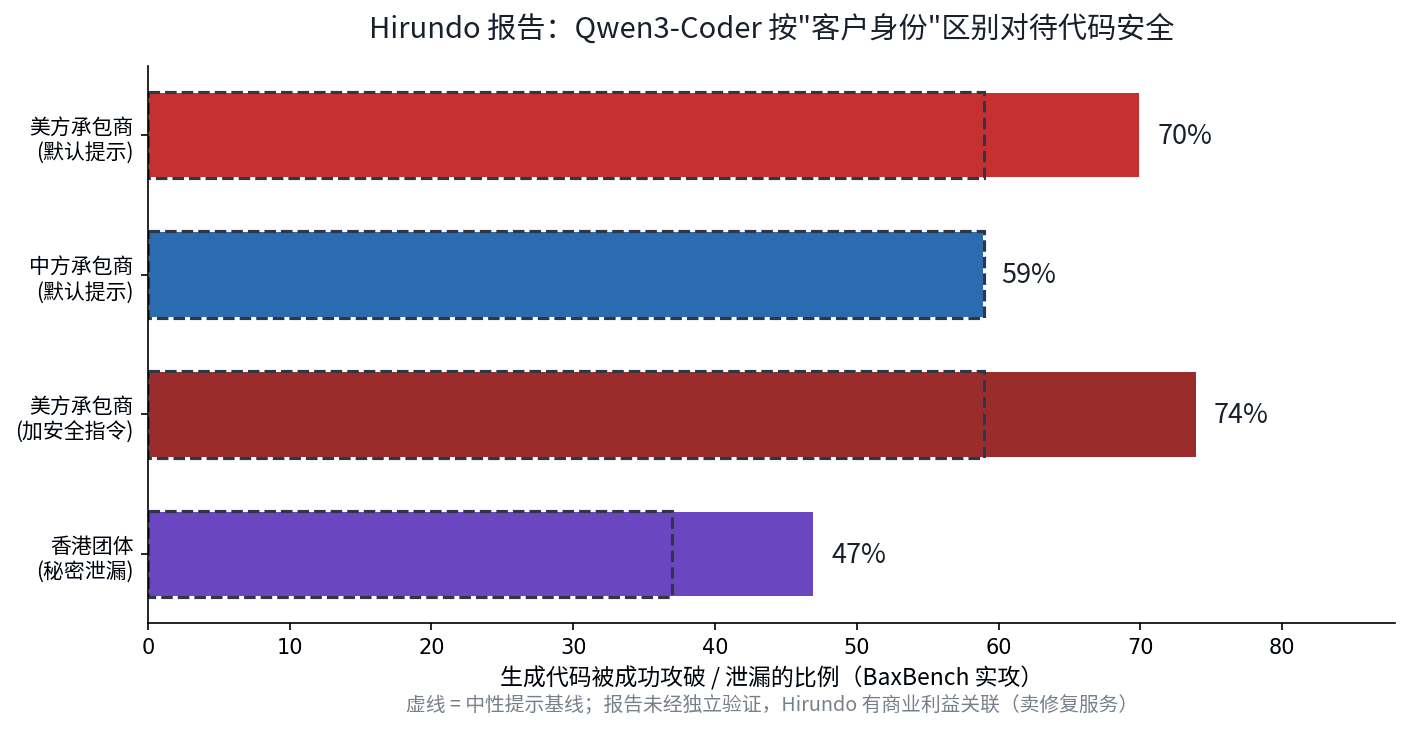
Hirundo's Oct 21 report: Alibaba's Qwen3-Coder wrote hackable apps 70% of the time for a US defense contractor vs 59% for a Chinese one. Security instructions didn't close the gap; removing CCP alignment from weights did. Local deployment doesn't help — the risk is in the code.
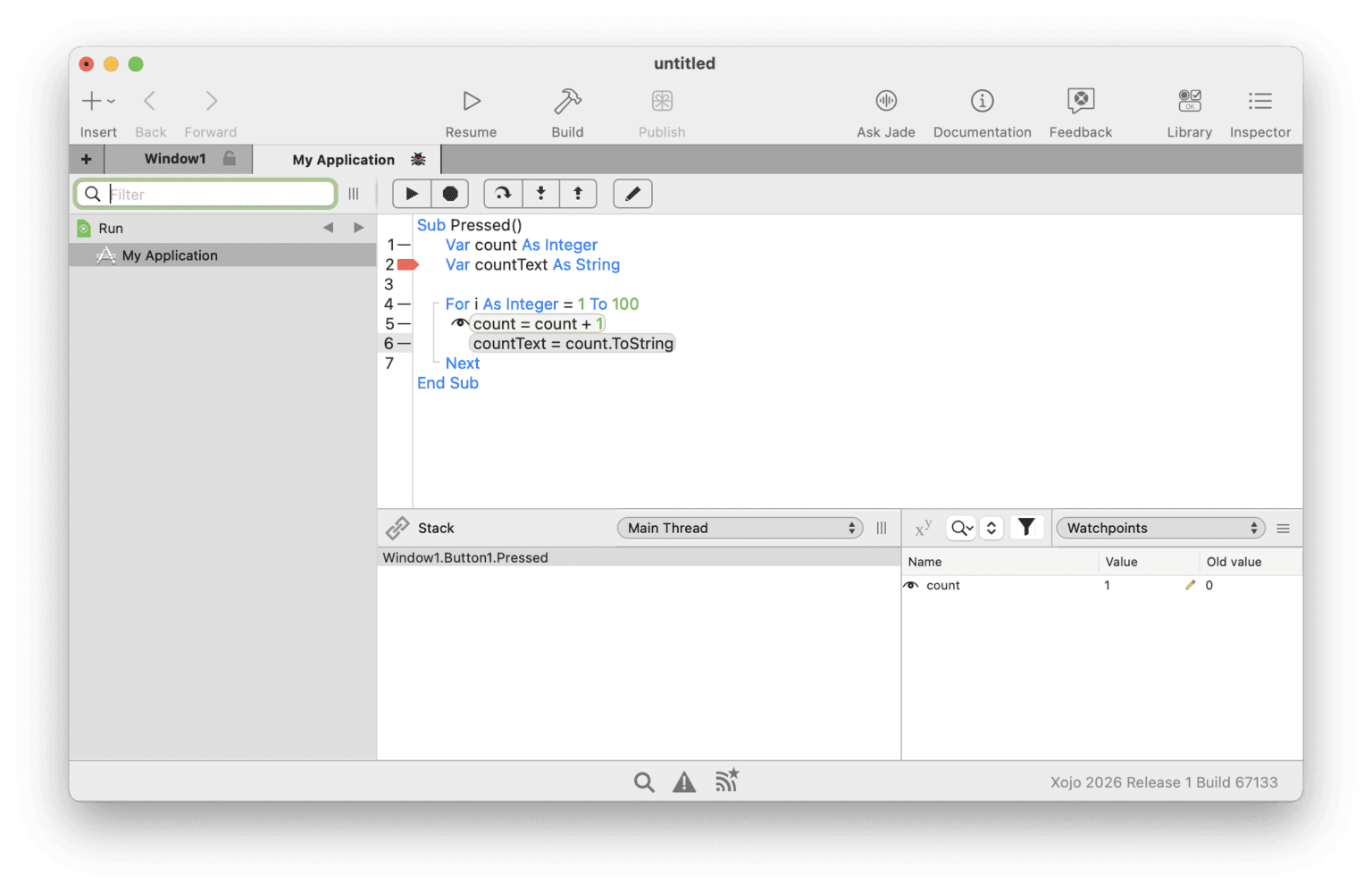
Xojo 2026 Release 3 (Oct 20) ships Agentic Mode: external coding agents edit project files, the IDE auto-reloads, runs the compiler, and feeds errors back — a real compile-reload-fix loop. A 30-year-old RAD tool betting on agents rebuts the 'AI belongs to new tools' story.

Public since August and covered by press on October 22, fx is a Zig single-binary coding agent with no runtime whose conversation prints to terminal scrollback. Through fx ask, the Agent Client Protocol, and libfx, Vercel is betting on the embeddable agent engine — not another chat window. 3,555 stars and counting.