Stop Just Consuming MCP: Build an MCP Server for Your Vibe Project
This is the supply-side MCP guide: turn your own project into an MCP server so agents come to call you. From 3 signals it's worth building and the Tools/Resources/Prompts decision table, to 150 lines of runnable TypeScript, 7 tool-schema design principles, stdio vs Streamable HTTP selection, a security red-line checklist, plus the registry submission list and a README install template — one afternoon to get your project into agents' toolboxes.
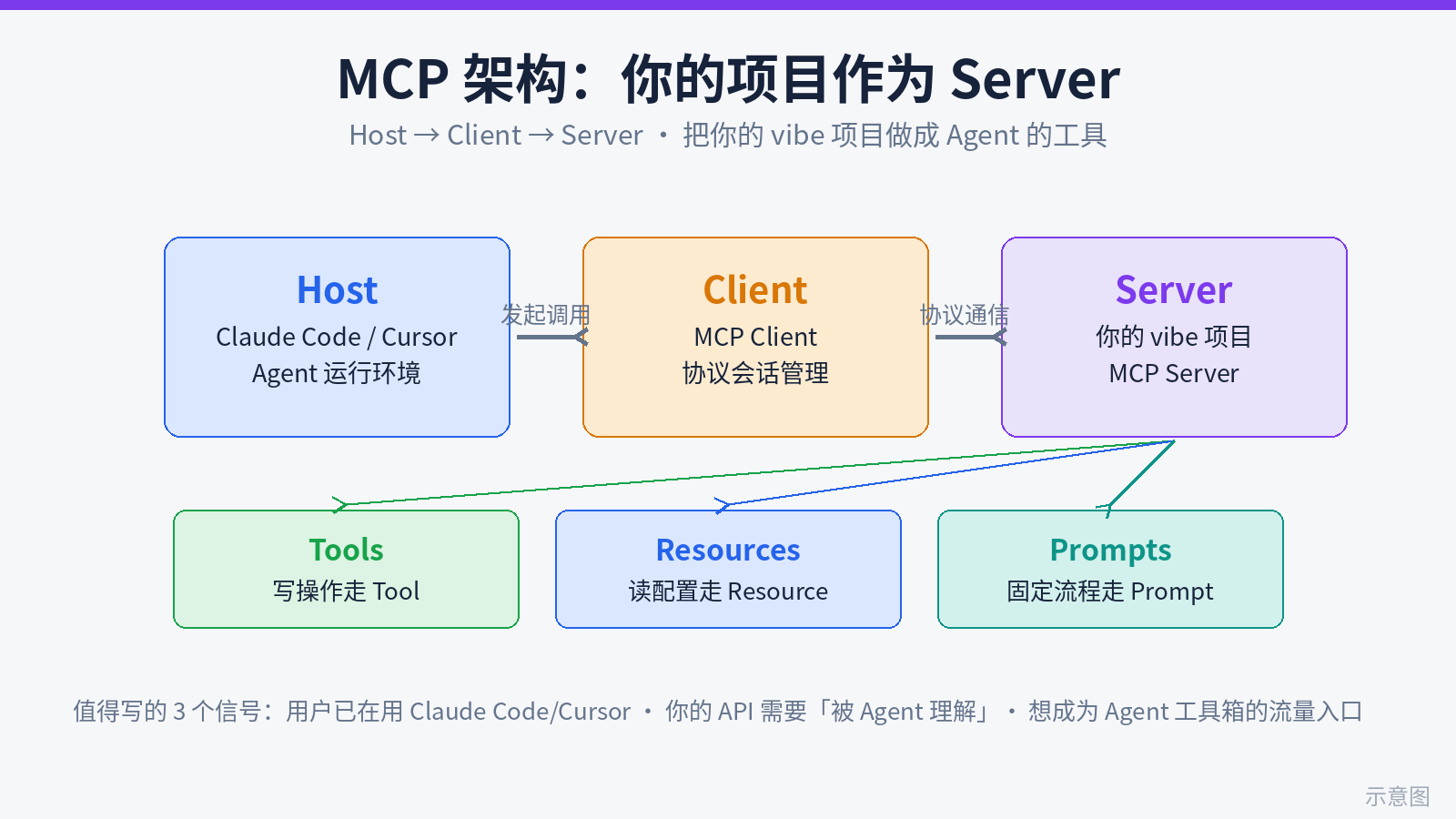
First, a line to keep you from reading the wrong guide: the earlier piece mcp-vs-script-agent-tooling-decision was about the consumer side — whether to plug someone else's MCP server into your agent workflow. This one goes the opposite direction: the supply side — how to turn your own vibe project into an MCP server that other people's agents can call.
Why is this worth doing? Here's my take: in 2026, software distribution is shifting from "a human opens your website" to "an agent calls your capability on a human's behalf." Your users already do half their work inside Claude Code and Cursor — if your project can only be opened in a browser, it effectively doesn't exist in the agent's world. Writing an MCP server for your project is opening an "agent-only entrance" to your product: no backend rewrite, no API redesign. You just wrap the capabilities you already have in the MCP protocol, and your project shows up in the toolboxes of thousands of agents.
More practically: a minimal working MCP server takes one focused afternoon, under 150 lines of code. This guide covers the whole arc — whether it's worth it, what to expose, how to write it, how to ship it — with code you can copy and run. You'll find the supply side of MCP is less intimidating than it looks — the hard part is the product thinking of translating "features for humans" into "tools an agent actually enjoys using," and that's exactly what vibe developers are good at.
1. When It's Worth Writing an MCP Server for Your Project: 3 Signals
Don't write one just to chase the hype. An MCP server carries maintenance cost (protocol upgrades, client compatibility, security). If any of the three signals below hits, it's worth building; if none does, focus on the project itself first.
Signal 1: Your users already work inside Claude Code / Cursor
The most direct signal comes from your issue tracker and user group: people asking "can the AI operate your data directly" or "is there a way to call your API from Cursor." When your power users have moved half their work into agents, what they're missing isn't another API doc — it's an entrance an agent can pick up and use. API docs are written for humans; MCP schemas are written for models. A model can't digest your 40-page REST documentation, but it can read a zod schema with good describe annotations.
My rule of thumb: if your users hit "I want the AI to operate your product for me" moments more than 3 times a week, the ROI of an MCP server is positive. Note-taking apps (have the agent file things for me), todo tools (have the agent schedule for me), dashboards (have the agent pull numbers for the weekly report) — all natural high-frequency scenarios.
Signal 2: Your API needs "to be understood by an agent"
REST APIs have a hidden entry cost: before one call, the agent must read docs, figure out auth, get parameters right, handle pagination — burning thousands of tokens per call and still getting it wrong. MCP flips this around: on the server side you explain once "how to call it, what the parameters mean, what to do on error" (in the tool's description and parameter describe fields), and every call after that costs the agent near-zero comprehension.
The test is simple: count the "unwritten rules" in your core API — "you must call /quote for a price before creating an order," "deletion uses POST not DELETE," "timestamps must be UTC." The more unwritten rules, the more MCP is worth, because those rules get encoded into tool logic instead of lurking in doc corners waiting for the agent to trip over.
Signal 3: You want into the agent's toolbox as a traffic entrance
This is the most mercenary — and most honest — signal. The MCP registry, awesome-mcp-servers lists, and each client's server marketplace are becoming a new app store. Once your server is listed, every agent user who installs it is a potential user of yours — arriving with a concrete task in hand, converting far better than SEO traffic.
Two anti-signals that mean don't bother: first, your project is pure CRUD with no real "workflow" (say, a static showcase page) — an agent calling you is no different from querying a database, not worth the wrapper. Second, your users don't work inside agents at all (e.g., completely non-technical consumers) — nobody will install your server. MCP is a distribution channel for developer tools; first confirm your users are in that river.
2. The MCP Trio, Dissected: Tools vs Resources vs Prompts
MCP gives servers three ways to expose capabilities, and the classic beginner mistake is "everything becomes a tool" — even reading config. Memorize this decision rhyme: writes go to Tools, config reads go to Resources, fixed flows go to Prompts. Here's the expanded decision table, using a fictional todo SaaS "TaskBoard":
- Tools — the agent's "hands": operations with side effects, needing parameters and logic. Good for: creating/updating/deleting data, triggering workflows, calling external APIs. TaskBoard examples:
create_task(new task),list_tasks(query tasks with filters),complete_task(mark done). Tools are the only type counted as "tool calls," and the type models handle best. - Resources — the agent's "eyes": read-only data the agent pulls on demand, costing no tool-call budget. Good for: configuration, static docs, state snapshots. TaskBoard examples:
config://taskboard/settings(workspace config: timezone, default list),docs://taskboard/shortcuts(shortcut syntax reference). Note: resources are passive supply — the client decides when to read; the server just puts them there. - Prompts — the agent's "scripts": fixed flows pre-packaged as templates, triggered by one user sentence. Good for: weekly-report generation, code review, launch checklists — processes with identical steps every time. TaskBoard example:
weekly-review(pull this week's tasks → categorize → generate review text). A prompt is essentially your best practice encoded as a reusable instruction.
One anti-pattern deserves a callout: making "reading data" a tool. A get_config tool burns one tool call to return static config every time. The right shape is a resource — clients can cache it, read on demand, at an order of magnitude less token cost. The other anti-pattern is over-granular tools: set_task_title, set_task_due, set_task_priority as three tools is worse than one update_task with optional parameters — too many tools crowd the model's context window. Industry experience says keep a single server under ~15 tools.
3. Minimal Working MCP Server, Complete Code: From Zero to npx-Runnable
Below is a complete runnable example, still TaskBoard: 2 tools (create_task, list_tasks) + 1 resource (config). TypeScript + the official @modelcontextprotocol/sdk; API shapes follow the official repo's current version.
Initialize the project — three commands:
mkdir taskboard-mcp && cd taskboard-mcp
npm init -y
npm install @modelcontextprotocol/sdk zod
npm install -D typescript @types/node
npx tsc --init  # then set "module" to "NodeNext" and "target" to "ES2022" in tsconfig
Two critical lines in package.json (without them, npx won't run it):
{
  "name": "taskboard-mcp",
  "version": "1.0.0",
  "type": "module",
  "bin": { "taskboard-mcp": "./dist/index.js" },
  "scripts": {
    "build": "tsc",
    "start": "node dist/index.js"
  }
}
The core src/index.ts, with line-by-line comments:
#!/usr/bin/env node
// shebang: lets the compiled dist/index.js run as an executable via npx / clients
import { McpServer } from "@modelcontextprotocol/sdk/server/mcp.js";
import { StdioServerTransport } from "@modelcontextprotocol/sdk/server/stdio.js";
import { z } from "zod";

// ---- 1. Create the server instance ----
// name shows up in the client's tool list — pick something self-explanatory
const server = new McpServer({ name: "taskboard", version: "1.0.0" });

// ---- 2. Register tool: create_task (writes go to tools) ----
// registerTool(name, {title/description/inputSchema}, handler)
// description is the "user manual" written for the model — section 4 is all about writing it well
server.registerTool(
  "create_task",
  {
    title: "Create Task",
    description: "Create a new task in TaskBoard. Use when the user says 'note this down' / 'add a todo'.",
    inputSchema: {
      title: z.string().describe("Task title: one sentence saying what needs doing"),
      due: z.string().optional().describe("Due date in YYYY-MM-DD; omit for no deadline"),
    },
  },
  async ({ title, due }) => {
    // swap in your real data layer here: call your API, write your DB, whatever
    const task = await fakeDb.insert({ title, due });
    // fixed return shape: a content array with text entries
    return {
      content: [{ type: "text", text: `Task created: ${task.title} (id=${task.id})` }],
    };
  }
);

// ---- 3. Register tool: list_tasks (filtered read with params → tool, not resource) ----
server.registerTool(
  "list_tasks",
  {
    title: "List Tasks",
    description: "List tasks with status filter. Use when the user asks 'what do I still have open'.",
    inputSchema: {
      status: z.enum(["open", "done", "all"]).default("open")
        .describe("Which tasks to list: open=incomplete, done=completed, all=everything"),
      limit: z.number().min(1).max(50).default(10)
        .describe("Max items to return, default 10"),
    },
  },
  async ({ status, limit }) => {
    const tasks = await fakeDb.list({ status, limit });
    // return only the fields the model needs for decisions — never dump whole rows (saves tokens, see principle 7)
    const slim = tasks.map((t) => ({ id: t.id, title: t.title, due: t.due }));
    return { content: [{ type: "text", text: JSON.stringify(slim, null, 2) }] };
  }
);

// ---- 4. Register resource: read-only config goes to resources, pulled on demand ----
server.registerResource(
  "config",
  "config://taskboard/settings",
  { description: "Current workspace config: timezone, default task list, shortcut syntax" },
  async (uri) => ({
    contents: [
      {
        uri: uri.href,
        mimeType: "application/json",
        text: JSON.stringify({ timezone: "Asia/Shanghai", defaultList: "inbox" }),
      },
    ],
  })
);

// ---- 5. Attach the stdio transport and start ----
// stdio = the client spawns your server as a subprocess and talks over stdin/stdout; zero-config local run
const transport = new StdioServerTransport();
await server.connect(transport);

// ---- stub data layer for the demo; replace with your own ----
// const fakeDb = { insert: async (t) => ({ id: Date.now(), ...t }), list: async () => [] };
Build and verify — two commands:
npm run build && npm start # starts without errors → your stdio server is aliveFor visual debugging, use the official MCP Inspector, one command:
npx @modelcontextprotocol/inspector node dist/index.jsThe Inspector opens a local page: your tools/resources on the left, click one to fill in parameters, call it, and see the response — before shipping, hand-test every tool in the Inspector. It surfaces badly written schemas faster than unit tests do (e.g., parameter descriptions the model can't understand).
4. Seven Principles of Tool Schema Design
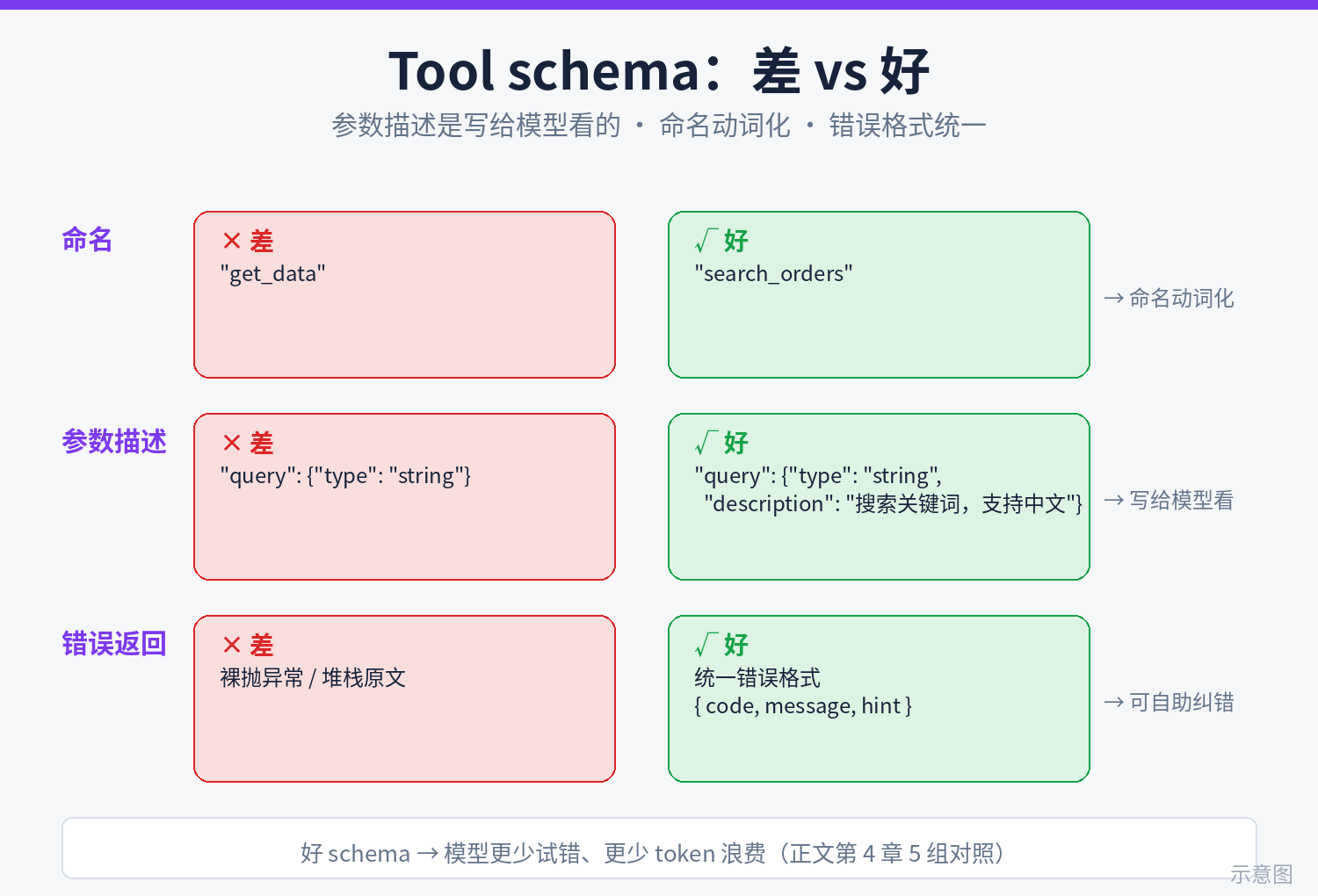
A tool's schema is the only contract between your server and the model; its quality directly sets agent call success rates. Seven principles, each tied to a real pitfall:
Principle 1: Name with verbs
Use create_task, list_tasks, complete_task — not task_create, newTask, or taskMgr. Verb-first names let the model tell at a glance "what this tool does," and they sort neatly when grouped by function. snake_case is the MCP ecosystem's dominant convention.
Principle 2: First sentence of description says "when to use"
The model picks tools by description alone. Template: "Use when the user says/wants …". Bad: "Creates a task." Good: "Create a new task in TaskBoard. Use when the user says 'note this down' / 'add a todo'; don't use it to look up existing tasks — that's list_tasks." That last clause, saying when not to use it, cuts wrong-tool calls dramatically.
Principle 3: Parameter descriptions are written for the model, not humans
This is where most people crash. The describe text is the model's only basis for understanding a parameter. Five bad-vs-good pairs:
- Bad:
"task name"→ Good:"Task title: one sentence saying what needs doing, e.g. 'send the weekly report to investors by Friday'"(format + example) - Bad:
"due date"→ Good:"Due date in YYYY-MM-DD; when the user says 'next Wednesday' you do the conversion to a concrete date"(assigns the conversion job to the model) - Bad:
"task id"→ Good:"Task id (number); take it from list_tasks output, never invent one"(blocks the model's urge to hallucinate ids) - Bad:
"filter"→ Good:"Filter by status: open=incomplete, done=completed, all=everything"(explains each enum value) - Bad: a catch-all
options: z.string()("other params as a JSON string") → Good: one named parameter per dimension; never make the model hand-assemble JSON strings — that's the #1 call-failure hotspot.
Principle 4: ≤6 parameters, minimize required ones
Past ~6 parameters per tool, the model's argument-filling error rate climbs visibly. Make it optional when you can, default it when you can, and don't ask the model for what you can derive from context (e.g., user_id belongs in the auth token, not in a parameter). Required params should be only the 1–2 without which the job can't be done.
Principle 5: Uniform error returns
Don't just throw on tool errors (clients only show a stack trace). Return a structured error body with isError: true:
// uniform error shape: code for programmatic checks, message for humans, hint for the model's next step
async ({ taskId }) => {
  const task = await fakeDb.find(taskId);
  if (!task) {
    return {
      content: [{
        type: "text",
        text: JSON.stringify({
          ok: false,
          code: "TASK_NOT_FOUND",
          message: `No task with id=${taskId}`,
          hint: "Call list_tasks first to confirm the task id; don't retry this id",
        }),
      }],
      isError: true,
    };
  }
  // ... normal path
};
The hint field is the key: it tells the model what to do next instead of letting it flail. An error with a hint gets corrected in one shot; one without averages ~3 retries before the model finds the right path — all burned tokens.
Principle 6: Write operations must be idempotent
Network jitters and client retries mean the same tool can fire twice. Two create_task calls = one duplicate task. Fix: add an optional clientMutationId string parameter (client-generated) to every write op; the server dedupes on it — a repeat submission within 24 hours returns the first result. For naturally idempotent ops (e.g., complete_task — completing twice changes nothing), say "safe to retry" in the description.
Principle 7: Trim responses to decision-relevant info
Don't dump whole DB rows on the model. A task row may have 20 fields; the model needs id, title, due date. Rule: field whitelist + pagination (limit default 10, cap 50). Measured effect: a tool returning 5KB vs one returning 500 bytes erodes multi-turn context at a 10x difference — when your server gets called heavily, that's a direct gap on the user's token bill.
5. Transport Choice: stdio (Local) vs Streamable HTTP (Remote)
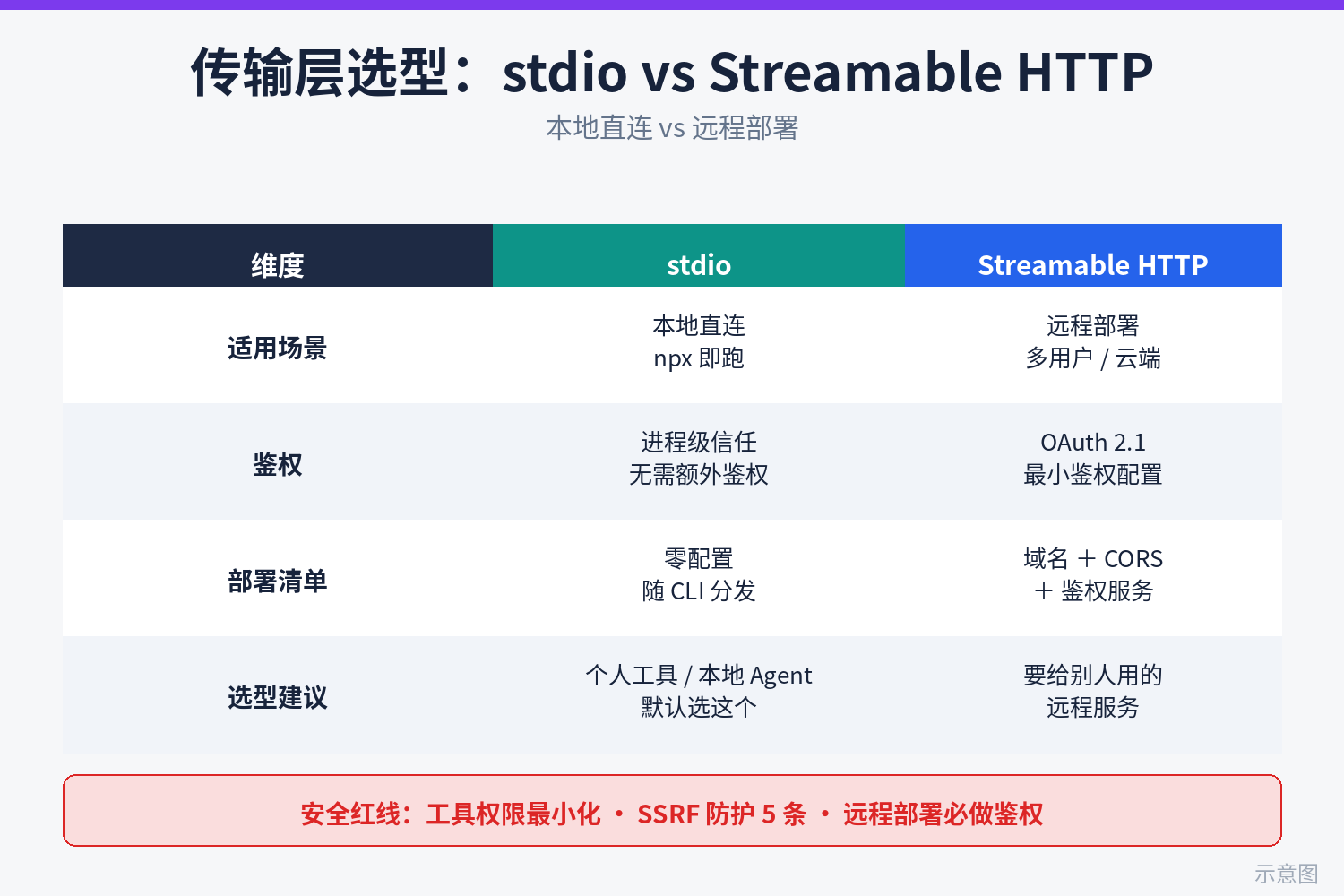
The transport decides where your server runs and who operates it. The decision table:
- Where it runs: stdio runs on the user's machine (client spawns a subprocess); Streamable HTTP runs on your servers (long-lived process or serverless).
- Auth: stdio needs none — a local process is the user themselves, permissions naturally scoped; HTTP must have auth (see section 6) — the biggest cost gap.
- Fit: stdio suits personal productivity tools and local dev tools ("turn my local notes into MCP"); HTTP suits multi-user SaaS and team-shared services ("the company's task system, one server for everyone").
- Ops cost: stdio is zero — distribution is an npm package; HTTP needs domains, TLS certs, rate limiting, monitoring, scaling.
- Updates: stdio users upgrade the npm package manually; HTTP ships server-side, users never notice.
My recommendation: get stdio working first, add HTTP only when needed. For 90% of indie projects, stdio + npm distribution is enough — the user runs npx your-mcp-server and three lines in Claude Code's .mcp.json. HTTP's ops cost is only worth it when your server must "share one dataset/quota across users."
If you do go HTTP, here's the Streamable HTTP server skeleton (Express version; SDK API per current official docs):
import express from "express";
import { randomUUID } from "node:crypto";
import { McpServer } from "@modelcontextprotocol/sdk/server/mcp.js";
import { StreamableHTTPServerTransport } from "@modelcontextprotocol/sdk/server/streamableHttp.js";

const server = new McpServer({ name: "taskboard", version: "1.0.0" });
// ... register tools/resources exactly like the stdio version — zero business-code changes
const app = express();
app.use(express.json());

app.post("/mcp", async (req, res) => {
  const transport = new StreamableHTTPServerTransport({
    sessionIdGenerator: () => randomUUID(), // independent id per session; use it for rate limiting
    enableJsonResponse: true,               // skip SSE, reply JSON directly — simplest deployment
  });
  // release the transport when the connection closes, or it leaks memory —
  // the most common production incident in HTTP mode
  res.on("close", () => transport.close());
  await server.connect(transport);
  await transport.handleRequest(req, res, req.body);
});

app.listen(3000);
Remote deployment checklist (tick each before going live):
- HTTPS domain: mandatory — MCP clients reject plaintext http by default (localhost excepted).
- Auth: OAuth 2.1 (see section 6), or at minimum an API key via the
Authorization: Bearerheader; keys must be revocable per user. - CORS: allowlist only your own client domains — never
*for convenience;*exposes auth tokens to any web page. - DNS rebinding protection: the SDK's
StreamableHTTPServerTransportsupportsenableDnsRebindingProtectionplusallowedHosts/allowedOrigins; turn it on even for local testing so a malicious page can't use the browser as a springboard into your server. - Rate limiting & quotas: limit by session id / API key — tool calls cost you money (they hit your backend APIs and write your DB); no limiting means handing your bill to the world.
- Health check:
/healthzreturns 200 for load balancers and monitors; keep it separate from/mcpand don't put health checks behind auth.
6. Security Red-Line Checklist
The special risk of an MCP server: the caller is a model, not a human. Models pass weird parameters, misunderstand tool purposes, and can be prompt-injected into calling tools they shouldn't. So security can't rely on "users won't do that" — it needs mechanisms.
Minimum OAuth 2.1 setup (mandatory for remote servers)
- Use Authorization Code + PKCE; never the implicit flow (removed in OAuth 2.1).
- Access tokens live ≤1 hour; refresh tokens may be longer but must be revocable; tokens travel only in the
Authorization: Bearerheader, never in URL query strings (queries end up in logs). - Scope per tool:
tasks:read/tasks:write— read and write authorized separately. When the user only wants the agent to look up tasks, don't hand out delete permission along the way. - Do auth in the gateway layer or the SDK's auth middleware — never hand-roll token checks inside each tool handler (hand-rolled checks always miss one).
Least-privilege tools
- Each tool gets only the permissions it needs:
list_tasksreads only,complete_taskonly flips status. The DB account your server connects with should be sized to "the most privileged tool of all," not one notch more. - Dangerous operations (delete, transfer, send email) need a confirmation parameter:
delete_taskmust receiveconfirm: true, with "this cannot be undone" in the description. Models miscall tools more often than you'd think; the confirm parameter is the last gate. - Secrets a tool can touch (API keys, DB connection strings) live only in environment variables and never get logged — MCP logs routinely get pasted into issues for help, and one leaked connection string is a security incident.
SSRF protection, 5 rules (mandatory when your tools fetch external URLs)
- 1. Outbound domain allowlist: URLs in tool parameters may only hit pre-registered domains; everything else is refused. Build an allowlist ("only these 5"), not a blocklist ("no intranet").
- 2. No intranet IPs: block 10.0.0.0/8, 172.16.0.0/12, 192.168.0.0/16, and 169.254.169.254 (cloud metadata service) outright — the classic SSRF path to cloud metadata.
- 3. Resolve DNS, then verify the IP before connecting: resolve first, check the IP isn't internal, then connect. Defeats DNS rebinding and TOCTOU (public IP at resolve time, swapped to internal at connect time).
- 4. Re-check on redirect: disable automatic redirect following, or run every redirect target back through rules 1–3.
- 5. Time out outbound requests: 10 seconds by default, fail fast with a structured error (with a hint — see principle 5), no blind retries — retry storms will take your own server down.
7. Publishing & Distribution: Be Discoverable, Be Installable
Finished code is only half done. An MCP server fights on two fronts: the registry (so agents discover you) and the README (so a human installs you in 3 minutes).
MCP registry submission checklist
- server.json metadata: name, version, a one-line description of the problem it solves, transport type (stdio/remote), auth method, repo URL. Write the description for search — include words users actually search ("todo," "task manager"), not your brand jargon.
- Semantic versioning: adding/removing/changing tools is a breaking change — removing a tool or changing a required parameter means a major version bump, with migration notes in the description/changelog. Agent configs are static; silently changing schemas just makes users' agents start erroring.
- At least one runnable example: registry reviewers and users alike first check "can I run this in 5 minutes." stdio: one
npxline; HTTP: a public demo endpoint (read-only tools, rate-limited). - Security disclosure: remote servers must state the auth method and data-collection scope ("we log tool calls for debugging, retained 30 days") — an increasingly hard registry requirement.
README "installation notes for agents" template (copy and adapt)
Give the README its own ## For AI Agents section. Note: it's written for the user's agent (the user will paste the README to their agent and say "install this for me"), so use imperative voice, exact paths, zero ambiguity:
## For AI Agents: installing taskboard-mcp

This is an MCP server exposing the TaskBoard todo tool to agents.

### Option A: local run (recommended for individuals)
1. Install: npm install -g taskboard-mcp
2. Create .mcp.json in your Claude Code project root with:
{
  "mcpServers": {
    "taskboard": {
      "command": "npx",
      "args": ["-y", "taskboard-mcp"],
      "env": { "TASKBOARD_API_KEY": "put the user's API key here" }
    }
  }
}
3. Restart Claude Code and type /mcp to confirm taskboard is connected.

### Option B: hosted service (for teams)
1. Create an API key at https://taskboard.example.com/settings/api.
2. In Cursor, go to Settings → MCP → Add Custom MCP and fill in:
   URL: https://mcp.taskboard.example.com/mcp
   Headers: Authorization: Bearer <your API key>
3. Back in chat, ask "what taskboard tools do you have" to verify connectivity.

### Available tools (updated 2026-10-11)
- create_task: create a task (needs tasks:write scope)
- list_tasks: query tasks with status filter (needs tasks:read scope)
- config://taskboard/settings: workspace config (read-only, no auth needed)
Three details not to skip in the template: spell out every env var name (the #1 thing users drop when copying), make verification concrete ("/mcp to confirm connection" beats "verify it works" tenfold), and date the tool list (schemas change; the date tells the agent how fresh this doc is).
One line to close: writing an MCP server isn't hype-chasing — it's buying your project a ticket to the agent era. 150 lines of code, one afternoon, in exchange for a seat in thousands of agents' toolboxes. Get stdio working first, then consider remote; write schemas for the model, and treat the security checklist as red lines. Go build it.
Related articles
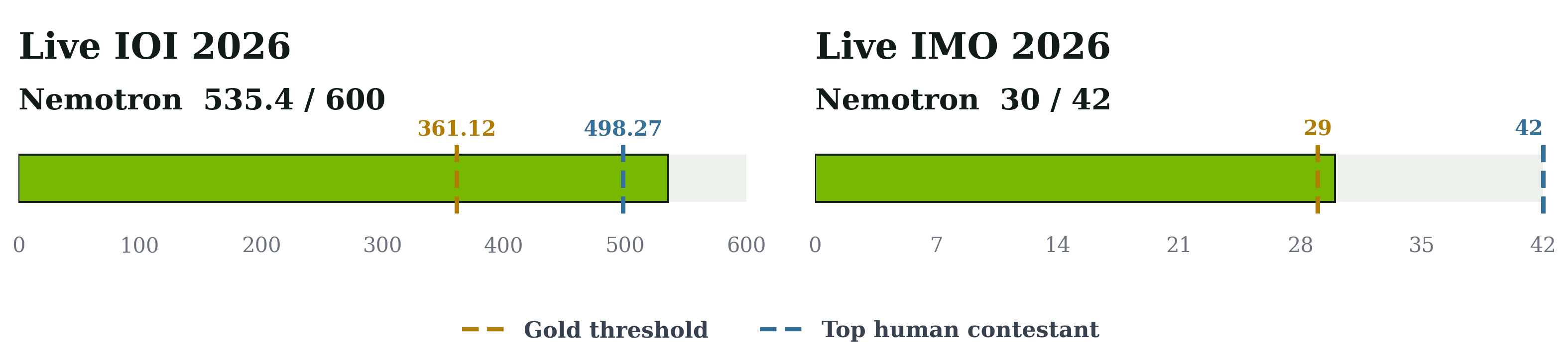
NVIDIA's Nemotron systems hit gold level at IOI 2026 (535.4/600, above the top human score of 498.27 in an unofficial run) and IMO 2026 (30/42, graded by official IMO graders) — and the team open-sourced the full recipe: SFT/RL checkpoints, both training datasets, a new 200-problem olympiad benchmark, inference pipelines, and prompts. The lesson is co-design of model, data, and inference loop: GenCorrect's generate-evaluate-refine cycle carried a 291-point model past the 438.3 gold bar.
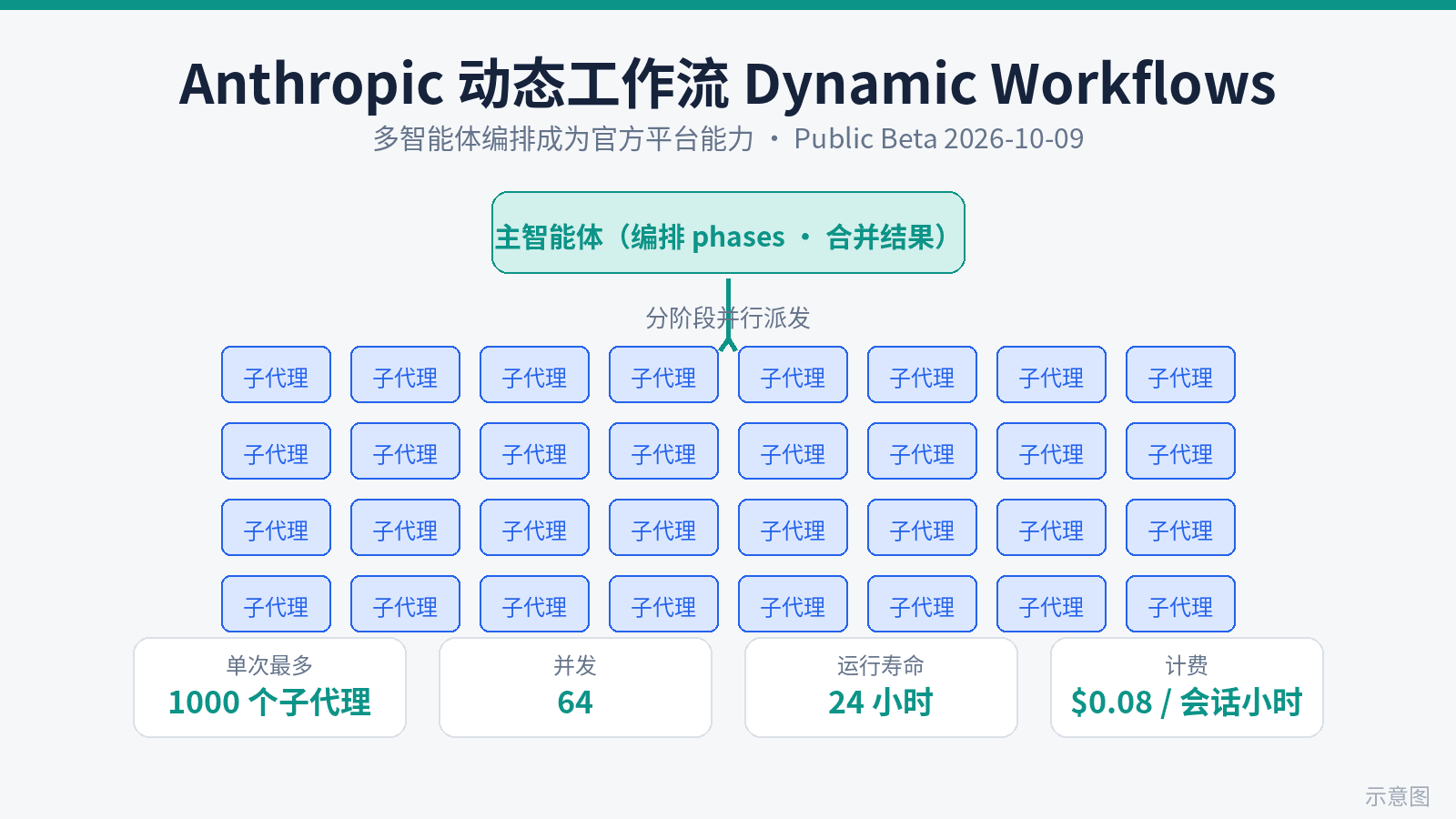
Dynamic workflows for Claude Managed Agents entered public beta on October 9: an agent writes a program that runs many agents in phases and merges results — max 1,000 agents per run, 64 at once, 24-hour default lifetime. The launch rebuts the 'waste of tokens' charge with a head-to-head: 70 planted bugs, a single agent found 14/15/27 across three runs, a workflow found 66 every time. Billing: tokens at each model's rates plus $0.08/session-hour. Token math and a use-it-or-save-it checklist.
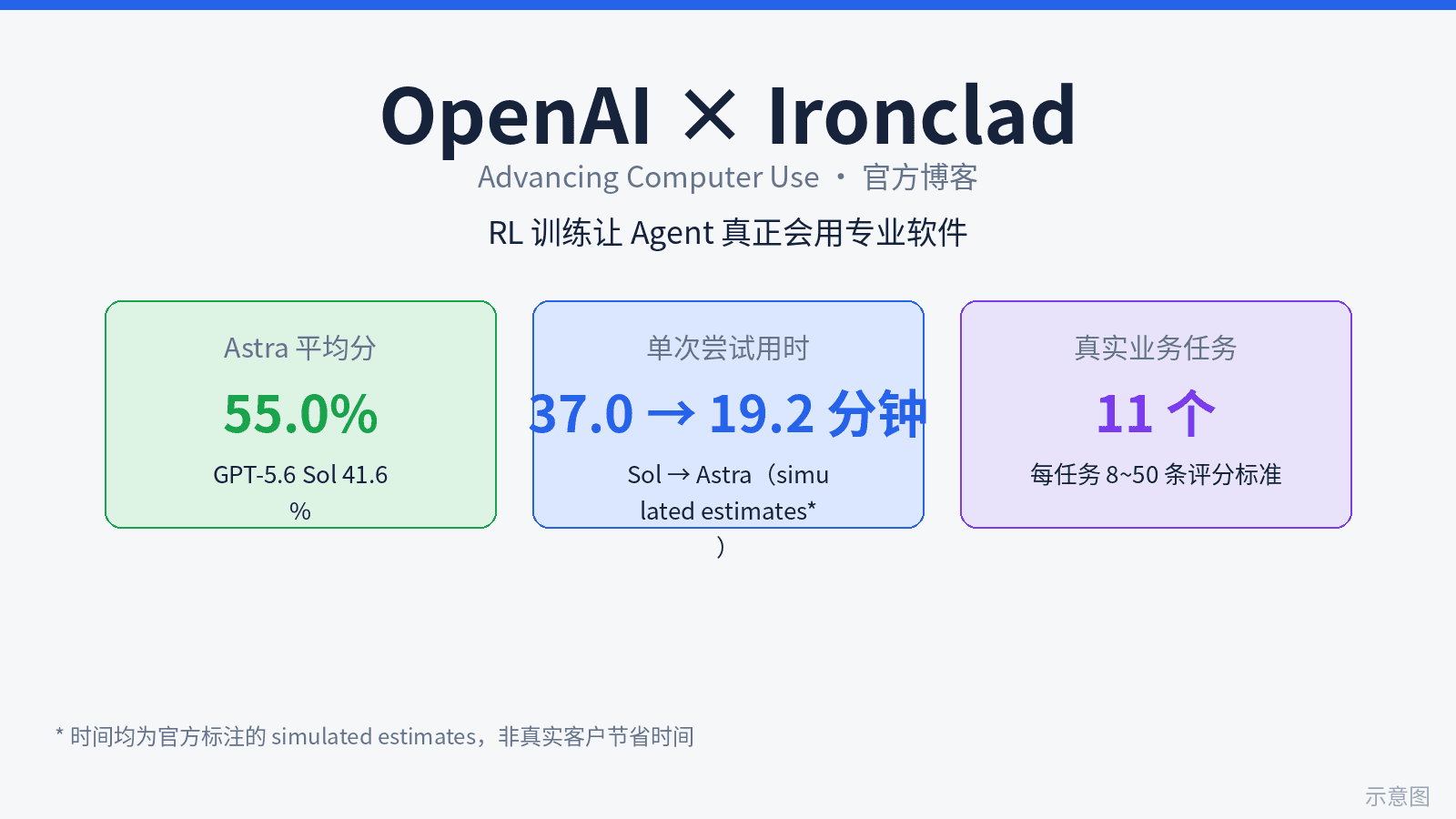
OpenAI's blog 'Advancing computer use with Ironclad' marks a paradigm shift: computer use moves from general capability to per-application customized RL training. GPT-6 Astra, the first frontier model trained on Ironclad tasks, scored 55.0% vs 41.6% for GPT-5.6 Sol on 11 contracting tasks (8-50 scoring criteria each), with time per attempt falling from 37.0 to 19.2 minutes. The moat is moving from models to the partner list - and OpenAI is openly recruiting the next batch of software companies.