GitHub Copilot Puts Agents on a Leash: Local Sandboxing Hits Public Preview Alongside Four Frontier Models
On September 23, Copilot's desktop app shipped local sandboxing in public preview — filesystem, network and credential controls per project — alongside Claude Opus 5.5, GPT-6 Sol/Luna and Grok 4.7. Capabilities sprint, guardrails chase.
On September 23, GitHub gave the Copilot desktop app something many had waited a long time for: local sandboxing, in public preview. The same week's release notes (September 21–25) also added four frontier models at once: Claude Opus 5.5, GPT-6 Sol, GPT-6 Luna, and Grok 4.7. Shackles for the agent on one hand, a stronger brain on the other — GitHub's week is a perfect snapshot of AI coding tools in 2026: capabilities sprinting, guardrails chasing.
This piece explains what the sandbox actually is, how to pick among the four models, and the industry shift behind the shackles.
What local sandboxing actually is
First, what it isn't: not a VM, not a container. GitHub's official wording is "lightweight isolation" — an OS-level policy between the agent and the rest of your machine, built on Microsoft's eXecution Container project. Policies can restrict writable files, readable files, outbound internet access, local network access, Git credentials, GitHub CLI credentials, local MCP servers, and language servers.
In plain terms: you can decree "this agent may read and write only the project directory, never touch my ~/.ssh; it may reach npm but not the database on the local network; it may use Git but never sees my GitHub token." Configuration is per-project: enable "sandbox new sessions" in project settings and new local sessions start fenced by default; mid-session you can flip it with /sandbox on and /sandbox off. The CLI has its own commands (/sandbox enable, /sandbox disable, /sandbox status, /sandbox policy) — and note the app and CLI are separate configuration surfaces. A locked-down app proves nothing about your CLI sessions; configure both.
Key details: off by default. GitHub chose opt-in over enforcement, which is realistic — sandboxing breaks things (test suites binding local ports, for instance, since localhost services are blocked by default), and forcing it on would nuke existing workflows. Fail-closed. If the OS can't enforce a requested policy, the session fails instead of running unprotected. That's the right call: the worst failure mode of any security mechanism is silent failure. Enterprises can enforce. Admins can push stricter-than-project policies, and managed-settings fetch failures can block startup entirely — in enterprise settings, "no policy, no work" is the correct posture.
Four new models: four vendors, one picker, first time
The model drop deserves a close read too. The September 21–25 weekly notes confirm: Claude Opus 5.5 and GPT-6 Sol for Copilot Pro+, Max, Business, and Enterprise; GPT-6 Luna and Grok 4.7 more broadly, starting at Pro. For the first time, Anthropic's newest reasoning model, OpenAI's latest GPT-6 tier, and xAI's Grok 4.7 sit in the same model picker.
Choice paralysis incoming. Here's a rough-but-practical split: Opus 5.5 for the hard nuts — gnarly refactors, cross-file reasoning, the current reasoning ceiling, and the priciest; GPT-6 Sol as OpenAI's performance tier for latency-sensitive daily development; GPT-6 Luna as the value tier, the official recommended fallback when you hit rate limits, for high-volume low-value work (bulk edits, test writing); Grok 4.7 for the curious or xAI-aligned teams. No silver bullet — only "which price of brain does this task deserve."
Don't overlook the companion update: OpenTelemetry. Agent activity can now flow into your existing monitoring stack. For enterprise teams this matters more than new models — "what did the agent do last night" finally lands in Grafana/Datadog. Observability is the precondition for scaling usage.
Why shackles and new brains arrived together
The pairing is deliberate. Stronger models mean a bigger autonomous action space, and bigger blast radius when something goes wrong (or when prompt injection steers it). GitHub's answer: layer capabilities, lead with guardrails — Pro users get a cheap model like Luna to experiment with, while the sandbox keeps the experiment's blast radius contained.
Here's homework worth copying: treat model selection and permission configuration as one decision. Many people give agents the strongest model with the loosest permissions — the most dangerous combination there is. Do it the other way: decide permissions by task first (which files, which networks, which credentials does this task need?), then decide the model by task (which price of brain is this worth?). Permissions are a safety question, models are a cost question — answer them separately.
One caution from Nandann's guide: even Microsoft's own eXecution Container project warns its preview policies "may still be overly permissive." So the sane framing for now is blast-radius control, not absolute safety. Least-privilege credentials, branch protection, code review, secret scanning — none of them go away. The sandbox is one more door, not a new lock.
A practical sandbox template: tighten in stages
Theory isn't enough; here's a starting template you can copy. Say you're a 5-person team with the repo at ~/work/acme-app:
Step 1 (this week): block only the two most dangerous categories. Deny all credentials: ~/.ssh, ~/.aws, ~/.gnupg, any .env file; make the rest of home read-only. Leave networking open — let the team get used to the sandbox existing, with minimum friction. Expected outcome: agents can never read your private keys, and daily development feels unchanged.
Step 2 (two weeks later): narrow the file scope. Writable = repo directory plus /tmp; other projects under ~/work become read-only (stops agents wandering into the wrong repo); system directories denied. This will block some legitimate operations — someone used to having the agent tweak docs in the neighboring repo — log each case and decide: whitelist it, or change the habit.
Step 3 (a month in): tier by project. Personal experiments stay loose; production projects handling user data go tight — outbound network denied by default (dependencies via internal mirror), MCP servers limited to a team-vetted list. The principle: strictness should track the cost of screwing up, not the project's prestige — a starred open-source demo can cost less to break than an unseen internal billing system.
Keep OpenTelemetry on and log blocked operations too. That log is the best basis for tuning policy: blocked 10 times, all 10 false alarms — policy too tight; blocked 10 times, 3 genuine catches — the sandbox is earning its keep. Tune with data, not vibes.
The model cost math: a concrete example
Four models on stage means doing the arithmetic. Suppose your team has 1,000 "hard tasks" a month (complex refactors, cross-file reasoning) and 10,000 "chores" (test writing, bulk edits, docs):
- Hard tasks all on Opus 5.5: priciest per token, but highest first-try success rate. One rework round (your time + re-run tokens) usually costs more than "three tries with a cheap model" combined. On hard tasks, don't economize on the model — economize on rework.
- Chores all on Luna: cheapest, rate-limit friendly. Chores just need to be right, not beautiful — that's Luna's job description. Trial it for two weeks; if the rework rate is acceptable, lock it in.
- Sol in the middle: the daily driver, for latency-sensitive pairing sessions. Grok 4.7 as the spare: cut over when the primary acts up or when you want a comparison.
The key is a team-wide "model tiering" consensus, reviewed monthly against the bill: which model spent what, delivered what. Without measurement, cost optimization is theater. Many teams' AI bills bloat not because models are expensive, but because the default model is set too rich — default to Luna, escalate manually when needed, and watch a chunk of spend evaporate.
Three things for teams to do
First, turn the sandbox on this week — but start with "read-only project dir + blocked credentials." Don't lock everything down on day one; the team will revolt. Tighten progressively: block the two most dangerous categories first (credentials, home directory), run two weeks, collect the "blocked but legitimate" list, then tune. The secret to security rollouts: normal people barely notice, abnormal operations can't move an inch.
Second, set a cover charge per model. Write it in the team wiki: Luna for bulk low-value work, Sol for daily driving, Opus 5.5 only for the hard nuts. Without the standard, expensive models get spent on cheap tasks and the bill quietly inflates. Park Grok 4.7 in the experimental corner for two weeks of comparison first.
Third, pipe agent activity into existing monitoring. The OpenTelemetry support is the most underrated item in this release. Once agents work at scale, "what did it do last night" must be queryable — a compliance requirement and a debugging necessity. Connect first, then scale.
One-line summary: GitHub did two things this week — gave agents stronger brains and put shackles on them. Don't reverse the order: shackles first, brains second. In 2026, AI coding tools compete not on who is smartest, but on who is most trustworthy to use. And trustworthiness was never built from marketing copy — it's accumulated one line at a time from sandbox policies, audit logs, and cost ledgers.
Sources
Related articles

On October 7, 2026, GitHub announced via Changelog: starting with CLI 1.0.94-0, the /model command discovers models in your local Ollama instance, listed alongside configured and cloud models. Discovery doesn't auto-enroll — each model needs manual confirmation — and models must support tool calling and streaming. GitHub also teased intelligent routing, and clarified: a local model neither enables offline mode nor disables telemetry.
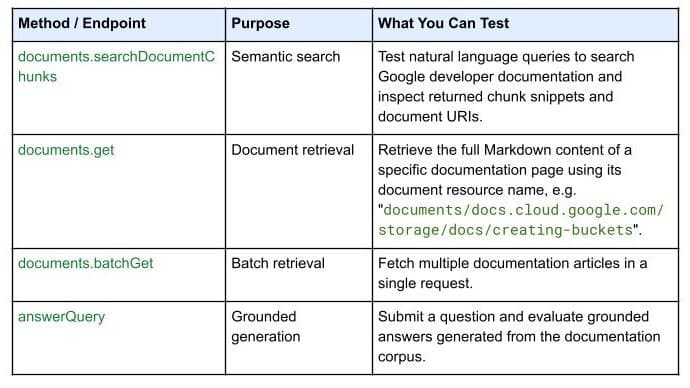
On October 7, 2026, Google Developers launched the Developer Knowledge API ecosystem: official Google Cloud, Firebase, and Android docs as a programmatic source of truth, with a gcloud CLI surface, an official Agent Skill (one-line install), an MCP server, and multi-language client libraries. Why 'docs as APIs' uproots vibe coding's classic failure of models misremembering APIs.

On September 30, 2026, Bitdefender launched AI Guardian in public beta: a security layer for autonomous AI agents that verdicts every tool call, file access, and credential use as allowed, flagged, or blocked. First on macOS, free during beta, supporting Claude Code and OpenClaw. Why this 'agent behavior firewall' arrives right on time for vibe coders.