Reading AI-Generated Code: A Code-Reading Playbook for the "AI Writes, You Own It" Era
AI now writes in a day what a team wrote in a week — but "written" doesn't mean "owned." This guide covers code reading for the AI era: get the map first, start from entry points and tests, keep a "distrust checklist." Reading code isn't nitpicking; it's being able to catch AI when it's wrong.

Since AI coding went mainstream, a paradox has emerged: one person can now "write" in a day what used to take a team a week — yet almost nobody dares claim they've actually read that code. The code is AI-written, the tests are AI-run, the PR is AI-opened — humans just click "merge." Until the day production breaks, someone opens that 2,000-line file, and everyone realizes: we own a house we've never walked through.
This guide argues something counterintuitive: in the AI era, reading code is scarcer — and more valuable — than writing it. Writing code is becoming cheap labor; judging whether code is shippable is becoming the core skill. Here are six field-tested methods.
1. Get the map before entering the city
Never read line by line from the start. First, ask the AI (yes, the one that wrote the code) to draw you a map. Templates that work:
- "Explain this project's module structure and data flow in 300 words"
- "List the 5 most critical files, and what breaks if each is deleted"
- "Which modules does this change touch, and how do they depend on each other?"
Reading with a map is an order of magnitude more efficient. Reading without one is wandering; reading with one is inspecting — you want the latter.
2. Start from entry points and tests
Always find three things first: entry points (main functions, route registrations, event listeners), tests (test cases are living documentation of "what the code should do"), and data models (schemas and type definitions are the skeleton).
AI-generated tests deserve special attention: they reveal what the AI understood the requirements to be. If the tests are testing the wrong thing, beautiful code is still wrong code. Read the assertions before the implementation — reverse the order and the implementation will lead you astray.
3. Control diff size: never more than 300 lines at once
Human review bandwidth is finite. Past 300 lines of diff, your eyes go into autopilot — skim, approve, remember nothing. That's the most dangerous habit of the AI era, because AI excels at dumping 2,000 lines of "looks fine" code on you in one shot.
The rule: make the AI split large changes into small PRs, each doing one thing, each with a human-readable explanation of why (not a git-log-style "what"). A change that can't be split is itself a smell.
4. Keep a "distrust checklist"
AI rarely makes syntax errors. It makes "looks done" errors. Pin this checklist to your PR template and check against it every time:
- Exception handling: does the catch block actually handle, or silently swallow? (AI loves empty catches)
- Edge cases: empty arrays, nulls, oversized inputs, concurrent writes — tested?
- Auth checks: does this endpoint really verify identity, or is it "trusted by default"?
- Hardcoding: magic numbers, hardcoded URLs, temporary secrets snuck in?
- N+1 queries: database calls inside loops — AI's signature move.
- TODO comments: an AI's TODO is unfinished work. Search for them all.
5. Use AI to explain AI's code — but cross-examine
Having AI explain its own code is the fastest way to learn, but the questioning matters. Don't ask "is this code correct" (it'll say yes). Ask "what happens to this code under XX edge condition" or "what breaks if I delete this function." The former seeks verification; the latter seeks praise.
Go further: have a different model do the review. Code written by A, critiqued by B, filters out most self-confirmation bias. It costs double the tokens and saves you one production incident — easy math.
6. Take a weekly "code walk"
The last one is the least "efficient" and the highest long-term ROI: spend 30 minutes a week opening a module you didn't write and reading it end to end — not to fix bugs, just to learn the terrain. Firefighters memorize every building's stairwells; they don't study floor plans when the alarm rings.
AI is growing codebases faster than humans can learn them, for the first time in history. The "code walk" is the only dumb-but-working way to close that gap.
Remember this: the point of reviewing AI code isn't finding bugs — it's finding the things you assumed it did but it didn't. AI never lies and says "I didn't do it." It just quietly skips, then uses pretty formatting to convince you everything's fine.
Reading code isn't about nitpicking. It's about being able to catch it the moment AI gets it wrong. It's your house — walking through it is the owner's basic duty.
Related articles

On October 3, engineer Kevin Liao published a polemic that hit the HN front page: agent memory plugins are a lottery over RAG snippets; what agents need is a documentation workspace. The essay's diagnosis, its open-source Operator Memory plugin, the two strongest objections, and the minimal practice you can start tonight.
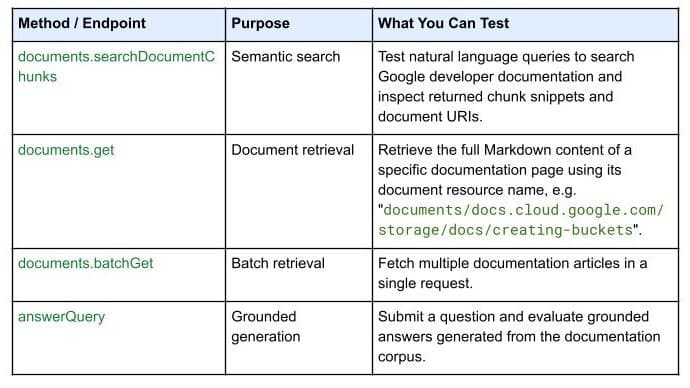
On October 7, 2026, Google Developers launched the Developer Knowledge API ecosystem: official Google Cloud, Firebase, and Android docs as a programmatic source of truth, with a gcloud CLI surface, an official Agent Skill (one-line install), an MCP server, and multi-language client libraries. Why 'docs as APIs' uproots vibe coding's classic failure of models misremembering APIs.

Gergely Orosz visited OpenAI, Anthropic, Cursor, and Ramp and wrote up the 2026 state of the industry: near-100% AI-generated code, agent PRs up ~10x in eight months, code review degrading into theater, the IDE declared legacy. Key takeaways plus three verdicts and four actions for vibe coders.