That Package Your AI Told You to Install Might Not Exist: Dependency Supply-Chain Security for Vibe Projects
AI confidently invents package names that don't exist — and attackers register them, waiting for you. A USENIX Security 2025 study found 19.7% of AI-generated code referenced nonexistent packages. This guide dissects the four-step slopsquatting attack chain and gives you a 5-minute pre-install review, lockfile pinning, CI defenses, and an incident-response SOP.
A true story first: the worm that learned to reproduce itself
Between September 14 and 16, 2025, the npm ecosystem saw its first true "worm incident": a malicious campaign codenamed Shai-Hulud began spreading through versions 4.1.1 and 4.1.2 of @ctrl/tinycolor. Its method was "elegant" — one line added to the package, "postinstall": "node bundle.js", executed automatically at install time. The bundled script scanned the victim's machine for environment variables, ~/.npmrc, and cloud credentials, exfiltrated them to the attacker's webhook, and — if it found a usable npm token — enumerated every package that account could publish, re-releasing each with the same malicious patch version. Within two days, hundreds of packages were compromised; CISA issued a dedicated alert on September 23.
The most unsettling part: every poisoned package was "legitimate." Real publisher accounts, valid signatures, clean provenance attestations — signatures answer "who published this," but they cannot answer "did the publisher publish this version willingly." Once an attacker holds a maintainer's token, every defense that asks "was this released by the legitimate owner" answers yes in unison. A second wave in November even spread to the OpenVSX extension marketplace, creating 25,000+ malicious repositories as dead drops.
So this guide won't lecture you about "installing fewer dependencies" — our site already has a guide for that, "Would You Trust the Packages Your AI Installed?" (slug: vibe-coding-dependency-supply-chain-security), which covers AI's four generous habits and a five-step workflow. That one is about restraining the AI's hands; this one is about seeing the attacker's road: a deep dive into one concrete attack chain — slopsquatting (AI-hallucinated package name squatting) — plus two classic name-layer attacks, followed by a 5-minute pre-install review routine, CI defenses, and an incident-response SOP. The two guides complement each other; nothing is repeated here.
/media/content-media/a56f3ccd-38fe-490f-a5d3-6edb6bc228d5/2026/10/5a14d798-94ed-4226-924f-3e880da08db2.png
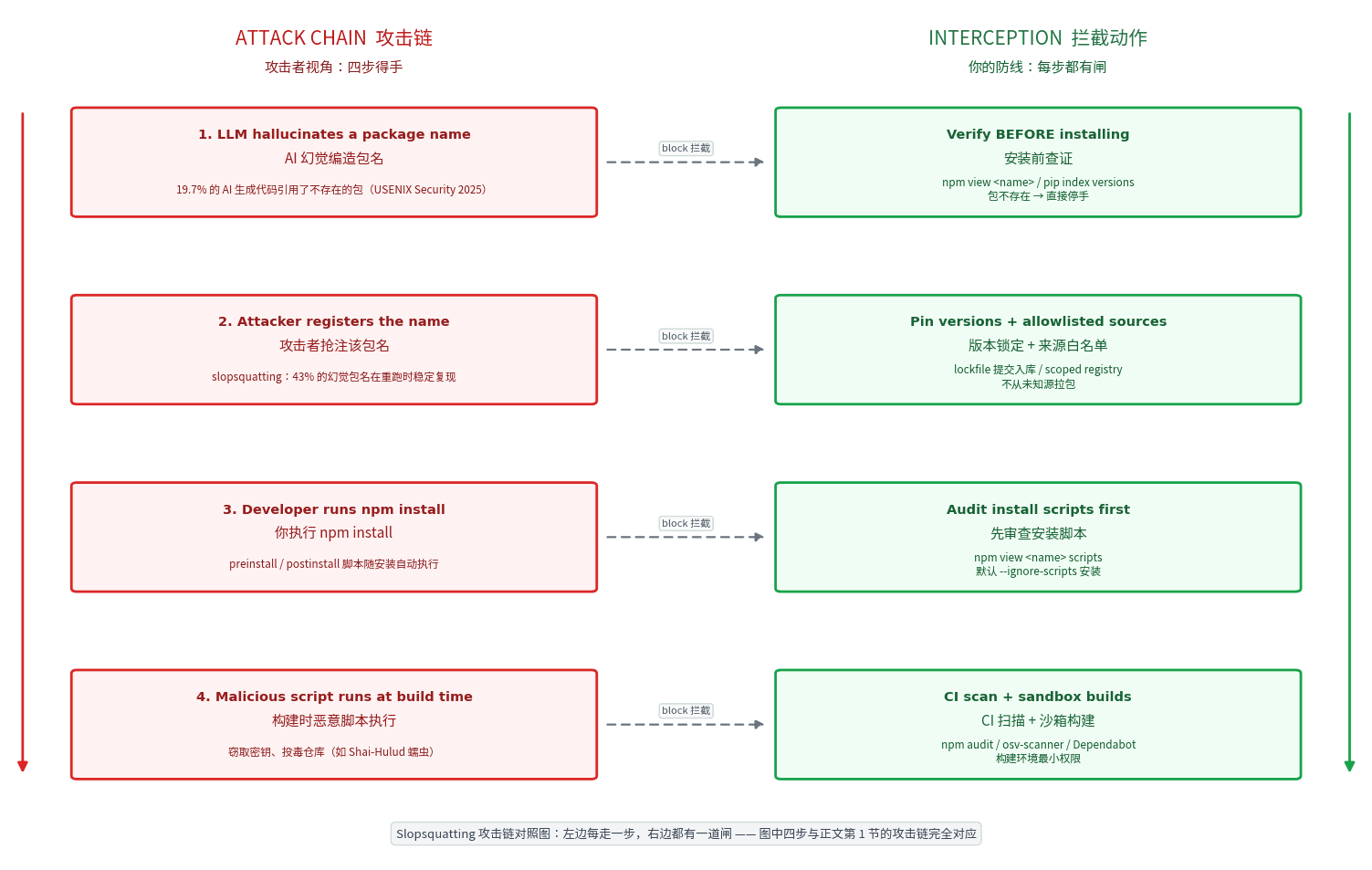
Slopsquatting attack-chain diagram: the left column shows the attacker's four steps to success (LLM hallucinates a package name → attacker registers it → you run npm install → malicious script executes at build time); the right column shows the interception action for each step. The four steps match the attack chain described in this and the next section; the right-column defenses are expanded in the following sections.Attack surface #1: AI-hallucinated package squatting (slopsquatting)
First, the word's provenance: slopsquatting was coined by Seth Larson, developer-in-residence at the Python Software Foundation, for exactly this attack — registering package names that AI hallucinates. And "AI hallucinates package names" is no longer folklore; it is a measured result published at USENIX Security 2025. In "We Have a Package for You!", Spracklen et al. tested 16 code-generating models across 576,000 generated samples: 19.7% referenced a package that does not exist, yielding 205,474 unique fabricated names in total. Worse is the predictability: re-running the same prompt ten times, 43% of hallucinated names appeared on every single run, and 58% appeared more than once. Commercial models hallucinated at 5.2%, open models at 21.7% — no model was clean. An April 2026 follow-up research note from the Cloud Security Alliance scaled the corpus to 2.23 million samples, and the 19.7% figure did not budge.
The attack chain is four steps, each of which has happened in the real world (matching the left column of the diagram above):
Step 1: the LLM hallucinates a package name. You ask your agent to "install an eslint plugin for unused imports," and it confidently writes npm install unused-imports — a package that does not exist on npm; the real one is eslint-plugin-unused-imports. The AI isn't lying to you; it's pattern-matching plausible-sounding names from training data.
Step 2: the attacker registers it. Attackers don't need to guess your model or your prompt — the papers are public, the hallucination distributions are public; running the same prompts themselves yields a ready-made target list. npm's unused-imports was squatted exactly this way and still saw roughly 233 weekly downloads as of February 2026; PyPI's huggingface-cli was downloaded 30,000+ times in three months — seeded by a public doc that had copied an unverified AI-suggested install command.
Step 3: you run the install. In the vibe-coding workflow this step has almost zero friction: the agent installs it directly, or you paste the AI's command into your terminal. npm preinstall/postinstall scripts execute automatically with your user privileges — they can read files and reach the network. Shai-Hulud completed its initial intrusion on exactly this one line of config.
Step 4: the malicious script executes at build time. The payload doesn't have to detonate on your laptop; more often it lies low: stealing CI tokens, committing malicious workflows into your repos (Shai-Hulud committed .github/workflows/shai-hulud-workflow.yml to victims' repositories), turning one install into persistent control.
Why are vibe coders the highest-risk group? A traditional developer at least glances at the README before installing; an agent's loop is "missing package → install automatically → keep coding," with nobody ever checking whether the name exists. Your agent can try 10 package names a minute; the attacker only needs one of them to be squatted.
Attack surfaces #2 and #3: typosquatting and dependency confusion
Slopsquatting is "AI making the mistake for you." The next two are classics of the name game, worth covering together because the defense logic is identical: before installing, confirm that the name points to the package you actually want.
Typosquatting. Attackers register names one or two letters off a popular package — react-dom vs raect-dom, lodash vs loadsh. Think only shaky fingers fall for it? AI has shaky fingers too: it misspells an import path and then helpfully installs the misspelled package. Beyond pre-install verification, one genuinely useful trick is keeping a "correct spellings of frequent packages" list for your agent to copy from — don't laugh, it works.
Dependency confusion. Security researcher Alex Birsan's 2021 claim to fame: many companies' private packages live only on internal registries, but their names are public (in open-source code or docs). The attacker publishes the same name at a higher version on the public registry (npm/PyPI), and the package manager's "highest version wins" rule pulls the malicious public copy. Birsan collected bug bounties from Apple, Microsoft, PayPal, and others with this. The vibe-project version: you install an internal package from a private registry or GitHub Packages without proper scope mapping, and one day your AI npm installs an internal package name that happens to have a malicious same-named twin waiting on the public registry. The defense is configuration: bind internal scopes to their dedicated registry in .npmrc, keep public packages on the public registry, and never let the two mix.
Viewed together, the conclusion is blunt: supply-chain attacks increasingly happen before you hit enter — the package name, the most boring link in the chain, is the link most worth defending in 2026.
The 5-minute pre-install review: four checks, one config
Don't be scared by "5 minutes" — once practiced, it's one. The core principle: for any AI-suggested package, verify "it exists and it's the right one" before discussing "is it any good." Note this doesn't duplicate our older guide's "make the AI defend each install" prompt constraint — that one constrains the AI; this is four actions plus one config that you (the human) run in the terminal.
Check 1: does the package exist?
npm view <name> version      # errors out if it doesn't exist: the cheapest interception
pip index versions <name>     # same idea for Python
A slopsquatted name is in one of two states: not yet registered (this command just saved you) or already registered (keep checking).
Check 2: does the timeline make sense?
npm view <name> time --json | tail -20Two signals: whether the package was published yesterday (squatted packages are usually brand new), and whether the version history jumps discontinuously (a package dormant for three years suddenly shipping a major version deserves suspicion). A Shai-Hulud victim glancing at @ctrl/tinycolor's timeline would have found version 4.1.1 appearing extremely abruptly.
Check 3: are the maintainers and download counts healthy? Open the npm page and check three things: whether weekly downloads match the package's claimed fame (a self-proclaimed lodash replacement with 200 weekly downloads is off); whether the maintainers are recognizable accounts; whether the repository link opens and points to a real repo. The most common tell of a squatted package is the "triple nothing": no repo, no README, no version history.
Check 4: does it ship install scripts?
npm view <name> scriptsIf the output contains preinstall/postinstall, download the tarball and read the scripts before deciding. 99% of pure-JS utility libraries need no install scripts — treat any install script outside of "compiling native modules" as suspicious by default.
One config: default to --ignore-scripts. Put this in your shell profile and your agent's system prompt:
# ~/.npmrc
ignore-scripts=true
The side effect is that some packages (esbuild, sharp — anything downloading binaries) need a manual npm rebuild afterward, an entirely acceptable cost. You never wanted "zero scripts"; you wanted "I nodded before any script ran."
Compress the five into one line in your project README for the agent: "Before adding a dependency, run the four checks — existence, timeline, maintainers, install scripts — default to ignore-scripts, and write the findings into the PR description." One sentence, zero cost, and it blocks the entire slopsquatting chain at step one.
Lockfiles and version pinning: why ^ is a hazard
The ^ in "lodash": "^4.17.21" is the default in many vibe projects — and supply-chain attackers' favorite shape. ^ permits automatic minor and patch upgrades, and Shai-Hulud-style campaigns specialize in shipping an "innocent-looking" patch: @ctrl/tinycolor 4.1.0 → 4.1.1, with one postinstall line smuggled into a diff nobody reviews for a patch release.
Three hard rules:
1. The lockfile must be committed. Non-negotiable. package-lock.json (or pnpm-lock.yaml) is the exact snapshot of "what this build actually installed." With it, CI and teammates install a byte-identical tree; without it, every npm install is a blind box. Give your agent one iron rule: never delete the lockfile, never use latest, every new dependency must appear in the lockfile diff.
2. Production installs always use npm ci. npm install re-resolves versions per ^ and rewrites the lockfile; npm ci installs strictly from the lockfile and fails loudly if it disagrees with package.json. Hard-code RUN npm ci --omit=dev in your Dockerfile — devDependencies never ship to production. AI loves installing dev tools on a whim, and history shows plenty of poisoned packages hid in dev dependencies precisely because "it doesn't ship" makes review lazier.
3. After the AI edits package.json, the diff gets three checks. Make it a habit: every dependency change comes with its diff pasted for you, and you only read three lines — is each new package name one you ran the four checks on; does any version carry ^/~/latest (rewrite to exact versions); did any unfamiliar transitive dependency get upgraded along the way. For transitive deps with known vulns and no upstream fix yet, pin them hard with overrides:
{
  "overrides": {
    "vulnerable-pkg": "1.2.4-patched"
  }
}
The essence of all three: move "trust" from "re-evaluated at every install" to "evaluated once, when the lockfile changes." Attackers can publish infinite malicious patch versions, but as long as your build trusts the lockfile instead of ^, none of them will ever reach your machine.
CI defenses: audit, osv-scanner, and Dependabot
Manual review stops "packages you deliberately install"; CI defenses stop "changes you didn't notice": a poisoned transitive dependency, a newly disclosed CVE in something already installed, a package your AI upgraded at 3am. Set expectations first: npm audit only knows CVEs in its database — a brand-new slopsquatted package isn't in any database yet. So CI is the second gate; pre-install verification is forever the first. Two gates, two different attacks; don't expect one gate to do both jobs.
The floor: npm audit in CI, gating on the delta. The goal isn't "zero vulnerabilities" (unrealistic) — it's incremental auditing of new dependencies: whatever the PR adds gets scanned automatically, critical findings block the merge. A 20-line GitHub Action does it; even a vibe project deserves these 5 minutes:
# .github/workflows/dep-audit.yml
name: dep-audit
on: [pull_request]
jobs:
  audit:
    runs-on: ubuntu-latest
    steps:
      - uses: actions/checkout@v4
      - uses: actions/setup-node@v4
        with: { node-version: 20 }
      - run: npm ci --ignore-scripts
      - run: npm audit --audit-level=high
Next level: osv-scanner widens "known vulnerability" coverage. npm audit only queries npm's official advisory database; Google's osv-scanner sits on the OSV distributed vulnerability database, covering more ecosystems and fresher poisoned-package records. One more line in CI, one more pair of eyes:
- run: npx osv-scanner --lockfile=package-lock.json --format=jsonLong term: let Dependabot watch "time to upgrade." Many poisoning victims didn't "install a malicious package" — they "sat on an old version with a known CVE." Dependabot opens a PR every week delivering the security-fixed version to your doorstep; you just click merge. The recommended cadence for a solo project is a "15-minute weekly dependency checkup": Monday morning, glance at Dependabot's PR list, merge what should merge, close what should close, and run npm audit for good measure. A recurring calendar reminder beats any amount of "security awareness."
The cost of the trio: 30 minutes to set up once, 15 minutes a week after. The projects hit by Shai-Hulud's second wave — stale tokens never rotated, CI holding npm publish permissions year-round — were never short on security knowledge. They were short on those 30 minutes.
When it happens anyway: the incident-response SOP
Accept one reality first: no defense is airtight. The difference is whether you have an SOP — with one it's "an incident," without one it's "a disaster." Run this checklist in order; don't skip steps:
Step 1: isolate — don't rush to delete. Pause the CI pipeline first (so malicious workflows stop running), archive a copy of the suspicious node_modules (for forensics), then delete. Before deleting, run npm ls <suspicious-package> to learn how it got in — direct or fifth-layer transitive — because that determines the blast radius in step 3.
Step 2: reinstall from a clean source, pinned to a clean version. Find the last known-clean version in the lockfile's git history, pin it exactly, remove node_modules and the tainted lockfile entries, then npm ci --ignore-scripts. For Shai-Hulud-style "malicious version of a legitimate package" cases, check the npm page to confirm the malicious versions were taken down (npm's response to such incidents is usually fast — flagged within hours), then upgrade to the fixed release.
Step 3: check whether the repo was "reanimated." Shai-Hulud committed workflows like .github/workflows/shai-hulud-workflow.yml to victims' repos; the November second wave also created runners named SHA1HULUD. Sweep GitHub Actions and repo settings for anything you don't recognize: unfamiliar workflow files, strange deploy keys, odd releases. Delete what shouldn't be there, then read the git log to confirm no malicious commits slipped in.
Step 4: rotate secrets — the full checklist. The easiest step to forget: npm tokens, GitHub PATs, cloud AK/SK, every secret in the project's .env, CI secrets — rotate all of them; never gamble on "it probably didn't steal that." A postinstall script runs at install time and sees everything you can see. For rotation technique (zero-downtime rotation, secret tiering), our site's credential-management guide has the complete playbook — go read that one instead of a recap here.
Step 5: report. File the malicious package through npm's abuse channel (with versions and payload behavior), and for confirmed slopsquatting registrations you can also ask npm's security team for a takedown. Your report might become the "already taken down" record someone else sees in their check #2.
One judgment to close with: for vibe coders, supply-chain security was never a question of "should I learn security" — it's "am I willing to add three checks." AI made coding ten times faster, and attackers install packages just as fast. In this arms race, the winner is always the person who took one extra look before
npm install— and this guide just decomposed that look into four commands.
Comments (0)
Related articles
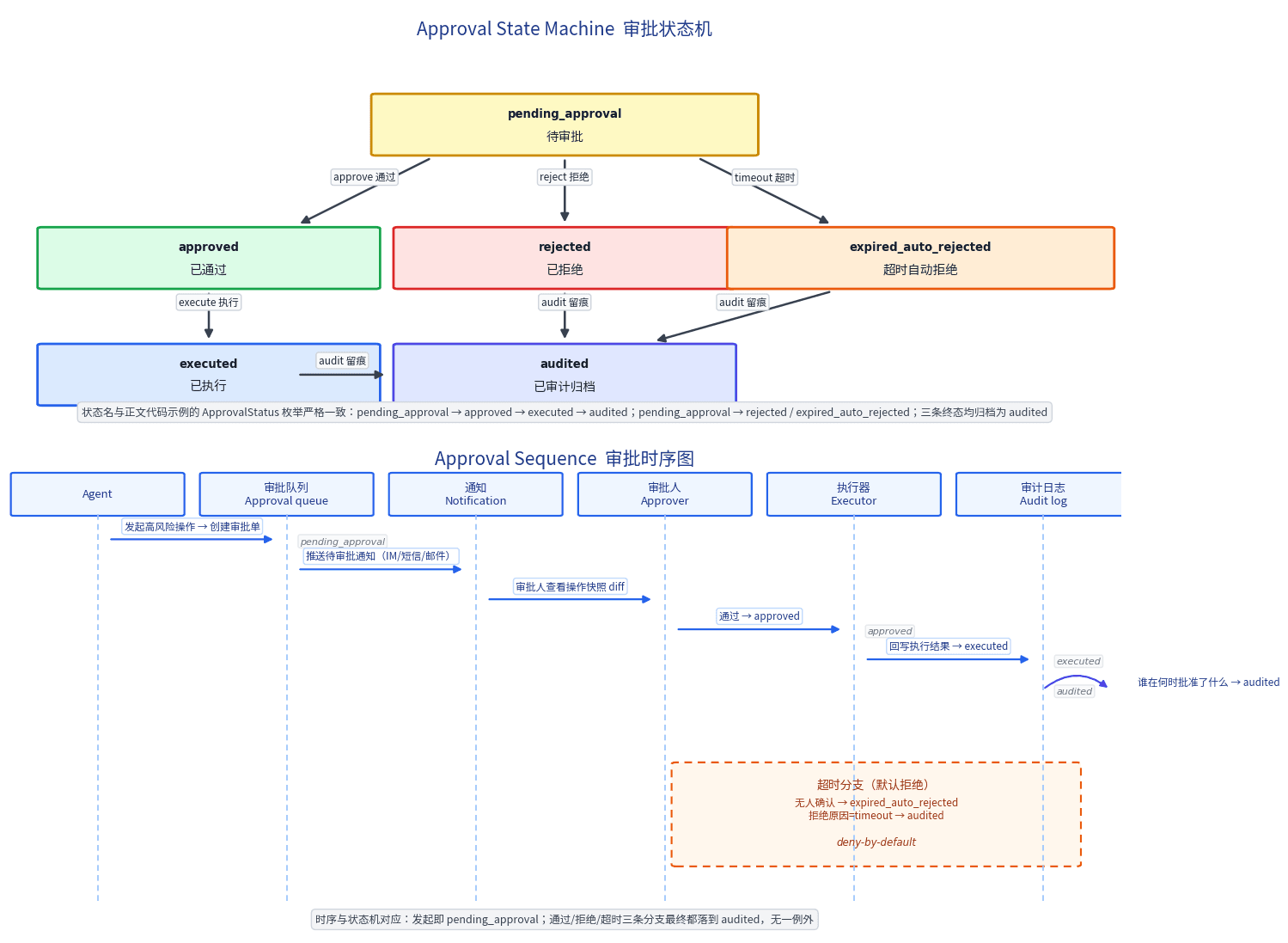
The more autonomous the agent, the larger the blast radius. A "human nods before it runs" gate on deletions, refunds, broadcasts, and permission changes is the cheapest insurance. This guide gives you a risk×reversibility quadrant, a minimal ticket schema, deny-by-default timeouts, audit trails, and an emergency lane — shippable in a weekend.
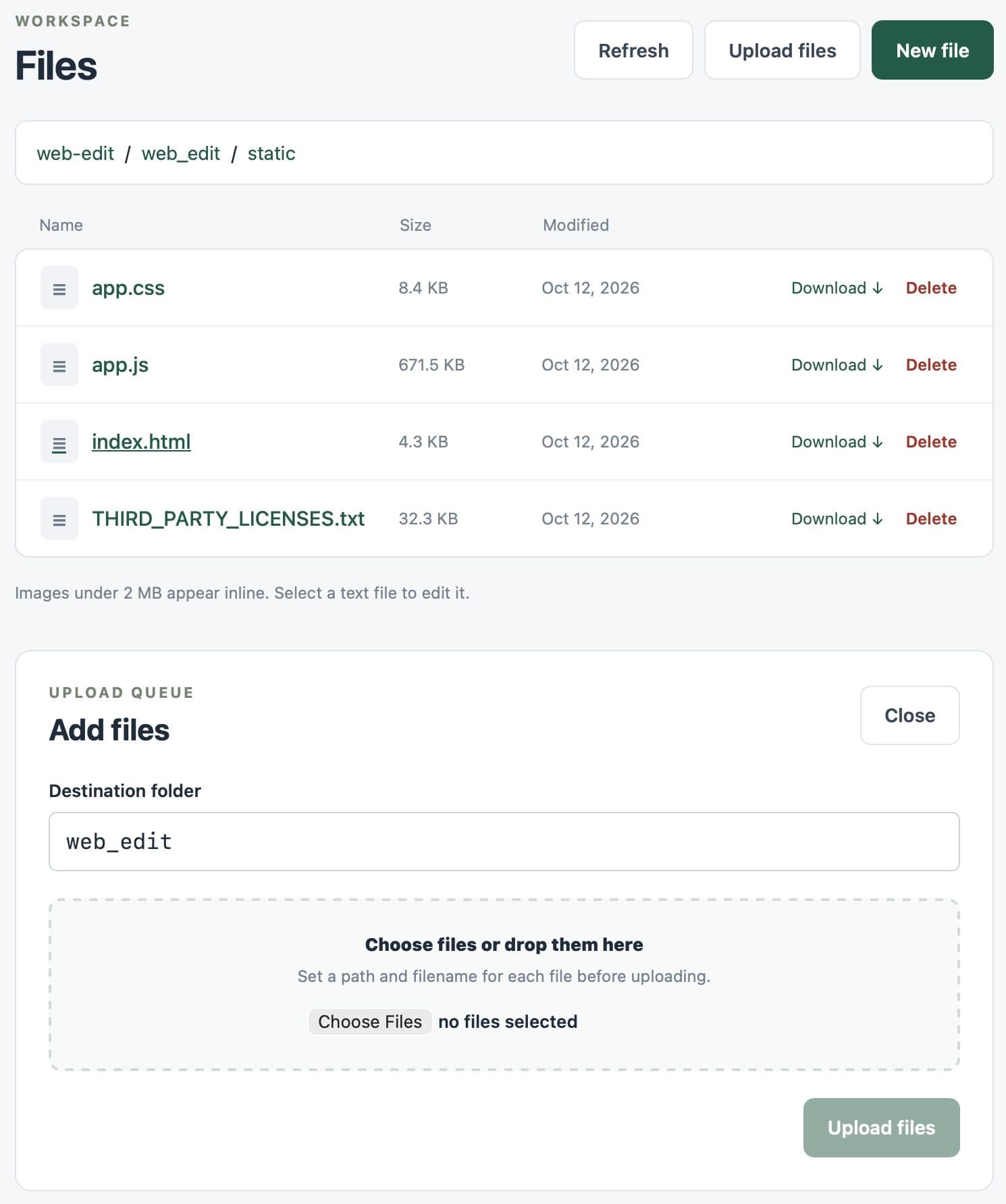
Simon Willison shipped web-edit 0.1a0, a tiny Python tool: the agent runs the web UI remotely, and he edits files directly from his phone over Tailscale — so credentials files never round-trip through the LLM's context. The tool itself was built with Willison directing Codex Remote from his phone, GPT-6 Astra Extra High doing the writing.

AI writes code fast but never writes secure code by default: running locally is not the same as being safe in production. This hands-on playbook fills the web security baseline for your vibe project — CSP headers, CSRF tokens, XSS defense, SQL parameterization, the cookie triple, dependency supply-chain gates, plus a copy-ready 10-item pre-launch acceptance checklist.