Don't Ship Your Vibe Project Naked: A Web Security Baseline Playbook (CSP, CSRF, XSS, SQL Injection)
AI writes code fast but never writes secure code by default: running locally is not the same as being safe in production. This hands-on playbook fills the web security baseline for your vibe project — CSP headers, CSRF tokens, XSS defense, SQL parameterization, the cookie triple, dependency supply-chain gates, plus a copy-ready 10-item pre-launch acceptance checklist.

Your vibe project runs smoothly on localhost. You deployed it to Vercel in one shot, wired up the domain, added login, added payments, and now you're thinking about the next feature. There is one question you may never have asked the AI: if someone scans this project right now, how long does it survive?
The answer: probably not one night. That's not alarmism — I've seen the code structure of too many vibe projects, and AI-written code has a structural blind spot: it doesn't write secure code by default. The feature code it produces passes tests, passes type checks, and looks the part — but it won't add CSP headers for you, won't add CSRF protection to your forms, won't set your cookies to httpOnly. Those things don't fall under "it runs," so the AI never reminds you.
That's not the AI's fault. It's the prompt's fault, and more importantly, a cognition fault. Security debt compounds: nobody touching you on day one is luck; getting scanned by script kiddies on day 30 is expected value. Fixing an XSS after six months in production can mean refactoring three layers of code; adding it on day one takes five lines of config. This guide skips advanced offense-defense theory and covers only the baseline: the web security minimum a vibe project must meet before going live.
Know Your Enemy: The 5 Most Common Vulnerabilities in Vibe Projects
Each vulnerability below comes with one line on "why the AI won't warn you." Learn this pattern, and you'll be able to do your own security reviews.
1. XSS (Cross-Site Scripting). A user submits a <script> tag, your page renders it verbatim, and the attacker's code now runs in your users' browsers. The AI won't warn you because "rendering user input" is not wrong per se in its training data — it doesn't know your project is live and exposed to the public internet.
2. CSRF (Cross-Site Request Forgery). An attacker tricks your logged-in user into clicking a link; the browser automatically attaches cookies and fires a POST request that wipes the database. The AI won't warn you because its generated forms and endpoints work perfectly in local testing — CSRF only explodes in the "a request from another site" scenario, which localhost can never reproduce.
3. SQL Injection. You concatenated user input into a SQL string; an attacker types ' OR '1'='1 and walks past login. The AI won't warn you because it wrote code that "works" — string concatenation passes functional tests just fine, and nobody writes malicious input into test cases.
4. Insecure Cookies. A session cookie without httpOnly means one XSS steals your admin's session; without Secure, a man-in-the-middle grabs it in plaintext. The AI won't warn you because cookie attributes are "deployment details" it assumes you already know.
5. Dependency Vulnerabilities. You ran npm install on a package with 4,000 transitive dependencies, one of which is an unmaintained library with a known CVE. The AI won't warn you because its only job was "this feature needs this package" — supply-chain security isn't on its checklist.
See the pattern? The AI's security blind spots all cluster at the fault line between "runs locally" and "safe in production." This article fills that fault line.
Figure 1: Request Lifecycle Security Check Pipeline
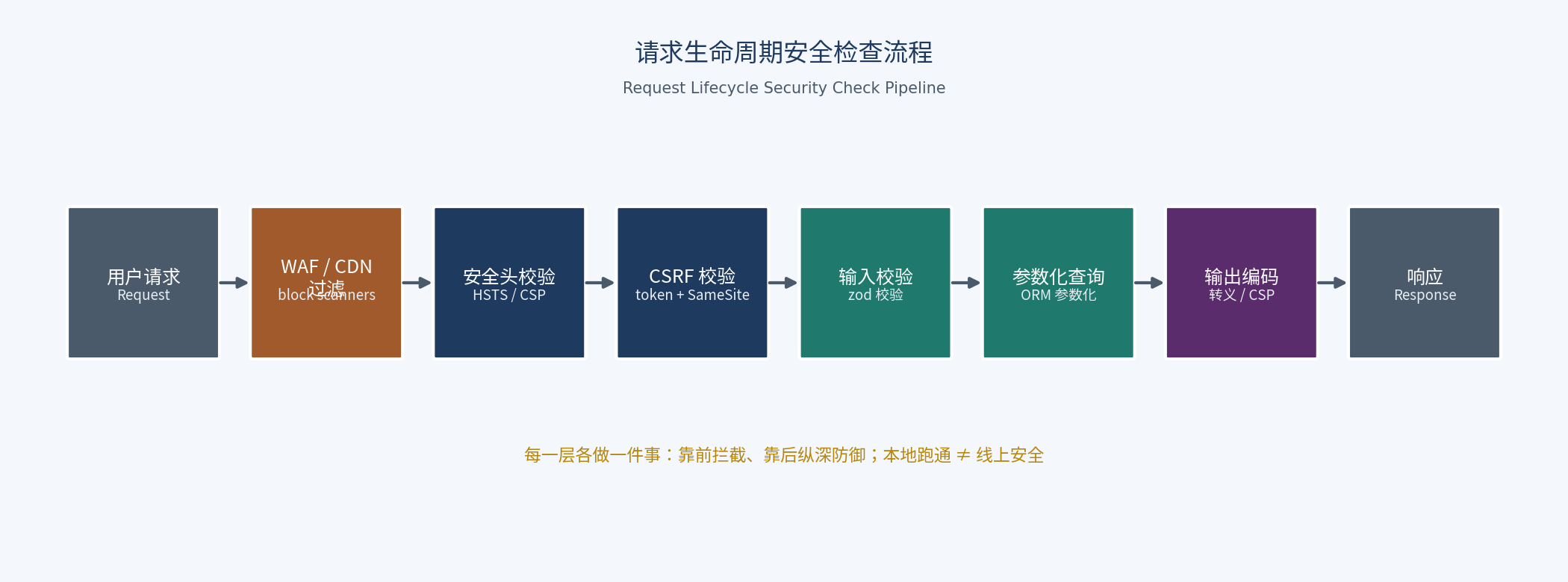 Request lifecycle security check pipeline. Each layer does exactly one job: early layers intercept, later layers provide defense in depth. A request passes 6 checks before touching business logic.
Memorize the order in this diagram — it's the skeleton of this entire guide: WAF → security headers → CSRF token → input validation → parameterized queries → output encoding. One-line duty per layer: the WAF blocks scanners and automated attacks; security headers tell the browser "how to treat my pages"; the CSRF token confirms "the user really clicked this themselves"; input validation rejects malformed data; parameterized queries guarantee data stays data; output encoding guarantees rendering stays rendering.
This pipeline has one more critical property: defense in depth. The WAF gets bypassed — fine, the security headers are still there. A CSRF token is missing on one endpoint — input validation still stands a layer down. Security is not "one wall"; it's "forcing the attacker to make 6 mistakes at once." The most dangerous shape a vibe project can take is exactly 0 layers of defense: AI-generated scaffolds ship with none of them by default.
HTTPS and Security Headers: 5 Minutes to Add, 90% Never Do
Here's a brutal fact: I have never seen an AI-generated next.config.ts ship with security headers. It's not laziness — these configs have nothing to do with "features," and most example projects in the training corpus don't include them either. So every vibe project goes live naked: the browser doesn't know whether the page may be embedded in an iframe, doesn't know which origins scripts may load from, doesn't know whether referrers should be hidden.
The fix is a single headers(). In Next.js, this is the canonical pattern:
// next.config.ts
const securityHeaders = [
  {
    // Force HTTPS site-wide, block downgrade attacks; includeSubDomains covers subdomains
    key: 'Strict-Transport-Security',
    value: 'max-age=63072000; includeSubDomains; preload',
  },
  {
    // Forbid iframe embedding, block clickjacking
    key: 'X-Frame-Options',
    value: 'SAMEORIGIN',
  },
  {
    // Forbid MIME sniffing, block "script hidden in an image" attacks
    key: 'X-Content-Type-Options',
    value: 'nosniff',
  },
  {
    // On cross-site navigation send only the origin, not the full path (prevents token leakage)
    key: 'Referrer-Policy',
    value: 'strict-origin-when-cross-origin',
  },
  {
    // Scripts/styles may load only from self and explicit allowlists; the last net against XSS
    key: 'Content-Security-Policy',
    value: "default-src 'self'; script-src 'self'; style-src 'self' 'unsafe-inline'; img-src 'self' data: https:; object-src 'none'; base-uri 'self'; frame-ancestors 'self'",
  },
];

export default {
  async headers() {
    return [{ source: '/:path*', headers: securityHeaders }];
  },
};
A few field judgments: once HSTS is on, there's no going back (browsers remember forced HTTPS for two years), so make sure the whole site works over HTTPS before enabling preload — or you'll lock yourself out. CSP is the most valuable and the easiest to shoot yourself with: the version above is a conservative starting point. If you use Google Analytics, Sentry, or similar third-party scripts, their domains must go into the script-src allowlist or production goes white-screen. Run a day in Content-Security-Policy-Report-Only mode first, read the console reports, then tighten.
Set X-Frame-Options to SAMEORIGIN rather than DENY, because many admin panels embed their own previews in iframes — DENY would break your own pages. The principle: security headers aren't "the stricter the better," they're "as strict as possible without breaking yourself."
XSS in Practice: React Blocks 80%, the Remaining 20% Is All Traps
First, the three flavors in one line each: stored — the malicious script is saved into your database and hits every visitor (comments, usernames); reflected — the script hides in a URL parameter and hits whoever clicks the link (search pages echoing the keyword); DOM-based — your frontend JS concatenates a URL parameter into the page itself, never touching the backend.
React escapes all interpolations by default, so {userInput} is safe — that's the 80% React blocks for you. The remaining 20% is all traps developers dig themselves, and AI loves digging them because the resulting code "looks fine":
Red line 1: dangerouslySetInnerHTML. It's right there in the name, yet AI reaches for it without hesitation in "render rich text" scenarios. The rule is simple: any user-controlled content entering dangerouslySetInnerHTML must go through DOMPurify first:
import DOMPurify from 'isomorphic-dompurify';

// Wrong: AI's favorite way to write this
<div dangerouslySetInnerHTML={{ __html: post.content }} />

// Right: sanitize before rendering
<div dangerouslySetInnerHTML={{ __html: DOMPurify.sanitize(post.content) }} />;
Red line 2: Markdown rendering. Eight out of ten vibe projects render Markdown (blogs, docs, AI outputs). react-markdown doesn't render HTML by default, which is safe — but many people enable rehype-raw for "richer formatting," personally dismantling the guardrail. The test: if you enabled rehype-raw, the output must go through DOMPurify again; if not, the default is safe — leave it alone.
Red line 3: URL concatenation. <a href={userInput}> looks harmless, but a user input of javascript:alert(1) owns you. Every user-controlled URL must pass a protocol allowlist (https:/http:/mailto:) before going live; everything else gets rejected.
Keep one mental model: wherever a "string becomes code," XSS breeds. HTML strings, URL strings, JS strings — AI-written code is least guarded at exactly these three spots. Stare at those three spots during review.
CSRF in Practice: SameSite Is Not a Silver Bullet
Let's get SameSite fully straight, because 90% of people half-understand it. A cookie's SameSite has three values: Strict (no cookie on any cross-site request — strictest, but UX suffers; even clicking in from a search engine lands you logged out), Lax (cross-site top-level navigation GETs carry the cookie, e.g. clicking a link from another site into yours; cross-site POSTs don't — this is the browser default), None (always sent, must pair with Secure).
So the subtext of "SameSite=Lax is the default" is: cross-site POSTs are already blocked by the browser, but cross-site GET top-level navigations still carry cookies. That's why "GET is read-only, POST gets validated" is iron law: if your "delete" / "transfer" / "change password" endpoints are GET requests, a single <img src="https://your-site/api/delete?id=1"> makes a logged-in user execute the action unknowingly. AI-generated REST endpoints frequently hang actions on GET "for convenience" — the number-one CSRF breeding ground.
But Lax is not a silver bullet, for two reasons: first, top-level navigation GETs still carry cookies, so every state-changing operation must use POST/PUT/DELETE — that's an architecture-level requirement no config can substitute; second, old browsers and some WebViews don't honor SameSite. So critical endpoints still need the token pattern. The minimal implementation:
// Server: issue a token (store in session, or sign it and put it in a cookie)
import { randomBytes } from 'crypto';

export function issueCsrfToken(): string {
  return randomBytes(32).toString('hex');
}

// Include it as a hidden form field
// <input type="hidden" name="csrfToken" value={csrfToken} />

// Server: verify (double-submit: cookie token must match the form field)
export function verifyCsrf(cookieToken: string | undefined, bodyToken: string | undefined): boolean {
  if (!cookieToken || !bodyToken) return false;
  return cookieToken.length === bodyToken.length &&
    crypto.timingSafeEqual(Buffer.from(cookieToken), Buffer.from(bodyToken));
}
Note the comparison uses timingSafeEqual, not === — it prevents timing attacks. This is the kind of detail AI never writes on its own but a security audit will always flag. If you use Next.js Server Actions, the good news is CSRF protection is built in; the bad news is the moment you hand-write an API Route "for flexibility," that protection is gone and you must add it back yourself.
SQL Injection in Practice: An ORM Is Not a Get-Out-of-Jail Card
"I use Prisma so I don't have SQL injection" — half true. An ORM's regular queries are parameterized, but every ORM has an escape hatch, and AI loves crawling through escape hatches. Compare:
// Anti-pattern: string concatenation (AI writes this in "dynamic query" scenarios)
const email = req.body.email;
const users = await prisma.$queryRawUnsafe(
  `SELECT * FROM users WHERE email = '${email}'`
);
// Input: ' OR '1'='1  →  login bypassed

// Correct: parameterized (Prisma's $queryRaw is template-string parameterization, not concatenation)
const users = await prisma.$queryRaw`
  SELECT * FROM users WHERE email = ${email}
`;
// ${email} is bound as a parameter — always data, never SQL code
The critical difference: $queryRawUnsafe is string concatenation; $queryRaw is parameterized. The one with "Unsafe" in the name is what AI recommends when "this ORM method can't express my complex query" — it may even write "watch out for SQL injection" in a comment, then use it anyway.
Another AI disaster zone: dynamic where-clause concatenation. An admin dashboard filter with 5 conditions, and AI produces:
// Anti-pattern: hand-building a where string
let where = '1=1';
if (status) where += ` AND status = '${status}'`;
if (keyword) where += ` AND name LIKE '%${keyword}%'`;

// Correct: object-style where, parameterization happens at the framework layer
const where: Prisma.OrderWhereInput = {};
if (status) where.status = status;
if (keyword) where.name = { contains: keyword };
const orders = await prisma.order.findMany({ where });
One principle only: never let user input appear inside a SQL string — even when it "looks like just a status enum." Enum values can be tampered with too. Request parameters are never trustworthy.
Sessions and Login: The Cookie Triple, Passwords, and Rate Limiting
Session cookies must satisfy three attributes at once — missing any one is naked: httpOnly (invisible to JS, XSS can't steal it), Secure (HTTPS only, MITM can't sniff it), SameSite=Lax (blocks cross-site POSTs). In Next.js:
cookies().set('session', token, {
  httpOnly: true,
  secure: process.env.NODE_ENV === 'production',
  sameSite: 'lax',
  path: '/',
  maxAge: 60 * 60 * 24 * 7, // 7 days
});
Password storage recognizes only bcrypt / scrypt / argon2 — never MD5/SHA256 (those are hashes, not password cryptography; rainbow tables crack them in seconds). For bcrypt's cost factor, 12 is today's sweet spot: roughly 200–300ms per hash, imperceptible at login, expensive for every brute-force guess. Cost 10 is too weak; cost 14 will DDoS your own login endpoint under peak traffic. Remember: each +1 doubles compute time.
Login endpoints must be rate-limited: against credential stuffing and brute force. We published an API Rate Limiting guide earlier (token bucket vs. sliding window, dual-dimension limiting by IP + account) — apply that playbook directly instead of re-deriving it here. Baseline numbers: over 10 attempts per minute from one IP gets a 429; 5 failed attempts on one account locks it for 15 minutes.
Dependency Supply Chain: npm install Installs More Than Code
A typical Next.js project has thousands of packages in node_modules; the code you wrote might be 5% of it. Supply-chain attacks keep escalating: poisoned via hijacked maintainer accounts, abandoned packages acquired and backdoored, typosquatting (loadsh vs lodash). AI's risk here is structural: it recommends packages based on "how often this package appears in training data," not "whether this package is alive and unpoisoned today." It even hallucinates package names that don't exist — you npm install a nonexistent name, and an attacker just needs to pre-register it to poison you. That's slopsquatting, and it has really happened since 2024.
Three mandatory release gates:
1. npm audit / pnpm audit in CI. High-severity findings block merges, hard stop:
# package.json scripts
"audit:ci": "pnpm audit --audit-level=high"
# Run in CI: anything high or above fails the build — no release
2. Dependabot / Renovate auto-PRs. The window for security patches is measured in days; manual npm update never keeps up. After enabling auto-updates, require green tests before merge — don't let an auto-update take production down.
3. A risk checklist for obscure packages AI suggests. AI recommends a package you've never heard of — don't install yet. Check three things: GitHub stars and latest commit date (no commits in 6 months = pass), npm weekly downloads (under 10k = be suspicious), and whether there's a single maintainer. All three red? Have the AI hand-roll a simple implementation with the standard library instead of installing that package.
Figure 2: Layered Attack-Surface Architecture
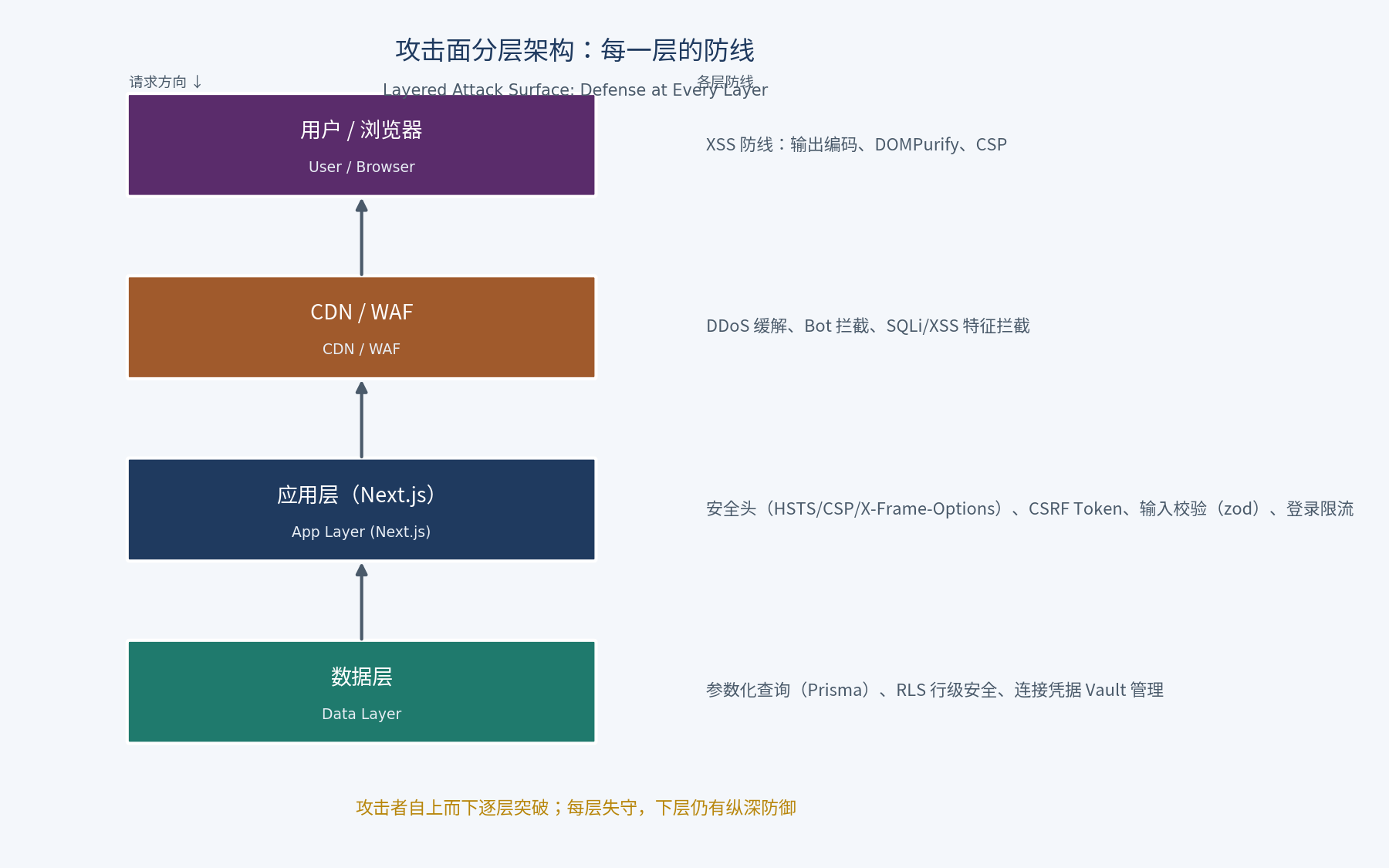 Layered attack-surface architecture. Attackers break through top-down: CDN/WAF absorbs DDoS and scanners, the app layer relies on security headers, CSRF tokens, input validation, and login rate limiting, and the data layer relies on parameterized queries and row-level security. When one layer falls, the next still stands.
Print this diagram and tape it next to your monitor. Every time AI generates a new feature, walk down the layers and ask: did this new code bypass any layer's defense? AI added a "CSV export" feature — did it pass the output-encoding layer? Added a search box to the admin panel — did it pass the parameterized-query layer? Security review doesn't require you to become a hacker; it only requires the habit of walking the layers.
Pre-Launch 10-Item Security Acceptance Checklist (Copy and Use)
□ 1. HTTPS everywhere, HSTS on (curl -I shows Strict-Transport-Security)
□ 2. Security headers present: CSP / X-Frame-Options / X-Content-Type-Options / Referrer-Policy
□ 3. All state-changing endpoints are POST/PUT/DELETE; no GET that mutates data
□ 4. CSRF token verification on critical forms/endpoints (or framework-provided and not bypassed)
□ 5. Global search for dangerouslySetInnerHTML: every occurrence has DOMPurify or provably uncontrolled content
□ 6. Global search for $queryRawUnsafe / string-concatenated SQL: zero tolerance
□ 7. Cookie triple: httpOnly + Secure + SameSite=Lax
□ 8. Passwords via bcrypt (cost=12) or argon2; no plaintext, no MD5
□ 9. Login rate limiting (IP dimension + account dimension), lockout on repeated failures
□ 10. pnpm audit clean above moderate; Dependabot enabled
All ten checked, and your project reaches "a script kiddie's scanner bounces off" level. Note items 5 and 6 are "global searches" — in AI-written code, these two problem classes never appear just once. Search them out and fix every one.
Closing: "Don't Ship Naked" Is the Floor, Not the Ceiling
Honestly: this baseline won't stop an APT, won't stop a 0day, won't stop an insider. It stops 95% of attacks on the internet — the script kiddies running automated scanners across the whole web for /.git/config, SQL injection payloads, and weak passwords. Your vibe project probably won't be an APT target, but it will absolutely be a scanner target, because scanners aren't picky.
The ROI curve of security investment looks like this: from zero to these 10 baseline items — one afternoon of work, 95% of attacks blocked. From baseline to "sleep soundly" — unbounded investment, diminishing returns. For indie developers, the right strategy is: get the baseline right in one shot; add advanced protection as needed.
Back to the opening question: AI doesn't write secure code by default — but that's not the AI's fault. It's ours, for defaulting to "it runs, ship it." Starting today, add one line to your prompts: "Validate all user input, encode all output, set all cookies httpOnly+Secure+SameSite." One line, for a good night's sleep every night. That's a trade worth making.
Comments (0)
Related articles

AI generates always-online apps by default — and your users go blank in subways, elevators, and rail tunnels. This hands-on guide grades offline capability into four tiers (L0–L3), then walks through the full stack: Dexie local storage, Service Worker cache strategies, the outbox write queue with idempotency keys, and three conflict-resolution strategies matched to scenario. Includes a pre-launch checklist and four real-world anti-patterns.

Deploying to xxx.vercel.app is just squatting. This hands-on guide walks the full chain: buying a domain, DNS resolution, the Cloudflare launch path, HTTPS/HSTS, and the SPF/DKIM/DMARC email trio — because your domain is the only asset you truly own.
AI-written code runs perfectly for one user and can collapse under 100 concurrent ones on launch day. This guide gets your first k6 script running in 15 minutes: derive load scenarios from real user behavior, read p95/p99 and saturation signals, locate DB, connection-pool and third-party API bottlenecks with a three-axe method, convert test numbers into paying-user capacity, and put load testing into CI as an automatic gate.