From Buying a Domain to the Green Lock: Custom Domains and DNS for Vibe Projects
Deploying to xxx.vercel.app is just squatting. This hands-on guide walks the full chain: buying a domain, DNS resolution, the Cloudflare launch path, HTTPS/HSTS, and the SPF/DKIM/DMARC email trio — because your domain is the only asset you truly own.

AI helped you deploy your project to yourapp.vercel.app. It loads in the browser, so you call it "launched." Wrong — you're just squatting. The subdomain belongs to the platform: it can take it back, change the rules, or ban your account with no appeal. When users see a pay button on xxx.vercel.app, their first thought isn't "what a cool product" — it's "can I trust this site?" This guide is about moving to ground you actually own: buying a domain, configuring DNS, landing HTTPS, and email authentication, end to end.
1. Why You Must Switch to a Custom Domain
Four reasons, each more practical than the last.
First, trust directly determines conversion. Nobody types their credit card into a strange subdomain. When users pay for your product, they're really betting on "will this person/team disappear tomorrow?" An independent domain plus the green lock is the cheapest trust signal money can buy. Flip it around: would you buy a $99 annual membership on random-name-8f3a.vercel.app? No. That's the whole argument.
Second, only brands compound. The brand equity of vercel.app belongs to Vercel, not you. Every link you post on social media, Product Hunt, or group chats builds someone else's domain authority. A custom domain is the only traffic asset you can take with you — switch platforms, switch stacks, repoint the domain, and the traffic follows.
Third, cookie scope is a real footgun. Browsers isolate cookies at a coarser granularity than you'd expect. If your app sets cookies with Domain=.vercel.app (or your framework behaves close to that by default), your login session is theoretically sent to every *.vercel.app site — including other people's. That's not just a privacy issue, it's a security one: if someone else's site has an XSS hole, your users' cookies are in range. With your own domain, the problem disappears at the root.
Fourth, SEO should have been yours from day one. Search engines evaluate a subdomain as part of its parent domain — whatever authority vercel.app has, none of it accrues to you. An independent domain starts building its own authority the day it goes live. The earlier you switch, the earlier compounding starts.
One-line thesis: servers are rented, platforms are borrowed, and your domain is the only asset you truly own. The line between a vibe "toy" and a "product" is whether it has its own domain.
2. Buying a Domain: Registrars and Naming
Conclusion first, reasoning after. Registrar picks that still hold true in 2026:
- Cloudflare Registrar (top pick): sells domains at cost with zero-markup renewals — that's what sets it apart from everyone. The catch is you must host DNS on Cloudflare (free), which isn't a catch at all if you're following path A in section 5. A
.comruns about ten-plus dollars a year, renewals at the same price, no "$1 first year, $15 after" tricks. - Namecheap: frequent first-year discounts and free WHOIS privacy (WhoisGuard). A safe, established choice if you want to grab a name cheaply. Check the renewal price before you buy.
- Alibaba Cloud (Wanwang): pick it in exactly one scenario — your users are mainly in China and you plan to file for an ICP license. Filing requires a domestically registered domain, a hard rule with no workaround. Purely outbound projects can ignore this.
One-liner: no ICP filing → Cloudflare; want a cheap first year → Namecheap; need filing → Wanwang. Don't spend more than 30 minutes agonizing over registrars — the name itself is what matters.
Five naming principles (AI won't care about these when it names things for you):
- Short: ideally under 10 letters; over 15 and you should pick another. Users type it by hand and tell friends verbally — every extra letter is churn.
- Pronounceable: if someone can't spell it after hearing it three times on a call, it fails. A plain compound word beats a tortured coinage.
- No hyphens, no digit lookalikes: hyphens are a disaster for word of mouth ("my-app, there's a dash before app"); confusing 0 with o is the same.
- .com first, but don't obsess:
.comis still the default-trust suffix — grab it if you can. If the good name is only left on.io/.dev/.app, a reasonable premium (tens of dollars a year) is acceptable — provided you check the renewal price, since some new TLDs renew at 10x the first year. - Avoid trademarks and big-tech product names: putting someone else's trademark in your name starts a countdown to a lawyer's letter. Spend 5 minutes searching before you commit.
WHOIS privacy must be on. Without it, your name, email, and phone sit in the public WHOIS database, followed by endless spam and "domain broker" cold calls. Cloudflare and Namecheap both offer it free with zero downside — with exactly one exception, covered in pitfall #5 of section 9.
Don't waste money on the obscure TLDs AI recommends. AI namers love pushing .xyz, .top, .online because they're "cheap with short names available." The truth: the $1 first year is bait, the $15+ renewal is the hook — and in users' minds these suffixes read as "junk site," starting you at a trust deficit. A domain costs tens of dollars a year; it's the highest-ROI spend in your whole project. Don't save in the wrong place.
3. The Full DNS Resolution Flow: 8 Steps, One Sentence Each
DNS is the most "mystical" part of the chain, but it's really just a layered game of asking for directions. See the diagram:
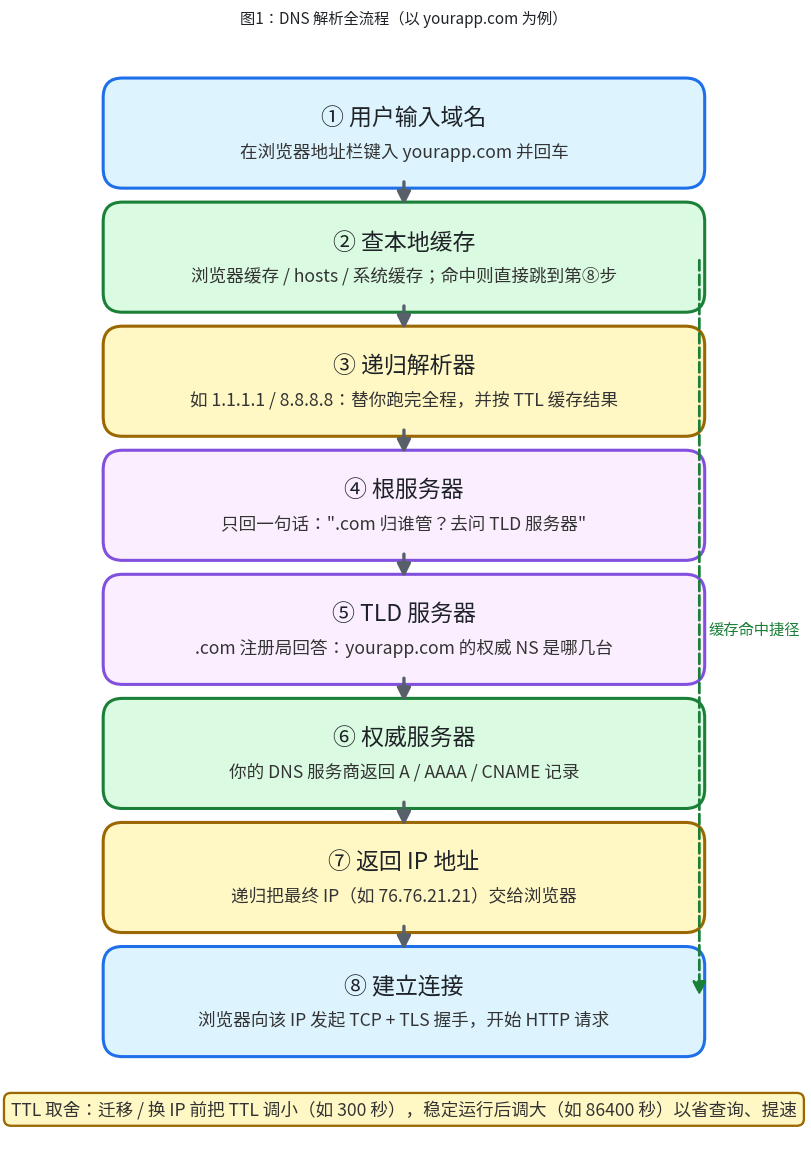 Figure 1: The full DNS resolution flow (using yourapp.com as an example). Two things to remember: every layer caches, and TTL decides how long a record change takes to propagate.
The diagram in plain words:
- User types the domain: type
yourapp.comin the address bar and hit enter. - Check local cache: browser cache, hosts file, and OS cache are checked in order. A hit jumps straight to step 8 — which is why you can't see your own DNS change (pitfall #2 in section 9).
- Recursive resolver: e.g.
1.1.1.1/8.8.8.8. It's your errand-runner: it walks the whole chain for you and caches the result per the TTL, answering directly next time someone asks. - Root servers: 13 groups worldwide, doing exactly one thing — telling the resolver "ask the TLD servers who runs
.com." They don't know your domain, and they don't need to. - TLD servers: the
.comregistry's servers, answering "which name servers are authoritative foryourapp.com?" - Authoritative servers: finally, the place where you're in charge — your DNS provider (e.g. Cloudflare) returns the real A / AAAA / CNAME records.
- IP address returned: the resolver hands the final IP (e.g.
76.76.21.21) to the browser. - Connection established: the browser opens a TCP + TLS handshake to that IP and starts the HTTP request.
TTL trade-offs are the only hands-on takeaway here. TTL is "how long a recursive resolver may cache the result." Before migrating servers or changing IPs, lower the TTL in advance (e.g. 300 seconds) so the cutover propagates globally in minutes; during stable operation, raise it (e.g. 86400 seconds) to cut lookups and speed up resolution. Don't reverse the order: lower first, wait out the old TTL, then migrate; raise it again once stable. 90% of "DNS migration disasters" come from skipping the TTL-lowering step.
4. DNS Records in Practice: 6 Records, One Sentence Each
| Record | What it does, in one sentence | Real vibe-project use case |
|---|---|---|
| A | Domain → IPv4 address | Apex yourapp.com points at Vercel's 76.76.21.21 |
| AAAA | Domain → IPv6 address | Paired with A; mobile IPv6 traffic share is already significant in 2026 — Vercel/Cloudflare set this up for you automatically |
| CNAME | Domain → another domain (alias) | www.yourapp.com → cname.vercel-dns.com; when Vercel changes IPs you touch nothing |
| ALIAS / ANAME | Looks like A, behaves like CNAME — the apex-domain fix | When the apex wants CNAME's "follow IP changes automatically" but the protocol forbids CNAME there |
| TXT | Stuff a text string into DNS for others to verify | Domain ownership verification, ACME certificate issuance (_acme-challenge), SPF/DKIM/DMARC (see section 7) |
| MX | Who receives mail for this domain | Mail for yourapp.com handled by Google Workspace / Cloudflare Email Routing |
The apex-can't-CNAME rule is DNS's most famous footgun. The RFC says: a name with a CNAME record may not have any other records; but an apex (bare domain, e.g. yourapp.com itself) is required to have SOA and NS records — the two conflict, so CNAME on an apex is illegal at the protocol level. The practical consequence: Vercel's IPs are anycast and can change, and you can't use CNAME to make the apex "follow automatically."
The fix is called CNAME flattening: Cloudflare resolves the CNAME to A records in real time on its authoritative servers and returns them — externally it looks like an ordinary A record, protocol-compliant, with automatic IP following. On Cloudflare you add a CNAME for the apex pointing at cname.vercel-dns.com, flip on the orange cloud, and flattening happens automatically. Other DNS providers offer the same under the names ALIAS or ANAME. Bottom line: use Cloudflare for DNS and you'll never step on this landmine.
5. Two Paths to Production: Decision Table + Step-by-Step
Domain bought, DNS understood — now decide how your domain "connects" to your app. Two mainstream paths:
| A: Delegate NS to Cloudflare (recommended) | B: Add CNAME at the registrar | |
|---|---|---|
| What | Point the domain's NS at Cloudflare — DNS + CDN + certificates in one | Add www → cname.vercel-dns.com in the registrar's DNS; A record for the apex |
| Pros | Free CDN + WAF + automatic HTTPS + fast DNS; origin IP changes need no record edits | Done in 5 minutes, no NS changes |
| Cons | One-time NS propagation of a few hours | No CDN/WAF; apex A record hardcodes an IP you must update manually; certificates entirely platform-dependent |
| For | Almost everyone. If you're serious about the product, take this path | Throwaway demos, 24-hour hackathons, validation pages with an expiry date |
My judgment is blunt: unless your project's lifespan is measured in hours, always take path A. The 20 minutes path B saves will be repaid with interest the first time you're hit by a DDoS, want a cache rule, or migrate platforms.
Path A, step by step (Cloudflare + Vercel; Netlify is analogous):
- Add the site in Cloudflare: sign up/log in → Add domain → enter your domain → pick the Free plan. It auto-scans your existing DNS records — verify MX/TXT and friends were picked up (add manually if not).
- Change the NS: Cloudflare gives you two NS addresses (e.g.
xxx.ns.cloudflare.com). In your registrar's panel, replace the NS with those two. Then wait — nothing else to do. - Wait for activation: the site status flips from Pending to Active, usually minutes to a few hours. Confirm with
dig NS yourapp.comthat it returns Cloudflare's name servers. - Add the domain in Vercel: project → Settings → Domains → enter
yourapp.comandwww.yourapp.com. Vercel tells you which records it needs. - Back in Cloudflare, add the records: CNAME for the apex →
cname.vercel-dns.com(orange cloud on, flattening automatic); CNAME forwww→ same target. Vercel auto-issues certificates once it detects them — green status means done. - Verify: open
https://yourapp.comandhttps://www.yourapp.comin a browser, confirm the lock on both; runcurl -I https://yourapp.comand look forcf-rayin the response headers (present = traffic flows through Cloudflare edge).
6. Landing HTTPS: From "Has a Lock" to "Actually Secure"
It's 2026: Chrome flags plaintext HTTP sites as "Not secure" outright, and form pages barely function. The good news is certificates are now completely free and automated; the bad news is "automatic" doesn't mean "you don't need to understand it."
ACME / Let's Encrypt auto-renewal in one sentence: your server (or Vercel/Cloudflare) periodically proves "I really control this domain" to Let's Encrypt (via a DNS TXT record or a well-known file on the site); on success it gets a 90-day certificate, and the dance repeats unattended before expiry. Note the industry trend: certificate lifetimes keep shrinking (new certs max out at 200 days from 2026, shorter ahead) — manual renewal is a dead end; auto-renewal is the only way to live. Vercel/Cloudflare users get this free; self-hosters, install certbot and set the cron job.
HSTS and the preload list: understand before enabling, especially preload. HSTS is a response header (Strict-Transport-Security: max-age=31536000) telling browsers "this domain is HTTPS-only for the next year" — it defeats SSL-stripping attacks and belongs on every production site. But preload is a different animal: once submitted to hstspreload.org, your domain is hardcoded into Chrome/Firefox/Safari source — browsers force HTTPS even on the very first visit. Warning: preload is effectively irreversible. Submitting is easy; removal takes months across browser release cycles, during which your HTTP traffic (some API callbacks, legacy clients) breaks entirely. Don't touch preload until you're 100% sure every corner of the site is HTTPS-clean. HSTS yes; preload only after serious thought.
Mixed content triage, three moves: HTTPS is on but the lock shows a gray warning triangle — 99% of the time some http:// resource snuck into the page. The three moves: ① open DevTools → Console + Network, filter by scheme, hunt down every http:// request one by one; ② rewrite all resource references site-wide to https:// (or protocol-relative URLs); third-party image hosts and external scripts are the usual suspects; ③ add a Content-Security-Policy: upgrade-insecure-requests header so the browser auto-upgrades http subresources as a backstop. AI-generated code loves hardcoded http:// — grep the whole project before a vibe launch.
Certificate expiry monitoring is the final fuse. Auto-renewal fails too (missing ACME TXT, a CAA record blocking issuance — see section 9). Point a free monitor like UptimeRobot or Better Stack at the certificate and alert 14 days before expiry. Self-hosted version: one cron job running openssl s_client to check the expiry date, firing an email/webhook when close. An expired certificate = total outage; this monitor deserves the same priority as uptime monitoring.
7. The Email Domain Trio: SPF / DKIM / DMARC
Your vibe project will send email sooner or later: signup verification, password resets, order notifications. Without the trio below, roughly half your verification emails land in spam — users never get the code and conclude your product is a scam. What each one defends against, in one sentence:
- SPF: stops "spoofed sending servers." A TXT record declares "only these servers may send mail for
yourapp.com"; recipients reject or flag mail from IPs not on the list. - DKIM: stops "tampered message content." The sending server signs every email with a private key; recipients verify with the public key in your DNS — a match proves the content is untouched and genuinely from you.
- DMARC: the "commander" over the first two. It tells recipients what to do when SPF/DKIM both fail (deliver / quarantine / reject) and where to send the handling reports.
Sample TXT records on Cloudflare (using Resend for transactional mail; swap the include value for other providers):
Type TXT | Name @               | Content v=spf1 include:_spf.resend.com ~all
Type TXT | Name resend._domainkey  | Content v=DKIM1; k=rsa; p=MIGfMA0G... (public key from Resend dashboard)
Type TXT | Name _dmarc             | Content v=DMARC1; p=quarantine; rua=mailto:dmarc@yourapp.com
Note p=quarantine is the starting point: quarantine suspicious mail and collect reports; after a week or two with zero false positives, tighten to p=reject. Starting at reject means one misconfigured record silently executes all your own mail.
My take: SPF/DKIM/DMARC aren't "security bonus points" — they're the precondition for deliverability. In 2026 Gmail and Outlook are increasingly unforgiving toward sending domains without the trio. For provider selection (Resend vs Postmark vs AWS SES), this site previously published a dedicated guide on transactional email infrastructure — search for it on the site; this article won't repeat it.
8. Subdomain Planning: 10 Minutes Now Saves a Week Later
Don't rush to serve everything from the bare domain — subdomain planning is free, and deciding now avoids painful migrations later.
www redirect or apex-first? A firm recommendation: apex-first, with www 301-redirecting to the apex. Rationale: shorter, more memorable, stronger brand feel; modern CDNs/platforms have no apex shortcomings left (see CNAME flattening in section 4). The counter-example is www-first — every piece of marketing then carries 4 extra letters, a loss. Add one www → yourapp.com 301 redirect rule in Cloudflare (or Page Rules) and SEO weight consolidates on the apex instead of splitting.
When to split api. / app.: for decoupled front/back ends, api.yourapp.com for the backend API and app.yourapp.com for the frontend app is the clean pattern. But if your vibe project is a Next.js full-stack monolith, don't split for "architecture vibes" — same-origin even saves you CORS headaches. The test: are frontend and backend deployed independently, or consumed by different teams/services? If both answers are no, don't split; if either is yes, split.
staging. / preview. isolation: staging.yourapp.com runs the pre-production environment; *.preview.yourapp.com (or Vercel's built-in preview URLs) auto-generates a preview per PR. Pre-production must be data-isolated from production — iron rule. Also gate staging behind HTTP Basic Auth or an IP allowlist: you don't want search engines indexing your half-built product, nor users wandering into a test environment and placing orders.
9. Troubleshooting: 5 Pitfalls, Each One Real
Pitfall 1: DNS propagation isn't magic. "I changed DNS — why does my phone still show the old site?" Don't panic: run dig yourapp.com @1.1.1.1 and dig yourapp.com @8.8.8.8 side by side, then dig yourapp.com @your-authoritative-NS. If the authoritative answer is already new but public resolvers show old, it's TTL caching — wait it out. If even the authoritative answer is old, you edited the wrong place. Remember: the authoritative server is always right; what resolvers see is a delayed truth.
Pitfall 2: Local hosts file / browser DNS cache. During development you hardcoded 127.0.0.1 yourapp.com in /etc/hosts for debugging, forgot to remove it after launch, and now tell the world "DNS isn't propagating." The triage triple: check the hosts file first, then clear the browser's DNS cache (chrome://net-internals/#dns), then verify from a device/network that never touched the project.
Pitfall 3: Certificate issuance stuck on a CAA record. CAA is a DNS record declaring "only these CAs may issue for me." Symptom: Vercel/Cloudflare stuck on "issuing certificate" for a day. Cause: you (or a previous DNS provider) left a CAA record authorizing only the old CA. Fix: check for CAA records — either delete them or add letsencrypt.org, pki.goog (Google Trust Services, which Vercel uses), and digicert.com.
Pitfall 4: Apex on a hardcoded A record, now you want a CDN. Early on you pointed the apex A record straight at the origin IP to save trouble; six months later you want Cloudflare CDN and discover the hardcoded IP defeats edge routing. The right posture is section 4's: apex on CNAME + flattening, so the IP is always "computed," never "written down." Already hardcoded? Lower the TTL ahead of migration day, then cut over.
Pitfall 5: WHOIS privacy swallowing domain-verification emails. Section 2 said privacy is mandatory, but there's a side effect: some CAs/platforms send domain verification to admin@yourapp.com-style WHOIS addresses, and privacy replaces the WHOIS email with a proxy address — the verification mail vanishes. Symptom: a certificate/service stuck on "awaiting email verification." Fix: prefer DNS TXT verification (immune to this); if email verification is unavoidable, temporarily disable privacy, verify, then re-enable.
10. Launch Checklist + Closing
Copy this checklist, tick every box, and only then announce the launch:
- ☐
https://yourapp.comandhttps://www.yourapp.comboth load, both show the lock (no warning triangle) - ☐
http://yourapp.comauto-301s tohttps:// - ☐
www301-redirects to the apex (or the reverse per your plan), no redirect loops - ☐
curl -Iconfirms CDN in the path (cf-ray/ equivalent response header present) - ☐ DevTools Console shows zero mixed-content warnings
- ☐ HSTS header present; preload is off (unless you're 200% sure)
- ☐ SPF / DKIM / DMARC TXT records added, starting at
p=quarantine - ☐ Send a signup verification email to Gmail — lands in inbox, not spam
- ☐ Certificate expiry monitoring configured (alert 14 days ahead)
- ☐
staging.yourapp.comisolated + access-controlled - ☐ Domain auto-renewal on, with a calendar reminder 30 days before expiry
The easily forgotten last item: turn on domain auto-renewal. Every year, well-known projects go fully offline over an expired domain, and redemption can mean losing it to squatters. Auto-renewal plus a calendar reminder — dual safety, 5 minutes of work.
Back to the opening thesis: vibe coding turned "building something that runs" into an afternoon's work, but "owning a product" is still serious business. Domains, DNS, certificates, email — none of it appears in your demo video, yet it decides whether users dare to click, dare to pay, and whether the project still belongs to you three years from now. AI turns ideas into code; you turn code into assets. You're only a real owner of your vibe project from the moment you buy that first domain.
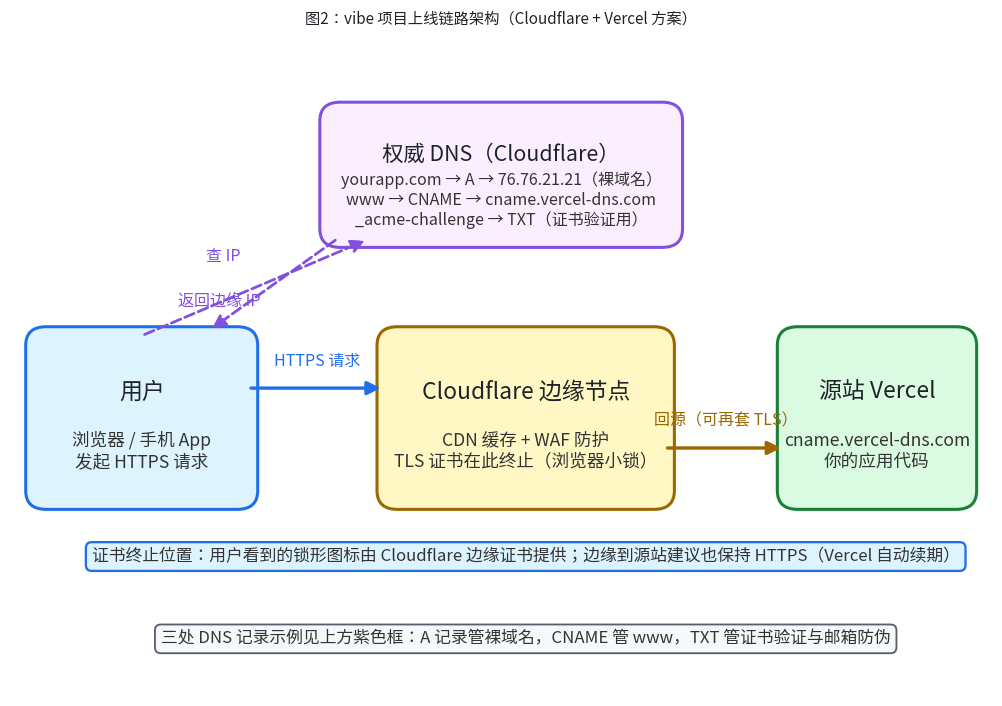 Figure 2: Vibe project production architecture (Cloudflare + Vercel). Remember where TLS terminates: the lock users see comes from the edge certificate, and edge-to-origin should stay HTTPS too.
Comments (0)
Related articles

AI generates always-online apps by default — and your users go blank in subways, elevators, and rail tunnels. This hands-on guide grades offline capability into four tiers (L0–L3), then walks through the full stack: Dexie local storage, Service Worker cache strategies, the outbox write queue with idempotency keys, and three conflict-resolution strategies matched to scenario. Includes a pre-launch checklist and four real-world anti-patterns.

AI writes code fast but never writes secure code by default: running locally is not the same as being safe in production. This hands-on playbook fills the web security baseline for your vibe project — CSP headers, CSRF tokens, XSS defense, SQL parameterization, the cookie triple, dependency supply-chain gates, plus a copy-ready 10-item pre-launch acceptance checklist.
AI-written code runs perfectly for one user and can collapse under 100 concurrent ones on launch day. This guide gets your first k6 script running in 15 minutes: derive load scenarios from real user behavior, read p95/p99 and saturation signals, locate DB, connection-pool and third-party API bottlenecks with a three-axe method, convert test numbers into paying-user capacity, and put load testing into CI as an automatic gate.