Works Without Wi-Fi: Offline-First and Data Sync for Vibe Projects
AI generates always-online apps by default — and your users go blank in subways, elevators, and rail tunnels. This hands-on guide grades offline capability into four tiers (L0–L3), then walks through the full stack: Dexie local storage, Service Worker cache strategies, the outbox write queue with idempotency keys, and three conflict-resolution strategies matched to scenario. Includes a pre-launch checklist and four real-world anti-patterns.

By default, AI writes you an "always online" app.
You feed a prompt to Claude Code, Cursor, or any AI coding tool, and the architecture it spits out is always the same: load the page, call the API; click the button, call the API; submit the form, call the API. When fetch succeeds, everyone's happy. When fetch fails — most vibe projects don't even have a failure branch written — you get a blank white screen.
That's fine at a developer's desk. But your users don't live at a desk.
Three Real-World Disasters
First one. A user of a note-taking app spent forty minutes editing a long note on a high-speed train. The network dropped for a few seconds in a tunnel. The app had no local save; the submit button kept spinning, and when the train emerged from the tunnel, the page refreshed — forty minutes of edits, gone. The user left a one-star review with just two words: garbage. The developer later realized this was a one-hour fix: write locally first, sync later.
Second: warehouse inventory. A client used handheld PDAs to count stock deep inside a warehouse where Wi-Fi was already flaky. Around noon the network dropped for half an hour. More than two hundred inventory records scanned during that window sat in memory, and when the OS killed the app, the data evaporated. The recount doubled the labor cost, and the client's IT lead said it plainly: "Your system is worse than Excel — at least Excel doesn't eat what I typed."
Third: overseas. An indie developer's small e-commerce tool targeted users in Southeast Asia, where weak networks are the norm. At checkout the spinner ran for more than 30 seconds, and most users simply gave up — conversion was a full 40% below comparable products. The developer blamed "a slow server" and paid to upgrade it. Conversion didn't budge — the real bottleneck was on the client: the checkout request retried three times on the weak network, restarting from scratch each time, so users waited three times as long.
All three share one root cause: the developer assumed the network is always available, while reality is that it can drop at any moment. Subways, elevators, high-speed rail tunnels, underground garages, remote warehouses, cross-border weak networks — your users open your app in all of these places, every day.
My take is blunt: offline support isn't a nice-to-have, it's a must-answer question. In 2026, an app that won't even open in the subway doesn't get a second chance from users. The good news: offline-first doesn't require rewriting your architecture. It's a stack of techniques you can layer on one by one: local storage, caching strategies, a write queue, and conflict resolution. Each layer has a clear cost-benefit ratio, and this guide walks through all four.
The Four Tiers of Offline Capability: Grade Your Project First
Before writing code, grade your project. Offline capability comes in four tiers, each with a one-line test:
- L0 · No offline support: network drops, white screen; refresh, data lost. The test: open Chrome DevTools, switch Network to Offline, and the app is unusable. Nine out of ten AI-generated projects sit at this tier.
- L1 · Read-only cache: offline, you can view previously loaded content but can't write anything. The test: offline, history pages and data are browsable, but every new action is disabled or errors out. Fits content-consumption products: blogs, docs sites, news, courses.
- L2 · Offline writes + queued sync: you can keep writing offline, and everything syncs automatically when the network returns. The test: notes, orders, or forms created offline all appear on the server after reconnecting, with no manual "sync" button needed. Any tool where users produce content — notes, to-dos, forms, inventory — needs at least this tier.
- L3 · Automatic conflict merging: multiple devices or people editing the same data simultaneously get merged automatically or prompted gracefully. The test: editing the same note on phone and laptop at once leaves both sets of changes intact after sync, with nothing silently lost. Only collaborative, team tools need this tier — and it costs the most.
The decision rule is simple: content-consumption products are fine at L1; anything where users produce content needs at least L2. Don't jump to L3 on day one — collaborative conflict complexity grows exponentially. Get L2 solid first. Most vibe projects are honestly at L0, not even L1 — which is exactly the opportunity: nail L2 and your product experience already beats 90% of AI-generated competitors.
Local Storage: Stop Stuffing Everything into localStorage
Step one of offline-first is putting data on the user's device. Three mainstream frontend options, and picking wrong is expensive:
- localStorage: tokens and tiny config only. 5MB cap, synchronous reads/writes — a main-thread blocking warning: store a few hundred KB of JSON and the page visibly stutters. It's string key-value pairs, so querying one record means reading everything and filtering; it collapses at scale. Remember: localStorage is the drawer for keys, not the warehouse for furniture.
- IndexedDB: the browser's real database — large capacity (usually hundreds of MB to GBs), async and non-blocking, with indexes and transactions. The downside: the raw API is callback hell, like doing archaeology.
- Dexie.js: a Promise wrapper over IndexedDB with an API as clean as MongoDB queries. This is my default recommendation: if offline business data is involved, go Dexie directly — don't hand-roll IndexedDB, and don't force localStorage to do a job it can't.
Here's the minimum viable Dexie code — schema plus reads and writes, copy-paste ready:
import Dexie from 'dexie';

// 1. Schema: notes is the business table, outbox is the write queue (used later)
export const db = new Dexie('vibe-app');
db.version(1).stores({
  notes: '++id, updatedAt',          // ++id auto-increment PK, updatedAt indexed for time queries
  outbox: '++id, createdAt, status', // offline write-operation queue
});

// 2. Write: always write locally first, UI responds instantly, never waits on network
export async function saveNoteLocal(note) {
  const id = await db.notes.put({
    ...note,
    updatedAt: Date.now(),
    dirty: true, // dirty flag: not yet synced to the server
  });
  return id;
}

// 3. Read: offline reads hit local storage directly, users notice nothing
export async function getNotesLocal() {
  return db.notes.orderBy('updatedAt').reverse().toArray();
}
Note the dirty: true field — it's the cornerstone of the whole sync system. Local data comes in two flavors: already consistent with the server (clean), and modified locally but not yet synced (dirty). The sync routine only cares about dirty data, no full comparisons needed. It looks trivial now; it will save your life when you write the sync logic.
One more hard rule: don't store sensitive data in IndexedDB in plaintext. IndexedDB is plaintext storage — any script on the device (including XSS-injected ones) can read it. Keep tokens in memory or httpOnly cookies; either don't persist sensitive fields locally or encrypt them first. Offline-first must not mean security downgraded.
Service Worker Caching Strategies: How to Play Three Cards
A Service Worker (SW) is the browser's "offline gateway": every network request passes through it, and it decides whether to serve from cache or hit the network. Pick the wrong strategy and your offline experience falls apart. Here's the decision table — one line each for when to use and when not to:
| Strategy | Applies to | When to use | When NOT to use |
|---|---|---|---|
| Cache First | Static assets: JS / CSS / fonts / images | Hashed filenames, immutable content. Check cache first; a hit returns instantly, offline opens in a snap. | HTML entry files and API responses. Cache a stale HTML and users never see the new version. |
| Network First | API reads | Endpoints where freshness matters. Try the network first, fall back to cache on failure — offline still viewable, online always fresh. | Large downloads and static assets. Hitting the network every time hurts both offline experience and load speed. |
| Stale-While-Revalidate | List pages, avatars, non-critical data | Where "show the old copy now, refresh quietly in the background" is acceptable. Offline has content, online is always fresh — the smoothest UX. | Strongly consistent data: prices, inventory, balances. If a user orders at a stale price, whose problem is that? |
On Service Workers I have exactly one piece of advice: don't hand-write them — use Workbox. Google's Workbox wraps all three strategies above in one-line configs. Hand-rolling means handling cache version cleanup, request interception boundaries, and iOS quirks yourself — pits Workbox has already stepped in for you. The vibe-coding principle is "hand deterministic grunt work to mature libraries," and SW is the textbook case.
import { registerRoute } from 'workbox-routing';
import { CacheFirst, NetworkFirst, StaleWhileRevalidate } from 'workbox-strategies';

// Static assets: cache first
registerRoute(
  ({ request }) => request.destination === 'script' || request.destination === 'style',
  new CacheFirst({ cacheName: 'static-v1' })
);
// API reads: network first, cache as offline fallback
registerRoute(
  ({ url }) => url.pathname.startsWith('/api/'),
  new NetworkFirst({ cacheName: 'api-v1', networkTimeoutSeconds: 3 })
);
Note networkTimeoutSeconds: 3: network-first doesn't mean waiting on the network forever — if nothing comes back in 3 seconds, read the cache. On weak networks that timeout is the balance point between freshness and experience; waiting on the network indefinitely is a rerun of the third disaster story above.
The Write Queue: The Outbox Pattern — Retries Without Idempotency Keys Manufacture Dirty Data
Read caching solves "viewable offline." The write queue solves "writable offline." This is the core of L2 and the most technical part of this guide.
The pattern is called outbox: every write a user makes while offline goes into a local queue table instead of calling the API directly. When the network returns, a sync routine replays the queue to the server in order. The state machine:
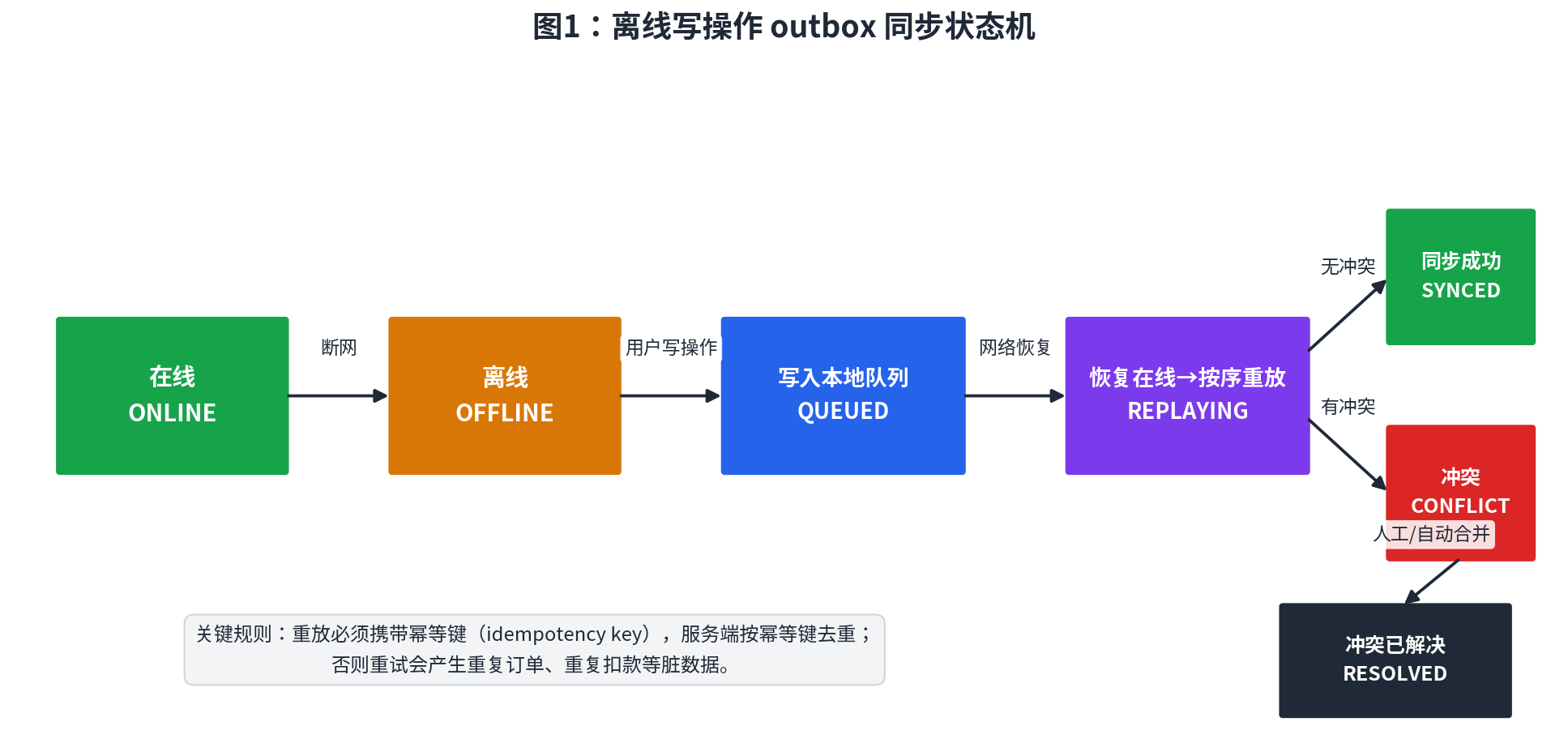 Figure 1: Outbox sync state machine. Online → offline → write to local queue → back online → replay in order → success, or into conflict handling. Core rule: replay must carry an idempotency key, or retries will manufacture dirty data.
Outbox table design (create it alongside your other Dexie tables):
db.version(1).stores({
  // Dequeue ordered by createdAt; status separates pending / syncing / failed
  outbox: '++id, createdAt, status',
});

// Each queue record looks like this
{
  id: 12,
  op: 'create-order',            // operation type: server routes by type
  payload: { sku: 'A001', qty: 2 },
  idempotencyKey: 'op_9f3c…',    // idempotency key: client-generated, globally unique
  createdAt: 1728871234567,
  status: 'pending',             // pending | syncing | failed
  retryCount: 0,
}
Sync function pseudocode. Three details matter: replay in order, retries with backoff, and clearing the local dirty flag only on success:
async function syncOutbox() {
  if (!navigator.onLine) return;
  const pending = await db.outbox
    .where('status').equals('pending')
    .sortBy('createdAt'); // replay in order: order is the order of user actions

  for (const op of pending) {
    try {
      op.status = 'syncing';
      await db.outbox.put(op);
      // Key point: always send the SAME idempotencyKey; the server dedupes by key
      await fetch('/api/' + op.op, {
        method: 'POST',
        headers: { 'Idempotency-Key': op.idempotencyKey },
        body: JSON.stringify(op.payload),
      });
      await db.outbox.delete(op.id); // delete only on success; failures stay for retry
    } catch (e) {
      op.status = 'failed';
      op.retryCount++;
      await db.outbox.put(op);
      break; // stop at first failure to preserve order; resume on next reconnect
    }
  }
}
// Double safety net: trigger sync on reconnect AND on a timer
window.addEventListener('online', syncOutbox);
setInterval(syncOutbox, 30_000);
Let me state the point as bluntly as possible: retries without idempotency keys manufacture dirty data. Picture it: a user places an order offline; during replay the network jitters, the client never gets the response, assumes failure, and resends next time — without server-side dedup by idempotency key, the user gets charged twice and shipped twice. The rule is simple: the client generates a unique key per operation (e.g. crypto.randomUUID()), and the server dedupes on it — a repeated key returns the first response instead of re-executing. Half a day of implementation saves you one P0 incident.
The server side is equally simple: accept an Idempotency-Key header on write endpoints and keep an idempotency_keys(key, response, created_at) table with a unique index on key. On each request, check the table first — key exists, return the stored response; otherwise run the business logic and store the result. Redis or a database both work; don't bikeshed the choice, get it built first.
The Conflict Resolution Fork: Match the Strategy to the Scenario, Don't Start with CRDT
After L2 comes the next question: if a user edits the same note on phone and laptop simultaneously, whose version wins on sync? That's conflict. Three strategies, matched to scenarios:
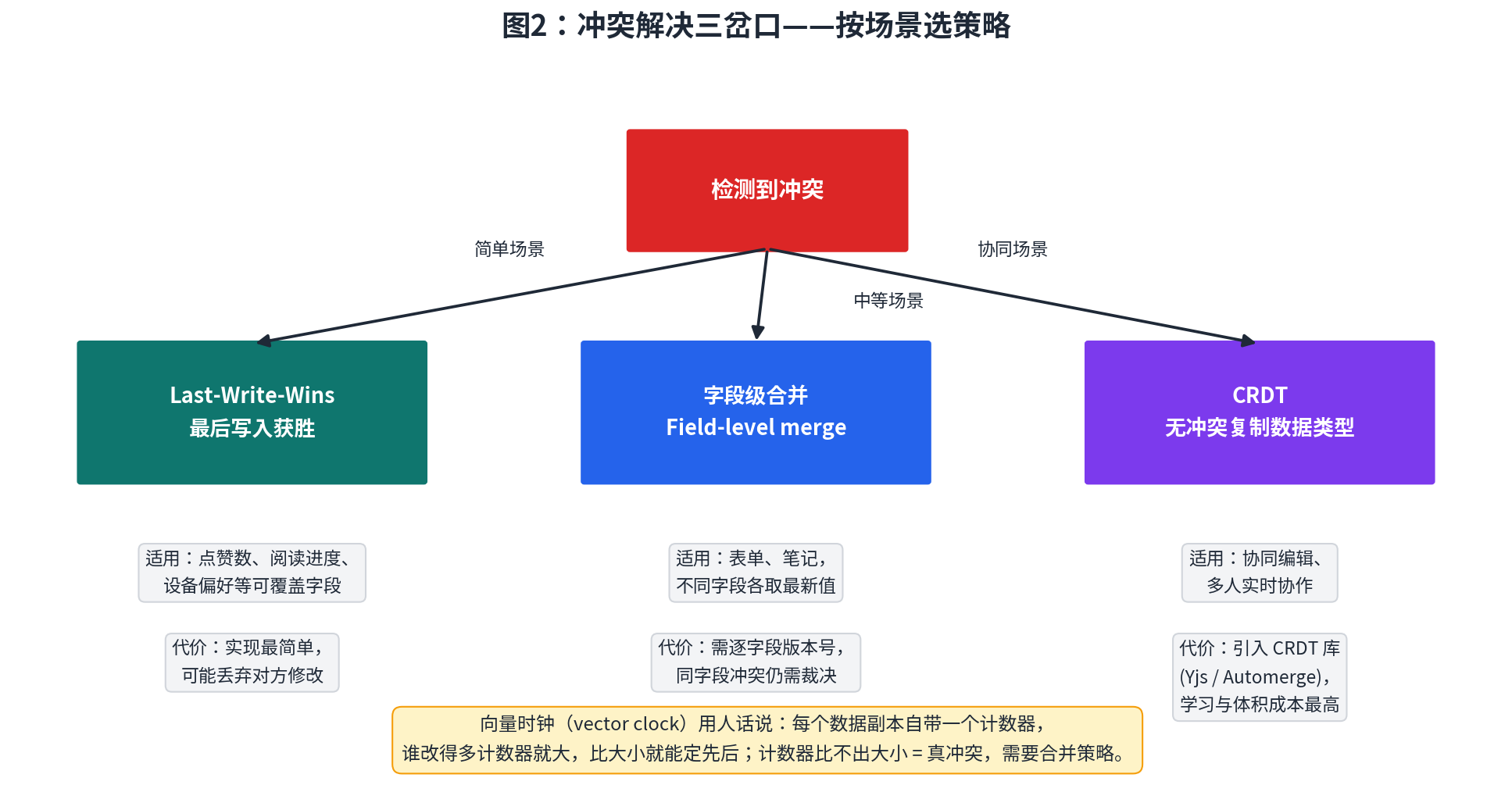 Figure 2: The conflict resolution fork. After detecting a conflict, branch by scenario: last-write-wins for simple cases, field-level merge for medium cases, CRDT only for collaborative editing. Each branch is annotated with when it applies and what it costs.
- Last-Write-Wins (LWW): whoever's timestamp is newer wins. Plenty for simple cases: like counts, reading progress, device preferences — users never notice these being overwritten. The cost: the other side's edit may be discarded, so reserve it for fields where "losing it doesn't matter."
- Field-level merge: instead of picking one whole record, take the newest value per field. Phone edited the title, laptop edited the body — the merge keeps both. Requires a version or timestamp per field; medium cost. For forms and notes where "different parts get edited independently," this is the best value for money.
- CRDT (conflict-free replicated data types): mathematically guaranteed consistent merges in any order — the ultimate answer for collaborative editing. Yjs and Automerge are mature libraries. But the cost is highest: new dependency, learning curve, bundle size. Before adopting CRDT in a solo-maintained project, ask yourself three times — do my users really need Google-Docs-level realtime collaboration? For most vibe projects the answer is no.
Vector clocks, explained like a human: every data replica carries its own counter; whoever edits more has the bigger counter. On sync, compare — bigger wins. If the counters can't be ordered, both sides edited independently — that's a genuine conflict, and that's when you need a merge strategy from above. You don't need to hand-roll vector clocks; internalizing this intuition ("unordered counters = real conflict") is enough.
Finally, the UI. When a conflict happens, how do you prompt without scaring users? The anti-example: "DATA CONFLICT DETECTED! Version vectors incomparable!" — users seeing that just want to uninstall. The right way is plain language plus a choice: "You also edited this note on another device. Which version do you want to keep?" with two buttons: "Keep this one / See the other one." Hide the technical details, hand the decision back to the user. Most conflicts are obvious to the user at a glance — don't decide for them.
Launch Checklist: Four Things You Must Personally Test Before Shipping
Offline features suffer most from "I thought I tested it." Each of these four needs a hands-on run before launch:
- Chrome DevTools Network Offline simulation: switch to Offline and walk the entire core flow — browse, create, edit, submit. Any white screen or error offline sends it back for rework. This is the most basic L1 verification, takes five minutes, no excuse to skip.
- Slow 3G test: switch DevTools to Slow 3G and watch weak-network behavior. Two things to check: do API requests have a timeout fallback (that's what Workbox's
networkTimeoutSeconds: 3above is for), and is the submit button disabled while a request is pending — a user triple-tapping submit puts three duplicate operations in the outbox; idempotency keys cover it, but preventing it in the UI is more dignified. - Kill-and-restore test: write a few records offline, then kill the app process outright (swipe it away on mobile, close the tab on desktop), reopen, and check the data is still there and the queue intact. This is the only way to prove "writes actually hit disk." Any queue still sitting in a memory variable instead of IndexedDB dies right here.
- Queue backlog cap and degradation: offline for three days, 500 operations pile up in the outbox — what happens on reconnect? My recommendation: once unsynced operations exceed 100, tell the user explicitly — a gentle top banner: "132 changes waiting to sync, they'll upload automatically when you're back online" — instead of silently grinding away in the background. And degrade gracefully: big payloads like images and attachments go last; small high-value text syncs first. Operations failing more than 5 replays get flagged for manual handling instead of retrying forever and draining the battery.
Anti-Patterns: Four Traps, Each One Stepped In for Real
- Storing JWTs in localStorage while talking about offline security: any injected script can read tokens from localStorage. Offline-first means your app runs on all kinds of untrusted networks — the man-in-the-middle surface is bigger, so tokens belong in httpOnly cookies or memory. Security and offline multiply; if either is zero, the whole thing is zero.
- Unbounded caching that fills up users' phones: Cache First feels great until unversioned caches and uncapped images eat 2GB of a user's storage. Workbox's
ExpirationPluginis standard equipment: set maxEntries and maxAgeSeconds per cache, auto-evict beyond that. Cache space is borrowed, not bought. - Silently discarding failed syncs: the nastiest one. For the sake of "smooth experience," a failed sync tells the user nothing and the queue gets cleared — the user thinks it went through, the other side never receives it. Remember: a visibly ugly error beats elegantly lost data. Failed operations must stay in the queue, flagged red, with the user informed.
- Using timestamps as the sole conflict authority: two devices' clocks can differ by minutes; LWW on timestamps alone means the fast-clock device always wins. The correct approach is timestamp + device ID + counter combined, or the vector-clock way of thinking. Single-machine thinking is the number-one killer in distributed systems.
Closing: Write "The Network Will Fail" into Your Architecture on Day One
Offline-first isn't "writing a lot more code." Count what this guide asked you to add: two Dexie tables, three Workbox routes, an outbox table plus a sync function, idempotency keys on write endpoints — a competent developer builds the skeleton in two days. The real cost isn't lines of code; it's the assumption switch: from "the network is always available" to "the network can fail at any time."
Once that assumption is written into your architecture on day one, every technical decision after it falls into place on its own: state management naturally splits into local vs. remote, writes naturally go through a queue, the UI naturally handles pending states. Go the other way — assume always-online on day one and bolt offline on six months later — and you're ripping up the foundation to redo it. What you're paying for then isn't a feature, it's architecture debt.
So my final advice is one sentence: next time you have AI generate a project skeleton, add one line to the prompt: "Assume the network can fail at any time; writable offline, auto-sync when back online." The AI will scaffold the outbox and cache strategies itself — it's not that it can't write them, it's that you never told it the assumption. And you, after this guide, no longer have the excuse of "I didn't think users would open my app in the subway."
Comments (0)
Related articles

AI writes code fast but never writes secure code by default: running locally is not the same as being safe in production. This hands-on playbook fills the web security baseline for your vibe project — CSP headers, CSRF tokens, XSS defense, SQL parameterization, the cookie triple, dependency supply-chain gates, plus a copy-ready 10-item pre-launch acceptance checklist.

Deploying to xxx.vercel.app is just squatting. This hands-on guide walks the full chain: buying a domain, DNS resolution, the Cloudflare launch path, HTTPS/HSTS, and the SPF/DKIM/DMARC email trio — because your domain is the only asset you truly own.
AI-written code runs perfectly for one user and can collapse under 100 concurrent ones on launch day. This guide gets your first k6 script running in 15 minutes: derive load scenarios from real user behavior, read p95/p99 and saturation signals, locate DB, connection-pool and third-party API bottlenecks with a three-axe method, convert test numbers into paying-user capacity, and put load testing into CI as an automatic gate.