It's 3 AM, Production Is Down, and You're the Only One There: An Incident Runbook for Solo Developers
The alarm fired — now what? A practical incident-response playbook for one-person teams: a SEV1/SEV2/SEV3 triage checklist plus a 'when to let it go' list, a free alerting stack you can build in 15 minutes, the 5 fixed moves for the golden 15 minutes, a one-click rollback SOP, and copy-paste-ready timeline, communication, and blameless postmortem templates — plus 5 anti-patterns solo developers keep repeating.
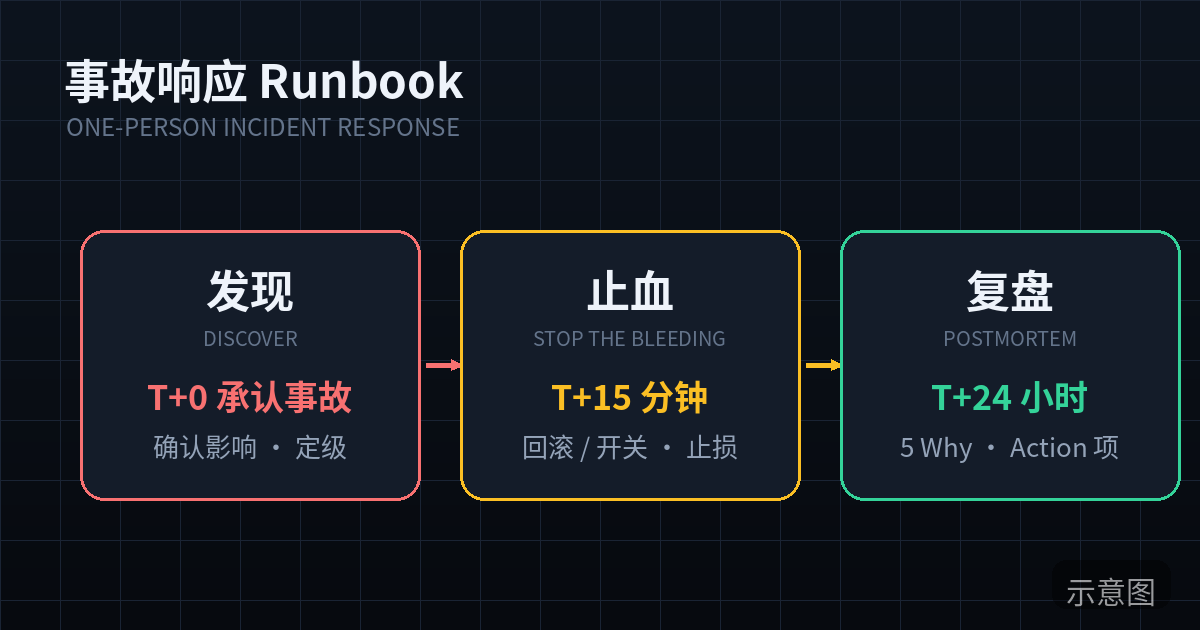
It's 3 AM, and Your Phone Is Buzzing
Let me reconstruct a scene every indie developer knows: 3:17 AM, your phone buzzing on the nightstand. You fumble for it half-asleep and see a Telegram message: "DOWN: api is down." Five questions hit your brain at once: is it really down or a false alarm? How many users are affected? When was the last deploy? Should I check logs first or roll back first? Do I need to post an announcement?
Big companies have answers: an on-call rotation, a runbook, an incident commander, a war room. You have none of that. You are the rotation, the runbook, and the incident commander — the 3 AM version of you, running at 30% of daytime cognitive capacity.
This article is written for that version of you. It doesn't cover "how to prevent incidents" (that's observability and testing territory). It covers exactly one thing: after the alarm fires, what you do, in what order, alone. Ten sections: the first five are "wartime moves," the last five are "templates and postmortems." Tonight, spend one hour setting up the alerting channel in section 3 and rehearsing the rollback command in section 5 — incidents won't wait until you're ready.
Positioning note: this site previously published "Giving Your Vibe Project Eyes and Ears: Observability for One-Person Teams," which covered installing monitoring, reading logs, and setting alerts — the "before the alarm" part. This is its sequel: after the alarm, what do you do.
1. Face Reality: On-Call Is You. There Is No Rotation.
The biggest difference between incident response at a one-person team and at a big company isn't tooling — it's that there is exactly one decision-maker, and that decision-maker gets woken up at night. A big company's runbook exists so "anyone on shift can follow the process." Your runbook exists so "the 3 AM version of you can follow the process written by the daytime version of you." Those are two completely different audiences: the first guards against newcomers' mistakes; the second guards against your own stupidity — because when you're exhausted, panicked, and rushed, you do things you'd never do at noon, like editing code directly in production.
So the first principle of this runbook: make every decision in advance. When to get up, when to roll back, when to post an announcement — don't decide any of that at 3 AM. Decide it now, on a clear Sunday evening. When the incident hits, you execute; you don't think. It sounds counterintuitive, but every mature emergency system works this way: firefighters don't start thinking about hose technique after entering the burning building.
The second principle: the runbook must be short. A big company's incident manual can be 50 pages because 10 people in the war room read different parts. If your runbook is longer than one page, the 3 AM you won't read it. Every template below follows the "one page" standard: the triage checklist is one table, the golden 15 minutes is 5 moves, the rollback SOP is 10 lines of commands. A process you can memorize is the only process that actually exists during an incident.
Core judgment: a one-person team doesn't need a "more complete" incident process — it needs a "shorter" one. Completeness is for teams of ten; brevity is for the 3 AM version of you, alone.
2. Incident Triage: A Three-Tier Checklist, and the "Let It Go" List That Matters More
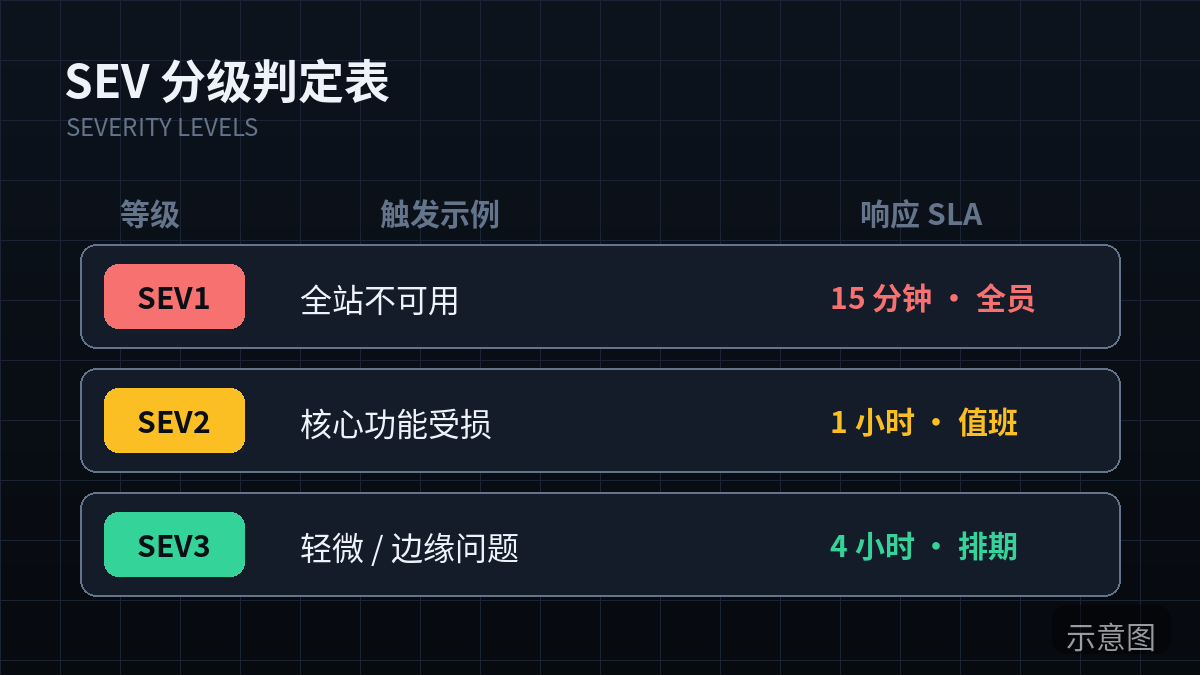
Triage serves exactly one purpose: deciding whether you get out of bed right now. A solo developer has no "escalate to tier two" option — severity maps directly to your sleep. My version has three tiers, all judged on one criterion: "are losses still growing?"
- SEV1: Get up now. Irreversible loss is happening. Triggers (any one qualifies): the payment flow is down (users can't pay, charges misbehaving); user data is being lost or corrupted; the whole site is down for more than 5 minutes; a security incident (data leak, unauthorized access). Common thread: every minute burns money, data, or trust.
- SEV2: Handle it in the morning; take a 5-minute look before bed. Triggers: a core feature is partially broken but a workaround exists (e.g., the AI generation feature is down but history is still viewable); a non-revenue path is fully down (blog, landing page); performance is severely degraded but the service works. Common thread: users hurt, but losses aren't growing — fixing it at 9 AM vs 3 AM changes almost nothing.
- SEV3: Write it down, fix it next workday. Triggers: edge-case bugs, rare low-impact issues, copy/style problems, a single unreproducible user report. Common thread: writing it down matters more than getting up.
Now the important part — the "let it go" list. I've watched too many indie developers (including myself three years ago) treat SEV3s like SEV1s: crawling out of bed at 3 AM to fix an edge bug affecting 3 users, working until 5, running on fumes the next day, then shipping a broken deploy in that exhausted state and causing a real SEV1. That's the black humor of incident response: over-response manufactures incidents.
So my iron rule: the only valid reason to get up at 3 AM is "losses are growing AND only I can stop them." Both conditions are required. Losses not growing (SEV2/SEV3)? Go back to sleep. The correct handling for SEV2/SEV3 is 30 seconds on your phone logging a todo, then sleep. Your sleep is the fuel for tomorrow's iteration — staying up for a SEV3 trades tomorrow's revenue for today's peace of mind. Bad deal.
Keep the triage checklist pinned in your phone's notes app, retrievable in 10 seconds during an incident:
Incident triage cheat sheet (solo developer edition)
SEV1 Get up now: payment flow down / data being lost / whole site 500 / security incident
SEV2 Morning: core feature partially broken but workaround exists / non-revenue path down / very slow but usable
SEV3 Log it and sleep: edge bugs / rare minor issues / copy & style / unreproducible one-offs
Get-up rule: losses are growing AND only I can stop them. Both required.
The one-line version: SEV1 is "fire," SEV2 is "smoke," SEV3 is "someone said they smell smoke." Only fire is worth getting up for at 3 AM.
3. Alerting That Reaches You: 15 Minutes, $0, Loud Enough to Wake You
A harsh truth first: email alerts are the same as no alerts. Nobody reads email at 3 AM, and during the day email drowns in notification noise. An alerting channel has exactly one KPI: when a SEV1 hits, it gets you out of bed within 5 minutes. Miss that bar and everything else is decoration.
For a solo developer, there's only one approach you can set up tonight: external uptime monitoring + strong push. Why must it be external? Because when your own server dies, the monitoring script running on the same machine probably dies with it — monitoring only counts when someone else is watching for you. Most vibe projects run on Vercel, Railway, or Render; those platforms' status notifications tell you "the platform is down," not "your app is down." That layer is yours to build.
Comparison table (all have free tiers, all take ~15 minutes to set up):
| Layer | Option | Free tier | Pros | Cons |
|---|---|---|---|---|
| Uptime monitoring | UptimeRobot | 50 monitors, 5-min interval | Sign up and go, battle-tested | Free tier checks every 5 min — slightly slower detection |
| Uptime monitoring | Better Stack | 10 monitors, 3-min interval + free status page | Monitoring + status page in one, modern UI | Fewer free monitors |
| Uptime monitoring | Self-hosted Uptime Kuma | Unlimited (you supply the server) | 1-min interval, full-featured, Telegram notifications | You maintain it; if your server dies it dies too — second layer only |
| Strong push | Telegram Bot | Completely free | Reliable delivery, pinnable, custom alert sounds | Needs VPN access in some regions |
| Strong push | Bark / Server Chan | Free | Pushes straight to iOS / WeChat | Bark is iOS-only; Server Chan depends on WeChat template messages |
| Strong push | Pushover | One-time $5 | "Emergency priority" rings until you acknowledge | Costs $5 (but it's the best-spent $5 in this whole table) |
My judgment is blunt: start with UptimeRobot (or Better Stack) plus whatever push you already use — set it up tonight. Don't spend a week agonizing over the choice — an alerting channel's value is in existing, not in being perfect. A free 5-minute-interval monitor beats the perfect 1-minute setup you'll finish next week. Once you have your first paying user, consider Pushover's emergency priority (it keeps ringing until you acknowledge — the highest-ROI five dollars in this table).
Two commonly missed monitors: SSL certificate expiry (UptimeRobot's free tier includes cert-expiry reminders — an embarrassing number of vibe projects die one morning to an expired cert); and keyword monitoring — don't just check "is the service up," check "does the key page contain a keyword," e.g., the order-success page must contain "order number." That catches the "returns 200 but all business logic is broken" zombie state.
The only acceptance test for your alerting channel: on a weekend afternoon, manually stop your service for 5 minutes and see if your phone rings. An alerting channel that's never been drilled is the same as none.
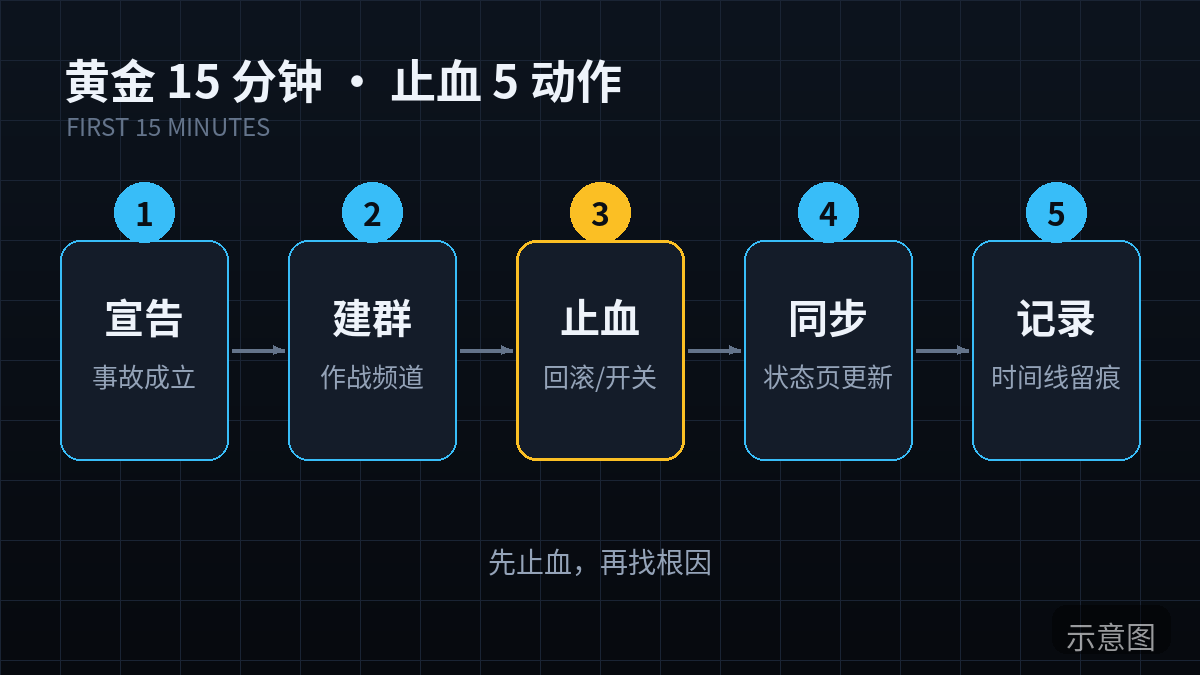
4. The Golden 15 Minutes: 5 Fixed Moves to Stop the Bleeding
SEV1 confirmed, you're up. For the next 15 minutes, do exactly 5 things, in fixed order, one at a time. I distilled this sequence from several real incidents — each step's "why" maps to a mistake I've actually made:
- Freeze deploys (minutes 0–2). Your first move isn't reading logs — it's locking the deploy pipeline: pause auto-deploys on Vercel/Railway, or message collaborators "no pushes until further notice." Why first? Because more than half of all incident escalations come from a panicked "let me push one more fix and see." At 3 AM your instinct screams "do something," and the most dangerous "something" is changing code. Keep the system as-is first — as-is, however broken, beats "as-is plus an untested hotfix."
- Confirm the blast radius (minutes 2–5). Answer three questions: how many users are affected? Which flow? Since when? Check dashboards and error tracking (Sentry and friends) — don't dive into logs yet. Logs are a microscope; blast radius is a map. Look at the map first. Blast radius determines the force of every later decision: a payment bug affecting 5% of users and a full-site 500 are two completely different tempos.
- Look at recent changes, not code logic (minutes 5–10). Check "when was the last deploy and what changed" — git log, deploy history, feature-flag states. The empirical number: well over half of production incidents trace directly to the most recent change. Look at the change, not the code. Debugging code is "fixing"; finding the change is "locating" — and the stop-the-bleeding phase only needs locating. This habit matters even more with AI-written code: when the AI touches 20 files at once, you can't remember what it did — only the deploy history is trustworthy.
- Roll back or shift traffic (minutes 10–15). If you haven't found the root cause in 10 minutes, roll back. That's not a suggestion — it's a hard rule in the runbook: 10 minutes without a root cause = roll back. Rollback doesn't need the root cause; it only needs "the previous version was good." The traffic-shifting variant: if you use feature flags, kill the new feature's flag — faster than a full rollback. The exact SOP is in section 5.
- Communicate publicly (in parallel with step 4). Update the status page: "We're aware of service issues and working on it." Sync one line in your community. Even if you haven't found the cause, speak first. Silence kills trust: users can accept "the service is down"; they can't accept "the service is down and nobody's talking." SEV1 announcements don't need to be perfect — they need to be fast. "Acknowledged + working on it + updates every 30 minutes" is the universal formula.
Notice there's no "fix the bug" in these 5 moves. The golden 15 minutes isn't about fixing — it's about stopping the bleeding, halting growing losses. Fixing happens after, with coffee, slowly. Mixing "stop the bleeding" with "fix it" is the classic beginner error: editing code during a full-site 500 is gambling on every keystroke.
5. One-Click Rollback SOP: The Execution Checklist for "It's Shipped and Must Go Back"
Rollback needs an SOP because it's counterintuitive: everyone wants "10 more minutes to find the root cause," and rollback feels like surrender. But the math favors rollback — rollback returns to a "known good" state; hotfixing bets that "my new change is correct." At 3 AM, your judgment doesn't deserve that bet.
Prerequisites first. A rollback SOP only works if three things are ready before the incident — preparing them mid-incident is too late:
- Every deploy gets an immutable version tag (git tag + container image tag). The rollback target must be a specific version, not "the previous one." Vercel, Railway, and Fly.io all support one-click rollback to a specific deployment — go find that button in the console now. Looking for it during an incident is the same as not having it.
- Database migrations must be reversible or forward-compatible. This is rollback's biggest trap: the code rolls back, the migration doesn't. Iron rule: destructive migrations (dropping or altering columns) always ship in two steps — step one adds the new column with dual writes, step two retires the old one. Only additive migrations (new tables, new columns) are rollback-safe. If the incident is the migration, confirm the data layer can go back before rolling back the code.
- The rollback command must run in one shot. Script it or bookmark it — don't count on the 3 AM you remembering the full
fly deploy --image xxxinvocation.
The execution checklist (copy it into your runbook, check items off during the incident):
One-click rollback SOP (run when SEV1 and root cause not found in 10 min)
[ ] 1. Confirm rollback target: stable version tag / deploy ID: ________
[ ] 2. Database check: does this release contain a destructive migration?
       Yes -> stop, handle the data layer first; No -> continue
[ ] 3. Execute rollback: platform one-click revert /
       fly deploy --image <tag> / vercel rollback
[ ] 4. Verify: health-check endpoint returns 200;
       manually walk the core flow (login -> order -> pay)
[ ] 5. Watch for 10 min: error-rate curve falls back to baseline
[ ] 6. Update status page: "processing" -> "recovered, monitoring"
[ ] 7. Freeze deploys for 2 hours: no new code until root cause is found
Note: after rollback, do NOT "fix and re-ship" immediately.
Sleep first; postmortem at dawn (see section 8).
The hard rollback rule, written into the runbook: "Root cause not found in 10 minutes = unconditional rollback." This rule doesn't protect the system — it protects you. It turns "should I roll back?" from a brutal 3 AM decision into a decision the daytime you already made.
6. The Incident Timeline Template: Start Writing While It's Happening, Not After
The timeline is the most-skipped, most-regretted part of incident response. It has two jobs: during the incident it keeps your rhythm — writing down "14:05 did X" stops you from repeating the same step in a panic; afterward it's the only trustworthy material for the postmortem. A timeline reconstructed after the fact is always airbrushed: you'll unconsciously rewrite "I flailed randomly for 40 minutes" as "I investigated systematically for 40 minutes."
So the rule: start the timeline while the incident is still happening. Phone notes, paper, anything — format doesn't matter, timestamps do. Log one line per action, minute precision. Below is the cleaned-up document template; fill it in and archive it within 10 minutes after the incident ends:
# Incident timeline — <one-line title, e.g. payment callback 500s dropping orders>

- Incident ID: INC-20261011-001 (date + sequence of the day)
- Severity: SEV1 / SEV2 / SEV3
- Started: 2026-10-11 03:17 (UTC+8)
- Detected by: alert push / user report / found it myself
- Blast radius: ~XX users / payment flow / lasted XX minutes
- Owner: <your name> (solo team — write it down so the postmortem
  remembers "it was only me back then")

## Timeline (all times UTC+8, minute precision)
- 03:17 — UptimeRobot alert: API 5xx ratio crossed threshold
- 03:19 — Blast radius confirmed: payment callback 500s, ~30% of orders affected
- 03:21 — Deploys frozen, auto-deploy paused
- 03:24 — Deploy history: v1.4.2 shipped at 02:40, touched callback signature logic
- 03:29 — Root cause not found in 10 min, rolled back to v1.4.1
- 03:35 — Rollback done, error rate back to baseline
- 03:40 — Status page updated to "recovered, monitoring"
- 04:00 — 20 min of clean observation, deploys unfrozen, back to sleep

## Root cause (one line, placeholder — sharpen it in the postmortem)
<e.g. v1.4.2's signature logic didn't handle legacy callback params,
causing signature failures to throw 500>

## Action items (filled in after the postmortem, see section 8)
- [ ] <action item 1> Owner: me Due: <date>
Note the "Detected by" field: if three incidents in a row say "user report" instead of "alert push," your alerting channel is decorative — that's the timeline template's free self-audit feature.
7. Communication Templates: Status Page, Community, and Paying-User Email
Solo teams have a natural disadvantage in comms: nobody writes the announcement for you. But also a natural advantage: users tolerate indie developers far more than big companies — as long as you're honest, fast, and human. Three iron rules: don't shift blame (users don't care whether Vercel or your bug caused it — write "our service" and move on); don't promise a specific recovery time (unless you're 100% sure — use "updates every 30 minutes" instead); SEV1s get a dedicated email to paying users, free users get the status page.
Template 1: Status page announcement (four stages, fill in the blanks)
[Investigating]
<time> — We're seeing issues with <service/feature>: <one-line
user-facing symptom>. The team (it's me) is investigating;
updates every 30 minutes.

[Identified]
<time> — Root cause identified: <one-line cause, e.g. today's deploy
broke signature compatibility>. Rolling back / fixing now;
expect recovery by <time>. (Only write a time if you're sure.)

[Monitoring]
<time> — Service recovered, error rates back to normal, watching closely.
Still seeing issues? Reply to this email / @ me in the community.

[Resolved]
<time> — Incident resolved, service fully restored. Impact: <duration/scope>.
Full postmortem will be published <date> on the blog / community.
Template 2: Community announcement (Discord / WeChat group / Twitter — casual tone)
[Incident update] Got paged — <feature> has been unstable since <time>:
<one-line symptom>. On it now; live updates on the status page 👉 <link>.
Syncing progress every ~30 min. If you're affected, @ me right here.
(After recovery, append: recovered, monitoring. My bad this time —
postmortem coming.)
Template 3: Paying-user email (SEV1 only, send within 24 hours)
Subject: About the <date> <service> outage — what happened and make-good

Hi, I'm <your name>, the solo developer behind <product>.

On <date> around <time window>, <service> went down for about
<duration>. Cause: <one-line root cause, no jargon>. During the window
<specific impact, e.g. ~30% of orders missed their callbacks — no money
was lost and all data has been backfilled>.

Full postmortem here: <link>.
As an apology, I've added <X> free days to your plan / a <X> credit.

One person maintaining a product — outages happen. But "telling you
promptly and clearly" is the promise I can make. Reply to this email
with anything; I read every one personally.

<Your name>
One word on compensation: indie developers don't need big-company "SLA payout tables." A few free days plus a sincere apology beats lawyered SLA wording every time. Users paying for an indie product are buying "a reliable person maintaining this" — incident communication is your brightest stage for showing "reliable." Handled well, one SEV1 can win you a cohort of more loyal users.
8. The Postmortem Template: 5 Blameless Questions, One Root Cause, One Action Item
"Blameless postmortem" at a big company means "don't punish the person." For a solo team it means something harder: don't put yourself on moral trial. It's tempting to write "I was an idiot for missing that bug" — self-flagellation that only teaches you to whitewash the root cause next time. Review the system, not the person, even when the person is you.
The template is fixed: 5 questions + one root cause + one action item. Nothing more:
# Postmortem — INC-20261011-001

## 5 questions
1. What happened? (Facts only, no feelings: when, what symptoms, how long)
2. How big was the impact? (How many users, which flow, any data/money lost — quantify)
3. What was the root cause? (One technical line, see below)
4. Why wasn't it caught sooner? (Missing alert / alert didn't wake me / monitoring blind spot)
5. How do we recover faster or avoid it next time? (Maps to the action item below)

## One root cause (drill down with 5 Whys, keep only the last line)
E.g.: payment callback 500s → signature logic didn't handle legacy params →
only new-version callbacks were tested before deploy →
no automated test for legacy callbacks →
every release was verified by manual clicking.
Root cause: release verification for a critical flow depended on humans;
no automated regression.

## One action item (exactly one, and it must be executable)
- [ ] Add automated regression tests for payment callbacks with old+new
  params; gate releases on them in CI
  Owner: me Due: 2026-10-18
  Done-when: CI runs them before every release; a failure blocks the deploy
Note the "exactly one action item" design: for a solo developer, more than one action item equals zero. Your bandwidth covers one thing — so write one thing, the most important one. And it must meet section 9's bar: it becomes either an alert rule (catch it earlier next time) or an automated test (block it before release next time). An action item like "be more careful next time" isn't worth writing.
The postmortem's acceptance test: three months later, rereading it, you can name exactly which alert rule or test exists today because of that incident. If you can't, the postmortem was paper.
9. Closing the Loop: Every Incident Must Become One Alert Rule or One Test
Section 8's action-item rule, expanded. Alert rules solve "detection"; automated tests solve "prevention." Every incident must plug at least one of those two holes:
- Become an alert rule — for "caught too late" incidents. Example: users found the broken payment callback before your alerting did → add a rule: "payment-callback 5xx ratio over 1% for 2 minutes → push." Make alert rules specific: "payment callback 5xx" beats "API 5xx" — the generic one pages you 10 times at night with 9 false alarms, and false alarms teach you to mute alerts, which is the real disaster.
- Become an automated test — for "shipped a bug" incidents. Example: signature logic didn't handle legacy params → add a regression test "legacy callback params must pass signature verification," gated in CI. Vibe projects don't need full coverage — write tests only for flows where failure loses money or data, leave the rest to chance. That's the indie test-ROI optimum.
One more thing most people skip: a monthly one-person "fire drill." On a quiet weekend, deliberately break something in staging, then walk this runbook: did the alert fire, how many minutes until you saw it, was the triage right, did the rollback command work first try or did you have to look it up? Every problem found in a drill is free; every problem found in a real incident is paid for with user trust. Keep it light — 30 minutes, a cup of coffee, treat it like a game.
Finally, one KPI for the whole loop: the same root cause is never allowed to cause a second incident. The first time is tuition; the second time is negligence. If a missing alert rule caused two incidents, your postmortem action items were never executed — go back and rewrite section 8.
10. Anti-Patterns: 5 Mistakes Solo Developers Keep Making
- "Give me 10 more minutes" — said six times, and it's dawn with no rollback. The #1 anti-pattern. Debugging has flow-state pleasure; rollback feels like surrender, so human nature keeps you "checking 10 more minutes." The cure is section 5's hard rule: no root cause in 10 minutes = unconditional rollback. Take the decision out of the 3 AM you's hands and give it to the daytime you.
- Hotfixing production directly. Skipping CI and tests, editing code with vim on the server, "looks fixed now." The problem with hotfixes isn't "it didn't fix it this time" — it's "production and the repo now disagree forever." The next deploy overwrites the hotfix and the same bug comes back for round two. Hotfix now, forensics later.
- Chained deploys during the incident. Panic-shipping — "fix, push, looks worse, push again" — four deploys in one night, each muddying the water. Section 4's step 1 (freeze deploys) exists for this: during stop-the-bleeding, the deploy pipeline is read-only.
- Silence. Users asking "is it down?" in the group for two hours while you debug without a word. Remember: users can forgive an outage; they can't forgive being ignored. Speaking up takes 30 seconds (copy-paste the section 7 templates) — 30 seconds for user trust is the highest-ROI move on the board.
- Postmortems that never get executed — or postmortems as self-flagellation. The first makes postmortems paper (section 8's acceptance test guards this); the second teaches you to write fictional root causes next time. Tell yourself during the review: "The system had a problem, not me; I'm fixing the system."
Tonight's 1-Hour Todo: Make the Runbook Yours
Don't just bookmark this. Tonight, spend one hour on these 4 items and your incident response will beat 90% of vibe projects:
- 15 minutes: sign up for UptimeRobot (or Better Stack); add three monitors — homepage, API health check, payment flow — and hook up Telegram / Bark push.
- 10 minutes: save section 2's triage cheat sheet as a pinned phone note, plus one line: "Only SEV1 gets me up; everything else gets logged and sleeps."
- 15 minutes: find your deploy platform's "roll back to this deployment" button, click into it, confirm you know where it is; write the rollback command into a note.
- 20 minutes: copy the section 6, 7, and 8 templates into your notes app, pre-filled with your product name and status-page link — during an incident you won't have time for blanks.
One last repeat of this article's core point: for a one-person team, incident response isn't about skill — it's about whether the 3 AM you can execute the process the daytime you wrote down. The runbook is the only backup the midnight you has. Go write it while you're still awake.
Comments (0)
Related articles
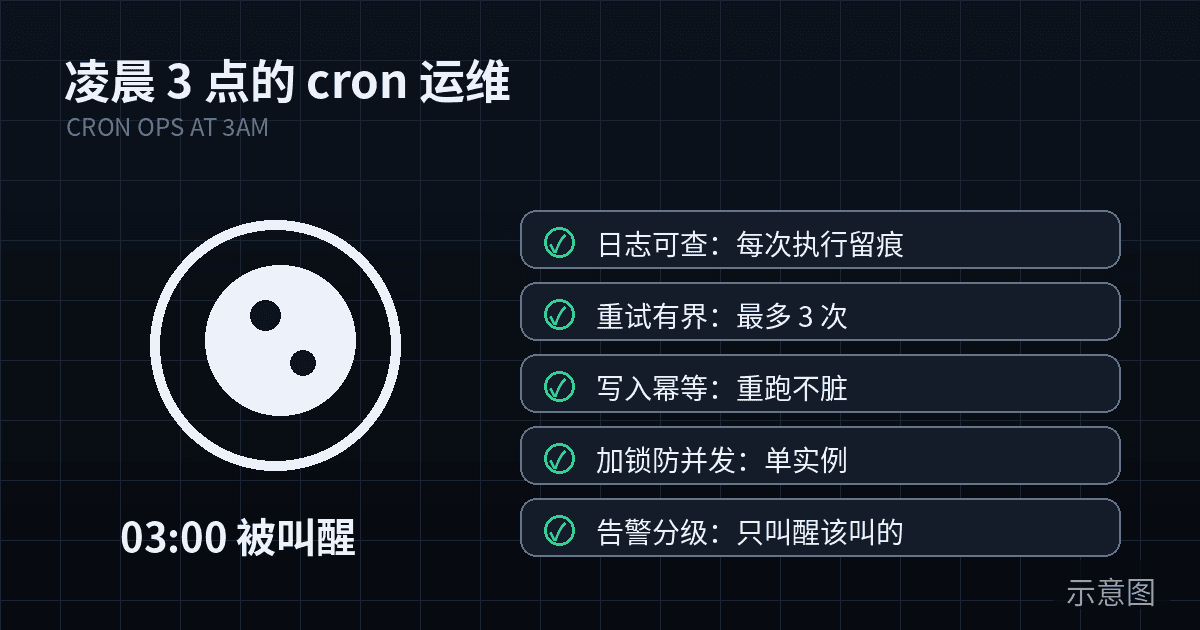
Cron jobs are the most neglected yet most costly-when-they-fail part of a product: they work while you sleep, and nobody shouts when they break. This hands-on guide covers the full solo-team cron ops loop — job triage, runner selection, idempotency, distributed locks, heartbeat alerting, structured logging, rerun SOPs, dependency-failure strategy, and a 5-minute weekly inspection checklist, with copy-paste-ready code.
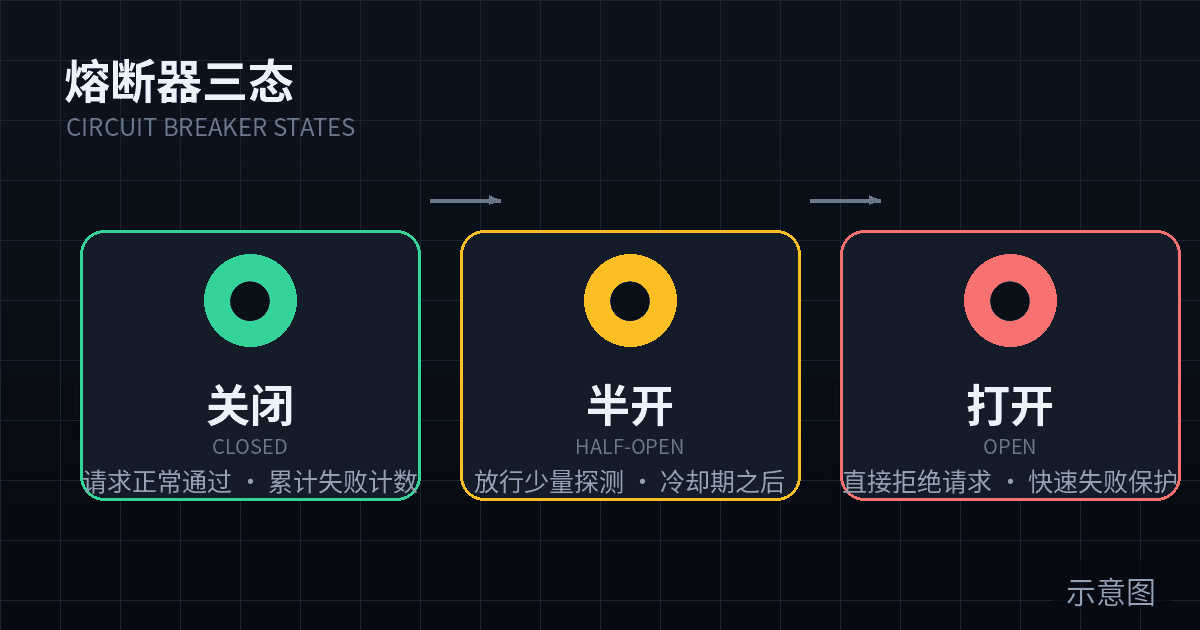
Your vibe project stands on borrowed pillars: model APIs, payments, email, storage. This guide builds four layers of defense in order — timeouts, retries with backoff and jitter, a complete copy-paste TypeScript circuit breaker, and fallback paths — plus budget breakers, a /health probe, and a monthly chaos drill SOP.
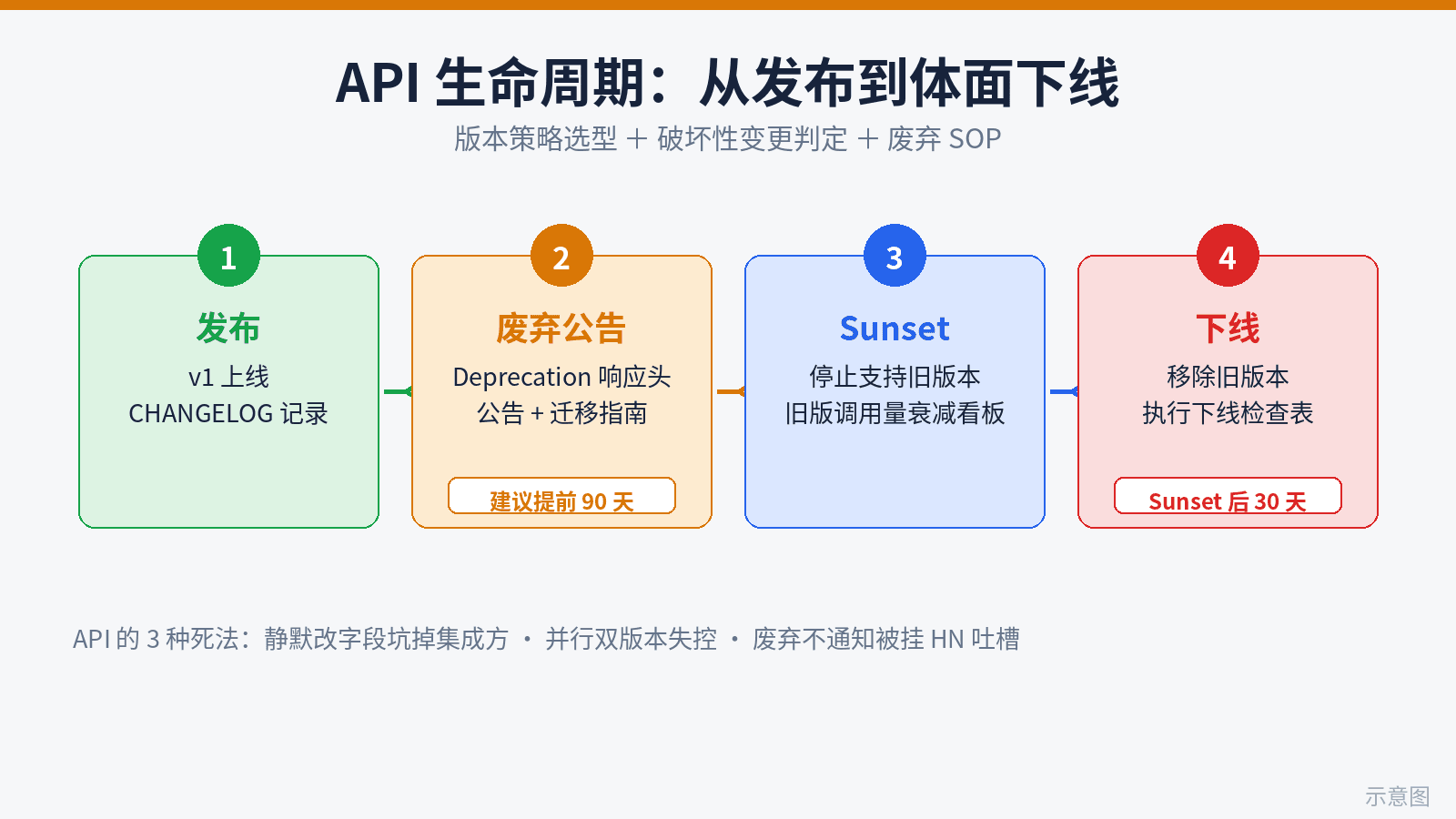
Vibe coding ships 10x faster than API contracts can move — where solo projects blow up. This guide fills the gap: 3 real ways vibe APIs die, a version-strategy decision table (URL path vs header vs versionless), a 12-rule breaking-change checklist, a 4-step deprecation SOP (headers, announcements, dual-run dashboards, sunset checklist), a copy-ready migration template, and the minimal solo setup: CHANGELOG-driven development plus CI auto-blocking breaking changes via openapi-diff.