Silky Kanban Drag and Drop for Vibe Projects: Library Picks, Ordering, and Conflict Handling
Drag a card from column A to position 3 of column B — silky, rollback-safe, order intact after refresh. Dodge archived react-beautiful-dnd in 2026 picks, persist order with fractional indexing (one drag = one row), then dnd-kit minimal loop, optimistic concurrency, mobile gesture isolation, and a 12-item launch checklist.
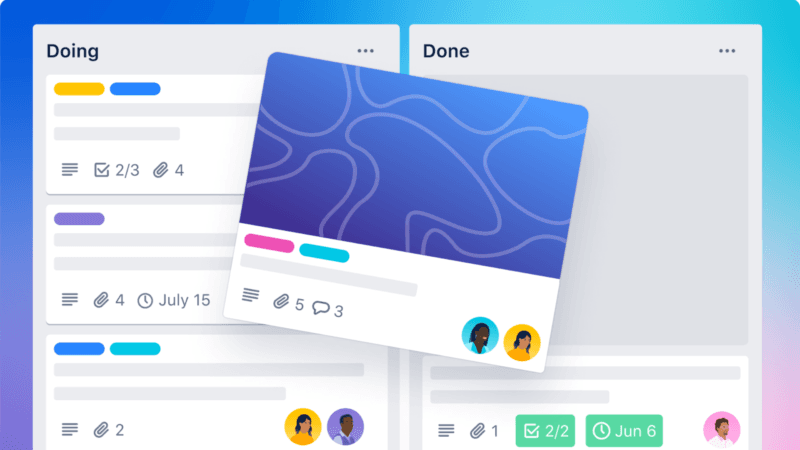
Two boundaries first, so this guide doesn't collide with others on the site: this article does not cover multi-user cursor sync and CRDT merge algorithms — that's the Real-time Collaboration Guide's territory; and it does not cover data tables — see the Data Table Guide. This guide answers one concrete question: how do you drag a card from column A to position 3 of column B so that it feels silky, rolls back on failure, and survives a page refresh with its order intact?
Kanban drag-and-drop is the classic "looks easy, full of traps" feature in vibe projects. An AI can generate a board UI in ten minutes, but once real users start managing dozens of cards, the traps surface one by one: janky dragging, cards "snapping back" on release, scrambled order after refresh, lost updates when two people drag the same card. The user's mental benchmark is Trello/Linear-level smoothness — the card should stick to the finger, the drop target must be predictable, and release must give instant feedback. This guide walks through the battle-tested order: library selection, order persistence, a dnd-kit build, concurrency, mobile/a11y, performance, and a launch checklist. Every section has directly usable code — no "it depends" filler.
1. Why Kanban Drag-and-Drop Is "Deceptively Simple"
First, give "smooth" a measurable definition, otherwise you and your users will talk past each other. A competent kanban drag must satisfy three criteria:
- Drag frame rate: when the finger/mouse moves, the card ghost must follow with under ~50ms of lag — visually "stuck" to the pointer. Jank almost always comes from re-rendering the whole column on drag: drag events fire dozens of times per second, and any
onDragMovehandler that setStates the full dataset will make the page stutter. - Predictable drop target: when the user releases between two cards, the card must land exactly in that gap. If the collision-detection algorithm is wrong, cards "jump" to unexpected spots and the product feels disobedient. For boards, prefer a center-distance-based algorithm over rectangle-intersection — the latter jitters badly in long, dense columns.
- Reversible operations: if the server write fails after release, the UI must roll back to the pre-drag position instead of leaving the card stranded. A drag must be a full "optimistic update + confirm/rollback" transaction, not a fire-and-forget setState.
The four classic failure scenes in vibe projects: janky dragging — drag state lives in a global store, so every pixel of movement re-renders the whole tree; snap-back on release — optimistic update applied locally but the server failed, with no rollback, so the card visually jumps back and the user drags again, producing a duplicate write; scrambled order after refresh — order only exists in frontend memory, or is persisted but overwritten by concurrent writes; lost updates when two people drag — the later write silently clobbers the earlier one. The following sections dismantle each trap.
2. 2026 Library Picks: Dodge the Archived One First
In 2026, the first selection question isn't "which is best" but "which is already dead." Something big happened in the DnD library space that sets your floor.
react-beautiful-dnd was officially deprecated by Atlassian on 2025-04-30; the GitHub repo is archived. That's a hard fact: the npm package is marked deprecated, the repo is read-only, and it will never receive updates — including security fixes. If you ask an AI to generate board code, training-data inertia will likely spit out react-beautiful-dnd patterns — using it in a new project is voluntarily taking on tech debt. Existing projects needn't panic; the community has a 1:1 drop-in.
The four realistic options in 2026, ranked by scenario:
| Library | Status | Best for | Caveats |
|---|---|---|---|
| dnd-kit | Actively maintained, top pick for new projects | Almost every vibe project | Modular; swappable collision algorithms; touch-friendly. More verbose than r-b-dnd, but far more controllable |
| @hello-pangea/dnd | Community fork of r-b-dnd, v18+ supports React 19 | Migrating legacy r-b-dnd projects | Nearly 1:1 API, cheapest migration; but it's the old architecture — not recommended for new projects |
| pragmatic-drag-and-drop | Atlassian's official successor, active | Bundle-size-sensitive, deeply custom needs | Built on native HTML5 DnD; lightweight but low-level — expect to build your own scaffolding |
| Native HTML5 Drag & Drop API | Browser-native, zero deps | Almost never | Practically unusable on mobile; drag-image styling is painful. Only if your users are 100% desktop |
The decision logic is three lines: new project → dnd-kit, no debate — the only library balancing customizability and out-of-the-box ergonomics, with official examples for boards, sortable lists, and multi-container drag; legacy r-b-dnd project → @hello-pangea/dnd for a minimal migration, don't rewrite; pragmatic-drag-and-drop only if you're obsessed with bundle size and can own low-level APIs. Native HTML5 DnD's trap is mobile: phone browsers support it in a "works but hurts" way, and touch dragging basically needs a hand-rolled pointer-event system — which dnd-kit's sensor architecture already handles.
All hands-on code below uses dnd-kit: the 2026-optimal choice for new projects, and the one with the most traps worth explaining.
3. Order Persistence: Fractional Indexing, Fully Explained
This is the most technical section — and where vibe projects most often get it wrong. The question is blunt: after a card is dropped in a new position, how is that order stored in the database?
The beginner instinct is an integer order column: 0, 1, 2, 3… insert between position 1 and 2, bump every later card's order by 1. Fine in a single-user demo; a disaster in production: two people dragging concurrently trigger full-table rewrites that clobber each other; hundreds of cards mean dozens of UPDATEs per drag — slow and deadlock-prone; worse, two concurrent requests can both read "max order is 5" and both write 6. Integer order's essential flaw: ordering is global state, so every local move rewrites the world.
The industry-standard answer is fractional indexing: the sort key is a base62-encoded fractional string; inserting a card only needs a midpoint key between its two neighbors — one drag = one UPDATE row, naturally concurrency-safe:

Three rules: first, initial keys are spaced like integers — a0, a1, a2; second, dropping between a0 and a1 calls generateKeyBetween('a0', 'a1') to get the midpoint a0V (V is the midpoint char of the base62 alphabet) — write that one row, touch nothing else; third, repeated inserts in the same gap lengthen keys (a0P → a0PH → a0PHUn…), so when key length passes a threshold (typically 8–10), run rebalance() to re-spread the column as a0, a1, a2… Rebalance is a low-frequency batch job — run it as a nightly cron, invisible to users.
The three drag scenarios need different write strategies — decide upfront and you'll write half the bugs:
- Same-column move: only this card's key is recomputed. Take the midpoint of its new neighbors' keys; at column head/tail where one neighbor is missing, generate "half below min" / "half above max" (
generateKeyBetween(a, null)/generateKeyBetween(null, b)handle this natively). - Cross-column move: update
columnIdand the sort key in the same transaction, or you'll get ghost states like "card in the new column with the old column's key." Optimistic UI updates both together; the server confirms transactionally. - Cross-board move: treat as delete + insert — soft-delete on the source board, generate a fresh key at the target position. Soft delete plus background cleanup avoids cross-board transaction complexity.
The full write sequence is "optimistic update + server confirm": on release, the frontend instantly re-sorts with the new key and renders (zero-latency feedback) while sending { cardId, newKey, newColumnId, clientOpId } to the server; the server writes transactionally and returns confirmation; on failure, the frontend rolls back to the pre-drag snapshot and toasts a retry prompt. clientOpId is an idempotency key — it cures the section-2 "snap-back illusion" where a user drags twice and the server writes twice.
// Server pseudocode: one drag = one UPDATE
import { generateKeyBetween } from 'fractional-indexing';

async function moveCard({ cardId, prevKey, nextKey, columnId, clientOpId }) {
  // Idempotent: the same clientOpId executes only once
  if (await opLog.exists(clientOpId)) return { ok: true, deduped: true };
  const newKey = generateKeyBetween(prevKey ?? null, nextKey ?? null);
  await db.transaction(async (tx) => {
    await tx.card.update({
      where: { id: cardId },
      data: { sortKey: newKey, columnId },
    });
    await tx.opLog.create({ data: { clientOpId } });
  });
  return { ok: true, sortKey: newKey };
}
My judgment: if your board may exceed ~50 cards or two people may use it, adopt fractional indexing from day one — don't start with integer order and migrate later. Migration costs far more than doing it right upfront: integer→fractional needs a full-table rewrite, while the reverse never happens. The npm package fractional-indexing is the standard implementation (the same idea Figma used) — don't hand-roll base62 midpoint math; hand-rolled versions always break on edge cases.
4. Building with dnd-kit: The Minimal Loop and Four Key Pieces
Four concepts only: DndContext (the drag context, a bus for all drag state), SortableContext (declares "these cards are one sortable set"), useSortable (the hook bound to each card), DragOverlay (the ghost that follows the pointer while dragging).
import {
  DndContext, DragOverlay, KeyboardSensor, PointerSensor,
  closestCenter, useSensor, useSensors,
} from '@dnd-kit/core';
import {
  SortableContext, arrayMove, sortableKeyboardCoordinates,
  useSortable, verticalListSortingStrategy,
} from '@dnd-kit/sortable';
import { CSS } from '@dnd-kit/utilities';

function SortableCard({ id, title }) {
  const { attributes, listeners, setNodeRef, transform, transition, isDragging } =
    useSortable({ id });
  return (
    <div
      ref={setNodeRef}
      style={{
        transform: CSS.Transform.toString(transform),
        transition,
        opacity: isDragging ? 0.4 : 1, // original fades; DragOverlay renders the ghost
      }}
      {...attributes}
      {...listeners}
    >{title}</div>
  );
}

function KanbanColumn({ cards, onMove }) {
  const sensors = useSensors(
    useSensor(PointerSensor, { activationConstraint: { distance: 8 } }),
    useSensor(KeyboardSensor, { coordinateGetter: sortableKeyboardCoordinates }),
  );
  const [activeId, setActiveId] = useState(null);
  return (
    <DndContext
      sensors={sensors}
      collisionDetection={closestCenter}
      onDragStart={({ active }) => setActiveId(active.id)}
      onDragEnd={({ active, over }) => {
        setActiveId(null);
        if (over && active.id !== over.id) {
          const from = cards.findIndex(c => c.id === active.id);
          const to = cards.findIndex(c => c.id === over.id);
          onMove(arrayMove(cards, from, to), active.id, over.id);
        }
        // over === null means dropped outside: do nothing = natural rollback
      }}
      onDragCancel={() => setActiveId(null)}
    >
      <SortableContext items={cards.map(c => c.id)} strategy={verticalListSortingStrategy}>
        {cards.map(c => <SortableCard key={c.id} id={c.id} title={c.title} />)}
      </SortableContext>
      <DragOverlay>
        {activeId ? <div className="card-ghost">{cards.find(c => c.id === activeId)?.title}</div> : null}
      </DragOverlay>
    </DndContext>
  );
}
The four key pieces, in depth:
- DragOverlay: half of the "smooth feel." The correct pattern: the original card fades in place (or leaves a placeholder), while the real follow-ghost renders in a top-level overlay. The ghost moves via transform only — no list re-layout, no jitter, frame rate preserved. The anti-pattern is transforming the original card directly, which makes the whole column twitch.
- collisionDetection:
closestCentermeasures center-to-center distance and picks the nearest card as the drop target;rectIntersectionmeasures rectangle overlap area. For boards, preferclosestCenter— it reads "drop into this gap" intent far more stably;rectIntersectionflip-flops between targets with uneven card heights and fast drags. - KeyboardSensor: a hard accessibility requirement, not a bonus. With
sortableKeyboardCoordinates, users grab with Space, move with arrows, drop with Space, cancel with Esc. It's often the first compliance question enterprise buyers ask — get it done early. - activationConstraint: { distance: 8 }: the anti-fat-finger key. Without it, a slight finger slip while tapping a card triggers a drag. 8px is the empirical sweet spot for mouse and touch. Note it's either/or with long-press activation — if cards are dense with buttons/links, prefer long-press (see section 6).
One more note on onDragEnd: when over is null (dropped outside any valid zone), dnd-kit does not auto-rollback — but in optimistic-update mode, doing nothing is the rollback, since the UI never changed. Real rollback logic only fires on server-confirm failure, as described in section 3.
5. Concurrency: Two People Dragging the Same Card
Section 4 suffices for single-user boards, but the moment you add a "share board" button, this section becomes mandatory. Scope first: full multi-user real-time collaboration (multi-cursor, CRDT merge, operational transform) belongs to the Real-time Collaboration Guide. Here we solve only kanban's minimal conflict surface: two people dragging the same card, or one dragging while another deletes it.
The answer is optimistic concurrency control with one move: every card carries a version (or use updatedAt), and the server writes with compare-and-swap — the write commits only if the submitted version matches the current row version, otherwise it's rejected. Fractional indexing shrinks the conflict surface dramatically: moves of different cards never interfere (each writes its own sortKey), so real conflicts only happen when the same card is moved by two people at once.
// Server: compare-and-swap; reject on conflict
async function moveCard({ cardId, baseVersion, ...move }) {
  const result = await db.card.updateMany({
    where: { id: cardId, version: baseVersion }, // version mismatch = someone wrote first
    data: { sortKey: move.newKey, columnId: move.columnId,
            version: { increment: 1 } },
  });
  if (result.count === 0) throw new ConflictError('card moved by someone else');
  return { ok: true };
}
Three UX tiers for conflicts — pick by product stage: tier 1, silent LWW (last-write-wins) — later write wins, no notice. Fine for personal tools with near-zero conflict probability, but confusing for the first mover; tier 2, toast + refresh — "This card was just moved by a teammate; refreshed to the latest position," auto-fetching fresh data. Best value for small teams; tier 3, modal asking the user to choose — "Keep your position or your teammate's?" Right for finance/medical contexts where position is sensitive, but it breaks flow — overkill for most vibe projects. My recommendation: ship tier 2 by default, keep tier 1 for pure personal tools.
WebSocket broadcasting only needs to be "minimally viable" — no full collaboration framework. Two goals: let users see others' cards moving (avoid the shock of a card jumping mid-drag), and get notified on conflict:
// Client: broadcast after a successful write; apply incoming broadcasts
socket.emit('card:moved', { cardId, sortKey, columnId, version, actor: myUserId });
socket.on('card:moved', (msg) => {
  if (msg.actor === myUserId) return; // ignore own broadcasts
  applyRemoteMove(msg); // re-sort that column by sortKey
  if (currentlyDraggingCardId === msg.cardId) {
    toast('A teammate is moving this card'); // gentle nudge
  }
});
One subtlety: when a remote move arrives, don't refetch the whole board — that jitters the UI of anyone mid-drag. Only update that card's sortKey/columnId and re-sort locally. If the card is being dragged locally, defer applying the remote update until the local drag ends (onDragEnd/onDragCancel) — basic courtesy toward the active user.
6. Mobile & Accessibility: Three Gesture Layers Fighting
A board that works on desktop will likely be crippled on phones. The root cause: three gesture layers fighting — horizontal board scrolling (switching columns), vertical in-column scrolling (browsing cards), and card dragging. The browser can't tell whether a touch means "scroll" or "drag" unless you say so explicitly.
First line of defense is CSS: touch-action: none. Put it on the draggable handle (or the whole card) — it tells the browser "I'll handle all touch gestures on this element; don't fire scroll/zoom defaults." Without it, dnd-kit's TouchSensor fights native scrolling on mobile: "drag once and the page scrolls, the card never lifts." But don't apply it globally — scope it to draggable elements only, or the whole page becomes unscrollable.
Second is the long-press vs. direct-drag tradeoff. Section 4's distance: 8 is direct-drag: 8px of movement enters drag mode. Its cost: buttons and links on cards get hard to tap (a slight slide is judged a drag). If your cards are interaction-dense, switch to long-press activation:
useSensor(TouchSensor, {
  activationConstraint: { delay: 250, tolerance: 8 },
  // 250ms hold enters drag; small wiggles within 8px don't cancel
});
The tradeoff is clear: Trello-style boards → direct-drag with distance constraint, since dragging is the top-frequency action; interaction-rich cards (buttons/toggles/links per card) → long-press activation. No silver bullet — choose by your card design.
Third is scroll-container isolation. The board's horizontal scroll container and each column's vertical scroll container are two nested overflow layers; dnd-kit won't auto-scroll for you by default. A pragmatic compromise: skip auto-scroll at column edges (complex and jittery) and instead offer an explicit "column-header drop zone" for cross-column moves — making the low-frequency action explicit is actually more predictable. Add dnd-kit's auto-scroll plugin later, when real users complain.
On accessibility, beyond section 4's KeyboardSensor: screen-reader announcements — DndContext accepts an announcements prop for "picked up card X" / "moved to position 3" / "dropped." Localize the copy (the default English is hostile to Chinese users); and visible focus styles — the currently held card needs an obvious focus ring, or keyboard users can't tell which card they're holding. Under 50 lines total, and it decides whether your product passes enterprise procurement compliance.
7. Performance: When a Column Holds Hundreds of Cards
Board performance has one enemy: too many DOM nodes. A 300-card column with titles, tags, avatars, and due dates is thousands of nodes; collision math every frame during drag makes the browser surrender. The fix is virtualization — with one famous trap when combined with dragging.
The standard tool is @tanstack/virtual (formerly react-virtual): render only the visible window. The trap: unrendered cards can't be drop targets — dragging to position 250 has no DOM node there for collision math. Two industry fixes: disable virtualization during drag and render everything (modern browsers handle 300 nodes fine; 3,000 is where it breaks), or keep virtualization but render a big drop placeholder for the unloaded region and compute the target index from scroll position on release. My advice: under ~300 cards, render everything + isolate DragOverlay, skip virtualization; beyond that, use the second approach. Premature optimization is the root of evil — virtualization's own complexity (scroll sync, dynamic height measurement) often exceeds the problem it solves.
Three performance iron rules regardless:
- Isolate DragOverlay from list re-renders: the follow-ghost moves via transform only — never triggers data updates. Data re-sorting happens in a throttled
onDragOver(e.g., 100ms) or once inonDragEnd. Decoupling "visual follow" from "data reorder" is the key to 60fps. - Animate only transform and opacity: GPU-composited, no layout thrash. Any drag animation touching width/height/top/left is performance suicide. dnd-kit's default transition is transform-based — don't "improve" it.
- Server pagination + "drag into unloaded region" strategy: with server-paginated lists, optimistically treat out-of-range drops as "insert at end of current page" and trigger the next page load, then calibrate with the real sortKey when data arrives. Never make the user wait for a network round-trip before releasing — release feedback must be instant, extending section 1's "predictable drop" rule.
8. Launch Checklist: 12 Items
Check each before shipping — any miss becomes a support ticket:
- Empty-column drop zone height: empty columns need a minimum-height drop zone, or cards can't be dragged into them — the most-missed item for newcomers; test with a dedicated empty column.
- Cancel rollback: Esc or releasing over an invalid region must leave the UI pixel-identical; add a unit test asserting data is unchanged after onDragCancel.
- Server-failure rollback: mock a 500 from the server; confirm the card returns to place with a toast, not stranded in the wrong spot.
- Offline queue: drags while offline enter a local queue, replayed in order on reconnect; dedupe replays with clientOpId.
- Idempotency keys: every moveCard request carries clientOpId; the server dedupes via opLog. Simulate "drag the same card twice fast" in Playwright and verify no duplicate writes.
- Drag success telemetry: emit
drag_start → drag_end → server_ack; alert if "unacknowledged 2s after release" exceeds 1%. - E2E tests: Playwright drags need coordinate style with multi-step moves simulating a real finger:
const card = page.locator('[data-card-id="c1"]'); const box = await card.boundingBox(); await page.mouse.move(box.x + box.width / 2, box.y + box.height / 2); await page.mouse.down(); await page.mouse.move(box.x + box.width / 2, box.y + 300, { steps: 25 }); await page.mouse.up(); // assert: drop target + server sortKey updated await expect(page.locator('[data-column="done"] [data-card-id="c1"]')).toBeVisible(); - Full keyboard path: complete grab → move → drop → cancel using only the keyboard, with sane localized screen-reader announcements.
- Real-device mobile test: test all three gesture layers (horizontal column scroll, vertical card scroll, card drag) on iOS Safari and Android Chrome — emulators don't count.
- Long-column perf baseline: build a 300-card column, record a drag in Chrome DevTools, confirm 55fps+ with no long-task blocking.
- sortKey rebalance patrol: a daily cron scans
sortKeylength distribution and rebalances over-threshold columns; watch rebalance counts in monitoring — a sudden spike means users are "inserting in the same gap repeatedly," possibly a UX gap (e.g., missing "insert at top" button). - Archived-library scan: add a CI rule that fails if
react-beautiful-dndappears inpackage.json— stopping AI-generated code from resurrecting the archived library. The most worthwhile defensive measure since the 2025-04-30 archival.
Final judgment: for drag-and-drop features, the gap between vibe projects and big-company products isn't "can it drag" — it's "does it drag smoothly, roll back on error, and keep order across refreshes." Those map to section 4 (dnd-kit build), section 5 (conflicts & rollback), and section 3 (fractional-indexing persistence). In that order, one person can ship a board at 80% of Trello's feel in a week. The remaining 20% is polish — let user feedback drive it.
Comments (0)
Related articles

A customer pastes one line of script into their site, and your chat/booking/review component must run stably inside someone else's DOM: iframe + postMessage protocol, Shadow DOM style isolation, publishable keys with domain allowlists, version pins and performance budgets — the embeddable widget playbook.
When a user edits an event in Google Calendar, your app notices in seconds, syncs incrementally, and writes back without conflicts: syncToken/deltaLink cursors, watch push renewal, external-ID mapping with deletion tombstones, updated-timestamp conflict resolution — a calendar sync engine built to stay stable for months.
Bots scraping your content, images, and product data around the clock? From Cloudflare's four-layer detection and JA3/JA4 fingerprints to signed URLs, watermark forensics, and an ROI checklist — a costed anti-scraping playbook for small site owners.