Spend Tokens Wisely: LLM Inference Cost Engineering for Vibe Projects
The September 2026 price war rewrote the price lists, yet most cost optimization is still stuck at switching models. Six shippable levers — Prompt Caching, Batch API, context pruning, cascade & degrade, output budgets, effort tuning — cut 77.75% on the same workload. Prices subject to official sites.

September 2026's price war rewrote the price lists: OpenAI launched GPT-6 Sol ($2/$10 per million input/output tokens) and Luna ($0.10/$0.50), while Anthropic pushed cache reads on Opus 5.5 and Sonnet 5.5 down to 0.05×. Yet most indie developers' cost optimization is still stuck at "switch to a cheaper model" — the most expensive misunderstanding of 2026.
The truth: for the same model, how you call it determines your margin more than which model you pick. The same Sonnet 5.5 costs one team $20,000 a month and another $4,450. The difference isn't the model — it's call-layer engineering. All prices below were verified against official pricing in October 2026 (prices are subject to the official sites — recheck before you act). Here are six levers you can actually ship.
1. Do the math first: token anatomy of an AI feature
Break down the bill before optimizing. Take a typical AI document-Q&A feature: 1 million calls a month, averaging 8,000 input tokens per call (about 6,000 of which are a fixed prefix — system prompt, tool definitions, RAG templates) and 400 output tokens. On Sonnet 5.5 ($2/M input, $10/M output):
- Input: 8,000 tokens × 1M calls = 8B tokens × $2/M = $16,000
- Output: 400 tokens × 1M calls = 0.4B tokens × $10/M = $4,000
- Total: $20,000/month — that's the "do nothing" list price.
Notice input is 4× the output bill, yet almost everyone's optimization energy goes to "make the model talk less." The input side is the gold mine: those 6,000 fixed-prefix tokens get recomputed at full price on every single call — and that's exactly what the first lever eats.
A quick look at the October 2026 price lists (official prices — recheck before you act): GPT-6 Sol at $2 input / $10 output; Luna at $0.10 / $0.50; flagship Astra at $10 / $50; Claude Sonnet 5.5 at $2 input, Opus 5.5 at $4. Prices can differ 5–20× within the same capability tier — but the price list is only the starting point. What follows is about what comes after you have it: how to beat the bill down.

2. Lever 1: Prompt Caching — the most underrated money printer
The principle in one sentence: the LLM computes a prompt's prefix once, then reads it from cache for identical prefixes. Anthropic's pricing (verified Oct 2026): cache writes cost 1.25× input price (5-minute TTL) or 2× (1-hour TTL); cache reads cost 0.1× by default and 0.05× on Opus 5.5 and Sonnet 5.5 — a 95% discount. On OpenAI's side, caching is automatic (prompts above 1,024 tokens), with cached reads at roughly a tenth of input price and writes at 1.25×.
The Anthropic usage is simple — tag the blocks you want cached:
{
  "model": "claude-sonnet-5-5",
  "system": [
    {"type": "text", "text": "…6000-token system prompt…",
     "cache_control": {"type": "ephemeral"}}
  ],
  "messages": [{"role": "user", "content": "…this turn's question…"}]
}
Three details where everyone gets burned:
- TTL is 5 minutes from request start, and every hit refreshes it for free. High-frequency apps barely pay write costs after warm-up. But low-frequency apps (a few calls per hour) keep cycling "write → expire → rewrite," and the 1.25× write amplification ends up costing ~25% more than no caching at all. For low-frequency workloads, either take the 1-hour TTL (2× write — do the breakeven math) or skip caching entirely.
- The prefix must match token-for-token. One changed token after the breakpoint recomputes everything after it. So the structural rule: stable content first, variables last — system prompt, tool definitions, few-shot examples up front; user questions and RAG results at the end. Stuffing a timestamp or request_id into the prefix is murdering your own cache.
- Verify with the usage fields, not vibes. On Anthropic, check that
usage.cache_read_input_tokensis above zero; on OpenAI,usage.input_tokens_details.cached_tokens. Look at it daily for the first week to confirm hit rates actually materialized.
Caching and RAG are a match made in heaven — with one precondition: retrieved results must come after the cache breakpoint. The correct layout is [system prompt | tool definitions | few-shots] → cache breakpoint → [RAG results | user question]. Retrieved content changes every time; placed after the breakpoint it never disturbs prefix hits. Put it before the system prompt instead and your hit rate goes straight to zero. Most "RAG + caching doesn't work for me" complaints trace back to this one ordering mistake.
Back to the worked example: the 6,000-token fixed prefix costs 6,000 × 1M × $0.10/M = $600 in cache reads; writes amortized at 2% (≈98% hit rate) ≈ $300; the remaining 2,000 variable input tokens $4,000; output $4,000. Subtotal $8,900 — more than halved before Batch even enters the picture.
3. Lever 2: Batch API — if you can wait 24 hours, don't pay real-time
OpenAI, Anthropic, Gemini, and Bedrock all offer Batch APIs at a flat 50% off, in exchange for async delivery within 24 hours. Indie developers have a reflex for "real-time," but plenty of workloads don't need it:
- Good fits: offline document processing, bulk translation, content moderation, embedding backfills, eval-set runs, scheduled report generation.
- Bad fits: user-waiting chat, real-time completion, anything with minute-level SLAs.
Practical advice: split every workload on one question — "is a user waiting?" What waits goes through the standard API; what doesn't goes into the batch queue. Many projects run 100% on the standard API today — just carving out the offline part halves the bill on its own. The $8,900 above becomes $4,450/month with Batch 50% — 77.75% off the $20,000 list price (see the waterfall at the top).
On orchestration: Batch is a 24-hour window, not "the later the better." Set one fixed daily submission time (e.g., midnight) so results land before the next workday — a stable offline pipeline rhythm.
Two hidden details about Batch: first, the Batch discount stacks with the caching discount (that's how the waterfall at the top was computed) — "pick one" is a misconception; the right move is both. Second, Batch's 50% is off the list price, so if your workload is already heavily cached, Batch's absolute savings shrink — but they're still positive. Don't skip it just because "we've already saved a lot."
4. Lever 3: context pruning — don't stuff the whole dictionary into the prompt
The classic RAG waste: retrieve 20 document chunks, stuff them all into the prompt, and the model only uses the first 3. More context isn't better — every extra token costs money, and long contexts dilute attention and degrade quality.
- Cap RAG injection: truncate by relevance score; top-k isn't "bigger is better." Start at k=8 and walk it down to the quality knee. Most Q&A workloads are fine at k=4–5 — instant halving of tokens.
- Compress history: don't replay full conversation history. Use a rolling summary window: keep the last N turns verbatim, compress older ones into a summary. Anthropic has compaction; OpenAI has /responses/compact — same idea of "old history becomes summary."
- Structure rule: stable prefix first, variables last (the same structure as the caching lever — one refactor, two dividends). Watch tool definitions especially: dozens of tools' JSON schemas are a giant fixed prefix. Trim tool descriptions and merge similar tools to save tokens and raise hit rates.
Run the pruning math too: a RAG Q&A injecting 20 document chunks (~12,000 tokens) per call; cutting top-k from 20 to 5 drops per-call input from 12,000 to about 4,000 (including a 3,000-token fixed prefix). At 1M calls/month on Sonnet 5.5 at $2 input: before, 12B × $2 = $24,000; after, 4B × $2 = $8,000 — $16,000/month saved. The price is one afternoon running evals to find the knee — one afternoon for $16,000/month is the highest hourly rate an indie developer will ever find.
5. Lever 4: cascade and degrade — small model first, big model as backstop
Not every request deserves the flagship model. A cascade works like this: try the cheap small model first (e.g., Luna at $0.10/$0.50, or Haiku-class), set a confidence threshold — when the model rates its own confidence low or output fails quality checks, escalate to the big model.
The three-piece setup:
- Routing rules: hard-route by task type (classification, extraction, summarization → small model; complex reasoning → big model). Hard routing is more stable than "small model first with fallback" — start with hard routing, then add dynamic cascading.
- Confidence threshold: have the model score its own confidence, or use a self-check prompt ("How confident are you in this answer? Number only."). Start the threshold at 0.7 and tune against fallback rate and quality.
- Fallback chain: small model → big model → human/degraded response, hard-coded in three tiers. A degraded response isn't surrender — it's part of cost engineering: for low-value requests, "can't handle this yet, try rephrasing" is more dignified than burning $50/M output tokens.
Field experience: in support and content-classification workloads, 70–80% of requests are fully handled by the small model. Cascaded total cost runs 1/4 to 1/5 of all-flagship, with barely perceptible quality change for users.
Run the cascade math: ticket classification at 300K calls/month, 2,000 input and 100 output tokens each. All on Sonnet 5.5: input 0.6B × $2 = $1,200, output 30M × $10 = $300, total $1,500. After cascading, 75% on Luna ($0.10/$0.50): $45 + $11.25; 25% falling back to Sonnet: $375. Total ≈ $431 — 71% saved. Every 5 points shaved off the fallback rate saves another ~$70 — which is why the confidence threshold deserves an afternoon of tuning.
6. Levers 5/6: output budgets and the effort parameter — capping the hidden cost
Output tokens usually cost 5× input (Sol $2/$10, Sonnet 5.5 $2/$10), yet everyone optimizes input. Two moves:
- Output budgets: set a max_tokens cap per feature. Does your summarizer need 4,000 output tokens? Ask first whether any user reads a 4,000-token summary. Most cases are fine at 500–800 tokens — an instant 80% cut of the output bill. Structured output (JSON) is naturally thrifty: ask for fields, not prose.
- The effort parameter: on reasoning models, effort (none/low/medium/high/xhigh/max) directly controls reasoning-token volume — the biggest hidden cost of 2026. Classification and extraction get low; only open-ended reasoning gets high. OpenAI's own numbers: Sol completes AutomationBench tasks at $0.27 each at max effort, an order of magnitude cheaper at low effort. Defaulting to medium is laziness — every feature deserves its own effort tuning.
A concrete output-budget example: your "smart summary" feature defaults to max_tokens=4000, but measured users only read the first 600 tokens on average. Cutting the cap to 800 slashes output tokens by 80%: at 500K calls/month and 1,500 average output tokens before, that's 0.75B × $10 = $7,500 down to 0.4B × $10 = $4,000 — $3,500/month saved by changing a single number. Same for effort: dropping ticket classification from default medium to low typically cuts reasoning tokens 60–80% with barely moved quality. These two are the cheapest levers in the whole guide — ten minutes combined.
7. Cost attribution dashboard: you can't cut what you can't see
(Scope note: this covers only how to build the dashboard. The accounting/allocation system belongs to the token-cost-accounting guide — no duplication here.)
A minimum viable attribution dashboard needs just three tags on every API call: feature (which product feature triggered it), model (which one actually ran), and user segment (free/paid/internal). Implementation: wrap your single LLM call gateway with a layer that logs model, input/output/cached token counts, feature name, and user id into logs or a time-series store.
Review three numbers weekly: total cost per feature, average cost per paying user, cache hit rate. Every decision grows out of those three: a feature looks expensive → is it call volume or per-call tokens → apply the levers above accordingly. Optimization without attribution is superstition — you wouldn't even know which feature your savings came from.
An example: your dashboard's first week might show three rows — AI Q&A: 1M calls/month, $20,000, 0% cache hit rate; ticket classification: 300K calls, $1,500, 0%; weekly report generation: 20K calls, $800, 0%. One glance tells you: Q&A is target #1 for the caching retrofit, classification is target #1 for the cascade pilot, report generation is target #1 for Batch. Attribution's value isn't precision — it's turning "what first" from an essay question into multiple choice.
8. Anti-patterns: three pits dug by saving money
Anti-pattern 1: caching a prefix that never hits. Caching is on, but the prefix changes every time (timestamps up front, user ids in the system prompt) — so you pay the 1.25× write fee every call at 0% hit rate. Symptom: cache_read_input_tokens stuck at zero. Cure: restructure the prompt and check hit rate daily.
Anti-pattern 2: everything on the standard API. Offline and real-time workloads mixed together, all on real-time for convenience. Batch 50% is free money; leaving it is a monthly donation to your cloud vendor. Cure: split on "is a user waiting" — a week's work.
Anti-pattern 3: cutting critical context to save input tokens. RAG k slashed to 2, few-shots deleted — bill down 30%, quality down 50%, users gone. The dumbest way to save: you saved tokens and lost retention. Cure: every pruning move ships with a quality regression test (fixed eval set, run before and after); roll back if quality drops past the threshold.
9. The one-page checklist
Work top to bottom, tick as you go. Print the list, stick it on your wall, and walk through it every Friday — cost engineering isn't a one-off project, it's a 15-minute weekly habit:
- □ Break down the bill: input/output/cached token anatomy of your top-3 most expensive features
- □ Cache: add cache_control to fixed prefixes, restructure to "stable first, variables last," verify hit rate > 80%
- □ Batch: move "nobody is waiting" workloads to the Batch API (50% off)
- □ Prune: tune RAG top-k to the quality knee, compress conversation history
- □ Cascade: small model first + confidence threshold + three-tier fallback chain
- □ Output: max_tokens cap per feature; tune effort per feature (default medium is laziness)
- □ Attribute: tag the call gateway (feature/model/user segment); review weekly
- □ Regress: pair every cost cut with a quality eval; roll back past the threshold

How to read the matrix: the top-left "quick wins" quadrant (Prompt Caching, Batch API, effort parameter) ships this week; the top-right (cascade & degrade, context pruning) goes into the next iteration. An indie developer's time is the scarcest resource — pick up the money on the floor first.
10. The two-week rollout: a roadmap from $20,000 to $4,450
You know the six levers now, but where you start decides whether you actually save money or just bookmark another guide. Follow this two-week plan — every step has a concrete deliverable and an expected saving, using the same worked example (1M calls/month, Sonnet 5.5).
Days 1–2: break down the bill + tag everything. Add the feature/model/user-segment tags to your LLM call gateway, run 48 hours, and surface your top-3 most expensive features. Deliverable: one table — monthly call volume, average input/output tokens, and cache hit rate (probably zero) per feature. This step saves nothing, but it's the foundation of every decision after it. Without this table, you don't even know how stable your prefix is, and caching work becomes blind.
Days 3–5: caching retrofit. Restructure prompts to "stable first, variables last," evicting timestamps, request_ids and the like from the prefix; add cache_control to the system prompt and tool definitions; watch cache_read_input_tokens daily, targeting 80%+ hit rate. Expected effect: on our worked example, the input bill drops from $16,000 to about $4,900 ($600 cache reads + $300 amortized writes + $4,000 variable input) — three days of work, $11,100/month saved. The highest-ROI three days in the whole plan.
Days 6–7: split out Batch. Cut workloads on "is a user waiting": offline document processing, bulk jobs, and scheduled reports go to the batch queue with a fixed midnight submission. Expected effect: the offline portion (say 60% of calls) halves its bill. Don't be greedy — week one takes only the obviously-offline stuff; borderline cases ("the user wants the report within 10 minutes") wait for week two.
Days 8–10: prune + tune effort. Walk RAG top-k down by 2 at a time against a fixed eval set to find the quality knee; separately tune the effort tier per feature (classification/extraction straight to low). Expected effect: another 20–30% off input, an order of magnitude off reasoning tokens. This step tests patience — change one feature at a time, run the eval, roll back if quality drops more than 2%.
Days 11–14: cascade pilot. Pick your highest-volume, most uniform task (e.g., ticket classification) for a cascade pilot: small model first + 0.7 confidence threshold + three-tier fallback. Watch two metrics for a week: fallback rate (target < 25%) and user complaint rate. Roll out to a second feature only after the pilot succeeds — cascading is the most complex of the six levers, worth two weeks for stability.
The bill after two weeks: ~$11,100 from caching, ~$4,450 more from Batch, $1,500–2,000 from pruning and effort tuning, ~$1,000 from the cascade pilot (single feature). Total monthly savings ≈ $18,000 — the bill drops from $20,000 to around $2,000, even lower than the waterfall's $4,450, because pruning and cascading are bonus savings the waterfall didn't count.
One final note: this plan has no "switch to a cheaper model" step. Not because cheap models are bad — but switching models before fixing your call layer just wastes money on a cheaper model. Get the calling pattern right first, then talk model selection. Reverse the order and the savings leak through your fingers.
One last line: for the same model, how you call it determines your margin more than which model you pick. Price wars end, models get replaced, but call-layer craft — caching, batching, pruning, cascading — transfers across every generation. Next time a price-cut headline lands, don't just switch models. Ask yourself: does my calling pattern deserve this price?
Comments (0)
Related articles
AI writes logic well, but UI fidelity decides whether something feels like a product. With Figma Code Layers in public beta and bidirectional MCP, design-to-code has an official pipeline for the first time: five stages, four copy-paste prompt patterns, three anti-patterns, and the real cost math.
AI has pushed the cost of adding features toward zero, so vibe projects rarely die from being unbuildable — they die from never being finished. This copy-ready system (MoSCoW baseline, change review funnel, parking-lot list, no-scripts, milestone gates) defends every requirement after kickoff.
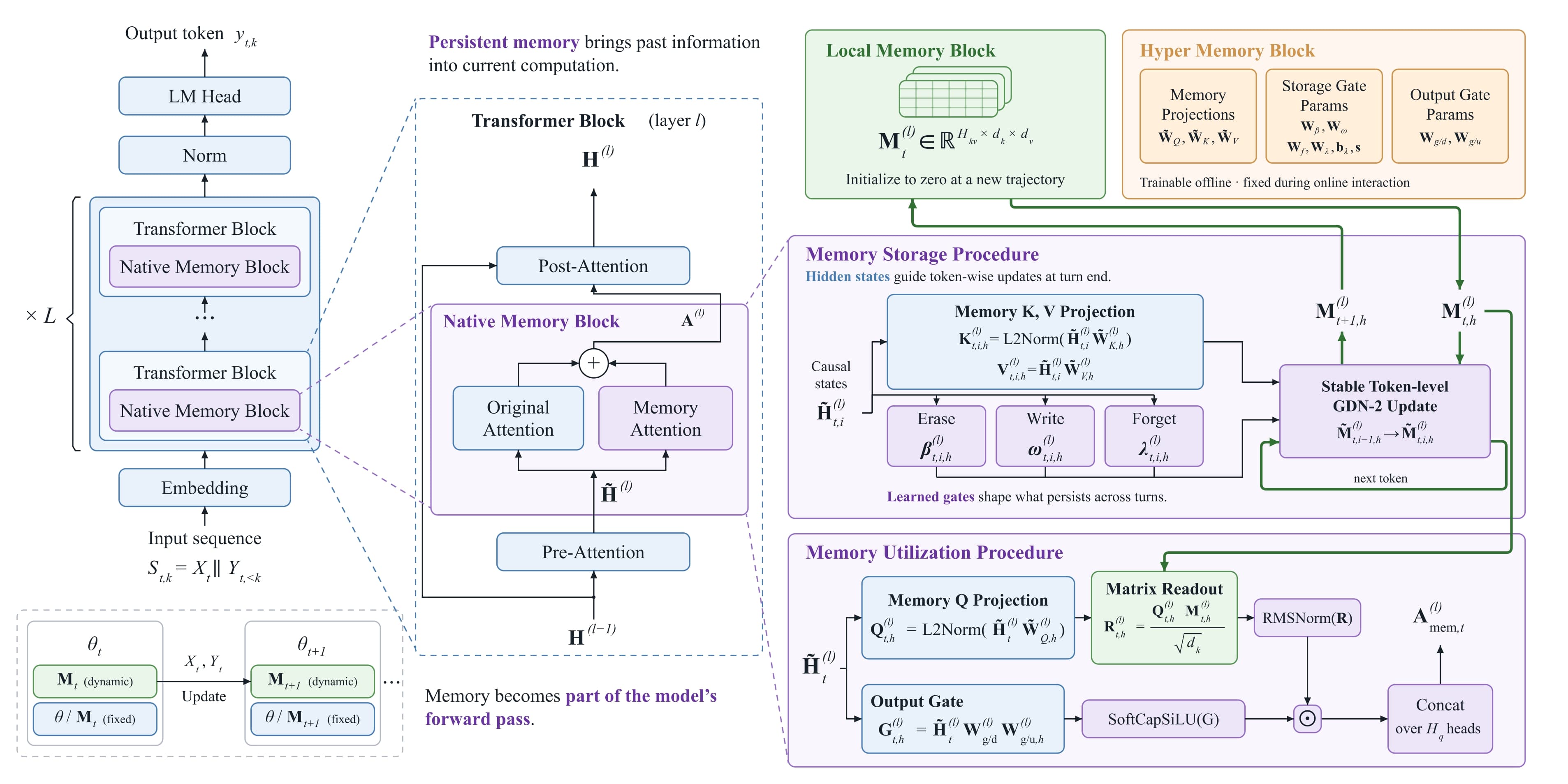
Chinese team MemTensor releases and open-sources MemT-1.0, a memory-native model family that builds persistent, updatable memory into the forward pass: GDN-2 token-level updates, Mixture-of-Storage scaling, Nano (36B) and Flash (288B) variants. The team candidly admits textual-memory systems still lead on detailed retrieval; licensing is PolyForm Noncommercial — free to explore, not for commercial use.