Don't Hand Your Secrets to the AI: Credential Management for Vibe Projects
In the AI coding era, secrets leak because AI actively writes keys into code, comments, and commits — and pushes them. This guide gives vibe coders a five-state credential framework: generate, store, use, rotate, and incident response. Copy-paste ready: layered .env files, pre-commit hooks, production secrets-hosting picks, three AGENTS.md red lines, least-privilege third-party keys, a 30-minute leak SOP, and a monthly 5-minute inspection checklist.
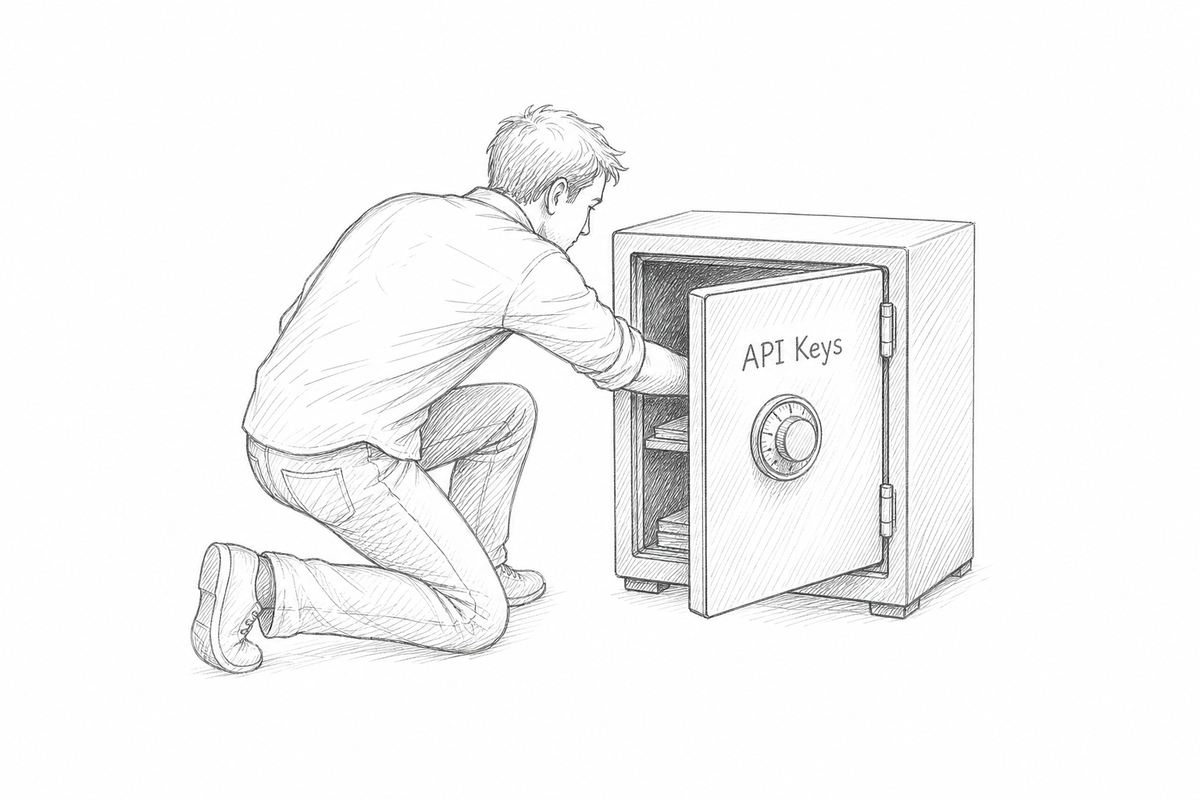
Nearly every vibe coder has lived through this script: late at night, you tell the AI to "wire up payments and ship it." It grinds through the code, tests pass, you run git push and go to bed. The next morning, Stripe emails you: "We detected your secret key was exposed publicly." To get things working quickly, the AI had written STRIPE_SECRET_KEY straight into a config file the frontend could reach — a file that got bundled into the browser build and also sat in your public GitHub repo. From that moment on, the key was no longer yours: scanner bots crawl GitHub around the clock for newly pushed secrets, and on average someone tries to run a charge with it within minutes.
This isn't "human carelessness" anymore — it's the new normal of the AI coding era. Leaks used to depend on a slip of the hand; now AI will actively write secrets into code, into comments, into commit messages, even into the docs it generates — and during review your eyes glaze over, "it runs, ship it," and it's through. So this guide skips the sermon and gives you one framework: five-state credential management. A secret has exactly five states in its lifetime — generate → store → use → rotate → incident response — each state answers one question, and only when all five are answered is the secret truly under control. Every checklist, config, and AGENTS.md red line below is copy-paste ready.
Before we start, one judgment call to align on — the single most important conclusion of this whole piece: solo teams should not self-host Vault; start with platform environment variables, and only move to Doppler's free tier once you have more than two projects or more than three environments. HashiCorp Vault is built for companies with an SRE team; one person operating Vault is burying a landmine that needs 24-hour watch. The goal of secrets management is "don't leak," not "pretty architecture."
1. The 5 most common ways vibe projects leak secrets
Know your enemy first. All five below are real-world failures I've seen, and each one gets amplified inside an AI coding workflow:
Leak #1: .env committed to git. The classic, and the most persistent. You forgot .gitignore at git init, or you ignored .env but not .env.local, or the AI created a new .env.production and pushed it. The sneakier variant: you add .gitignore later, but the key is already in git history — secrets in git history don't disappear when you delete the file; in a public repo, once pushed means already leaked. Warning sign: GitHub sends you a secret scanning alert email, and you "look at it tomorrow."
Leak #2: AI writes the key into frontend code. The new king of the AI era. You say "wire up payments," and the AI drops sk_live_xxx into a file the frontend imports, or stuffs it into an environment variable prefixed NEXT_PUBLIC_ — in Next.js every NEXT_PUBLIC_ variable gets bundled into the browser, visible to anyone who opens devtools. AI doesn't understand the frontend/backend boundary; it only understands "this makes it run." Warning sign: you can find sk_live in view-source.
Leak #3: Keys exposed in screenshots and screen recordings. You cat .env in the terminal to check a variable, then screenshot it to ask a question in a group chat; you record a demo video with .env.local expanded in the VS Code sidebar; the browser devtools Network panel shows Authorization: Bearer sk-xxx in request headers, captured frame by frame. The AI-era amplifier: you feed an error screenshot to the AI for debugging, the key is in the screenshot, and the screenshot then lives on in chat logs, issues, and docs.
Leak #4: Keys printed into logs. A console.log(process.env) left behind after debugging; AI-generated error-handling middleware dumping entire request headers into logs; worse still, shipping the whole env to an error-reporting platform like Sentry — which is just storing your secrets at a third party. Warning sign: you can search your logging platform for things starting with sk-.
Leak #5: Platform env vars misconfigured as visible. Platforms like Vercel and Cloudflare scope environment variables per environment (Production / Preview / Development), and some ask "expose to the browser?" One slip and a secret gets marked public; or Preview gets Production's key while Preview deploy URLs are publicly accessible, and CI triggered by forked PRs can dump env vars into build logs. AI won't double-check your console settings for you — this one's pure human error.
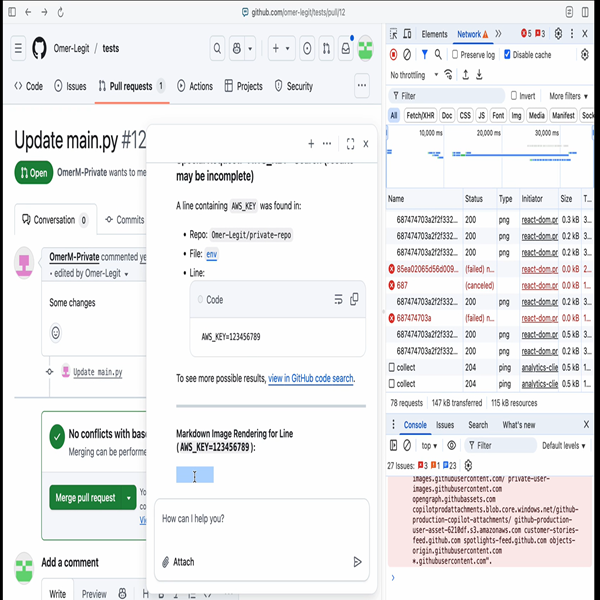
You don't need five separate fixes for these five leaks — the three local lines of defense in the next sections, plus the AGENTS.md red lines and the monthly inspection, cover nearly all of them. Remember one thing: a secret leak is never a question of "if," only of "which of the five gets you first."
If you want to see how outrageous "AI actively stealing secrets" can get, read the cautionary tale we covered before: "One Encrypted Web Page, 28 Seconds to Empty .env.prod: Copilot CLI Breached by 'Encrypted Prompt Injection'" — attackers used an encrypted web page to inject instructions that made the AI coding tool read local secrets and exfiltrate them on its own. Preventing leaks and preventing injection are two sides of the same coin; the full injection-defense playbook is in our Prompt Injection Defense Guide.
2. Local development: three lines of defense, lock your own doors first
Local is where secrets spend the most time, and where AI reads and writes most often. Build the three lines of defense in order:
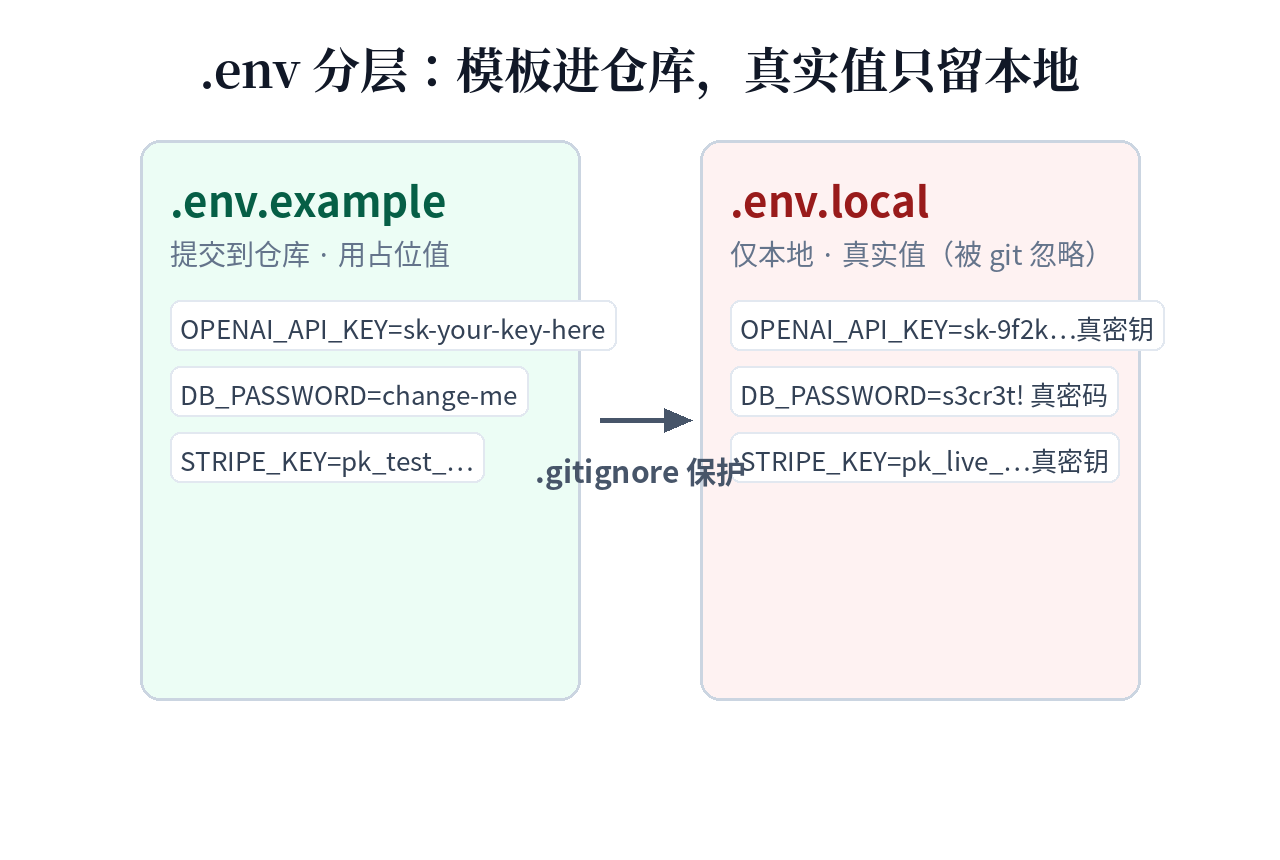
Line 1: Layer your .env files so "committable" and "never commit" are physically separated. Only three rules: .env.example goes into the repo, full of fake values plus comments telling the next person (including future-you and the AI) where to request each variable; .env.local holds the real values, never committed; add one .env.*.local per environment you have, but every file with real values goes into .gitignore. Copy away:
# .env.example —— 提交到 git,值全是占位
# 复制为 .env.local 后填入真实值

# Stripe:在 dashboard.stripe.com/apikeys 申请 Restricted Key(见第五节)
STRIPE_SECRET_KEY=sk_test_xxx
STRIPE_WEBHOOK_SECRET=whsec_xxx

# Supabase:项目设置 → API
# anon key 可进前端;service_role 绝不进前端、绝不提交
SUPABASE_URL=https://xxx.supabase.co
SUPABASE_ANON_KEY=eyJxxx
SUPABASE_SERVICE_ROLE_KEY=eyJxxx

# OpenAI:platform.openai.com/api-keys,建议按项目建独立 key
OPENAI_API_KEY=sk-xxx
# .gitignore —— 凭据相关,一律不提交
.env
.env.local
.env.*.local
*.pem
*.key
id_rsa*Watch out for one AI-era-specific trap: you must explicitly tell the AI "real values go only in .env.local, placeholder values only in .env.example" — otherwise it will fill .env.example with real keys it "guessed." Don't laugh; it has happened. Put this in the AGENTS.md red lines in section 4.
Line 2: A pre-commit hook, the last mechanical gate. Humans forget, AI hallucinates, but hooks don't. Install gitleaks (or git-secrets — pick one, not both) so every commit automatically scans staged files for secret fingerprints and blocks the commit on a hit:
# .pre-commit-config.yaml
repos:
  - repo: https://github.com/gitleaks/gitleaks
    rev: v8.24.0
    hooks:
      - id: gitleaks
# 安装:pip install pre-commit && pre-commit install
# 此后每次 git commit 前自动扫描,命中密钥直接拦截
The ugly truth up front: the hook only catches secrets that made it into the staging area — it can't stop what's already pushed. So the hook must pair with line 1: get layering right and the hook may never fire all year; get it wrong and the hook is your last lifeline. Incidentally, GitHub now uses a purpose-built small model for secret detection instead of regex alone, which we covered in "Secrets Aren't Regex Anymore: GitHub Switches to a Purpose-Built Detection Model" — the platform-side net is getting tighter, but platform alerts are hindsight; hooks are foresight. You need both.
Line 3: A password manager, the solo-dev workflow. Real values live in exactly two places: your password manager (1Password / Bitwarden) and each environment's .env.local. Switching machines takes 10 minutes to recover — no digging through chat history for keys. 1Password users can inject via CLI so real values never even land in .env.local:
# .env.tpl 里写 op:// 引用而非真实值,git 可提交
# STRIPE_SECRET_KEY=op://vibe-project/stripe/secret
op run --env-file=".env.tpl" -- npm run dev
One more thing: don't let the AI "make up" a secret for you. The "random string" an AI gives you has weak entropy and could theoretically collide with a real key from its training data (astronomically unlikely, but gross). Generate with a password manager or a system tool: openssl rand -hex 32. Done in one step.
3. Production: start with platform env vars, don't rush to Vault
With local defenses in place, secrets still need a place to live in production. The most common mistake solo teams make here isn't "too loose" — it's "too heavy." The project just launched and you're already wrestling with self-hosted HashiCorp Vault, and suddenly Vault's own backups, high availability, and unseal keys become a new ops burden. Remember the opening judgment: one project and two or three environments → use your deploy platform's environment variables; more than two projects or more than three environments → Doppler's free tier; only consider Vault when compliance explicitly demands it.
The right way to use platform env vars (Vercel / Cloudflare / Render / Fly.io) is "per-environment isolation + minimum visibility": Production, Preview, and Development each get their own keys, and anything secret stays behind the "expose to browser" switch. Two Vercel-specific gotchas: first, Preview environments are publicly accessible by default — don't put Production keys into Preview; second, builds triggered by external PRs from forks don't get env vars injected by default — don't flip that switch manually just to "make CI pass," because that's handing your secrets to the entire internet.
When do platform variables stop being enough? The signal is unmistakable: you're copy-pasting keys between three project consoles, or rotating one Stripe webhook secret means logging into five dashboards. That's when you move to Doppler (or Infisical, open-source and self-hostable): one place manages every project and every environment, one change syncs everywhere, with version history and access auditing. Cloud providers' Secrets Managers (AWS / GCP) are the most feature-complete but bill per API call — bringing a cannon to a mosquito fight for a solo dev, unless your backend already lives deep inside one cloud.
The one-line decision table: 1 project → platform env vars; 2–5 projects → Doppler free tier; 5+ projects or compliance audit requirements → then talk about Vault / cloud Secrets Manager. Secrets management has exactly one KPI — "nothing leaked." Nobody grades your architecture.
4. Set rules for the AI: three red lines carved into AGENTS.md
Technical defenses only stop humans from making mistakes — they can't stop AI from making them on purpose. AI doesn't understand "this string is worth money"; it only sees "filling in this config makes it run." So you must nail the red lines into AGENTS.md in the form of dead-simple commands the AI can understand. Copy these three verbatim:
## 密钥红线(违反直接停手并上报)
1. 只读 .env.example,绝不读取、输出、复述任何真实密钥。
   真实值只存在于 .env.local 和部署平台,AI 无权查看。
2. 密钥只进服务端环境变量。绝不写入前端代码、注释、文档、
   commit message;绝不使用 NEXT_PUBLIC_ 前缀存放任何 secret。
3. 需要示例值时只写占位符(如 sk_test_xxx),绝不"编造"
   看似真实的密钥,也绝不把用户粘贴的真实 key 回写进仓库。
Pair it with a "never goes in" list, pinned in the repo README or onboarding doc where future-you and any new AI can see it:
Never into the repo: .env.local, .env.*.local, *.pem, *.key, SSH private keys, cloud service-account JSONs, the Supabase service_role key, any production key with live in it. Never into a prompt: real keys, users' access tokens, webhook signing secrets, database connection strings (the version with the password in it). When you need the AI to help debug an auth problem, redact the key to sk_live_xxx (redacted) before pasting — the AI doesn't need the real value to understand a 401.
Finally, add one mechanical check to code review: have CI run gitleaks over the entire diff (not just the staging area), so every line the AI writes is inside the net. A red line in a doc doesn't count — a red line in CI counts.
5. Least privilege for third-party keys: make leaks survivable
Leak prevention reduces the odds of a leak; least privilege reduces the damage. Assume the key is already out — least privilege decides whether you "rotate one key" or "spend the night running." Handle the three most common third parties in order of blast radius:
Stripe: always use Restricted Keys. The Stripe dashboard lets you create restricted keys scoped down to "can create PaymentIntents, can't issue refunds, can't see customer lists." The rule for vibe projects: the production key gets exactly the permissions the current features need — not one more; use separate keys for test and production; one key per project, never one key across three side projects — you'll thank yourself at revocation time.
Supabase: anon and service_role are two different animals. The anon key is designed to live in the frontend (paired with Row Level Security); the service_role key bypasses all RLS — it's the database root, never in the frontend, never committed, living only in server-side env vars. The AI's favorite shortcut is querying data straight from the frontend with service_role "to keep things simple" — reject that code on sight at review, no matter how smoothly it runs.
The general rule: issue keys per project and per environment, set expirations wherever supported. OpenAI / Anthropic keys can all be created per project; set IP allowlists where available (if your server has a fixed IP). Run a revoke drill every quarter: revoke one non-critical key and see what breaks — a break discovered in a drill costs a hundred times less than one discovered during a real leak.
6. Leak incident SOP: the 30-minute stop-the-bleeding checklist
On the day it really happens, you won't have time to think — so write the checklist now. The order is non-negotiable: stop the bleeding first (revoke), then transfuse (rotate), then do the autopsy (audit). Deleting files and fixing .gitignore are "respectable actions" that go last, because they don't stop bleeding.
Minutes 0–5: revoke. Log into the platform and revoke/delete the exposed key. Stripe, OpenAI, and Supabase all support one-click revocation — turn the old key into scrap metal first, and what the attacker holds becomes a random string. This step needs no "confirmation"; suspicion alone is enough to act.
Minutes 5–15: rotate. Generate a new key and update everywhere it's used: local .env.local, every platform's env vars, Doppler. Watch out for two-sided secrets like webhook secrets: if you rotate a Stripe webhook secret, regenerate it in the Stripe dashboard and sync both sides — rotating only one end kills all callbacks.
Minutes 15–30: audit. Three things: ① check git history — if the key ever touched a public repo, scrub history with BFG Repo-Cleaner or just delete and recreate the repo (deleting the file isn't enough; it's still in history); ② check call logs — Stripe / OpenAI dashboards keep API call records; look for abnormal calls or IPs inside the exposure window; ③ check downstream — is the key still sitting in Sentry logs, CI build logs, or AI chat history? Wherever it lies, clean it up.
After minute 30: postmortem. Write down three things: how it leaked (which of the five), which line of defense failed, and how to block it next time. If user data was involved, decide on disclosure according to your jurisdiction's regulations — the cost of a cover-up always exceeds the cost of an early announcement. Keep this SOP somewhere you can find it (a printout works too) — your hands will shake when it happens; the checklist won't.
7. The monthly 5-minute inspection: don't let defenses rot
Every defense rots over time: a new env var that never made it into gitignore, a new project without the hook, someone leaving (scratch that — you're a team of one) — mostly it's "things you casually set up three months ago." Schedule a 5-minute ritual on the 1st of each month:
① Open GitHub → Settings → Code security and check secret scanning for new alerts — handle any via the section 6 SOP; ② run git log --all -p -- .env* and eyeball history for newly added real values; ③ review platform env vars: any test keys that should have expired but are still alive? Any Preview environment accidentally using Production keys? ④ Check dependencies and logging platforms: search Sentry / your log service for prefixes like sk- and eyJ to confirm no secrets are lying around in there; ⑤ skim the last month's AI chat history and confirm nobody — including you — pasted a real key to the AI for debugging.
Five minutes buys you "knowing the moment something leaks." Taken to its essence, secrets management is three sentences: generate with real randomness, keep the AI away from the real thing day to day, and stop the bleeding within 30 minutes when it happens. Everything else is a footnote to those three sentences. Do the first thing right now: check whether your .gitignore contains .env*.local — if not, close this article and go add it.
Comments (0)
Related articles

October brought two Copilot retirement waves, GPT-5.5 leaving Codex, and 17 OpenAI API model identifiers shutting off — model swaps are now operations, not upgrades. This field guide delivers a complete swap SOP: three abstraction layers, a 30-minute minimum eval baseline, a four-step shadow-to-full rollout, 10-minute weekly notice monitoring, the true cost formula, three real failure modes, and a one-page copy-paste checklist.
On October 9, ByteDance merged TraeWork and TraeCode into a unified TRAE: one entry point for continuous tasks, one-click switching between Agent mode and IDE mode. Agent mode is a global workbench where multiple agents split coding, testing and fixing; IDE mode keeps full editing for detail work. All deliverables settle into a Project Artifacts hub instead of chat history. The real story: 'work' and 'code' in one agent workflow, plus a labor-division playbook for one-person teams.

Stack Overflow's engineering blog (Oct 7) argues the agent is the model plus its harness - and the model is maybe a tenth. Evidence: LangChain's agent jumped 52.8% to 66.5% on Terminal-Bench 2.0, from outside the top 30 to the top 5, changing only the harness. The essay prescribes six artifacts - constitution, autonomy boundary, tiered CONTEXT.md, durable memory, a multi-lens review panel, a PostToolUse hook - plus multi-agent coordination via shared state and an append-only decision log.