SEO for Vibe-Coded Projects: 30-Item Technical Checklist + 3 Content Growth Plays
Your vibe-coded site is live — now nobody can find it. This guide gives you the full organic-traffic playbook: a 30-item technical SEO checklist in three tiers, copy-paste Next.js metadata and sitemap code, dynamic OG image generation, safe programmatic SEO without triggering Google penalties, three content growth plays (docs-as-marketing, public changelogs, tutorial topic formulas) with a 4-week calendar, the 4 Search Console reports worth watching, and 5 anti-patterns.
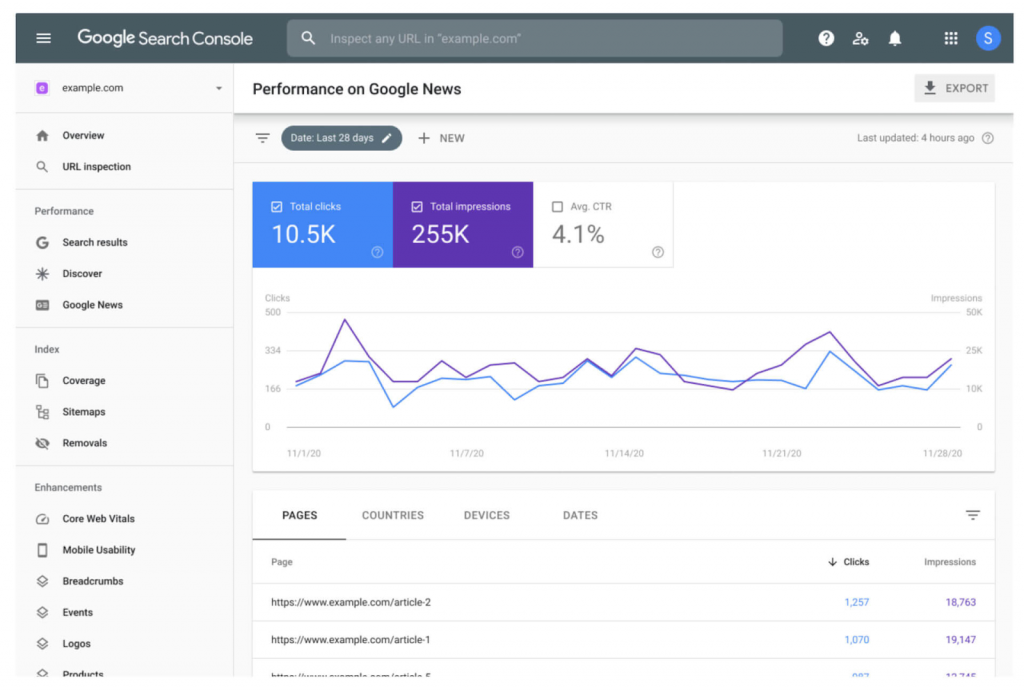
AI has compressed "building a website" into a single weekend — but "getting anyone to visit it" still takes just as long as ever. That tool site, template library, or SaaS landing page you vibed out in three days will most likely meet the same silence after launch: Google indexes your homepage, Search Console shows a scattering of impressions, and real organic traffic stays at zero. It's not that the product is bad. Search engines simply don't know who you are or what problem you solve.
Organic traffic is the most cost-effective growth channel for vibe projects. Ads burn money, social media runs on luck, and SEO — once it gets going — is the only channel that keeps working while you sleep. Indie developers have a natural edge at SEO: you're the webmaster, the developer, and the content editor in one person. Changing a meta tag doesn't require a ticket; publishing a tutorial doesn't wait on a schedule. This guide breaks the full journey from zero to steady organic traffic into checklists, code, and templates. Just follow along.
1. The Technical SEO Checklist: 30 Items in Three Tiers
Technical SEO is the foundation. A shaky foundation wastes even the best content. But don't fall into the trap of endlessly "optimizing the foundation" — plenty of vibe developers spend two weeks pushing Lighthouse from 98 to 100 while their site doesn't even have a submitted sitemap. These 30 items are tiered as "must do / nice to have / don't bother." Work down the list; stopping at any tier is fine.
Must do (12 items): skip these and you haven't launched
| # | Action | Why |
|---|---|---|
| 1 | Unique <title> per page, 50–60 characters, containing the core keyword | The title is one of the highest-weight on-page ranking factors |
| 2 | Write a meta description per page, 120–155 characters, written like ad copy | Doesn't directly affect rankings, but decides click-through rate in search results |
| 3 | Submit sitemap.xml to Search Console | Tells Google which pages you have and speeds up indexing |
| 4 | Configure robots.txt — and don't accidentally block important pages | One wrong Disallow line can wipe your whole site from the index |
| 5 | HTTPS everywhere, with http 301-redirecting to https | Chrome flags non-HTTPS as "not secure," which scares visitors off immediately |
| 6 | Self-referencing canonical tag on every page | Prevents ?utm= parameters, casing, and trailing slashes from creating duplicates |
| 7 | Mobile usable: responsive layout, tappable buttons, readable text | Google indexes the mobile version — if mobile is broken, everything is broken |
| 8 | Semantic HTML: one h1 per page, no skipped heading levels (h1 followed by h2, not h4) | Helps Google understand page structure; AI-generated code loves abusing divs |
| 9 | Alt text on images describing the image, not stuffing keywords | Image search is a traffic source too, plus accessibility points |
| 10 | 404 pages return a real 404 status code — no soft 404s | Soft 404s waste your crawl budget |
| 11 | Open Graph + Twitter Card tags so shares show an image and title | Social shares are a new site's first backlinks and traffic source |
| 12 | Connect Search Console + Bing Webmaster Tools and verify ownership | Without them you're driving blind — you won't even know how many pages are indexed |
Nice to have (10 items): fill these in during month one
| # | Action | Why |
|---|---|---|
| 13 | JSON-LD structured data: organization, breadcrumbs, FAQ, SoftwareApplication | Earn rich results (ratings, breadcrumbs) and lift click-through rate |
| 14 | Keep LCP under 2.5s: use next/image, no giant video backgrounds above the fold | Core Web Vitals are a ranking factor — and a retention factor |
| 15 | CLS near zero: reserve dimensions for images and ad slots, stop layout jumps | Layout shift is a silent visitor killer |
| 16 | Optimize INP: debounce heavy interactions, lazy-load third-party scripts | INP replaced FID as the interactivity metric |
| 17 | Breadcrumb navigation + breadcrumb structured data | The channel through which deep pages receive internal link equity |
| 18 | Internal links: every new piece links to 2–3 related pages and gets linked back from 1–2 older ones | Internal linking is the only fully controllable way authority flows on a new site |
| 19 | hreflang (multilingual sites): zh/en pages referencing each other | Without it Google may index only one language of a bilingual site |
| 20 | Canonicalize paginated/filtered pages to the main listing, or noindex them | Filter-parameter pages on tool sites are the most common duplicate-content disaster zone |
| 21 | Knowledge-panel basics for your brand: About page, contact info, interlinked social profiles | An info card on branded searches builds instant trust |
| 22 | RSS / update feeds for blog and changelog | Makes aggregation and subscriptions easy — nearly free to add |
Don't bother (8 items): noise until traffic arrives
| # | Why not now | |
|---|---|---|
| 23 | Pushing Lighthouse from 95 to 100 | No perceptible ranking difference between 95 and 100 — spend that time writing content |
| 24 | Buying premium plans of SEO audit tools | Free Search Console already gives a new site more data than it can use |
| 25 | Academic E-E-A-T optimization | First solve "do we have content," then worry about "authority" |
| 26 | Building AMP pages | AMP is dead; Google no longer rewards it. Don't do archaeology |
| 27 | Keyword density to the decimal point | Write naturally; stuffing backfires |
| 28 | Agonizing over subdomain vs. subdirectory | New site: put everything in subdirectories of the main domain — simple and consolidates authority |
| 29 | A grand link-building master plan | First have 20 pieces worth linking to, then talk about links |
| 30 | Launching in 10 languages at once | Nail one language first; ten translations equal ten empty shells |
Remember the priority order: indexation > click-through rate > rankings > extreme performance. A new site's only goal for the first three months is getting Google to steadily index its pages — and getting people to actually click them in search results.
2. Three Code Snippets: Copy and Use
Items 1, 2, 6, and 11 from the checklist are all covered by one metadata template in Next.js App Router. I reuse this template in every vibe project — just change the fields in siteConfig.
Snippet 1: Site-wide metadata template (app/layout.tsx)
// app/layout.tsx
import type { Metadata } from 'next'

const siteConfig = {
  name: 'Your product name',
  tagline: 'One line on what problem it solves, with the core keyword',
  url: 'https://yourdomain.com', // production domain, no trailing slash
  ogImage: '/og-default.png',
  twitter: '@yourhandle', // delete twitter lines if you don't have one
}

export const metadata: Metadata = {
  metadataBase: new URL(siteConfig.url),
  title: {
    default: `${siteConfig.name} – ${siteConfig.tagline}`,
    template: `%s | ${siteConfig.name}`, // child pages append automatically
  },
  description: '120–155 chars, written like ad copy: who it is for, what it solves, why pick you.',
  keywords: ['core term 1', 'core term 2', 'long-tail term'],
  authors: [{ name: 'Your name' }],
  creator: siteConfig.name,
  openGraph: {
    type: 'website',
    locale: 'en_US',
    url: siteConfig.url,
    siteName: siteConfig.name,
    title: `${siteConfig.name} – ${siteConfig.tagline}`,
    description: 'Same as description, or tweaked for the social context.',
    images: [{ url: siteConfig.ogImage, width: 1200, height: 630, alt: siteConfig.name }],
  },
  twitter: {
    card: 'summary_large_image',
    title: `${siteConfig.name} – ${siteConfig.tagline}`,
    description: 'Same as above.',
    images: [siteConfig.ogImage],
    creator: siteConfig.twitter,
  },
  robots: {
    index: true,
    follow: true,
    googleBot: { index: true, follow: true, 'max-image-preview': 'large' },
  },
  alternates: {
    canonical: siteConfig.url,
    languages: { 'en': siteConfig.url, 'zh-CN': `${siteConfig.url}/zh` }, // delete for single-language sites
  },
}
Override title and description per page with generateMetadata. The rule: every indexable page gets a unique title in the fixed format "page topic + differentiator | brand", and the description is rewritten for that page's search intent — never reuse one paragraph site-wide.
Snippet 2: Auto-generated sitemap (app/sitemap.ts)
// app/sitemap.ts
import type { MetadataRoute } from 'next'

const BASE = 'https://yourdomain.com'

async function getToolSlugs(): Promise<string[]> {
  // swap in your data source: DB query, CMS API, or local file list
  return ['tool-a', 'tool-b']
}

async function getPostSlugs(): Promise<{ slug: string; updatedAt: string }[]> {
  return [{ slug: 'hello-world', updatedAt: '2026-10-01' }]
}

export default async function sitemap(): Promise<MetadataRoute.Sitemap> {
  const [tools, posts] = await Promise.all([getToolSlugs(), getPostSlugs()])

  return [
    { url: BASE, lastModified: new Date(), changeFrequency: 'daily', priority: 1 },
    { url: `${BASE}/tools`, lastModified: new Date(), changeFrequency: 'daily', priority: 0.9 },
    { url: `${BASE}/blog`, lastModified: new Date(), changeFrequency: 'weekly', priority: 0.8 },
    ...tools.map((slug) => ({
      url: `${BASE}/tools/${slug}`,
      lastModified: new Date(),
      changeFrequency: 'weekly' as const,
      priority: 0.7,
    })),
    ...posts.map((p) => ({
      url: `${BASE}/blog/${p.slug}`,
      lastModified: new Date(p.updatedAt),
      changeFrequency: 'monthly' as const,
      priority: 0.6,
    })),
  ]
}
// add app/robots.ts in the same directory: empty Disallow, sitemap pointing at /sitemap.xml
Two gotchas: only include URLs that return 200 and are allowed to be indexed — don't stuff login or draft pages in there. And split into a sitemap index once you pass 50k URLs or the file gets too large — vibe projects basically never hit that limit, and the day you do, you've already made it.
Snippet 3: Auto-generated OG images (next/og)
Every blog post and tool page deserves a 1200×630 share image, and making them by hand gets old fast. Use next/og's ImageResponse for dynamic OG images: a route at app/og/route.tsx takes a ?title= parameter and renders a branded card with JSX — brand colors, title, domain, system fonts or an embedded woff. Point openGraph.images in your metadata at /og?title=encodeURIComponent(title). Near-zero cost, and the payoff is that your link looks like a real product instead of a naked URL when shared on X, Discord, or chat apps. Many people skip this step, but it's the detail that makes or breaks social-driven conversion during a cold launch.
3. Programmatic SEO: Templated Pages — How to Do It and Where the Line Is
The core idea of programmatic SEO (pSEO): one page template × structured data = hundreds of pages targeting long-tail keywords. Built a color-palette tool? Generate a "color schemes for XX industry" series. Built a resume tool? Generate "resume templates for XX role" pages. Vibe developers are naturals at this — bulk-building with code is what you do.
What works: three safe zones
| Type | Example | Why it's safe |
|---|---|---|
| Tool result pages | "PDF to Word converter online," "ZIP code lookup for XX city" | Each page is itself a working tool — inherently unique value |
| Comparison / review pages | "Tool A vs Tool B: an in-depth 2026 comparison" | Real data, opinions, conclusions — not keyword-swapped boilerplate |
| Curated index pages | "50 free AI writing templates (with use cases)" | Human curation + categorization + commentary — the aggregation is the value |
What blows up: where Google's penalty line sits
Google's spam policies explicitly cover "scaled content abuse": whether the content is AI-written or human-written, if it's produced in bulk, has no substantive differences between pages, and exists mainly to manipulate rankings rather than help users, the site can be demoted or fully deindexed. The March 2024 core update specifically wiped out a wave of sites that had AI-generated thousands of pages — many went to zero traffic overnight.
To judge whether your template pages cross the line, ask three questions:
- Strip away the template — what's left? If two pages differ only in the keyword and the rest is word-for-word identical, that's thin content. Don't publish it.
- Is this page useful to someone searching that term? A page for "PDF to Word converter in Anchorage, Alaska" — the answer is no.
- Would you share this page on social media? If you wouldn't, you already know it's junk.
The safe approach: templates solve "structure," but each page's core data, examples, screenshots, and conclusions must genuinely differ. My rule of thumb is at least 30% of a template page must be unique to that page — real data, tested screenshots, or human commentary, pick at least one. Below that ratio, don't ship in bulk.

4. Three Growth Plays for Content
Technical SEO gets you found; content gets you ranked and clicked. A vibe project's content strategy shouldn't copy big-company brand storytelling — your advantages are speed, authenticity, and closeness to the product. These three plays are all indie-developer-tested and cheap.
Play 1: Docs as marketing
Write your product docs as public, SEO-friendly tutorials. People don't search for your product name — they search for problems: "how to sync a Notion database to Google Sheets," "remove image background free." A docs page titled "Sync Notion to Sheets in 3 minutes with XX" is both a tutorial and a soft ad, and once it ranks, it converts far better than a generic blog post, because readers searching for a problem have the strongest buying intent.
How: one docs page per core feature, following "problem → steps → screenshots → common pitfalls," with the URL using the problem's own keywords (e.g. /docs/notion-to-google-sheets) and the title phrased the way users actually search. Mintlify, Fumadocs, or plain Next.js all work — what matters is public, indexable, one concrete problem per page.
Play 2: Write your changelog for the public
Don't write changelogs as internal jargon like "fixed several bugs." Every release is a content launch: spell out what shipped, whose pain it kills, and how to use it, with a screenshot. Products like Linear and Plane treat their changelogs as acquisition channels — users search "does XX tool support YY yet," and your changelog page catches exactly that query.
Level up: give major updates their own blog post, titled "We shipped XX: solving the YY problem," ending with a trial link. The SEO value of changelogs is timeliness: right after a feature ships, search competition for it is near zero.
Play 3: A formula for tutorial topics
Don't rely on inspiration for tutorial topics — use a formula. Three sources that never run dry:
- Support questions, transcribed: any question asked twice or more in Discord or email becomes a tutorial. Every repeat asker is one more piece of proven search demand.
- "vs" and "alternative" terms: "XX alternative" and "XX vs YY" are the highest-converting keywords for tool products. Compare honestly, including admitting competitors' strengths — readers can smell advertorials, and candor converts.
- Workflow tutorials: don't just cover your product; cover the full workflow "get C done with A + B + your product." This kind of content gets bookmarked, shared, and earns backlinks naturally.
4-week content calendar template (~4 hours/week)
| Week | Piece 1 (2h) | Piece 2 (1h) | Piece 3 (1h) |
|---|---|---|---|
| Week 1 | One core-feature docs page (problem-style title) | Changelog: rewrite your latest release in human language | Share the docs page on X / relevant communities |
| Week 2 | One workflow tutorial: "get YY done with XX" | First draft of an "XX alternative" comparison page | Add real screenshots to the tutorial, check internal links |
| Week 3 | Publish the comparison page (vs competitors, honest) | One changelog entry | Interlink old and new content both ways |
| Week 4 | Turn a frequent support question into a tutorial | Review: find pages with impressions but no clicks in Search Console, rewrite titles | Plan next month's topics (from the search-terms report) |
The calendar's real trick is the week-4 review: content isn't done when published. Search Console tells you which pages get "impressions but no clicks" (weak titles) or "clicks but no rankings" (thin content), and next month's topics grow straight out of that data.

5. Metrics: The 4 Search Console Reports That Matter
Too much data drowns you; too little leaves you guessing. For a new site, these four reports are enough — check weekly, 20 minutes each time.
Report 1: Performance → Search results
Watch four numbers: clicks, impressions, average CTR, average position. Focus on queries with high impressions but CTR under 1% — the ranking is already there, the title and description just aren't compelling. Rewriting the title is the highest-ROI optimization move there is. Conversely, pages ranking 11–20 are almost-there candidates: add a section, patch in a few internal links, and they often jump onto page one.
Report 2: Indexing → Pages
Watch "indexed" vs. the "why pages aren't indexed" reasons. New-site classics: Discovered – currently not indexed (Google knows about it but hasn't gotten around to it — add internal links and request indexing manually) and Crawled – currently not indexed (crawled but judged not good enough — go back and thicken the content). If an important page stays unindexed, check robots and canonical first, then content quality.
Report 3: Core Web Vitals
Only watch whether the count of "poor" URLs is trending up. One page flashing red is not a fire; a whole template category flashing red is (e.g. every blog page failing LCP means your template's image strategy is wrong). Treat this as a health check, not a KPI.
Report 4: Links → External links
Check "top linking sites." A new site's backlinks usually come from: your own social posts, product directories (Product Hunt, BetaList, VibeFix-style showcases), and citations in other people's tutorials. Scan monthly — if spammy link farms point at you, ignore them (Google discounts most automatically); if you spot a valuable mention, thank the author and politely ask whether they'd consider adding anchor text.
How the four reports relate: the indexing report answers "does it exist," performance answers "is it working," the experience report answers "is it stable," and the links report answers "who's vouching for it."
6. Five Anti-Patterns: Don't Touch These
| Anti-pattern | Why it's tempting | What actually happens |
|---|---|---|
| 1. Keyword stuffing | The illusion that "more mentions = higher rank" | Pages read like robot output, visitors bounce instantly; severe cases get flagged as spam |
| 2. Buying backlinks | Wanting "authority" fast | Explicitly cheating per Google; link-scheme enforcement got harsher after 2024 — getting caught means site-wide demotion |
| 3. AI-generating 500 junk pages overnight | "Vibing out 500 pages takes one evening" | Triggers scaled content abuse; fully deindexed sites are a dime a dozen |
| 4. SEO without a product | Traffic anxiety looking for an escape hatch | Rankings arrive, bounce rate hits 95%, Google demotes you right back; traffic × zero conversion = zero |
| 5. "We'll think about it once we rank" | Treating SEO as a one-time task | SEO is a compounding game — stop publishing for 3 months and competitors' content buries you |
Number 4 deserves emphasis: SEO visitors are the pickiest kind — they arrive with a specific problem and decide within 3 seconds whether your page solves it. If the product itself is weak, the better your SEO, the faster the bad word spreads. Make the product worthy of traffic first, then scale the traffic.
Closing: The 14-Day Minimum Action List After Launch
If you remember one page from this guide, make it this one:
- Day 1: Apply the metadata template, generate the sitemap, submit Search Console, double-check robots.txt has no typos.
- Days 2–3: Add OG tags and dynamic OG images, post one social update with the image, earn the first backlinks.
- Days 4–7: Write the first "problem-style" docs page and the first human-readable changelog; interlink them.
- Days 8–14: Write the second tutorial per the content calendar; spend 5 minutes daily on the Search Console indexing report and manually submit new pages.
- Evening of day 14: Open the performance report, note your first keyword with impressions — that's where your SEO starts. Screenshot it.
Vibe coding compressed "idea to product" into days; SEO handles the second half, "product to users." It's unglamorous and slow, but it's the only long-term traffic an indie developer can actually afford: no renewals, no platform whims, and it gets more valuable with age. The foundation (the checklist), the ammunition (the code templates), and the playbook (the three content plays) are all in this guide — the rest is 4 hours a week for 3 months. When you look at your Search Console curve then, you'll be glad you started today.
Related articles

Vibe projects rarely die from missing features — they die in the first minute after signup. This field guide argues onboarding's job isn't to teach the product but to deliver the promised value fast: a Value Promise Canvas to find your Aha moment, a decision table for three onboarding patterns, 7 signup fields to cut, empty-state copy templates, a paste-ready 3-step React tour component on localStorage, 4 funnel metrics with event naming, and a 10-item pre-launch audit.

Auth vendors raise prices, free tiers get killed, even big tech's own children get shut down. A solo team has no lawyers or procurement leverage — its only armor is grading every external dependency and writing a one-page escape plan for each critical one. Includes a ready-to-use triage matrix, plan template, 10 anti-lock-in selection questions, and dissections of the Parse, Heroku, and Auth0 blowups.
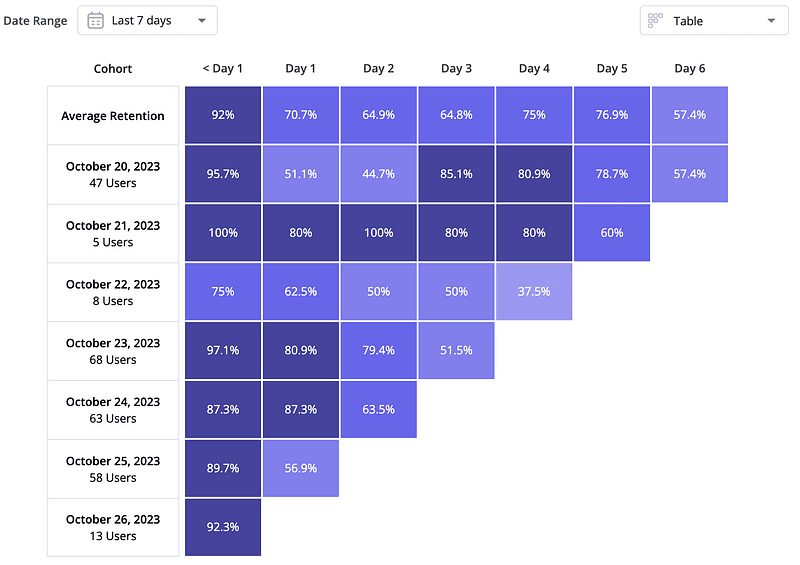
Launch day is the peak; what follows is the war. This hands-on guide covers defining D1/D7/D30 without fooling yourself, reading cohort tables, segmenting churned users into 4 tiers and 6 churn reasons, a channel selection matrix, 3 copy-paste win-back email templates, tiering SQL, PostHog/Plausible setup notes, a Resend vs self-hosted SMTP comparison, 5 anti-patterns, and a day-30/60/90 review checklist.