"Do You Support SSO?" Upgrading Your Vibe Project from Single-User to B2B Team-Ready
Five must-answer items from the enterprise security questionnaire; OIDC vs SAML decision table with a SAML trigger formula; a copy-pasteable Prisma schema for the org-team-member model; SP-initiated login, JIT provisioning, domain claim, instant revocation; SCIM trade-offs, a 12-item go-live checklist with questionnaire answers; SSO pricing strategy.
Where this guide sits: clearing up the boundaries first
This site already has three authentication-related guides, so let's place this one before you start reading. "Auth in Practice" (slug: vibe-project-auth-login-permissions-guide) covers how a person logs into a single app — sessions, JWTs, OAuth callbacks, the single-app view. "The RBAC Guide" (slug: vibe-project-rbac-permissions-guide) covers people and roles inside one tenant — who is an admin, who is read-only. "Multi-Tenancy Isolation" (slug: vibe-project-multitenancy-isolation-guide) covers isolation between tenants — company A's data must never leak into company B. This guide sits one level above all three: identity federation and organization modeling. The question "who is this person" is no longer answered by you, but by the customer's IdP (Okta, Entra ID, Google Workspace). And the question "how does a group of people use your product" graduates from "a pile of loose users" to a three-level structure: organization → team → member. In short: the first three guides handle "the doors and keys inside your app"; this one handles "who issues the building's access cards, which companies are in the building, and which departments each company has." The four link to each other; nothing repeats.
Why enterprise customers obsess over SSO: the 5 must-answer questionnaire items
Your single-user plan works, revenue just started, and then the first enterprise customer's procurement process produces a security questionnaire — 30 questions at the short end, 200 at the long end. However long it is, the identity questions are always these five: 1) Do you support SAML 2.0 / OIDC single sign-on; 2) Do you support SCIM for automatic provisioning and deprovisioning; 3) Do you keep complete audit logs (who, when, what); 4) How fast can a departing employee's access be revoked; 5) Do you enforce MFA or integrate with the customer's existing MFA policy. Fail these and the questionnaire dies on the spot — sales never even gets to quote a price.
Why the obsession? It's not fashion. Think like an IT admin: 500 employees, 40 SaaS apps per person on average. Without SSO that's 500 sticky notes with passwords plus a manual slog through 40 systems every time someone leaves. SSO collapses 40 login doors into one: employees remember one company password (plus MFA), and when someone leaves, IT clicks "deactivate" in the IdP and access to every SaaS theoretically dies at once. For enterprises, SSO isn't "easier login" — it's offboarding audits and compliance. Once you see that, every train wreck below makes sense: they all happen where someone thought "we added a login button, so we have SSO."
The classic wreck: labeling "Sign in with Google" as "SSO supported." This is the most common way vibe projects die in procurement: a "Sign in with Google" button on the login page, and "SSO: supported" on the pricing page. Any enterprise IT person sees through it instantly. Google one-click login is social login — the authenticator is Google's public identity system, anyone with a Gmail can walk in, and your product cannot tell "this is our employee" from "this is a stranger." Enterprise SSO is identity federation — the authenticator is the customer's own IdP, only people in that company's directory get in, and each arrival carries attributes like department and title. Selling the former as the latter gets you exposed on the questionnaire at best, and accused of misrepresentation by the customer's legal team at worst. Remember: if it can't tell "inside the company" from "outside," it's social login, not SSO.
OIDC vs SAML: decide first, code second
Two mainstream SSO protocols. Picking wrong means rewriting. The verdict first, then the decision table:
| Dimension | OIDC (OpenID Connect) | SAML 2.0 |
|---|---|---|
| Essence | Identity layer on OAuth 2.0, JSON + JWT | The veteran enterprise standard, XML assertions |
| Who uses it | Google Workspace, modern SaaS, developer-friendly IdPs | Okta, Entra ID, traditional enterprise IT |
| Integration cost | Low: mature libraries, straightforward code + PKCE flow | High: XML signatures, metadata exchange, cert rotation pitfalls |
| Customer coverage | Mostly SMBs and tech companies | Large enterprises, hard requirement in finance/government procurement |
| One-liner | "Modern, easy to integrate" | "Old-school, but big deals demand it" |
The decision rules (copy these):
1. Ship OIDC first, SAML second. OIDC runs in a week; SAML alone can burn two weeks just exchanging metadata with the customer's IT. Most of your first enterprise customers use Google Workspace or Okta (Okta speaks both), so OIDC makes "we support SSO" true, and SAML goes after the remaining traditional-procurement deals.
2. The SAML trigger: one customer's annual renewal ≥ 3× your 2-week labor cost. Make it concrete: if a week of your time is worth $700, SAML integration plus joint debugging plus first-year maintenance is about 2 weeks, ~$1,400. Only customers paying $4,000+/year justify a dedicated SAML build. Below that, have them use OIDC (Okta and Entra ID both support it), or bundle SAML into the Enterprise tier and let price filter out small accounts. This formula is bought with blood: plenty of solo developers hand-rolled SAML for a "big-company trial" paying $30/month, the trial never converted, and the code rotted in the repo.
3. Auth0 vs WorkOS vs self-build:
WorkOS: the default "SSO outsourcing" for B2B SaaS. Its entire job is ironing out the quirks of dozens of IdPs: you integrate one API, and whether the customer runs Okta, Entra ID, Google, or a self-hosted ADFS, WorkOS translates. For a solo team the math is simple: per-connection pricing, but it saves dozens of hours of metadata ping-pong with enterprise IT. Rule of thumb: if you expect fewer than 10 SSO customers in year one, a hosted option wins.
Auth0: the most complete feature set, with enterprise-grade pricing and complexity to match. Right for teams that already run PLG + Enterprise in parallel and have someone owning identity. For a one-person team, its admin console learning curve is a trap of its own.
Self-build: worth it in exactly one case — your product is itself in the identity/security space and SSO is your capability showcase. Otherwise, self-built SAML means XML signature verification, certificate rotation, and IdP metadata drift, each a 3am page waiting to happen. OIDC with a mature library is fine to self-build; think three times before self-building SAML.
One line to close: year one, get OIDC live on a hosted platform and spend the saved time closing deals; once you pass 10 SSO customers and real SAML demand appears, then evaluate self-build or a heavier platform. Identity is the layer where an outage means "every enterprise customer locked out at once" — not worth gambling your sleep to save a monthly fee.
The organization data model: User ≠ Member, the first watershed
In the single-user era, the typical vibe project model is one User table for everything: email, password hash, subscription status all crammed in. The first enterprise customer arrives, and the reflex is to add an orgId column to User — and that is the origin of every permission bug for the next two years. Why? Because "a person" and "a person's identity inside an organization" are two different things: the same human can be an admin at company A and a regular member at company B; when she leaves company A, the person shouldn't be deleted — her seat at company A should. Cramming both into one table, and three months later you'll be writing WHERE orgId = ? AND (role = 'admin' OR isSuperAdmin) monuments.
The correct model has three levels — Organization → Team → OrganizationMember (seat) — plus a standalone User (the human). Here's a Prisma schema you can copy:
model Organization {
  id          String   @id @default(cuid())
  name        String
  slug        String   @unique
  plan        String   @default("team")
  ssoEnforced Boolean  @default(false) // everyone must use SSO; password login off
  members     OrganizationMember[]
  teams       Team[]
  ssoConnections SsoConnection[]
  invitations Invitation[]
  createdAt   DateTime @default(now())
}

model User {
  id           String   @id @default(cuid())
  email        String   @unique
  name         String?
  passwordHash String?  // pure-SSO users have no password; nullable
  memberships  OrganizationMember[]
  createdAt    DateTime @default(now())
}

model OrganizationMember {
  id       String       @id @default(cuid())
  orgId    String
  org      Organization @relation(fields: [orgId], references: [id], onDelete: Cascade)
  userId   String
  user     User         @relation(fields: [userId], references: [id], onDelete: Cascade)
  role     MemberRole   @default(MEMBER)
  status   MemberStatus @default(ACTIVE)
  joinedAt DateTime     @default(now())
  @@unique([orgId, userId])
}

enum MemberRole { OWNER ADMIN MEMBER }
enum MemberStatus { ACTIVE SUSPENDED }

model Team {
  id     String @id @default(cuid())
  orgId  String
  org    Organization @relation(fields: [orgId], references: [id], onDelete: Cascade)
  name   String
  slug   String
  teamMembers TeamMember[]
  @@unique([orgId, slug]) // slugs unique per org; different companies may collide
}

model TeamMember {
  id       String @id @default(cuid())
  teamId   String
  team     Team   @relation(fields: [teamId], references: [id], onDelete: Cascade)
  memberId String // note: hangs off the seat, not the User
  member   OrganizationMember @relation(fields: [memberId], references: [id], onDelete: Cascade)
  @@unique([teamId, memberId])
}

model SsoConnection {
  id       String  @id @default(cuid())
  orgId    String
  org      Organization @relation(fields: [orgId], references: [id], onDelete: Cascade)
  protocol SsoProtocol // OIDC | SAML
  domains  String[]    // domain claim: acme.com emails route to this org
  config   Json        // issuer/clientId or IdP metadata; secrets encrypted
  createdAt DateTime @default(now())
}

model Invitation {
  id        String @id @default(cuid())
  orgId     String
  email     String
  role      MemberRole @default(MEMBER)
  token     String     @unique
  status    InviteStatus @default(PENDING)
  expiresAt DateTime
}
enum InviteStatus { PENDING ACCEPTED EXPIRED REVOKED }

model AuditLog {
  id      String @id @default(cuid())
  orgId   String
  actorId String   // acting userId
  action  String   // member.invited / member.removed / sso.enabled ...
  target  String?  // object acted upon
  ip      String?
  createdAt DateTime @default(now())
  // append-only: no updates, no deletes
}
Three iron rules, read against the schema above:
Rule 1: authorization reads Member, never User. Every "can they see this data" decision takes (orgId, userId) → OrganizationMember.role/status as input. The User table answers "who are you"; only the Member table answers "what can you do here." Putting role on the User table is the biggest technical debt of the single-user era.
Rule 2: TeamMember hangs off the seat (Member), not the User. Joining a team is "seat first, team second": invitation accepted → create OrganizationMember → then create TeamMember. Going the other way, removing a member from the org cascades to their TeamMembers and seat, but the User row stays — they may still belong to other orgs.
Rule 3: SSO config hangs off the org, isolated per tenant. SsoConnection.orgId means "this IdP config only ever serves this organization." Company A's Okta config can never be read by company B's login flow — tenant isolation applied at the identity layer, the same idea as row-level isolation in our multi-tenancy guide, different surface.
/media/content-media/a56f3ccd-38fe-490f-a5d3-6edb6bc228d5/2026/10/d657d7fe-fcd1-4505-ae77-6d4a3e9f0490.png
ER diagram of the org / team / member data model: User stores only the human identity; authorization reads OrganizationMember.role/status; TeamMember hangs off the seat, not the User; SsoConnection and Invitation hang off the org for per-tenant isolation; AuditLog is append-only. Every relation maps to the Prisma schema in this section.The invitation state machine (Invitation lifecycle): PENDING → ACCEPTED (user clicks the email link and completes auth), PENDING → EXPIRED (7 days, no click), or → REVOKED (admin pulls it back). The OrganizationMember row is created only when the invitation is accepted — never create the seat when the invitation goes out, or "100 invites sent, 10 accepted" will corrupt your member counts and billing. Per-seat billing counts only status=ACTIVE seats, which is the foundation of the pricing section later.
Integration in practice: what SP-initiated login looks like
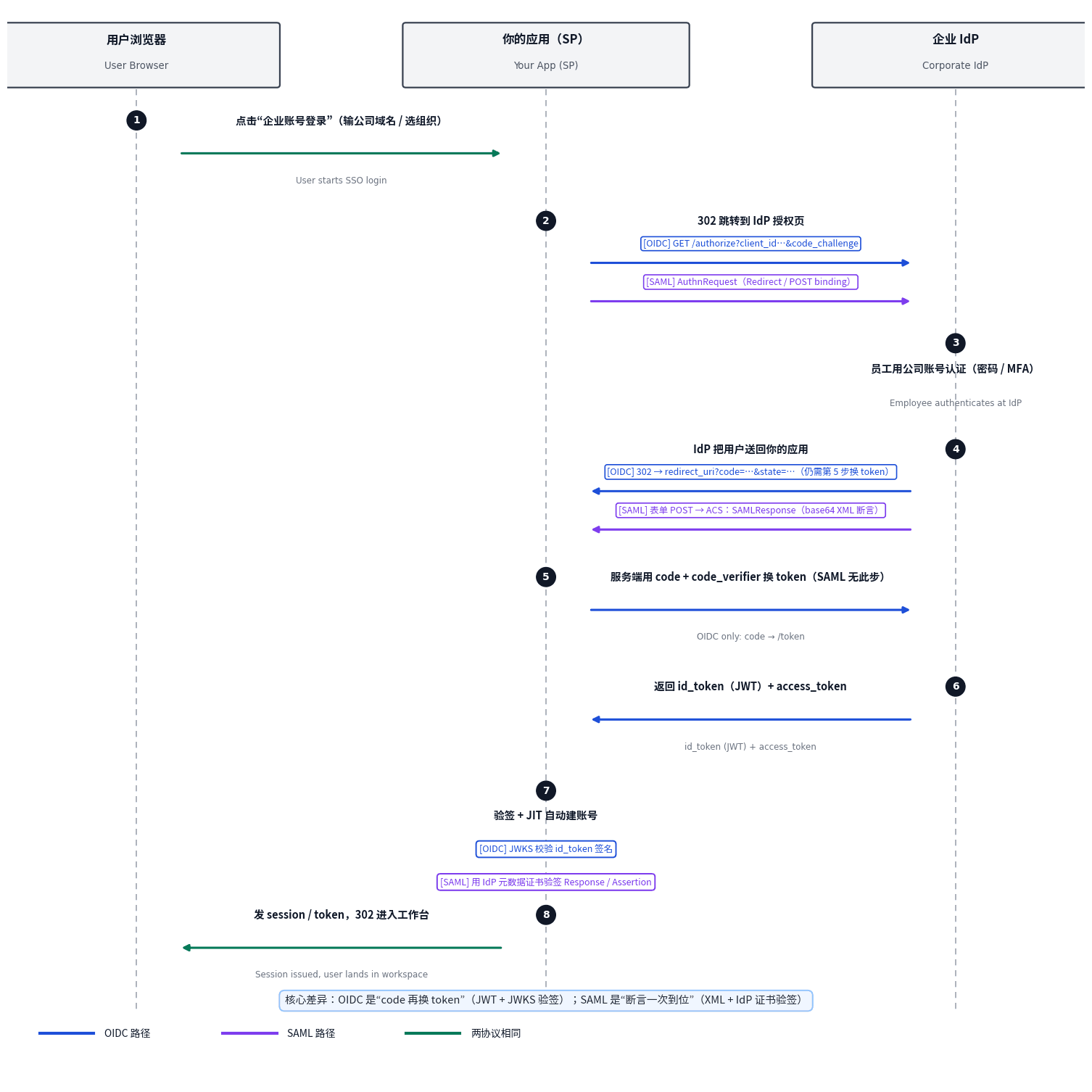
OIDC or SAML, enterprise SSO login is SP-initiated: the user clicks "Sign in with company account" on your login page, you send them to the customer's IdP, they authenticate there, and the IdP sends them back. IdP-initiated (clicking your app's icon in the Okta dashboard) exists in theory, but for first integration do SP-initiated only — IdP-initiated RelayState validation is a CSRF minefield.
/media/content-media/a56f3ccd-38fe-490f-a5d3-6edb6bc228d5/2026/10/45e85577-6b01-429d-a1d7-4b6dcce6f726.png
OIDC / SAML login sequence diagram: user → your app (SP) → corporate IdP, eight steps round-trip. Blue is the OIDC path, purple the SAML path, green the steps identical in both. The core difference: OIDC is "code, then exchange for tokens" (JWT + JWKS verification); SAML is "assertion in one shot" (XML + IdP certificate verification). Each step matches the text in this section.OIDC integration (do this first): standard Authorization Code + PKCE. Use a library like openid-client; never hand-roll the URLs:
// pseudocode: starting login (step 2)
const authUrl = client.authorizationUrl({
  scope: "openid profile email",
  code_challenge: pkce.challenge,   // PKCE: defeats code interception
  code_challenge_method: "S256",
  state: randomBytes(16),           // stored in session, defeats CSRF
  nonce: randomBytes(16),           // defeats replay, verified in id_token
});
// 302 redirect to the IdP

// callback handling (steps 5-7)
const tokenSet = await client.callback(redirectUri, params, { state, nonce });
const claims = tokenSet.claims(); // sub (unique ID at the IdP), email, name
// signature: the library verifies id_token against the IdP's JWKS;
// you only confirm issuer/audience
SAML integration (for the big deals): SP-initiated + HTTP-POST binding has the highest joint-debugging success rate. Three traps, called out in advance: 1) Metadata exchange: your SP metadata (entityID, ACS URL, certificate) versus the customer's IdP metadata (SSO URL, X.509 cert) — one hand-edited character on either side breaks everything. Both sides publish a URL and fetch automatically; never copy-paste XML. 2) Certificate rotation: IdP certs typically live 1-3 years; the only way to avoid a hard cutover at expiry is "monitor expiry 30 days out + auto-refresh metadata," written into the checklist. 3) NameID format: align with the customer's IT in the very first message — emailAddress or persistent? Get it wrong and one human spawns a new account on every login.
The essence of verification is identical on both sides: you trust not "who the user claims to be" but "who the IdP's signature says they are." OIDC verifies the id_token against the IdP's JWKS public keys; SAML verifies the Response/Assertion signature against the X.509 certificate in the IdP metadata. Any "skip verification to get it working" shortcut is a door left open for person-in-the-middle attacks — fine during debugging, mandatory before launch, no exceptions.
JIT provisioning: everything built on first login
The scenario enterprise IT hates most: 500 employees — is an admin supposed to click "invite" 500 times? JIT (Just-In-Time) provisioning is the answer: the moment a user completes SSO login for the first time, your app automatically runs the full routine — create User (if missing) → create the OrganizationMember seat → assign the default role → drop them into the default team. Zero manual work. The flow:
1. Find the org: match the email's domain against SsoConnection.domains (domain claim, next section), or use the org the user picked on the login page. No match → reject with "your domain isn't claimed," and never auto-create a new org — that's how shadow IT starts.
2. Find or create the human: look up User by email; create if missing (passwordHash stays empty, name from the IdP assertion's displayName).
3. Create the seat: look up OrganizationMember by (orgId, userId); create with the default role if missing. The default is a small science: default MEMBER, first person through the door gets OWNER. Why? At JIT time you don't know if this human is the CEO or an intern — MEMBER is the safe default. And the "first person" is usually the IT admin you're working with; OWNER lets them into the admin console. Hard-code "first JIT user auto-promoted to OWNER" and skip countless "our admin can't get into the console" tickets.
4. Role mapping (optional but recommended): if the customer's assertion carries groups (e.g. "Engineering-Managers"), keep a mapping table of IdP group → MemberRole and land roles automatically at JIT time. This is SCIM-lite; it covers 80% of "auto-assign roles" needs without full SCIM.
Account merging: what if SSO login collides with an existing password account? The guaranteed week-one support ticket. Anchor on email: 1) the SSO assertion's email matches an existing User.email → bind to the same User, don't create a new one (only if that email's domain is claimed by the org — prevents impersonation); 2) the user registered with a password before and now arrives via SSO → keep the password (don't delete it), but if the org has ssoEnforced on, password login for that org is rejected server-side — "coexist, SSO wins"; 3) the dangerous reverse: never overwrite or clear the user's original password hash because they logged in via SSO. If the customer's IdP has an outage and you need the password fallback, a deleted hash is a deleted escape hatch.
Domain claim: who proves "this domain is ours"
SsoConnection.domains = ["acme.com"] sounds simple, but claiming a domain must be verified — otherwise an attacker registers an org, claims gmail.com, and hijacks routing for every Gmail user. Two standard options: 1) DNS TXT verification (recommended): the customer's IT adds a TXT record at _vibefix-challenge.acme.com with a random token you generated; your app queries it on a schedule — same logic as domain ownership verification everywhere; 2) email loop: send a verification link to admin@acme.com. DNS is more reliable: someone who can send from the admin mailbox doesn't necessarily control DNS, but whoever controls DNS owns the domain.
After the claim verifies, login routing is: user types li@acme.com → domain hits the org → check that org's SsoConnection → 302 straight to their IdP, skipping the "pick an org" step entirely. That's the Notion/Figma "type your work email and get redirected" experience. One boundary: a domain can be claimed by exactly one org (global uniqueness on domains); subsidiary cases (acme.com + acme.co.jp) get separate SsoConnection rows — never stuff two companies' domains into one row.
The multi-org switcher: when one human is an admin at company A and a member at company B, the first thing after login is "which org am I entering." Store activeOrgId in the session, put an org switcher in the top bar; switching orgs = swapping activeOrgId + reloading that org's seat permissions (no re-login). Scope every API by activeOrgId for data isolation — the session-layer continuation of row-level isolation from our multi-tenancy guide. Putting the org slug in the URL (/acme/dashboard) makes links shareable, but handle "slug changed, old links 301" as a fallback.
When a member is removed, sessions must die immediately
Back to questionnaire question 4: "how fast can a departing employee's access be revoked?" The standard answer is "instantly," while many vibe projects' honest answer is "whenever their JWT expires (say, 7 days)." That window is time a former employee can still read company data. Three layers, done right:
1. Data layer: admin clicks "remove member" → OrganizationMember.status = SUSPENDED (not a physical delete — audit needs the trace).
2. Gateway layer: on every request, besides verifying the JWT signature, re-check the seat status for (orgId, userId). Worried about a DB hit per request? Cache seat status in Redis with a 60-second TTL and evict on removal — revocation latency drops from "JWT lifetime" to "60 seconds," which counts as "instant" on the questionnaire.
3. IdP linkage (advanced): with SCIM, the customer deactivates the employee in Okta → SCIM PATCH /Users/:id {active: false} hits you → steps 1 and 2 run automatically. That's the full loop of "IT clicks once, every SaaS dies at once."
One more commonly missed: when ssoEnforced is on, every password login door for that org must actually close — not just hiding the button in the UI. The backend login endpoint rejects password credentials by orgId. The questionnaire will ask "can passwords bypass SSO once it's enabled," the answer must be "no," and you should be able to point at backend code to prove it.
SCIM: when it's worth it, when to leave it alone
SCIM (System for Cross-domain Identity Management) is the protocol where the IdP calls your API to sync people changes: auto-create on hire, auto-move on transfer, auto-deactivate on exit. Beautiful in theory, real in cost: you implement CRUD + pagination + filtering on /scim/v2/Users and /Groups, then joint-debug with Okta and Entra ID one by one. The decision line is clean: build SCIM only when a customer with 200+ employees asks for it; below that, JIT + manual invites. 200 is an empirical threshold: under it, the IT admin clicking invites in your console costs far less than your SCIM build-and-debug. And SCIM always comes after SSO has run stably for three months — automatic sync on top of unfederated identity is a full-auto trigger on an unzeroed rifle.
First joint debug: the handoff package for the customer's IT
The biggest time sink in SSO integration isn't code — it's the email ping-pong of "what do you need, what will you give me." Send this handoff package complete on day one and compress two weeks of back-and-forth into three days:
What you send (SP side): 1) SP entityID (use https://yourapp.com/sso/metadata/<orgSlug> — org-scoped, saves arguments in M&A scenarios later); 2) ACS URL (where assertions get POSTed); 3) your SP signing certificate (if you ask the IdP to verify your AuthnRequest signatures — recommended, defeats request forgery); 4) the attribute list you need back: email (required), displayName, groups (optional, for role mapping).
What you ask for (IdP side): 1) IdP metadata URL (prefer a URL over an XML file — URLs auto-refresh); 2) NameID format confirmation (emailAddress or persistent — get this wrong and accounts split, as discussed); 3) the claim name for groups/department attributes (every IdP names it differently — Okta says groups, Entra ID may use the long http://schemas.microsoft.com/ws/2008/06/identity/claims/groups form; don't guess); 4) test accounts: at least two — one regular employee, one admin — plus a third you'll "offboard" together.
Debug order (don't skip): first run end-to-end against the customer's test IdP application in your own test tenant (Okta and Entra ID both support test apps that don't touch the production directory); then smoke-test against their production IdP; only then flip ssoEnforced. Too many teams connect to the customer's production IdP on step one, one misconfiguration breaks the login page for the whole company, and the apology email costs more than two patient days.
Top 5 SSO launch wrecks (all true stories)
1. The certificate expired at 3am; every enterprise customer went dark. IdP certs live ~2 years; on expiry day, all SAML logins start failing signature checks. Fix: auto-refresh from the metadata URL + 30/7/1-day expiry alerts in the on-call handbook.
2. Five minutes of clock drift rejected every assertion. SAML assertions and OIDC id_tokens carry NotBefore/exp windows; more than ~5 minutes of drift between your server and the IdP kills everything. Fix: NTP on production is baseline, plus a 300-second clock-skew tolerance at verification — standard practice, not laziness.
3. Wrong NameID turned one human into three accounts. The customer's IT sent persistent NameIDs while you keyed accounts on email; the NameID was an opaque ID, different every login for the same mailbox — accounts multiplied. Fix: confirm the NameID format on day one, and always anchor account merging on email, using sub only as a secondary "same human" signal.
4. No email in the assertion; the whole flow dead-ends. Some IdPs don't return email by default (privacy policy); your JIT flow dies at step one. Fix: write "email required" into the handoff package and verify assertion contents with a test account on day one, not the day before launch.
5. Flipped ssoEnforced and locked yourself out. After forcing SSO org-wide, the founder's personal password account couldn't get in either — and the customer's IdP hadn't added them to the directory yet. Fix: ssoEnforced applies to regular members; OWNER always keeps password/hardware-key login — plus the break-glass account from the checklist. Two escape hatches, both mandatory.
The 30-day roadmap for a solo team
Theory is done; how does the calendar look? A realistic 30-day plan for a one-person team: week 1: data-model migration — create Organization / OrganizationMember / Team / SsoConnection per the schema above, and "claim" existing User rows into default orgs (each legacy user auto-becomes OWNER of their personal org; old features feel nothing); week 2: wire OIDC on a hosted platform — SP-initiated login + JIT + account merging, plus an admin-console "enable SSO / enforce SSO" switch; week 3: audit-log export, instant revocation on removal, the invitation state machine, and joint debugging with your first seed enterprise customer (using the handoff package); week 4: pricing page gains the Enterprise tier (SSO + audit export + dedicated support) and the questionnaire answer template goes into the library. SAML and SCIM are not in the first 30 days — they're the side quests you open only when real customers pay for them.
Pricing: SSO is a paywall, not a default
Finally, money. SSO must be paid, and paid well. Industry norm: SSO belongs to the Team/Enterprise tier, or ships as a per-connection annual add-on. Why? 1) Real costs: hosted platforms charge per connection and joint debugging eats hours — giving it away is a loss; 2) signal value: customers who pay for SSO are exactly the "has IT, has budget, renews" customers you want — price filters them in; 3) anchoring: bundling "SSO + SCIM + audit export" into Enterprise feels worth far more than selling three features separately.
A pricing formula for solo teams: SSO add-on annual price = 2× your per-customer SSO integration + first-year maintenance labor. At ~$1,400 of labor from the earlier estimate, a $2,800+/year add-on is defensible — the customer compares against their own IT team's cost of wrestling an open-source setup, and anything under two weeks of their labor is a bargain. And per-seat billing (ACTIVE member count) is SSO's natural partner: SSO makes company-wide rollout frictionless, so seats grow on their own. Make member count the usage dimension and SSO becomes your seat-expansion engine.
One judgment to close: the biggest SSO trap was never the protocol — it's doing multi-org work with a single-user brain. Split User from Member, hang SSO config off the org, revoke on removal — get these three right and OIDC-vs-SAML, WorkOS-vs-self-build are just engineering details. Get them wrong, and the most standards-compliant protocol won't survive the customer's IT team's first question: "when someone leaves, how fast are they locked out?" Fumble that, and the deal is dead. Nail it, and you've earned more than one contract — you've earned the whole B2B game.
Comments (0)
Related articles
Your users' credits are not a balance column — they're a journal. This guide builds a double-entry credits ledger for AI SaaS: immutable journal schema you can copy, idempotent deduction with row locks, two-phase pre-auth/settle for unpredictable token usage, refund and expiry write-backs, a three-way daily reconciliation, negative-balance circuit breakers, and an anti-abuse checklist.

AI writes code fast but never writes secure code by default: running locally is not the same as being safe in production. This hands-on playbook fills the web security baseline for your vibe project — CSP headers, CSRF tokens, XSS defense, SQL parameterization, the cookie triple, dependency supply-chain gates, plus a copy-ready 10-item pre-launch acceptance checklist.
The more autonomous the agent, the larger the blast radius. A "human nods before it runs" gate on deletions, refunds, broadcasts, and permission changes is the cheapest insurance. This guide gives you a risk×reversibility quadrant, a minimal ticket schema, deny-by-default timeouts, audit trails, and an emergency lane — shippable in a weekend.