Don't Leave Newcomers Stuck at the Door: Team Invitations and Onboarding for Vibe Projects
An invitation is not a link but a closed loop from sending and acceptance to confirmation, effect, and first successful use. This guide gives a copy-ready method: three role tiers, link lifecycle, day-one tasks, departure recovery, and quarterly permission audits, with a checklist.
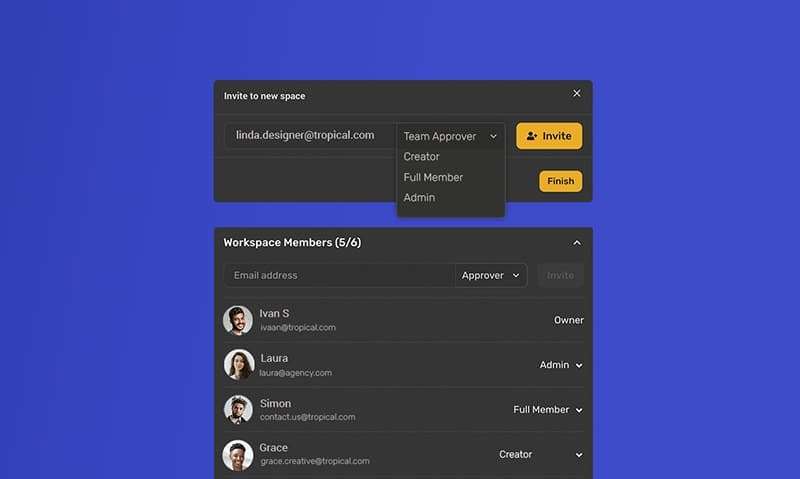
The most demoralizing thing on a new colleague's first day is not a hard task. It is not being able to get in at all: the invitation link has expired, the account exists but the project is invisible, permissions are either too broad or too narrow, and nobody knows who to ask. This guide is about the most underestimated part of a vibe project: how to bring someone in so they can do real work on day one.
Note: the product name 'Lime Ledger', and the people Lin Xiaoyu and Chen Mo in this guide, are fictional examples used to explain the flow. They do not refer to a real product or real people. The method itself is general: swap the names and roles for your own project and it still works.

An invitation is not a link. It is a closed loop
Many people treat an invitation as one action: sending a link. In fact it is a closed loop with five stages: sending the invitation, the other person accepting, identity confirmation, permissions taking effect, and the first successful use. If any stage breaks, the earlier work is wasted. A link sent but an email never received breaks the loop at stage two; a registration that lands in the wrong team breaks it at stage four; a login that leaves someone staring at an empty homepage breaks it at stage five.
So when designing an invitation flow, do not only ask 'can the link be sent'. Ask five questions: what happens if the other person never receives it, clicks the wrong thing, or has a mismatched identity; what happens if permissions are wrong; and what happens if they get in but do not know what to do first. Each question should already have an answer, not one improvised after someone asks. Writing those five answers into a team handbook is what makes an invitation flow complete.
Take a fictional example. Lin Xiaoyu is a designer newly joining 'Lime Ledger', and Chen Mo is the administrator sending the invitation. After Chen Mo sends it, Lin Xiaoyu says no email arrived. If the flow only offers a 'resend link' button, Chen Mo can only wait. If the flow offers 'check invitation status, verify the spelling of the email, try another delivery method, or use a manual approval fallback', the problem is located in ten minutes: one extra letter in the email address. The value of a closed loop shows up in exactly such small incidents.
Fix the roles before you talk about invitations
The most important step before inviting anyone is not choosing a delivery method. It is fixing roles. Many small teams have messy invitation flows because roles are invented on the spot: 'admin' this time, 'member' next time, and the same person has different permissions in different projects. After a while, nobody can say who can do what.
A workable starting point is three tiers. Administrator: can invite people, change roles, and view billing and audit records. Member: can use core features normally and create and edit content they own. Visitor or read-only: can view but not change, suitable for outside advisors and temporary collaborators. If finer divisions are genuinely needed — for example, 'can see this project but not that one' — divide by project rather than inventing more global roles. Fewer roles mean fewer mistakes.
Roles also need a default rule: grant the minimum that is enough, and add more when needed, rather than granting the maximum first and taking it back after a problem. Minimum permission sounds conservative but is actually the least trouble: taking back an over-broad permission feels like a demotion, while adding to a too-narrow one takes one request and embarrasses nobody. This applies especially on a newcomer's first day: start with the smallest set that lets them work, and adjust after the first week based on actual work.
Roles must also be tied to responsibility. Who is the administrator, who do you contact about a permission problem, who re-sends an expired invitation — each needs a named person, not just 'the team'. A small team can put it on the first page of the project documentation: the invitation and permission owner is Chen Mo (fictional example), and the backup owner is named too. Once a name is written down, problems have somewhere to go.
The lifecycle of an invitation link: sent, expired, revoked, resent
An invitation link is not permanently valid; it has a lifecycle. After it is sent, the other person may accept immediately or only see the email three days later. When a link expires, the person clicking it should see a clear message — 'This invitation has expired, please ask an administrator to resend it' — not a blank page or a vague error. How long is right depends on the team's rhythm: during a hiring rush or when the other person is on leave, even seven days may be short; for routine collaboration, three days is usually enough. The key point is that the expiry time should be visible in the invitation email itself, not buried in a help document.
Resending and revoking are different actions and should look different in the interface. Resending means sending again to the same person, and the interface should state whether the old link stays valid. Revoking means telling the system 'this invitation no longer counts', for invitations sent to the wrong person, to someone who no longer needs to join, or where the link may have been forwarded. Sending to the wrong email is the most common accident: a misspelled address, or a personal email instead of a work email. The correct response is to revoke the old invitation, confirm the right email, and send again — not to leave two invitations hanging.
Another case: the other person already has an account. The invitation flow should recognize 'this email is already registered' and add the person to the team directly, instead of forcing a second registration. Duplicate accounts are the hardest mess to clean up later: one person with two identities means permissions, records, and billing all go wrong. The first step of inviting should check whether the email already exists in the system; if it does, take the 'join the team' branch, not the 'register a new account' branch.
Domains and single sign-on are advanced questions, but worth thinking about early. If a team uses a corporate email domain, a rule can be set: addresses from that domain automatically join a team, or at least prompt an administrator to confirm. If single sign-on already exists, the invitation flow should connect to it, so the other person signs in through single sign-on after clicking the link instead of setting another password. The earlier these connections are made, the less account cleanup is needed later.
They are in. What should day one look like
Permissions taking effect is not the same as getting started. Many invitation flows end at 'the other person logged in successfully', leaving the newcomer to explore an empty homepage alone. A good flow adds three things: a first task, a map of key locations, and a person to ask.
The first task should be concrete, not 'get familiar with the system'. For the fictional 'Lime Ledger', a first task could be: open the demo project, change one piece of copy, submit it, and see where the change appears; or read last week's release notes and ask one question in the team channel. The smaller the task, the faster it is completed, and the faster a newcomer's confidence builds. Completing one small thing on day one matters more than 'learning a lot' on day one.
The map means: where the project lives, where documentation lives, where to ask questions, and who handles permission problems. Those four facts can sit on a welcome page or in the last paragraph of the invitation email. What matters is that the newcomer can find them without asking a second person. Many teams scatter this information across documents, and newcomers must visit five places to piece it together. That is where the experience breaks.
The person to ask means a specific name, not a channel. When a newcomer asks a question in a channel, often nobody picks it up; asking a specific person gets a much higher reply rate. Assigning an onboarding buddy, even just for the first week, can cut a newcomer's exploration time in half. The buddy does not need to be senior, only willing to answer 'where is this button' questions.
Common invitation failures, for troubleshooting
- No email received: first check whether the invitation status is 'sent' or 'accepted', then verify the email spelling and the spam folder, then try another delivery method or a manual approval fallback.
- Link expired: give a clear message and a resend entry, not an error page to guess at; when resending, check whether the expiry window was too short and lengthen it if needed.
- Wrong team or invisible project: first check whether the person registered a duplicate account under another email, then check whether the role and project scope were wrong; after fixing, have them log in again rather than only changing the backend.
- Permissions too broad or too narrow: adjust by the minimum-sufficient rule — ask what the person must do in the first week, then grant by task; record the adjustment for later review.
- Invitee declines or never responds: after the agreed time passes without a response, revoke the old invitation before resending, rather than leaving expired invitations hanging; if they no longer need to join, clean up the invitation record promptly.
- Someone who left can still get in: the most dangerous case, covered separately below.
Leaving and permission recovery: the other half of inviting
An invitation flow that only explains 'how to get in' and never 'how to get out' is incomplete. Outside advisors finish projects, interns finish terms, partners change staff — and permissions must be recoverable promptly. Recovery should be as easy as inviting: an administrator can see in one place who has access, what the permission is, and when it was granted, revoke it with one click, and the person immediately loses access rather than only at the next login.
Regular review is cheaper than investigating after an incident. Review permissions monthly or quarterly: list all members and outside people, and ask three questions: does this person still need this permission, is the role set too high, and is there anyone who has left but still holds access. The review does not need to be formal; half an hour over the list by an administrator is enough. Many security incidents are not hackers breaking in, but departed people's accounts that nobody revoked.
One more easily missed point: invitation records themselves should be kept. Who invited whom, when, with what role, and when it was revoked — those records are the team's audit trail. If something goes wrong, they explain what happened; if nothing goes wrong, they help a new administrator quickly understand the permission landscape. The records need not be complex; one table is enough, as long as every invitation and revocation is logged.
An invitation checklist you can copy
- Before sending: are roles fixed, is the default minimum-sufficient, has the email spelling been checked, does the other person already have an account?
- When sending: does the email state the expiry time, the first task, and who to contact with problems, and is the landing page understandable to a newcomer?
- After acceptance: can the person see the projects they should see, are the projects they cannot see genuinely out of scope, and did the first action succeed?
- At the end of week one: do permissions need adjusting, was the first task completed, has the newcomer raised any process issues?
- Regularly: has anyone left this month, were their permissions revoked, and are invitation records complete?
Closing note
How good an invitation flow is, a newcomer feels on day one. A good flow is invisible: the link works, permissions are just right, the first task is clear, and there is someone to ask. A bad flow is visible everywhere: expired links, wrong permissions, unanswered questions. The difference is not technical difficulty, but whether 'sent, accepted, confirmed, effective, first use' is designed as one closed loop.
For vibe projects this is especially worth doing. Small teams have no dedicated IT or people staff, and invitations are often handled casually by a founder or administrator — and the more casual the handling, the easier it is to miss a step. Spending half a day fixing roles, expiry times, resend and revoke rules, first-day tasks, and departure recovery, and writing them into one page of documentation, means every future invitation follows the checklist instead of being improvised. That half day is among the best-spent time on newcomer experience.
How to write the invitation email: five sentences are enough
An invitation email is a newcomer's first impression of a team, and the clearer it is, the fewer questions follow. Five sentences are basically enough: who you are and which team you represent; what the person is invited to do and in what role; the link, with its validity period; the first task and who to contact with problems; and what to do if the link fails or the email went to the wrong person. Anything else, such as team introductions and project background, can sit behind links rather than crowding the email.
Two styles should be avoided. One is sending only a link with no explanation, leaving the recipient unsure whether the email is genuine or what clicking will do; cautious people may simply delete it. The other is a long welcome letter packing in project history, team culture, and rules before the person has even entered, burying the link and expiry date that actually matter. An invitation email's job is to get someone through the door smoothly, not to explain everything at once.
The sender identity also matters. Use a consistent team or project identity rather than someone's personal email. A consistent identity remains recognizable when the responsible person changes, and problems stay traceable; invitations from a personal email lose their history when that person leaves. Even without a unified sending domain, a small team can open with 'I am Chen Mo (fictional example), administrator of this project', so the identity can be verified.
Bulk and cross-project invitations: do not force a single-person flow
Inviting a dozen people at once is not the same process as inviting one person. With bulk invitations, the email list is the likeliest source of error: one misspelled address muddles feedback for the whole batch. Before sending in bulk, do three things: deduplicate the list so each email appears once; spot-check spellings, especially common domains; and send in batches, verifying the flow with two or three invitations before sending the rest. Batching costs little; a whole-batch failure costs a lot.
Cross-project invitations have their own trap. One person in two projects may hold different roles: a member in project A, only a visitor in project B. If the system has only one global role, that person gets the same permission in both projects — either too little in A or too much in B. The correct approach sets roles per project, and the invitation must ask clearly: which project is this person joining, and in what role there. Invitation records should also be kept per project, not as a vague 'this person is a member', but as 'a member in project A, a visitor in project B'.
Another bulk scenario is migrating a whole team to a new tool or system. Do not mix 'inviting' with 'migrating': first confirm the account and role list for everyone, then send invitations against that list, then verify permissions one by one. On migration day, keep one person on duty specifically for the three problem types — cannot get in, cannot see, wrong permissions — and publish the duty roster in advance. That beats everyone hunting for help individually.
Permission audits: half an hour a quarter can prevent an incident
Audits sound formal but can be lightweight. Once a quarter, spend half an hour going through the member list and answering five questions: is anyone who left still holding access, is anyone's role clearly too high, is there a long-inactive account with broad permissions, does any outside person's access exceed the cooperation scope, and are any invitation records missing. Answering those five questions completes the audit; no long report is needed.
Results must turn into actions: revoke what should be revoked, downgrade what should be downgraded, and complete missing records. An audit that finds problems but takes no action is the same as no audit. After acting, send the team a short note: how many permissions were adjusted in this review and why. That does two things: the team sees permissions being managed seriously, and future adjustments by the administrator are less likely to be misread as personal.
Audit records themselves should be kept: when the review happened, who was checked, and what was adjusted. Records need not capture every click, but they should answer 'when and why did this person's permission become what it is now'. Over time, those records become the history of the team's permission management, and they are especially valuable when administrators change: a new administrator can read the records instead of guessing from scratch how the current state came about.
Comments (0)
Related articles

Account stolen, banned, or locked out by your own hand — three different problems with three different playbooks. This guide gives the golden-hour theft checklist, a graded appeal evidence pack, and the 24-hour post-recovery routine. All examples are fictional.

Leaked passwords are routine, and a password alone cannot guard an account that can delete data, spend money, or see other people's data. This guide covers TOTP enrolment, verification, and recovery: verify before enabling, one-time backup codes, a 5-attempt lockout, and revocable trusted devices.

When users step away, lock the door for them — but don't throw away their work. Idle timeout, absolute lifetime, step-up checks, and draft recovery for vibe projects.