Your first WordPress patch should not start with installing a toolchain: Contributor Toolkit 2.0 is here
WordPress released Contributor Toolkit 2.0 on 23 October 2026: a redesigned interface on the WordPress Design System, one settings dialog, ten languages, and a changed-files view that separates patch changes from your own. It does not teach you to code, but it flattens the setup friction that stops first contributions.
One line: for a first WordPress patch, writing code is not the hardest step
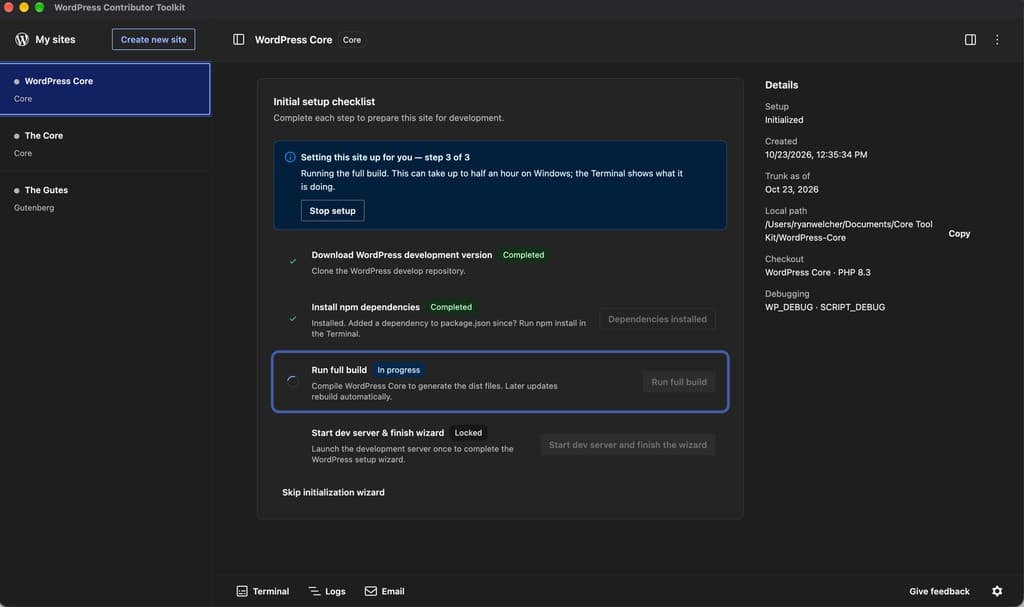
Many people who want to contribute to open source get stuck in the same place: before writing a single line of code, the environment talks them out of it. Install Git, install Node.js, install npm, install Docker; a version mismatch here, a broken path there, and an afternoon is gone before a local site even runs. The WordPress Contributor Toolkit 2.0, released on 23 October 2026, is aimed squarely at that discouragement: it is a desktop app that sets up a full WordPress Core development environment and carries the whole contribution workflow — from reading a ticket, to changing code, to submitting a patch or pull request (PR) — without asking you to install that chain of prerequisites by hand first.

That may not sound like big news, but for an open-source community it is exactly the kind of news that matters most. At a Contributor Day, dozens of people often download, set up and submit a first patch on the same network at the same time; any friction in setup burns through a whole day's enthusiasm. Version 2.0 rests on a plain judgement: lowering the bar for a first contribution keeps more newcomers than adding another advanced feature. For vibe developers used to pair-programming with AI, there is a second, practical point: AI can help you write code, but it cannot walk the rest of the road for you — submitting to a real project, going through review, and revising until merge. This tool paves the first half of that road.
What changed in 2.0: the interface first, then the workflow
The most visible change is a full redesign of the window on the WordPress Design System: sidebar, page header, site details, cards, dialogs and the bottom tray now share one visual language. If you have used the block editor, the buttons, notices and dialogs will feel immediately familiar. That familiarity is not decoration; it cuts the cognitive cost of learning the tool itself before you can start learning the contribution workflow.
Next, settings finally have one home. Open the settings dialog from the cog at the bottom right of the window, from Settings in the app menu on macOS, or from the File menu on Windows and Linux. It has three groups. General covers the theme, the language, whether a site's server and build watch start when you open it, whether what was running at quit starts again next time, and a default folder for new sites. Sites covers the PHP version each site's development server runs on, and the WP_DEBUG and SCRIPT_DEBUG flags; a change applies the next time a server starts, and the site details show the values the next start will use. Account covers your WordPress.org username and the event you are at — both go into a patch you hand to a mentor — and the GitHub account the app opens pull requests with. The theme itself can be light, dark, the same as your operating system, or custom: pick a background and a primary colour, and the app builds every other colour from them.
Third, language. Every interface string in 2.0 is translatable, covering the setup checklist, trunk updates, reviewing and submitting changes, the pull-request form and GitHub sign-in, ticket and branch notices, patch errors, Terminal and Logs output, the mail dialog, the app menu and the app's own dialogs. It ships in ten languages: Czech, Dutch, English (Canada), English (UK), Galician, Hungarian, Lao, Polish, Serbian and Turkish. By default the app follows your operating system's language; to choose another, open Settings, pick a language, and relaunch when the dialog offers to. There is also an explicit rule: a language ships with the app once it is at least 80% translated on translate.wordpress.org, so the list grows with each release. If your language is not there yet, helping translate it is itself a good first contribution.
The improvement worth lingering on: changed files, file by file
For contributors, the most useful change in 2.0 is not cosmetic. It is the changed-files view. After you apply a patch or check out a pull request for a site, the site details list changed files as a folder tree in two groups: files from the patch or PR, and your own changes. A pencil marks a patch file you have since edited; clicking a file opens it in your editor inside the site's folder; each file you changed has its own revert button, restoring just that file without discarding the patch you are testing. Discard your changes now removes only your own work and leaves the applied patch or pull request in place.
Why does that matter? Because the classic beginner mistake is confusing "changes the patch brought" with "changes I casually made myself", submitting the two mixed together, or wiping out someone else's patch while reverting. By showing the two groups separately and reverting them separately, the interface enforces a version-control discipline: do not contaminate the change you are testing, and do not bundle the test subject into your own submission. For AI-assisted programming, that discipline matters even more — AI is good at changing many files at once, and you must be able to say, before submitting, what each change is and why it is there.
Ticket details now persist as a companion improvement. When you click Read details from Trac, the app keeps what it read: quit and reopen, and the ticket's summary, status, type, component, milestone and keywords are still there, with the time they were read. A refresh button beside that line reads the ticket again when you want the latest. The ticket card has also been reorganised: the title leads, facts sit on labelled rows, and unsubmitted work appears as a notice with Review and submit and Discard changes buttons. None of these are showy features. Together they turn the three easiest mistakes — losing work, mixing work, forgetting to submit — into things the interface helps you get right by default.
About 350 MB smaller: thoughtfulness for Contributor Day itself
Version 2.0 is about 350 MB smaller once installed, achieved by removing three kinds of dead weight: PHP builds it never loads, libraries already bundled into the interface, and Chromium language files for languages the app has no translation for. The number itself is unremarkable until you change the scene: at a Contributor Day, dozens of people download the app at the same time on the same network, and 350 MB times dozens of people is gigabytes of traffic and long waits. Slimming the download cuts a chunk of frustration out of the first hour on site.
The other improvements share that on-the-day friendliness: sites run as a local environment, so Application Passwords can be tested over HTTP; Adminer opens the right database when a site uses randomised SQLite storage or a custom DB_PATH; the debug.log pane no longer shows a line twice or replays the whole file when you save it from an editor; the pull-request preview no longer lists trunk's files when the site's trunk is behind; the main window can no longer be navigated away from the app, and HTML mail is shown in a separate frame. Individually unremarkable, together they say one thing: let newcomers spend their time reading tickets and writing patches, not tripping over setup.
What it does not solve: the tool paves the road; the rules you still have to learn
Honesty requires saying what Contributor Toolkit 2.0 does not fix: environment and workflow friction, not the difficulty of contributing itself. It will not read a ticket for you, judge whether a fix meets WordPress coding standards, or carry you through review comments. The real hurdles of a first contribution usually sit outside the tool: finding a ticket suited to a newcomer, understanding two collaboration habits across Trac and GitHub, and revising without discouragement after a "please change this". Those take human time, which is exactly why mentors exist in the community.
For vibe developers, one distinction deserves emphasis: submitting an AI-generated patch is not the same as using AI to understand a ticket and then writing the patch yourself. WordPress review judges patch quality and maintainability, not generation speed. Submitting dozens of AI-changed files without being able to explain each one is a fast way to be sent back for revision. The steadier use is AI as a reading partner: let it map the ticket background, the relevant code paths and the testing approach, then decide yourself what to change, how to change it and what tests cover it. Before submitting, walk the changed-files view file by file and confirm each entry belongs in one of three lists: from the patch, your own, or to be reverted.
One more boundary: a local environment is not production. Version 2.0 lets Application Passwords be tested over HTTP locally for development convenience, not as encouragement to relax security on a production site; the WP_DEBUG and SCRIPT_DEBUG flags likewise belong only in development. The smoother the tool makes local development, the more worth remembering why it is smooth: locally you are allowed to make mistakes, and in production you are not.
A plan for a first contribution: walk the whole road once, from download to submission
If you have never submitted a WordPress patch, use 2.0 to walk the whole road once. The goal is not to merge on the first try, but to have personally travelled the route. Step one: download the app, create a site, change nothing, and confirm the site runs and the Terminal and Logs panes behave. Step two: find a ticket or issue marked suitable for newcomers in Core Trac or the Gutenberg repository, and read it three times — what the problem is, what the reproduction steps are, what approaches others have already suggested. Step three: use the app to read the ticket details, apply a related patch or check out a PR, and run the tests, until you understand what that code does. Step four: change the smallest possible scope, then check the changed-files view entry by entry — which files are the patch's, which are yours, whether any unrelated file slipped in. Step five: run the relevant tests and write the results and reproduction steps into the submission notes. Step six: submit as a PR or patch through the app, including your WordPress.org username and event information so a mentor can find you. Step seven: answer each review comment, revise, and submit again — that step is the actual contribution, and the previous six only earn you the right to reach it.
After that pass, the real value of Contributor Toolkit 2.0 becomes clear. It is not that it looks better, weighs less or speaks more languages, but that it compresses "getting started" from an afternoon of wrestling into a single click. Open-source communities are rarely short of clever people; they are short of people who make it past the first time. Lower that first bar a little, and more people stay for the second and third times. That is also why it earns a place on VibeFix: vibe coding lets us produce things faster, and tools like this let us hand things into real project review faster — producing fast is only half the job; submitting steadily is the other half.
Comments (0)
Sources
Related articles

Loading, empty, and error states are not edge cases: they are what users meet on slow networks, new accounts, and bad days. This guide covers skeleton and progress rules, four distinct kinds of empty, error copy that protects user input, race conditions in state transitions, and an acceptance checklist.

Mistral released Voxtral 3 on 22 October 2026, putting transcription in 50+ languages, speech synthesis in 35+ languages and a LiveKit-based voice-agent SDK into one real-time pipeline. This article unpacks the four parts, the price list and five pre-launch checks, and judges whether independent developers should try it.

Anthropic moved Code Review for Claude Code to general availability on October 15, 2026 for Team and Enterprise plans, with reviews in 6 to 10 minutes and Quick, Standard, and Deep levels per repository. This article covers what the service does, the base-branch REVIEW.md rule, usage-based billing, the credits offer, and who cannot use it.