Project Directory

Browse all indie developer projects and co-creation requests

Active: ShowcaseTools
Showcase
Online
Tools

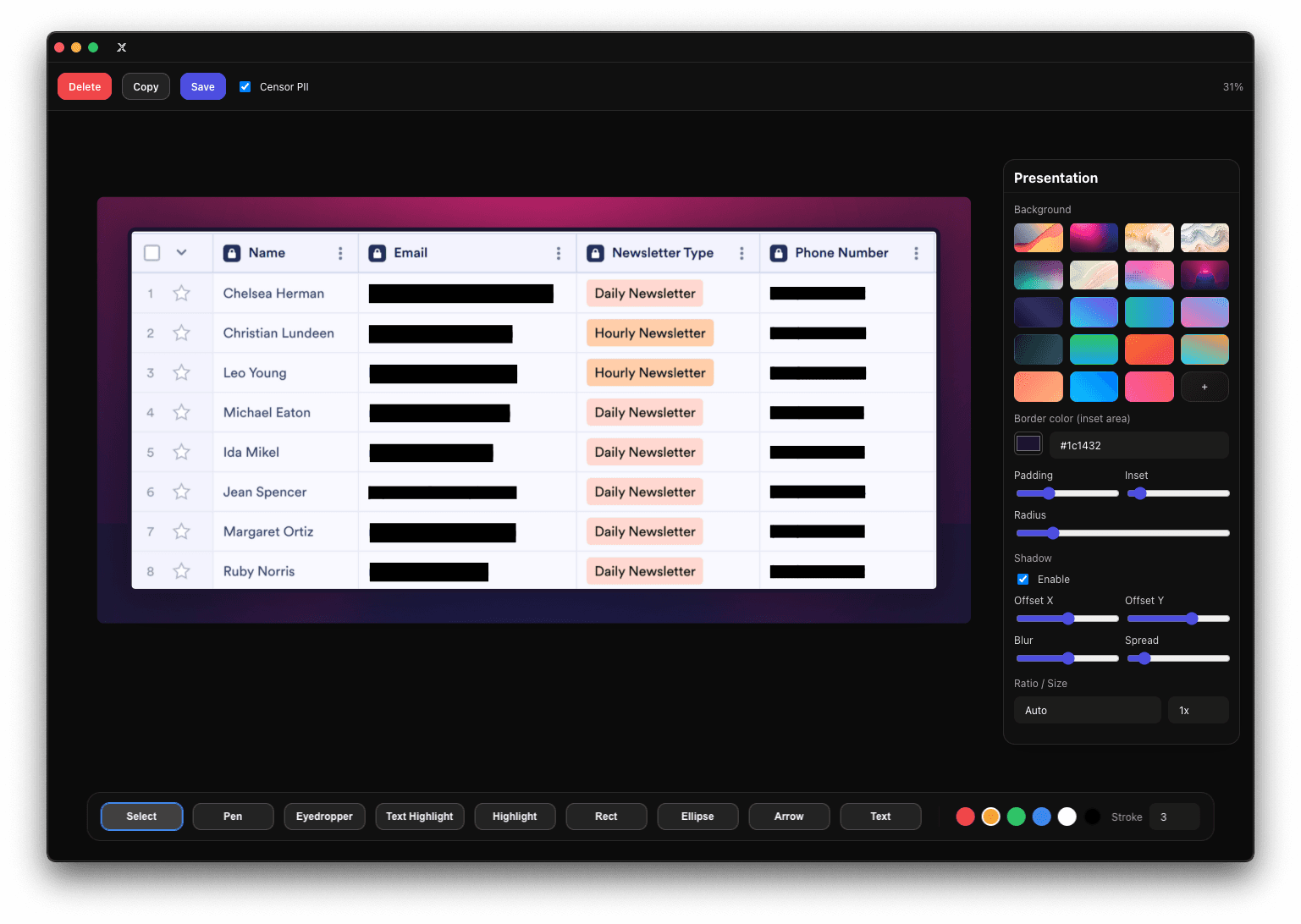
X-Shot

Screenshot capture and editing from your system tray — global hotkey, automatic PII masking, OCR, and polished presentation exports.

X-Shot is a screenshot capture and editing app that lives in your system tray: hit the global hotkey, grab any screen or window, and land in an editor with rectangle, ellipse, arrow, freehand pen and text tools. Its standout trick is PII masking — it automatically detects and blacks out sensitive data in your screenshots, plus OCR text extraction via Tesseract.js for pulling text out of any capture. The presentation mode is what sets it apart from bare-bones snipping tools: background gradients and images, padding, radius, shadows and aspect presets turn a raw screenshot into a polished share-ready graphic. Exports go to clipboard or file with configurable filename patterns, multi-display capture is supported, and it runs on macOS, Windows and Linux. The author's repo description says it straight: "Majority of this was Vibe coded." Built with Electron and React, tested with Jest and Playwright smoke tests, and maintained since 2025 — this is a vibe-coded utility with real staying power, not a weekend throwaway.
Showcase
Online
Tools

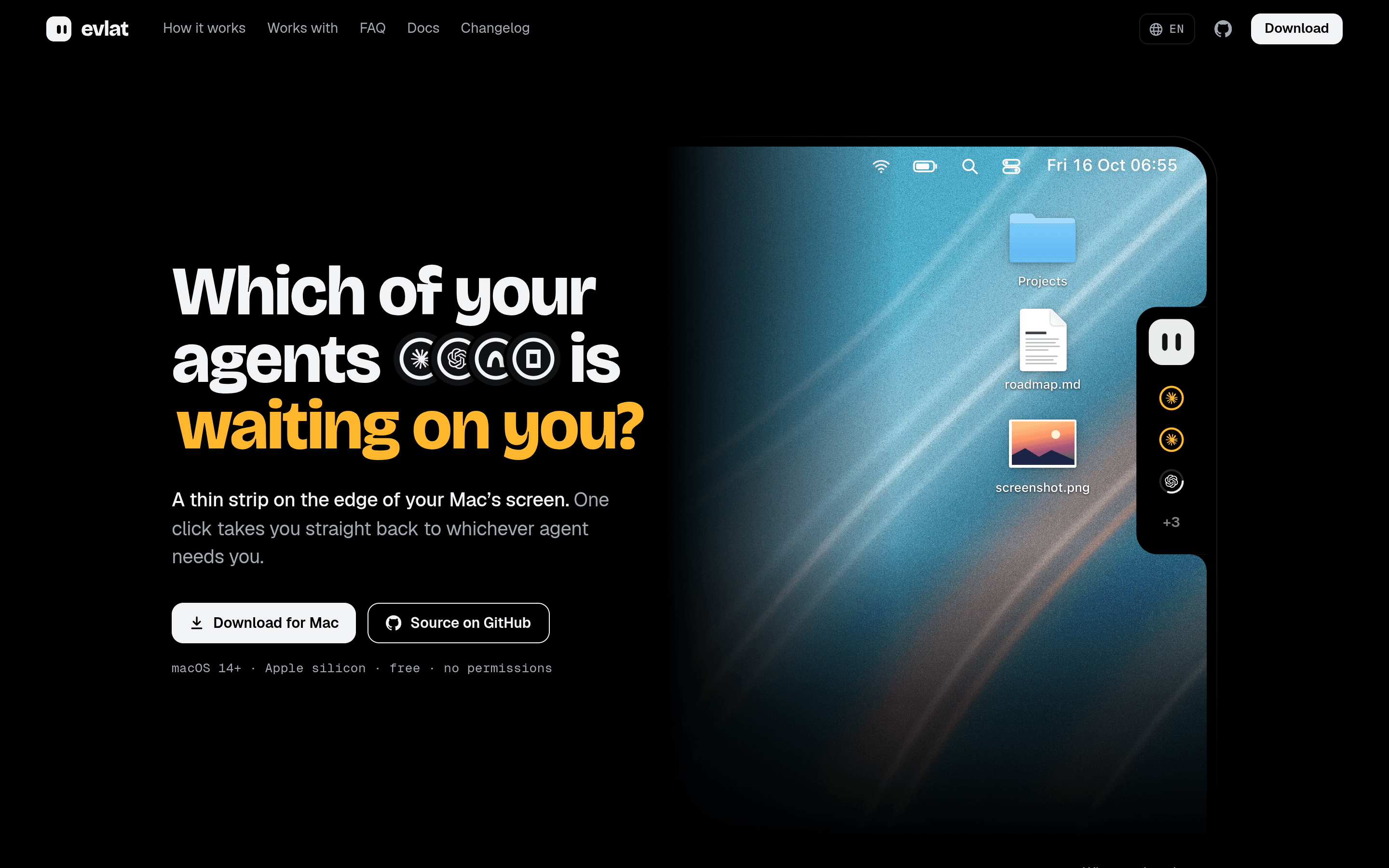
Evlat

A thin strip on your Mac's screen edge that shows which AI coding agent is waiting on you — one click jumps back in.

Evlat is a thin strip docked to the edge of your Mac's screen that answers one question at a glance: which of your AI coding agents is waiting on you? One ring per Claude Code, Codex, Antigravity or OpenCode session, one face for all of them — and an amber pulse the moment a session needs your input. One click takes you straight back to whichever agent needs you, no more alt-tabbing through a dozen terminal windows. It runs on macOS 14+ (Apple silicon), asks for zero macOS permissions, updates itself, and speaks twelve languages including Simplified and Traditional Chinese. Session state is read from each agent's local hooks and logs, and the built-in chat bubble can answer permission prompts or drop files onto a session without switching windows. A playful extra: the strip's mascot is fully customizable, and the site ships a guide for having your own coding agent design one. The author says it plainly in the Show HN thread: "I'm the vibe coder of Evlat app. I use it everyday for tracking my cc sessions." The repo (12 stars, pushed four days before scouting) is a native Swift app with signed and notarized releases, and the whole thing reads like a tool built by someone who lives inside parallel agent sessions — because it was.

Showcase
Online
Tools

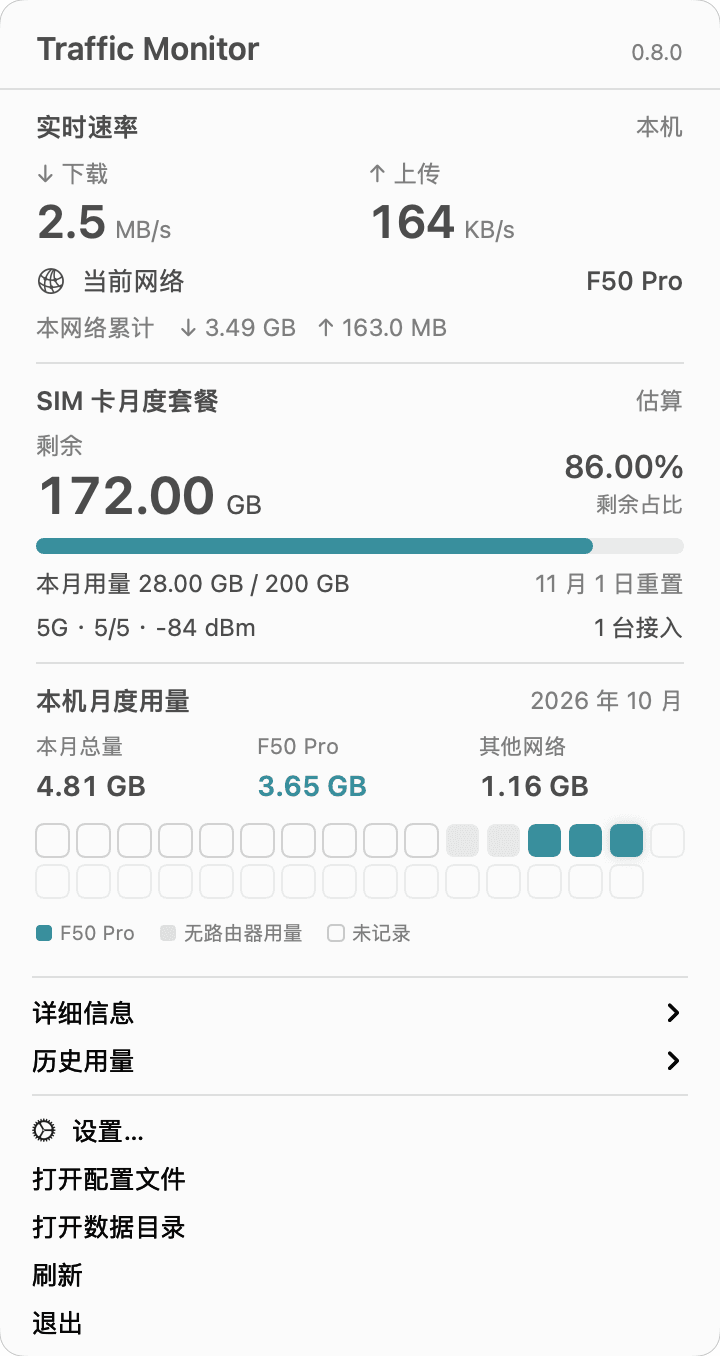
Traffic Monitor

macOS 菜单栏流量看板:实时网速、月度用量历史,中兴 F50 Pro 的信号、接入设备与套餐余量一目了然。

买了台中兴 F50 Pro 随身 WiFi,想随时查流量和信号,作者 Nowhere1975 干脆自己 Vibe 了个小工具——Traffic Monitor,一个常驻 macOS 菜单栏的原生流量看板。 它直接读取本机网卡计数,实时显示当前网速,并按月记录历史用量,用每日柱图直观展示流量趋势。连上 F50 Pro 时,工具还会通过设备的 HTTP 接口读取信号强度、当前接入设备数,并按运营商计费口径估算 SIM 卡套餐余量,把 F50 Pro 和其他网络的用量分开记账。 应用用 Swift / SwiftUI + AppKit 开发,纯原生菜单栏体验,所有历史数据都保存在本地,无需刷机、root 或 ADB,也无需注册账号。作者已发布 Apple Silicon(M 系列)DMG 安装包,下载后拖入「应用程序」即可运行;套餐余量需要先用运营商已用量做一次校准。

Showcase
Online
Toolsclaude-code

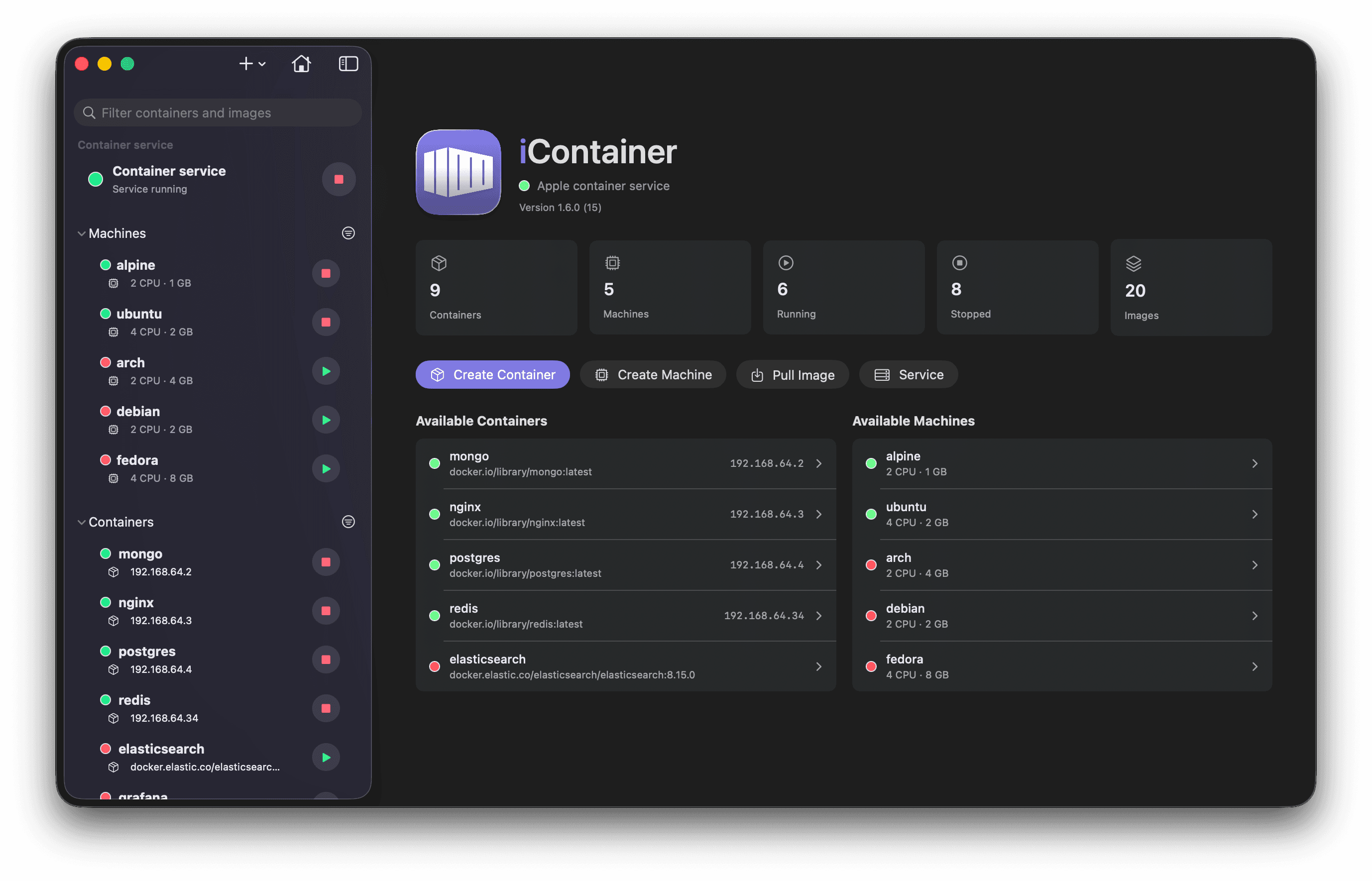
iContainer: native macOS manager for Apple Container workloads

A native macOS app for Apple Container workloads — containers, images, logs, stats and an interactive shell, plus on-device AI log analysis.

What it isiContainer is a native macOS app to manage Apple Container workloads — containers, images, logs, stats, and an interactive shell — built with SwiftUI on top of the official container CLI. It ships as a signed, notarized app with Sparkle auto-updates and a Homebrew tap, so it behaves like real shipping software, not a side project. Built with vibes, full disclosureThe README says it plainly: "Full disclosure: iContainer was vibe-coded — designed and written hand-in-hand with Claude Code." A "Vibe-coded with Claude Code" badge sits right under the title. The ideas, direction, and every "no, not like that" are human; a lot of the typing isn't — and the author is upfront that it's a hobby project on brand-new Apple tech: "read the code, kick the tires, and don't run it anywhere you'd cry about." Standout: on-device AI log analysisOne click on any container's or machine's Logs tab turns raw output into a concise diagnostic — health summary, quoted errors and warnings, likely cause, concrete next steps — streamed live. It runs on Apple's Foundation Models entirely on your Mac, so logs with their secrets and tokens never leave the device: no cloud, no API keys, no subscription. Plus Docker interop (import images, translate docker inspect configs into Apple Container settings) and a Docker Compose MVP. RequirementsmacOS 26 or later on Apple silicon, plus the Apple Container CLI. Apple Intelligence is optional — only needed for the on-device log analysis.

Showcase
Online
Toolsclaude-code

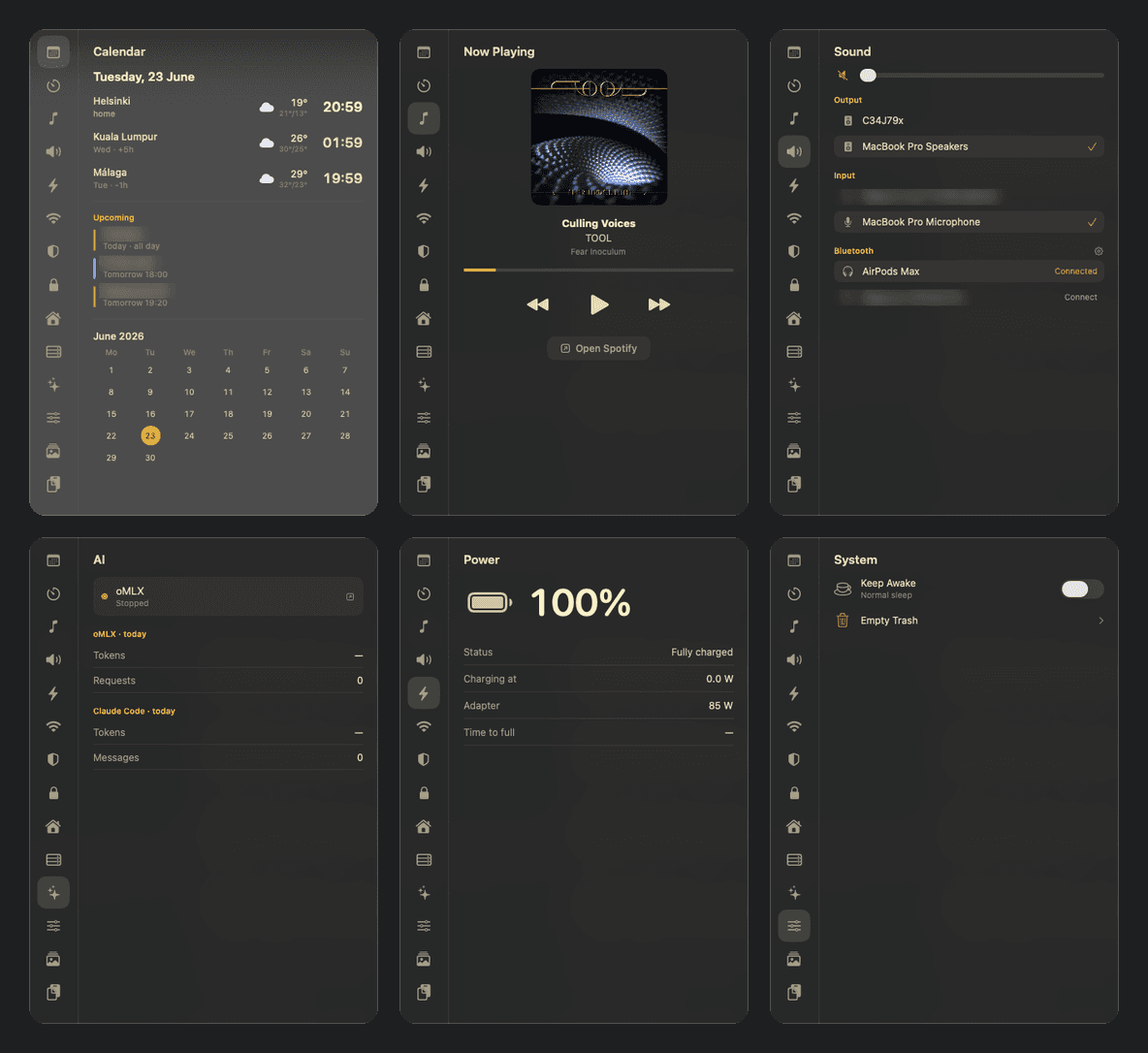
Kajo:macOS 下拉式 Gruvbox 控制中心

从 MacBook 刘海里弹出来的 Gruvbox 控制中心:日历、Spotify、声音、电源、剪贴板去追踪全在一页。作者 README 开头就写:100% vibe-coded,风险自负。

是什么Kajo 是一个 macOS 上的下拉式控制中心:一个半透明的 Gruvbox 主题小窗口,从 MacBook 的刘海里“弹”出来,里面用标签页收纳了你日常要看要点的所有东西——日历(带世界时钟、天气和日程)、计时器、Spotify 正在播放、声音(输出/输入设备、AirPods 左右耳和充电盒电量)、电源、网络(Wi-Fi 扫描连接、可复制的内外网 IP、网速测试)、系统(一键保持唤醒、清废纸篓)、表情包、剪贴板(带 URL 追踪参数清理,还能发到安卓)、货币换算(ECB 汇率,不用 API key)、工时记录,甚至还有 UniFi、Home Assistant、VPN 和本地大模型服务的状态页。 它致敬的是 Linux 圈的 Noctalia,但做在了 macOS 上。唤起方式也很“mac”:菜单栏图标、kajo://tab/calendar 这样的 URL scheme、全局快捷键都行。最妙的是它从刘海长出来的方式——Dynamic Island 风格:平时刘海两侧缩成两个“耳朵”,左边显示正在跑的工时计时,右边显示 Spotify 正在播的歌(带专辑封面和跳动的小节线);鼠标悬停刘海,弹出一排标签图标,点哪个就切到哪个标签页。 亮点这个项目的灵魂是“一个人的控制中心”。作者把自己每天要查的东西全塞进了一个窗口:几点有个会、赫尔辛基和吉隆坡现在几点、AirPods 还剩多少电、今天写了几个小时代码要不要记工时。工时(Hours)标签页甚至是个完整的小产品:秒表计时、按天记条目、打标签关联 Severa 项目,一键把一天的工时按 30 分钟取整上传到 Severa timesheet,顺手生成月度清单——自由职业者看了会心动。 细节密度极高:剪贴板标签页能一键剥掉链接里的 utm_ 追踪参数和电商追踪片段;终端(kajo://terminal)是个 Quake 式的下拉终端,⌘V 能直接把剪贴板里的图片粘进 Claude Code;刘海耳朵上还有个 Claude Code 会话状态小图标,黄色是忙、绿色是做完,点一下跳到终端。甚至连记事本(Scratch)都是从刘海滑下来的悬浮窗。 但作者在 README 里先把丑话说在前面:这是“personal tool, not a polished product”(个人工具,不是打磨过的产品)。部分标签页是为他自己家里的服务器准备的(UniFi、树莓派健康检查),没配好的在你电脑上就只显示一句“No config”。诚实得可爱。 vibe-coded 证据这是本轮证据最硬的项目之一。作者在 README 开头原话写着:“100% vibe-coded — use at your own risk. Built almost entirely by AI pair-programming (Claude Code).”后面还跟着“没有保修、没有保证,它可能会发脾气甚至吃掉你的配置,运行前请先读代码”。能把“这玩意儿可能吃掉你的配置”写进 README 的作者,证据可信度直接拉满。 更有意思的是,连安装方式都是 vibe 式的:README 里有个章节叫“用 Claude Code 安装(复制粘贴这段)”——一段超长的 prompt,你把它粘进 Claude Code,Claude 会一步步帮你在你的 Mac 上构建、签名、装到 /Applications、处理代码签名证书、改掉写死的作者家时区和城市、问你家里有没有 UniFi 再决定配哪些标签页。作者甚至替你想好了:Makefile 里的签名证书名是作者自己钥匙串里的,prompt 里会教你建一个同名的自签名证书,或者改成临时签名。 活跃度也没问题:仓库创建于 2026 年 6 月 25 日,76 个 commit,最近一次提交是 2026 年 10 月 13 日(侦察当天),版本迭代日志记到了 v0.35.4,一个仍在被主人天天打磨的自用工具。 技术实现技术栈是作者明确声明的:原生 Swift,SwiftUI/AppKit 混写。构建方式很“叛逆”:纯 swift build(SwiftPM,只有一个依赖 SwiftTerm)加一个 Makefile,全程不用 Xcode 工程。跑起来是一个 LSUIElement agent——Dock 栏里没有图标,干净。 架构上是一个文件一个标签页(Sources/*.swift),加上 Theme/Config/Panel/App 四块基础设施。配置走 ~/.config/kajo/ 下的 JSON(600 权限),内置的设置窗口提供带类型的表单和原始 JSON 两种编辑方式。进程间调用全靠 kajo:// URL scheme:kajo://tab/sound 切声音页,kajo://terminal 呼出终端,kajo://clip/clean 清追踪参数——Raycast、skhd、Hammerspoon 都能直接调。 那个从刘海弹出的动画是 SwiftUI spring 做的:窗口尺寸瞬间定好,面板用弹簧动画从刘海“长”出来;没刘海的屏幕就退化成菜单栏里的一颗黑色小药丸(virtual notch)。耳朵(island ears)的内容是事件驱动的,不是轮询——Spotify 耳朵靠通知,工时耳朵靠文件 watch,Claude 会话图标靠 hook 写的状态文件。作者在更新日志里为这些小毛病修了十几个版本(v0.33 到 v0.35 全是刘海和耳朵的打磨),看得出是真每天在用。 安装方式本身就是 vibe 宣言一般 macOS 工具的 README 写“下载 dmg 双击安装”,Kajo 的 README 写的是“打开这个仓库,让 Claude Code 帮你装”。那段复制粘贴 prompt 长达上百行:先检查 macOS 14+ 和命令行工具,再二选一处理代码签名(建一个叫“Kajo Self-Signed”的自签名证书,或者改成临时签名),然后 make install 装到 /Applications、注册 kajo:// scheme,接着问你用什么方式唤起(skhd、Hammerspoon、Raycast 还是菜单栏按钮),最后把写死的赫尔辛基/吉隆坡/马拉加三个城市换成你自己的城市。它甚至提醒你:示例配置里指向作者个人 AWS 的 remote 字段千万别照抄。一个把“怎么在你电脑上跑起来”都外包给 AI 的项目,100% vibe-coded 这句话就不是口号,是工作流。 适合谁适合三类人:一是 macOS 重度用户,尤其用 Raycast/sketchybar/skhd 的那批——Kajo 的 kajo:// scheme 能直接嵌进你现有的快捷键体系;二是 Gruvbox 配色爱好者,这个深棕底 + 蜜黄字的界面在 README 截图里相当耐看;三是对“AI 结对编程能做到什么程度”好奇的人:这是一个 76 commit、仍在迭代的真实自用软件,不是 demo,它证明了 Claude Code 不只能写小脚本,还能陪一个人把“每天用的工具”从 0 做到 1。 不适合谁也要说清楚:它不是开箱即用的 App Store 应用。在新 Mac 上跑起来要自己构建、自己搞定代码签名,部分功能(UniFi、Home Assistant、Severa 工时上传)需要你有对应的服务端。这正是作者那句“use at your own risk”的意思——但反过来说,愿意折腾的人,拿到的是一套完全按自己手型长的控制中心。

Showcase
Online
Toolsclaude-code

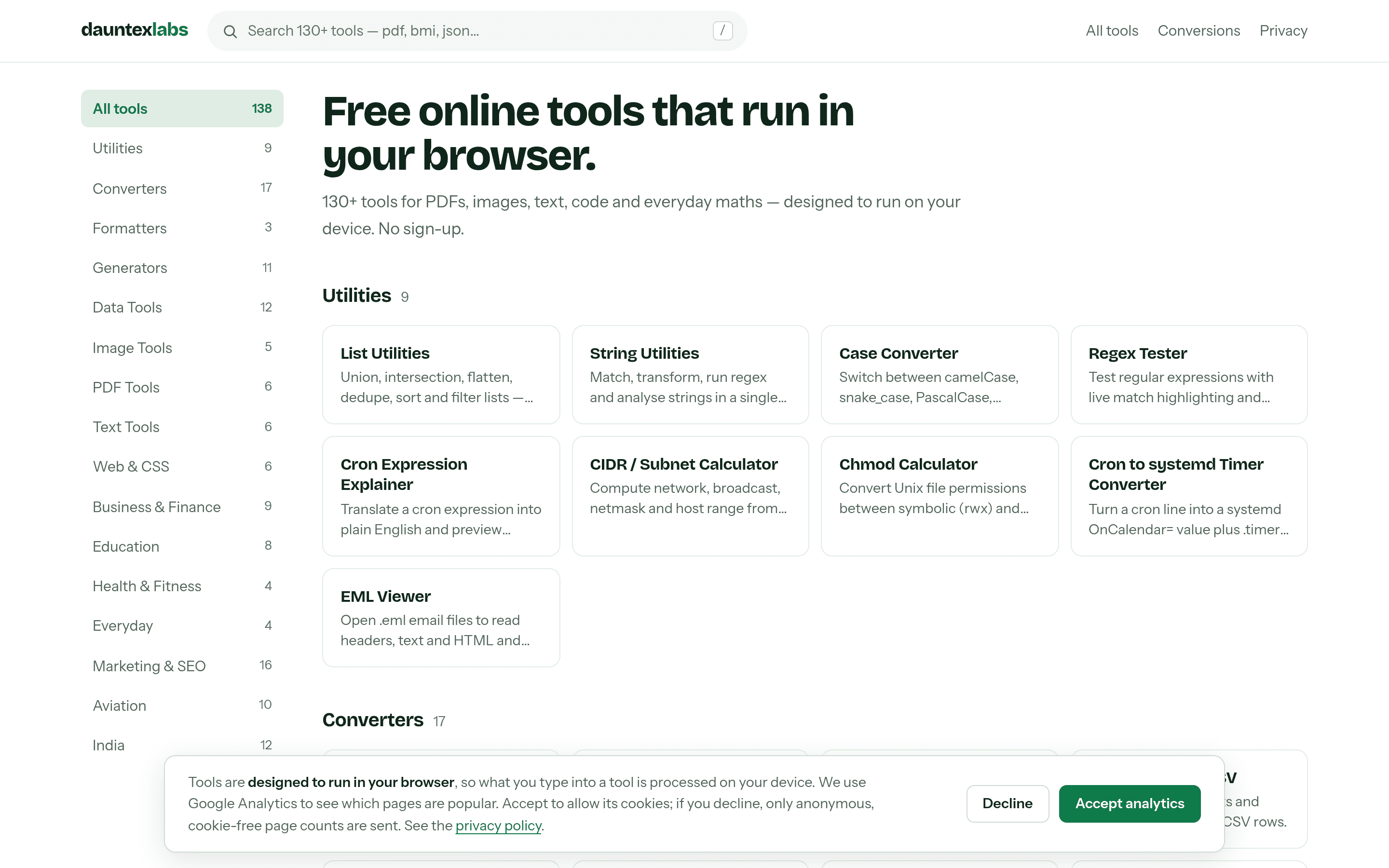
DauntexLabs:150 个纯前端小工具的瑞士军刀站

130 多个 PDF、图片、文本、代码工具全部跑在浏览器里,无后端、无上传;作者亲口承认“mostly vibe coded with Claude Code”,并用 1780 个测试给 vibe 加了护栏。

是什么DauntexLabs 是一个纯前端的在线小工具集合站:PDF 合并、图片转换、JSON 处理、二维码生成、密码生成器、正则测试、JWT 解码、VCF 转 CSV、飞行员用的侧风/密度高度计算器、印地语 Krutidev 旧字体转 Unicode 等等——首页目录里躺着 130 多个工具,作者的目标是 500 个。每个工具都是一页独立 HTML,打开即用,不用注册,也不用把你的文件传到任何服务器上。 这个站点的核心卖点就一句话:所有工具都在你的浏览器里跑完。想合并 PDF?文件只进你电脑的内存。想解码一个生产环境的 JWT token?粘贴进去,token 哪儿也不去。这对处理敏感文件的场景(银行对账单、联系人通讯录、私钥材料)是实实在在的价值,而不是一句营销口号。 亮点最有意思的不是工具数量,而是作者把“隐私优先”做成了一套测试,而不是一句承诺。每个工具都埋了一个“金丝雀字符串”:Playwright 测试会把这个唯一字符串喂给每个能吃文本或文件的工具,然后检查所有网络请求、URL、页面标题、localStorage、console——只要金丝雀出现在任何不该出现的地方,测试就挂。还有一层静态扫描:Vitest 会扫工具代码里的 fetch、XHR、WebSocket、sendBeacon 和 storage 写入,谁半夜手滑加了个网络调用,pre-push hook 直接拦下。最后还有 CSP 头做兜底,连跨域请求都被浏览器级拦截。 连作者自己都承认,绝对版的“数据永不离开设备”他不敢保证——你装的 9 个 Chrome 插件他可管不了。所以隐私页写的是“designed to run in your device”,再附上测试证据。这种诚实的分寸感,在工具站里很少见。 另一个细节:QR 码生成器里那些花里胡哨的“眼睛”样式,不是作者凭审美挑的——测试会用 jsQR 把生成的码反解一遍,只有真正能扫出来的样式才允许出现在 UI 里。哪个样式好看但扫不出来,哪个就下架。让测试替人做决定,是这个站贯穿始终的风格。 vibe-coded 证据作者在 2026 年 10 月 10 日的 dev.to 长文里亲口写道:“Confession: it's mostly vibe coded with Claude Code.”(坦白:这基本是跟 Claude Code 一起 vibe 出来的。)他还补了一句:大部分代码是 Claude Code 写的,不是我敲的,没必要装。 证据就摆在提交记录里:6 月 9 日第一次提交;6 月 20 日一天之内 68 个新工具、4 个 commit;10 月 7–8 日两天 59 个 commit,做完整站视觉改版加新工具扩充。作者自己说:我手写一天 68 个工具?不可能。但他也承认,光靠 vibe 会做出 150 个“微微有点坏”的工具,所以他给 vibe 上了三道保险:仓库根目录的 CLAUDE.md 规则文件(agent 每次会话必读:工具逻辑里禁 fetch、重库必须在点击处理器里动态 import、统一用共享 UI kit、共享 JS 体积卡在 105 KB 左右);大功能先写 spec 再写代码,6 份设计 spec 和 3 份实施计划都在 docs/superpowers/ 里;最后是约 1780 个 Vitest 测试当真正的 code reviewer——“我一天 review 不了 68 个工具,测试可以。” 作者的总结很到位:如果 AI 写代码,人就负责写“护栏”。规则文件、spec、测试,就是他这句话的三个注脚。 技术实现技术栈是作者明确声明的:Next.js 15,全静态导出(output: 'export'),一个工具就是一个纯 HTML 页面。选 Next 而不用纯 SPA 的唯一理由是 SEO:每个工具页都有独立的标题和描述。他还设了个 bundle 预算:共享首屏 JS 压在 105 KB 左右,每加十几个工具只涨约 1 KB。做法是:能用 Web API(crypto.subtle、Canvas)就不用库;MD5 这种 Web Crypto 不支持的就手写一个小实现;openpgp、pdf-lib、qrcode-generator 三个重库只允许在点击处理函数内部动态 import,绝不出现在顶层。 工具注册表也值得一提:lib/tools.ts 一个文件管全站——首页、搜索、分类筛选、每个工具页、sitemap.xml、robots.txt 全从这一个列表生成。加一个条目,页面、卡片、sitemap 行自动出现。 还有个反常识的运营故事:作者曾铺了 220 个单位换算页想吃 SEO,三个月 Search Console 数据是 2.08 万次展示、6 次点击、平均排名 76——“km to miles”这种词 Google 自己就有计算器小部件,根本打不过。于是他把那 220 页全部 noindex,转向没人做的长尾:飞行员的侧风计算、印度的 GSTIN 校验、Krutidev 转 Unicode。冷门字体的字符映射表还有条铁律:必须有两个独立来源对得上才发布,对不上的 Shivaji 字体转换器就挂着“维护中”不上线。错的转换器比没有更坏——这句话应该裱起来。 小众工具举例值得单独说说作者“往小众里钻”的那批工具。航空类有 10 个:侧风分量、风修正角、密度高度、真空速、METAR/TAF 解码——飞行学员和私人飞行员经常要算这些,市面上的现成工具要么收费要么难用。印度本地化有 12 个:GSTIN 税号校验、印度数字格式(lakh/crore)、Krutidev 等 legacy 印地语字体转 Unicode——印度很多政府和老办公室文档还停留在这些旧字体里,转换一直是个痛点。这些工具每个可能只有十几个用户,但对这十几个人来说是刚需。作者的原话是:没人需要,但有些人真的很需要。这种“广撒网不如打深井”的思路,恰恰是小团队对抗 Google 内置小部件的唯一活路。 适合谁适合三类人:一是每天跟 PDF、JSON、正则、二维码打交道的开发者和运营,把它当瑞士军刀书签收着;二是对“上传文件到陌生网站”有本能警惕的人——银行对账单、客户通讯录、生产 token,在这里处理确实更让人放心;三是对 vibe coding 工程化感兴趣的人:这个站是“AI 写代码 + 测试当 reviewer + 规则文件当记忆”的完整样本,仓库是公开的(github.com/jha-adrs/dauntexlabs),CLAUDE.md 和那 1780 个测试本身就是一份 vibe coding 实战教材。 要说缺点也有:工具多了难免有粗糙的,UI 是统一模板套出来的,谈不上精致。但免费、无广告、无需注册,冲着“文件不出本机”这一点,它值得一个书签位。

Showcase
Online
Toolsclaude-code

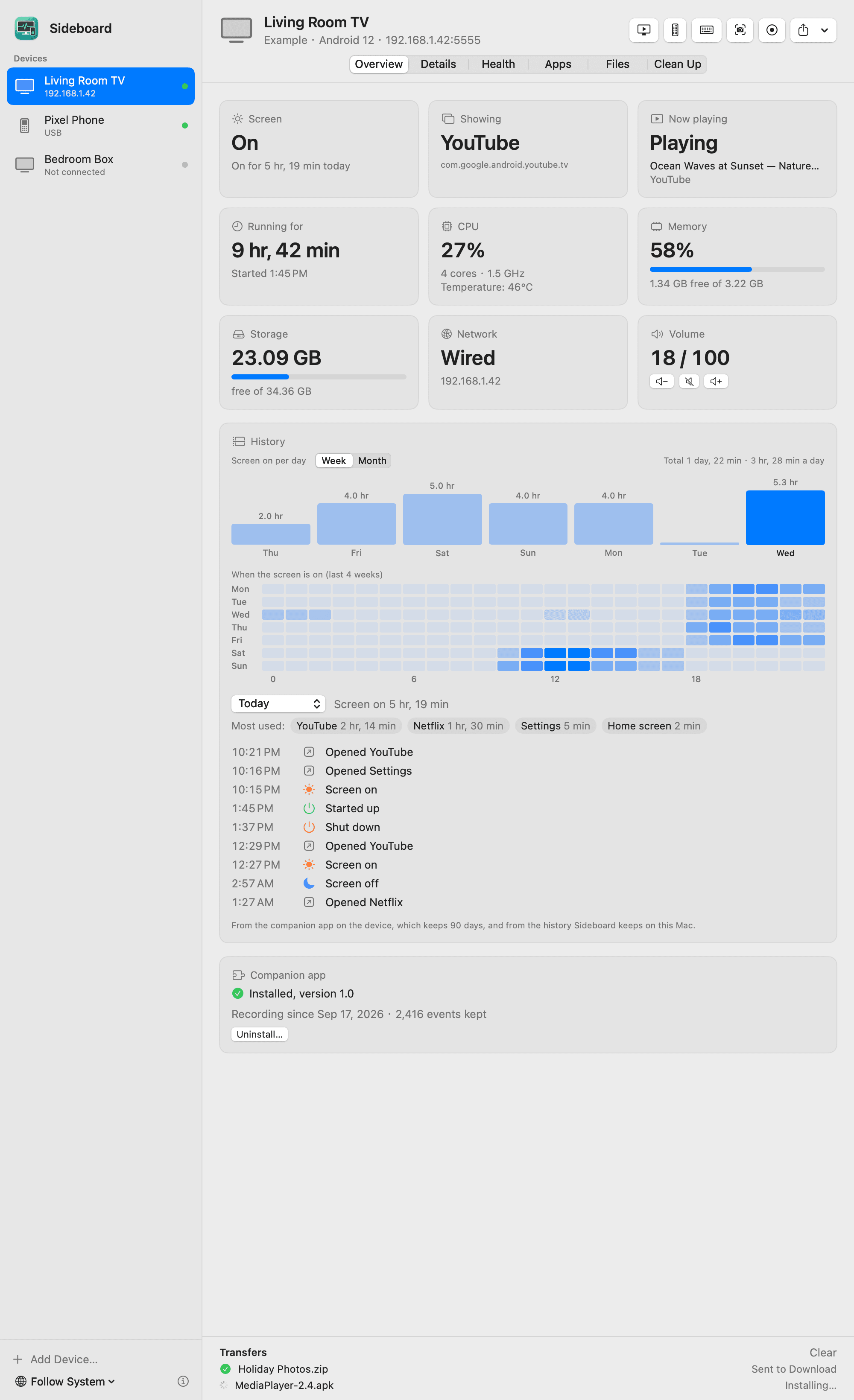
Sideboard

在 Mac 上用 adb 可视化管理安卓电视/手机/平板的开源应用:屏幕状态、功耗内存、24 小时开关机记录、实时投屏操控、文件互传。

Sideboard 是一个开源 Mac 应用:在 Mac 上通过 adb 可视化管理安卓电视、盒子、手机和平板。起因很生活化——作者用 adb 从安卓电视里读到了大量信息,但全藏在命令行里,于是“用 Claude Code 写了个 Mac App,把这些都摆出来”。 它能显示设备的屏幕状态、前台 App、正在播放的内容、运行时长、CPU/内存/存储/网络/温度;保留 24 小时开关机记录和按周/月的使用热力图;支持实时投屏操控、遥控器、截屏录屏、App 管理、文件互传;还能常驻菜单栏做异常告警。所有数据都不出 Mac,MIT 开源。 适合谁 家里有安卓电视/盒子、想知道它到底在干什么的人:孩子看电视看了多久、盒子为什么卡、半夜是不是自己亮了——Sideboard 把这些变成一张张卡片和一张热力图。对开发者来说,它也是一个 adb 可视化调试台:装包、传文件、看进程,一行命令都不用敲。 上手 GitHub 仓库 zhaoweijia1997/Sideboard,Mac App,设备端无需安装任何东西(可选装一个伴侣 App 获得更长的历史记录和应用图标)。README 里有完整的功能截图。

Showcase
Online
Toolsclaude-codecodex+3

Caspian

One agent to manage all your AI coding agents — Claude Code, Codex, Gemini, Cursor and Grok in a single session with pre-flight cost estimates.

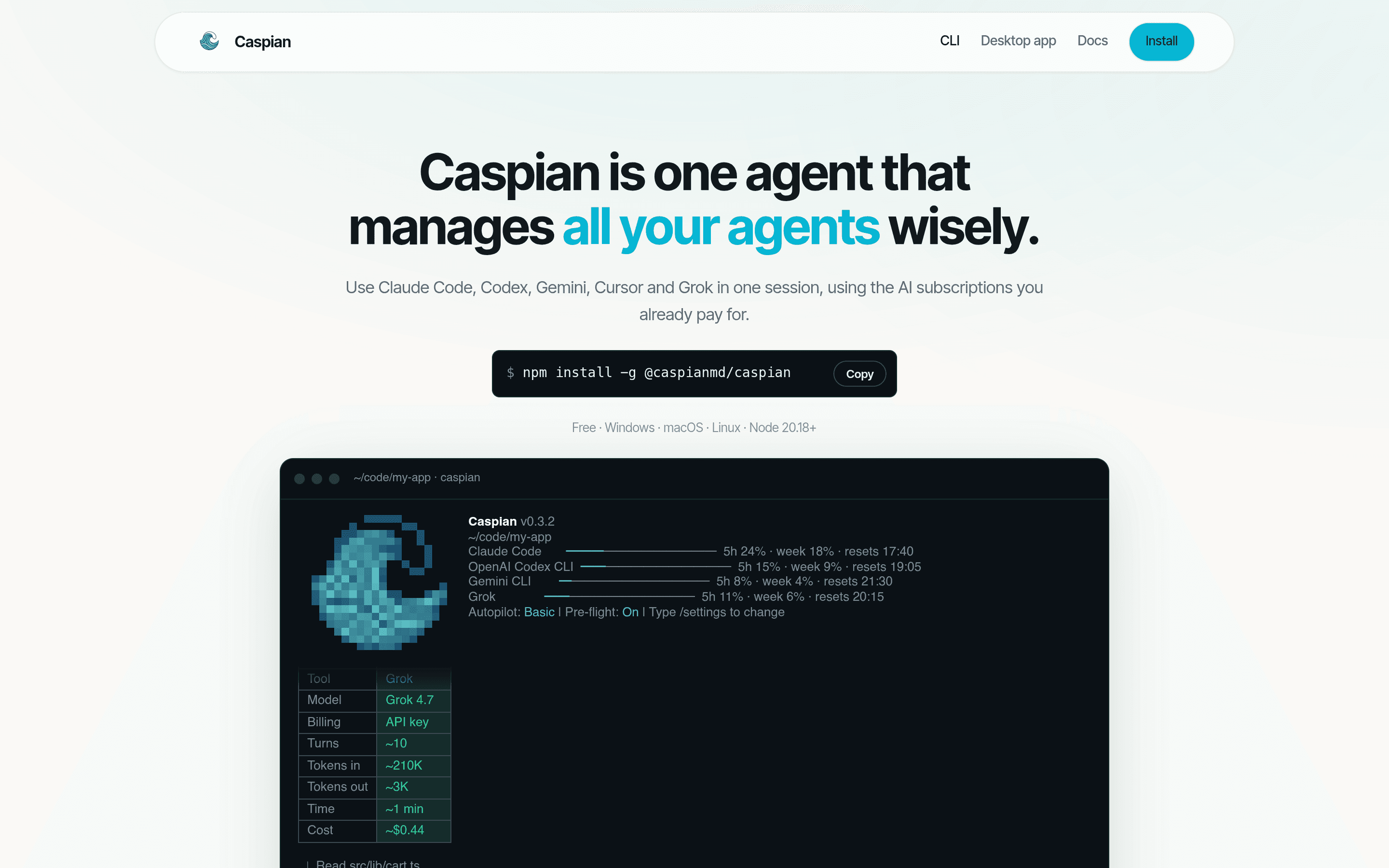
Caspian is one agent that manages all your AI coding agents: it runs Claude Code, Codex, Gemini, Cursor and Grok in the background, routes each task to the cheapest or strongest model depending on difficulty, and keeps one shared memory file (.caspian/context.md) so context survives across tools. It ships as both a CLI (npm install -g @caspianmd/caspian) and a desktop app, free for Windows, macOS and Linux, requiring Node.js 20.18+. The pitch resonates with anyone who vibe-builds: the author's own Hacker News post opens "For someone who vibe builds almost all the time…" and describes building Caspian to manage the chaos of running several agents at once. Features include prompt refinement before a task runs, a pre-flight cost estimate for every run, usage analytics with live quota bars for each subscription, and email notifications when agents finish. Why it exists The vibe-coding workflow has a coordination problem: you pay for multiple AI subscriptions, each with its own quota, memory and CLI quirks, and you context-switch between them by hand. Caspian's answer is a single session layer on top: tell it what to do, it picks the right tool and model, shows you what it will cost before it starts, and writes a session brief you can review before anything is built. Built for the multi-agent reality The official screenshots show the real thing — a CLI dashboard with per-tool quota bars (Claude Code, OpenAI Codex CLI, Gemini CLI, Grok) and a desktop workbench that drafts project briefs from your agent sessions, listing what was asked, what was decided, and what files changed. It is a product made by and for people who build with AI agents all day.

Showcase
Online
Toolsclaude-code

CrumbVMS

Self-hosted home-camera video management: Rust backend, motion detection, timeline scrubbing and native clients — your footage stays yours.

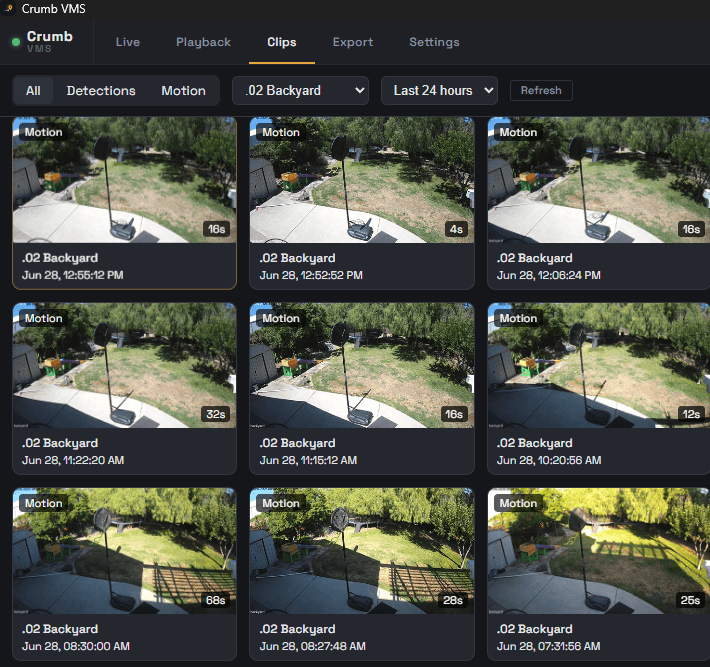
CrumbVMS is a self-hosted video management system for your home cameras: a Rust backend with a Postgres recorder, native clients on Windows, macOS and Linux (Tauri + libmpv), an Android app and a web admin. Point it at your cameras and get motion detection, a scrubbable timeline, clip review and export — your footage stays on your own hardware, no cloud subscription. The build story is unusually transparent. On the project's "Full transparency" page the author writes: "I'm using AI to build CrumbVMS itself, and to build this page. The architecture, the decisions, and the testing are mine, AI is the power tool that lets a side project move at this pace." In the announcement post he adds: "Built almost everything with Claude Code: Rust backend, Postgres recorder, native clients on Windows/macOS/Linux (Tauri + libmpv), Android app, and web admin." The project is open source (AGPL-3.0) at v0.2.0 alpha with 27 GitHub stars; the repo was pushed 2 days ago, and the author's own 11 cameras have been recording on it for months.

Showcase
Online
Toolsgoogle-antigravity

TruthLayer

An AI knowledge-health system for docs: it finds contradictory claims across your documentation and routes each fix through human approval.

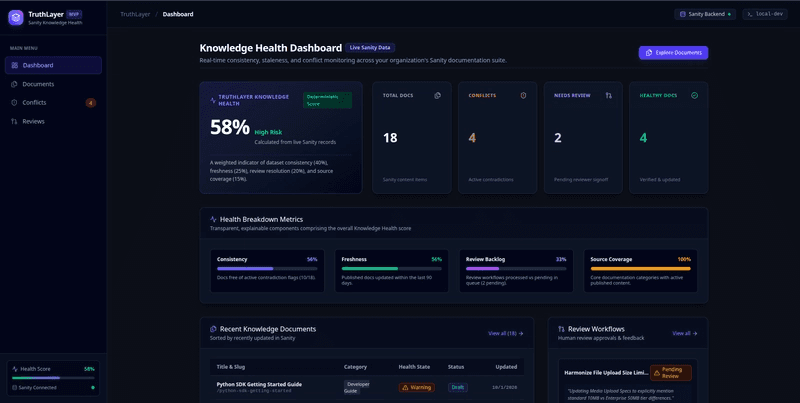
TruthLayer answers a question most documentation teams are afraid to ask: what if your docs could argue with themselves? It's a "knowledge health" dashboard for Sanity-backed documentation that continuously scans your docs, detects contradictory claims, and routes each one through human review. The dashboard shows an overall health score (the demo reads 58%, high risk), totals for documents, conflicts, and items needing review, plus metrics on consistency, freshness, review backing, and source coverage. The conflicts it finds are the kind that quietly break products: an onboarding guide that enforces an 8-character password minimum while the enterprise compliance doc demands 12; media specs saying 10 MB per file while the attachment policy says 50 MB. For each conflict, an AI-written summary explains the discrepancy, a side-by-side view shows both sources, and a review workflow lets a human approve the resolution, reject it, or flag it as needing investigation — every decision logged with the reviewer's name. The build is documented in the author's dev.to post for the Sanity "Vibe-Code Something Strange" challenge, where they write: "I built TruthLayer using Google Antigravity" and describe using the coding agent to turn the idea into a working product. The declared stack is Next.js 16 (App Router), TypeScript, Tailwind CSS v4, Sanity CMS, and the OpenAI API. For anyone maintaining docs at scale, it's a working demo of a genuinely useful pattern: AI does the hunting, humans keep the gavel.

Showcase
Online
Toolsclaude-opus-45gemini-3

SkySpottr: Plane Spotting AR

Point your iPhone at the sky and see live flight data overlaid in AR: flight number, aircraft, altitude, speed, and destination — no ARKit required.

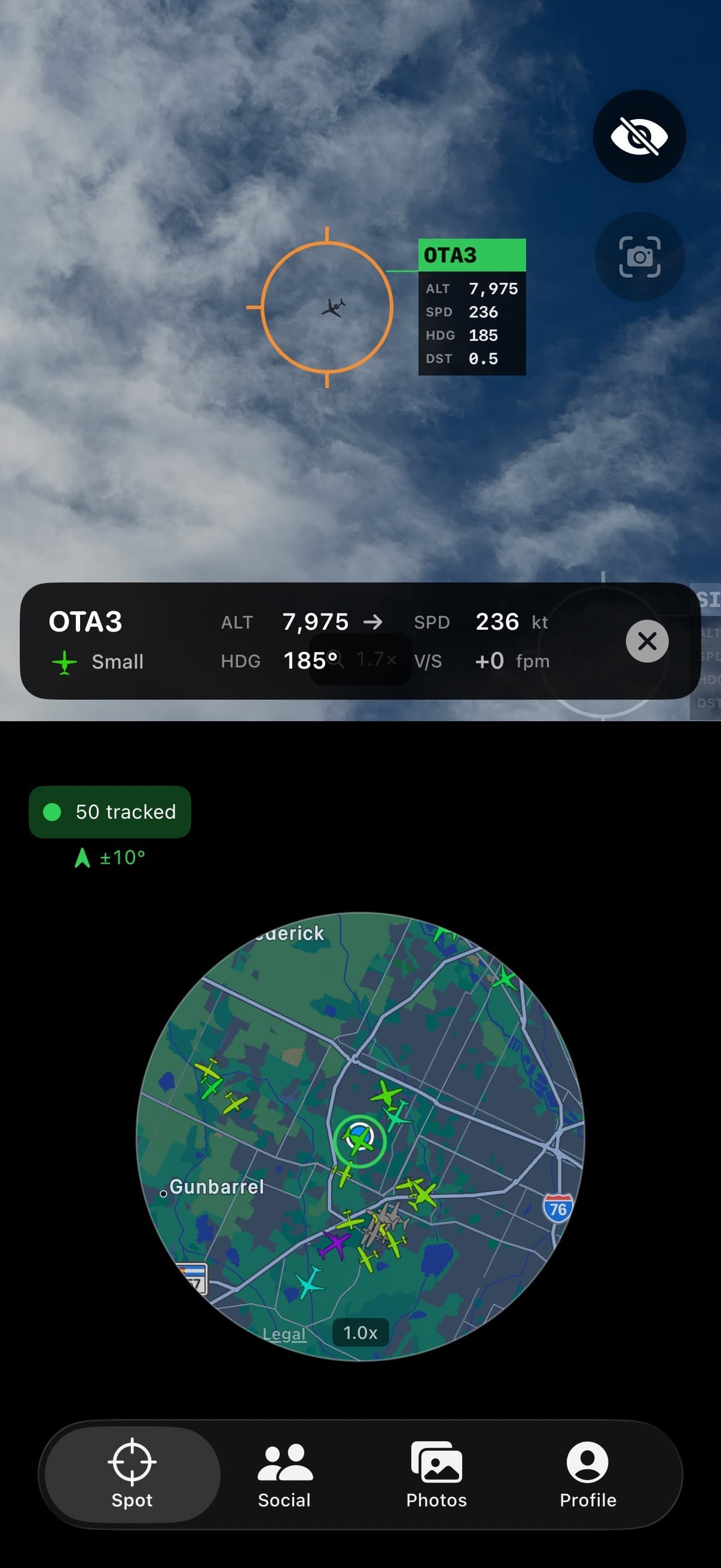
SkySpottr turns your iPhone into a plane-spotting instrument. Point it at the sky and the app overlays live flight data on the aircraft above you: flight number, aircraft type, altitude, speed, heading, and distance — an AR reticle locks onto a plane while a data card floats beside it (one screenshot shows SWA519, a 737-700, climbing at +2880 fpm). A circular radar map at the bottom shows every tracked aircraft around you, with 50-tracked counters and heading indicators, and tabs for Spot, Leaderboard, History, and Profile give it the feel of a hobbyist's field tool rather than a toy. The clever bit is how it works: ADS-B data projected through GPS and compass math, no ARKit required. That tradeoff is part of why the app is interesting to read about — the developer documented the whole thing on Show HN with a section called "Takeaways from vibe-coding a full product," and stated plainly: "Built an app entirely with Claude/AI assistance." Claude Opus 4.5 did the UI work; Gemini 3 cleaned up code the author described as messy. Under the hood it's an iOS SwiftUI frontend on a self-hosted backend — Django and PostgreSQL with Redis, running on a single VPS, later partially rewritten from Python to C# for performance. It's free with a $1.99 Pro tier, and the App Store shows v1.3.3 was updated about a day ago, so this is an actively maintained product, not a one-shot demo. For aviation nerds who've ever pointed at a contrail and wondered what it was, this is the app that answers.

Showcase
Online
Toolsgoogle-antigravitygemini-api

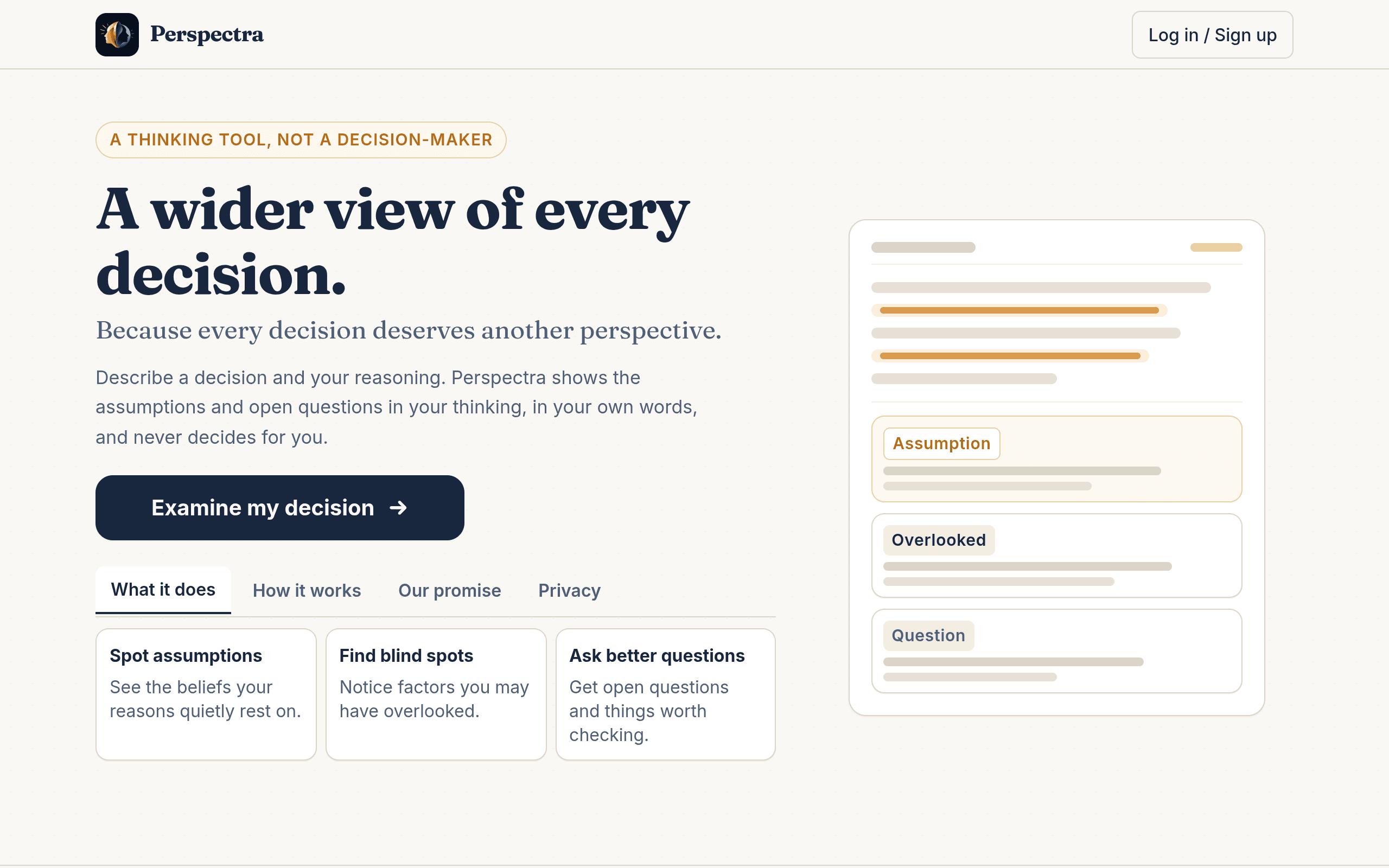
Perspectra

Blind-spot finder for your decisions: a 3-hour PromptWars solo build, vibe-coded with Google Antigravity

Perspectra is a structured-thinking tool that finds blind spots in your reasoning: it surfaces unstated assumptions, overlooked factors, and internal contradictions — exploring, never deciding for you. It was built solo in 3 hours at PromptWars (Google for Developers x Hack2skill, 2026-10-04), a hackathon format where "participants build vibe-coded solutions with Google Antigravity or Google AI Studio within limited time" (author's PROMPTWARS.md). AI score 90.28/100, ranked 45 of ~300, and the author kept iterating after the event. Stack: Next.js App Router + TypeScript, Gemini API, Firebase Auth, Firestore, Vercel (all author-stated); built with Google Antigravity (author-stated).

Showcase
Online
Toolslovable

Fraud Doctor — Scam Detector

A free scam checker for Canadian seniors: paste a suspicious text, email or link and get a plain-language risk verdict.

Fraud Doctor — Scam Detector is a free scam-screening tool built for Canadian seniors and their families: paste a suspicious text, email or link — or describe a phone call — and get an AI verdict of SCAM / LIKELY SCAM / LOOKS SAFE, with a danger level, a plain-language explanation, and what to do next. A "latest Canadian scam alerts" card keeps the threat picture current. Free, no account required, clearly framed as an educational screening rather than a guarantee. The author's GitHub README says it plainly: "This project was built with Lovable." 中文导读:面向加拿大老年人的免费反诈骗筛查工具——粘贴可疑短信/邮件/链接,AI 判定诈骗等级并给出通俗解释和应对建议;作者 README 原话为 Lovable 构建。

Showcase
Online
Tools

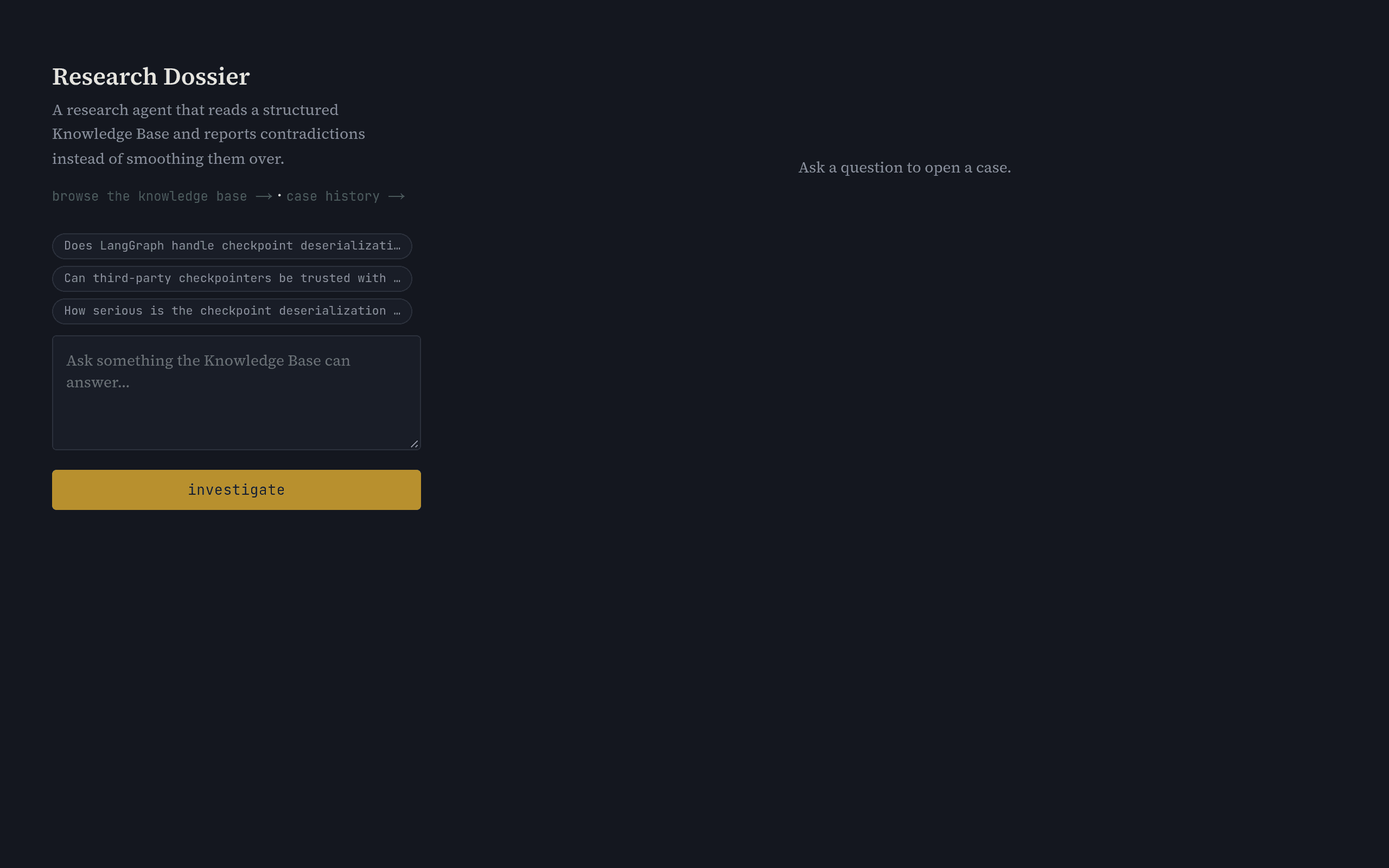
Research Dossier

A multi-agent research system that reports contradictions between sources instead of smoothing them into one answer.

Research Dossier is a multi-agent research system that queries a structured knowledge base and deliberately preserves disagreement between sources — it reports contradictions rather than flattening everything into one confident answer. You open a case by asking a question, agents investigate against the knowledge base, and a human approves the dossier before it is archived. The author's own dev.to writeup says the app "got built almost entirely through prompting" — an iterative conversational process rather than hand-writing the UI from scratch — submitted as a Sanity Challenge entry on 2026-10-03. Declared stack: Next.js, LangGraph, Groq, Sanity. 中文导读:多智能体研报系统,保留信源间分歧而非抹平成单一答案,人工审批后归档。

Showcase
Online
Toolslovablecursor

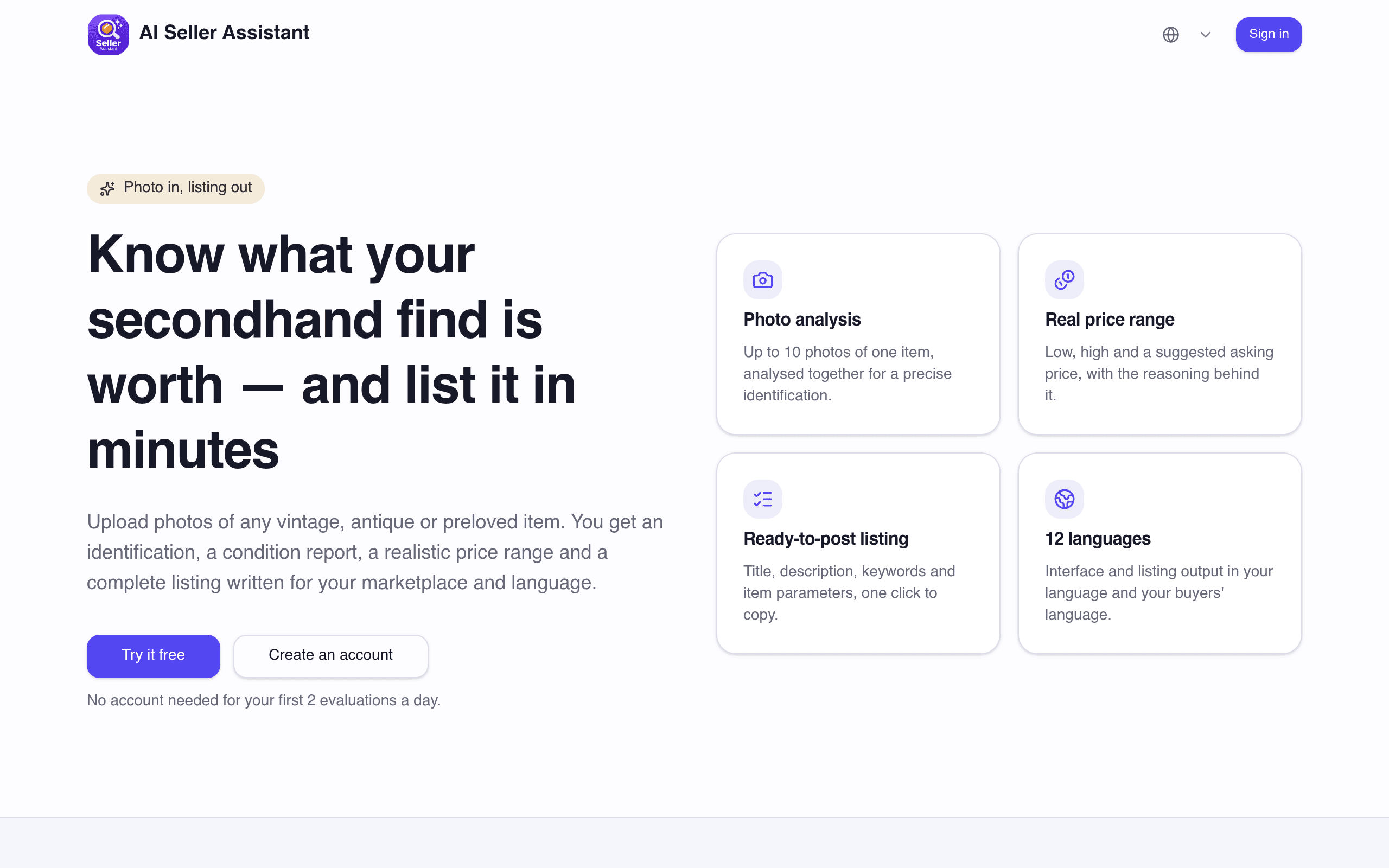
AI Seller Assistant

Snaps photos of secondhand items and returns a realistic price range, a ready-to-post listing and a studio-style product shot.

AI Seller Assistant takes a few phone photos of a secondhand item and returns a realistic price range, a ready-to-post marketplace listing and a studio-style product shot — in 12 languages, covering eBay, Etsy, Vinted and a dozen more secondhand marketplaces. It is live on the web and on Google Play. The maker states it plainly on the official Made with Lovable Showcase: "the web app, backend and admin are entirely Lovable. The Android app is a native wrapper built in Cursor" — the author's second product built this way after Cineyx AI Studio. Declared stack: Stripe (subscriptions/credit packs), Resend (transactional email), Unity LevelPlay (Android ads), plus a JavaScript bridge in the Cursor-built Android shell. 中文导读:拍几张二手物品照片即得真实价格区间、现成上架文案与影棚级产品图,已上线 Google Play。

Showcase
Online
Toolslovable

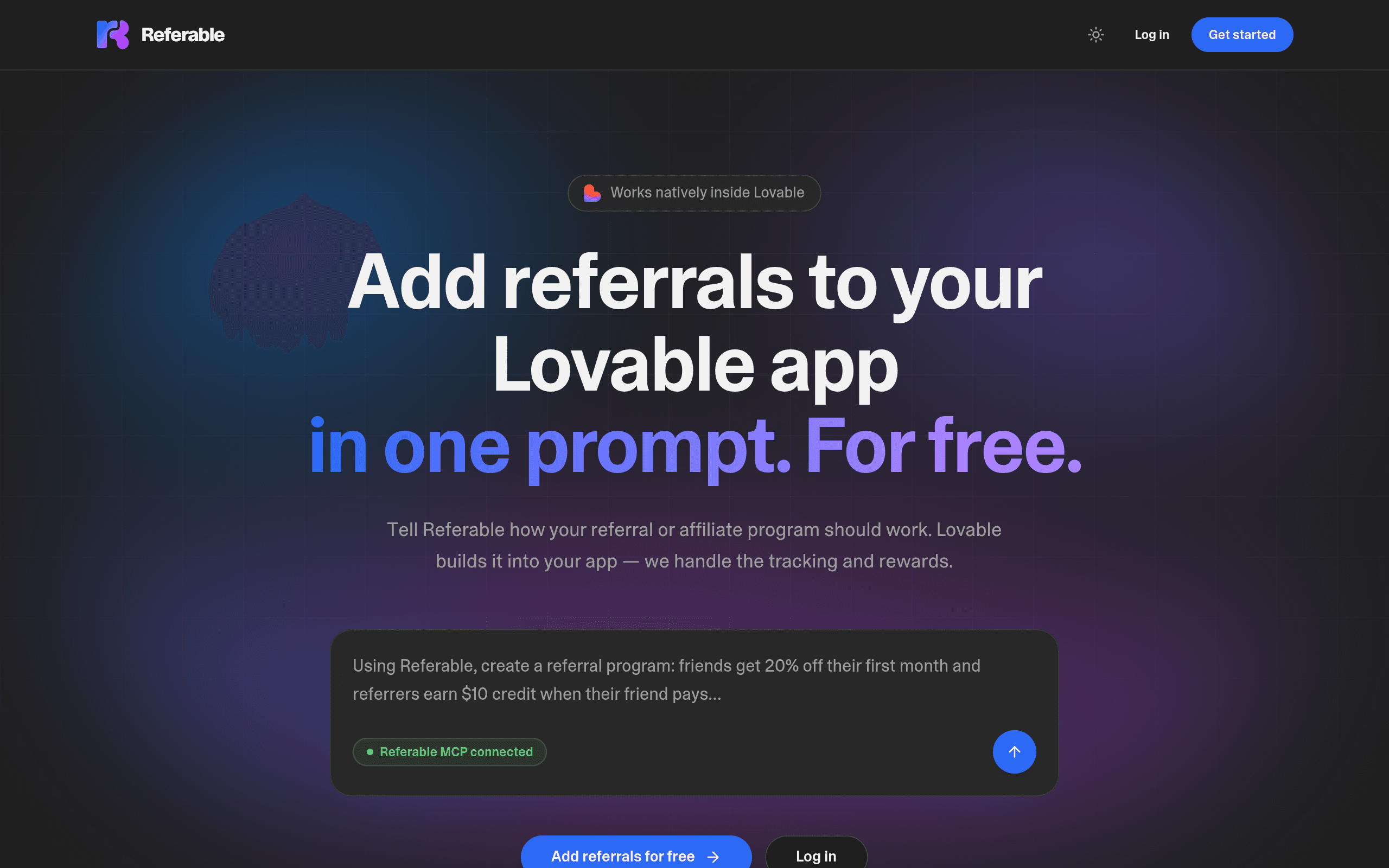
Referable

Adds referral programs to your Lovable app in one prompt — MCP-connected tracking, rewards and share links.

Referable adds a referral program to your Lovable app in one prompt. Describe how the program should work — friends get 20% off their first month, referrers earn $10 credit when a friend pays — and Referable connects through MCP to build it into the app, handling tracking, rewards and share links with no separate backend to wire up. The Lovable angle is first-party: the official Made with Lovable Showcase lists Referable as a Featured project marked "Built with, Lovable", added October 6, 2026 — Lovable's community showcase only accepts projects actually built with Lovable. 中文导读:用一句话提示词给 Lovable 应用加上推荐计划的 MCP 工具,追踪与奖励全自动。

Showcase
Online
Toolsboltnew

LocalGov.AI

Ask about any local law in plain English — AI answers with citations, no legal jargon.

LocalGov.AI answers one kind of question most government sites refuse to simplify: what does my local law actually say? Enter a city, ask in plain English, and the AI explains the ordinance or policy with citations and disclaimers attached — no legal jargon. The homepage embeds a live demo: Phoenix, AZ, and a parking question, with an AI response preview right on the page. The README is unusually transparent about how it was made: the project was "developed using Bolt.new," with "Primary Development Platform: Built entirely with Bolt.new," full-stack Next.js inside the Bolt environment, and production-ready deployment. The repo (kroszborg/localgov.ai) is at version 2.0 with streaming responses, smart caching, markdown rendering, and keyboard shortcuts; the site claims 10,000+ questions answered across 500+ cities. It is the rare vibe-coded civic tool that kept shipping past the hackathon demo: 30 commits, a v2.0 with real engineering concerns (95% faster repeat queries via a one-hour smart cache), and a clear free-forever signup funnel. A solid example of Bolt-built software doing unglamorous public-good work. curated by the VibeFix editors

Showcase
Online
Toolschatgptclaude-code

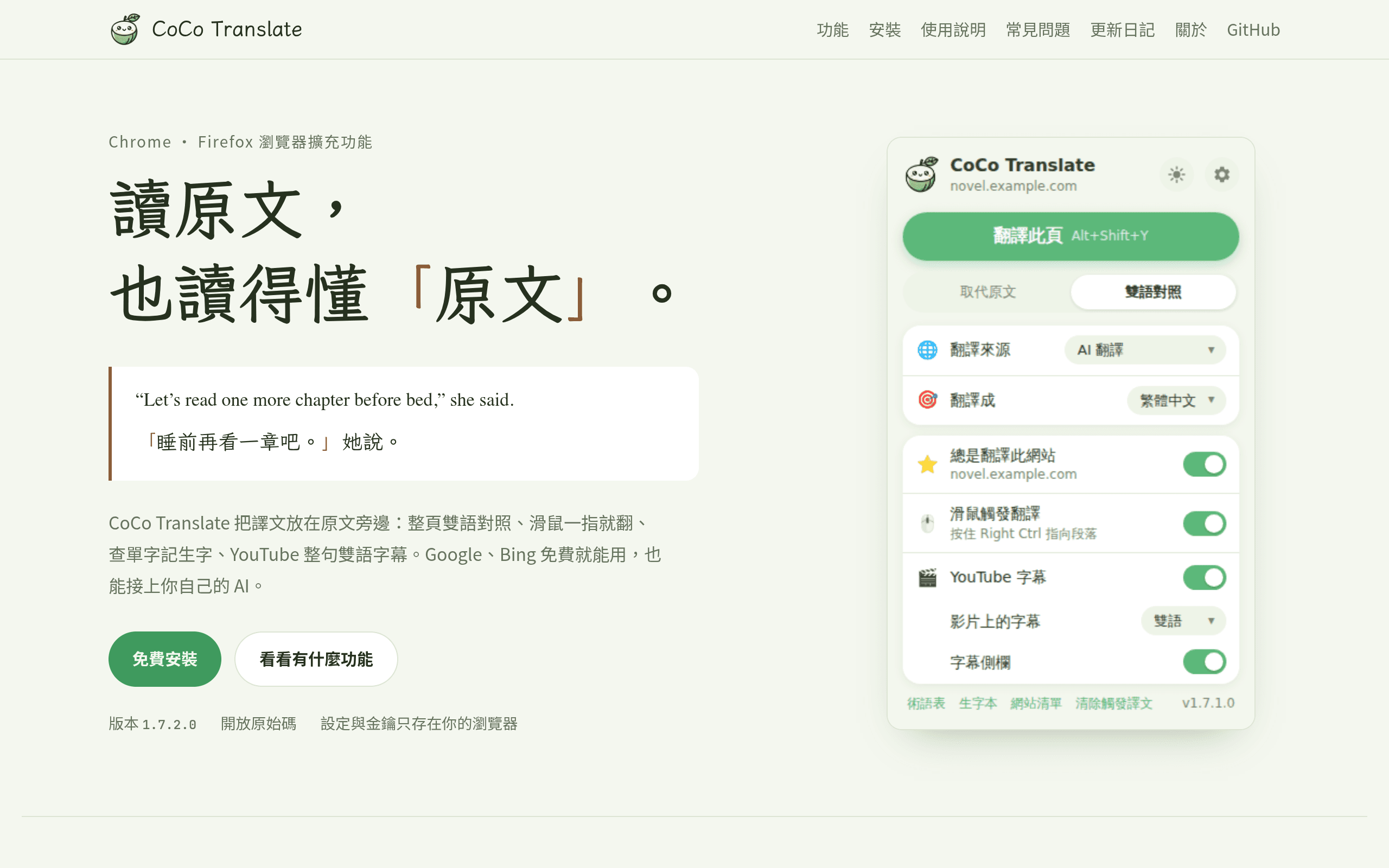
CoCo Translate

雙語對照的瀏覽器翻譯擴充:整頁對照、懸停翻譯、YouTube 雙語字幕,免費開源。

讀原文,也讀得懂原文CoCo Translate 是 Chrome / Firefox 雙語對照翻譯擴充功能:整頁雙語對照(保留原文連結與排版)、滑鼠懸停即翻、劃詞查單字並存成生字本(可匯出 Anki)、YouTube 整句雙語字幕。翻譯來源支援 Google、Bing(免 key)、DeepL,也可以接 Ollama、OpenRouter、Gemini 等 AI 翻譯;設定與金鑰只存在你的瀏覽器裡,不上雲。 作者從沒學過程式README 的「關於」寫得很直白:「用 Vibe Coding 做出來的擴充:作者沒有學過程式,由 ChatGPT 打好 1.0~1.4 的基礎,1.5 以後的大改版與官網由 Claude(Claude Code)協作完成。」這是典型的「非程式背景 + AI」做出可用工具的案例:2025 年 8 月開坑、69 commits、2026 年 10 月仍在更新(v1.7.x),AGPL-3.0 開源。 給學英文的人的利器對 lee 的英語學習軌來說這類工具正合適:讀英文原文時旁邊直接對照中文,YouTube 字幕也是整句雙語。注意擴充尚未上架瀏覽器商店,需依官網手動安裝。

Showcase
Online
Toolsclaude-designclaude-code

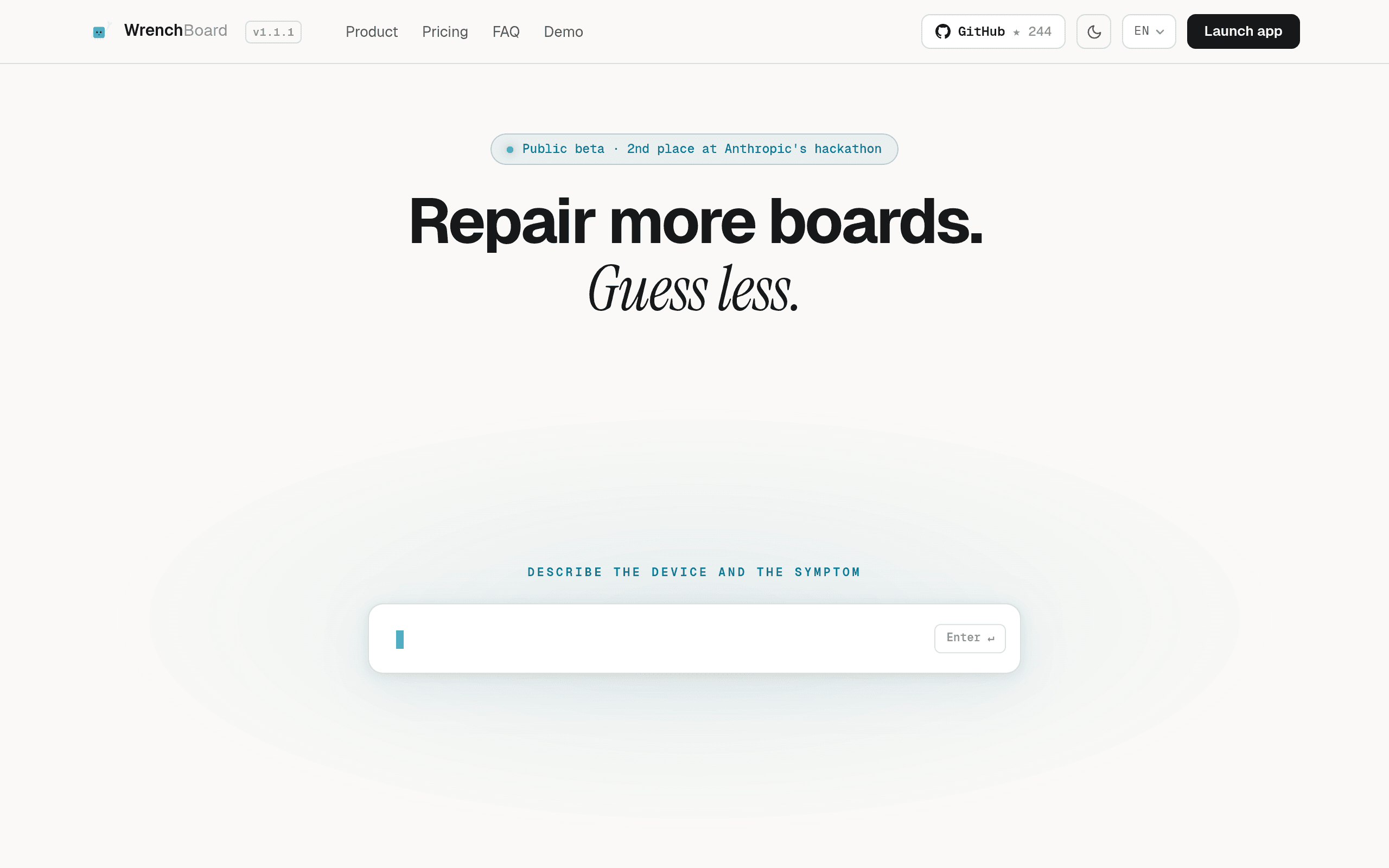
Wrench Board

AI diagnostic workbench for electronics repair: upload a schematic and boardview, and the agent traces the fault to the exact pad.

An AI repair bench for people who fix boards for a livingWrench Board is a diagnostic workbench for independent electronics technicians. You drop in a schematic and a boardview, describe the symptoms, and the agent builds a unified electrical graph, reasons over it, points at the exact pad to probe, reads your measurements, and updates its hypotheses until it diagnoses the fault. The site's pitch: "Repair more boards. Guess less." Five days, multi-agent Claude CodeAlexis Chapellier — a self-taught builder from a repair shop background in France — prototyped the app in Claude Design, wrote specs and plans for each module, then executed in Claude Code's multi-agent mode, running five or six agents in parallel while debugging. The project took second place in Anthropic's official Built with Opus 4.7 Claude Code hackathon. By a repairer, for repairersThe big bet was on the model's ability to read visual schematics — Alexis knew it was working when it traced a power path across a motherboard. The project has 244 GitHub stars and is in public beta with a growing community of electronics repairers.

Showcase
Online
Toolsclaude-code

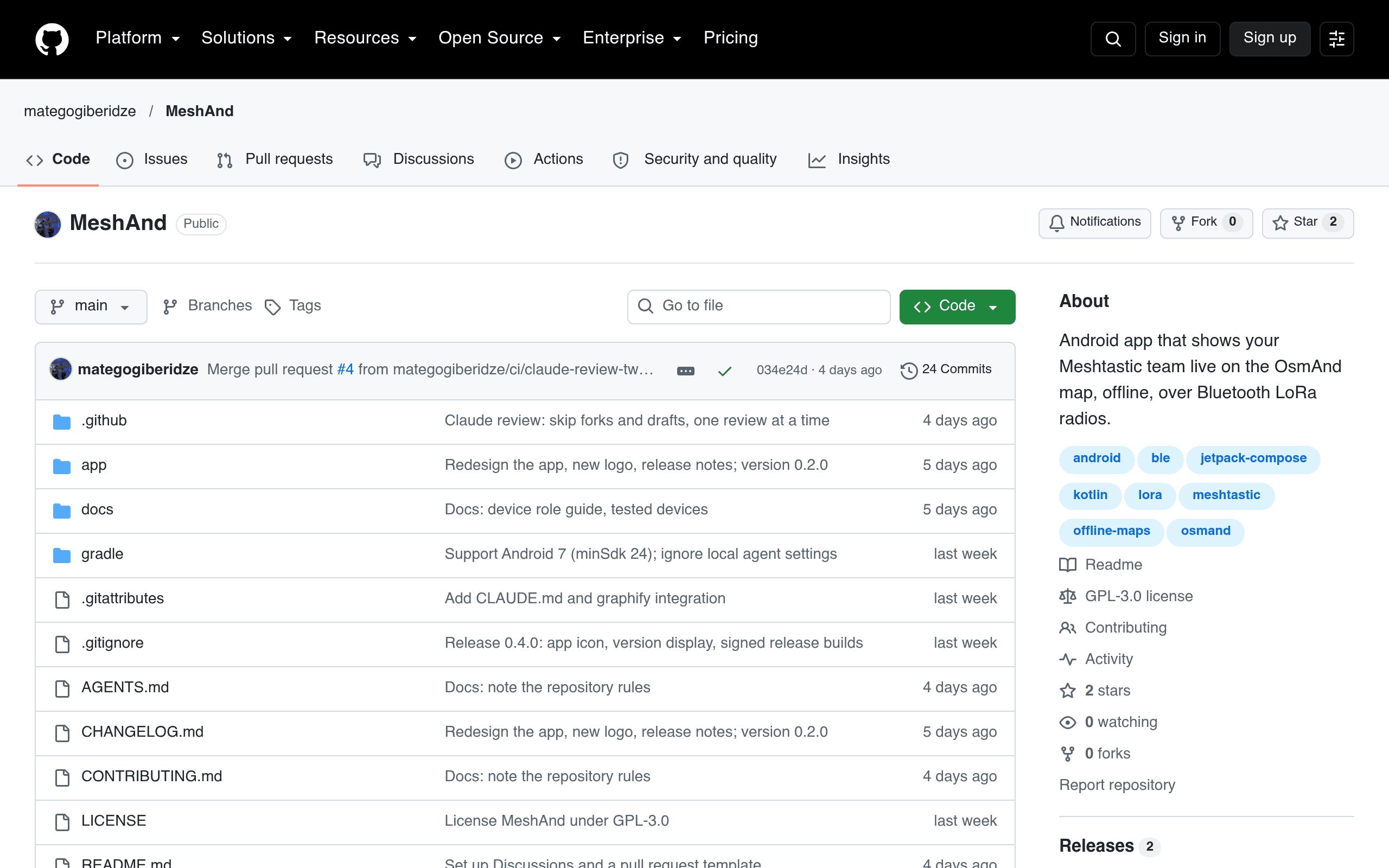
MeshAnd

See your Meshtastic team live on the OsmAnd offline map — no internet, no extra app

MeshAnd is an Android app that puts your Meshtastic team on the OsmAnd map you already use — live, offline, with no internet connection and no extra app to juggle. Connect your LoRa radio over Bluetooth and it draws teammates, 30-minute-to-6-hour movement trails, shared pins, and quiet-teammate alerts right inside OsmAnd's offline maps. The README is refreshingly honest about how it was built: "This project is 100% vibe coded. Every line of code, test and document was written by an AI (Claude Code), steered by a human who tested it on real radios and a real phone." Created 2026-09-30, 24 commits through v0.2.0, GPL-3.0 — a niche tool built the vibe way for a niche radio community.