ChatGPT chats can now be locked: 4-digit PIN plus biometrics — but it's not end-to-end encryption
OpenAI began rolling out ChatGPT Locked Chats on October 20: 4-digit PIN plus biometrics, with an isolated locked memory. But it's not end-to-end encryption — retention and training opt-in are unchanged, and resetting the PIN permanently deletes everything.

On October 20, 2026, OpenAI began rolling out a new ChatGPT feature: Locked Chats. Users can move selected conversations into a separate locked area, and every subsequent visit requires authentication first — a 4-digit account PIN on web and desktop, or Face ID, Touch ID, or device unlock on phones. As TechCrunch reported that day, the design scenario is deliberately concrete: handing your phone to a friend or family member to show them one conversation, or riding a crowded bus while someone peers over your shoulder — the conversations you don't want seen are already tucked away.
OpenAI puts it even more bluntly: many people use ChatGPT in crowded places like buses or subway platforms and don't want bystanders reading their screens; handing a device to a friend while pointing at a chat and saying "look at this" is everyday life. Locked Chats is built for that "semi-public moment." It's not a cryptographic breakthrough — it's a precise product surgery. What gets cut isn't data; it's the possibility of being seen.
It sounds like WhatsApp's Chat Lock, and the logic is indeed close. But this piece isn't about "yet another lock." It's about two design decisions behind the lock that show real craft, one honesty boundary that must be stated plainly, and — if you're building AI products — a memory-isolation mechanism and a "reset PIN, everything burns" rule you can copy straight into your own product.
1. What it is: three taps to lock, and the chat vanishes from every normal entry point
The flow is short: in a conversation's more-options menu (•••), tap "Lock chat," confirm, then set a 4-digit PIN (if you haven't already). The conversation immediately disappears from regular history, pinned chats, and search results, and moves to a dedicated section in the sidebar: Projects > Locked chats. One subtle detail: the sidebar shows the "Locked chats" project entry, but the titles of locked chats stay hidden — an onlooker can see that a locked area exists, but not what's inside.
Unlock methods differ by device but follow one rule: web and the macOS / Windows desktop apps use the PIN; supported iPhones can use Face ID or Touch ID, and Android devices can use device unlock. The PIN is always the fallback, and the same PIN works on every device signed in to the same account — this is an account-level lock, not a device-level one.
The auto-relock behavior is more serious than most apps' "private modes":
- Web and desktop: the locked area relocks when you leave the tab or window, refresh the page, or close the tab;
- iOS and Android: access expires after one minute away from the locked section, or one minute with the app in the background;
- A "Lock now" button ends access immediately at any time; signing out or switching accounts does the same.
Two more practical details: you can start new conversations directly inside the locked section, and files uploaded or created within a locked chat are protected too — hidden from your regular file space. A shared link you created before locking keeps working after the lock until you delete it — the lock secures the entry points, not links already sent out.
To keep three easily confused concepts straight:
| Locked chats | Archived chats | Temporary chats | |
|---|---|---|---|
| Hidden from history | Yes | Yes | Yes (never saved) |
| Requires authentication | Yes (PIN / biometrics) | No | No |
| Conversation is saved | Yes | Yes | No |
| New messages update memory | Locked memory only | Regular memory | No memory updates |
| Can it be locked again | — | Archived chats can't be locked | Temporary chats can't be locked |
In one line: archiving is tidying ("out of sight"), temporary chats are amnesia mode ("forgotten after"), and locking is a safe ("visible but unopenable"). They solve different problems — don't substitute one for another.
Availability: all tiers — Free, Go, Plus, Pro, Business, Enterprise, Edu — rolling out gradually (if you don't see "Lock chat," your account isn't there yet). The sole exception is ChatGPT for Healthcare, where compliance demands are higher and OpenAI skipped the feature for the entire tier. Chats that can't be locked: temporary chats, archived chats, group conversations, chats created from shared links, conversations with scheduled tasks, and chats containing meeting recordings.
2. The technical detail worth your time: two memory pools — write-isolated, read-shared
The most interesting design in locked chats isn't the lock itself; it's what happens to Memory when it's enabled. OpenAI gives the locked area its own separate shared memory, governed by three rules:
- New messages sent in a locked chat after locking update only the locked memory — nothing leaks into regular memory;
- Information ChatGPT remembered before you locked the chat is unaffected and stays in regular memory — locking doesn't "wash" the past;
- Locked chats can still use relevant information from regular memory — reads are open, writes are isolated.

The "write-isolated, read-shared" choice is worth savoring. Full isolation (locked chats unable to read regular memory at all) would be safest, but it would fracture the experience: you ask "continue from that plan we discussed" inside a locked chat and the model pretends not to know you — the lock becomes a lobotomy. OpenAI put the one-way valve on the write side: sensitive new information doesn't flow outward, but historical context still flows in. It's a classic product trade-off: the strength of privacy protection depends on which side of the information flow you place the valve.
But the second rule is an honest "gotcha" that deserves naming: if you told ChatGPT your real name, employer, or health details in a regular chat before locking, that information already sits in regular memory — locking the conversation afterward doesn't delete the memory entry. The lock governs the visibility of conversation entries, not the forgetting of the memory store. For a true clean-up, you have to delete it in memory management manually.
A concrete example makes it click. Say you first asked ChatGPT in a regular chat to help write a cover letter, and the model remembered "you're job hunting, target company X." A week later you lock that conversation, feeling safe. But when you casually ask in another regular chat, "help me prep for the interview," the model may still invoke that memory — because the memory was never locked; only the conversation's door was. That behavior matches OpenAI's documentation exactly, yet it easily violates user intuition. Intuitively, "locked" feels like "hidden away"; engineering-wise, "hiding a conversation" and "deleting a memory" are two independent operations.
Zoom out, and the dual-memory-pool design actually answers a question every memory-equipped AI product faces: when a user says "don't remember this part," what should happen? OpenAI's answer is layered — new content in locked chats goes to an independent pool, old content stays put: no retroactive scrubbing, no cross-contamination. The "isolate only the increment, don't rewrite history" strategy is simple to implement and gives users a clear mental model: "from the moment of locking, new things won't leak out." The cost is the gotcha above, which needs repeating in docs and UI copy.
3. The honesty boundary: four things OpenAI says locking does NOT do
OpenAI lists in bold, on its support page, what locking does not change. That up-front candor is precisely the part of this story most worth relaying:
- It does not create end-to-end encryption or a separate encrypted vault — the lock is access control, not encryption;
- It does not change retention policy — how long chats are kept on OpenAI's servers is exactly as before;
- It does not change your "Improve the model for everyone" training setting — if you've opted in to having conversations used for model improvement, the lock won't opt you out; locked chats can still be used for training;
- It does not override workspace policies, safety requirements, or legal and compliance obligations — in Enterprise and Edu, locked chats are still included in conversation message logs available through the Compliance Platform. Your employer and compliance officers can still see what they need to see.
Translation: this lock defends against the person sitting next to you, not the people who own the servers. OpenAI itself can access locked chats (and use them for training when you've opted in); your employer can see them in compliance scenarios. Think of it as "screen-level privacy," not "cryptographic privacy," and you won't misuse it.
The third item deserves unpacking because it's counterintuitive. Many people's gut reaction: "it's locked — surely it's excluded from training by default?" But OpenAI's logic is that locking changes where conversations appear and who can open them, while the training opt-in is an account-level data-use setting. The two are orthogonal. That's clean engineering, but dangerous for user psychology — the act of "locking" carries such a strong mental implication that users will assume it quietly solves every privacy problem. OpenAI's compromise is to document the four "nots" rather than interrupting the locking flow with a warning — smooth flow preserved, "we told you so" evidence filed. If you're a PM, file this one away: when a feature's psychological implication outruns its actual power, the duty to inform can't live only in the help docs.
One more extreme-but-essential rule: resetting your 4-digit PIN permanently deletes all locked chats, memories stored only in the locked area, and files protected only by the old PIN — with no recovery, not even by OpenAI Support. "Forget the PIN, the data is cremated" — no exceptions. The upside: with no backdoor, the lock's credibility doesn't depend on support staff keeping their mouths shut. The price: memorize the PIN, and back up locked conversations that matter.
Two more real-world gaps: search results take a while to update, so a freshly locked chat's title may linger briefly; on other devices where ChatGPT is already open, titles persist until the list refreshes, and on iPhone, already-loaded content stays visible until the app refreshes. So in the minute before you share your screen, checking your other devices beats trusting the lock.
Finally, the 4-digit PIN itself: 10,000 combinations is laughably weak by cryptographic standards — so why does OpenAI dare? Because brute force isn't in this lock's threat model at all. Anyone in a position to try PINs has already signed in to your ChatGPT account, which is itself guarded by a password, email verification, or SSO. The PIN defends against "the person standing at your screen tapping casually," not "an attacker running a script." Security strength should always match the threat model; over-engineering (say, mandating a 12-character complex password) would just make users skip the feature entirely. A 4-digit PIN plus biometrics is "exactly enough" — a textbook case.
4. Four design takeaways for vibe developers: copy these directly
If you're building a "private mode / locked area" for your own AI product, Locked Chats hands you four ready-made answers — each backed by an observation of real user behavior, not armchair security theater:
1. Make the PIN account-level; treat biometrics as a shortcut. One PIN works across devices; Face ID / Touch ID / device unlock merely reduce friction, with the PIN always kept as fallback. Lesson: never let biometrics be a single point of failure — new phone, broken sensor, a mask on your face, every scenario needs an escape hatch that doesn't depend on hardware.
2. Auto-relock can't rely on user discipline. Relock on leaving the page, relock after one minute in the background, plus a prominent "Lock now" button. Most private modes fail at exactly one step: "the user forgot to lock it back." Make relocking the default behavior, and make "stay unlocked" the state that requires an explicit user choice.
3. Isolate writes for memory (or any cross-session state), not reads and writes both. New information generated in the locked area must not leak outward, but let it read regular context so the experience doesn't fracture. If your product has long-term memory, a knowledge base, or preference profiles, "data created in private mode doesn't pollute the main profile, but can use the main profile" is the more mature default.
4. Write the worst case into the rules — and tell users up front. "Resetting the PIN permanently deletes everything; even support can't save you" sounds scary, but it's the most credible promise in the whole design: no backdoor means no risk of being compelled to open one. When building sensitive features, an explicit contract of irreversibility beats vague reassurance — users will decide for themselves what's worth putting inside.
Taken together, these four points form a complete checklist for a "social privacy" feature: account-level credential + biometric shortcut + default auto-relock + write-isolated state + an explicit no-recovery contract. Next time you add a private mode to your product, tick through these five; for each missing one, write down in the PRD why it's missing — every gap will eventually become a user complaint or a security incident.
5. The verdict: a lock against the people around you — don't lend it a sense of security it doesn't have
An accurate positioning for Locked Chats: it's an excellent "social privacy" feature, not a "data security" feature. Its threat model names exactly one adversary from start to finish — the person who can see your screen or hold your unlocked device. Against that adversary, it delivers a complete answer: hidden entries, hidden titles, PIN plus biometrics, auto-relock, write-isolated memory, protected files.
The list of what it doesn't defend against is longer: the OpenAI platform itself, data use when training opt-in is on, employer compliance audits, lawful compelled access. OpenAI wrote that list into its own support page — commendable honesty, but it also puts an obligation on the product not to let users misunderstand. If you build something similar, put "who this lock defends against — and who it doesn't" on the very screen where the user taps "lock," not on page 7 of the help docs.
One more lens: Locked Chats' arrival signals that "AI conversations" are shifting from personal tools to everyday fixtures in semi-public settings. When people start using ChatGPT constantly on subways, in meeting rooms, in front of family, the conversation list becomes a new privacy surface — it can't be wiped with one click like browser history, nor does it have chat apps' "disappearing messages" tradition. OpenAI's answer isn't heavier encryption but lighter "visibility management," which is itself a judgment call: for most users, privacy anxiety comes not from the NSA but from the nosy person leaning over. Craft in product design often shows in exactly this — correctly identifying who the user is actually afraid of.
Finally, four practical tips for regular users. First, before tapping "Lock chat," back up any conversation you can't afford to lose — a forgotten PIN has no undo. Second, check links you shared before: locking doesn't invalidate them; delete the ones you no longer need. Third, look at your "Improve the model for everyone" setting — the lock can't touch the training opt-in; that switch is yours to flip. Fourth, if you're on a company or school Enterprise / Edu account, remember locked chats still land in compliance logs — route work-sensitive content through your organization's proper channels instead of hoping the lock shields you from an audit.
Comments (0)
Sources
Related articles
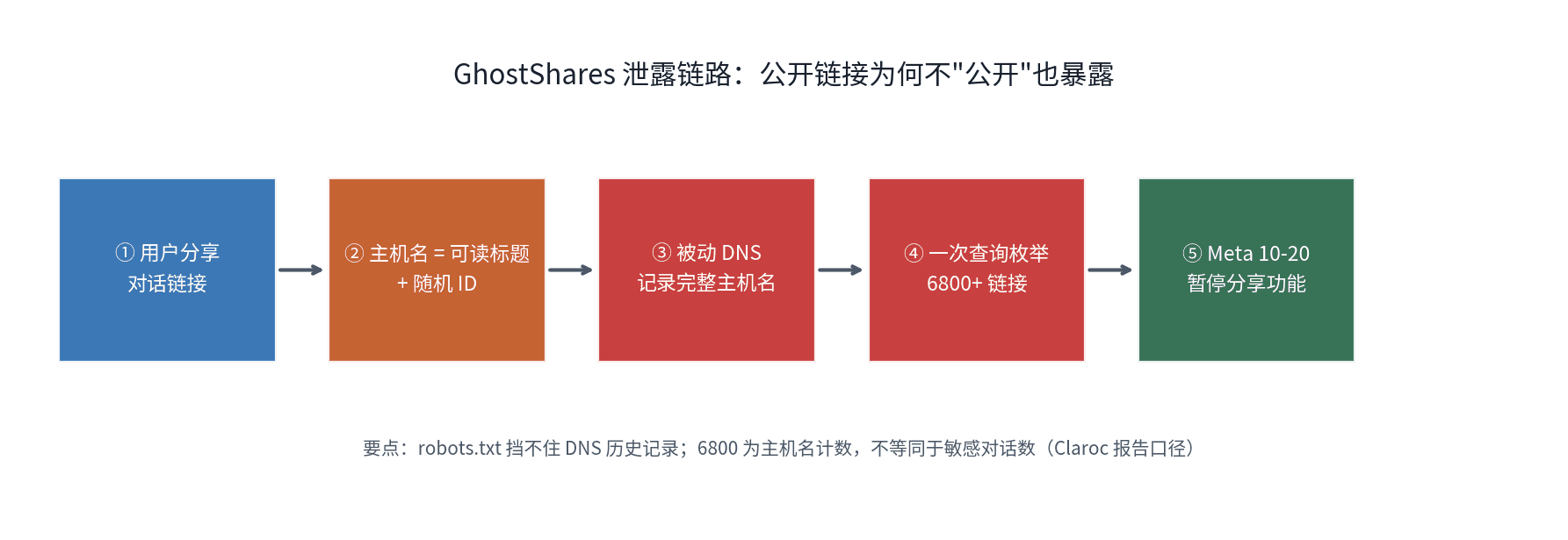
Meta paused Muse AI's conversation sharing on Oct 20 after Claroc researchers enumerated 6,800+ share links via passive DNS — Muse put readable chat titles in subdomains. A lesson in share-link design every vibe project should read.

A New Mexico judge ordered Meta to pay $25 billion over the Cambridge Analytica privacy case after a jury found 43.9 million violations of state consumer-protection law. Single-state litigation dwarfs federal settlements — and state AGs have a new playbook.
Bloomberg reported on Oct 22 that DeepSeek is closing a ~¥100B ($14.98B) round led by CATL and Tencent at a ~¥500B pre-money valuation — two days after the US DHS ordered federal agencies to remove DeepSeek. We unpack the investor map, the two capital logics of China vs. the US, and what it means for the open-source vibe coding ecosystem.