Claude Code Cloud Sessions Come with Up to $250 Free Credit: Claim by October 7
$250 for Max, $100 for Pro — cloud-sessions-only credit expiring November 4. Claim by October 7, 11:59 PM PT from your Usage page.

If you subscribe to Claude Code on Pro or Max, check the Usage page in your claude.ai settings right now — there may be unclaimed money sitting there.
On September 23, Claude Code's cloud sessions moved from research preview to general availability, and Anthropic launched a one-time credit promotion alongside: $250 for Max subscribers, $100 for Pro, earmarked for cloud session usage. The claim deadline is October 7, 11:59 PM PT — time is running short.
Read the rules first: cloud only
The credit comes with several restrictions, worth going through one by one:
Cloud sessions only. Local Claude Code, regular Claude chat, Cowork, and Remote Control are all excluded. The help page explicitly lists "all Claude usage other than cloud sessions" as not covered.
Who qualifies. Individuals with an active Pro or Max subscription when the promotion started (September 23, 2:00 PM PDT). Team/Enterprise plans, trials, and overdue accounts are excluded.
Spend deadline. Anything unused by November 4, 11:59 PM PT vanishes. Claiming without spending equals not claiming.
Prerequisite. A GitHub connection — cloud sessions work by cloning your repo onto an Anthropic-managed cloud VM and handing results back as a PR.
How to claim: four entry points
Anthropic offers four ways in: the banner atop the Usage screen in claude.ai settings, a banner in the desktop app or IDE, the /claim-credit command in the terminal, and the claim link in the announcement. The settings route is the most reliable in practice: click your name (bottom left) → Settings → Usage, hit "Claim credit" on the banner, agree to the terms. Some accounts are credited automatically, but no banner means not claimed — verify manually.
Where this money is best spent
The core value of cloud sessions is "close the laptop, the work continues": long refactors, dependency upgrades, full test runs — hand them to the cloud and come back to a PR. Anthropic also recommends an efficient combo: plan locally in plan mode (claude --permission-mode plan), commit the plan as a document, then let the cloud execute it — human judgment stays local, long waits go to the cloud.
Two details worth noting. First, the cloud VM is a fresh Ubuntu 24.04 every time: your home-directory CLAUDE.md, personal skills, and local MCP configs do not follow — commit workflow rules into the repo if you want them in the cloud. Second, parallelism is the cloud's natural advantage: three heavy tasks would choke your laptop but run independently as three cloud sessions.
The one-line advice
If you qualify, claim it now even if you have no use this week — you have until November 4 to spend it. But don't invent work to burn credit: the sweet spot for cloud sessions is long-running asynchronous tasks. Treat it as your overnight outsourcing team, not a replacement for your local terminal.
Sources
Related articles
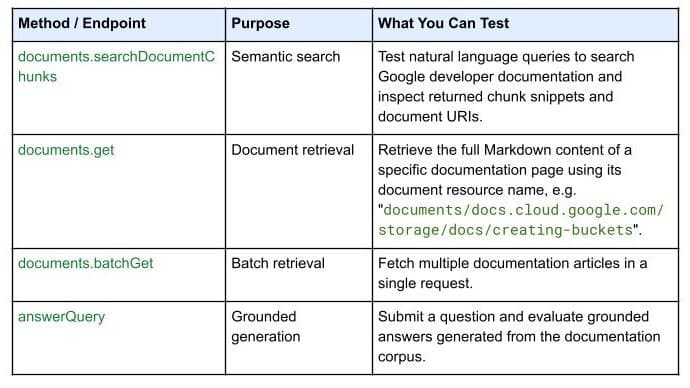
On October 7, 2026, Google Developers launched the Developer Knowledge API ecosystem: official Google Cloud, Firebase, and Android docs as a programmatic source of truth, with a gcloud CLI surface, an official Agent Skill (one-line install), an MCP server, and multi-language client libraries. Why 'docs as APIs' uproots vibe coding's classic failure of models misremembering APIs.

On October 7, 2026, GitHub announced via Changelog: starting with CLI 1.0.94-0, the /model command discovers models in your local Ollama instance, listed alongside configured and cloud models. Discovery doesn't auto-enroll — each model needs manual confirmation — and models must support tool calling and streaming. GitHub also teased intelligent routing, and clarified: a local model neither enables offline mode nor disables telemetry.

Getting signups is only the start — users churn by day 3 and you have no horn to call them back. This guide covers notification systems for vibe projects: channel selection, email with Resend from day one, SPF/DKIM/DMARC done right, when SMS is worth the money, frequency caps and unsubscribe, retries and dead letters, plus a launch acceptance checklist.