User Said 'Delete All My Data': A DSR Response Playbook for Vibe Projects (GDPR/PIPL)
When a user says 'delete all my data,' a solo team must close the loop within the statutory window. This hands-on guide covers the six-right DSR matrix, identity verification, a data asset map template, delete-vs-anonymize decisions, a cascading deletion checklist, machine-readable export packages, and a five-node 30-day SOP with message templates.

Opening: When a User Says "Delete Everything," You're Not Doing Support — You're Running Compliance
A quick disclaimer first: this guide shares practitioner experience; it is not legal advice. For concrete compliance obligations, rely on the current regulations in your jurisdiction and your lawyer's opinion.
The day any vibe project gets real users and real paying customers, this email arrives: "Please delete my account and all my data." The tone is polite, but this isn't a support ticket — it's a Data Subject Request (DSR). Under GDPR, the user is exercising their right of access (Article 15), right to erasure / right to be forgotten (Article 17), or right to data portability (Article 20). Under China's Personal Information Protection Law, individuals likewise hold rights to access, copy, and delete their personal information. This guide won't compare EU and Chinese regimes; it answers one question: when the request lands, in what order and with what deliverables must a one-person team close it out within the statutory window (GDPR: without undue delay, at the latest within one month)?
The published "legal starter kit" covered paper compliance (what your privacy policy, terms, and cookie copy should say); the backup guide covered disaster recovery (how to restore lost data). This piece fills the missing last mile: operational reality when a user lawfully demands their data. The prettiest paperwork means nothing if a deletion request sits untouched for 30 days.
1. The DSR Type Matrix: Six Rights, Their Deadlines and Deliverables
First, translate "what the user is asking for" into "what you must deliver." The table below covers the six most common request types. Deadlines follow GDPR: without undue delay and at the latest within one month; complex cases may extend by two further months, but you must notify the user of the extension and reasons within the first month:
| Right | Basis | What the user typically says | Statutory deadline | Your deliverable |
|---|---|---|---|---|
| Right of access | GDPR Art. 15 | "What data do you hold on me?" | At the latest one month | Copy of the data + processing notice (purposes, categories, recipients, retention) |
| Right to rectification | GDPR Art. 16 | "My name/email is wrong, fix it" | Without undue delay | Confirmation of the corrected record |
| Right to erasure (right to be forgotten) | GDPR Art. 17 | "Delete all my data" | Without undue delay | Deletion confirmation + list of exceptions retained (if any) |
| Right to restriction of processing | GDPR Art. 18 | "Stop using my data until you sort this out" | Without undue delay | Processing-freeze confirmation (data kept but flagged unavailable) |
| Right to data portability | GDPR Art. 20 | "Export my data, I'm taking it with me" | At the latest one month | Structured, commonly used, machine-readable export package (JSON/CSV) |
| Right to object | GDPR Art. 21 | "Stop profiling / marketing me" | Without undue delay | Confirmation that processing stopped (removed from marketing lists, etc.) |
Three field lessons: first, users don't speak legalese — they say "delete everything," "export it," "leave me alone," and you map that onto the table yourself. Second, classify first, then start the clock — the deadline runs from the moment you receive an identifiable request, not from when you figure out how to handle it. Third, responding is free as a rule; you may only charge or refuse for manifestly unfounded or excessive repeat requests, and the burden of proof is on you.
On China's Personal Information Protection Law: individuals likewise enjoy rights to access, copy, rectify, supplement, and delete their personal information, and handlers must respond promptly. Specific timelines and procedures follow local regulations and supervisory guidance; the SOP skeleton in this guide (verify — execute — review — respond) applies equally.
2. Gate One: Identity Verification — Don't Hand Data to an Impostor
The most overlooked and most consequential step in the DSR flow is the first one. Access and export requests deliver the user's entire dataset — verify the wrong person and you've personally handed user data to a social engineer. Verification strength must match request sensitivity:
| Request type | Data sensitivity | Minimum verification strength | Example |
|---|---|---|---|
| Object to marketing / unsubscribe | Low | Weak: request email matches account email | Clicking the unsubscribe link suffices |
| Correct non-sensitive fields | Low–medium | Weak–medium | In-app while logged in, or email OTP |
| Access / data export | High | Strong | Logged-in session + secondary email/SMS confirmation |
| Delete entire account | Extreme (irreversible) | Strongest | Logged-in session + second confirmation + cooling-off notice (see below) |
Verification SOP (Four Steps)
- Confirm the request channel is trustworthy. Prefer "submitted while logged in" — an in-app "Export my data / Delete account" button in settings is the strongest identity evidence. For email requests, the sender address must match the registered account email.
- Require a second confirmation for sensitive actions. Exports and deletions need a second step: a second in-app modal, or a time-limited confirmation link sent to the registered email (24-hour expiry recommended). Never accept "I changed my email, send the data to the new one" unless the full email-change verification is completed.
- Log the verification. Who verified, when, and how goes into the request ticket. This is your future evidence of reasonable effort.
- When in doubt, ask one more question. If identity can't be confirmed, reply asking for additional verification — that isn't stalling. GDPR lets you request necessary information when identity is in doubt, and the clock can run from when it's provided.
Anti-Impersonation Checklist
- Request comes from a free email address that doesn't match the registered one? → Decline; require a logged-in action.
- They "forgot the password" but want a direct export? → Run the password-recovery flow first; don't open a backdoor inside the DSR process.
- Urgent tone, pressuring "delete it today"? → Follow the normal timeline; urgency is not a reason to lower verification.
- Asking for the export package at a third-party address or file host? → Deliver only to the account-bound channel.
3. The Data Asset Map: Chart Exactly Where User Data Lives
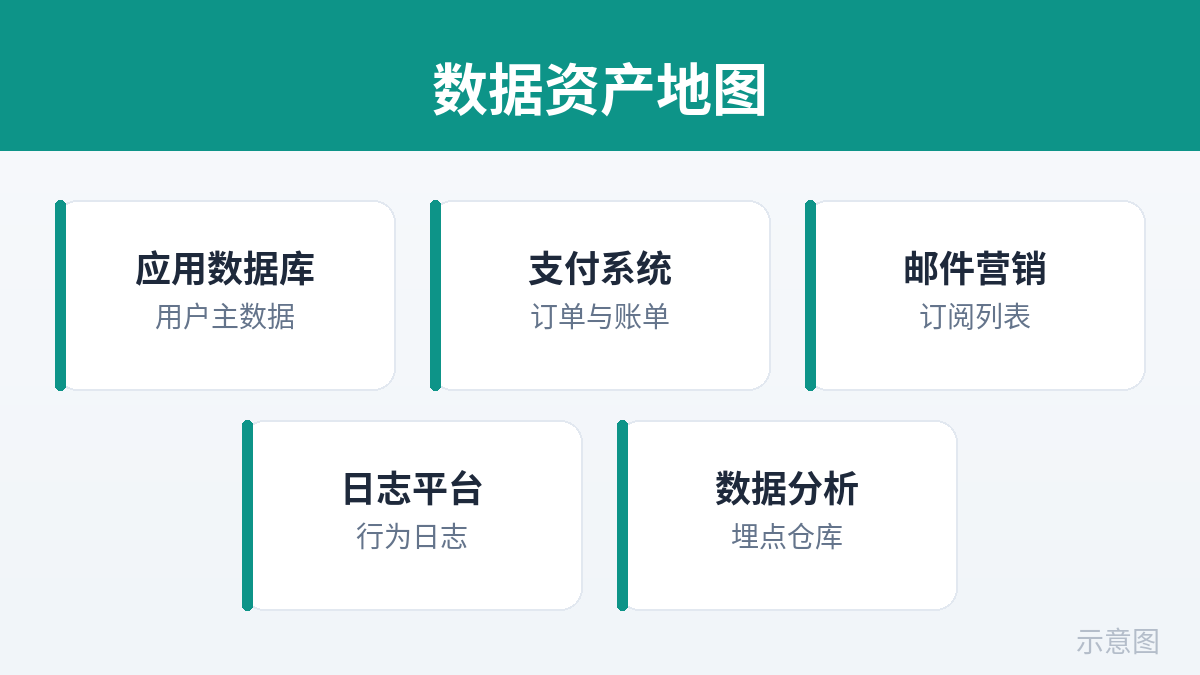
Ninety percent of DSR failures share one root cause: "I thought I'd deleted everything." Your database is clean, but the logs still have it, the backups still have it, the email provider still has it, the analytics tool still has it. Without an asset map, deletion is guesswork. Fill in this inventory table before your first DSR arrives — it's the foundation of the whole response:
User Data Asset Inventory (Template)
User identifiers: user_id / email / phone (list every key you use to join on)
[Own database] Table → PII fields → join key → deletion policy (hard delete / anonymize / retain)
E.g.: users → email, name, phone → id → hard delete; orders → amounts, items → user_id → anonymize, keep stats; invoices → billing details → user_id → retain under legal obligation[Logs & monitoring] App logs / error tracking (Sentry-like) / access logs → contain user_id, email, IP? → retention period → cleanup method
[Third parties] Payments (Stripe-like: customer objects) / email (Resend-like: contact lists, send history) / analytics (PostHog/GA-like) / support tickets / object storage (user uploads) → each one's data-deletion entry point and API
[Backups & snapshots] Backup cadence → backup retention → policy for deleted data inside backups (see Section 5)
[Caches & indexes] Redis cache keys / search indexes (Algolia/ES-like) → contain PII? → invalidation/deletion method
The three corners most often missed when filling this in: logs — error trackers routinely carry request params and user emails; analytics — event properties may embed user_id; support/email history — every email exchanged with a user is their personal data. Vibe projects have few tables early on; building this map now is cheapest.
4. Delete vs. Anonymize vs. Must-Retain: The Three-Way Decision Table
"Delete everything" doesn't mean DELETE every row. Deleting some data breaks the law (tax invoices); keeping other data breaks the law (logs long overdue for deletion). The decision logic is three filters:
| Situation | Handling | Rationale & practice |
|---|---|---|
| Account profile, preferences, user uploads | Hard delete | Data stored purely to serve the user; a deletion request removes any basis for keeping it. Physically delete from the primary DB and cascade through related tables. |
| Order stats, analytics aggregates | Anonymize, then retain | The business needs trends, not identities. Replace user_id with an irreversible anonymous token, or aggregate to a granularity where individuals can't be identified. |
| Invoices, transaction records (tax/accounting duties) | Must retain | Legal obligation outranks the right to erasure. Keep the minimum necessary fields, restrict access, and state plainly in the deletion confirmation which data is retained under tax compliance and until when. |
| Risk/fraud records (device fingerprints, blocklists) | Retain after assessment | GDPR Art. 17(3) lists erasure exceptions, including "for the establishment, exercise or defence of legal claims." Retention needs a written internal basis and access isolation. |
| User-published content (comments, works) | Delete + notify downstream | Art. 17(2): where personal data was made public, the controller should take reasonable steps to inform other controllers. In practice: full in-site deletion at minimum, plus a handling record for reposts/caches. |
One blunt word on anonymization: swapping user_id for a hash isn't anonymization — it's pseudonymization. As long as you hold the mapping table, it's still personal data and GDPR still applies. True anonymization is irreversible: destroy the mapping, aggregate coarsely enough that re-identification is impossible, or drop detail rows and keep only statistics. The safest play for a solo team: hard-delete whenever you can, and serve stats needs with "generate an aggregate snapshot at deletion time" rather than trying to scrub data after the fact.
5. Cascading Deletion: The Full Checklist From Database to Backups
This is the most hands-on section of the guide. Tick every item below; miss one and "deleted everything" is an empty promise:
- Settle foreign-key cascade policy first. Decide at table-creation time: when the user master row is deleted, do related tables
ON DELETE CASCADE(sessions, preferences) or get anonymized first and retained (orders)? Most dangerous is "no foreign keys, deletion handled in app code" — one missed relation is one compliance incident. - Soft deletes must be convertible to hard deletes. Many vibe projects use a
deleted_atsoft delete for recoverability. A DSR erasure makes soft delete only step one: after confirming no recovery is needed (suggest a 7–14 day cooling-off period, disclosed to the user), physically delete, and lock down access during the soft-delete window. - Have an answer for "deleted" data in backups. You can't rewrite backups for one person. The industry-standard approach: fixed backup rotation (e.g., 30 days), log the deletion request, let expired backups age out — and ensure your backup-restore procedure can't write deleted data back into production. Verify that in restore drills. Regulators broadly accept this, provided your backup retention is the shortest period necessary.
- Wash PII out of logs on a schedule. user_ids, emails, and IPs in app logs and error trackers get an automatic rolling retention (e.g., 30–90 days). Don't full-text-search logs for a single DSR — let the retention policy age them out, and document it in the asset map.
- Delete across sub-processors too. The most-forgotten block on the list: the payment provider's customer objects, the email provider's contact lists and send history, the analytics tool's user profiles, support tickets, user files in object storage. Every sub-processor needs a corresponding deletion entry point (API or console action), with screenshots/logs of the operation kept as records.
- Clear caches and search indexes in sync. Redis entries keyed by user_id and user documents in search indexes must be actively invalidated or reindexed after deletion — otherwise users hit the haunted "I deleted my account but can still search myself" bug.
- Guard against "deleted, then written back." Every webhook handler, cron job, and sync script that writes user data needs a "skip deleted users" guard. A real-world failure: after account deletion, a Stripe webhook wrote the customer update straight back into the database the next day. After the deletion script runs, do a final verification pass:
SELECTthe whole DB for the original user_id.
6. Export Package Format: Machine-Readable Is a Structure, Not a Slogan
GDPR Art. 20 requires portability data in a "structured, commonly used and machine-readable format." Translated into a solo developer's implementation checklist:
- JSON first, CSV second. JSON for nested structures (orders with line items, settings with layered preferences); CSV for flat tables (transaction history). A PDF screenshot alone is not machine-readable.
- Structure example (JSON top-level convention):
{
  "export_version": "1.0",
  "exported_at": "2026-10-11T09:00:00Z",
  "user": { "id": "usr_123", "email": "user@example.com", "created_at": "..." },
  "profile": { "name": "...", "preferences": { "...": "..." } },
  "orders": [ { "id": "...", "amount": 0, "items": [ "..." ], "created_at": "..." } ],
  "uploads": [ { "file_id": "...", "download_url": "...", "expires_at": "..." } ],
  "notes": "Invoice data retained under tax compliance is excluded from this export; see the enclosed notice."
}- Fields must be self-explanatory. Full English key names, no abbreviations only you understand; timestamps in ISO 8601 with timezone; amounts with currency.
- Delivery: time-limited download links. Put the package in object storage and generate a signed URL — 7-day expiry recommended, auto-invalidated after. Don't email large files as attachments, and don't hand out permanent links.
- Shard large packages. User uploaded gigabytes? Ship a "file manifest + sharded download links," not one giant zip.
- Include a README. The package ships with one: export scope, field glossary, data excluded and why (e.g., tax retention), and contact details. An export the user can't understand is an undelivered export.
7. The 30-Day Response Timeline: Five-Node SOP and Message Templates
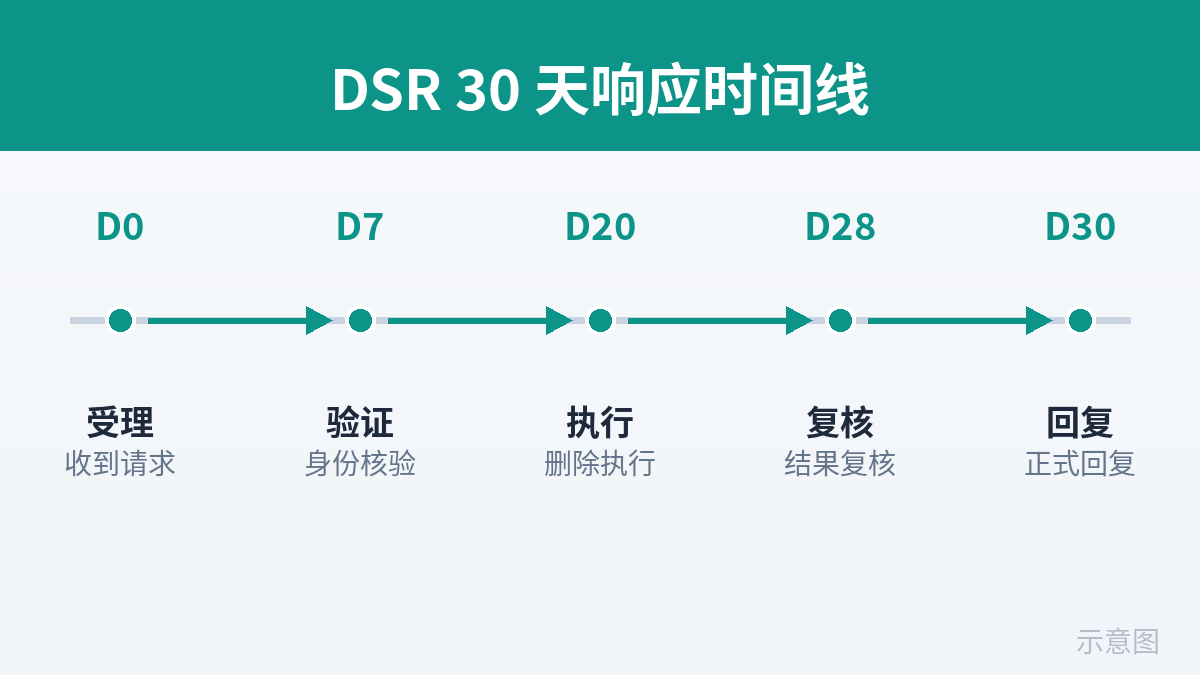
A solo team has no legal department, but it must have a timeline. Turn these five nodes into your DSR ticket template (Notion, Linear, even a markdown file works) — one ticket per request:
| Node | Owner | Deadline (from receipt) | Output |
|---|---|---|---|
| 1. Intake & triage | You (founder = support) | Within 24 hours | Ticket created: request type, channel, received timestamp |
| 2. Identity verification | You | Within 3 days | Verification method logged; if in doubt, request additional proof |
| 3. Execution | You + scripts | Within 14 days of verification | Export package / deletion run log / sub-processor receipts |
| 4. Review | You (fresh eyes) | Within 3 days of execution | Item-by-item check against the asset map: full-DB SELECT verification, third-party confirmations |
| 5. User reply | You | Within 30 days total | Formal response: what was done, what wasn't deleted and why, appeal channel |
The timeline keeps slack by design: execution and review finish within ~20 days, leaving 10 for surprises like "slow sub-processor response" or "complex case needs extension." If you need an extension, notify the user of the reason and expected date within the first month — silence is the worst compliance strategy.
Template 1: Acknowledgement (send within 24 hours)
"We've received your request to [delete/export] your personal data (ticket #___). We'll process it after verifying your identity; the full process usually completes within 30 days. If we need additional identity verification, we'll contact you separately."Template 2: Deletion completion
"Your deletion request is complete: account profile, preferences, and uploaded content have been deleted from production; data in backups will age out with the 30-day rotation cycle. The following data is retained under [tax compliance] until [date] by legal obligation: [list]. Reply to this email with any questions."Template 3: Extension needed
"Because your request involves [third-party data retrieval / large data volume], we need more time and expect to finish by [date]. We apologize for the inconvenience."
8. Common Pitfalls: The Eight Places Teams Get Burned
- "Deleted" data in backups. Production is spotless; the backup holds a full snapshot. Counter: fixed rotation + deletion log + restore drills verifying no write-back (Section 5, item 3).
- PII in logs. Error trackers carry user emails; access logs carry IPs. Counter: automatic rolling log retention — don't full-text-search logs for a single DSR.
- Sub-processor carry-over. You deleted; Stripe/Resend/the analytics tool still hold it. Counter: every third party gets a deletion entry point in the asset map, with operation records kept.
- Deleted, then written back by webhooks. Payment/sync callbacks resurrect deleted users. Counter: "skip deleted users" guards on every write path, plus a full-DB SELECT verification after deletion.
- Treating soft delete as hard delete. A
deleted_atflag is set and the job is declared done — while the data sits queryable. Counter: physical deletion after the cooling-off period, with access locked down meanwhile. - Incomplete export packages. Only the master table exported; related tables, uploads, and settings all missing. Counter: export scripts walk every table per the asset map; spot-check before delivery.
- Perfunctory verification. One email arrives and the full dataset goes out. Counter: Section 2's strength matrix is a floor, not an option.
- Overdue silence. Thirty days pass with no reply; the user files with the regulator. Counter: ticket template + calendar reminders; if you can't make it, send the extension notice first — never leave the user guessing.
Closing: Turn DSR Into a Script, Not a Fire Drill
These eight sections compress into one line: the asset map is the foundation, verification is the lock, the cascade checklist is the blueprint, the timeline is the deadline. The end state for a solo team is semi-automation: a self-serve export button in-app (covering ~80% of access/portability requests), a delete-account flow (covering ~70% of erasure requests), and only the hard cases going through manual tickets. Spend one afternoon today filling in the asset map and writing the deletion script, and every future "delete everything" becomes routine operations instead of a 3 a.m. fire drill.
One last repeat: this is practitioner experience sharing, not legal advice. Obligations under GDPR and the Personal Information Protection Law follow the statutory texts and your local regulator's guidance — consult a lawyer for complex cases.
Comments (0)
Related articles
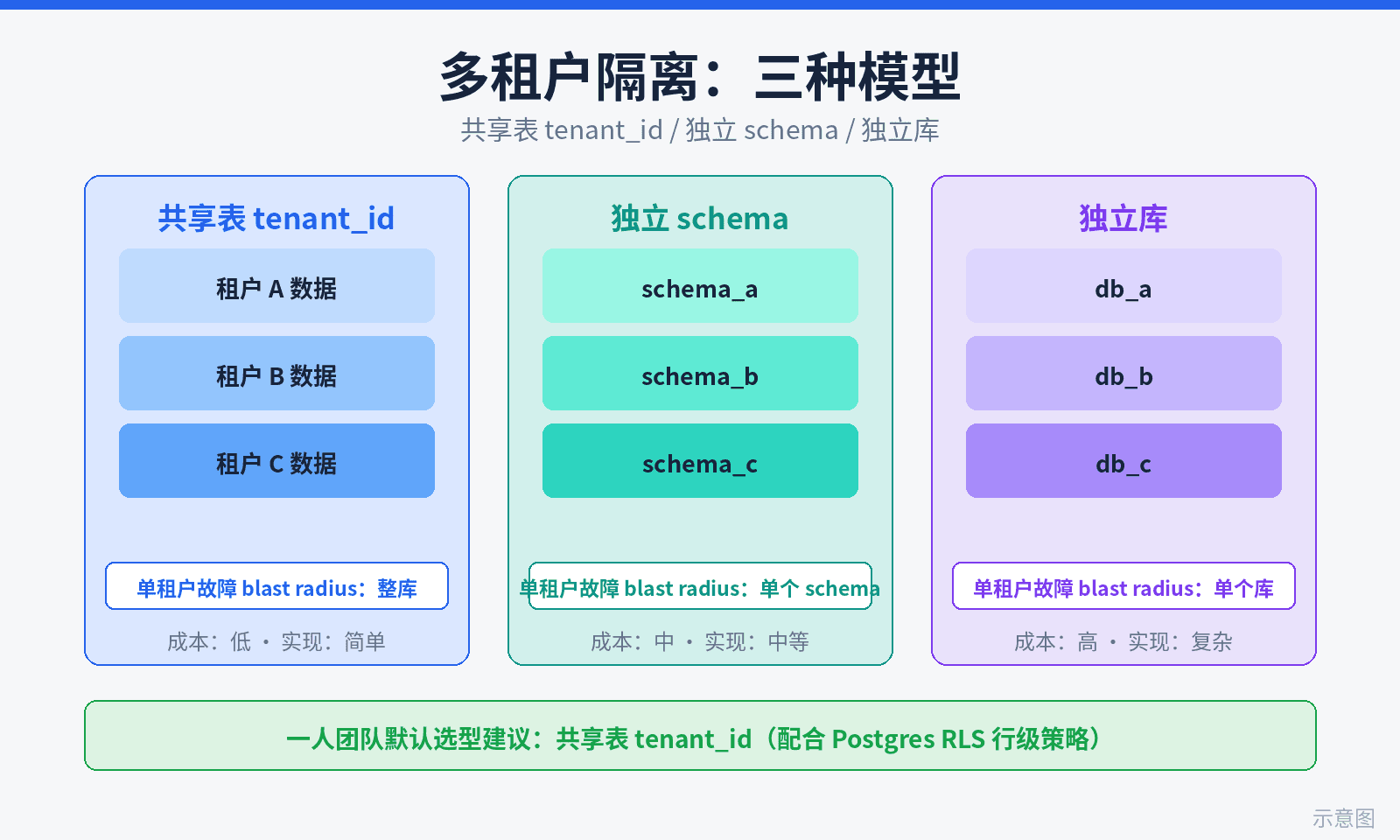
The second customer is a vibe project's coming of age: single-tenant code hides three implicit assumptions — a global single user, hardcoded config, no tenant boundary — and they collapse on contact. This guide scores the three isolation models on six dimensions, lands Postgres RLS hands-on (middleware resolution, CREATE POLICY, Prisma auto-filtering), compares routing options, and includes 10 negative leak tests, a 5-step zero-downtime migration SOP, and minimal per-tenant metering.
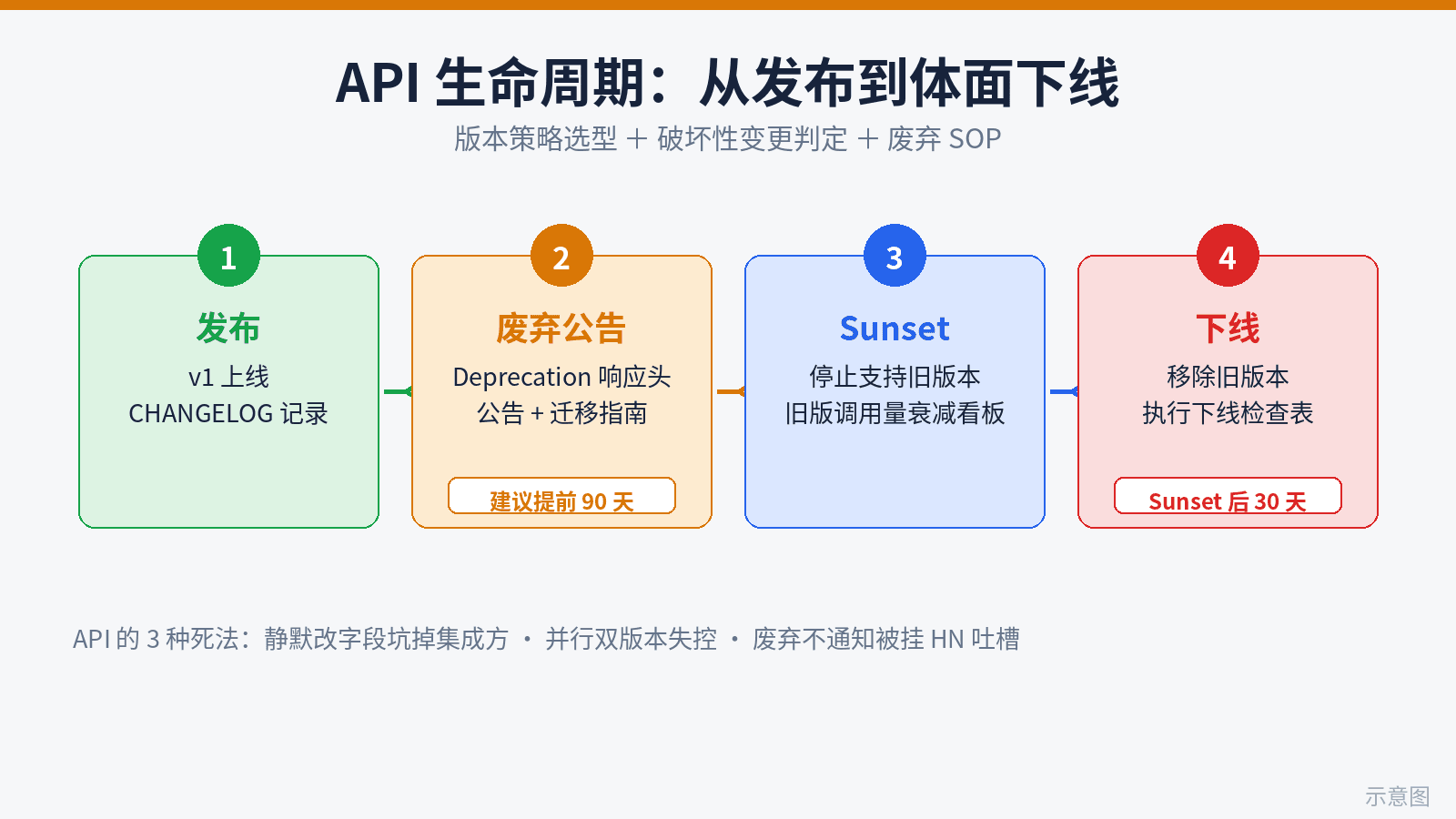
Vibe coding ships 10x faster than API contracts can move — where solo projects blow up. This guide fills the gap: 3 real ways vibe APIs die, a version-strategy decision table (URL path vs header vs versionless), a 12-rule breaking-change checklist, a 4-step deprecation SOP (headers, announcements, dual-run dashboards, sunset checklist), a copy-ready migration template, and the minimal solo setup: CHANGELOG-driven development plus CI auto-blocking breaking changes via openapi-diff.

This guide flips that mindset: a clear refund policy is the cheapest trust advertising, well-handled refunds bring 30% of users back, and one mishandled chargeback can eat a month of profit. Covers three-tier policy design with copy-ready templates, Stripe Dashboard vs API refunds, a charge.refunded webhook closed loop, a save-vs-refund decision tree, the chargeback evidence playbook, Radar anti-fraud rules, and cross-border tax notes for MoR platforms.