Refunds Without the Pain: Refund Policy and Chargeback Defense for Vibe Projects
This guide flips that mindset: a clear refund policy is the cheapest trust advertising, well-handled refunds bring 30% of users back, and one mishandled chargeback can eat a month of profit. Covers three-tier policy design with copy-ready templates, Stripe Dashboard vs API refunds, a charge.refunded webhook closed loop, a save-vs-refund decision tree, the chargeback evidence playbook, Radar anti-fraud rules, and cross-border tax notes for MoR platforms.
When I first started pricing my own SaaS, I made a mistake nearly every indie developer makes: the vaguer the refund policy, the better — ideally "all sales final." My thinking was: money is easy to give back and hard to get back, and what if someone games the system?
Real-world testing proved that mindset is a losing one. A fuzzy refund policy isn't a shield; it's a roadblock on the path to paid conversion. In the 30 seconds a user hesitates on the checkout page, "7-day no-questions-asked refund" converts measurably better than "no refunds." Do the math this way: a clear, generous refund policy is the cheapest trust advertising on your entire site. It lowers the user's cost of trying from "taking a gamble" to "just give it a spin," while the actual refund rate — around 3% in my own numbers — is far below the conversion lift it brings.
More importantly, roughly 30% of users whose refunds are handled well come back for a later version. But one mishandled chargeback — dispute fee plus the hours of labor — can easily wipe out a whole month's profit. The "money going back" half of the journey is the gap in the payment pipeline nobody writes about. This guide covers the pitfalls I've stepped in and the process I've built, all in one place.
1. Policy First: Writing It Clearly Saves 10x the Time Arguing About Refunds
The most time-consuming part of a refund dispute is never "refund or not" — it's "on what grounds." With a vague policy, every refund request becomes a negotiation: the user says you promised, you say the page wasn't clear, three emails go back and forth, and in the end you either cave (and eat a bad review) or dig in (the user goes straight to their card issuer and files a chargeback, which costs you even more).
My advice: write your refund policy like product copy, place it where it's visible on the pricing page, and state three things in plain language — how many days you have to request a refund, how the refund amount is calculated, and what the process looks like. The template doesn't need to be long; 200 words that spell it out will do. While you're at it, solve three side quests on the policy page: add "How do I request a refund?" to the FAQ, link the policy in your support auto-replies, and link it again in the payment confirmation email. When users know the rules before they ever need a refund, dispute volume gets cut roughly in half.
One more small pitfall: once written, enforce it. If you promise a 7-day no-questions-asked refund, don't haggle with someone who applies on day six — one review about saying one thing and doing another will take ten blog posts to undo.
2. Three-Tier Policy Design: Full Refund, Prorated Refund, No Refund
Not every product fits "full refund, no questions asked." I've seen three tiers, each for completely different scenarios — pick the wrong tier and your policy is decorative:
- Full refund (7/14/30 days, no questions asked): for standardized SaaS, templates, and courses — products with near-zero marginal cost. A digital product can't be "taken back" once delivered, so trade generosity for conversion instead of nitpicking the policy wording.
- Prorated refund: for annual plans and consumable credits (API credits, generation quotas). For example, an annual user who used 3 months gets the remaining 9 months back. Note: a prorated policy must spell out the exact formula, or it generates more disputes than full refunds do.
- No refund / case-by-case: for custom development, one-off consulting, and services where you've already incurred third-party costs (e.g., you fronted SMS or compute fees for the user). "No refund" doesn't mean a bad attitude — the wording just needs to offer a graceful way out.
A copy-ready three-tier wording template (replace the bracketed parts):
[Full refund template]
Refund policy: Within 14 days of purchase, if you're not satisfied with the product,
you may request a full refund, no questions asked.
How to apply: Email support@example.com with your order email address;
we will refund to the original payment method within 3 business days.

[Prorated refund template]
Refund policy: Annual plans are refundable on a prorated basis for remaining whole months:
Refund amount = annual price x (12 - whole months used) / 12;
any partial month used counts as a whole month.
Monthly plans are eligible for a full refund of the current billing cycle
if core features (defined in the FAQ) were not used.

[No refund / case-by-case template]
Refund policy: Custom development and consulting services are not eligible for
no-questions-asked refunds once delivered. If the deliverable materially deviates
from what was agreed, contact us within 7 days of delivery and we will assess
case by case: one free rework, or a negotiated partial refund.
The pitfall is in defining "core features" — in the prorated template I wrote "if core features were not used," and that "core" must be named explicitly in the FAQ (e.g., "generated at least 1 export file"). Otherwise every user has a different understanding of "used."
3. Stripe Refunds in Practice: Dashboard Manual Refunds vs. API Refunds
When volume is small (two or three refunds a day), just do it in the Stripe Dashboard: Payments → find the charge → Refund, enter the amount — partial refunds are supported. Manual refunds are fast, but they don't integrate with your own system — you refund the money while the user's Pro plan stays active.
So even at tiny volume, I'd recommend refunding via the API. It's essentially one call; you just need to pick the right fields:
// Full refund: pass only the charge (or payment_intent)
await stripe.refunds.create({
  charge: 'ch_3Pxxxxxx',          // or payment_intent: 'pi_3Pxxxxxx'
  reason: 'requested_by_customer' // optional: duplicate / fraudulent / requested_by_customer
});

// Partial refund: add amount (in the smallest currency unit — cents for USD)
await stripe.refunds.create({
  charge: 'ch_3Pxxxxxx',
  amount: 2000, // refunds 20.00 USD
  reason: 'requested_by_customer',
  metadata: { internal_ticket: 'REF-2026-1042', handled_by: 'founder' }
});
A few field-tested notes:
- There is no magic field for prorated refunds — Stripe won't compute the ratio for you. You calculate the amount in your own code from the policy formula, then pass a partial refund. Write the formula as a function and unit-test it; don't do it by hand.
- Don't fill in the reason field carelessly:
fraudulentflags the transaction as fraud and affects your risk profile. User-initiated refunds should always userequested_by_customer. - Processing fees are not returned on refund — Stripe does not give back the payment processing fee when you refund (per the current official docs). Build that cost into your pricing; don't discover it with a wince at month-end reconciliation.
- Refund arrival time depends on the card issuer, typically 5-10 business days. State that up front in your support wording and you'll halve the "where's my money" follow-up emails.
4. Refund Trigger Automation: A Webhook Closed Loop You Configure Once
The biggest risk of manual refunds isn't slowness — it's forgetting. Refund the money but forget the downgrade, and you've given away Pro for free; downgrade but forget the confirmation email, and the user assumes you pocketed the money and complains to their card issuer. Configure this closed loop once with webhooks:
Listen for the charge.refunded event (note: not refund.created — the former means the money actually went back), and on receipt do four things in order:
// Webhook handler skeleton (verify event structure against current official docs)
app.post('/webhooks/stripe', async (req, res) => {
  const event = stripe.webhooks.constructEvent(
    req.rawBody, req.headers['stripe-signature'], process.env.STRIPE_WEBHOOK_SECRET
  );
  if (event.type === 'charge.refunded') {
    const charge = event.data.object;
    const refundedAll = charge.amount_refunded === charge.amount;
    const user = await db.users.findByStripeCustomer(charge.customer);
    // 1. Downgrade: full refund -> back to free; partial -> prorate the plan
    await downgradePlan(user.id, refundedAll ? 'free' : 'pro-rated');
    // 2. Revoke entitlements: SSO / API keys / team seats all at once
    await revokeEntitlements(user.id);
    // 3. Send confirmation email: refund amount + expected arrival + win-back hook (see section 5)
    await sendRefundConfirmation(user.email, charge.amount_refunded);
    // 4. Log it: tag the refund reason for the monthly review in section 9
    await logRefund(user.id, { amount: charge.amount_refunded, reason: charge.metadata?.reason });
  }
  res.json({ received: true });
});
The pitfall is webhook idempotency: Stripe retries delivery, so your handler must dedupe on the event id (store event.id in a processed-events table), or users get downgraded twice and emailed twice. And when developing locally, don't hand-craft JSON — use the Stripe CLI's stripe listen --forward-to to forward real events.
5. Save or Instant-Refund: A Decision Tree for Three User Types
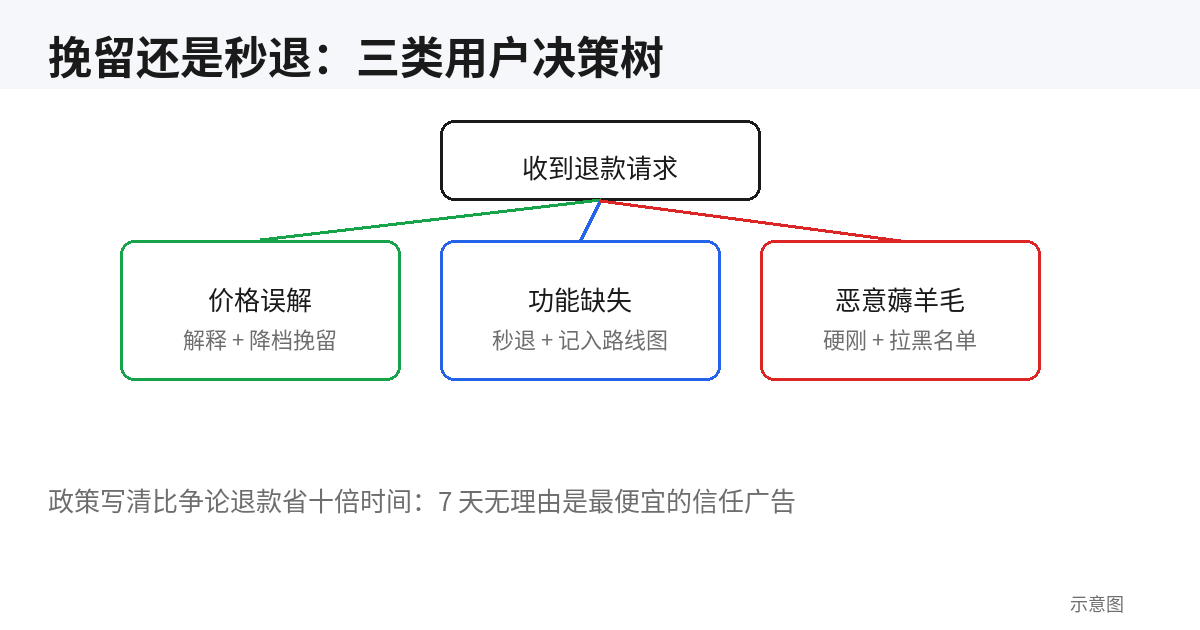
When a refund request lands, don't rush to hit the refund button. Spend 30 seconds classifying the user — the handling path is completely different for each:
- Price-misunderstanding type ("I thought it was lifetime" / "I didn't notice it's billed monthly"): explain first, then offer a graceful exit. These users don't dislike the product; their billing expectation was misaligned. Wording: acknowledge the page may not have been clear → proactively refund the current period → hand them an annual-plan discount code as a save. In my numbers this type has the highest save rate.
- Missing-feature type ("it doesn't have the export I need"): this is free input for your product roadmap. Log it in the backlog first, then decide save vs. refund: if the feature they want is in your two-week plan, say "this ships next week, I'll extend you a free month" — many will wait. If it's nowhere in your plans, refund cheerfully and don't drag it out.
- Bad-faith abuser type (same email buying and refunding repeatedly, maxing out quotas right before refunding): don't waste words — refund per policy, then blocklist. Every extra sentence with this type is a loss; spend the time on normal users instead.
The decision tree condenses into one line for your support SOP: check refund count first (≥2 → instant refund + blocklist), then usage depth (heavy users get the save attempt), then reason type (price misunderstanding gets a discount, missing feature gets a timeline). Put this logic in your internal wiki and a new support hire is productive in 5 minutes.
6. Chargeback 101: The Card-Issuer Dispute Process and the 135-Day Window
A chargeback and a refund are two different animals: a refund is you voluntarily sending money back; a chargeback is the user going around you, having their card issuer claw the money back — plus a dispute fee attached (typically around $15, per current official docs). For a small indie operation, the true cost of one chargeback = order amount + fee + half a day assembling the evidence package.
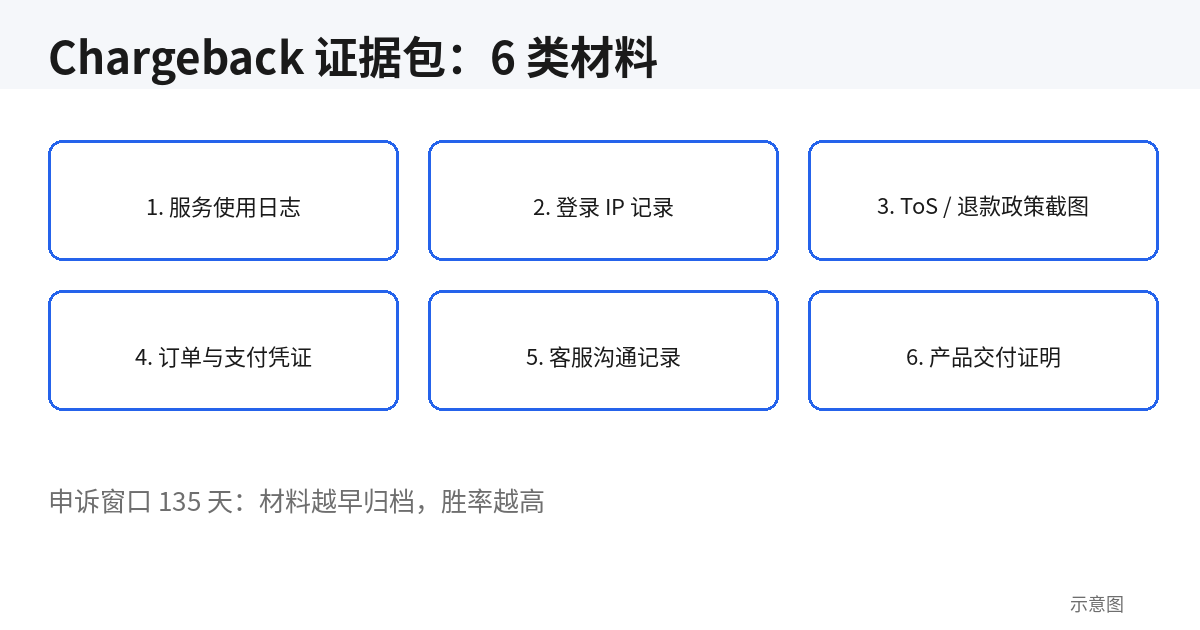
The flow: the user disputes with their card issuer → the issuer pulls the disputed amount from your Stripe account → Stripe notifies you and opens a response window → you submit evidence → the issuer rules. Memorize the key numbers: the response window is typically 7–21 days (varies by card network; Stripe shows the deadline on each dispute in the Dashboard — watch it), while the user can initiate a dispute up to roughly 135 days after the transaction (Visa/Mastercard rules, per current official docs). That means a June order can still be disputed at the end of October — which is why transaction records and logs should be kept for at least six months.
Disputes come in several common reason codes, each needing a different evidence angle: fraudulent (user claims they never bought it) requires proving it was the account holder; product_not_received requires proving delivery; subscription_canceled requires proving the cancellation flow and billing were compliant. Check the reason code first when a dispute arrives, then assemble the evidence package — don't use one generic set of materials for everything.
7. Raising Your Win Rate: 6 Categories of Evidence and How to Present Them
The biggest mistake indie developers make with chargebacks is "writing an essay to reason with them." Issuer reviewers process hundreds of cases a day; they look at the evidence chain, not your feelings. My evidence package is a fixed 6 categories, ordered:
[Chargeback evidence package checklist]
[ ] 1. Order & payment proof: Stripe receipt, order number, payment time, amount, last four digits of card
[ ] 2. ToS / refund policy screenshot: the version in effect at purchase + page timestamp (use a dated archive)
[ ] 3. Usage logs: login times, core-feature usage records (export counts, API call volume) — proving "delivered and used"
[ ] 4. IP & device records: order IP, habitual login IPs, device fingerprint — proving it was the account holder (vs. fraudulent claims)
[ ] 5. Communication records: screenshots showing the user never contacted support, or that support handled it per policy
[ ] 6. Delivery proof: account-activation email, license-key issuance record, download/activation logs
The core technique for "deliverable digital goods" is one sentence: turn "they used it" into timestamps. Reviewers don't accept "I think they used it" — they accept "on 2026-09-14 at 03:22 the user logged in from IP x.x.x.x and exported 3 files." So for category 3, the finer the logs, the higher the win rate — which is why I recommend logging key behavioral events from day one instead of discovering, when the dispute arrives, that all you have is Google Analytics pageviews.
One more small technique: attach a one-page English summary that states the conclusion of each of the 6 categories in a single sentence. Reviewers read the summary before the attachments, and in my experience it makes a noticeable difference to pass rates. Template: "Customer purchased [plan] on [date], actively used [core feature] [N] times from consistent IP [x.x.x.x], and never contacted support before disputing."
8. Fraud Prevention Up Front: Three Rules for Spotting Abusers
Winning a chargeback is still a loss (the fee isn't refunded), so the best defense is keeping fraudulent transactions out entirely. Three rules, all configurable in Stripe Radar:
- Same email / same card, multiple refunds: build a Radar rule — if the same customer or card refunds ≥2 times in 90 days, subsequent payments go to manual review instead of being auto-approved. Historical refund data can feed a blocked list under Radar → Lists in Stripe.
- Trial-card cycling: the signature is many trial signups from the same IP/device fingerprint in a short window, using disposable emails. Rule combination: rate-limit trial signups by IP + require 3D Secure verification at trial conversion. 3D Secure shifts the liability for
fraudulent-type disputes to the issuer — the highest-ROI defensive move there is. - Abnormal high-risk signals: don't use Radar's default risk-score thresholds. My suggestion: score ≥75 → block outright, 50–75 → manual review. After tuning, review the block log weekly and immediately loosen any rule that's false-positive-ing on legitimate users — fraud prevention and conversion are always a seesaw.
The pitfall is over-defending. I've seen people crank Radar to maximum and block legitimate users' corporate cards, only noticing after conversion dropped 20%. Remember the order: launch loose, collect data, then tighten based on real fraud samples — don't start out seeing enemies everywhere.
9. Monthly Refund Review and Cross-Border Notes: Turning "Why They Refunded" Into Roadmap Input
Spend 30 minutes a month on three numbers: refund rate (refunded orders / total orders; <5% is generally healthy, 3–8% is normal for a new SaaS), top 5 refund reasons (tagged with the three categories from section 5), and dispute rate (chargebacks / total transactions; above 1% gets card networks' attention, below 0.5% is healthy).
The top-5 refund reasons are the highest-value review material you have: "missing feature" at #1 → next month's plan writes itself; "price misunderstanding" at #1 → rewrite the pricing page copy; "couldn't figure out how to use it" at #1 → fix onboarding and docs first. Export refund tickets into a spreadsheet and make it the first agenda item of your monthly review — it's the closest an indie developer gets to raw user feedback.
Finally, cross-border notes. For Chinese developers collecting USD, two details are easy to miss on refunds: FX — refunds go back via the original route, and exchange-rate differences are generally yours to absorb (per the payment platform's current rules). For large orders, consider stating "refunds are settled in the original payment currency" in your policy. Tax — if you use a Merchant of Record platform like Paddle or Lemon Squeezy, they handle VAT/GST withholding for each country, and the tax portion is returned along with the refund; your backend reports must reverse both revenue and tax, not revenue alone. Reconcile against the MoR's payout report — don't try to reconstruct it from raw Stripe transaction records by hand.
One line to sum up: refunds aren't a cost center; they're a trust asset. Write the policy clearly, automate the process, review the data monthly — once this half of the pipeline runs smoothly, you can raise prices and push annual plans with confidence, because the whole monetization stack is solid.
Related articles
Vibe coding made building easy and getting noticed hard; community and open source are the few fair arenas where time trades for traffic. This tactical manual covers venue picks, 5 seed-user sources for the 0-20 cold start, a daily 15-minute ops SOP for 0-100, the README-as-landing-page formula, GitHub trending mechanics and launch timing, issue-driven marketing, build-in-public rhythms, crisis playbooks, 5 health metrics, and the path from community to revenue.

An email list is the only traffic asset an indie developer truly owns. This guide takes you from 0 to 1,000 subscribers: three capture placements and 5 high-converting lead-magnet formats, a complete 5-email welcome sequence script, a sustainable biweekly newsletter model, Resend/Loops/ConvertKit/Buttondown picks, SPF/DKIM/DMARC setup with a 4-week warmup plan, health benchmarks and minimal A/B testing, three essential automations, and the levers from 1,000 to 10,000.
Great UX can't answer policy questions, error-message searches, or pre-purchase trust checks. This guide gives solo developers a shippable help-center methodology: a four-quadrant matrix for what to document, a 6-category IA template, writing skeletons for 6 article types, a three-stage AI-drafting workflow from your codebase, a minimal docs-as-code setup for one person, a release-tied doc-debt checklist, and a monthly 1-hour maintenance SOP.