From 0 to 100 True Fans: Community Cold Start and Open-Source Acquisition for Vibe Projects
Vibe coding made building easy and getting noticed hard; community and open source are the few fair arenas where time trades for traffic. This tactical manual covers venue picks, 5 seed-user sources for the 0-20 cold start, a daily 15-minute ops SOP for 0-100, the README-as-landing-page formula, GitHub trending mechanics and launch timing, issue-driven marketing, build-in-public rhythms, crisis playbooks, 5 health metrics, and the path from community to revenue.

Vibe coding has driven the barrier to "building a product" into the floor — with an idea and AI, you can ship a working SaaS in a week. But the flip side is that "getting noticed" has gotten harder. When everyone can ship a product in a week, attention becomes the only scarce resource.
Community and open source are among the few fair arenas where you trade time for traffic. No budget games, no ad-buying skills — just whether you're willing to show up consistently and deliver value. A community of 100 true fans brings more word-of-mouth and feedback than 10,000 drive-by clicks. This is a tactical execution manual for acquisition: SOPs for every step from 0 to 100 true fans, with zero overlap with the already-published "open vs. closed source" strategy piece and the "support automation" post-sales piece.
1. Why Community Is an Indie Developer's Acquisition Lever
Community gives indie developers three things money can't buy:
- Upfront trust: users watch you fix bugs, answer questions, and ship releases inside the community — trust accumulates from watching you work. By the time they pay, half the decision cost is already paid;
- A feedback loop: float an idea for a new feature in the community and within 10 minutes five people tell you whether it works. That's far cheaper than building in silence for three months and getting educated by the market;
- Word-of-mouth compounding: community members are your cheapest marketing channel — they post on X, mention you on podcasts, share inside their companies. One "I'm using XX and it's genuinely good" beats ten of your advertorials.
Field-tested: community members' paid conversion rate is typically 3–5x that of pure drive-by traffic, with lower churn to boot. The logic is simple: people don't easily abandon a product they've participated in. So community isn't "an extension of support" — it's the top of your acquisition funnel, just filled with trust instead of ads.
One caveat first: community is slow work. The first 20 people might take a month; the first 100 might take three to six. If you're expecting "create a Discord and explode tomorrow," close this guide now.
2. Picking Your Ground: Discord vs. WeChat Groups vs. GitHub Discussions vs. Self-Hosted Forums
For a one-person team running a community, the #1 criterion for picking a venue isn't "where the people are" — it's "what you can afford to maintain." The real costs of the four options:
- Discord: highest concentration of overseas developers, mature bot ecosystem (welcome bots, leveling bots all off-the-shelf), flexible channel structure. Downsides: unreachable for China-based users, mediocre mobile experience. Maintenance cost: medium — once channels multiply, someone has to watch them.
- WeChat groups: highest reach in China, zero learning curve for users. Downsides: 500-member cap, zero content persistence (you can't scroll back through history), ads and noise are hard to moderate. Maintenance cost: high — after 500 members you need a second group; management hell.
- GitHub Discussions: naturally integrated with the repo, Q&A persists as SEO-indexable pages, fits the developer mindset. Downsides: weak "community feel" — more forum than hangout, poor real-time interaction. Maintenance cost: low — shares a workflow with issues.
- Self-hosted forums (Discourse etc.): best content persistence and search, fully yours. Downsides: hardest cold start (who registers on a forum for a tiny product?), server and upkeep costs. Maintenance cost: medium-high.
My advice: overseas-leaning users → Discord as home base + GitHub Discussions for persistent Q&A; China-leaning users → start with a WeChat group (start diverting before 300 members), and persist highlights in GitHub Discussions or a blog. Core principle: do the hanging-out where it's lively, do the archiving where it's searchable. Someone who can't maintain one venue well will kill all three by opening three.
A starter Discord channel structure, ready to copy:
[Discord channel structure template]
📢 Announcements (read-only)
  #announcements  releases, important notices
  #rules          community rules, one-liner version

💬 Chat
  #general       casual chat, anything goes
  #showcase      users showing their work / use cases (highlights)
  #help          questions, answered by mods / veteran users

🔨 Building together
  #feedback      feature requests, with voting reactions
  #bugs          bug reports, fixed format (version / repro steps)
  #roadmap       what's in the next release, build-in-public sync

🤖 Bot zone
  #bot-commands  level checks, giveaway commands — keep out of main channels
The pitfall is opening too many channels. Seven channels is the cap for a new community; more than that and every channel looks like a ghost town. A newcomer's first impression becomes "nobody's here" and they leave. Start small, split later — split #general only when it hits 50 messages a day.
3. Cold Start 0→20: Five Sources of Seed Users
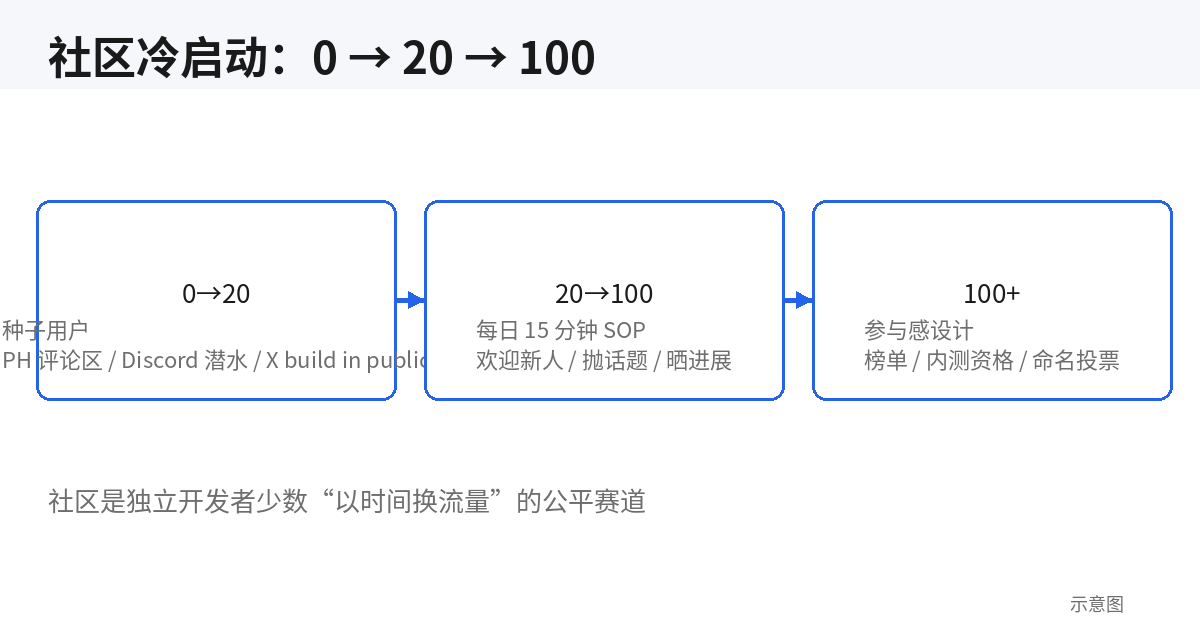
0→20 is the hardest stretch — nobody wants to be the first person in a group. Seed users come from exactly 5 sources, ranked by conversion:
- DM your existing users: pick the 10 most active, DM them one by one. "I'm starting a small group — you're one of our earliest users and I'd love your input." Feeling needed is the strongest hook, and it converts best;
- X build-in-public: when posting dev logs, add "started a small group, I sync progress there daily — join if you're curious." Your followers are natural seeds; the trust is prepaid;
- Product Hunt comments: on launch day, reply to every comment and add "we have a user group, come chat." PH users are action-oriented — good seed material;
- Lurking in relevant Discords: go where your target users hang out (indie hackers, a tech-stack Discord), lurk for two weeks providing value, then mention your community naturally. Note: parachuting in with ads gets you banned — give first, take later;
- Competitors' communities: a competitor's Discord/forum always has a cohort of "complains but never leaves" people. They need the category and dislike the current option — the highest-quality seeds. Do it via DM, never by poaching publicly on their turf — ugly behavior gets you called out.
The bar for 20 seed users: at least half have actually used your product, and at least 3 are willing to answer newcomers' questions when you're away. Twenty warm bodies are worth less than 5 true fans — headcount is the most meaningless metric during cold start.
4. The 0→100 Ops SOP: 15 Minutes a Day and Belonging by Design
The killer of community ops is "only when I remember." Fix 15 minutes a day; tape the action list to your monitor:
[Daily 15-minute ops checklist]
[ ] Welcome newcomers (3 min): @ new members within 12 hours, say hi + ask what they're working on
[ ] Throw one topic (5 min): pull from the topic pool — "what format do you usually export reports in?"
[ ] Show one update (3 min): what you fixed yesterday / writing today, with a screenshot
[ ] Answer questions (4 min): zero out #help; note what you can't answer and reply tomorrow
[ ] Weekly extras: Friday "this week's changelog"; monthly AMA or feature vote
If 15 minutes isn't enough, it means one of two things: the community came alive (good — start recruiting mods) or you're doomscrolling your own group (bad — rein it in). Once daily active chatters stabilize above 20, promote 1–2 moderators from the active crowd — give permissions, give titles, hand off "welcoming newcomers" and "answering questions." That's the watershed moment when the community goes from "your group" to "everyone's community."
Design belonging with low-cost incentives — no money needed:
- Contributor leaderboard: post "this month's 5 most active members" in announcements monthly, with names. Humans are more addicted to public recognition than you'd think;
- Beta access: community members get new features two weeks before public release. Privilege is the cheapest perk;
- Naming votes: let the community vote on feature names or the mascot's look. People who voted feel "I chose this" ownership;
- Showcase highlights: pin a user's project to highlights or retweet it from the official X — it's free advertising for their work, mutually beneficial.
The pitfall is the founder showing up too much. If you're in the group chatting all day, it becomes a "fan club," not a "user community" — the former dies without you, the latter runs itself. Your ideal state: visible 15 minutes a day, the community entertaining itself the rest of the time.
5. README as Landing Page: The Open-Source Positioning Formula
If you choose open-source acquisition, remember one line: the README isn't documentation — it's a landing page. 90% of visitors only see the first screen, and the formula is fixed:
- One-line value: line one states what it is + for whom + what it solves. "An open-source template that helps indie developers set up refund webhooks in 10 minutes" — subject, audience, benefit, all there;
- GIF demo: a sub-30-second screen recording right under the one-liner. Field-tested: READMEs with GIFs convert stars at 2x+ the rate of text-only ones. Free recording tools are fine; don't chase cinematic quality;
- Star trends and badges: shields.io badges (version, license, CI status) are trust signals; a star-history graph tells visitors "this project is on the rise";
- 5-minute quickstart: Quick Start must run within 5 minutes — cut it down if it takes more than 5 steps. If it doesn't run, the visit was wasted;
- Screenshots or architecture diagram: UI projects get screenshots, infra projects get architecture diagrams — one glance should show "what this thing looks like."
The README skeleton template:
# [Project name] — one-line value proposition
 ← 30-second screen recording, most prominent spot
[Badge row: version / license / CI / stars]
> One-liner: [core feature] for [target users], solving [concrete pain].
## See it in 30 seconds
- Feature 1 (one line)
- Feature 2 (one line)
- Feature 3 (one line)
## Up and running in 5 minutes
```bash
npx xxx init # step 1
npx xxx dev # step 2, it's running
```
## How it differs from [competitor]
| Dimension | This project | Competitor |
|-----------|--------------|------------|
| XX | ✅ | ❌ |
## Roadmap / Contributing / LicenseThe competitor comparison table is something many people don't dare write — afraid of offending. Field-tested: an objective comparison table is a star-conversion killer feature, because visitors were going to do vendor selection anyway — you just saved them the research. Stick to facts only (features, pricing, license), no trash talk, not one emotional adjective.
6. GitHub Trending Playbook and Issue-Driven Marketing
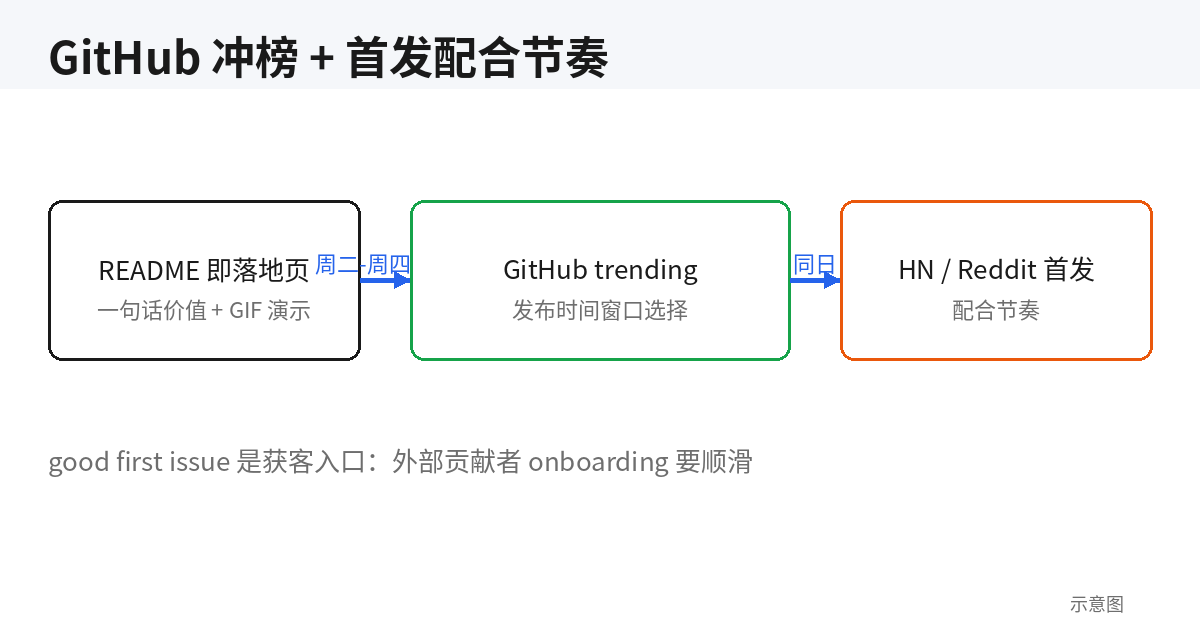
GitHub trending is the fairest exposure slot in open source — no money, just star velocity. Key mechanics: trending ranks by new stars within the time window (daily/weekly/monthly), so burst matters more than totals. The execution rhythm:
- Timing window: Tuesday–Thursday, 9–11 PM Beijing time (morning US West Coast) — that's when Western developers start work and scroll GitHub, and it's also peak hours for Hacker News and Reddit traffic. Launching on weekends donates your exposure to dead hours;
- Launch coordination: GitHub release → Hacker News "Show HN" → relevant subreddits → X, spaced 2–4 hours apart — never all in the same minute (that reads as spam). For Show HN, don't title it "I built XX" — use "Show HN: [one-line value] + [brightest number]";
- Warmup: before launch, tell your email list and Discord community "we're going for trending tonight, star us" — the first 50–100 stars are the booster rocket. The trending algorithm feeds on starting acceleration.
The pitfall is buying stars. GitHub's punishment for star-farming is repo-deletion level, and bought stars come with zero follow-on engagement — you hit trending for an hour and fall right off. Slow is fast.
Issue-driven marketing is longer-tail acquisition than trending: use the good first issue label well — it's not just "practice for beginners," it's your acquisition funnel. To fix one issue, an outside developer reads your code, runs your project, and joins your community — zero acquisition cost. Pair it with solid onboarding:
- Every good-first-issue states repro steps, expected outcome, and relevant file locations — don't make people guess;
- CONTRIBUTING.md turns "first contribution" into a 10-minute checklist: fork → run → change → PR;
- An outside contributor's first PR gets reviewed within 24 hours — leave it hanging for three days and they're gone. Thank them publicly in the community after merging, and invite them to the core group.
Field-tested: in projects with serious issue onboarding, ~30% of outside contributors become long-term users and ~10% become paying users. That's the cheapest "trial" there is — they write code for you and then pay you.
7. Build-in-Public Rhythm Template and Community Crisis Management
Build in public isn't "post whatever comes to mind" — it's a fixed-rhythm content asset. The template:
- X / Jike: 3–5 posts a week, fixed format — "what I shipped this week (with screenshot) + what I learned + next week's plan." Posts with numbers travel best: "MRR from $200 to $350" beats "more growth" 10 to 1;
- Monthly retrospective essay: one long post a month — revenue, user counts, pitfalls, all public. The highest trust-compounding format there is, and a long-tail SEO entry point;
- Dev-log sync to community: sync the Discord #roadmap channel weekly so members feel "I'm part of building this."
Treat dev logs as content assets: every public update is one more chance to be discovered — 200 exposures a year. Don't find it tedious; it's the best time-for-traffic trade there is.
Community crisis management — three types of people, three playbooks, rules that start lenient and get strict:
- Trolls (pure venting): first offense DM warning, second public warning, third mute. Never argue publicly — you win the argument and lose the audience;
- Help vampires ("write this code for me"): don't comply directly; use the "teach to fish" script — doc link + "where exactly are you stuck." After three rounds, gently point them to paid consulting;
- Competitor disruptors (backhanded praise, poaching): one DM — "product discussion welcome, poaching not." Offend again and show them out — the community is your turf; save the sainthood for elsewhere.
The rules template, ready to pin in #rules:
[Community rules (one-liner version)]
1. Attack ideas, not people — no personal attacks or flame wars
2. Search #help highlights and docs before asking; include version + repro steps
3. No ads, no poaching users, no spamming
4. Mods warn via DM first; repeat offenders get muted/removed — no public shaming
5. Ping a @mod when there's trouble; don't wade into the fight yourself
Rule 4 is the key: "no public shaming" — handle violations via DM. People warned publicly become your haters 90% of the time; handled privately, half of them stick around and keep using the product.
8. Measuring Health and Turning Community Into Revenue
Five community-health metrics, reviewed monthly:
- Weekly active chatters: not DAU — "people who said something this week." In a 100-person community, 20+ weekly chatters is healthy; below 10 is ghost-town warning;
- Question resolution time: median time from question asked to answered in #help. Over 24 hours means you're understaffed — time to promote mods;
- NPS: drop "how likely are you to recommend us (0–10)" in the community quarterly; 8+ are your true fans;
- Community-to-paid conversion: compare against non-community users' paid rate — 3x+ means the community is earning its keep;
- UGC volume: user-posted showcases, tutorials, plugins. The ultimate indicator of whether the community "runs itself."
From community to revenue, design the path in three layers:
- Free community → paid conversion: keep surfacing real cases of "what the paid tier solves" in the community — no hard selling. The conversion hook can be a "community-member-only 20% off" — welfare and belonging in one;
- Free vs. paid membership tiers: past ~300 members, open a paid-members channel (monthly AMAs, roadmap voting rights, exclusive betas). Caveat: free-community content quality must not drop when paid launches, or you're killing the golden goose;
- GitHub Sponsors timing: open it at 500+ stars with sustained outside contributors. Too early (dozens of stars) is a donation box in an empty room — and looks desperate. State clearly on the Sponsors page "where the money goes" (servers, domains, full-time development) — transparency drives contributions.
Closing line: community is the only indie-developer asset that appreciates with age. Code goes stale, traffic gets expensive, but 100 true fans' trust only compounds. Start with today's 15 minutes.
Related articles

An email list is the only traffic asset an indie developer truly owns. This guide takes you from 0 to 1,000 subscribers: three capture placements and 5 high-converting lead-magnet formats, a complete 5-email welcome sequence script, a sustainable biweekly newsletter model, Resend/Loops/ConvertKit/Buttondown picks, SPF/DKIM/DMARC setup with a 4-week warmup plan, health benchmarks and minimal A/B testing, three essential automations, and the levers from 1,000 to 10,000.
Your product isn't bad — it's just unclear. A hands-on playbook for vibe coders: the 5-second headline rule with 6 before/after pairs, a one-job-per-screen page architecture, solo-founder social proof tactics, CTA and form field optimization, plus an AI copy review checklist.

This guide flips that mindset: a clear refund policy is the cheapest trust advertising, well-handled refunds bring 30% of users back, and one mishandled chargeback can eat a month of profit. Covers three-tier policy design with copy-ready templates, Stripe Dashboard vs API refunds, a charge.refunded webhook closed loop, a save-vs-refund decision tree, the chargeback evidence playbook, Radar anti-fraud rules, and cross-border tax notes for MoR platforms.