All articles

VIBEFIX GUIDES

AI Coding Guides

Practical knowledge for tools, deployment, workflows, and building projects.

Real photograph of a man reading email on a laptop, the inbox on screen showing a stack of unread messages
Guide
Signed Up and Then Silence? A Lifecycle Email Sequence That Actually Keeps Users

Users sign up and then hear nothing for 30 days — and quietly leave. This guide builds the lifecycle email sequence that fills that gap: a welcome and activation run for days 0, 1, 3, and 7, three behavior-triggered habit emails after the aha moment, at 80% of quota, and after 14 days asleep, plus win-back execution, frequency caps, unsubscribe rules, and how to measure it with activation conversion instead of open rates.

Creator EconomyIndie DevelopmentProduct Strategy
Real photograph: two hands exchanging a red gift card with a gold bow and the words 'GIFT CARD'.
Guide
Give Someone a Subscription: Gift Cards and Redemption Codes for Vibe Projects

A gift card is not a coupon with a different name: the giver pays first, the recipient spends later, and the money is a liability until it is spent. This guide covers the three forms, the five-step purchase flow, redemption code design against brute force, the balance ledger, fraud prevention, refunds and support, and a 14-item launch checklist.

Payments & MonetizationIndie DevelopmentProduct Strategy

Real photograph of a woman resting her head on her hand at a small table, looking exhausted in front of a laptop
Guide
Don't Want to Cancel — Can I Just Pause? Subscription Pause and Resume for Vibe Projects

A user asks to pause for two months — and the only button you have is cancel. This guide splits pause, downgrade, and cancel into three choices, explains Stripe's two pause modes and the three invoice behaviors, covers read-only access and data retention during the pause, walks through the three things that break at resume time, and ends with a save funnel and a 12-item launch checklist.

Payments & MonetizationBackend EngineeringIndie Development
Real photograph: a frustrated developer with his head in his hands at a desk with a monitor and keyboard.
Guide
The User Got Stuck and You Found Out Last: Session Replay and Heatmaps for Vibe Projects

Analytics tells you something is wrong somewhere; session replay shows you exactly what happened. This guide covers what replay records and what it must never record, sampling rates, privacy in four layers, how to read click, scroll, and movement heatmaps, a weekly replay review routine, and a 12-item launch checklist.

Data WorkflowsUser ResearchProduct Strategy
Real photograph of a woman typing on a laptop at a desk
Guide
Search Fast, Search Right: The Search Box Playbook for Vibe Projects

The search box looks simple, yet it meets users at their most purposeful moment: a 300 ms debounce, cancelling old requests so they never overwrite new results, empty states with corrections and a way out, match highlighting, full keyboard navigation, Chinese input handling, and a seven-item pre-launch checklist.

Design ExperienceIndie DevelopmentFrontend Engineering
Real photograph of a person relaxing on a sofa holding a tablet showing a video with a progress bar
Guide
Spinning, Silent, Stuck Halfway: Video Playback That Actually Works in Vibe Projects

The video is uploaded, so why can nobody watch it? This guide fixes the second half: picking a player, three quality rungs with automatic switching, muted autoplay, subtitles in sync, resume that rewinds five seconds, and what to do when playback stalls — with a ten-item checklist to run on a real phone before launch.

Mobile AppsDesign ExperienceIndie Development
Real photograph of hands holding a phone browsing a photo grid, with a cup of coffee on the table
Guide
Hold the Space Before the Picture Arrives: Lazy Loading and Placeholders for Vibe Projects

Images are the heaviest resource on a page and the easiest to lose control of: native lazy loading covers ninety percent of cases with one attribute, IntersectionObserver takes over 200 pixels before the viewport, aspect-ratio placeholders hold the space, blurred previews and dominant colours ease the wait, first-screen images go first, failures get a fallback — plus a seven-item pre-launch checklist.

PerformanceDesign ExperienceIndie Development
Over-the-shoulder photo of a person typing to an AI chat assistant on a laptop, with the conversation interface visible on screen
Guide
Designing Against Hallucinations: UX Guardrails for AI Products

You can't eliminate hallucinations, but you can design down their damage. A field guide for vibe builders: three kinds of user harm with real crash cases, a three-tier confidence UI, traceable citations, draft-badge and disclaimer rules, a correction loop with code and prompt templates, circuit breakers for medical/legal/financial red lines, a weekly 30-sample spot-check SOP, and an 8-item pre-launch checklist.

Design ExperienceIndie DevelopmentTypeScript
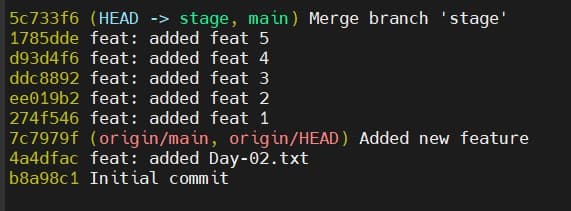
Colored git log commit history with branch pointers in a dark terminal
Guide
AI Writes Fast and Breaks Things: A Git Workflow for the One-Person-One-AI Team

An agent changes twenty files in one go and you can't possibly review them all — that's when git becomes your only undo button. This guide lays out a Git workflow designed around one premise: the AI will mess up. Keep main always runnable, branch per task, let the AI write conventional commits, master three rollback moves, and have the AI generate a daily changelog. No ceremony, just survival.

Developer WorkflowTool TipsIndie Development