Don't Let Your First Email Land in Spam: Transactional Email Infrastructure for Vibe Projects
Signup verifications, password resets, order notifications — almost every vibe project needs transactional email on day one, yet most wire up a random SMTP and watch those emails die in spam. This guide covers why transactional and marketing mail must never share a channel, a Resend vs AWS SES vs Postmark decision tree with pricing, a hands-on SPF/DKIM/DMARC walkthrough on Cloudflare, a spam troubleshooting checklist, and the CAN-SPAM/GDPR baseline — with copy-paste DNS records and code.
Intro: Your First User May Never Receive That Verification Email
Picture this: you spend three weeks vibing out a SaaS. On launch day, your first real user signs up. They fill in their email and stare at the inbox waiting for the verification link — one minute, five minutes, ten minutes, nothing. They check the spam folder. Nothing there either. So they close the tab and never come back. What you lost wasn't just one user — it's a user you'll never know you lost.
This isn't scaremongering. Signup verification, password resets, order notifications, billing reminders — collectively called transactional email — is something almost every vibe project needs on day one. But most vibe coders handle it by plugging some random SMTP credentials into an environment variable and calling it done. The result: verification emails land in spam across the board, or get rejected by Gmail outright, and you'd never know — because "sent successfully" does not mean "delivered to the inbox."
This guide fixes exactly that. My core judgment up front: email infrastructure is day-one engineering, not a day-30 optimization. You'd rather launch two days late than launch with naked sending configuration — because once you wreck your sending reputation, recovery is measured in weeks, sometimes months.
1. Transactional vs. Marketing Email: Two Worlds, Don't Share One Lifeline
First, the distinction: what counts as transactional email
Transactional emails are triggered by a user action, sent one-to-one, and explicitly expected by the recipient: signup verification, password resets, login alerts, order confirmations, shipping notices, billing receipts, reply notifications. Marketing emails are ones you initiate, sent one-to-many: product update newsletters, promotions, new-feature broadcasts.
The essential difference isn't the content — it's the recipient's level of expectation. A user is "expecting" the verification email within 30 seconds of signing up; it landing in the inbox is only natural. Nobody expects a promo email on a Tuesday morning — it starts life on the spam suspect list. Gmail and Outlook's filtering systems are modeled precisely around "expectation": open rates, reply rates, "not spam" clicks, complaint rates — every one of them scores the sender.
Sending reputation: the credit score you can't see
Every sending domain and sending IP holds a "credit account" with Gmail, Outlook, and Yahoo. A new domain starts at zero — like having no credit history: you can send, but with low limits and strict scrutiny. Every send adds or subtracts points: opens, replies, and "moved out of spam" add points; spam complaints, high bounce rates, and mass ignoring subtract them.
Three mechanisms every vibe coder must internalize:
- Reputation is isolated per "channel," but not isolated by default. If you send both verification emails and marketing blasts from the same domain and the same provider account, Gmail sees a single sending identity. Marketing mail is inherently complaint-prone — once a campaign's complaint rate crosses the line, the whole domain's score drops, and your password-reset emails go to spam along with it.
- Since 2024, Gmail and Yahoo have gotten serious about bulk senders. Anyone sending over 5,000 messages a day to Gmail/Yahoo users is classified as a bulk sender and must have SPF, DKIM, and DMARC fully configured, offer one-click unsubscribe, and keep complaint rates under 0.3% (ideally 0.1%). That threshold may look far away for a small project, but the trend is clear: mailbox providers are running out of patience for "loud, unverified shouting."
- IP reputation and domain reputation are two different things. A shared IP means your "neighbors" affect your score too — which is why, when choosing a provider, you should check whether it keeps its shared IP pools clean, and whether you need to buy a dedicated IP.
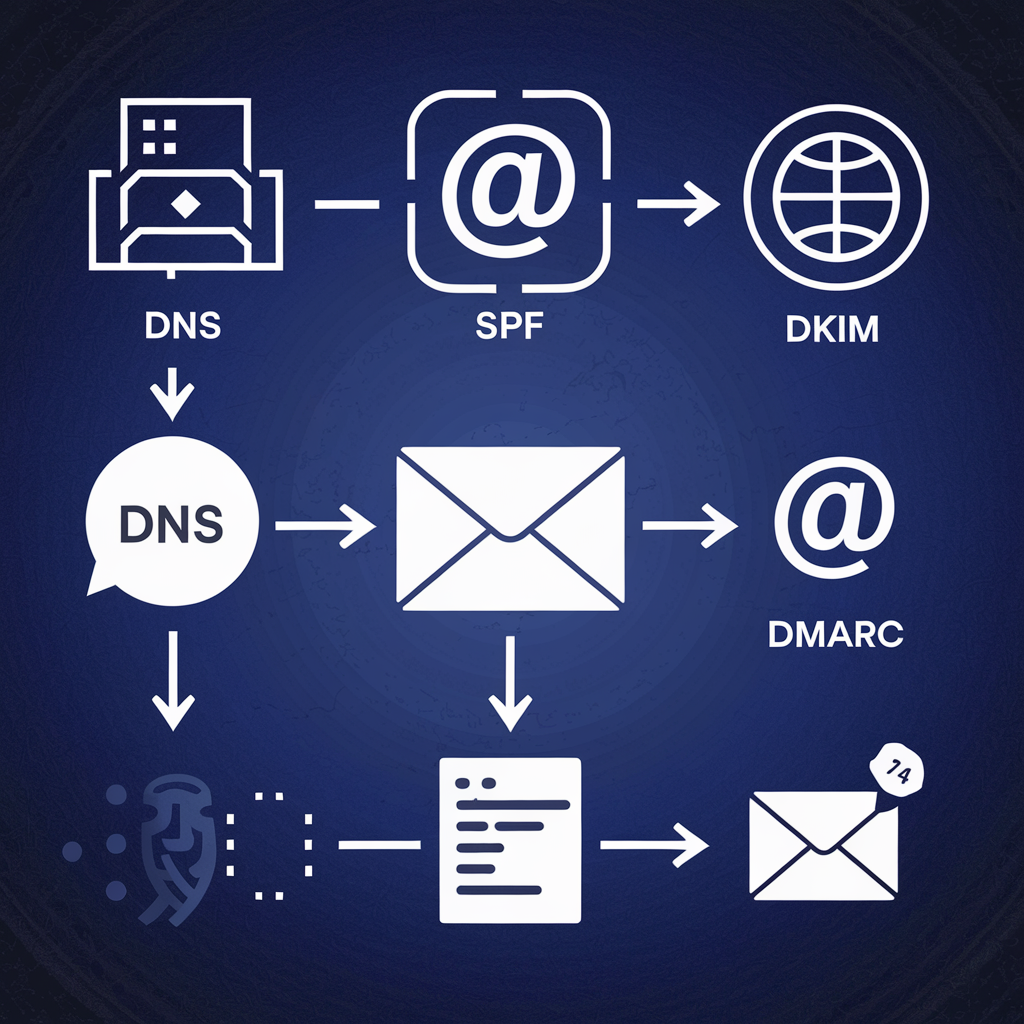 DNS records and mail delivery diagram
A true-to-type incident: one blast that dragged down three weeks of verification emails
Here's an incident pattern that plays out over and over in indie-hacker circles (details anonymized, but the mechanism is absolutely real): a developer built an AI bookkeeping tool. Two months after launch, everything was fine — verification emails had great deliverability. One day, on a whim, they blasted a "major update" announcement to 8,000 registered users — from the same domain and the same Resend account used for verification emails.
The blast itself wasn't catastrophic, but several hundred of those addresses were throwaway emails users had typed carelessly. The bounce rate shot to 6%, plus dozens of "report spam" clicks. Three days later, new users started reporting they never received verification emails. The logs showed every send as "successful" — but in Gmail's Postmaster Tools, the domain reputation had fallen from High to Low, and verification emails were being dumped into spam. It took three weeks: pausing all marketing sends, keeping only transactional mail, slowly nursing the reputation back before signup conversion recovered.
The lesson is one sentence: transactional and marketing email must be physically isolated — different subdomains, different sending channels, ideally different provider accounts. Verification emails go out via send.yourapp.com; marketing goes via news.yourapp.com or an entirely separate domain. When one channel gets into trouble, the other is untouched. It's the highest-ROI advice in this entire guide, and it costs zero.
So, principle number one
Never send transactional email from your personal Gmail, QQ Mail, or 163.com mailbox (you'll get throttled or banned at any real volume, and there's no DKIM alignment). Never mix transactional and marketing mail under one sending identity. And treat domain reputation as an asset from day one — because it genuinely is one, and redeeming it costs weeks.
2. Provider Selection: How to Choose Between Resend, AWS SES, and Postmark
A personal SMTP relay (like sending through Gmail's SMTP directly) is disqualified outright, for the reasons above: no reputation management, no bounce webhooks, throttling at modest volume. The three providers vibe coders debate most each have their own personality. My verdict first, data after:
- Default to Resend. Unless you have a specific reason not to.
- High volume and cost-conscious: AWS SES. Once you pass ~100k emails a month, SES's cost advantage becomes impossible to ignore.
- Zero tolerance for delivery failure (login verification, financial notifications): Postmark. Expensive, but deliverability is literally what it sells.
Head-to-head (public pricing as of October 2026; check official sites, subject to change)
| Dimension | Resend | AWS SES | Postmark |
|---|---|---|---|
| Free tier | 3,000 emails/month (100/day cap), 1 domain | No free tier for new accounts (only AWS new-user credits); sandbox limits you to 200/day to verified addresses until you request a limit increase | 100 emails/month, hard cap — only enough to test the API |
| Paid entry point | $20/mo (50k emails); $35/mo (100k emails), overage ~$0.90 per 1,000 | Pay-as-you-go ~$0.10 per 1,000 (since July 2026 new accounts default to Essentials at ~$0.16 per 1,000, switchable back to the classic rate) | $15/mo (10k emails), overage from $1.80 per 1,000, dropping to ~$0.50 per 1,000 at high tiers |
| Approx. cost at 10k/mo | $20 (Pro tier) | ~$1–1.6 | $15 |
| Approx. cost at 100k/mo | $35 | ~$10–16 | ~$100–177 (including overages) |
| Deliverability reputation | Good, well-managed shared IP pools; dedicated IP as a $30/mo add-on | Up to you: cheap shared IPs with uncontrollable neighbors; dedicated IPs ~$24.95/mo per IP, and you nurse the reputation yourself | Industry benchmark, consistently measured near 99% inbox placement; transactional and marketing isolated via Message Streams |
| Developer experience | Excellent: REST API, official SDKs, React Email for templates, integrated in 10 minutes | Raw: API/SMTP works, but templates, bounce handling, and dashboards are DIY | Good: clean API, Mustache templates rendered server-side, 45-day log retention |
| Biggest gotcha | The free tier's 100/day cap can blow up on launch day; marketing email is billed separately per contact — don't confuse the two | The sandbox and limit-increase process deters newcomers; when things break you're on your own, and support is slow | Pricey: per-unit cost is several times Resend's at comparable volume; the free tier is effectively nonexistent |
Learn to read the table like an accountant: at 10k emails a month, SES costs a buck or two while Resend costs $20 — more than a 10x difference. But for a vibe project, that ~$18 monthly gap buys you "no DIY bounce handling, no support tickets for limit increases, API integrated in 10 minutes." Your time is worth far more than that. Cost optimization is a scaling-stage problem, not a launch-day problem.
Decision tree for a one-person project
- Pre-launch / just launched (< 3,000 sends/month): Resend free tier, straight away. Watch the 100/day cap — a launch-day signup spike can throttle verification emails. The safe move is upgrading to the $20 Pro before launch day, or at least having one-click upgrade ready.
- Earning revenue, 10k–100k sends/month: stay on Resend Pro. $35 solves everything; don't churn.
- Stably above 100k/month and the email bill starts to hurt: evaluate migrating to AWS SES. The migration itself is easy (it's all SMTP/API); the hard part is rebuilding everything Resend gives you for free — bounce webhooks, templates, analytics. My threshold: only migrate when SES would save you more than $100/month. Saving $20 isn't worth sacrificing a weekend.
- Zero tolerance for "email didn't arrive" (e.g., login entirely depends on email codes, financial transaction notifications): go straight to Postmark. It's expensive, but the whole product is built around delivery — separate Message Streams, strictly governed shared IPs, sub-45-second delivery in independent tests. In this scenario, one failed login's lost user costs far more than a few dozen extra dollars a month.
- Already all-in on AWS, and someone on the team has used SES: starting with SES is fine, skipping Resend. Just budget half a day for the sandbox limit increase and DKIM setup.
One more that's easy to overlook: don't hop between providers. Sending reputation follows the domain; switching providers means switching IP pools, which is like moving your credit history — you have to "warm it up" all over again each time. Pick one and commit for at least three months before re-evaluating.
3. The DNS Trio in Practice: SPF, DKIM, DMARC
This is the most hands-on section of the guide — and the highest-ROI one. With these three DNS records in place, your mail goes from "unverified identity" to "verifiable identity" in Gmail's eyes. That's the ticket into the inbox, not bonus points. In plain language:
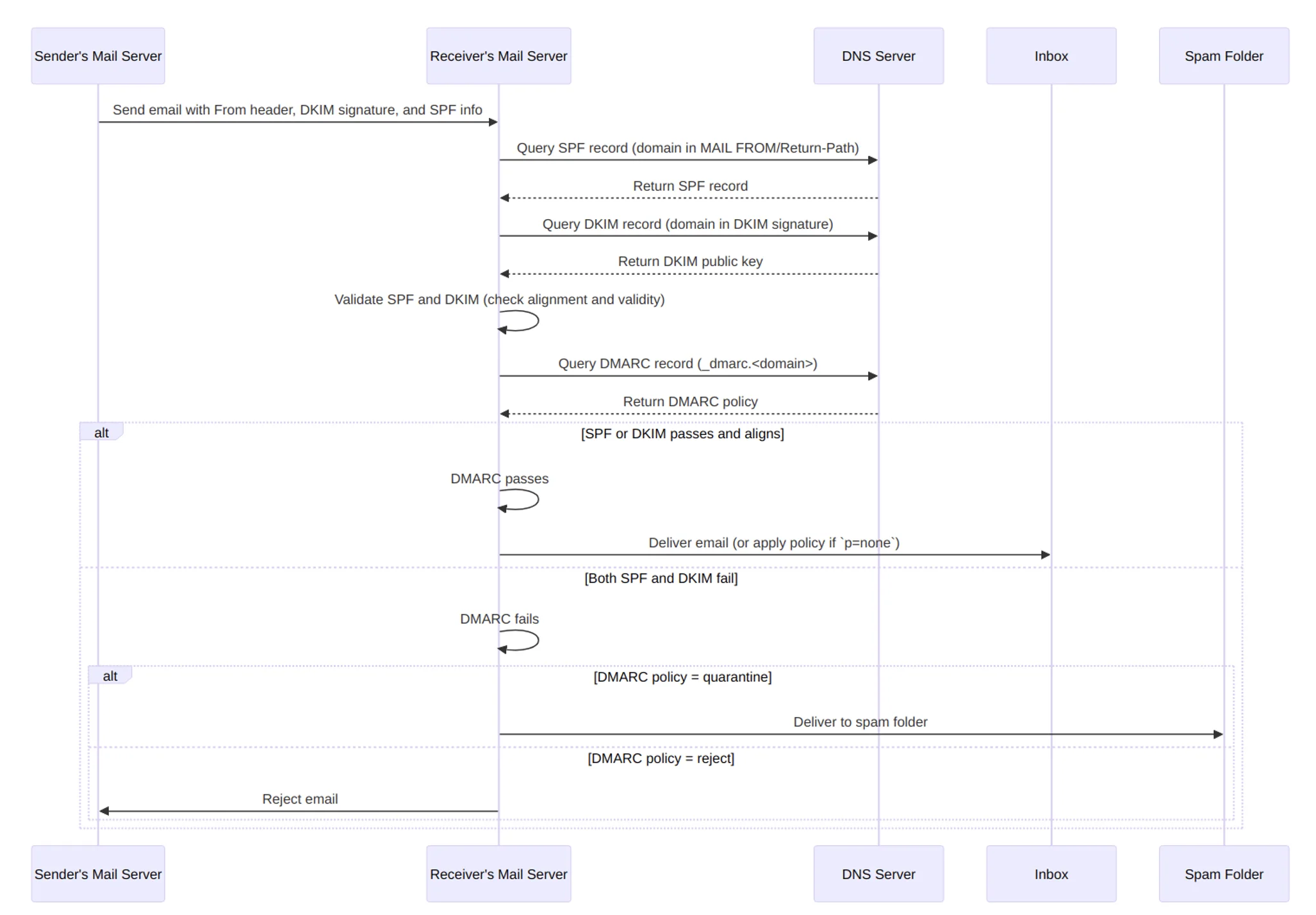
- SPF: you publish an "authorized senders list" in DNS, declaring which servers may send mail for your domain. If the sending IP isn't on the list, the recipient knows the message may be forged.
- DKIM: every email gets a cryptographic signature (asymmetric encryption); recipients verify it against the public key you published in DNS. A valid signature proves the mail genuinely came from you and wasn't tampered with in transit.
- DMARC: tells recipients "if SPF and DKIM both fail, here's what to do with the message" (drop it? quarantine it? deliver it but send me a report). It also requires "alignment" — the From header domain must match the domain SPF/DKIM validated, preventing bait-and-switch.
The relationship in one sentence: SPF says "who may send," DKIM says "is it really me," DMARC says "what to do about impostors." Missing any one of them leaves your sending identity limping.
Hands-on: Cloudflare + Resend, done in 15 minutes
Say your domain is yourapp.com and you send from the subdomain send.yourapp.com (repeating: use a subdomain for transactional mail and keep the root domain clean — it's the cheapest reputation isolation there is).
Step 1: Add the domain in the Resend dashboard. Log in to Resend → Domains → Add Domain, enter send.yourapp.com. It will give you three sets of DNS values (the DKIM public key is generated per account — replace the p=MIIB... placeholder below with the actual value from your dashboard).
Step 2: Add three TXT records in Cloudflare. Cloudflare dashboard → your domain → DNS → Add record, type TXT for all three:
Record 1 (SPF):
Name: send
Content: v=spf1 include:amazonses.com ~all

Record 2 (DKIM):
Name: resend._domainkey.send
Content: p=MIIBIjANBgkqhkiG9w0BAQEFAAOCAQ8AMIIBCgKC... (full public key from the Resend dashboard)

Record 3 (DMARC, on the root domain):
Name: _dmarc
Content: v=DMARC1; p=none; rua=mailto:dmarc@yourapp.com; fo=1;
Details you must get right — where 90% of beginners trip:
- When adding records in Cloudflare, enter only the host part for the name (
send, notsend.yourapp.com) — it appends the suffix automatically. Entering the full name createssend.yourapp.com.yourapp.com, the most classic rookie DNS mistake. - All three records must be set to "DNS only" (grey cloud). With the orange cloud (CDN proxy) enabled, Cloudflare swallows TXT records and verification will never pass.
- There can be only one SPF record per domain (including subdomains). If you already have one (e.g., for Google Workspace), don't add a second — merge them:
v=spf1 include:_spf.google.com include:amazonses.com ~all. Two coexisting SPF records fail validation outright — the number-one cause of "but I configured SPF, why doesn't it pass." - End SPF with
~all(soft fail), not-all(hard fail), at least initially. With hard fail, one wrong character nukes all your own mail; soft fail leaves recipients room to maneuver. - Start DMARC at
p=none— "just send me reports, don't block anything." Run it for two weeks, confirm via theruamailbox that all reported sending is your own legitimate mail, then tighten top=quarantine, and finallyp=reject. Going straight to reject on day one is burying a landmine for yourself.
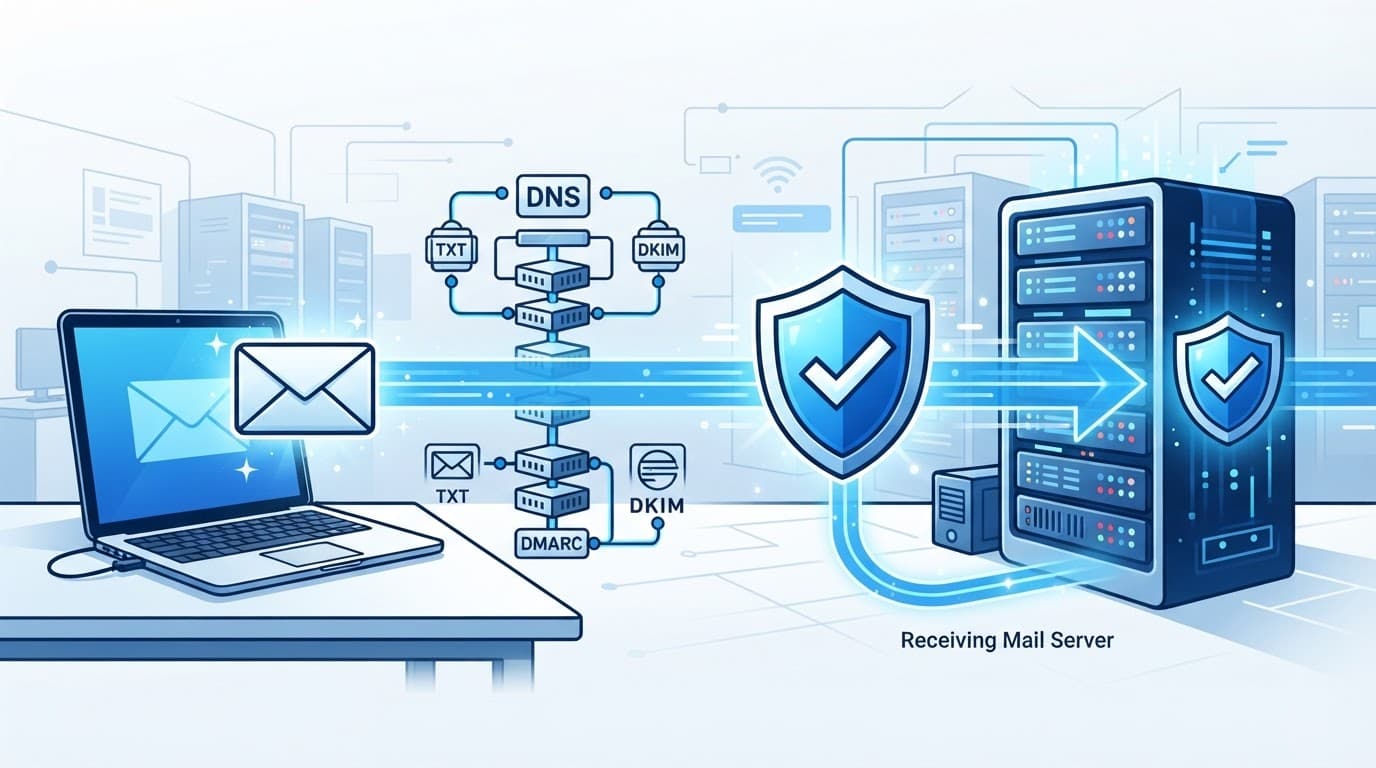 SPF/DKIM/DMARC email authentication flow chart
Step 3: Go back to Resend and hit Verify until it turns green. DNS usually propagates within minutes; Cloudflare is fast. After it turns green, send a test email to Gmail, open it → click "..." → "Show original," and confirm SPF: PASS, DKIM: PASS, DMARC: PASS — all three. Don't trust the dashboard's green checkmark; trust the three PASSes in Gmail's raw view.
Code: sending a transactional email that "passes"
DNS done — two iron rules remain at the code level: send from the subdomain, and every HTML email must include a plain-text version (HTML-only mail is a prime suspect for spam filters). Using Resend's Node.js SDK:
import { Resend } from 'resend';

const resend = new Resend(process.env.RESEND_API_KEY);

await resend.emails.send({
  from: 'YourApp <noreply@send.yourapp.com>',  // subdomain + fixed sender
  to: user.email,
  subject: 'Please verify your email address',
  html: '<p>Click the link below to verify:</p><p><a href="https://yourapp.com/verify?token=xxx">Verify email</a></p>',
  text: 'Verify here: https://yourapp.com/verify?token=xxx',
});
If you use AWS SES (Python):
import boto3
ses = boto3.client('ses', region_name='us-east-1')
ses.send_email(
    Source='YourApp <noreply@send.yourapp.com>',
    Destination={'ToAddresses': [user.email]},
    Message={
        'Subject': {'Data': 'Please verify your email address'},
        'Body': {
            'Text': {'Data': 'Verification link: https://yourapp.com/verify?token=xxx'},
            'Html': {'Data': '<p>Verification link: <a href="https://yourapp.com/verify?token=xxx">click to verify</a></p>'},
        },
    },
)
Note the from format: YourApp <noreply@send.yourapp.com> — display name is your product name, address is a fixed address on the subdomain. Once set, never change the sender address. Rotating senders kills reputation; a user adding noreply@send.yourapp.com to their contacts is the cheapest "reputation boost" there is.
Symptom lookup table: when something breaks, check here first
| Symptom | Likely cause | Where to confirm |
|---|---|---|
Gmail rejects outright, bounce contains 550-5.7.26 | SPF or DKIM failing; Gmail treats you as unverified identity | Check Authentication-Results in Gmail's raw view; verify DNS is live: dig TXT send.yourapp.com |
| Delivered but all to spam; Gmail shows "via amazonses.com" | DKIM misaligned or missing; Gmail doesn't recognize the From as yours | Re-verify the domain in the Resend/Postmark dashboard; confirm the DKIM record's proxy status is the grey cloud |
| Everything to spam in Outlook/Hotmail, Gmail fine | Microsoft runs its own SNDS reputation system; new domains/IPs start with a low score there | Register your IP/domain in Microsoft SNDS to see the reputation; Outlook issues are usually fixed by "nursing" (low, steady, high-open-rate volume) — there's no switch to flip |
| DMARC reports show unfamiliar SPF/DKIM sources | Someone is spoofing your domain, or you forgot a sending channel that's still active | Add legitimate channels to SPF/DKIM; once spoofing is ruled out, tighten DMARC from none to quarantine |
Your own mail gets rejected after setting DMARC p=reject | You went strict before SPF/DKIM alignment was solid | Drop back to p=none immediately, use two weeks of reports to confirm alignment, then tighten |
| Sometimes inbox, sometimes spam, no pattern | A "neighbor" in the shared IP pool is sending spam and dragging you down | Ask the provider about pool health; consider a dedicated IP at volume; Postmaster Tools' domain-reputation trend is how you tell "neighbor problem" from "my problem" apart |
Remember the triage order: DNS first (are all three passing?) → then content (subject, body, links) → then reputation (Postmaster/SNDS). Ninety percent of problems die at step one — don't start doubting your life choices over template wording.
4. Spam-Folder Troubleshooting Manual: A Binary-Search Checklist
DNS all PASSing, but mail still lands in spam? Don't panic — and don't change things randomly; random changes make reputation worse. Work through this checklist binary-search style: change one variable at a time, observe for 48 hours, then touch the next. Ordered from most common to most obscure:
Group 1: Sender identity (highest hit rate)
- Is the sender name a real product name? Don't use robot-smelling names like
no-reply,admin, ornotification123. Users recognize the product name — so do filters. - Is the sender address fixed? Are verification, password reset, and order emails all using the same address? Rotating addresses means rebuilding trust with every send.
- Is the Reply-To valid?
noreply@itself is fine, but pair it with a Reply-To that can actually receive mail. Few users reply to verification emails, but "replyable" is itself a trust signal. - Check
Authentication-Resultsin the raw message: SPF, DKIM, DMARC must all PASS. If any is missing, go back to section 3 and reconfigure.
Group 2: Content and structure
- Do you have both HTML and plain-text versions? HTML-only is a demerit; and the two versions must agree — don't say one thing in HTML and another in text.
- Is the image-to-text ratio off? An email that's one giant image with almost no text is the most classic spam signature. For functional mail like verification emails, text-first with few or zero images actually delivers best.
- Trigger words in the subject? "Free," "earn money," "limited time," ALL CAPS, multiple exclamation marks — suicidal in transactional mail. A verification subject should just say "Please verify your email address." No flourishes.
- Do link domains match the sender domain? If the sender is
send.yourapp.combut links point to some shortener or an unrelated domain, filters flag it as phishing. Redirect through your own domain, even if it costs one extra 301. - Are links HTTPS? An HTTP link in a 2026 email is roughly equivalent to holding up a sign that says "I'm suspicious."
- Unsubscribe links: transactional mail should not carry marketing-style unsubscribe (the user never subscribed to anything — unsubscribe from what?). Instead, the footer should state "This email was triggered by an action on your account" with contact info. A misplaced unsubscribe button confuses filters instead.
Group 3: Sending behavior
- Is the bounce rate above 2%? Hard bounces (nonexistent addresses) must be removed from the list immediately — repeatedly mailing the same dead address is reputation suicide. Providers usually offer an automatic suppression list; confirm it's enabled.
- Is the complaint rate ("reported as spam" clicks) above 0.1%? Above 0.3%, Gmail throttles you directly. The only reasonable explanation for high complaint rates on transactional mail: someone is using your signup endpoint to bombard other people's inboxes — go add CAPTCHA and rate limiting.
- Is volume smooth or spiky? 50 emails a day normally, then suddenly 5,000 one day — to filters, that spike is indistinguishable from a hijacked account blasting spam. Queue large notification batches and stagger them.
- Are you "warming up" a new domain/IP? For the first two weeks on a new domain, send only dozens per day to real, active users and let open rates lift the initial score. Don't import 10,000 addresses and blast on day one of a new domain.
Group 4: The god's-eye view with Google Postmaster Tools
- Register for Postmaster Tools (free) and add your sending domain. It's Gmail's official "health report" for you — without it, you're flying blind.
- Watch domain reputation: High / Medium / Low / Bad. Dropping from High to Medium is a yellow alert; dropping to Low means pausing all non-essential sending and nursing it back with transactional mail only.
- Watch the spam rate: the share of users clicking "report spam." Keep your eyes on the 0.1% line.
- Watch authentication pass rates: the SPF/DKIM/DMARC pass-rate curves. If one suddenly dips, something changed in DNS or sending config — check that before touching content.
- Watch delivery errors: distinguish rejected, rate-limited, and temporary failures — the three demand completely different fixes, so don't treat them as one disease.
The logic underneath: filter problems always start with "identity," then "content," then "behavior." Reverse the order and you'll waste an afternoon on template wording while the real cause is a missing character in DNS.
5. The Compliance Baseline: Don't Trip on Legal Issues
The easiest misconception for vibe coders: "transactional email doesn't need compliance." Wrong. Compliance doesn't care whether you "meant to market" — it cares what you sent and how.
CAN-SPAM (US): what it demands of transactional mail
The good news: purely transactional mail (order confirmations, password resets — anything required to complete a transaction) is exempt from CAN-SPAM's unsubscribe provisions. But the red line is don't smuggle marketing content into transactional mail: slipping a "new features 20% off" pitch into a password-reset email legally turns it into a commercial message, which must then include a physical address and an unsubscribe mechanism. The test is simple: remove the marketing part — does the email still stand on its own? If yes but you wanted to "also" market, then follow commercial-mail rules honestly.
GDPR (EU): what it demands of transactional mail
Under GDPR, transactional mail usually rests on "contract performance" (e.g., the user registered an account; sending verification is necessary to perform the contract) — no separate marketing-style consent needed. That doesn't mean you can run naked:
- Your privacy policy must disclose which transactional emails you send and through which provider (data-processor disclosure).
- Minimize personal data in emails. Use tokens in verification links — don't put raw email addresses in URLs.
- Choose an EU-region data center for your provider or confirm Standard Contractual Clauses (SCCs) are in place. Resend, Postmark, and SES all publish compliance documentation — confirm it during selection, not when a user asks.
- When a user deletes their account, transactional mail must stop — the "contract performance" basis dies with the account.
Red lines when AI generates your email templates
Vibe coders generate email templates with AI nine times out of ten. AI-written templates have two high-risk tendencies — a human must review before shipping:
- Spam-trigger words: AI loves "free," "exclusive offer," "act now," "guaranteed," "zero risk" marketing-speak. Each one in transactional mail raises the spam-folder odds. Write it into the prompt itself: "neutral, functional tone; marketing vocabulary banned."
- Over-eager formatting: ALL-CAPS subjects, triple exclamation marks, "Dear user!!!" — AI thinks it's friendly; filters think it's spam from 2008. Sentence case for subjects, declarative sentences for body.
- Hallucinated links and sign-offs: AI invents help-center links that don't exist or gets the company name wrong. Click every link and verify every sign-off manually before shipping — the one step in the vibe workflow you must never skip.
- Never let AI draft legal text: privacy policies, terms of service, unsubscribe notices — use standard templates or a lawyer, don't let AI improvise. A wrongly worded unsubscribe notice is worse than none.
Closing: The 10-Minute Pre-Launch Checklist
If you remember one checklist, make it this one. Before the first transactional email goes out on any new project, tick these off:
- Transactional and marketing mail use different subdomains/channels.
- SPF, DKIM, DMARC records configured; test email to Gmail shows three PASSes in the raw view.
- DMARC starts at
p=none; theruamailbox receives reports. - Sender name is the product name, address is fixed, on the subdomain.
- Every HTML email has a matching plain-text version.
- The provider's bounce webhook / suppression list is enabled.
- The domain is added in Google Postmaster Tools.
- The free-tier quota covers launch day (upgrade in advance if not).
- All template links are HTTPS on your own domain; AI-generated wording reviewed by a human.
- The privacy policy documents transactional sending.
One last, possibly counterintuitive judgment: email infrastructure is the least "vibe" part of your entire vibe project — and the most worth de-vibing. The essence of vibe coding is spending energy where it matters — and deliverability is exactly the kind of thing you never notice until it breaks, at which point you're the first to know. Spend one afternoon implementing this guide, and buy yourself peace of mind for every day after launch. That math always works out.
Related articles
Vibe projects ship five times a week, yet users perceive zero releases. This guide covers Keep a Changelog conventions, the honest art of 0.x versioning, a four-part breaking-change communication kit, channel-specific messaging for in-app modals, email, X and Product Hunt, good-vs-bad writing templates, public roadmap options, plus a copy-pasteable React changelog timeline, an RSS feed script, and release SOPs.
Your product isn't bad — it's just unclear. A hands-on playbook for vibe coders: the 5-second headline rule with 6 before/after pairs, a one-job-per-screen page architecture, solo-founder social proof tactics, CTA and form field optimization, plus an AI copy review checklist.
AI's biggest fear when editing code: fixing A breaks B. This execution-layer companion to our AI Testing Strategy shows solo developers how to build an E2E regression moat with Playwright, 5 golden paths, a data-testid convention, and GitHub Actions — one hour to set up, one hour a week to maintain, inside the free tier, with copy-ready code.