It Works on My Machine Is Not a Deployment Strategy: Docker Production for Vibe Projects
AI-generated Dockerfiles ship with five common defects: single-stage builds, root execution, no health checks, swallowed SIGTERM, and secrets baked into layers. This guide gives you multi-stage templates, a base-image decision table, production compose config, and a launch checklist.

Scope first: what this guide does not cover
Three published guides on this site are easy to confuse with this one, so here is the division of labor:
- "Self-hosting for vibe projects" answers where to put your service — VPS vs Coolify vs Dokku, cost break-even points;
- "Dev environment standardization" answers how it runs on your laptop — devcontainers, the 30-minute onboarding test;
- "Minimal CI/CD pipeline" answers how code ships automatically — the 5-job pipeline.
This guide answers exactly one question: how to build the image and run the container without production surprises. Multi-stage builds, base image choice, non-root execution, health checks, graceful shutdown, production compose — the unglamorous work none of the three above go deep on.
The 5 usual defects in AI-generated Dockerfiles
Asking an AI to "write a Dockerfile" is standard vibe-coding practice — 10 seconds, done. Ship it to production as-is and you will likely hit at least one of these:
- Single-stage build, image starts at 1.2GB. Source, node_modules, build tools and .git all end up in the final image; pulling it takes longer than deploying the code;
- Running as root. Container escape is not FUD — a compromised root process is a compromised host;
- No HEALTHCHECK. The process is wedged but the container reports running, and the load balancer keeps routing traffic into it;
- SIGTERM never arrives. Shell-form CMD means sh becomes PID 1 and swallows the signal; rolling updates kill in-flight requests;
- Secrets baked into image layers.
ENV API_KEY=xxxin the Dockerfile means pushing the image publishes the key.
Let's dismantle them one by one.
Decision table: is your project worth containerizing?
Not every vibe project needs Docker. Take 30 seconds with this table:
| Scenario | Verdict | Why |
|---|---|---|
| Pure Next.js frontend on Vercel / Netlify | Skip it | The platform already handles build and runtime isolation |
| Full-stack on Railway / Render / Fly.io | Optional | Platforms accept Dockerfiles, but buildpacks are fine; containerize when you want a locked environment |
| Own VPS / bare metal / Coolify / Dokku | Required | Without containers, environment drift will find you sooner or later |
| Backend + database + Redis + cron workers | Required | docker compose is the only thing that lets local and production share one orchestration |
| Handing someone a "just run it" deliverable | Recommended | docker compose up beats a 3-page setup doc |
Multi-stage builds: only the runtime ships
The whole idea in one sentence: building is not running — use COPY --from to move only artifacts into the final image. Here is a production-ready Node.js template (works for Next.js standalone output or plain Node services):
# ---------- Stage 1: dependencies ----------
FROM node:20-slim AS deps
WORKDIR /app
COPY package.json package-lock.json ./
RUN npm ci --omit=dev

# ---------- Stage 2: build ----------
FROM node:20-slim AS build
WORKDIR /app
COPY package.json package-lock.json ./
RUN npm ci
COPY . .
RUN npm run build

# ---------- Stage 3: runtime (the only image that gets pushed) ----------
FROM gcr.io/distroless/nodejs20-debian12 AS runtime
WORKDIR /app
COPY --from=deps /app/node_modules ./node_modules
COPY --from=build /app/dist ./dist
COPY --from=build /app/package.json ./package.json
USER nonroot
EXPOSE 3000
ENTRYPOINT ["node", "dist/index.js"]
Three details matter: first, npm ci --omit=dev installs production deps while the build stage installs everything — devDependencies (typescript, eslint) never reach the final image; second, the final stage runs as USER nonroot (distroless ships a nonroot user, uid 65532); third, ENTRYPOINT uses JSON-array (exec) form so node becomes PID 1 and receives signals directly — that fixes defect #4.

Same pattern for Python — swap npm for pip and the runtime for python:3.12-slim:
FROM python:3.12-slim AS build
WORKDIR /app
COPY requirements.txt .
RUN pip install --no-cache-dir --prefix=/install -r requirements.txt

FROM python:3.12-slim AS runtime
WORKDIR /app
COPY --from=build /install /usr/local
COPY ./src ./src
RUN useradd -m appuser && chown -R appuser /app
USER appuser
EXPOSE 8000
ENTRYPOINT ["python", "-m", "src.main"]
Base image choice: an order of magnitude apart

| Base image | Use when | Caveat |
|---|---|---|
node:20 (full debian) | Don't | ~1GB with a full toolchain, largest attack surface |
node:20-slim | Default | Has a shell — you can exec in to debug |
node:20-alpine | When size is critical | musl, not glibc — sharp, prisma and friends may break; test first |
distroless/nodejs20 | Production end state | No shell, no package manager — debug via logs and metrics; temporarily swap to slim when troubleshooting |
The pragmatic solo-dev route: slim for debugging, distroless for production, switched with one ARG BASE_IMAGE line. One warning about Alpine: AI loves suggesting it because it's "small", but musl-vs-glibc differences can break prebuilt npm binaries with extremely cryptic errors — don't gamble 40MB of savings unless you've tested it.
6 hard rules for a production Dockerfile
- Write a
.dockerignore. Exclude at minimumnode_modules,.git,.env,*.log,.next/cache. Otherwise the build context is gigabytes andCOPY . .bakes your local .env into the image — that's how secret leaks happen. - Run as non-root.
USER nonrooton distroless;useraddon slim/debian. Combine with--read-onlyfor extra credit (mount a volume for anything that must write). - Always HEALTHCHECK. Without it the orchestrator can't tell alive from wedged:
MakeHEALTHCHECK --interval=30s --timeout=5s --start-period=20s --retries=3 \ CMD node -e "fetch('http://localhost:3000/api/health').then(r=>{if(!r.ok)process.exit(1)})" || exit 1start-periodcover your cold start, or the container gets executed before it ever wakes up. - Exec-form for signals.
CMD npm start(shell form) makes sh PID 1 and SIGTERM never reaches node. Always use JSON-array form:["node","dist/index.js"]. - Secrets injected at runtime, never in layers. No
ENV SECRETin the Dockerfile; build-time keys go through build secrets:RUN --mount=type=secret,id=npmrc npm ci. - Pin minor versions.
FROM node:20is not the same image three months from now. Use exact tags likenode:20.18.1-slimand let renovate / dependabot track updates.
Graceful shutdown: don't let rolling updates cut requests
A container gets SIGTERM and then SIGKILL, 10 seconds apart by default. Those 10 seconds must: stop accepting new requests, finish in-flight ones, close DB connections. Node.js template:
const server = app.listen(3000);

async function shutdown(signal) {
  console.log(`received ${signal}, draining...`);
  server.close(async () => {          // 1. stop accepting new connections
    await db.end();                  // 2. drain the pool
    process.exit(0);
  });
  setTimeout(() => process.exit(1), 9000).unref(); // 3. 9s backstop
}
process.on('SIGTERM', () => shutdown('SIGTERM'));
process.on('SIGINT', () => shutdown('SIGINT'));
For Python (uvicorn/fastapi), raise --timeout-graceful-shutdown and close pools in the lifespan handler. Pair with stop_grace_period: 30s in compose and rolling updates become invisible to users.
Production compose: a template that actually works
services:
  app:
    build: .
    image: registry.example.com/myapp:${TAG:-latest}
    restart: unless-stopped
    env_file: .env.production
    ports: ["127.0.0.1:3000:3000"]   # localhost only; Caddy/Nginx in front
    depends_on:
      db: { condition: service_healthy }
      redis: { condition: service_started }
    healthcheck:
      test: ["CMD", "node", "-e", "fetch('http://localhost:3000/api/health').then(r=>{if(!r.ok)process.exit(1)})"]
      interval: 30s
      start_period: 20s
    deploy:
      resources:
        limits: { cpus: "1.0", memory: 512M }  # a leak restarts the container, not the box
    stop_grace_period: 30s
    logging: { driver: json-file, options: { max-size: "10m", max-file: "3" } }

  db:
    image: postgres:16-alpine
    restart: unless-stopped
    environment:
      POSTGRES_PASSWORD_FILE: /run/secrets/db_password
    secrets: [db_password]
    volumes: [pgdata:/var/lib/postgresql/data]
    healthcheck:
      test: ["CMD-SHELL", "pg_isready -U postgres"]
      interval: 10s

  redis:
    image: redis:7-alpine
    restart: unless-stopped
    command: ["redis-server", "--appendonly", "yes", "--maxmemory", "256mb",
              "--maxmemory-policy", "allkeys-lru"]

volumes: { pgdata: {} }
secrets: { db_password: { file: ./secrets/db_password.txt } }
Why each choice: ports binds 127.0.0.1 only — Postgres and Redis expose no ports at all; containers talk over the compose network, which is network isolation at zero cost. depends_on with service_healthy (not a bare dependency) stops the app from crash-looping while the DB is still waking up. resources.limits caps memory so a Node leak restarts one container instead of taking down the whole VPS. Log rotation with max-size matters because the default json-file driver grows forever — the classic "why did my VPS die at 3am" story.
Image security minimum: three things one person can finish
- Scan after building.
docker scout cves myapp:latestor the open-source trivy:trivy image myapp:latest. Care about CRITICALs, run weekly; the fix is usually bumping the base image tag. - Audit for secrets. Run gitleaks across the repo — one command, catches keys before they ship.
- Least privilege at runtime. Non-root plus a read-only filesystem (
read_only: true,tmpfswhere writes are needed) breaks most container-escape chains.
Faster builds: stop waiting 10 minutes per deploy
Multi-stage builds come with a hidden bonus — layer caching: the dependency layers barely change, only the last layers rebuild. In CI, use buildx registry caching:
docker buildx build \
  --cache-from type=registry,ref=registry.example.com/myapp:cache \
  --cache-to type=registry,ref=registry.example.com/myapp:cache,mode=max \
  --push -t registry.example.com/myapp:${GITHUB_SHA} .
Typical effect: 6 minutes down to 40 seconds when dependencies don't change. And the iron law of layer caching: COPY package.json always goes before COPY . . — reverse the order and every one-line change reinstalls all dependencies.
Pre-launch checklist (print it, tick it off)
- ☐
docker buildpasses in a clean environment (CI); local cache doesn't count - ☐
whoamiinside the image is not root - ☐
docker scout/ trivy shows no CRITICAL CVEs - ☐
/api/healthgenuinely checks DB connectivity (not a bare 200) - ☐
docker stopexits gracefully within 10s; logs show draining - ☐ Database and Redis expose no public ports
- ☐ Log rotation configured; disk can't fill up
- ☐
.env.productionis in neither the image nor git - ☐ Memory limit set; OOM restarts only the container
- ☐ Rollback plan: the previous image tag is still in the registry, one command to switch back
5 real production incidents (paid for in blood)
- Alpine + Prisma = 500s at 3am. The Prisma engine binary won't load under musl; you can't reproduce it on a Mac. Fix: use slim, or set
binaryTargets = ["linux-musl"]and actually test it. npm startate the SIGTERM. Rolling update SIGKILLed the old container mid-payment-callback. Fix: exec-form ENTRYPOINT plus graceful shutdown code.- HEALTHCHECK interval shorter than cold start. 25s cold start, 10s interval — the container never reaches healthy and compose restarts it forever. Fix:
start_periodcovering the cold start. - Logs filled the disk. json-file has no default cap; three months later the VPS hit 100% disk and Postgres died first. Fix: logging max-size rotation.
.envbaked into an image pushed to a public Docker Hub repo. The API key was abused the same day. Fix: .dockerignore + build secrets + rotate every key after a leak (don't just delete the image).
One line to close: the Dockerfile is the first gate of your production environment, and the AI-generated draft is always just a draft — run the checklist above before it goes live.
Comments (0)
Related articles

Three signals tell you it's time for a monorepo: one feature needs 3 PRs, type mismatches only explode in production, and the AI agent keeps missing spots. This guide gives you a copy-paste layout, Turborepo orchestration, shared-type practice, and deployment gotchas.
Feature flags decouple deploy from release: code ships first, features turn on later. Four flag types and a selection matrix, a one-table minimal implementation, the fallback iron rule (new features fail-closed, kill-switches freeze), flag-rot governance, and how flags pair with canary releases.
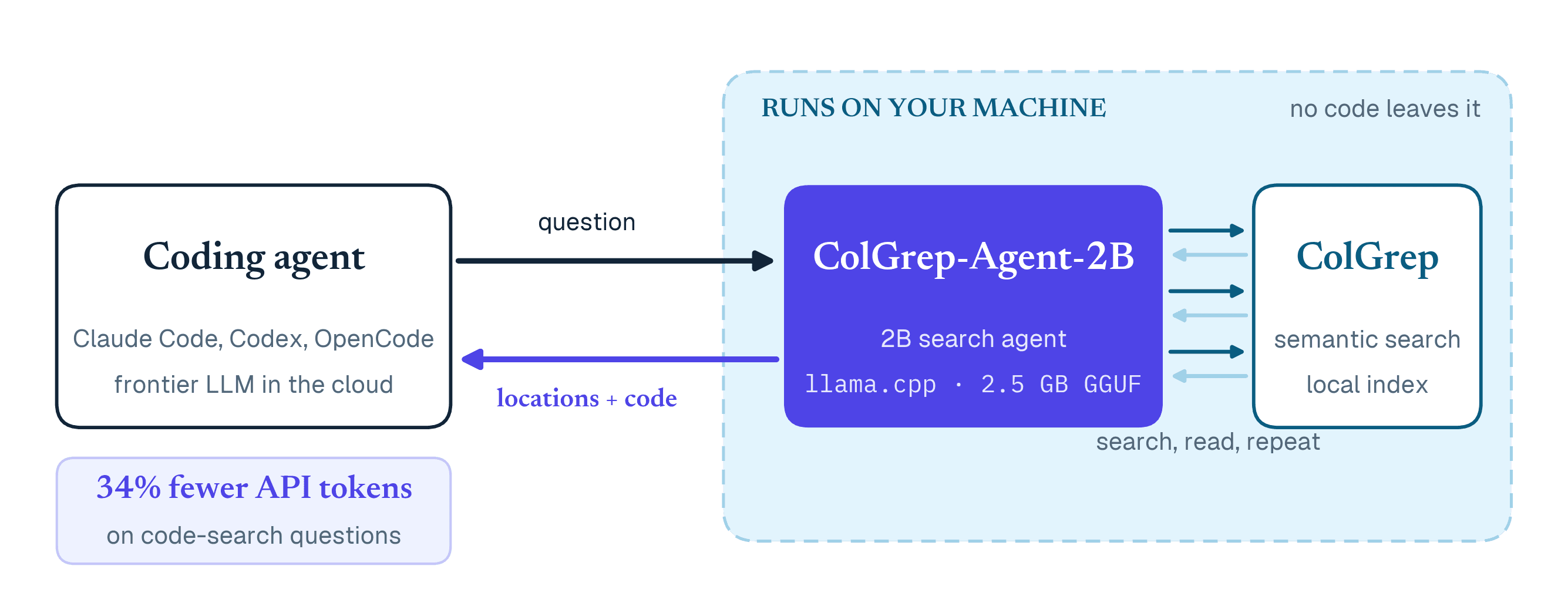
On October 12, LightOn published ColGrep-Agent-2B on the Hugging Face blog: an open 2B-parameter code-search agent that runs locally. Across 624 sessions (Claude Code + Sonnet 5.5, 52 questions × 13 repos created in 2026), delegating search to the local small model cut API tokens 34.3% and cache-aware cost 40%, with no statistically significant accuracy change. The first hard ledger of small-model division-of-labor economics.