How Slow Counts as an Incident: Error Budgets and SLOs for Vibe Projects
AI-generated code has no concept of reliability — everything is 'feels fast.' This guide gives solo teams the SRE decision layer: SLI/SLO/error-budget in plain terms, two-tier burn-rate alerting, and a minimal implementation (one SQL + one cron + one status-page line) plus the 'budget gone, releases freeze' discipline.
Scope first: this guide sets standards — not "testing" or "watching"
This site already has three neighboring guides, so let's draw the lines before you read further. The k6 load-testing guide covers "how to find your system's limits" (a technique). The first-week-monitoring guide covers "what to watch after launch" (a technique). The slow-query guide covers "how to investigate a slow database" (a technique). This guide is a different layer: how slow counts as an incident? — setting measurable reliability standards (SLOs) for your critical paths, backing them with error budgets, and enforcing the discipline of "when the budget is gone, releases freeze." This is the SRE decision piece, not the tooling piece.
Why does a solo team need this? Because AI-generated code ships with no concept of reliability by default. It will hand you queries with 8-second P99 latency, payment callbacks that 500 intermittently, and acceptance testing based on "feels fast." And "feels" is the most expensive metric there is — it only tells you the truth after users have left.
Three concepts, solo-team edition
SLI (Service Level Indicator): the metric you choose. E.g., "checkout success rate," "homepage P99 latency." A solo team sets SLIs only for critical paths: checkout, payments, login. Your blog's "about" page needs no SLI.
SLO (Service Level Objective): the number the SLI must hit. E.g., "checkout success rate 99.9%," "P99 latency < 800ms." Note an SLO is not 100% — 100% is wishing; 99.9% is engineering.
Error budget: 100% − SLO — the amount of failure you're "allowed." A 99.9% SLO means 43 minutes of downtime per month (30 days × 0.1% ≈ 43.2 min); 99.95% is 21.6 minutes; 99% is 7.2 hours. The error budget is the most important of the three, because it translates "reliability" into a currency: budget unspent, you can ship boldly and launch features; budget spent, stop everything and pay down the reliability debt first.
This currency metaphor is the exact discipline a solo team needs. Without an error budget, decisions are emotional: "this bug seems bad, hotfix?" "users will churn if the feature doesn't ship." With one, decisions become arithmetic: 60% budget left, features keep shipping; 5% left, freeze releases, and the entire team (you) fixes reliability. Google SRE's original line is that error budgets reconcile the structural conflict between product development and operations — inside a solo team, that conflict lives between your own left and right brain, and the budget is the referee.
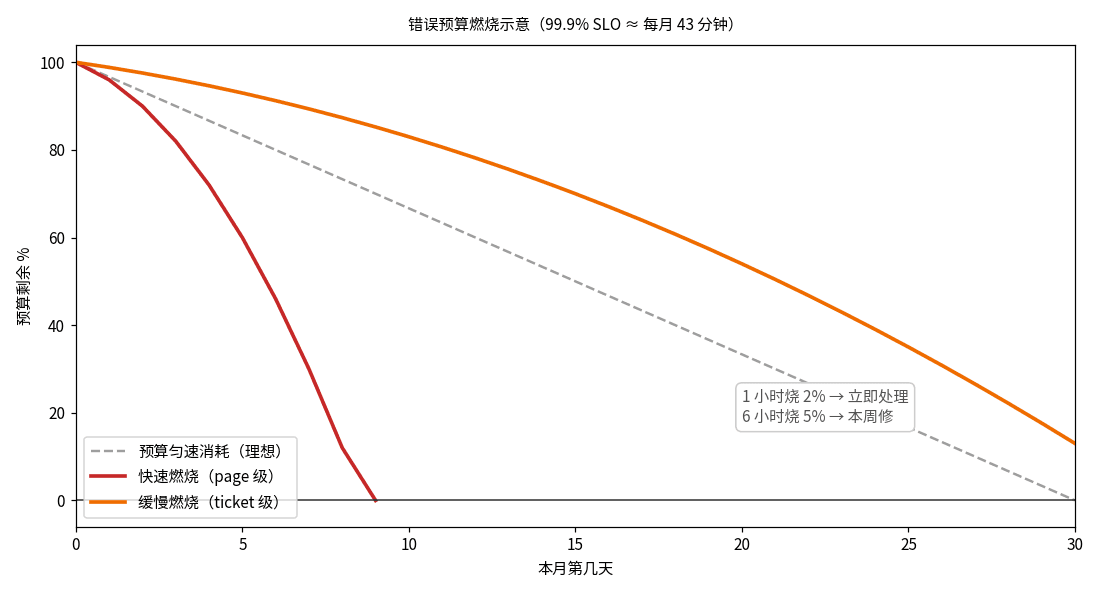
 Error budget burn-down chart: monthly budget draining with fast-burn and slow-burn alert thresholds
Figure 1: Error budget burn-down — the monthly budget (99.9% SLO ≈ 43 minutes) drains with incidents; fast burn and slow burn trigger different alert severities.
Alert tiers: don't let threshold alerts wake you at 3am
After setting SLOs, the most common mistake is threshold alerting: "alert when error rate > 1%." Threshold alerts have two flaws: they don't know how much budget you have left (1% in week one vs. week four are completely different things), and they can't distinguish "burning budget" from "budget already gone."
The right approach is burn-rate alerting, in two tiers:
Fast-burn alert (page me): 2% of the monthly budget burned in the last hour. The math: at 99.9% SLO, burning 2% of budget in an hour ≈ error rate spiking to ~14%. At that pace the whole month's budget is gone in 2 days — drop everything, roll back.
Slow-burn alert (ticket): 5% of budget burned over the last 6 hours. The frog-boiling kind: error rate hovering at 2–3% for hours, which threshold alerts call "fine," but which guarantees the budget breaks by month-end. No need to wake up, but file a ticket and fix it this week.
A solo team can simplify this to one SQL query + one cron job (see the minimal implementation below) — no need for Prometheus's full multiwindow machinery. The key is the mindset shift: alert on "the budget is disappearing at some rate," not "a metric crossed a number." The former is a thermometer; the latter is a fuel gauge — and drivers watch the fuel gauge.
Minimal implementation: one SQL query + one cron + one status-page line
Don't let SRE jargon scare you; a solo-team SLO can be radically simple:
1. One SQL query (compute the SLI). Assuming your request-log table has success boolean and created_at, the checkout-success SLI is:
-- Checkout success rate, trailing 30 days (SLI)
SELECT
  SUM(CASE WHEN success THEN 1 ELSE 0 END)::float / COUNT(*) AS success_rate,
  COUNT(*) FILTER (WHERE NOT success) AS failed_count
FROM request_logs
WHERE route = 'POST /api/orders'
  AND created_at > NOW() - INTERVAL '30 days';
-- success_rate >= 0.999 means SLO met; budget remaining = (success_rate - 0.999) / 0.001
2. One cron job (compute burn rate + alert). Run the query hourly, recomputed on a 1-hour window: if one hour's failures exceed 2% of the monthly budget, send a page-level notification (SMS/call); if the trailing 6-hour total exceeds 5%, file a ticket. Reuse notification channels you already have (as the serverless-cost guide on this site argues — don't build a second system just for alerts).
3. One status-page line. On your status page (even if it's just a /status route), write: "Checkout success SLO 99.9%, 62% of this month's budget remaining." Two readers: your users (during an incident they see you're measuring, not "feeling"), and yourself (glance daily — the budget is your release traffic light).
One step further: wire "budget remaining" into your release flow. When budget drops below 20%, have CI add a required check on main — "error-budget-ok" — that needs your manual confirmation before feature PRs merge. Once discipline becomes code, it stops needing willpower. One more cheap upgrade: have the cron push "yesterday's budget burn" to your phone every morning (Bark, Pushover, whatever you use). Three straight days at zero means the system is calm; three straight days above 1% means a chronic problem is smoldering — many "sudden major incidents" are just the last straw of a slow burn. Seeing it early beats paging at 3am.
 Error budget burn-down chart: monthly budget draining with fast-burn and slow-burn alert thresholds
Figure 2: The SLO landing decision flow — define SLIs → set SLOs → compute the budget → configure two burn-rate alert tiers → freeze releases when the budget is gone.
SLO vs. SLA: one letter apart, worlds apart in liability
Before setting SLOs, separate two acronyms — don't mix them up in front of customers. An SLO is a target you set for yourself; hitting it is your internal business, and when the budget burns out you freeze your own releases. An SLA (Service Level Agreement) is a contract with the customer — written, with compensation clauses: miss it and you pay in money or service credits.
The solo-team iron rule: SLOs yes, SLAs almost never. Every line of an SLA is future liability: a 99.9% SLA commits you to at most 43 minutes of monthly downtime, and overruns trigger contractual compensation. Once signed, your on-call is no longer "best effort" but "breach risk." Unless an enterprise deal forces it, keep SLAs outside the door — use "status page + published SLOs" instead: transparency for customers without turning yourself into a 24/7 compensation machine.
If you must sign (e.g., an enterprise procurement process requires it), three lifelines: 1) the SLA covers only paths you control (your API success rate — exclude upstream cloud outages in writing); 2) compensate with service time, never cash (credits are an order of magnitude cheaper than refunds); 3) the SLA number is always one notch looser than your internal SLO (internal 99.9%, external SLA 99.5% at most) — keep a buffer zone.
From 99.9% to 99.99%: the price of each extra nine
Many people feel the urge to set a bigger number to look professional. Here's the honest price table (per 30 days):
99% → 7.2 hours of monthly downtime allowed. A single machine + daily backups gets you there — the solo-team starting point.
99.9% → 43 minutes. Needs health checks + auto-restart + off-site backups, roughly 1–2 days of engineering.
99.95% → 21.6 minutes. Needs multi-AZ, database replicas — engineering measured in weeks.
99.99% → 4.3 minutes. Needs full-chain redundancy, chaos drills, dedicated on-call — not a number a solo team should touch.
The pattern is brutal: each extra nine roughly 10×es the reliability cost, while the user-perceived gain diminishes. From 99% to 99.9%, users go from "outages every week" to "once a month" — hugely felt. From 99.95% to 99.99%, yearly incidents drop from 4 to 1 — nobody remembers. The rational solo choice: 99.9% for critical paths, 99% elsewhere, and spend the saved engineering time on features. Remember: every SLO is bought, and every nine has a price tag.
Three common traps
Trap 1: SLOs for every endpoint. A solo team gets at most 3 SLOs: checkout/payments/login (or your critical-path equivalents). The number of SLOs should be proportional to your on-call headcount — you're one person, so three is the cap. Extra SLOs don't buy reliability; they buy 3am text messages.
Trap 2: setting 99.99% to look professional. 99.99% allows 4.3 minutes of downtime a month — one restart of your single Postgres blows it. An SLO must be a number you can reach on tiptoes; start at 99.5% (3.6 hours/month) if needed, hold it for three months, then tighten. SLOs guide action; they're not wall decorations.
Trap 3: shipping features after the budget is gone. This is the error budget's one iron rule, and the hardest to follow. Fight human nature by encoding it in process (the CI required check above), not in a memo. Remember the classic SRE ordering: budget healthy → reliability work yields to features; budget exhausted → features yield to reliability. No middle ground.
One sentence: k6 tells you how fast the system can go, monitoring tells you how the system is doing, and the error budget tells you whether you dare to ship. The first two are the dashboard; the last one is the steering wheel — and a solo driver needs the wheel more than the dashboard.
Comments (0)
Related articles
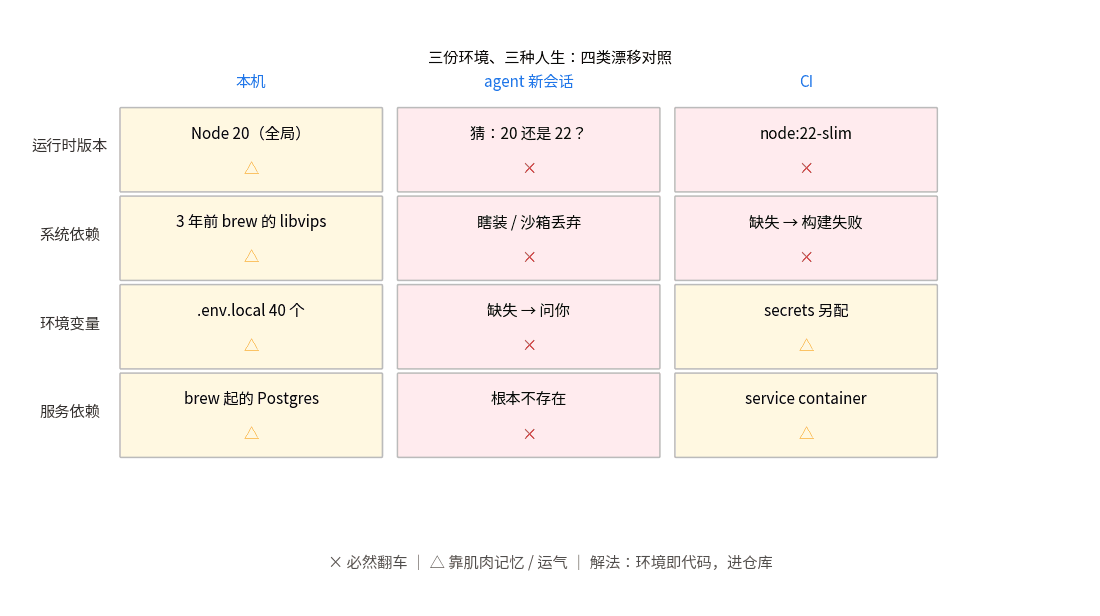
Your code runs in three different environments: your laptop, a fresh agent session, and CI — and they disagree. This guide standardizes the dev environment for vibe projects: a full devcontainer.json template (Node+Postgres), the nix-flakes endgame, and a 15-minute minimum viable version.
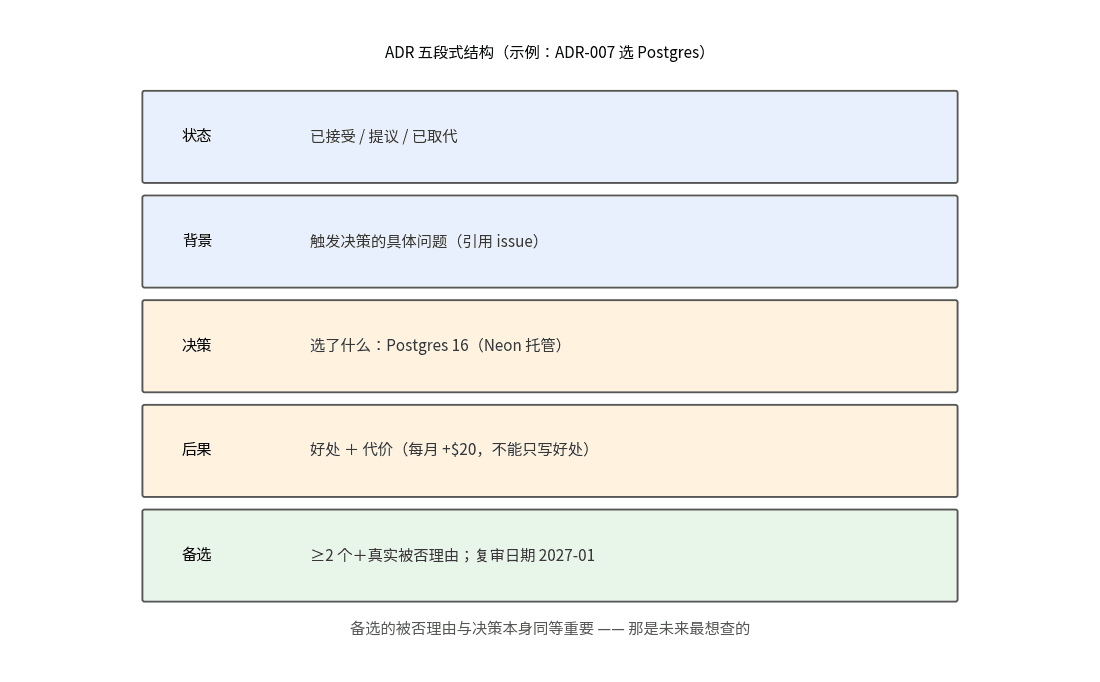
AI writes code fast; decisions evaporate faster. This guide introduces ADRs (Architecture Decision Records) for solo teams: a real five-part template, the 'only write the irreversible' rule (2–3 per month), a prompt for letting AI draft them, and the quarterly review with superseded archaeology.
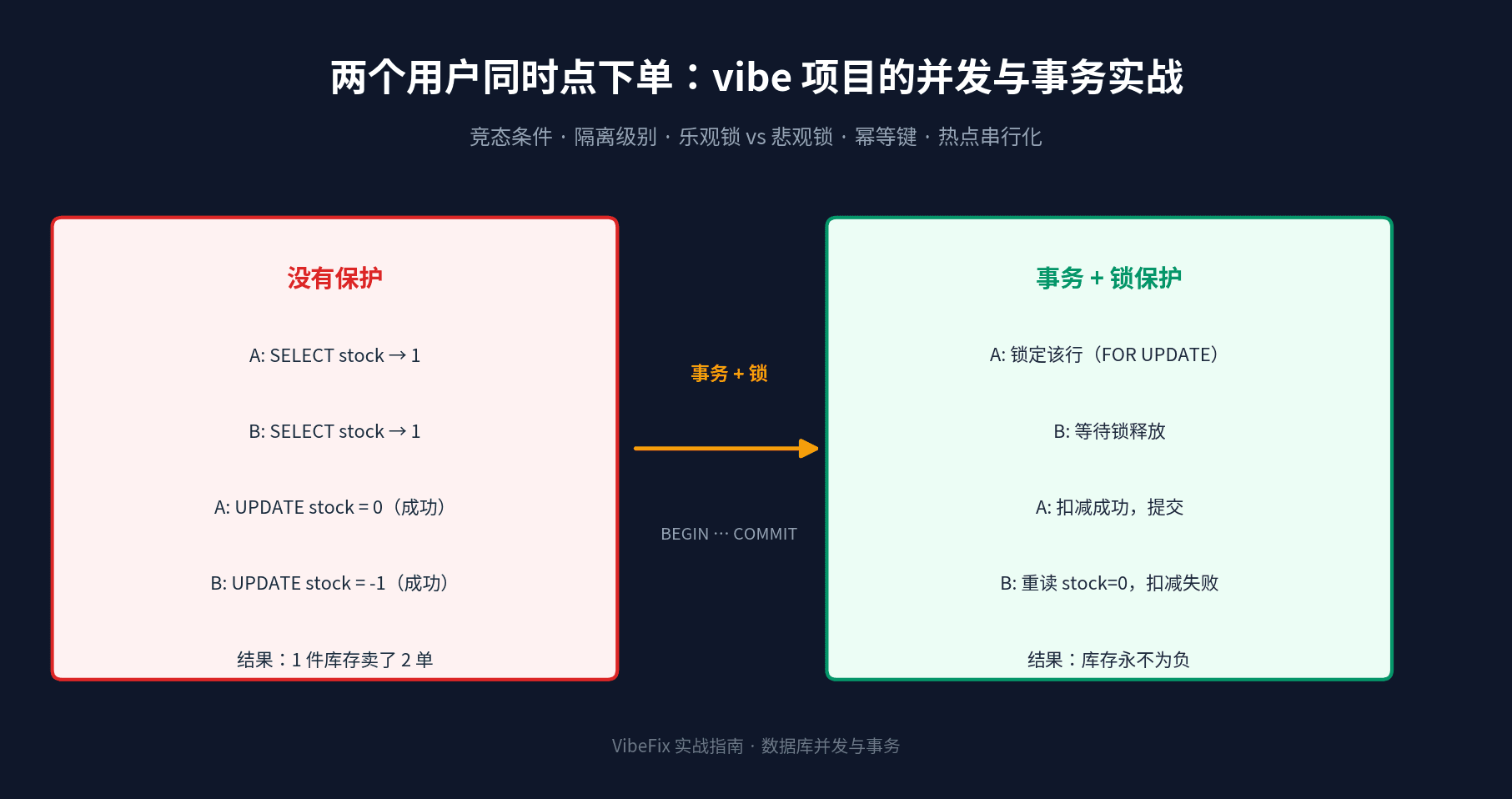
AI-generated checkout code never thinks about concurrency: two users buying at once means negative stock and double-spent balances. This guide starts from three real race-condition scenes, then covers transaction isolation levels, optimistic (version column) vs pessimistic (SELECT FOR UPDATE) locking, idempotency keys against replays, queue serialization for hot rows, and hands-on transaction code in Prisma and Drizzle — plus a rollout checklist.