Building a Form Builder for Your Vibe Project: Schema, Render Engine, and Drag-and-Drop
Questionnaires, sign-ups, applications… once your vibe project grows its third form, hand-written maintenance starts to spiral. This hands-on guide builds a form builder from zero: JSON Schema as the data contract, UI schema for layout, a type-to-component registry for rendering, a rule engine for conditional logic, plus the drag-and-drop canvas and schema versioning — with an AJV/zod decision guide and a launch checklist.
1. Why Your Vibe Project Needs a Form Builder
Almost every vibe project grows forms: user feedback, event sign-ups, onboarding applications, admin config pages. The first form takes thirty minutes to hand-write. The second is copy-paste-and-tweak. By the third, things start going wrong — the same "phone number validation" is scattered across three files, product asks to "make company name required on the sign-up form," and after you fix it you discover the application form still has the old version; the designer ships a new input style and you have to hunt down every form one by one.
This is the maintenance hell of hand-written forms: form logic tangled with business code — fix one place, miss three. A form builder doesn't solve the surface problem of "drawing forms faster." It is an architectural decision: turn forms from "code" into "data." What a form looks like, what validations it has, how fields interact — all described by a JSON Schema. The renderer only turns that data into UI. Adding a field becomes editing data, not code; changing styles becomes swapping a theme, not rewriting forms.
But first, a cold splash of water: if you have three or fewer fixed forms, just hand-write them — don't build a builder. A builder is itself a product: schema design, render engine, drag-and-drop canvas, versioning — each piece costs real effort. The signals that it's worth it are clear: a growing number of forms (questionnaires, sign-ups, applications, config pages); fields that need to be configured by ops or customers instead of requiring a code change from you every time; the same data needing to render across multiple platforms or themes. One of these is worth serious consideration; all three, and skipping the builder means the forms will bury you sooner or later.
2. Schema Design: Data Contract First, Presentation Second
The foundation of a form builder is schema — and it must be two layers of schema: a data schema for "what gets stored" and a UI schema for "how it lays out." This separation is the single most important design decision, and the easiest to get wrong.
Use JSON Schema as the data contract: field names, types, required flags, enums, nested objects, arrays — one standard expresses it all. The payoff is "say it once, use it everywhere": the frontend renders from it, the backend validates against it, API docs can be generated from it, and database JSON-column constraints can align with it. A minimal sign-up form data schema looks like this:
{
  "type": "object",
  "required": ["name", "phone"],
  "properties": {
    "name": { "type": "string", "title": "Name", "minLength": 2 },
    "phone": { "type": "string", "title": "Phone", "pattern": "^1[3-9]\\d{9}$" },
    "company": { "type": "string", "title": "Company" },
    "members": {
      "type": "array", "title": "Companions",
      "items": { "type": "object", "properties": {
        "name": { "type": "string", "title": "Name" }
      }}
    }
  }
}
The field type taxonomy is most durable when organized by data shape: input types (text, number, date), choice types (select, radio, checkbox), file types (upload), nested types (object), and array types (arrays, e.g. "add a family member" style dynamic lists). Note this is a data-layer classification, not a widget-layer one — a "date" is a formatted string at the data layer and only becomes a date picker at the presentation layer.
So why must the UI schema be a separate thing? Because the data schema is "truth" and the UI schema is "expression." Field order, group headings, whether a field renders as a dropdown or radio buttons, placeholder copy, CSS classes — all of that is presentation. Stuff it into the data schema and the disasters follow: changing a theme touches the data contract; the mobile client wanting a different layout is forced to reuse the web ordering; the backend validating data has to strip out a pile of frontend layout fields first. The correct posture: the data schema only answers "what does the data look like, is it valid," the UI schema only answers "how is it laid out," and the two are linked by field keys without polluting each other.

3. The Render Engine: A Type-to-Component Registry
With schema in place, the render engine has exactly one job: see the type declared in the schema, find the matching component, render it. The cleanest implementation is the registry pattern:
const widgetRegistry = {
  text: TextInput,
  date: DatePicker,
  select: SelectInput,
  mapPin: MapPicker,      // custom widget
  richText: RichEditor,   // custom widget
};
function renderField(fieldSchema, uiSchema) {
  const Widget = widgetRegistry[fieldSchema.widget || fieldSchema.type];
  return <Widget schema={fieldSchema} ui={uiSchema} />;
}
The biggest win of this pattern: adding a field type never touches the main render flow — a new "map pin" field is just one more registration. The renderer itself handles only three things: walking the schema, dispatching via the table, and managing the whole form's state. What goes into the render core versus what gets thrown out is the watershed that separates good design from bad.
A custom widget slot is non-negotiable. Heavyweight fields like rich-text editors, map pickers, file uploads, and signature pads cannot and should not be stuffed into the render core. Define a minimal slot protocol: a widget only needs to accept four props — value / onChange / disabled / error — and can use whatever third-party library it wants internally. The thinner the protocol, the easier an ecosystem grows: the day you swap the rich-text editor from Quill to TipTap, only the widget implementation changes while schema and render core stay untouched.
The render core must be theme-agnostic. State management, when validation triggers, how submission data is assembled — none of that has anything to do with "what an input looks like." Make the theme a replaceable layer: default theme, dark theme, customer brand theme — swapping only changes the concrete component implementations in the registry. Many homegrown builders die right here: v1 hard-codes styles into render logic, and v2's re-skin requires rewriting half the codebase.
For library choices, the community already offers proven paths to study (check each library's docs for exact APIs rather than memorizing versions): RJSF (react-jsonschema-form) is the veteran — schema + uiSchema + validator as a trio, the largest ecosystem, ideal for "get running first"; uniforms takes a more abstract approach, bridging multiple schema types including zod via its schema bridge, with AutoForm producing a form in one line; JSON Forms bakes the data-schema/UI-schema separation into its bones with framework-agnostic renderers; for questionnaire scenarios, SurveyJS offers survey-core as a platform-independent kernel. Build vs. adopt comes down to one test: do your field types and interactions exceed what these libraries express — if not, don't reinvent the wheel.

4. Conditional Logic: The Rule Engine Is the Soul of the Builder
A form builder without conditional logic is just a "form generator." Real-world forms are full of if-thens: show "ID number" only when country is "China"; require "business license number" only for "enterprise" accounts; the city dropdown's options follow the selected province. These three — visibility, required-if, option cascading — cover ninety percent of needs, and the rule engine exists to serve them.
Rules come in two flavors, and picking wrong costs you a rewrite. Expression-based rules (JSON Logic style, e.g. {"if": [{"==": [{"var": "country"}, "CN"]}, ...]}) suit developer-maintained fixed logic: written in code, version-controlled, reviewable, unit-testable. Visual rule builders ("when 【Country】 equals 【China】, show 【ID number】") suit ops or customer self-service — but you must then implement a complete rule DSL: parsing, evaluation, error messages, audit logs, every piece, at an order of magnitude higher cost.
The trade-off criterion is brutally practical: who changes the rules, and how often. Twice a year, changed by you — use expressions. Three times a week, changed by ops — bite the bullet and build visual. The classic trap is "expressions for now, visual later" — the two approaches differ completely in storage format and evaluation path, so "later" means a rewrite. Decide at project kickoff.
One more thing that's easy to miss: rules must be versioned together with the schema. Rules reference field keys; rename a field and old rules point at nothing. So rule snapshots ship with each form version, and replaying historical submissions uses the rules from that time — never today's. Frontend evaluation is only an experience optimization (timely hiding, instant hints); the real validation happens again on the backend at submit time — the security iron rule expanded in section 6.

5. The Drag-and-Drop Builder: Three Columns, Single Source of Schema
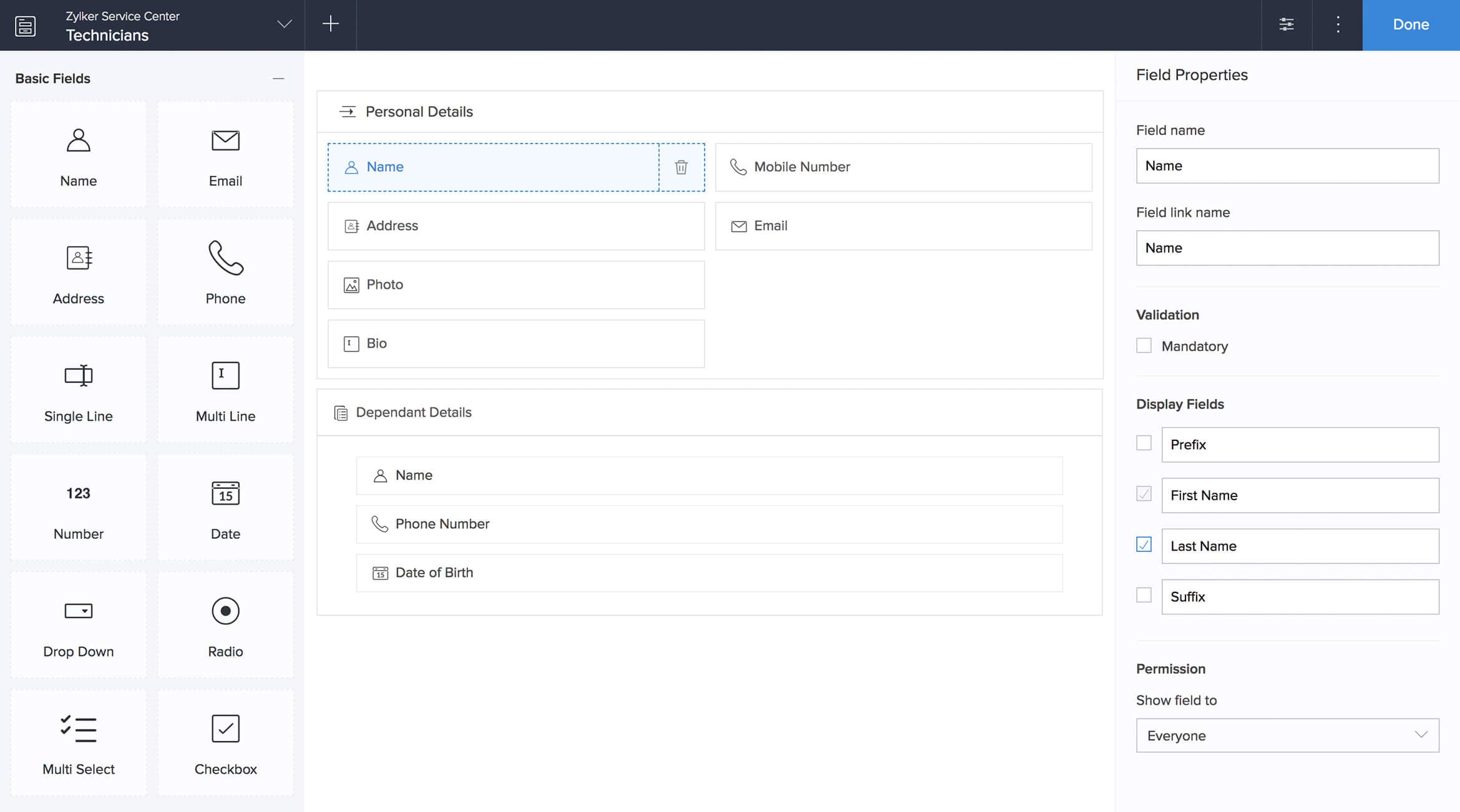
If the renderer is the "read end," the drag-and-drop builder is the "write end" — letting non-coders produce schema. The UI shape has converged across the industry: left: component palette (field type list: single-line text, date, dropdown…), center: canvas (WYSIWYG form preview), right: property panel (schema editing for the selected field: title, required, options). This three-column layout isn't an aesthetic choice — it's a direct map of the three-layer schema: the palette mirrors the "type taxonomy," the canvas mirrors the "render output," the property panel mirrors "schema editing."
Two design decisions matter most. First, dropping a field onto the canvas auto-generates a default schema fragment: drop "date," the canvas gains a field and the underlying schema gains {"type": "string", "format": "date", "title": "Date"}; editing the title or toggling required in the property panel edits the same schema, and the canvas re-renders live. The user perceives "dragging widgets"; what actually happens is "writing schema."
Second, the builder and the renderer must share the same schema and the same renderer. The canvas preview should not reimplement rendering — just call the render engine from section 3. This guarantees WYSIWYG isn't two implementations telling different stories: what the builder shows is exactly what end users will fill in. Whenever a project's builder preview looks "close but not quite" like the real form, the root cause is almost always the write end and read end having diverged.
For the drag interaction layer, dnd-kit is the recommended pick: unstyled, composable, with solid accessibility support — a good fit for a custom builder (follow its docs for usage). Two practical pitfalls to flag early: after drag-reordering, field order must be written back into the schema (JSON Schema's properties are inherently unordered, so maintain a separate order array in the uiSchema or a propertyOrder field); and nested fields should be addressed with JSON Pointer-style paths (members/0/name) — the property panel and validation errors both rely on it for locating fields, so don't invent your own scheme.
6. Validation & Submission: AJV vs. zod, and the Security Iron Rule
The validation choice is AJV versus zod. Picking wrong won't kill you, but switching hurts. AJV is the reference JSON Schema validator, and its strength is "standard interop": the same schema validated by AJV on the frontend, AJV on the backend, with JSON Schema validators available in other languages too — frictionless cross-team, cross-language collaboration. zod is the TypeScript-first option, and its strength is "frontend-backend isomorphism": one zod schema shared by frontend form validation and backend API validation, with types inferred automatically — a superb feel for TS-fullstack teams. The decision test: TS-fullstack team chasing type ergonomics → zod; schema that must travel across languages and teams as a contract → JSON Schema + AJV. They can also coexist: JSON Schema persisted as the standard, zod at runtime (uniforms' ZodBridge is a ready-made implementation of exactly this idea).
Then comes the security iron rule: frontend validation is for experience only; the backend must re-validate against the same schema. No matter how thorough frontend validation is, one curl bypasses it — it optimizes the experience of legitimate users, not the security boundary of the system. The correct approach: when a submission reaches the backend, run validation again server-side against the same schema (the same one — not a backend engineer's rewrite "based on the frontend logic"). The "hidden fields aren't submitted" trick in conditional logic must never serve as a security boundary: the frontend hides the "discount code" field, the attacker stuffs one into the request body anyway, and the backend must re-check types, required fields, and enums against the schema — rejecting what fails. File fields follow a two-step flow ("upload first for a URL, then the URL goes into the submission"), and the upload endpoint itself needs type and size checks — never build trust on the frontend's accept attribute.
7. Versioning & Historical Data: What Separates a Builder from "a Pile of Hardcoded Forms"
Hardcoded forms have no versioning problem — a code deploy replaces everything. But a builder's forms are data: a sign-up submitted last month, the schema changed this month — can the historical data still be read? Versioning is the essential difference between a form builder and "a pile of hardcoded forms": the former manages forms as data assets, the latter as code.
It lands as three disciplines. First, store a version on the schema: every publish of every form snapshots the full schema (including UI schema and rule snapshots) with a version number, and each submission records "the schema version used for this submission." Replay, export, and audit all fetch snapshots by version — never interpret historical data with "the latest version."
Second, field renames need a mapping: phone becomes mobile — what happens to old data under phone? Option A maintains a rename map and migrates on read; option B is more ruthless — a field key is never renamed after publish, only its title (display name) changes. Small teams should just pick B and eliminate a whole class of bugs.
Third, the add-only evolution discipline: never delete fields, only mark them deprecated — the frontend stops rendering them, the backend still accepts them in old data. Deleting a field means old data becomes unreadable, new submissions mismatch, and report columns vanish into thin air. For migration strategy, small projects are fine with "migrate on read" (transform old-version data through the mapping when reading) — don't start with a full data-migration job.
8. Launch Checklist: Performance, Accessibility, and Sharing Security
A working builder is only halftime — three more gates before launch. First, performance: a 100+ field mega-form with fully controlled components can freeze a low-end phone on a single re-render. Apply techniques in order: grouped/stepped rendering first (render one group at a time — it matches how users think about long forms anyway); then field-level subscriptions (one field's change re-renders only itself); virtualization last — forms aren't lists, and the focus-management and validation complexity virtualization brings isn't worth it until you have no other choice.
Second, the accessibility baseline: for builder-generated forms, you set the a11y floor. Labels must be correctly associated with inputs, every interaction keyboard-reachable, error messages exposed via role="alert" so screen readers announce them, color contrast up to standard. Doing it once in the render core benefits every form forever; doing it per hand-written form means it's never really done — another dividend of the builder architecture.
Third, sharing and embedding security: a builder makes "publishing a form" trivially easy, so the security bar must keep up. For iframe embeds, think through the allow attributes and the CSP/X-Frame-Options trade-offs; share-link tokens need expiry and revocation; public forms need abuse protection (CAPTCHA, rate limiting, per-IP submission quotas). The most dangerous mindset is "it's just collecting info, what could go wrong" — plenty: spam flooding your database, phishing forms abusing your domain. Each one is a headache you don't want.
A final word on rollout order: get three real forms running end-to-end through "schema → render → validate → submit → version" before building the drag-and-drop canvas — never reverse the order. The builder canvas is a write-end efficiency tool; the full pipeline is the builder's lifeblood. A builder with a broken pipeline produces nothing but pretty screenshots; with the pipeline solid, the canvas arriving two months late won't bring the sky down.
Comments (0)
Related articles

DMs are not just sending messages. This hands-on guide walks through a complete DM system for vibe projects: three conversation shapes, a three-table data model with a stranger-request state machine, WebSocket delivery with idempotency, read watermarks, the anti-abuse quartet, signed attachment URLs, silent push aggregation, delete semantics, and 12 launch test cases.

A public roadmap turns 'when will you build X?' from a support nightmare into a trust engine. This guide covers the five-state request lifecycle, voting-wall rules (one-vote vs weighted, anti-gaming, cold start), request dedup and merging, kanban vs timeline layouts, biweekly/monthly update cadence with changelog linking, three graceful rejection scripts, a three-table Prisma data model, and the four pitfalls that turn roadmaps into promise lists.

A bounty program burns budget to save you from incidents. This guide covers when to launch, how to price, how to write scope, how to set up disclosure channels, how to choose a platform, how to triage and deduplicate, how to filter AI slop reports, how to communicate with hunters, and how to set remediation SLAs — a complete, ready-to-run bounty operations playbook for vibe projects.