Don't Let AI's Fake Data Fool You: Test Data and Seed Libraries for Vibe Projects
AI-written seed scripts always explode on day three: dangling foreign keys, timestamp collapse, unique-index collisions. This guide covers the three-profile split, deterministic seeding, factory patterns, and CI integration — turning pnpm db:seed into reliable infrastructure.
Why AI-Written Seed Scripts Always Explode on Day Three
Almost every vibe developer knows this cycle: you ask the AI to "whip up some test data," day one goes smoothly, day two a new table starts throwing errors, and by day three the whole seed script is dead — leaving you staring at 300 lines of AI-generated INSERT statements, unsure which line drew first blood.
AI-generated seed data suffers from three classic diseases, each fatal in its own way. The first is dangling foreign keys: the AI inserts 200 orders, then remembers the users table is still empty, so every userId points at thin air. The infuriating part is that it worked the first time — because you had manually created two users, and the AI mistook "the environment happened to have data" for "my script is fine." The second is timestamp collapse: every createdAt lands on the same day, the same minute. You open your revenue chart and see a perfectly flat line — no way to tell whether trends render correctly. The third is the sneakiest: unique-index collisions. AI loves "clever" emails like test1@test.com, test2@test.com. The first hundred rows are fine; row 101 hits the unique index, the whole transaction rolls back, and you spend half an hour discovering it was the emails all along.
The root cause isn't that the AI is dumb — it's that your instruction was one sentence: "make some test data." Seed data isn't a throwaway script; it's development infrastructure. And infrastructure deserves infrastructure standards: repeatable, versioned, with acceptance criteria. This guide is about turning pnpm db:seed from "fingers crossed" into "identical every time."
The worst blowup I've seen: someone asked the AI to "add more data so it looks lively" the night before a demo. The AI stuffed 50,000 rows into the orders table — forgetting the users table had 30 people. Next day, the "user leaderboard" showed "test1" with 4,000x the orders of second place. Three seconds of total silence. The problem is never "not enough data" — it's that the data has no relationships. The soul of seed data is relationships: between users and orders, between time and events. Two hundred rows with relationships beat fifty thousand without, every time.
Three Kinds of Seed Data: Divide and Conquer
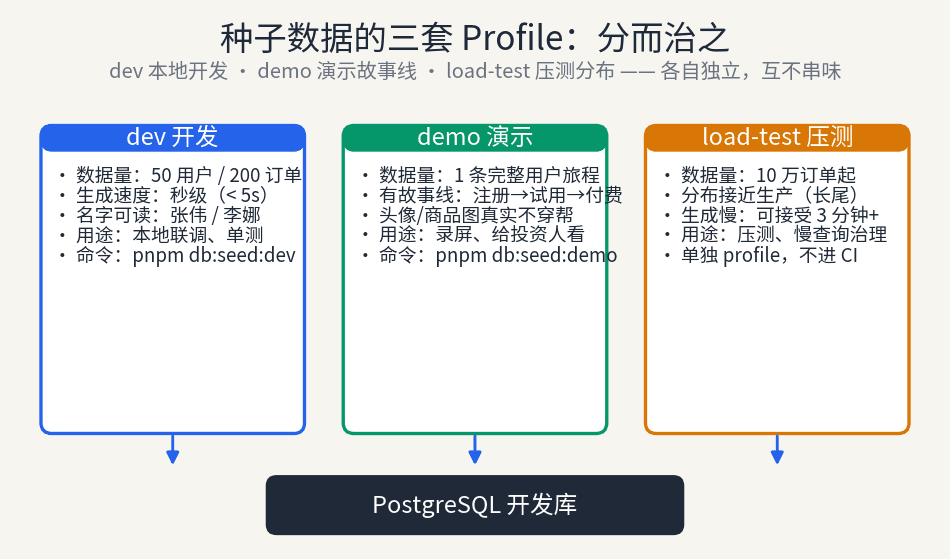
Rule one: one seed to rule them all is the root of all evil. What local development needs, what demos need, and what load tests need are three completely different datasets. Cram them into one script and nobody ends up happy.
dev: for local development. One requirement: speed. Fifty users, 200 orders, and pnpm db:seed:dev must finish in under 5 seconds. Names should be readable — "Zhang Wei", "Li Na", not "user_8f3a" — because you'll see these names in dashboards, logs, and debuggers dozens of times a day, and readable names let you spot data-flow problems at a glance. Dev data doesn't need to look good; it needs to be "locatable at a glance."
demo: for demos. This is the storefront. Small in volume, but it must tell a story: one user going from signup to trial to paid, with a complete trail. Avatars and product images can't be broken placeholders. Run pnpm db:seed:demo before every recording — you don't want a "test123" making an investor frown. Demo data is worth the effort because it directly shapes people's first impression of your product.
load-test: for pressure testing. 100k orders minimum, with a production-like distribution — real-world order volume follows a long tail, not a uniform spread. Slow generation is fine; 3+ minutes is acceptable because it doesn't run in daily CI. This is the most neglected of the three profiles, and the first to bite after launch: the slow query that behaved on 200 dev rows will take your database down at 100k.
Three profiles, each independent: separate scripts, separate commands, separate cadences. Dev runs dozens of times a day, demo a few times a week, load-test once a month. The day you mix them is the day your seed scripts start rotting.
When landing this, hardcode the commands in package.json: db:seed:dev, db:seed:demo, db:seed:load, plus db:reset for one-click resets. Don't use flags (like db:seed --profile=demo) — flags get mistyped; separate commands are self-evident. A new hire reads "run pnpm db:seed:dev" in the README and has an environment identical to yours in 5 seconds. That "environment consistency" is seed data's most underrated value: nobody on the team ever has to ask "how many orders do you have locally" in chat again.
Deterministic Seeds: Same Command, Same Database, Every Time
The most important property of seed data isn't "looks real" — it's reproducibility. Run the same command twice; the database should contain row-identical data. Without that, your bug reproduction, CI tests, and pair debugging are all built on quicksand.
The fix is simple: pin the random seed. Faker and friends all support faker.seed(42) — 42 or your birthday, doesn't matter, as long as it's fixed. And when prompting the AI, demand explicitly: all randomness must go through the seedable RNG; no naked Math.random(). The AI's default habit is mixing both random sources, the most common technical cause of non-reproducible seeds — block it in the prompt.
Pinning alone isn't enough; you need acceptance. My approach: run db:seed twice, dump the database, diff line by line — zero differences or it doesn't ship. Write this acceptance into your dev docs, so the next person to touch the seed script (or future you, three months from now) knows instantly whether determinism broke. It sounds crude, but it's the only reliable method — "it should be the same" is worthless when it comes to seed data.
For AI-written seed scripts, I recommend a fixed prompt template so you never re-describe requirements: "Generate seed data with faker. Requirements: 1) all randomness via faker.seed(fixed value), Math.random() banned; 2) list table dependencies and insertion order first, write code only after confirming; 3) organize with factory functions, one per model; 4) spread timestamps across the last 90 days, not piled on one day; 5) emails as user_{n}@example.com to avoid unique-index collisions." Store that in your AI instruction file and reference it every time. With those five constraints, the AI's first-try success rate goes from "luck" to "likely" — and all it cost you was a copy-paste.

One more detail: time. AI-generated createdAt values are either all "now" or all the same day. The right approach gives time a distribution too: orders spread over the last 90 days, with weekday/weekend differences and spikes around sale events. You don't need to simulate reality precisely — just "not all crammed into one day." Charts should show trends, pagination should reach page two, search should return results from different times. Pass those three and the time dimension is good enough.
Foreign Keys and Relations: Diagram First, Data Second
The biggest technical trap in seed scripts is insertion order. The AI writes in "the order I thought of," not "the order the database demands." The cure: make the AI output the ER relationships and insertion order before writing any code. Add one line to your prompt — "list all table dependencies and insertion order, confirm, then write code" — and you filter out half of all foreign-key problems. This isn't magic; forcing the AI to topologically sort first stops it from winging it.
The second fix is factory functions instead of hand-stacked SQL. Write one factory per model: createUser() returns a valid user object, createOrder(user) takes a user and returns their order. Factories own defaults and associations; the script body is just "call factories in a loop." The payoff: adding a field means editing one factory, not patching 50 INSERTs. AI happens to be excellent at factory functions — they're among the most common patterns in its training data. You just have to ask for them.
Prisma users, watch for one specific trap: createMany doesn't support nested connect. The AI loves writing prisma.order.createMany({ data: ordersWithUserConnect }) — looks right, explodes on run. The correct move is createMany on the parent table first, then bulk-insert children with the returned ids. Write this trap into your project's AI instruction file (e.g., AGENTS.md) once, and never think about it again.
Self-referencing tables are another classic blowup: an employees table with a "manager id" pointing at itself. The AI's instinct is "insert managers first, then employees" — but managers are employees too. One pass can't do it; the answer is two-pass insertion: pass one inserts everyone with the manager field blank, pass two updates the reporting lines. The same pattern covers category trees and threaded comments. Memorize the phrase "two-pass insertion" and hand it to the AI next time.
What does a factory look like? Here's a minimal template the AI can riff on: createUser(overrides) uses faker for name and email, with the password hash fixed to "password123" (don't randomize the hash, or you won't be able to log in during testing yourself); createOrder(user, overrides) takes an already-created user and generates only that user's orders. One subtlety: factories should default to "valid and ordinary" data. Edge cases (absurdly long nicknames, negative amounts) belong in explicitly named variants like createEdgeCaseUser(). Mix them together and your ordinary-flow testing drowns in edge data — page one of pagination scares you before you've started.
Sampling Production: Anonymization Is a Prerequisite, Not an Option
Some data can't be faked convincingly: real user behavior sequences, real product long-tail distributions. That's when you sample production — but production data must never become seed data directly. Not "preferably not" — it's a red line. Your dev machine, your CI logs, your screen recordings can all leak seed data.
The standard flow is three steps: sample, anonymize, verify. Sample only the columns you need, never SELECT *; anonymize emails, phones, and names with pseudonymization (format- and uniqueness-preserving, e.g., mapping real emails to user_xxxx@example.com — not naive masking, which wreaks havoc on unique indexes and foreign keys); jitter numerics like amounts and ages within a band (±10%, preserving distribution shape). Then verify with a hard rule: if any query against the seed database can identify a real person, the sample is void — redo it.
For the full PII-tiering framework, see this site's published guide on log redaction and PII governance — no need to repeat it here. One sentence to remember: every row in your seed database must survive accidental publication. If a row going public would keep you up at night, it doesn't belong in the seed database.
One more word on pseudonymization method: build a mapping table, real name → pseudonym, one-to-one, stable across runs. The win is that relationships survive — "Zhang Wei's 5 orders" becomes "Chen Jing's 5 orders," order ownership intact, behavior-analysis tests still work. Naive masking ("Zhang * Wei") destroys exactly those relationships, and relationships are what make sampled data valuable. The mapping table itself is a sensitive asset: encrypt it, delete it on schedule, let it exist only for the minutes sampling takes.
Versioning Seed Scripts and CI Integration
Seed scripts and migrations are conjoined twins: when the schema changes, the seed must follow. Put seed scripts in prisma/seeds/ (or your ORM's equivalent), numbered, aligned one-to-one with migrations. A PR that changes the schema without touching seeds should go red in CI — not harsh, just letting the machine remember the "conjoined" relationship for you.
CI's fixed order is: migrate → seed → test. Never shuffle it: create tables, load data, run tests. Tests depending on seed data is perfectly fine, but the dependency must be explicit — test files never insert their own fixtures; all setup data comes from seeds. That way, when a test fails, your first thought is "did the seed break," not a scavenger hunt through test files.
One more rule of thumb: if a seed script takes over 3 minutes, split out the load-test profile. CI runs dozens of times a day; 3 extra minutes each is tens of hours of waiting per year. The dev profile must stay snappy — that's a hard target. Load-test slowness is fine because it runs monthly; quarantine the slowness, don't let it infect daily development.
In GitHub Actions this pipeline is roughly: one job running prisma migrate deploy, then pnpm db:seed:dev, then pnpm test, failing on any nonzero exit. Read "seed went red" and "tests went red" as different signals: a seed failure means schema and seeds drifted — fix the seed first; a test failure is a business-logic problem. Conflate them and you'll burn hours in the wrong direction. Also give CI seeds a timeout guard: dev profile over 60 seconds fails immediately — it catches "someone wrote load-test volumes into the dev script" on day one.
Demo Environments Need a Storyline
The biggest difference between demo and dev data is that demo data has to perform. Investors, users, judges don't look at data — they watch a story. A good demo dataset tells one: user "Lin Xiaoyu" signed up three weeks ago, browsed in week one, started a trial in week two, paid annually yesterday. Her dashboard shows a real curve, her order list reaches page two, her settings page is fully filled in.
The dumb-but-effective method for storylines: write the script before generating the data. Write out your 5-minute demo verbatim — "I open the dashboard, see this curve…" — then work backward to what each screen needs, and have the AI generate to the script. Doing it the other way (generate a pile of data, then figure out the demo) never tells a smooth story, because the data has no intent in it.
Before every recording or screenshot, do three things: run db:seed:demo, set the clock to "story time" (don't let a user who "signed up 3 years ago" show "active 2 minutes ago"), and scan for giveaway strings like "test" or "aaa." Two minutes total, preventing 90% of demo blowups. Demo failures aren't like code bugs: bugs can be fixed, but the investor's frown in that moment doesn't un-happen.
Checklist: 9-Point Seed Database Health Check
A checklist to run for 10 minutes each month, so your seed database never quietly rots:
1. Deterministic: run db:seed twice back-to-back; dump diff must be zero.
2. Zero dangling FKs: every foreign key joins to an existing parent — verify with one SQL query.
3. Zero PII: no real user emails, phones, or names anywhere in seeds.
4. Three independent profiles: dev / demo / load-test each own their scripts and commands, never referencing each other.
5. CI green: migrate → seed → test order fixed; seeds updated whenever the schema changes.
6. Speed targets met: dev profile under 5 seconds; anything over 3 minutes already split into load-test.
7. Documented: the README tells a newcomer the one command to re-seed — no tribal knowledge.
8. Demo has a storyline: demo data tells a complete user journey, no "test123" giveaways.
9. One-click reset: a db:reset-style command returns you to clean in 10 seconds.
Seed data is the most underrated infrastructure in a vibe project. The faster AI writes your code, the more bad data drags you — because code can be rewritten in a day, while bad-data smells follow you the entire dev cycle. Spend an afternoon building the seed library properly, and it will repay you every single day afterward in the form of "never having to think about it."
A final litmus test: a good seed library is invisible. The fewer times you think about it in a year, the more successful it is. Conversely, if you're spending half a day each month fixing seed scripts, it's degraded from infrastructure into tech debt — and tech-debt interest is paid in the extra 20 minutes of every debugging session. Go add dev/demo/load-test profiles to your project now; future you will thank this afternoon.
Comments (0)
Related articles
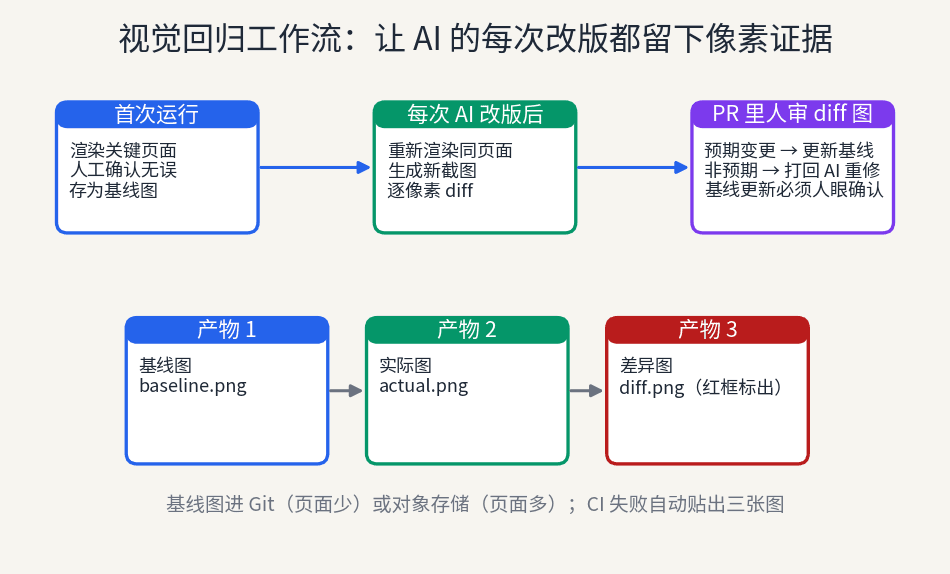
Every AI page rewrite can silently shift layouts: 8px button drift, white-on-white dark mode, collapsed breakpoints — while E2E stays green. This guide gives solo teams a half-day Playwright screenshot setup plus four false-positive countermeasures.
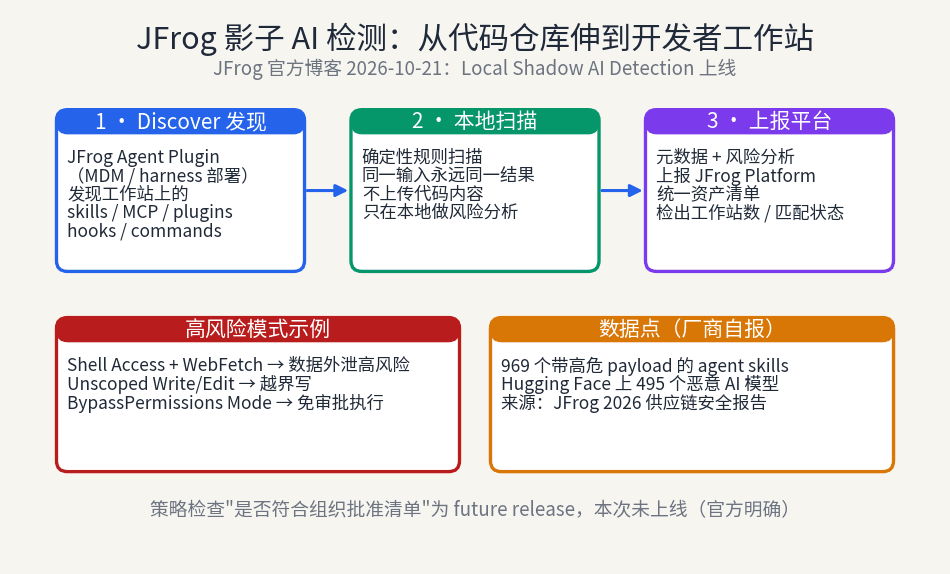
JFrog extends Shadow AI detection from repositories to developer workstations: the Agent Plugin discovers unregistered AI assets — skills, MCP servers, hooks — on laptops, scans them with deterministic local rules, and reports to a unified inventory. But the approved-list policy check is still a future release: visible, not yet stoppable. Individual developers should build their own skill inventory too.
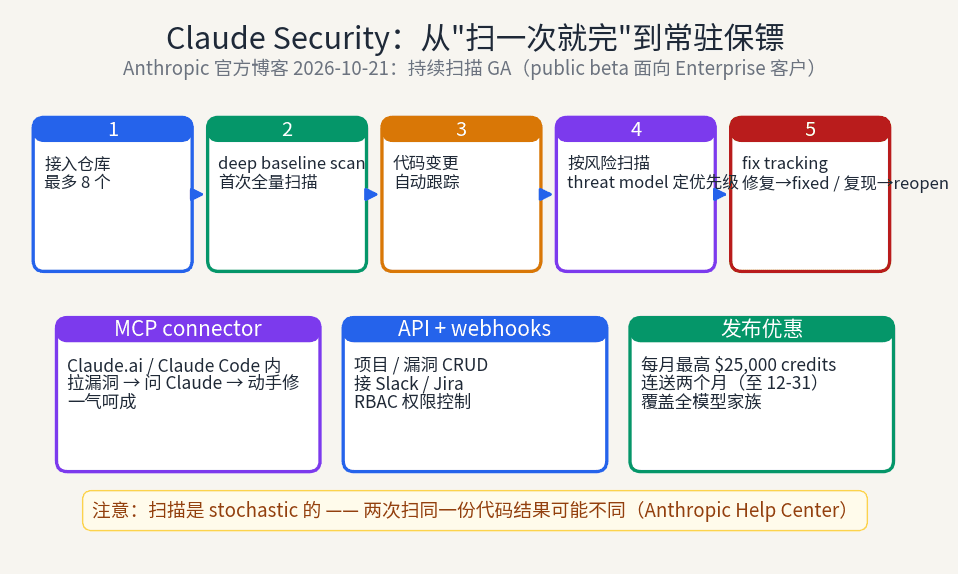
Anthropic has turned Claude Security from manually triggered one-off scans into continuous monitoring: a deep baseline scan first, then automatic tracking of every code change, automatic fix tracking, per-project threat models, plus a new API and MCP connector that move vulnerability triage into Claude Code. For vibe coders who ship fast with no one doing security review, this is the missing "always-on" layer — but its non-deterministic scans pose a real new challenge for CI merge gates.