Stop Making Users Watch the Spinner: A Field Manual for Streaming UX in AI Apps
Streaming output is more than spitting out characters one by one. From a decision table for three output modes, to TTFT optimization, an interruptible stop-button state machine, three tiers of stream-failure degradation, four techniques for jank-free long-text rendering, and billing rules for cancel-and-regenerate — this field manual turns streaming UX into an engineering checklist you can work through item by item, and names the three most common anti-patterns.
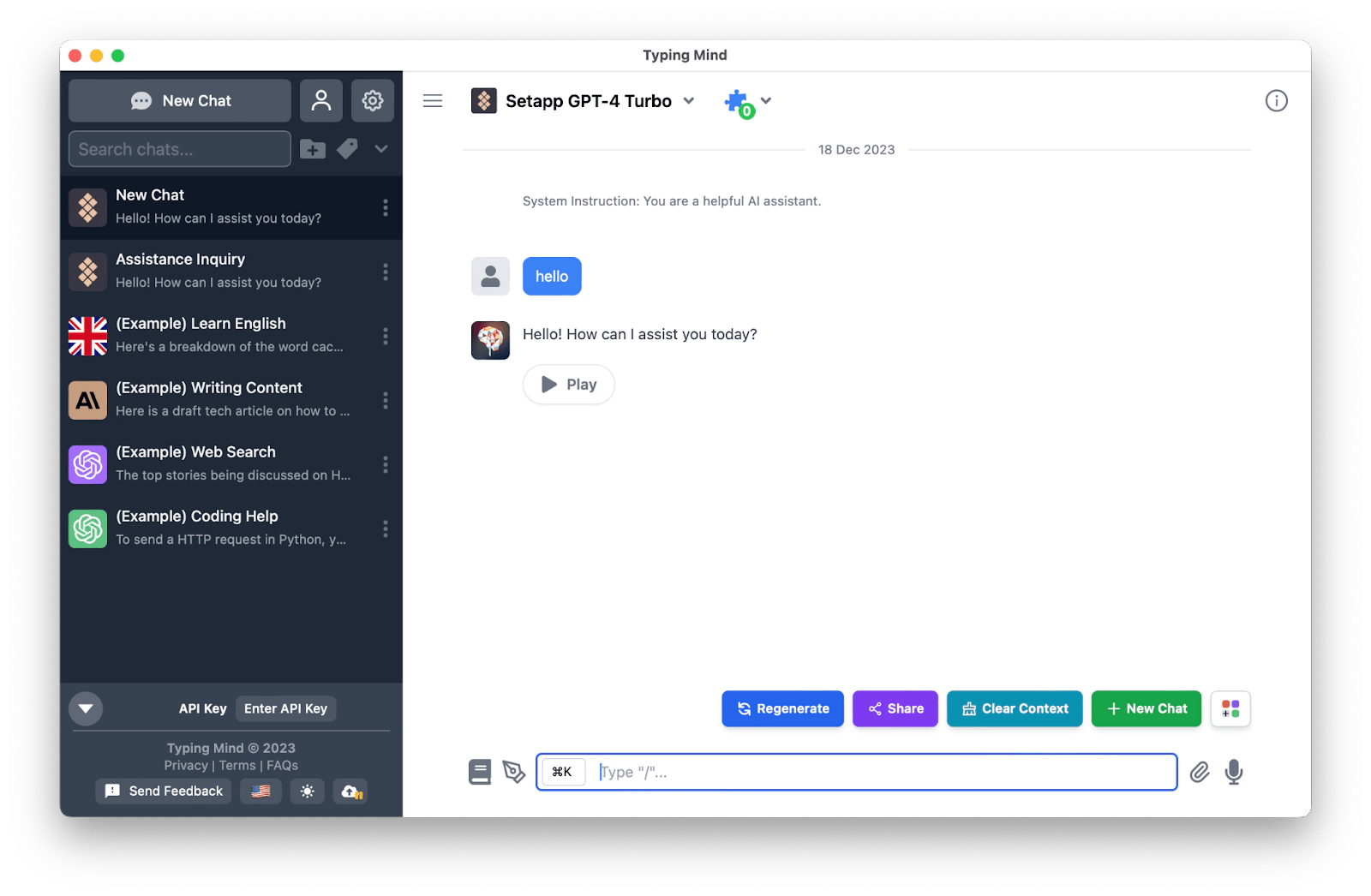
How an AI app's answer "grows" on screen decides whether users will wait for it. A generation task that takes 20 seconds will lose most users by second five if you return the whole thing at once; stream it word by word and most people will patiently watch the same 20 seconds play out. This isn't mysticism — it's the engineering of perceived latency. This guide isn't about model capability. It's about transport: how to pick among three output modes, how to crush time-to-first-token, how to make generation interruptible, how to degrade gracefully when a stream breaks, and how to render long streaming text without jank. Everything below is actionable.
Three Modes: Pick Right First, Optimize Later
Every way of presenting AI output boils down to three modes. Pick the wrong one and every optimization after that is just patchwork.
Whole-block return: everything arrives at once
The backend waits for the model to finish, returns the complete text in one response, and the frontend renders it whole. This is the most underrated mode — plenty of people assume "it's 2026, everything should stream," but whole-block wins in three scenarios: short answers (a sentence or two — streaming overhead just makes the experience feel choppy), results needing full-text post-processing (syntax-highlighting generated code or laying out a generated table works far better on complete output than on half-baked fragments), and deterministic or cacheable content (translations, template summaries — on a cache hit, whole-block is simply the fastest). The cost is explicit: TTFT equals total generation time, and all the user sees while waiting is a spinner.
Typewriter streaming: the default for conversation
Token-by-token streaming — the frontend appends each token as it arrives. This is the most effective known cure for "waiting anxiety": the moment users see the first character within a second, their brain switches from "waiting for a result" to "reading in progress," and their patience roughly doubles. It fits open-ended chat, creative writing, and long explanatory answers. But it carries two hidden costs: first, rendering pressure — high-frequency setState calls will drop frames on low-end phones (see Section 5 for fixes); second, half-baked awkwardness — markdown tables and code blocks are broken mid-stream, so users catch glimpses of garbled fragments. If you can live with that, stream. If not, use the next mode.
Structured block rendering: the dignified way to do long documents
Stream in semantic blocks — paragraphs, headings, code blocks, tables. The backend can flush per block, and the frontend renders each block once it's complete. This suits generated reports, tutorials, and long answers with code. It feels more "stable" than typewriter mode — users only ever see fully laid-out blocks, never half a table — yet it's far faster than whole-block, since the first block typically lands in seconds. The price is implementation complexity: you need the backend to cooperate with a block protocol (each block carrying a block_id and block_type), or the frontend to do incremental markdown splitting.
Decision table
| Mode | First-token feel | Best for | Avoid for | Key technique |
|---|---|---|---|---|
| Whole-block | Slow (= total time) | Short answers, cacheable results, needs full post-processing | Anything over 5 seconds | Timeout fallback + loading-state design |
| Typewriter | Fast (under 2s achievable) | Chat, creative writing, explanatory long answers | Serious documents heavy on tables/code | SSE + render throttling |
| Structured blocks | Medium (first block in 2–4s) | Long reports, tutorials, mixed-layout content | Quick Q&A | Block protocol + incremental parsing |
There is exactly one criterion: does the user want to "watch the process" or "get the result"? Watching the process means streaming; wanting the result means whole-block. When in doubt, remember this rule of thumb: past 5 seconds of generation, streaming is almost always better; under 3 seconds, the simplicity and reliability of whole-block return wins outright.
TTFT: Treat "How Fast the First Character Appears" as Your Core Metric
TTFT (Time To First Token) is the time from the user hitting send to the first visible character on screen. It's the one number worth obsessing over in streaming UX, for a brutally practical reason: users tolerate about 2–3 seconds of "no response" under a pure loading state, but once the first character appears, that tolerance stretches to tens of seconds or even minutes. Shaving 30% off total generation time may go unnoticed; crushing TTFT from 4 seconds to 1 second feels like a different product.
Measure before you optimize. Stamp a timestamp in the frontend when the request goes out, stamp another when the first token actually renders, and the difference is the TTFT users truly perceive. Note: rendered on screen, not first byte received — parsing and React commit time sit in between. Use performance.now() for the stamps, pipe the number into your monitoring, and review it as often as you review API success rates.
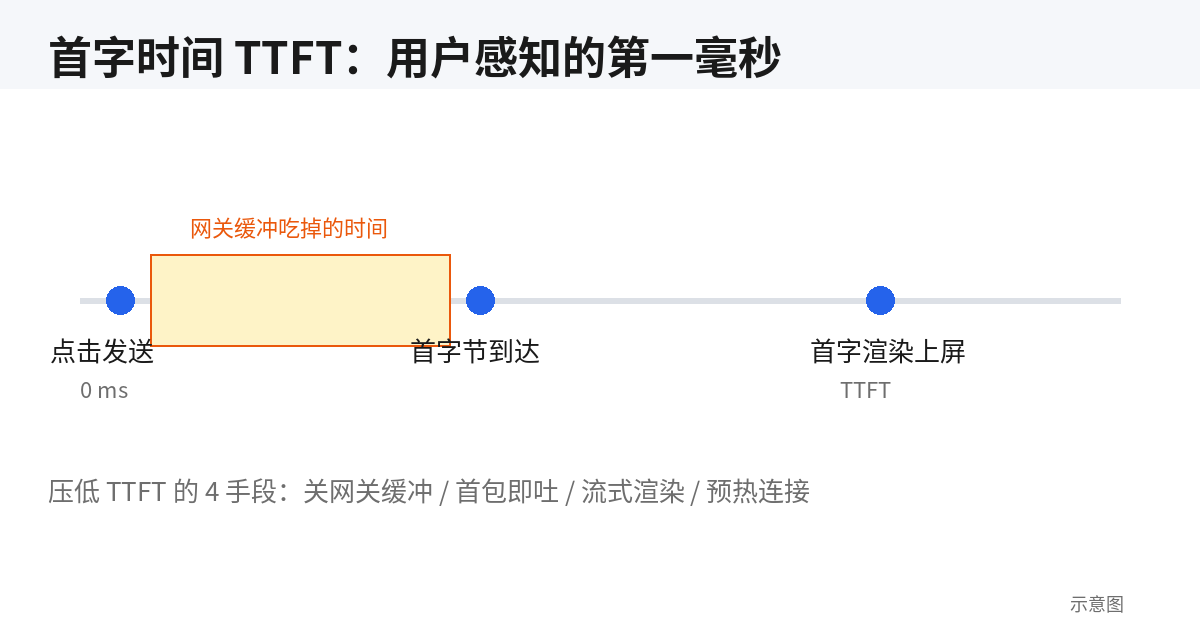
Lever 1: Flush early on the backend — don't let the gateway eat your stream
This is the most common and most unjust TTFT killer: the model emits its first token in 0.5 seconds, but Nginx or the CDN buffers the response by default, holding data until several KB accumulate before sending anything to the client — and the user's perceived first character slips to 3 seconds. Self-check list: add proxy_buffering off and the X-Accel-Buffering: no response header in Nginx; confirm your CDN / API gateway isn't whole-body caching SSE; explicitly flush after every chunk on the backend (Node's res.flush(), or yielding per-chunk in Python streaming responses). Before shipping, curl the backend directly to measure time-to-first-byte, then compare against going through the gateway — the delta is what the gateway is eating.
Lever 2: Reuse connections — don't let handshakes eat a second
Every fresh HTTPS connection burns 500ms–1s on TCP + TLS handshakes under weak networks, producing zero tokens the whole time. Countermeasures: rely on fetch keep-alive in the frontend (browsers reuse same-origin connections by default — don't switch domains per request for the sake of "cleanliness"); keep heartbeats on SSE long-lived connections so middleboxes don't kill idle lines; on mobile under weak signal, this optimization often beats prompt engineering.
Lever 3: Prompt the model to "lead with the conclusion"
Models generate tokens sequentially, so TTFT depends not just on infra but on when the first token becomes "worth" emitting. If the system prompt asks for heavy implicit reasoning before output, the first visible character naturally arrives late. The practical fix: hard-code "give the conclusion in one sentence first, then elaborate" into the system prompt; for structured output, require the model to emit the heading line first. This trick costs nothing and the effect is immediate — the price is accepting a fixed answer structure.
Lever 4: Skeleton first, swap in the stream when it lands
When the first three levers are exhausted and TTFT still exceeds 2 seconds (e.g., mandatory external tool calls, slow RAG retrieval), stop muscling through: render a content skeleton first — honest progress placeholders like "Retrieving sources…" or "Drafting outline…" — and swap in real content when the stream arrives. This converts "waiting with no feedback" into "waiting with feedback," and the anxiety curves look nothing alike. One rule for skeleton copy: be honest. If it says "retrieving," something must actually be retrieving. Don't fake progress bars (fake streaming gets its own section below).
Interruptible Design: The Stop Button Is Not Decoration
Any generation longer than 5 seconds must give users the power to call it off at any moment. This isn't just UX polish: when users watch a model go off the rails with no way to stop it, they're watching tokens — money — burn while feeling helpless. That powerlessness wears down product trust faster than almost anything. Interruptible design centers on a small state machine plus one coordinated abort between frontend and backend.
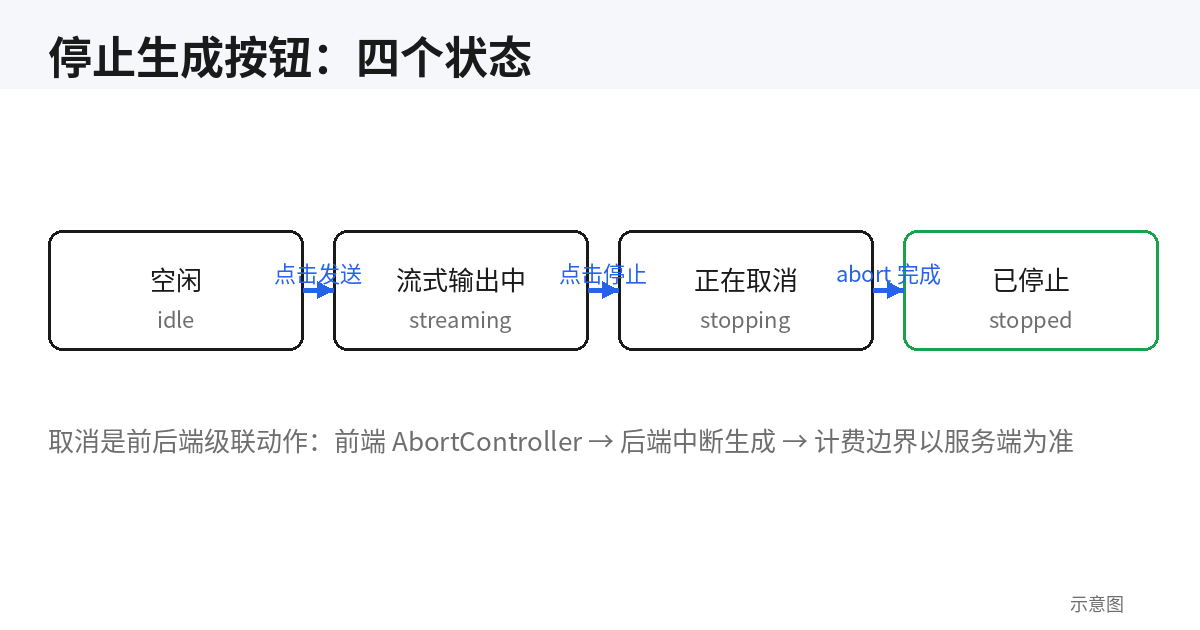
The stop button's state machine
The button has only two visible states, but the transitions behind it need thought: idle (shows "Send") → streaming (shows "Stop," input locked or queued) → user clicks stop → stopping (button greys out showing "Stopping…," preventing double-clicks) → backend confirms termination → stopped (message keeps what was generated, tagged "Stopped," with "Regenerate" and "Continue" actions). The stopping intermediate state is the easiest to skip and the most important not to: abort is asynchronous, and there are hundreds of milliseconds between the click and the backend actually killing the upstream request. Without the intermediate state, users triple-click and then file bugs saying "the stop button doesn't work." One more detail: when the stream ends naturally, flip the button back to "Send" immediately — don't leave users staring at a "Stop" button with nothing to stop. The moment reader.read() returns done is the moment to switch.
Minimal working code: frontend abort + backend-aware cancellation
The frontend uses AbortController and passes the signal to fetch; in the stream-reading loop, abort makes reader.read() throw AbortError — catch it and flip state to stopped. The critical part is the backend: a frontend abort only severs the browser-to-your-server connection; your server-to-model-API request keeps burning money. You must listen for client disconnect and cascade-cancel the upstream request. Node (Express) example:
// Frontend: cancellable streaming request
const controller = new AbortController();
setStatus('streaming');

try {
  const res = await fetch('/api/chat', {
    method: 'POST',
    signal: controller.signal,
    body: JSON.stringify({ message }),
  });
  const reader = res.body.getReader();
  const decoder = new TextDecoder();
  while (true) {
    const { done, value } = await reader.read();
    if (done) break;
    appendChunk(decoder.decode(value, { stream: true }));
  }
  setStatus('idle'); // stream ended naturally
} catch (err) {
  if (err.name === 'AbortError') setStatus('stopped');
  else setStatus('error');
}

// Stop button: controller.abort(); setStatus('stopping');
// Backend: cascade-cancel upstream when the client disconnects
// (Node + fetch-to-upstream example)
app.post('/api/chat', async (req, res) => {
const upstream = new AbortController();
// Fires on browser abort, tab close, or network drop
req.on('close', () => upstream.abort());
res.setHeader('Content-Type', 'text/event-stream');
res.setHeader('X-Accel-Buffering', 'no');
try {
const r = await fetch(MODEL_URL, { signal: upstream.signal, /* ... */ });
for await (const chunk of r.body) { res.write(chunk); res.flush?.(); }
} catch (e) {
// An aborted upstream is an expected cancellation, not an error —
// don't log it as one.
} finally { res.end(); }
});Remember the iron rule: a stop button without backend cascade-cancellation is fake — it stops the display, not the billing. To verify during integration: after clicking stop, check your model provider's token usage dashboard — upstream tokens for that request should flatline within a second of your click.
Three UI Degradations for Broken Streams: Don't Dump Tech Failures on Users
Streaming connections are far more fragile than ordinary requests: CDNs kill idle connections, users walk into elevators, servers time out — any of these can snap a stream mid-way. What the user sees is "characters stopped appearing," and your UI must respond within 3 seconds. Past 3 seconds of silence, users assume the product is dead. Three degradation strategies, chosen by scenario:
Degradation 1: Resume-from-breakpoint retry (first choice for long generations)
Use when substantial content already exists (say, 500+ characters). Approach: fold the generated text into the retry request's context and instruct the model to "continue from where you left off, don't repeat." The UI shows a one-shot notice — "Connection interrupted, auto-resuming" — which dismisses itself once the stream recovers. Two pitfalls to avoid: the resume prompt must explicitly demand "do not restate existing content," or the model will likely rewrite from the top; and cap resume attempts (e.g., 2) — persistent failure falls through to strategy two. Its value is protecting what the user has already read into — wiping a half-read long answer and starting over is the single most unacceptable experience here.
Degradation 2: Full retry (short answers: just start over)
Use when little content exists (a few dozen characters) or the content isn't worth keeping. Discard the partial output, show "Generation interrupted — retry," and let one click re-issue the full request. Don't silently auto-retry — re-sending is cheap for short answers, but the user may be looking elsewhere, and characters suddenly appearing is startling. Give them control; it's one click.
Degradation 3: Fall back to non-streaming (when the channel itself is unreliable)
When the SSE channel keeps failing (some corporate proxies kill SSE, some carriers hijack long-lived connections), the pragmatic move is retreating to whole-block return: after 2 consecutive stream failures, the frontend automatically re-sends via plain POST, with UI copy like "Unstable network — switched to full-load mode." This is a session-level, one-time degradation; the next conversation tries streaming again. Many indie developers burn weeks making "SSE work on every network" — terrible ROI. Admitting the channel can break, and having a Plan B ready, beats perfecting Plan A.
The selection logic fits in one sentence: content worth keeping → resume; not worth keeping → full retry; channel itself broken → non-streaming fallback. And one shared baseline: every degradation must tell the user what happened — four words like "auto-resumed" build more trust than silent recovery.
Four Techniques for Jank-Free Rendering of Long Streaming Text
The biggest technical debt of typewriter streaming isn't the network — it's rendering. Models emit tokens (tens per second) far faster than React comfortably handles setState calls. Without mitigation, a multi-thousand-character answer visibly drops frames on low-end Android phones by its second half. Four techniques, ordered by ROI:
Technique 1: Throttle appends — don't setState per token
Accumulate incoming chunks into a string buffer held in a ref, then flush the buffer with a single setState per animation frame via requestAnimationFrame (or every 100ms). No matter how fast tokens arrive, render frequency is clamped under 60fps. In practice this is the highest-ROI single optimization — one rAF loop fixes ~80% of jank. Don't forget the tail: flush any buffer residue when the stream ends, or the last fragment goes missing.
Technique 2: Incremental markdown parsing — never re-parse everything
Streaming content usually needs markdown rendering, and markdown parsing is O(n) or worse — re-parsing the full text on every token gets slower as text grows. Two pragmatic approaches: deferred rendering — show plain text during streaming (pre-wrap preserves line breaks) and render markdown once at the end. Users read plain text with zero friction, and you skip all intermediate parsing. Incremental parsing — cache the previous parse result and parse only the new delta, splicing it onto the AST. Deferred rendering is simple and stable; choose it for most products. Only build incremental parsing when "watching layout form live" is a core selling point.
Technique 3: Isolate streaming content in its own component
The other jank source is collateral re-rendering: every update to the streaming message re-renders the entire message list, churning syntax highlighting and images in history messages. Fix: make the actively-streaming message its own component, wrap history messages in memo, and guarantee stream updates touch only the message being written. Combined with throttled appends, this keeps ten-thousand-character streams smooth on budget phones.
Technique 4: Virtualize ultra-long lists
When the first three techniques are in and single messages past a few thousand characters (long reports, bulk tables) still stutter, the bottleneck is DOM node count itself. Time for virtual scrolling (react-window / virtua): render only viewport rows, using placeholders to hold height for the rest. One tension: virtualization and streaming appends pull in opposite directions — virtual lists need measurable, stable row heights, while streaming rows keep changing height. The compromise: skip virtualization during streaming (the first three techniques carry you), then switch to a virtual list once content settles. Users never notice the swap, but resident DOM nodes for a ten-thousand-character document drop from thousands to dozens.
Cancel-and-Regenerate Details: The Devil Lives in Three Places
Making the stop button clickable is only the starting line. What state is the input in afterward, how does the half-finished message look in history, and how is the token bill settled — these three details decide whether users dare click "Stop" a second time.
Input state: can users type while streaming?
Both routes have big-company precedent; pick based on your product shape. Route A: lock the input. During streaming the input is disabled with copy like "Generating… you can stop anytime." Simple, unambiguous, right for single-turn Q&A and tool-like products. The downside: users who want to follow up must stop first — one extra step. Route B: allow typing, enter a queue. Users keep typing during generation; hitting send queues the new message, which auto-executes when the current generation finishes. Right for heavy conversational use. But B has two details you must get right: queued messages need an explicit "waiting" badge — users must never think a sent message got no response; and when the user hits stop, should queued unsent messages be cleared? Default to clearing them with a toast ("Queued message discarded"), because someone hitting stop usually wants to rephrase — auto-sending the stale question only adds insult. Indie developers should start with A: B's queue state machine is roughly 3× the complexity, and you can upgrade when users actually complain about not typing while waiting.
History: a half-finished answer isn't trash — keep it on record
After a user-initiated stop, what happens to the unfinished message? The worst option is deleting it — the user may have read the first half, and deletion confiscates their reading. The right approach: keep the text, add a grey "Generation stopped" tag, with two actions below: "Continue" (resume from breakpoint, see Section 4) and "Regenerate" (full retry). Continue is the primary button, because it respects reading time already invested. One more edge: if the user sends a new question right after stopping, leave the half-finished message in place — don't auto-collapse it. A history's first duty is fidelity; "smart" collapsing only makes users lose content they've already seen.
Three billing rules for tokens: say them upfront, not on invoice day
Streaming plus interruptibility turns billing from "backend logic" into "frontend trust." Three rules, worth putting directly in your FAQ or billing page:
Rule 1: tokens generated before cancellation are billed normally. The model did the work and your provider charged you — that cost passes through honestly. But the frontend must say so the moment stopping happens: next to the "Stopped" tag, add "≈X characters generated this run." Visible spending is tolerated far better than mysteriously shrinking quotas.
Rule 2: regeneration bills independently — never merged with the previous run. "Regenerate" is fundamentally a new model call, metered from zero. Don't imply "retries are free" in the UI unless you genuinely plan to subsidize them. And skip clever ideas like "retries at half price" — the simpler the billing rules, the less thinking users have to do.
Rule 3: on resume, already-generated content isn't re-charged for inference, but context tokens still count. This is the most misunderstood one: resuming feeds the generated text back as context, and providers charge input tokens for that (still far cheaper than regenerating the whole thing). The honest move is a note beside the "Continue" button: "uses a small amount of context quota." The unifying principle behind all three: billing logic may be complex, but the rules shown to users must be simple and predictable. Users don't fear spending; they fear spending they can't explain.
Anti-Patterns: Three Things Not to Do
Anti-pattern 1: Fake streaming — a frontend timer spitting out preset text
The recipe: backend returns the full text at once, frontend uses setInterval to drip it out every 30ms, faking a stream. Why do people do it? It's easy to build, and it "guarantees" TTFT (the first character can appear instantly). But it's poison: first, latency isn't reduced at all — perceived total wait equals whole-block generation time plus fake typewriter time, longer than real streaming; second, it falls apart on weak networks — if that one whole-block response takes 10 seconds, users see 10 seconds of spinner followed by sudden "typing," and the faked TTFT is exposed on the first screen; third, the typing speed is fixed — fake streams feel agonizingly slow on long answers and blink-and-miss on short ones; the rhythm is never right. The test: if your "streaming" needs no SSE / WebSocket and the backend returns everything at once, it's fake streaming. Tear it out sooner rather than later.
Anti-pattern 2: long generations with no cancel button
Some products reason "it's only 20 seconds, just sit through it" and offer nothing but a spinner. During those 20 seconds users may want to rephrase, realize they picked the wrong model, or simply stop waiting — waiting with no exit is the worst experience there is, bar none. The sneakier variant is "a button that does nothing": the stop button only flips frontend state, while the backend cascade-cancellation from Section 3 was never built. Users click stop, characters halt, but tokens keep burning server-side — and on billing day they come back to do the math with you. Remember: cancel button = frontend abort + backend cascade-cancel + an explicit stopped state. All three, or it doesn't count.
Anti-pattern 3: full-page error on stream interruption
The stream breaks, the frontend throws a giant red error boundary over the entire conversation page — ten rounds of history invisible, only a refresh helps. This is the crudest possible error handling: one network hiccup punishes the user's entire context. The correct approach: scope the error boundary to the failed message component, leaving everything else (history, input, sidebar) untouched, and handle that message with the three degradations from Section 4. Implementation-wise, that's wrapping each message in a small ErrorBoundary instead of wrapping the page in one big one. Usually under 20 lines of code — but it's the line between "a product that survives turbulence" and "one that shatters on contact."
Closing: Streaming UX Is an Engineering Problem, Not an Aesthetics Problem
Looking back, every link in streaming UX has a concrete engineering answer: pick the mode with the decision table, crush TTFT with instrumentation + flushing + skeletons, make it interruptible with a state machine + AbortController + backend cascade-cancel, degrade broken streams in three tiers, kill jank with throttling + isolation + virtualization, govern cancel-and-regenerate with three explicit rules, and dodge the three anti-patterns. No step requires "inspiration" — just check them off one by one.
A final suggested rollout order, by ROI: week one, add TTFT instrumentation, fix gateway buffering, and ship the stop button (with backend cascade-cancel) — those three alone eliminate ~80% of user complaints. Week two, build interruption degradation and render throttling. Week three, consider block rendering and queued input. There is no silver bullet for streaming UX, but there is a clear blueprint. Just work down the checklist.
Related articles

AI-generated UI never presses Tab and never turns on a screen reader — accessibility failures are invisible inside its visual feedback loop. This hands-on guide gives you a P0/P1/P2 prioritized checklist, four copy-paste prompt templates, a 30-minute free audit routine, before/after fixes for 6 high-frequency code failures, and a pre-launch acceptance checklist.
Great UX can't answer policy questions, error-message searches, or pre-purchase trust checks. This guide gives solo developers a shippable help-center methodology: a four-quadrant matrix for what to document, a 6-category IA template, writing skeletons for 6 article types, a three-stage AI-drafting workflow from your codebase, a minimal docs-as-code setup for one person, a release-tied doc-debt checklist, and a monthly 1-hour maintenance SOP.

Model, prompt, or tool changes can silently break your agent while you're busy celebrating the fix. This guide shows how to build an eval harness from scratch: a 20-case golden set from real traffic, deterministic code scorers plus calibrated LLM judges, a three-layer scoring split, an anti-self-deception checklist, and a CI gate that actually blocks merges — closing the loop with production sampling and shadow runs.