From ZIP to Store Page: 7 Gates to Shipping a Browser Extension
Vibe coding can build a browser extension in a week, but shipping it to a store is a different game. This guide covers picking among the three stores, 5 MV3 migration traps, permission minimalism, a privacy-policy template, listing asset SOP, a rejection first-aid kit, and staged rollouts — everything a solo developer needs to actually get listed.

Vibe coding has demolished the barrier to building a browser extension: one weekend, one prompt, and the popup opens and the buttons click. But getting from "runs on my machine" to "listed on the store page" is a different game with different rules — reviewers don't care how pretty your prompt was, they care whether your permissions overreach, whether your code loads anything remotely, and whether your privacy policy holds up. This guide walks through the 7 gates between a zip file and a store listing: picking your store, the MV3 pitfalls, permissions, privacy policy, listing assets, the rejection first-aid kit, and post-launch. Every section is written from a solo developer's perspective: what judgment call to make, how much time it costs, and where you're most likely to trip.
1. Pick Your Battlefield: The Three-Store Decision Table
Don't launch on all three stores at once. First figure out who your extension is for: Chrome has the biggest audience but the most grueling review; Edge is free and takes nearly the same package unchanged, a low-cost place to test the waters; Firefox has its own code-review philosophy, and developers who write clean code often have the smoothest ride there. The three aren't ranked by difficulty — they're ranked by trade-off.
| Dimension | Chrome Web Store | Edge Add-ons | Firefox AMO |
|---|---|---|---|
| Registration fee | $5, one-time | Free | Free |
| First review time | Usually 1–3 business days; up to 1–3 weeks with sensitive permissions or manual review | 1–7 business days | Automated validation is instant; human review ranges from hours to weeks |
| Update review | Often under 24 hours, sometimes within hours | Same queue as first submission | Faster than first review once you have a track record, usually within days |
| Where review is strictest | Permissions and policy compliance: host permission breadth, the remote-code ban, the single-purpose rule | Same Chromium policy lineage as Chrome, but feels smoother in practice | The code itself: minified or obfuscated code must be accompanied by source; the data_collection_permissions declaration is mandatory for new submissions (enforced since November 2025) |
| Audience | Largest — Chrome holds roughly two-thirds of the browser market | Edge users, 300M+ | Smaller than Chrome, but with a reputation for loyal, paying users |
| Technical bar | MV3 only; the last MV2 listings were removed on August 31, 2026 | The same MV3 package as Chrome, nearly zero changes | Supports MV3, but the background is an event page (background.scripts), not a service worker — needs separate handling |
The trade-off advice is blunt: if you're Chromium-only, start with Edge and then attack Chrome — Edge is free and fast to review, and the same package makes it a free "pre-review". If you want Firefox coverage, move AMO's source-readability requirement into your development phase: keep unminified sources if you use a build step, and don't wait until submission to redo the work. The three developer portals are Chrome Web Store Developer Dashboard, Microsoft Partner Center (Edge), and the AMO Developer Hub; the accounts are independent, so keep your publisher name consistent across all three.
One decision point people overlook: public listing, or unlisted (install-by-link) for a quiet validation round first? Chrome and Edge both support unlisted visibility with the same review process, which lets you dodge the cold-start pile of public one-star reviews. For vibe coders, running unlisted for a week or two to confirm crash rates and core flows before going public is the cheapest possible way to de-risk.
2. The MV3 Migration Checklist: 5 Traps AI Loves to Set
Let's pin down the timeline first: since Chrome 138 (July 2025), MV2 extensions have been fully disabled on every channel — users can't turn them back on; on August 31, 2026, the Chrome Web Store removed the last MV2 listings. The question today isn't "should I migrate to MV3" but "how do I migrate without falling into these 5 traps". AI coding tools were trained on a corpus full of MV2-era tutorials, and they won't volunteer that the code they just generated is an expired pattern — each trap below comes with a "self-check prompt for your AI" you can copy verbatim.
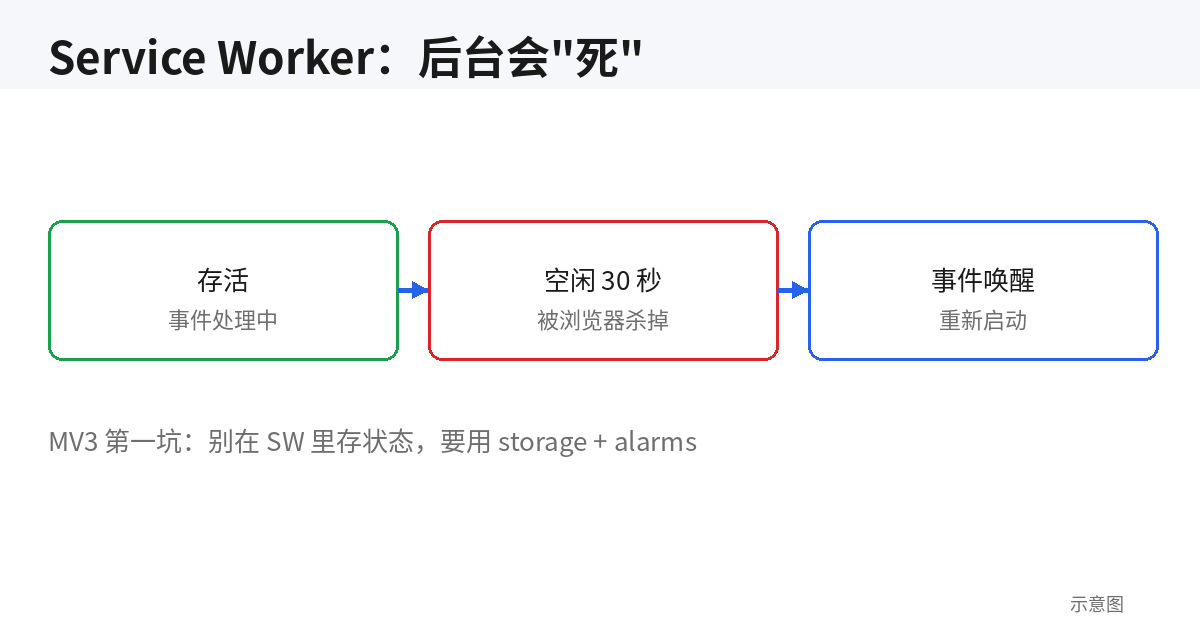
Trap 1: The service worker dies — stop writing resident background pages
In MV3 the background is a service worker, and the browser kills it whenever it's idle. State cached in global variables, timers built on setInterval — all of it can vanish when you're not looking. The symptom is textbook: everything works in local testing, then users report "it only works sometimes" — because with DevTools open during debugging, the service worker stays alive and you can never reproduce the killed state. The fix is one rule: all state goes through chrome.storage, all timers go through chrome.alarms. Self-check prompt for your AI: "Audit the background script: replace every setInterval/setTimeout with chrome.alarms, move all state held in globals into chrome.storage.local, and handle restoring state from storage when the service worker restarts."
// ❌ MV2 thinking: assuming the background lives forever
let cache = {};
setInterval(() => syncData(cache), 60000);

// ✅ The MV3 way: persist state, schedule with alarms
chrome.alarms.create('sync', { periodInMinutes: 1 });
chrome.alarms.onAlarm.addListener(async (alarm) => {
  if (alarm.name === 'sync') {
    const { cache } = await chrome.storage.local.get('cache');
    syncData(cache || {});
  }
});
Trap 2: host_permissions and permissions are divorced now
MV3 split URL match patterns out of permissions into their own host_permissions key. AI working from old memory may put <all_urls> inside permissions, or place host patterns in the wrong key — packaging won't complain, but review will. Worse is the second layer: the broader your host_permissions, the more likely you trigger manual review. Declaring <all_urls> is basically holding up a sign that says "please scrutinize me". The rule: name specific domains instead of wildcards whenever you can; use activeTab instead of tabs plus host permissions whenever the flow is user-initiated on the current tab. Self-check prompt: "List every domain the extension actually touches, shrink host_permissions to the minimal set, and switch anything that only acts on user click to activeTab, deleting the corresponding host declarations."
Trap 3: The remote-code ban — CDN imports are a death sentence
The Chrome Web Store flatly prohibits executing remotely hosted code: a <script> tag pulling a library from a CDN, a dynamic import() of a remote module, fetching a config from a server and eval-ing it — all forbidden. AI-generated code is addicted to this pattern: pulling a utility library from a CDN "to stay lightweight", fetching a rules script from an API "to stay configurable". It runs fine locally and gets rejected on review, and there's no appeal for this one — it's a policy red line. The fix: bundle every dependency into the zip, and keep build output readable, since heavily obfuscated code draws reviewer attention too. Self-check prompt: "Scan all HTML and JS for external <script src> tags, dynamic import() calls, and eval/new Function; convert everything to locally bundled imports and confirm the zip contains zero code that loads and executes from the network at runtime."
Trap 4: Blocking webRequest is gone — meet declarativeNetRequest
The MV2 era relied on chrome.webRequest in blocking mode to intercept and rewrite network requests. MV3 removed blocking entirely and replaced it with declarative rules via declarativeNetRequest: you hand your rules to the browser up front, the browser enforces them itself, and your extension code never sees request contents. Code generated from pre-2023 tutorials fails silently here — no errors, it just doesn't work, which makes this the nastiest trap of the five. Anything involving ad blocking, request rewriting, or header manipulation isn't a "migration", it's a rewrite — estimate it as a rebuild, not a port. Self-check prompt: "Translate each webRequest blocking behavior into declarativeNetRequest rules one by one, list which dynamic decision logic cannot be expressed as static rules, and either redesign around it or cut the feature."
Trap 5: CSP killed inline scripts — your onclick does nothing
MV3's default content security policy bans inline scripts and eval. AI-generated popup.html loves <button onclick="doSomething()"> — inside an extension that line of code simply doesn't exist: clicks do nothing, and the console may not even complain, which is how vibe coders lose an afternoon staring at it. The fix: addEventListener for everything. Self-check prompt: "Scan every HTML file for inline event handlers (onclick, onchange, etc.) and inline <script> blocks; move them to external JS files bound with addEventListener."
One cross-browser gotcha worth knowing before it costs you a rework: Firefox's MV3 background is not a service worker — it keeps the event page model (background.scripts). The same codebase shipping to Firefox needs a branch, so "write once, run everywhere" breaks down at the last mile. The pragmatic setup is two manifests (manifest.chrome.json / manifest.firefox.json), switched at build time, with the JS core shared as much as possible.
Here's a clean MV3 manifest starting point, with permissions already sized to "just enough" — the next section explains why each line is written this way:
{
  "manifest_version": 3,
  "name": "Your Extension",
  "version": "1.0.0",
  "description": "Say what it does in one sentence",
  "action": { "default_popup": "popup.html" },
  "background": { "service_worker": "background.js" },
  "permissions": ["storage", "alarms"],
  "host_permissions": ["https://api.example.com/*"],
  "icons": {
    "16": "icons/icon-16.png",
    "48": "icons/icon-48.png",
    "128": "icons/icon-128.png"
  }
}
3. Permission Minimalism: "Just Enough" and the 3 Most Common Rejection Reasons
The first thing a reviewer looks at is your manifest's permission declarations. Permissions are the extension's balance sheet: every extra line is an explanation you owe the reviewer. The principle is four words: just enough. Not "request it now in case we need it later", but "the feature is impossible without it, so we request it". The 3 rejection reasons below cover the vast majority of permission-related rejection letters — self-check against each one and your pass rate at least doubles.
Rejection reason 1: Permissions don't match the features
The most common one, by far. You declared <all_urls> but only read data from one site; you declared tabs but only act on the current tab when the user clicks (activeTab would do); you declared cookies and never read a cookie in your code. The reviewer's logic is simple: you're asking for more than you use, which means either you don't understand what you're doing or you're planning to do something else — neither gets approved. The self-check: have your AI output "which line of code uses this permission" for each one, and delete whatever it can't account for. Then run a full feature test after deleting — vibe coders' biggest enemy is "afraid to test after deleting", and this is exactly the step you can't skip.
Rejection reason 2: Sensitive permissions with no written justification
The Chrome Web Store submission flow has a privacy tab asking you to write a one-sentence justification for each permission. Leave it blank, or write "for a better experience" — correct-sounding fluff — and you're volunteering for rejection. The format is a fixed three-parter: what this permission is used for → which feature breaks without it → where the data goes (local only / which domain). For storage, for example: "Used to persist the user's theme and shortcut settings locally; settings can't survive restarts without it; data stays in the browser, nothing is uploaded." Writing this up front has a bonus effect: it forces you to re-examine whether each permission is worth keeping.
Rejection reason 3: Zombie permissions — the feature is gone, the declaration stayed
After a few iterations, your manifest is carrying two or three permissions nobody uses anymore — the classic aftermath of AI-driven refactoring: the feature got cut, the declaration stayed, because "remove the permission" isn't on the AI's default checklist. Reviewers don't care about your iteration history; they see declarations your current code can't justify. Self-check prompt: "Compare every entry in permissions/host_permissions against actual calls in the current code, delete zero-reference declarations, and explain why each surviving one can't be removed." Add that line to your pre-release checklist — it pays off more than anything else.
One last judgment call for deciding whether a permission deserves to stay: if you'd feel sheepish explaining to a non-technical friend why this extension needs that permission, don't request it. The reviewer's mindset is the same as your friend's. Tighter permissions have a hidden benefit too: fewer permissions, lower odds of manual review — extensions that clear first review in 1–3 days are almost always the ones with clean permission sets.
4. Privacy Policy & Data Disclosure: A Passing Version in 30 Minutes
This is where solo developers burn the most pointless energy: treating the privacy policy as a legal document, either procrastinating on it or copying a big company's template and tweaking it — the latter is more dangerous, because the collection behavior in the template won't match what your extension actually does, and reviewers spot that instantly. The truth: for the vast majority of vibe-built extensions, the privacy policy is one page, and "we collect nothing" is itself the strongest possible statement. What matters isn't beautiful prose, it's strict consistency between "what you declare" and "what the code does".
The 30-minute method: spend 10 minutes honestly answering 4 questions — what data does the extension collect? Where does it live (local / your server / a third party)? Any third-party SDKs or API calls? How can users contact you to delete their data? Then spend 20 minutes filling the answers into the template below. The square brackets are mandatory edits — don't get lazy and leave the original text:
[Extension Name] Privacy Policy (Last updated: [YYYY-MM-DD])
1. What we collect: [Extension Name] [collects no personal data / collects only the following data to power its core features: [e.g., an API key you enter yourself]]. We do not collect browsing history, track user behavior, or serve ads.
2. Where data lives: All settings and data are stored only in your browser's local storage (chrome.storage) and are never uploaded to our servers. [If you have cloud sync or your own API, use instead: The following data is transmitted to [domain/purpose], encrypted in transit over HTTPS.]
3. Third-party services: [This extension calls no third-party services / This extension calls [service name] ([domain]) to provide [feature]; that service's privacy policy governs its handling of data.] This extension contains no advertising SDKs and no behavioral analytics SDKs.
4. Permissions: The browser permissions this extension requests ([e.g., storage, activeTab]) are used solely to provide [one-sentence feature description]; the full list with purposes is on the store listing's permissions section.
5. Contact: If you have questions about this policy or want data related to this extension deleted, contact [email].
6. Updates: Changes to this policy will be posted on this page; material changes will also be noted in the extension's release notes.
A few practical notes: first, the policy needs a publicly accessible URL — a rendered PRIVACY.md in your GitHub repo, a public Notion page, or your own domain all work; don't use a link that requires login. Second, Chrome's submission form also has a data-usage disclosure questionnaire alongside the policy link, and the answers must match the policy text — questionnaire says "no collection" while the policy says "may collect" is an instant manual-review trigger. Third, on the Firefox side, new submissions since November 2025 must declare data_collection_permissions in the manifest; if you collect nothing, declare "none" rather than leaving reviewers to guess.
When do you have to write it seriously instead of using the "zero collection" template? Three cases: the extension has login (even just storing a token), it calls your own or third-party network APIs, or it uses crash reporting or analytics SDKs. Each additional data flow gets its own paragraph in the policy. Remember the reviewer's perspective: they're not grading your prose, they're cross-checking "declared" against "actual code behavior". One fetch in the code that the policy doesn't mention is one rejection letter.
5. Store Listing Assets SOP: Screenshots, Promo Images & Copy
The store page is the extension's storefront, and it's where vibe coders cut the most corners: a month on code, then two casual screenshots and three lines of description before hitting submit. Review may not reject you for it, but your conversion rate will pay the price. Here's the checklist, optimized for two standards: "won't get stuck in submission" and "users actually click".
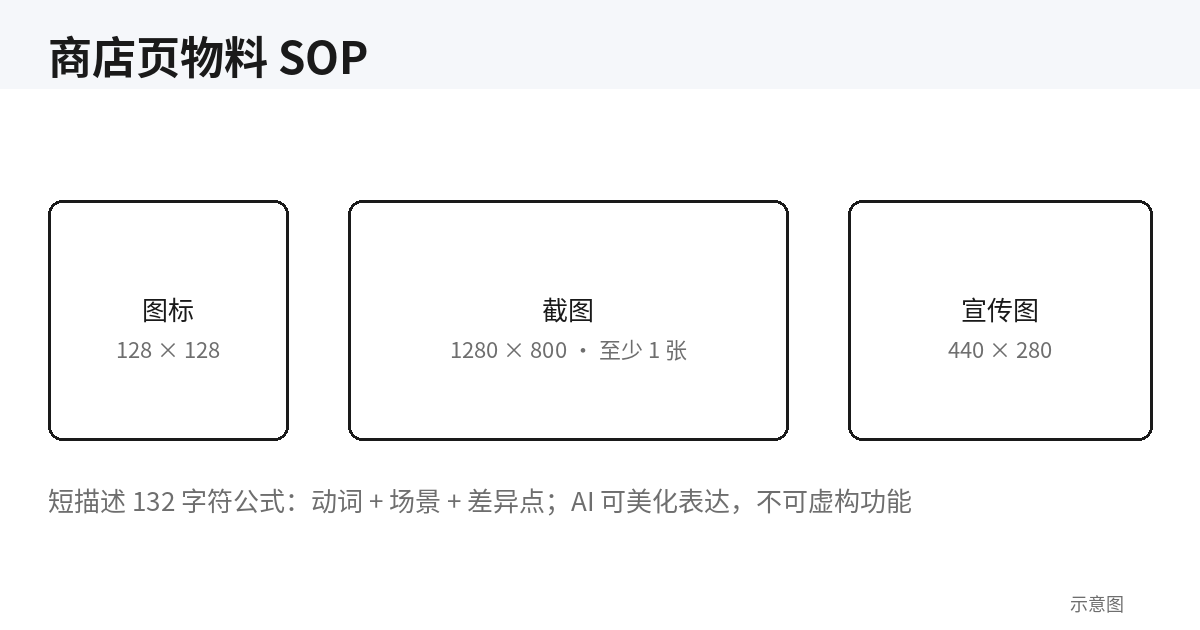
Image assets: sizes are hard requirements
- Store icon, 128×128 PNG: required. Also prepare the 16/48/128 extension icon set referenced in the manifest — don't fake it by scaling one big image; a blurry toolbar icon looks cheap.
- Screenshots: Chrome Web Store requires 1280×800 or 640×400, minimum 1, maximum 5; Edge Add-ons accepts 1366×768 / 1920×1080 / 2560×1440. Screenshot order is narrative order: the first one must make "what this extension does" obvious at a glance, then settings and detail features.
- Promo images (optional but strongly recommended): small tile 440×280, large tile 920×680, marquee 1400×560. With these, your listing becomes eligible for homepage features and category banners — an order of magnitude more traffic.
Copy assets: the short description decides click-through
- Short description / summary: Chrome caps it at 132 characters, AMO's summary at 250. This is the only copy shown on search results and listing pages — the formula is "verb + object + scenario", e.g. "Turn any web article into clean Markdown in one click, ready to paste." Never write "a powerful productivity tool" — "powerful" is the cheapest adjective there is.
- Long description: cover three things — the problem it solves (from the user's view), how to use it (three steps max), and the privacy promise (one line: data stays local / nothing collected). The classic vibe-coder mistake is writing the long description as a changelog full of "v1.2 added…" — users don't care about your version numbers, they care about "what chore does this save me".
- Category & language: pick the single closest category instead of checking every box that sort of fits; set the language to your actual target audience — a Chinese-language extension should honestly declare Chinese, not English for fake "internationalization" with Chinese-only copy inside.
Where AI-generated screenshots are acceptable
This deserves its own section, because AI image generation is dangerously convenient for vibe coders. Store screenshots must show the real product UI: store policy forbids misleading presentation, and an AI-rendered screenshot of a UI that doesn't exist in the product gets you asked to replace it at best and delisted for "deceptive claims" at worst. The workable boundary: the screenshot itself must be captured from the actually running extension; acceptable post-processing is limited to cropping, annotation arrows, and redacting private info; promo tiles (the 440×280 kind) may use AI-generated backgrounds and styling, but the feature presentation should still use the real UI. One line to remember: AI may polish the presentation, never fabricate the facts. A listing image's job is to let users see what the extension does at a glance — and the real UI is the best possible ad.
6. The Rejection First-Aid Kit: Appeal Letter, Lookup Table & Timeline
First, some reassurance: rejection is the norm, not an accident. Extensions that pass on the first submission are the minority; most people go through 1–2 rounds. What matters isn't "never getting rejected" but reacting correctly within 48 hours: understand the letter, fix the right thing, use the right channel. That's what this three-piece kit is for.
Step 1: Read the letter — the common rejection lookup table
| Rejection keywords | What it really means | The fix |
|---|---|---|
| Excessive permissions | You're asking for more than you use (see section 3) | Shrink permissions and host_permissions, add a justification for each, repackage and resubmit |
| Remotely hosted code | The package loads and executes code from the network at runtime | Bundle all dependencies locally; remove CDN references, dynamic imports, eval. This is a red line — no appeal, only fix |
| Single purpose | The extension does several unrelated things, or the description doesn't match reality | Cut the edge features or split into multiple extensions; rewrite the description to match actual behavior |
| Missing or mismatched privacy policy | No policy link, or the policy says something the code doesn't do | Rewrite the policy using the section 4 template; make "questionnaire = policy = code behavior" consistent in all three places |
| Deceptive description | Screenshots or copy show features the product doesn't have | Replace with real screenshots, rewrite the hype; take down all AI-generated "concept art" |
| Obfuscated code | The code is too unreadable for reviewers to follow (Firefox is especially strict here) | Submit an unminified build; AMO requires a separate source package for minified/obfuscated code |
Step 2: Decide — "fix and resubmit" or "appeal"
The decision tree has two levels: is what the letter says actually true? If yes → don't appeal; fix and resubmit, the fastest path, usually 1–3 days for re-review on Chrome. If you're confident it's a misjudgment (e.g. the reviewer didn't understand a feature's usage context) → appeal. Note that Chrome's appeal channel (the One Stop support form) gives you one appeal per violation, so gather your evidence before writing: a demo recording, the code locations where the permission is used, step-by-step test instructions. Here's the appeal template — write it in English, keep it under 200 words; reviewers read hundreds of these a day and nobody reads long ones:
Subject: Appeal regarding [Extension Name] (Item ID: [32-character item ID]) – [violation, e.g. Permission justification]
Hi review team,
Our extension [name] was rejected for [the violation as worded in the rejection letter]. We believe this was a misunderstanding, and here's the context:
1. What the feature does: [one sentence, e.g.: the extension summarizes the current tab only when the user clicks the toolbar button.]
2. Why the permission is needed: [the permission-to-feature mapping, e.g.: activeTab is the only host access used; no broad host permissions are requested.]
3. How to verify: [a reproduction path in three steps or fewer, e.g.: 1. Install the extension 2. Open any article page 3. Click the extension icon – the summary appears in the popup. No data leaves the browser.]
We've also attached [a 60-second demo video / screenshots] demonstrating the above. Happy to provide any further information.
Thanks,
[Your name] ([contact email])
The iron rule of appeal letters: no complaining, no storytelling, just evidence. "We're indie developers and this is really hard for us" is noise to a reviewer; "step 3 shows the permission only activates on user click" is signal. If the appeal is denied, don't re-appeal the same violation — go back to the "fix and resubmit" route and change things until the letter's literal wording can't trip you up.
Step 3: The resubmission timeline
Here's the full fix-and-resubmit timeline so you know what to expect: Day 0, the rejection arrives — read it and pinpoint the issue the same day. Day 0–1, fix the code/copy/policy, repackage, and run a complete local test pass. Day 1, resubmit with reviewer notes explaining "what changed and which line of the rejection letter it addresses" — most people skip this note, but it measurably reduces the odds of getting mis-flagged in round two. Day 2–4, wait: Chrome re-review is usually 1–3 days, Edge similar, AMO can take a bit longer. One pitfall to avoid: never hit "resubmit" without changing anything — the system bounces it back and you've burned a queue cycle. If you get rejected twice in a row with shifting reasons, different reviewers are looking at it each time — stop, re-run the manifest, description, policy, and screenshots against this guide's checklists, and have a peer look it over before the third submission. Fresh eyes catch the over-permissioning you're blind to.
7. Minimum Viable Post-Launch: Staged Rollouts & Review Care
Going live is the starting line, not the finish. Once an extension sits in users' browsers, every update is an irreversible push — and this is where vibe coders crash hardest: a version that tested fine locally breaks on some minor Chrome version after a full rollout, and rolling back means another review cycle. So the post-launch routine can be tiny, but it must exist: staged rollouts, and review care.
Staged rollouts: Chrome gave you a brake pedal — use it
The Chrome Web Store supports staged publishing: the new version goes to a fraction of users first, and you go full only after a few quiet days. In the dashboard, choose percentage-based publishing and ramp 10% → 25% → 50%. One threshold detail: fine-grained percentage control via the API (deploy percentage) requires 10,000+ seven-day active users — for smaller extensions, the dashboard's manual staging is plenty. During the ramp, watch three signals: whether crash rates tick up (dashboard feedback and stats), how core features behave in the wild, and whether "broken after update" reviews appear. If something looks off, pause the rollout, fix, and ship again — far cheaper than an apology letter after a full-scale breakage. Firefox AMO has no staging mechanism: approval means a full push to everyone, so be more conservative with pre-release testing on the Firefox side — run it thoroughly via temporary loading before submitting.
User reviews: every one-star review is a free user interview
Store reviews are the extension's only public feedback channel, and maintaining them has absurd ROI. First, reply to every bad review. A one-star usually comes from a specific bug or misunderstanding — reply with a workaround or "fixed in x.y.z", and many users come back and change their rating; an unanswered bad review sits there deterring newcomers forever. Second, treat reviews as a feature backlog. What vibe coders lack most isn't implementation ability, it's judgment about "what to build next" — any request that shows up twice in reviews is a candidate for the next version. Third, answer users in your release notes. "Thanks to @xxx for reporting XX, fixed in this release" — a user written into the changelog becomes your most loyal evangelist. Fourth, never buy or farm reviews: all three stores have anti-fraud systems, and getting caught means delisting — a hundred times worse than a bad review.
Finally, lock the post-launch minimum into a monthly rhythm: check installs, uninstalls, and review data in the dashboard once a month; ship one "bug fixes + review responses" release a month. Extensions don't work like apps — there's no cold-start bonus; growth comes from word of mouth and search ranking, and both reward "actively maintained" listings. An extension updated every month for three years and one untouched for three years are not the same species in users' eyes.
One Last Thing: The Pre-Submission Final Checklist
Compressing all 7 sections into one checklist — tick each box before submitting. No zero-reference permissions in the manifest; host_permissions shrunk to the minimal domain set; zero remotely loaded code in the zip; no inline event handlers in popup/options pages; service worker state via storage and timers via alarms; a publicly accessible privacy policy URL with "questionnaire = policy = code behavior" consistent in all three; real-UI screenshots with the first one self-explanatory at a glance; a short description under 132 characters that states the value; reviewer notes with a test path. Tick them all, then submit — nine times out of ten, the review gate is one you built yourself.
From zip file to store page, the real barrier was never technical — it's learning to look at your own product through a reviewer's eyes. Vibe coding gets you a working extension in a week; these 7 gates decide whether it survives its first year. Good luck shipping — see you in the comments.
Related articles
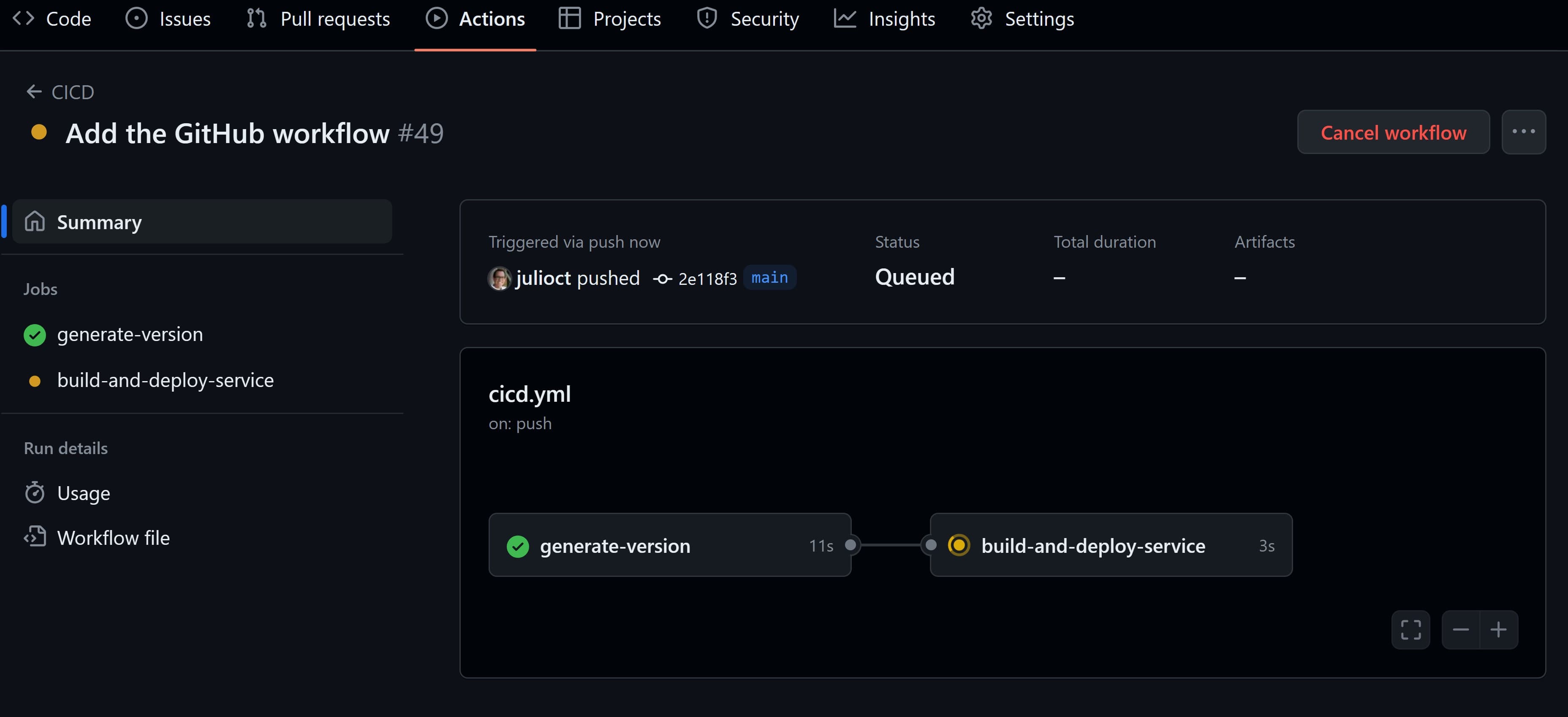
Release strategy and launch-day ops get all the attention, but nobody talks about step zero: what should the very first CI pipeline look like for a one-person vibe project with no code review? This guide gives you a keep-or-cut decision table for 5 jobs, a copy-paste-ready GitHub Actions template, preview deploys with AI visual review, a database migration gate, a 60-second post-deploy smoke check SOP, and 4 classic over-engineering anti-patterns.

On October 7, Shengshu Technology launched Vidu Q4 Preview: flagship video generation starting at $0.014/sec (~14 cents for a 10-second clip), with up to 15 image references, 3 audio references, and 2K/4K 10-bit output. The public preview ships first, with creator feedback shaping the final release. We break down the price war for indie developers, the 15-image consistency fix, positioning vs. Sora/Runway/Veo, and when vibe coders should wire video generation in.

On October 6, GitLab announced its "governed software factory": /goal-driven flows in Duo Agent Platform carry one intent from code to deploy; Artifact Central, Dependency Firewall, and Secrets Manager guard assembly, entry, and keys; Orbit and Impact Analytics put the token ledger on the table. We break down the five highlights and read the three-way split between GitHub, Microsoft, and GitLab.