The Pre-Launch Legal Trio: A Minimal Compliance Guide to Privacy Policy, Terms and Cookies
Your solo product is one deploy away from charging users — but the privacy policy, terms of service and cookie banner are missing or copy-pasted. This guide gives you the minimum viable legal trio: the 8 questions a privacy policy must answer, the 5 essential terms clauses, cookie banner minimums that pass review, a GDPR/CCPA/PIPL cheat sheet, and an AI drafting workflow with a 10-point human review checklist.

It's 2 AM. Your SaaS finally works: the Stripe test payment just went through, the landing page is glowing green on Vercel. One button left — "Deploy". And then it hits you: where's the privacy policy? The terms of service? That cookie banner that's supposed to pop up for every EU visitor?
That's the reality for 99% of solo projects: the legal trio is either missing or copy-pasted from some template site. Missing it won't survive app store review or Stripe's risk checks; copy-pasting it is a different kind of risk — a privacy policy that doesn't match your actual data flows is, in legal terms, a "misrepresentation." And that's more expensive than having nothing at all.
This guide gives the copy-paste crowd a safe path ashore: half a day, AI drafting plus checklist self-review, and you clear the launch bar. But I'll also be honest about the ceiling of AI-generated legal text — code can be vibed, legal text cannot. This is one of the few steps you must personally own.
Why Copy-Paste Is a Landmine
Here's a counterintuitive conclusion first: a wrong privacy policy is more dangerous than no privacy policy. With no policy, people see a gap; with a policy that claims "we don't collect any data" while you're actually running PostHog for behavioral analytics, Sentry for crash logs, and Resend for transactional email, people see a lie. The former is a compliance gap; the latter is misrepresentation, and the penalties and trust costs aren't even in the same league. The problem with templates was never that they're poorly written — it's that they describe someone else's product, not yours.
The three most common ways solo products blow up all look like this:
Scenario 1: The analytics tool is connected, but the policy doesn't mention it
An indie developer hooked up a behavioral analytics tool to their AI writing app for heatmaps, curious where users dropped off. The privacy policy was copied from a template site and said "we only collect information you actively provide." An EU user exercised their GDPR right of access and emailed asking for an export of "all data you hold about me." The developer checked the analytics dashboard: session recordings, click heatmaps, device fingerprints — all there. There was no good way to reply — admitting it meant confessing the policy was a lie; denying it was impossible with the data staring back. In the end they spent two weeks rewriting the policy, adding a cookie banner, and writing a formal apology. The bitter part, they said in retrospect: the analytics tool was added a week before launch; the policy was copied three months earlier. The two were never reconciled.
Scenario 2: App store review gets stuck on "missing terms"
Another developer wrapped a web app for the app store. Review rejected: "apps with subscriptions or in-app purchases must provide accessible privacy policy and terms of service URLs." They hastily pasted together an English policy into the settings page. Second rejection — the review guidelines require policies to truthfully describe data practices, and the template's "we may share data with advertising partners" directly contradicted their actual "no ads, pure subscription" model. The reviewer flagged it as misleading. Three weeks of back-and-forth, and the whole launch window was missed. App store reviewers don't care whether your policy is elegantly written; they care about two things: does it exist, and is it true.
Scenario 3: Payment risk review asks you to "prove you're serious"
A developer selling templates had their Stripe account flagged for review right after the first sizable enterprise payment landed. The risk email listed required materials, including "user-facing terms of service and refund policy." All they had was one line buried in the FAQ: "refunds not supported at this time." Stripe's logic is blunt: merchants without a clear refund policy are statistically higher-risk for disputes, and the risk model weights that directly. Ten days of patching terms and documenting the refund flow — with funds frozen the entire time. For a solo product, ten days of frozen cash flow can be the difference between life and death.
What the three stories share: nobody involved was a bad actor. They were all good people who chose "ship first, figure it out later." The legal trio isn't written for lawyers — it's written for reviewers, risk systems, and the meticulous user. It's your product's proof of adulthood. Without it, you don't even qualify to be taken seriously.
 Signing a privacy policy document
The Minimum Compliance Trio: Fill In the Checklist
Forget those 30-page law-firm templates. For a solo product, the goal of the legal trio isn't "airtight" — it's "truthful, complete, and enforceable." The checklist below is the minimum bar for launch — every item maps to a real-world checkpoint: reviewers look at it, risk teams look at it, meticulous users look at it.
Privacy policy: the 8 questions it must answer
A solid privacy policy is, at its core, an honest answer to 8 questions from your users. While writing, don't think "I'm writing a policy" — think "I'm answering what users most want to know":
- What do you collect? List your data inventory by category: account data (email, username), payment data (note: card numbers are usually handled by Stripe — state clearly that you don't store full card numbers), behavioral data (page views, clicks), device data (IP, device model), user content (uploaded files, entered prompts). The more specific, the better — "we may collect certain information" says nothing.
- Why do you collect it? Map each data category to a purpose: email for transactional notifications and password resets, behavioral data for optimizing the conversion funnel, crash logs for fixing bugs. Purpose limitation is a core GDPR principle — if you can't articulate the purpose, don't collect the data.
- On what basis? The legal basis: contract performance (delivering the service someone paid for), consent (marketing emails), legitimate interest (fraud prevention). Even if your users are mostly in the US, stating the basis signals professionalism.
- Where is the data stored? Name the server locations and cloud providers: "data is stored in Vercel/Neon data centers in the United States." This directly determines which cross-border rules apply to you — and saves users from having to email and ask.
- Who do you share it with? List every third-party processor, no exceptions: Stripe (payments), PostHog (analytics), Sentry (error monitoring), Resend (email), Vercel (hosting). This is where copy-pasted policies blow up most often — the template doesn't know who you plugged in.
- How long do you keep it? Give retention periods: "personal data deleted within 30 days of account closure; anonymized analytics retained for 13 months." Indefinite "permanent storage" with no timeline is a red flag in every jurisdiction.
- What rights do users have? Access, correction, deletion, export, withdrawing consent. Provide at least one working contact email and a response SLA (e.g., within 30 days). Rights with no working entry point are an empty promise.
- How are changes announced? State the version number, effective date, and how material changes get communicated (email or in-app notice). This is both a compliance requirement and your "due process" for when you need to amend terms later.
Terms of service: the 5 essential clauses
Terms of service are the contract between you and your users. A solo product doesn't need 20 pages, but these 5 clauses are non-negotiable — missing one means flying blind in that exact scenario:
- Service description & "as is". Say what you provide ("an AI writing assistant") and what you don't promise ("provided as is; no guarantee of output accuracy"). AI products especially need this: generated content may be inaccurate, users must exercise their own judgment. This is your first line of defense when "the AI hallucinated and the user lost money."
- Payments, subscriptions & refunds. Pricing, billing cycle, how to cancel, refund policy — spell out every one. Write it more generously than you think you need to — "7-day no-questions-asked refunds" is your shield in Stripe disputes and actually boosts conversion. A vague refund policy is an invitation for users to go to their bank for a chargeback.
- Limitation of liability. Cap damages: the standard formulation is "limited to fees actually paid by the user in the preceding 12 months," excluding indirect losses. Without this clause, a claimed "business loss" from one outage is theoretically uncapped. A solo company cannot survive unlimited liability — this clause is the survival line.
- Account termination. Under what circumstances you can shut down an account (abuse, non-payment, illegal activity), and what happens to data afterward (retention period, export availability). With this clause written, you have grounds when banning abusers and bad actors; without it, every ban looks like platform bullying.
- Governing law & dispute resolution. Agree on which country's or state's law applies and where disputes get resolved. A pragmatic choice for solo products going global is often Delaware or Singapore law plus arbitration — cost-controlled. Don't leave it blank — blank means users can sue you in a court in their own jurisdiction. That's the real nightmare.
It's also worth adding an acceptable use policy (prohibited conduct: spam, attacking others, illegal content) — either inline or as a separate page. It's your basis for acting when you need to handle abuse through Cloudflare or provider complaint processes.
Cookie banner: the minimum bar that passes review
The cookie banner is the easiest part of the trio to fake. Many sites have a banner with a single "Got it" button — which under EU standards is the same as having no banner at all. The minimum bar is these 5:
- Inform on first visit. Users must see the banner on their first page load — not buried in the footer waiting to be discovered. It can be simplified for non-EU users, but the act of informing can't be skipped.
- Accept and reject must be equally easy. If "Accept" is a big button, "Reject" can't be a small-text link buried three dialogs deep. Symmetric design is the first thing regulators check — asymmetric banners have already drawn fines in multiple EU countries.
- Non-essential cookies off by default. Analytics and marketing scripts must load only after the user clicks "Accept" — that's opt-in. Loading Google Analytics in full on page load and then asking "do you agree?" in a banner is asking after the fact.
- State the categories. List cookie categories in the banner or a second-level panel: necessary (login state, security), analytics (PostHog), marketing (if any). Users should be able to toggle by category, not just "accept all / reject all."
- Record consent; allow withdrawal. Store the user's choice (cookie or localStorage) and keep a "Cookie settings" entry in the footer so it can be changed anytime. Withdrawing consent must be as easy as giving it.
Three-Jurisdiction Cheat Sheet: One Table for "How Far to Go"
Solo products going global can't dodge three regimes: the EU's GDPR, California's CCPA/CPRA in the US, and China's Personal Information Protection Law (PIPL). Their underlying logic differs, but for a small team it converges into one cheat sheet. Differences first, then "how far to go":
| Dimension | EU GDPR | California CCPA/CPRA | China PIPL |
|---|---|---|---|
| Jurisdiction threshold | No size threshold: applies if you serve EU users at all, solo products included | $25M+ annual revenue, or data of 100k+ California residents — most early-stage solo teams won't hit it | Applies if you serve users in China; larger data volumes trigger security assessments |
| Consent model | Strictest: marketing cookies and non-essential tracking require prior opt-in; pre-ticked boxes are invalid | Mostly opt-out: must offer a "Do Not Sell/Share" entry point, but collection is allowed by default | Close to GDPR: separate consent + item-by-item consent for sensitive personal info; pre-ticked boxes invalid |
| Core user rights | Access, rectification, erasure, restriction, portability, objection to automated decisions | Know, delete, correct, opt out of sale/sharing, limit sensitive info use | Know, access, copy, correct, delete, withdraw consent — roughly the full GDPR set |
| Cross-border transfer | Needs an adequacy decision or Standard Contractual Clauses (SCCs); solo products rely on their cloud provider's DPA | No dedicated transfer restrictions | Strictest: thresholds trigger security assessment filings; smaller volumes should still prefer domestic storage |
| Penalties | Up to €20M or 4% of global revenue, whichever is higher | Per-violation fines; high class-action risk | Up to ¥50M or 5% of prior-year revenue, plus possible business suspension orders |
The pragmatic "how far" advice: if your users are mainly in Europe and the US, build to the GDPR baseline directly — it's the most detailed of the three in what it demands of your product shape (opt-in banners, rights request entry points, third-party lists). Hit GDPR and CCPA is mostly covered for free; just add a "Do Not Sell/Share" link.
If you have a Chinese version or Chinese users, handle PIPL separately with three additions: "separate consent" in signup and permission dialogs (can't be bundled into one pre-ticked mega-agreement), item-by-item disclosure for sensitive personal info (face data, location, financial accounts), and a serious decision about where data lives — cross-border transfer compliance is brutally expensive for a one-person team, so use domestic cloud early if you can.
One-line summary: GDPR is a "product shape" requirement, PIPL is an "architecture" requirement, CCPA is an "add-a-link" requirement. Prioritize in that order and your half-day is spent where it counts.
 Privacy protection illustration
The AI Drafting Workflow: Fast, But Don't Sign Blind
Legal text is one of the genres AI is best at: fixed structure, standard terminology, zero creativity needed. But AI drafting only works if you feed it the right materials — your agent doesn't know your stack, so it will invent one. My recommended workflow has three steps: feed materials, generate, human review.
Step 1: The four materials to feed your agent
Prepare these four before writing the prompt. Every missing one becomes something the output invents:
- Stack inventory: frontend framework, hosting platform, database, auth solution (e.g., Next.js + Vercel + Neon + Auth.js). This determines how the "where data lives" section gets written.
- Third-party service inventory: every external service — Stripe (payments), PostHog (analytics), Sentry (error monitoring), Resend (email) — plus what data each handles. This is the raw material for the "who we share with" section, and the part copy-paste policies most often get wrong.
- Data flow inventory: walk the user journey: what signup collects, what login collects, what checkout collects, which tracking scripts run. Doesn't need to be formal — a bullet list is fine — but it must reflect your actual code.
- Target markets & pricing model: which countries/regions, subscription vs. one-time, free tier or not, what the refund policy should say. This drives the "payments & refunds" and "governing law" sections of the terms.
Step 2: The drafting prompt template
Feed this prompt to your agent along with the four materials above. Note the three constraints baked in: honesty first (flag unknowns instead of inventing), cite real service names, output bilingual:
You are a compliance advisor familiar with GDPR, CCPA, and China's PIPL.
Based on the materials below, draft three documents for my solo SaaS product:
1) Privacy Policy 2) Terms of Service 3) Cookie Policy.

[PRODUCT MATERIALS]
- Stack: <paste stack inventory>
- Third-party services and the data they handle: <paste service inventory>
- User data flows: <paste data flow inventory>
- Target markets: <e.g., global, including EU and China>; Pricing: <e.g., $12/mo subscription, 7-day no-questions-asked refunds>

[HARD REQUIREMENTS]
1. Only write about services and data flows that exist in the materials;
   mark anything uncertain as [TO CONFIRM] — never invent.
2. The privacy policy must cover: what is collected, why, legal basis,
   storage location, third-party list, retention periods, user rights,
   contact info, versioning and change notices.
3. The terms must include: service description (as-is), payments & refunds,
   acceptable use, limitation of liability (capped at fees paid in the
   preceding 12 months), account termination, governing law & disputes.
4. Plain language; avoid jargon-stuffing. Output in both Chinese and English.
5. End with a "human review checklist" of factual points I must verify myself.
Step 3: The 10 points you must verify by hand after generation
AI-generated text scores 95 on language; the facts need your own eyes. These 10 are the highest-risk spots — check them off one by one:
- Does the third-party list match the services actually wired up in your
package.json/ env vars? (The most common failure point.) - Does the stated data storage location match your cloud provider's actual region?
- Does the refund policy match the rules you'll actually enforce in Stripe?
- Is the contact email real, valid, and one you actually read?
- Is the effective date today — not a leftover 2023 from a template?
- Are the company/personal name and domicile your own real information?
- Does it mention anything you don't actually do, like "we use facial recognition" or "we serve personalized ads"?
- Are the user-rights response SLA (30 days) and entry point actually achievable with a one-person operation?
- Is the governing law a jurisdiction you genuinely accept? Don't pick a state you've never set foot in.
- Do the English and Chinese versions say the same thing? AI translations occasionally "improvise" — cross-check key numbers and deadlines item by item.
When you must hire a real lawyer: three red lines
AI + checklist covers 90% of solo product scenarios. But if any of these three red lines is crossed, don't economize on legal fees:
- Red line 1: sensitive data. Health, finance, children, biometrics, faces, precise geolocation — the compliance bar for these is a different league; templates and AI aren't qualified. Touch them, get a lawyer. No discussion.
- Red line 2: scale triggers "big player" duties. For example, enough EU users to require an EU representative or a data protection officer (DPO), or China-side data volumes that trigger security assessment filings. Judging whether those duties apply is itself professional work.
- Red line 3: something already happened. A regulator inquiry, mass user complaints, a lawyer's letter, an app store takedown for "misleading statements" — every word of post-incident remediation can become evidence. An AI-drafted response letter will only make things worse.
The rule of thumb is simple: AI handles the "0 to 1" compliance skeleton; lawyers handle the "1 to N" risk backstop. Don't let AI make judgments it's not qualified to make — and don't overpay for the skeleton phase.
Shipping It: The Standard Placement in a Next.js Project
With the text done, what remains is engineering: where it lives, how users see it, what happens when versions change. This part has standard answers — just copy them.
Routes and pages: three static pages
In an App Router project, the standard approach is three static routes, generated at build time, costing nothing at runtime:
app/[locale]/(legal)/privacy/page.tsx   # Privacy Policy
app/[locale]/(legal)/terms/page.tsx     # Terms of Service
app/[locale]/(legal)/cookies/page.tsx   # Cookie Policy
The (legal) route group exists to share one minimal layout (strip the nav, keep the footer) so legal pages look clean and formal. Write the content directly as JSX/MDX — don't pull it dynamically from a CMS. Version stability of legal text matters far more than editing convenience.
Three mandatory "exposure points"
- Footer links. Put "Privacy Policy / Terms of Service / Cookie Settings" in the site-wide footer. That's the first place reviewers and risk teams check — no findable link means no policy.
- Signup checkbox. Below the signup form, add a checkbox that is unchecked by default: "I have read and agree to the Terms of Service and Privacy Policy." Pre-ticked boxes are invalid under both GDPR and PIPL — this detail determines whether your "consent" has any legal force. Note: the linked terms must be clickable right next to the checkbox.
- Version change notices. For every material change: bump the version, stamp the effective date at the top of the page, announce significant changes by email or in-app notice, and keep historical versions. A useful trick: archive old versions by date at paths like
/legal/archive/2026-10-10— in a dispute, that's your timeline evidence.
Lightweight consent management: skip the heavy CMP
Enterprise CMPs like OneTrust or Cookiebot are a triple waste for solo products: expensive, heavy (hundreds of KB of JS), and hard to customize. A ~100-line homegrown consent manager is plenty. The core logic is just four steps:
- First visit shows the banner: categories explained (necessary / analytics / marketing), "Accept" and "Reject" equally prominent, "Customize" expanding per-category toggles.
- Store the choice in
localStorage(a key likecookie-consentholding the version and timestamp); read it on later visits and don't nag again. - Load scripts conditionally on consent: analytics scripts (PostHog, GA) get injected only after the user consents to the "analytics" category. Use conditional rendering or dynamic
import()— not full loading at page boot. That's what opt-in really means: the banner is UI, the script gate is compliance. - Keep a permanent "Cookie Settings" entry in the footer that reopens the banner so users can withdraw anytime. Withdrawing must actually stop the corresponding scripts and clear already-set non-essential cookies — flipping a state bit alone doesn't count.
This setup has zero external dependencies, adds nothing to your bill, and is fully style-controllable. The only cost is honesty: gate every third-party script in code. The prettiest banner means nothing if the Network panel shows GA firing before the user clicks "Reject" — and that's exactly what regulators' technical checks look at.
Closing: Code Can Be Vibed, Legal Text Cannot
The philosophy of vibe coding is "get it running first," and that works for code — broken code can be rolled back and hotfixed. Broken legal text can't be rolled back: every version you publish is a statement of fact you've personally attested to, and regulators and users will hold it against your actual behavior.
So the right posture is: let AI do the 80% that's labor (drafting, bilingual versions, formatting) and keep the 20% that's judgment for yourself (fact-checking, red-line recognition, version management). Half a day buys you: app store review passed on the first try, Stripe risk leaving you alone, and meticulous users finding nothing to pick at. That ROI is the highest on your entire launch checklist.
And one more time, the counterintuitive line: no policy is a gap; a wrong policy is a lie. The day before launch, spend half a day getting the trio right — it's the cheapest lesson in going from "person who writes demos" to "person who ships products."
Related articles

You don't need a support team — you need a support system. This guide walks solo developers through the full playbook: ticket triage, a three-layer defense funnel, ticket-deflecting FAQs, an AI draft pipeline with copy-paste prompt templates, five canned-response templates, automation red lines, and a weekly 30-minute review SOP. Every section ships with templates you can use today.
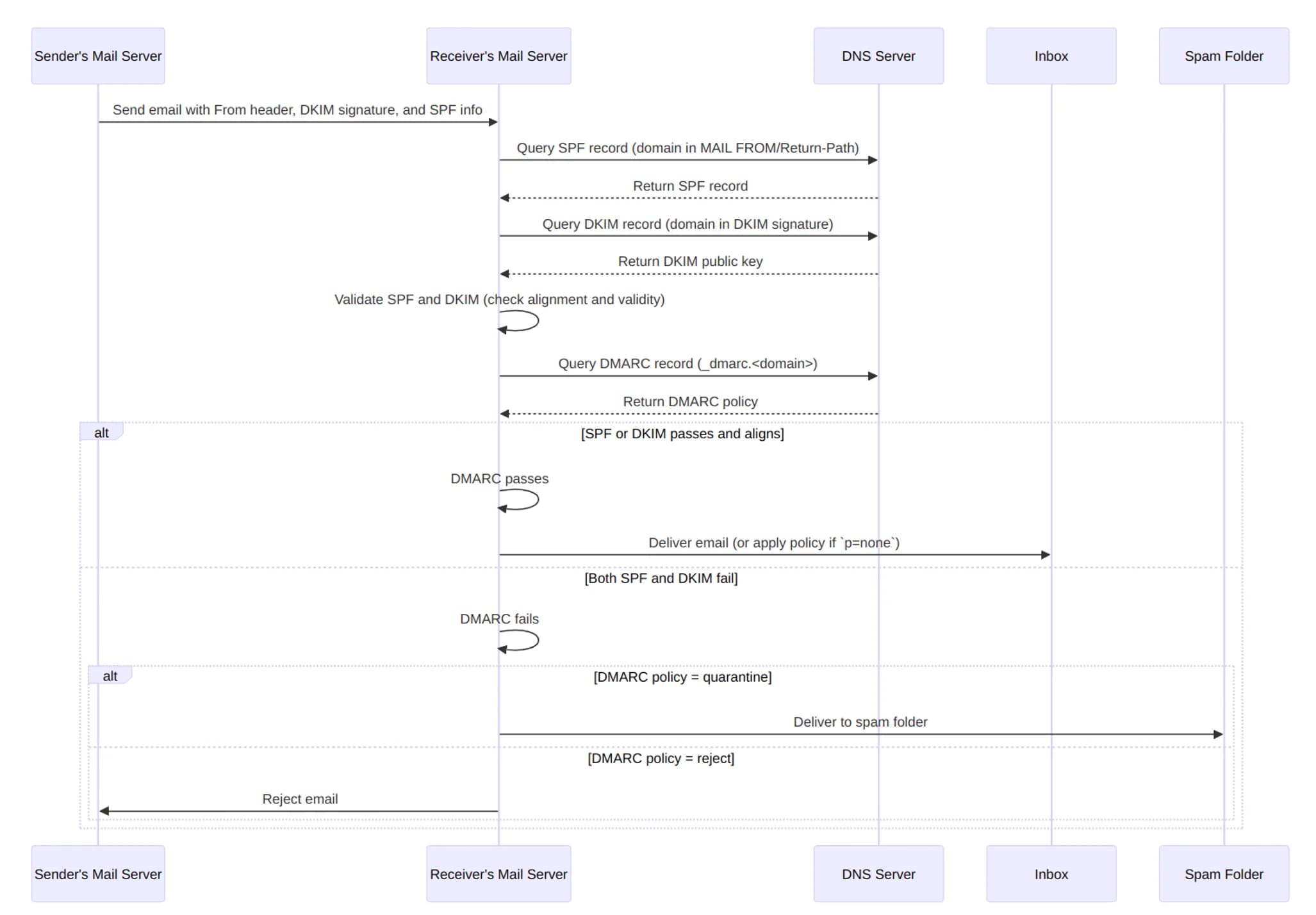
Signup verifications, password resets, order notifications — almost every vibe project needs transactional email on day one, yet most wire up a random SMTP and watch those emails die in spam. This guide covers why transactional and marketing mail must never share a channel, a Resend vs AWS SES vs Postmark decision tree with pricing, a hands-on SPF/DKIM/DMARC walkthrough on Cloudflare, a spam troubleshooting checklist, and the CAN-SPAM/GDPR baseline — with copy-paste DNS records and code.
Your product isn't bad — it's just unclear. A hands-on playbook for vibe coders: the 5-second headline rule with 6 before/after pairs, a one-job-per-screen page architecture, solo-founder social proof tactics, CTA and form field optimization, plus an AI copy review checklist.