Structured Decisions in Practice: Turning Your Agent's Judgment into Data Your Code Can Use
At DevDay, OpenAI shipped a Decisions API that only answers multiple-choice questions (still in limited preview); two weeks earlier, TypeSafe AI's Jev defined the category. This is a field guide, not an API doc: four patterns you can copy today — routing, gating, scoring, next-step selection — plus option design, probability thresholds, fallbacks, log audits, the input-token-only cost math, when not to use it, and how a thin adapter keeps you off single-vendor lock-in.

First, the backdrop: a new model category that only answers multiple-choice questions
At OpenAI's DevDay on September 29, the Decisions API was a quiet launch worth thinking about. It runs on a specialized version of GPT-6 Luna and does not generate free text. You pass in context (text or an image) plus a finite list of answers you define, and it returns one thing: which option was picked, and the probability of each option. The official figure is roughly 150ms per call, versus about 1.6 seconds for the same question through a standard Luna call. Billing changed too: input tokens only, $0.10 per million — output tokens don't exist here.
The interesting part: OpenAI didn't define this category. Two weeks earlier, TypeSafe AI launched Jev: text-only input, 70–500ms responses, a probability per option, $0.042 per million input tokens with free output. OpenAI's version is conceptually a mirror of Jev — the same three question types (yes/no, choices, scores), a very similar API shape — except it adds image input and costs more than twice as much.
On October 6, Simon Willison had GPT-6 Astra read OpenAI's docs and wrote the llm-openai-decisions plug-in that same evening. People in this circle vote with their actions: a usable plug-in built in one night means the thing scratches a real itch.
The honest caveat up front: as of October 7, the Decisions API is still in limited preview. OpenAI promised a broader rollout "in the coming days," but the October 5 changelog showed no movement. Pricing, quotas, and availability can all change. What follows is thinking and method, not an API manual — and anything in preview deserves a backup plan before it touches production.
The real pain: in an agent loop, deciding is more expensive than doing
If you've built agents, you've seen this pattern: every branch in the main loop starts by asking the model a question. "Is this user message a technical issue or a refund request?" "Can this diff be merged directly?" "Should the next step call search or read a file?" Each judgment is a full LLM call: write a prompt, wait for generation, parse the returned text, handle format drift, retry on failure.
The bill has two layers. The first is tokens: judgment prompts are rarely short, context has to be stuffed in, and half the returned text is reasoning you didn't ask for — yet you pay for every output token. The second layer is sneakier: format drift. The model returns technical today, Technical Issue tomorrow, and a full paragraph with "hope this helps!" the day after. The more robust your parsing code, the higher its maintenance cost; keep it simple and production breaks every few days.
The result: judgment logic routinely costs more than the actual work. The main task finishes in one call, while deciding "whether to act, how to act, and who gets the result" burns three or four. The decision-model idea is to peel "judgment" out of text generation entirely: the output space is closed, the model can only score the options you gave it, and what comes back is data your program can use directly — an option name plus probabilities. No explanations, no filler, no format drift.
Four patterns you can copy today
(a) Routing: triaging tickets and messages. This is OpenAI's own example, and the most mature use. An indie SaaS gets user messages all day: technical issues go to the tech queue, billing questions to the billing flow, refund requests to the refund SOP, ads and spam straight to the bin. The old approach was one general-model call to "classify this," then parsing its answer; now it's one decision call. Context is the raw user message, options are [technical, billing, refund, spam, other], and the return value is the queue name — no parsing code needed at all.
Probabilities earn their keep here for the first time: above 0.9, route automatically; between 0.6 and 0.9, tag it "needs review" and let a human glance at the queue; below 0.6, even the decision model is unsure, so escalate to a general model for a closer look or straight to a human. Note that other is mandatory — a classifier with no catch-all will take your whole pipeline down on the first weird input.
(b) Gating: "Is this shell command reversible?" Before a coding agent executes a command, ask one yes/no question: "Is executing this command reversible (data recoverable, no external side effects)?" rm -rf node_modules is reversible — reinstall it; rm -rf ~ is not — block it and demand human confirmation or a rewritten safe version.
Gating is brutally latency-sensitive: it sits in front of "execute," so every second of delay stalls the whole agent loop by a second. A general model's 1.6-second round trip is unacceptable here; only a ~150ms decision call makes sense. This is the classic case where "fast" beats "smart" — gating doesn't need the model to write an essay, just a reliable yes or no.
(c) Scoring: grading code diffs against a rubric. Auto-merging PRs is every indie developer's dream and a rich source of incidents. Use the score question type and write the rubric into the question itself: "version-bump-only dependency changes with no logic changes = high score; touched core business logic = low score; deleted tests = minimum score." The decision model returns a number; above the threshold it merges automatically, below it goes to human review.
One warning: scoring is the easiest of the four patterns to get "looks accurate, actually sloppy." The more concrete the rubric, the better — "high code quality" is the same as writing nothing. And audit regularly: have a human or the main model re-grade a batch of scored diffs. Wherever they disagree, your rubric has a hole.
(d) Next-step selection: the scheduler inside your agent loop. Say your agent has six tools: search, read file, write file, run tests, send HTTP requests, ask the user. Each step, ask the decision model: "Given the current state, which tool should be called next?" The options are the tool names; the top-1 result is the function name directly — no parsing, no typos.
That's an order of magnitude cheaper than letting the main model "decide along the way" inside a multi-thousand-token prompt. And once scheduling logic leaves the main prompt, the main prompt can go on a diet — the whole system gets easier to debug. "Why did it call search here?" Just check the decision log instead of digging through tens of thousands of tokens of conversation history.
Design rules: options are constraints, not suggestions
This is the most valuable part of the whole piece. Whether a decision model works for you depends almost entirely on how you design the question and the options — the model itself is secondary.
- Keep options between 3 and 7. A "multiple choice" with 20 options is no different from free text — the constraint stops working. Two options shoehorns complex situations into a false binary. Seven is a practical ceiling; beyond it, think about grouping or layering.
- Write the question like a unit-test assertion. Bad: "What does this message mean?" Good: "Does this user message literally request a refund? Consider only the literal request, not tone or emotion." A decision model gets no chance to explain, so every word has to survive scrutiny. Read your question three times after writing it; replace any ambiguous word.
- Use probabilities as thresholds, not just the top-1. High confidence goes automatic; low confidence goes to a human or degrades to a general model. Don't guess thresholds: run 200 of your own real examples, look at where the probability distribution lands, then draw the line. Different scenarios deserve different lines — routing and gating should not share a threshold.
- Always include a default branch.
other,unknown,escalatemust be in the option list. Decision models get things wrong too; a decision chain with no fallback collapses on the first anomalous input. This is non-negotiable. - Log every decision. Each record: input summary, question version, returned options and probabilities, which branch was taken. Every week, sample 50 and compare "the decision model's call vs. human/main-model review." The disagreements are exactly where your option design or question wording has holes. A decision system gets sharper with use — but only if you read the logs.
- Stay skeptical of probabilities. A third party tested Luna on 3,600 logic problems: on questions needing multi-step reasoning, options the model labeled 99%+ confident were actually right only about 68% of the time — and option ordering shifts the probability distribution. Don't take vendor confidence at face value. Calibrate on your own data; thresholds are earned by running, not by reading.
The cost math: what "input tokens only" really means
The core change in one sentence: decision calls have no output tokens, so high-frequency judgment gets an order of magnitude cheaper. Here's the formula, not a pre-cooked conclusion — fill in your own measured numbers.
Formula: monthly cost = daily calls × 30 × input tokens per call × price per million / 1,000,000. Input tokens per call = question text + option list + context; count all three yourself, no hand-waving.
- Scenario: 10,000 routing judgments per day, 800 input tokens each (an assumed number — replace it).
- Decisions API: 300,000 × 800 = 240M tokens × $0.10/M ≈ $24/month.
- General model (using standard Luna pricing of $0.10 input / $0.50 output as the example): input costs the same $24, but each call also emits ~300 tokens of reasoning and answer: 300,000 × 300 = 90M × $0.50/M = $45; total ≈ $69. The decision model drops the output leg — roughly a third of the cost.
- With Jev ($0.042/M input): the same math gives ≈ $10/month.
Two caveats. First, that 300-token output is my illustrative guess: the longer your prompt and the chattier the model's output, the wider the gap; if your judgment prompt is already short, the gap narrows. The formula is yours now — plug in your numbers instead of copying my conclusion. Second, the latency math works the same way: the official 150ms vs. 1.6s is a 10x claim, but it's a vendor figure, and third parties have noted it hasn't been independently reproduced. For latency-sensitive gating or real-time routing, measure p50/p95/p99 yourself before making architecture decisions off a keynote slide.
When not to use it
- When the judgment needs nuance. "What is this user actually asking for beneath the feedback?" — if you can't list the options, don't force it into a multiple-choice shape. Decision models do classification, not understanding.
- When you need creativity or open-ended reasoning. It generates no text. Brainstorming, copywriting, naming things — wrong tool entirely.
- When the logic needs multiple reasoning steps. The benchmark above already showed the problem: accuracy falls off fast as reasoning depth grows. Either decompose complex judgments into chains of simple ones, or use a general model. Don't expect a 150ms call to do five steps of reasoning for you.
- When the options themselves change frequently. If your taxonomy changes weekly, the cost of maintaining the option list and recalibrating thresholds will eat the token savings. Decision models fit scenarios where the questions are stable, volume is high, and latency matters. For an early product whose categories are still shifting daily, ride the general model until the patterns settle, then converge the stable ones into decision calls.
Engineering advice: wrap it in a thin adapter, don't weld your logic to one vendor
Jev and OpenAI Decisions are conceptually near-identical — three question types, similar return shapes — but the details will diverge, especially in preview. Today only OpenAI supports image input; tomorrow Jev might too. Today it's $0.10; tomorrow it could drop or rise. Writing business logic directly against "the OpenAI Decisions API" hands away your negotiating power for the next six months.
The fix is simple: define your own decide(question, options, context) -> (choice, probabilities) interface, with three implementations behind it — Jev, OpenAI Decisions, and a local rules engine (keywords plus regex as the baseline). Business code only knows the interface, never who's doing the work behind it.
Three payoffs. First, if the preview breaks, the price jumps, or you never get access, one config line switches providers and business code doesn't move. Second, local dev and tests run on the rules engine — zero cost to exercise the full pipeline, and CI burns no real money. Third, the rules engine is a free control group: the cases where "decision model vs. rules" disagree are perfect material for the log audits described above, and they make threshold calibration much easier.
One last rule, for the preview phase: don't bet core flows on it. Routing can go first — a misclassification gets caught by a human. For safety-critical gating, use the decision model as an advisor while keeping your existing confirmation flow in front of execution. Tighten up only after GA, after you've measured p95 yourself, and after thresholds have held steady on real traffic. Fast things deserve slow adoption.
When "judgment" becomes structured data, an agent finally grows a reflex arc. The main model does the thinking, the decision model makes the call in a few hundred milliseconds, and the rules engine catches what's underneath — three layers, each doing its own job, none blocking the others. It may be the most worthwhile bet in agent architecture over the next year: not a bigger model, but cheaper judgment.
Related articles
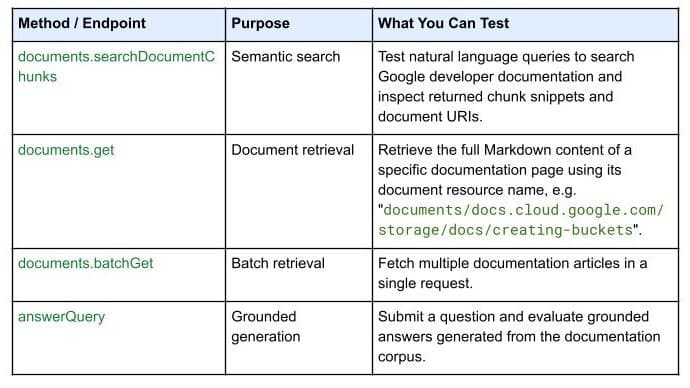
On October 7, 2026, Google Developers launched the Developer Knowledge API ecosystem: official Google Cloud, Firebase, and Android docs as a programmatic source of truth, with a gcloud CLI surface, an official Agent Skill (one-line install), an MCP server, and multi-language client libraries. Why 'docs as APIs' uproots vibe coding's classic failure of models misremembering APIs.

Reported by InfoQ on October 3: a GPT-4 coding agent given CVE descriptions successfully exploited 87% of 15 test vulnerabilities, versus 7% without descriptions. rclone's author received 40+ security disclosures in a single month — more than the project's previous decade combined; QEMU has shortened its embargo period. The vulnerability disclosure timeline is collapsing under agent speed.
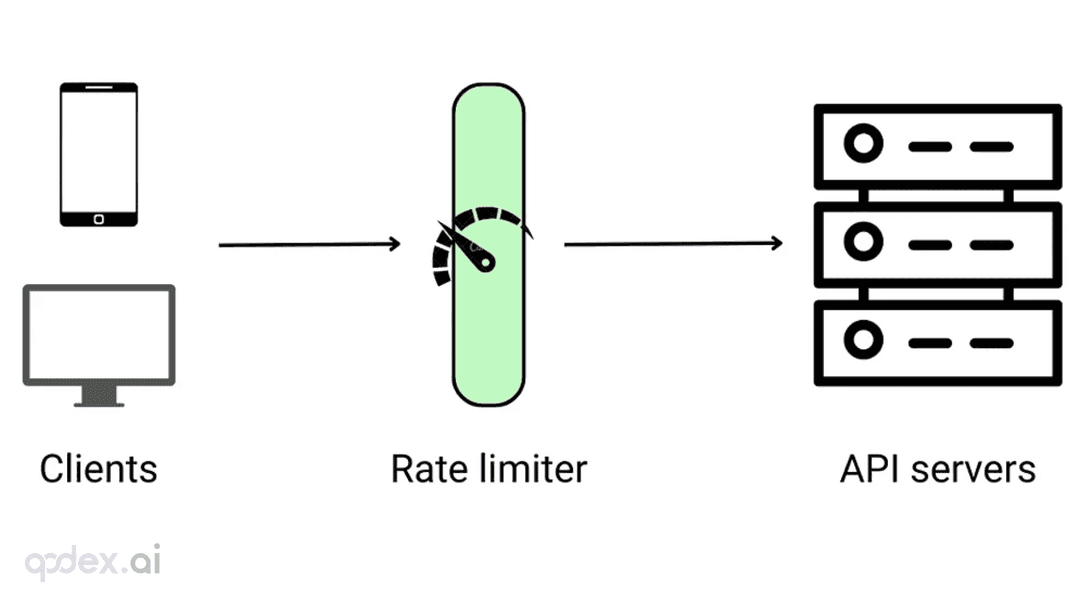
Every public endpoint will be called beyond your expectations some night. This guide builds a one-person-team rate-limiting system: algorithm choice (sliding window vs token bucket), four-layer defense, AI-endpoint money-burning protection, quota design, 429 response conventions, false-positive triage, and a launch checklist.