$300 Burned Overnight by a Script: API Rate Limiting and Quota Design for Vibe Projects
Every public endpoint will be called beyond your expectations some night. This guide builds a one-person-team rate-limiting system: algorithm choice (sliding window vs token bucket), four-layer defense, AI-endpoint money-burning protection, quota design, 429 response conventions, false-positive triage, and a launch checklist.
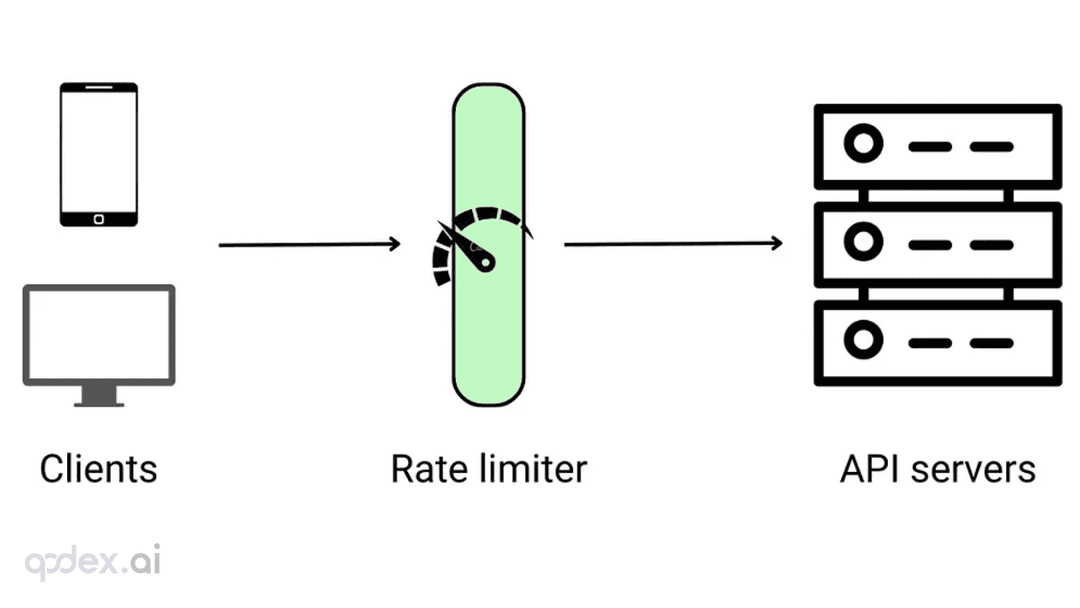
Every vibe project can live through this 3 AM: a cloud billing text wakes you up, you open it, and API costs jumped $300 overnight. The logs show it: some endpoint got hammered by a script dozens of times per second — maybe a scraper, maybe malicious, maybe just a bug in someone's client causing infinite retries. And your service was completely defenseless: no rate limiting whatsoever.
In AI-generated code, the absence rate of rate limiting is near 100%. It will write you login, payments, and beautiful loading animations, but never proactively asks: "what happens if this endpoint gets called 1,000 times per second?" The reality is: every endpoint on the public internet will be called beyond your expectations — that's a law of the internet, not a hypothesis.
Rate limiting is a vibe project's "body armor": it produces no user-visible feature, yet decides whether your service survives its first traffic spike and its first malicious bill. This guide gives you a rate-limiting system a one-person team can ship — from algorithm choice, layered strategy, and expensive-endpoint (AI call) specifics, to quota design, 429 response conventions, false-positive triage, and a launch checklist.
Start with the mental model: three questions of rate limiting
Before building, ask three questions about every endpoint worth protecting:
1. Limit whom? By IP (anti-scraper, anti-DDoS), by user ID (anti-abuse by one user), by API key (multi-tenant), by endpoint (expensive endpoints get tighter limits). Limiting on the wrong dimension is no limiting at all: IP-only limits are bypassed by a logged-in user switching proxies; user-only limits let unauthenticated scrapers run wild.
2. Limit what? Not every endpoint deserves it. Login (anti-brute-force), AI generation (burns money), SMS/email sending (burns money + enables harassment), export (data exfiltration) — these four are mandatory. Static assets and public article pages shouldn't be limited — you'd only hurt real users and SEO.
3. What happens when exceeded? Reject outright (429), queue up, or degrade — three strategies for different business tolerances. Payment webhook over limit? Queue it. AI generation over limit? Reject and suggest upgrading. The wrong strategy hurts more than none: if login requests just "queue" during a brute-force attack, the attacker's requests pile up and legitimate users still can't log in.
One more key distinction: rate limiting ≠ quota ≠ circuit breaking. Rate limiting governs speed (requests per second), quota governs volume (requests per month), circuit breaking keeps you from dying along with a downed downstream. They're a combination, not a multiple choice — this guide covers the first two; circuit breaking's spending breaker was covered in the error-monitoring guide's AI section, same line of thinking.
Algorithm choice: vibe projects only need to remember two
Four classic algorithms exist, but you only face one multiple-choice question:
Fixed window: N requests per minute, counter resets on the dot. Simplest to implement (Redis counter + expiry); the flaw is boundary spikes — 100 requests at 23:59:59, another 100 at 00:00:00, 200 in two seconds. Fine for internal endpoints where abuse-resistance isn't critical.
Sliding window: precisely counts "the last 60 seconds" — no boundary spikes. Slightly more complex (Redis sorted set of timestamps). The sweet spot of precision and cost; pick this as your default.
Token bucket: the bucket holds N tokens, refills M per second, each request spends one. Allows short bursts (drain a full bucket at once) — right for "usually idle, occasionally bursty" flows like AI generation, where a user clicking generate 3 times in a row is normal behavior that shouldn't be throttled to death.
Leaky bucket: requests drain at a steady rate — smooths peaks. Right for protecting fragile downstreams (e.g., your database survives 50 QPS).
The choice: sliding window for generic endpoints, token bucket for expensive AI endpoints (small bursts allowed). But here's the honest truth: 90% of vibe projects never need to hand-roll an algorithm — use what's there: Upstash Ratelimit (three lines of code, serverless-friendly), Cloudflare Rate Limiting (at the edge, never touches your origin), Nginx limit_req. Hand-rolled Redis+Lua is only worth it with special bucketing logic.
Minimal Upstash implementation:
import { Ratelimit } from "@upstash/ratelimit";
import { Redis } from "@upstash/redis";

const ratelimit = new Ratelimit({
  redis: Redis.fromEnv(),
  limiter: Ratelimit.slidingWindow(10, "60 s"),  // 10 per 60 seconds
});

const { success, reset } = await ratelimit.limit(`generate:${userId}`);
if (!success) {
  return Response.json({ error: "Too many requests, please try again later" },
    { status: 429, headers: { "Retry-After": String(Math.ceil((reset - Date.now()) / 1000)) } });
}
Note the key design: generate:${userId} — rate-limit key = endpoint name + limit dimension, the same thinking as cache-key design. Get the key wrong and limits cross-contaminate: keying every endpoint by userId means a user brute-forcing login also gets their AI generation throttled as collateral.
Layered limiting: each layer stops 90%, only the rest reaches your app
Rate limiting must be layered, not a single wall. Four classic layers, each stopping 90% of junk traffic:
Layer 1: edge (CDN/WAF). Cloudflare Rate Limiting rules or WAF managed rules. What dies here: scanners, scrapers, DDoS — they never touch your origin. Cheapest to configure, biggest effect: turn this on first, then talk about app-layer limits. Many vibe projects expose their origin directly — that's hanging the house key on the front door.
Layer 2: gateway/middleware. Nginx limit_req_zone or a global limit in Next.js middleware. Catches "abnormal IPs that slipped past the edge" — e.g., one IP at 50 requests/second gets stopped here without spending app resources.
// middleware.ts: global backstop, 60/min per anonymous IP
export async function middleware(req: NextRequest) {
  const ip = req.headers.get("x-forwarded-for")?.split(",")[0] ?? "unknown";
  const { success } = await ratelimit.limit(`global:${ip}`);
  if (!success) return new Response("Too Many Requests", { status: 429 });
}
Layer 3: application/business level. The Upstash example above lives here — limits by business semantics: login 5/min per IP, AI generation 50/day per user, SMS 3/day per phone number. These values are product decisions: free users get 20 generations/day, paid users 500 — the numbers go straight onto your pricing page.
Layer 4: downstream protection. The LLM APIs, payment gateways, and SMS providers you call all have their own QPS caps. Your app must do the math: 1,000 users × 1 req/s each = 1,000 QPS, but your OpenAI key caps at 500 QPS — your limits in aggregate must not exceed the weakest downstream link, or the downstream dies first, and it's still your service that looks dead.
Expensive-endpoint special: AI generation limits are the art of money
For vibe projects, the limit deserving the most careful design is AI generation — because it's wired directly to your wallet. One flagship-model generation can cost 1,000× a plain database query. Get the values wrong and you either burn cash or drive away paying users.
1. Tier by user, never one-size-fits-all. Anonymous: 3/day (just a taste); free registered: 20/day; paid: 500/day + overage (metered billing on the excess). Tier values must be reverse-engineered from your cost model: at $0.05 per generation, a free user at 20/day costs $1/day/person — can your acquisition cost and conversion rate cover that? A free tier whose math doesn't work is charity.
2. Queue, don't reject — for paying users. Hitting a paying user with a bare 429 over limit is churn fuel. Better: put them in a queue, return 202 Accepted + queue position, and have the frontend poll or receive the result over WebSocket. Not hard to implement (Redis list as the queue); worlds apart in experience. Only free users get the direct 429, with an upgrade link in the error — that's part of the conversion funnel.
3. Concurrency limits + rate limits, both. Rate limits govern "how many per minute"; concurrency limits govern "how many at once." AI generation is long-running (10–60s); a user opening 10 tabs and clicking generate in each stays under the rate limit while blowing up concurrency. Use a semaphore (Redis SETNX counter) to cap one user at 2 concurrent generations; the rest queue.
4. Limit prompt length too. The stealthiest money-burn: a user pastes a 100,000-word prompt and one call burns several dollars. Estimate tokens at the gateway (text.length / 4 as a rough gauge); reject or truncate the oversized. AI-generated code will never add this check for you — it doesn't even know tokens cost money.
Quota design: making "usage" part of the product
Rate limiting governs speed; quota governs volume. Quota is the foundation of the SaaS business model — design it badly and your pricing page is fiction.
1. Pick one quota dimension: per-use, per-volume, or per-seat. AI generation: per-use (simple to grasp); API products: per-call volume (10k/month); team collaboration: per-seat. Don't mix — "1,000 generations or 500k tokens per month, whichever comes first" confuses users and drowns support.
2. Four overage strategies, pick by business:
- Hard stop (403): free tier just stops. Simple, but a cliff-edge experience.
- Metered billing (recommended): overage auto-bills by usage; users keep going uninterrupted. That's what Stripe Billing's metered billing does — a few lines of config with Stripe's usage-based pricing.
- Degrade: after quota, switch to a cheaper model or slower cadence. Right for AI features: free quota exhausted means slower generation, not none.
- Human touch: enterprise overage goes through sales. Don't build this early; handle it manually.
3. A usage endpoint is mandatory. GET /api/usage returning remaining quota and reset time. Show it prominently in the frontend ("320/500 used this month"). Quota without usage display is no quota at all — users get zero warning before hitting the cap, and their anger doubles. The product detail vibe projects miss most: AI will write the quota check but never proactively build you the usage-display UI.
4. The quota-reset timezone trap. "Per month" — from when? Calendar month or signup anniversary? Calendar months are simple, but every user resets at midnight on the 1st — your system eats a mini-spike at that moment. Rolling 30 days from signup spreads the load. Use UTC for timezones, never server-local time — timezones are the root of all evil, as established.
429 response conventions: the throttled experience is product too
What users see when throttled decides whether they "understand" or "rage." The three-piece convention:
1. Use 429, not 403. Completely different semantics: 403 is "you're not allowed," 429 is "you're too fast." Frontends handle them differently — 429 triggers backoff-and-retry, 403 routes to login. Wrong status code and client retry logic falls apart.
2. Retry-After header is mandatory. Tells the client how many seconds to wait, in seconds. Retry-After: 60. Good clients (including your own frontend) read this header for exponential backoff instead of hammering blindly — a 429 without Retry-After invites even more aggressive retries, making everything worse.
3. Error bodies in human language + a next action.
{
  "error": "rate_limited",
  "message": "Generating too fast, please try again in 60 seconds",
  "retryAfter": 60,
  "upgradeUrl": "/pricing"   // include for free-tier overages: a conversion point
}
Anti-pattern: {"error": "Too Many Requests"} — users can't parse it, support can't explain it, and the conversion opportunity is gone. Error messages are product copy, not developer logs.
False-positive triage: when good users get limited
False positives will happen after launch: a corporate NAT with hundreds of people behind one IP, a user on VPN, a big customer's bulk-import script. Prepare the handling in advance:
1. A rate-limit-hit dashboard. Glance daily: which endpoint, which key triggers most. If a legitimate user's key trips constantly, the limit is too tight — limit values aren't set by gut feel, they're tuned from data. First week live, set values loose (2× your estimate), watch a week of data, then tighten.
2. An allowlist mechanism. Whitelist big customers, internal services, your own monitoring probes. But allowlist entries need expiry — allowlist:{key} EX 30 days, auto-expire and re-evaluate. Permanent allowlists are the most dangerous tech debt: three years later nobody remembers why this key is unlimited, while it's being abused.
3. Signals that separate "attack" from "false positive." Attacks: single IP, no login state, mechanical request patterns (fixed intervals), odd User-Agents. False positives: logged in, normal history, immediate slowdown after triggering. Write this distinction into your on-call runbook — at 3 AM with a paging alert, you have no brain left for deduction.
4. A kill switch. If a limit rule is misconfigured (say you throttled the payment webhook), an env-var switch must disable app-layer limiting within 10 seconds: RATELIMIT_ENABLED=false. A lifeline you rarely use — worth every penny the one time you need it.
Launch checklist: run through it in the 10 minutes before release
1. The four mandatory endpoints covered: login (anti-brute-force), AI generation (money-burner), SMS/email sending (money + harassment), export (exfiltration).
2. Edge-layer (Cloudflare/WAF) limiting on; origin not exposed bare.
3. Limit-key design: endpoint name + dimension (IP/user ID/API key); no cross-contamination.
4. Token bucket for expensive endpoints (small bursts allowed); sliding window for generic ones.
5. AI generation endpoints: tiered values reverse-engineered from the cost model; prompt-length checks; concurrency limits added.
6. 429 responses: correct status code, Retry-After header always present, human-readable body with a next action.
7. Usage endpoint live; remaining-quota display in the frontend.
8. Single quota dimension (per-use/per-volume/per-seat — pick one); overage strategy decided.
9. Allowlist entries carry expiry; the RATELIMIT_ENABLED kill switch ready.
10. Hit dashboard built; first-week values set loose (2× estimate), tighten from data.
One-line summary: rate limiting isn't decorative "keep honest people honest" — it's the baseline against bad actors, bugs, and yourself. Every public endpoint will be called beyond expectations some night — the only question is whether you put the armor on beforehand or wake up to a billing text. AI won't dress you in it. That's your call.
Related articles
Every vibe project has the same darkly comic moment: your site goes white-screen and a friend tells you before your monitoring does. This guide builds a one-person-team error monitoring system: a 5-minute Sentry loop, error boundaries, report context design, backend structured logging, AI-call-specific protection, alert tiers, and a launch checklist.

On September 30, 2026, Bitdefender launched AI Guardian in public beta: a security layer for autonomous AI agents that verdicts every tool call, file access, and credential use as allowed, flagged, or blocked. First on macOS, free during beta, supporting Claude Code and OpenClaw. Why this 'agent behavior firewall' arrives right on time for vibe coders.

Every vibe project eventually needs scheduled jobs: daily syncs, expired-order cleanup, billing reconciliation, scheduled reports. AI's first version is usually setInterval — fine for dev, fatal in production. This guide maps four scheduling options, cron expressions and timezone traps, idempotency, distributed locks against overlap, failure retries and alerting, run-log observability, and cron endpoint auth — plus a launch checklist.