Card Declined, Revenue Gone? A Practical Dunning Guide for Vibe-Coded Subscription Products
Involuntary churn — customers who never wanted to leave but whose renewal charge failed — typically makes up 20-40% of subscription churn. This guide covers the missing fourth piece of subscription revenue: failure triage by decline code, a D+1/D+3/D+7/D+14 retry schedule, four recovery email templates, grace-period and degradation strategy, the 8-element self-serve recovery page, a 4-metric weekly dashboard, and a production-ready invoice.payment_failed webhook skeleton.

When my first SaaS got its first "involuntary refund" notification, I assumed a customer had canceled. I opened Stripe and saw: payment failed — card declined. The customer hadn't clicked cancel, hadn't sent an angry email, hadn't done anything at all. The money just didn't arrive. And if I did nothing, this customer wouldn't pay next month, or the month after. They didn't even know they had "churned."
That's involuntary churn: the customer never wanted to leave — the payment pipeline lost them. Active churn takes product and marketing work to win back, and it's hard. Involuntary churn is a pure engineering problem: a retry schedule, a reminder email sequence, and a self-serve card-update page. Build those three and the money comes back on its own. For an indie developer, this is among the highest-ROI work there is: build it once, and it runs automatically every month.
Where this fits in the series: we've already published three payment guides — Payment Integration in Practice taught you how to get Stripe connected and collect money, Pricing & Paywalls covered how to price, and Refunds & Chargebacks covered what happens after money goes back out. This is the missing fourth piece: what to do when the money never comes in. Together, the four close the full subscription-revenue loop. Implementation details can reference Stripe's official Revenue Recovery docs (docs.stripe.com/billing/revenue-recovery); public concepts like Smart Retries are cited directly below — no need to reinvent the wheel.
1. Do the Math First: Involuntary Churn Is the Leak You Can't See
Two concepts first. Active churn is when a customer deliberately cancels: too expensive, no longer using it, switched to a competitor. Involuntary churn is when the customer does nothing, but the renewal charge fails: expired card, insufficient funds, bank decline, failed 3DS, fraud block. The difficulty of winning them back couldn't be more different: active churn means convincing someone to change their mind; involuntary churn just needs one successful payment — the customer already wanted to pay.
What share of total churn is involuntary? Industry rule of thumb is typically 20%–40% (higher for low-ticket B2C subscriptions, lower for enterprise; this is an empirical range, not a precise statistic — it varies widely). But solo founders usually can't even see this number: Stripe's dashboard lumps payment failures into churn by default. If you never split it out, you'll forever assume churn means "the product isn't good enough" — and go fix the product, in the wrong direction.
Measure your baseline first: in Stripe, count invoice.payment_failed invoices over the last 90 days and divide by total churned subscriptions in the same period. That's your involuntary churn share. Once you have it, look at this "one point of recovery rate" revenue table (assumes 6% monthly churn, 30% involuntary share):
| MRR | Monthly involuntary churn | +1pp recovery rate, extra recovered/mo | +1pp, annualized | +10pp, annualized |
|---|---|---|---|---|
| $5,000 | $90 | $0.9 | ~$11 | ~$108 |
| $20,000 | $360 | $3.6 | ~$43 | ~$432 |
| $100,000 | $1,800 | $18 | ~$216 | ~$2,160 |
One point looks small, but note three things. First, this is monthly, automatic, zero-marginal-cost revenue — once built, you never touch it again. Second, in the real world, going from "naked" (relying only on the payment provider's default retries) to a complete dunning system typically lifts recovery rate by 10–20 points (rule of thumb), not one. Third, recovered customers keep renewing — it compounds. A weekend spent building dunning may well be the highest hourly rate you'll ever earn as an engineer.
The call: whenever "the customer wanted to pay but couldn't," it's an engineering problem, not a product problem. Fix the engineering first.
2. Failure Taxonomy: Triage Before You Treat
The most common dunning mistake is treating every failure the same: three identical retries, one identical email. But "expired card" and "insufficient funds" are completely different diseases: retrying the first one 100 times is useless (the card is dead); retrying the second one on a different day will very likely succeed. decline_code is dunning triage — retrying without reading it is like sending every ER patient straight to surgery without triage.
This table covers the five most common failure types. Get the decline code from the PaymentIntent's last_payment_error.code (the code skeleton in section 8 shows how). Recoverability ratings are empirical:
| Failure reason | Typical decline_code | Recoverability | Strategy | Worth auto-retrying? |
|---|---|---|---|---|
| Expired card | card_expired | ★★★ High | Retrying is pointless — the card is dead. Go straight to human outreach: email/SMS guiding the customer to update their card. Also check Stripe's automatic card updater (if the issuer supports it, the new card number syncs automatically — no customer action needed). | No. One confirmation is enough; don't burn retry attempts. |
| Insufficient funds | insufficient_funds | ★★☆ Medium-high | The core strategy is retrying at a different time: D+3, D+7, avoiding the pre-payday window; plus a reminder email asking the customer to check their balance. | Yes. This is the category the retry schedule mainly serves. |
| Generic bank decline | generic_decline, do_not_honor | ★★☆ Medium | Guide the customer to call their bank to authorize the charge (include a "what to tell your bank" script), or simply switch cards. Translate the reason into human language in the email — don't dump the code on them. | Yes, but after 2–3 failures switch to human outreach instead of hammering. |
| 3DS authentication failed | authentication_required | ★★ Medium | The customer must complete verification themselves: send a magic link so they can open it and finish the 3DS challenge. Retrying doesn't help — every attempt needs the customer's action. | No. Send a verification link, not another charge attempt. |
| Fraud block | fraudulent, risk rejection | ★ Low | Do not auto-retry! Contact the customer to confirm it's really them; suggest a different payment method or handle it manually. Rapid-fire retries get you blacklisted by risk systems — the more you retry, the deader it gets. | No. At most once, and never several attempts in quick succession. |
In practice: in your webhook, sort failures into three buckets by decline code — the retryable bucket (insufficient funds, bank declines), the human-touch bucket (expired card, 3DS), and the do-not-touch bucket (fraud). Three buckets, three playbooks. This triage is the foundation everything else hangs on.
One easy trap: do_not_honor looks scary, but it's usually just the bank's default rejection — many customers clear it with one phone call. Your email copy should give the customer that path, not just "your card was declined." The former gives them an action; the latter only gives them anxiety.
3. Retry Strategy: The Schedule, Smart Retries, and Build-vs-Buy
Retries are the cheapest part of dunning: the customer does nothing, and the system recovers some of the money by itself. But when you retry matters enormously — hammering a declined card five times in a row buys you nothing but annoyed customers and risk-system flags.
A fixed retry schedule: the solo-developer default
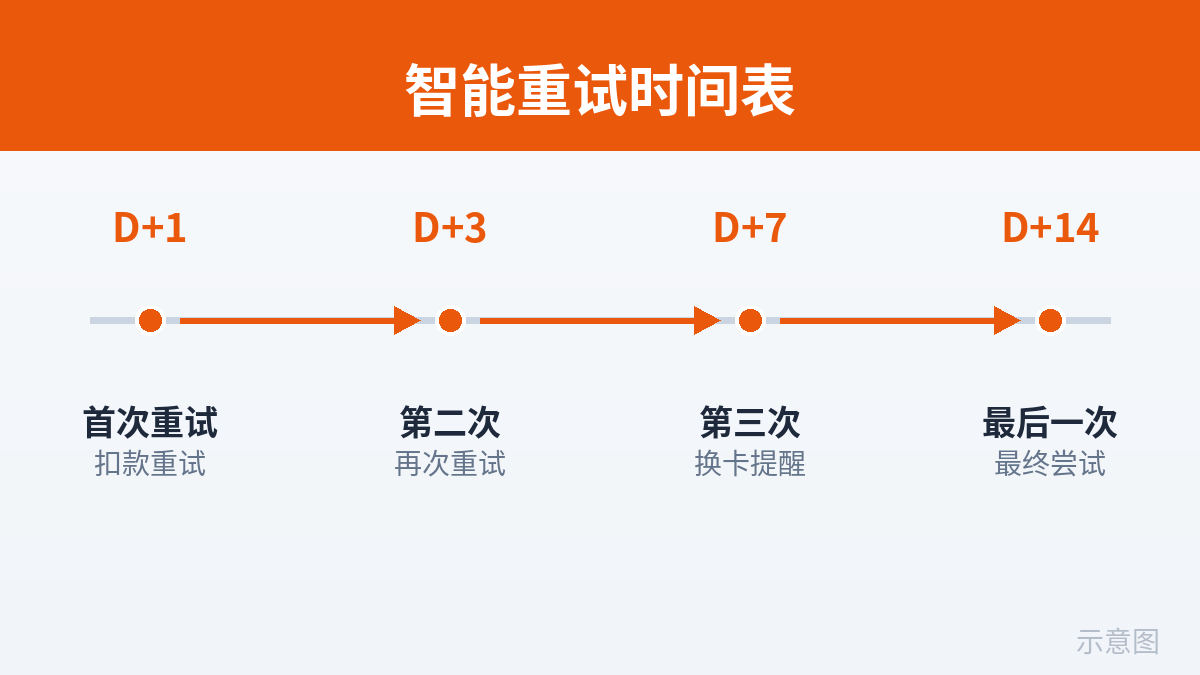
Here's my default recommendation for a one-person team: five attempts over 14 days, each paired with a "don't bother the customer, or bother them only once" rule.
| Attempt | Timing | Why this timing | Paired action |
|---|---|---|---|
| 1 | Immediately (when the webhook arrives) | Transient network timeouts and bank-side blips often pass on an immediate second try. | Silent retry — don't bother the customer. |
| 2 | D+1 | Insufficient funds may resolve overnight (payday deposit, transfer completing). | Send email #1 (see section 4). |
| 3 | D+3 | Dodges the payday cycle; gives the customer time to see the email and act. | No extra outreach. |
| 4 | D+7 | A full weekly cycle, covering customers who only check email on weekends. | Send email #3 (final warning). |
| 5 | D+14 | Last chance; dragging it out further stretches the delinquency too long. | Send email #4 (suspension notice), then follow the grace-period policy. |
Three details to note. First, fraud failures don't use this schedule — one attempt only (see section 2). Second, for "retrying is pointless" failures (expired card, 3DS), confirm once and switch to human outreach; don't consume retry attempts. Third, if D+14 still fails, follow the section 5 grace-period policy — don't retry forever. Recovery rates fall off a cliff past three weeks of delinquency (rule of thumb); your time is better spent on new customers.
Smart retries vs. fixed retries: Stripe Smart Retries vs. building your own
Stripe has a public feature called Smart Retries, part of Billing's Revenue Recovery: per the official docs, it uses machine learning to pick retry timing instead of a fixed schedule. The concept is citable; its internal model and exact timings are a black box, and Stripe promises no specific numbers — the citation stops there, and I won't vouch for its effectiveness.
| Dimension | Stripe Smart Retries | Self-built fixed retries |
|---|---|---|
| Setup cost | Flip a switch (a Revenue Recovery feature; whether it's included in your Billing plan is per the official pricing page) | One weekend: webhook + queue/scheduler + the schedule above |
| Effectiveness | Officially claimed better than fixed schedules (per official docs) | Controllable, explainable, plenty for small-to-mid scale |
| Control | Low: timing is a black box, no per-decline-code tuning | High: the three triage buckets, every step yours to define |
| Right stage | Stable revenue, want zero maintenance | Just starting out, non-Stripe processor, want to save on subscription fees |
| Risk | Running it alongside a self-built system double-charges | A bad schedule harasses customers |
My take is blunt: solo teams should start with fixed retries — it's a hundred or two lines of code (skeleton in section 8) — and consider Smart Retries once MRR passes ~$10k. One iron rule: use exactly one retry system — Stripe's or yours, never both. Double-running means the same invoice gets charged twice, which means refunds, chargebacks, and destroyed trust. That's the most expensive mistake in dunning, bar none.
4. The Recovery Email/SMS Sequence: 4 Templates and Their Timing
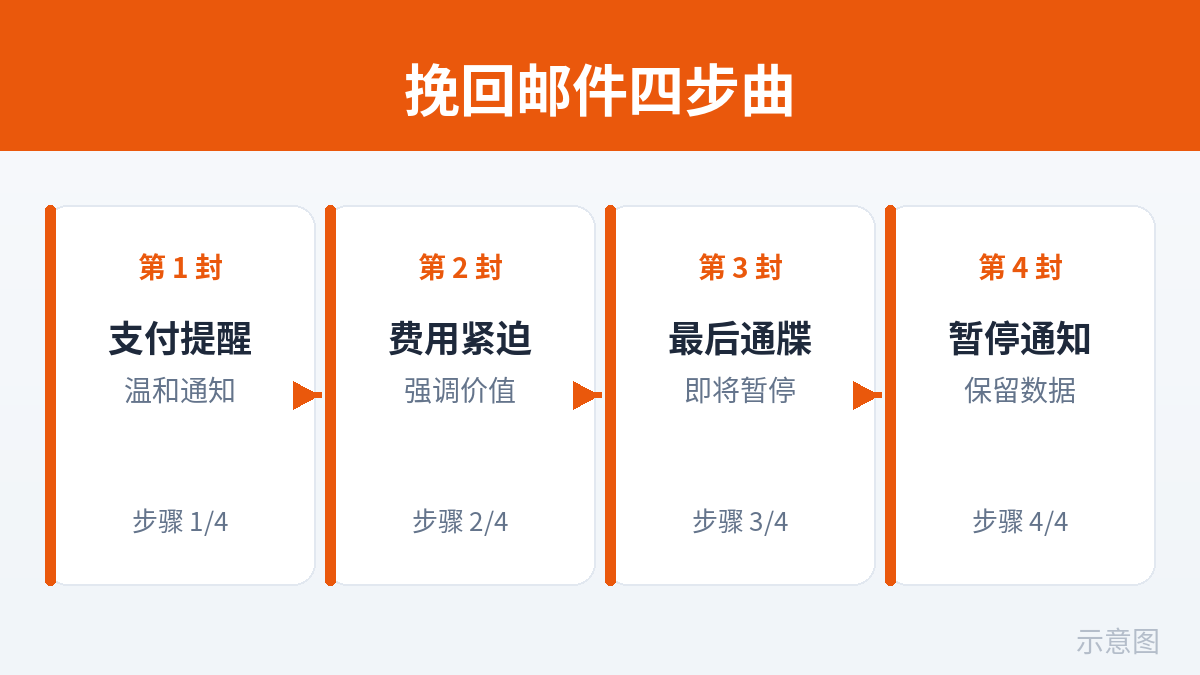
Retries are the system trying on its own; the email sequence asks the customer to lend a hand. The emotional arc across the four emails is deliberate: reminder → urgency → final warning → suspension notice, tightening gradually, then softening again in email #4 — don't insult a customer who might come back. Each email has exactly one CTA: update the payment method.
Memorize three copy principles before writing: ① one email, one action button — no "check out our new features" on the side; ② translate the failure reason into human language — customers can't read decline codes; ③ always include a login-free magic link — never make the customer log in first to find the entry point. Every extra step kills conversion.
Email 1: D+1, the friendly reminder
Subject: A small hiccup with your [Product] subscription renewal
Body:
Hi [Name],
Your [Product] monthly subscription didn't renew today — usually a temporary bank block or a card limit issue. Not your fault.
Update your payment method in 30 seconds here — your data and settings stay exactly as they are: [Update payment method]
We'll automatically try again in 3 days. If you've already switched cards, you can use the link above to retry manually right now.
Just reply to this email if anything's off — I'll handle it personally. — [Your name]
Key points: blame the bank/system, never the customer; explicitly say "your data is safe" to kill their biggest fear; sign with your real name — the human touch is a solo founder's advantage.
Email 2: D+3, urgency + the specific reason
Subject: Action needed: [Product] renewal failed ([human-readable reason])
Body:
Hi [Name],
We flagged this 3 days ago and the renewal still hasn't gone through. The specific reason: [your bank declined the charge (do_not_honor) — a quick call to your bank confirming it's really you usually clears it, about 5 minutes on the phone].
Two automatic retries remain ([date 1], [date 2]). The safest move is spending 1 minute switching cards now: [Update payment method]
If you'd rather not use this card anymore, just switch — your subscription continues automatically, no need to repurchase.
Key points: the bracketed human-readable reason is the whole game — turn the section 2 triage table into sentences the customer can act on. Give them two paths (call the bank / switch cards), not just "it failed."
Email 3: D+7, the final warning
Subject: Final 3 days: your [Product] subscription will be suspended on [date]
Body:
Hi [Name],
Your subscription has been past due for 7 days. If the payment method isn't updated by [date], the subscription will be suspended automatically: [premium features/usage] will be limited, but all your data stays intact for [30] days.
Recover now and everything continues as normal: [Restore my subscription]
If you actually meant to cancel, just reply "cancel" and I'll take care of it — no more nudges. — [Your name]
Key points: name the deadline, name exactly what suspension means (kill the fear of the unknown), and give deliberate cancelers a graceful exit — clinging to someone who wants to leave only earns you bad reviews and chargebacks. This one can be paired with an SMS (only where the customer explicitly opted in), under 160 characters: [Product] reminder: your subscription will be suspended in 3 days due to a failed renewal. Restore in 1 minute: [short link]. Reply STOP to opt out.
Email 4: D+14, the suspension notice (tone softens again)
Subject: Your [Product] subscription is now suspended — your data is kept for [30] days
Body:
Hi [Name],
Your subscription was suspended today. Don't worry: all your data is fully preserved until [date], and you can come back anytime with one click: [Reactivate my subscription]
If you ran into any issues using the product, or have thoughts on pricing, just reply and tell me. — [Your name]
Key points: no blame, no guilt trip, no begging. Suspension isn't the end — a meaningful share of customers come back on their own some future month. Leave a clean door open; it matters more than anything.
One honest footnote: the ceiling of any email sequence is set by section 2's triage. Sending four "we'll try again" emails to an expired-card customer is noise — the card is dead; no number of retries helps. For human-touch-bucket customers, email #1 should push "switch cards" from the start, not "wait for our retry."
5. Grace Periods and Degradation: What the Customer Can Still Use While Past Due
Between the failed renewal and full suspension sits a grace period. How long it lasts and what the customer can do during it is the decision in dunning that most needs a firm call — it directly determines whether you "recover a bit more money" or "raise a few more freeloaders."
Choosing the grace-period length
| Grace period | When it fits | The cost |
|---|---|---|
| 0 days (cut immediately) | Suspected fraud or malicious delinquency | You'll nuke legitimate customers too. Reserved for the do-not-touch bucket. |
| 7 days | Low-ticket (<$10/mo) utility tools | Short recovery window; the D+7 fourth retry lands right on the boundary. |
| 14 days | Default recommendation: the mainstream $10–$100/mo range | Meshes perfectly with the retry schedule above (D+14 is the last attempt). |
| 21–30 days | High-ticket (>$100/mo), enterprise customers | Higher bad-debt risk and follow-up cost; suits manual outreach. |
Why 14 days as the default? Two reasons. First, it interlocks with the section 3 retry schedule — D+14's final retry fails, the grace period ends, the process is clean. Second, 14 days covers nearly every legitimate delay scenario (customer traveling, not checking email, salary not arrived). Past that, recovery rates fall off a cliff (rule of thumb) — spend the energy on new customers instead.
While past due: degrade vs. shut off — the tradeoff matrix
| Strategy | Customer experience | Revenue protection | Engineering cost | When it fits |
|---|---|---|---|---|
| Full-feature grace | Best — the customer notices nothing | Weak: a freeloading window | Lowest: barely any code changes | High-ticket + manual follow-up, betting one saved deal pays for it all |
| Feature degradation (capped usage, premium features off) | Medium: usable, but annoying | Medium | Medium: needs a "past-due" permission tier | Default recommendation: most SaaS |
| Read-only mode | Medium-poor: can look, can't touch | Strong: core value is locked | Medium: a read/write switch | Data products (notes, project management): as long as the data's there, they can't leave |
| Hard shutoff | Worst | Strongest | Lowest | Fraud, malicious delinquency. Using this on normal customers just chases them away. |
My default answer: 14-day grace + feature degradation (data fully preserved, usage capped or premium features off); after expiry, switch to 30 days read-only before any talk of deletion. Hard shutoff is reserved for the fraud bucket. One principle to remember: the goal of the past-due period is to make the customer annoyed enough to pay, not desperate enough to leave — that's the difference between degradation and shutoff. One word apart, double the recovery rate.
Technically, "past-due state" is just one more intermediate state in the subscription state machine (past_due) — one rule in the permission middleware. Don't build a separate permission system for degradation: a single if (subscription.status === 'past_due') return degradedLimits in your existing plan check is enough. A one-person team needs nothing fancier.
6. The Self-Serve Recovery Page: 8 Elements, All Required
Every CTA in the email sequence lands on the same page: the self-serve recovery page. Its conversion rate sets the ceiling for the entire dunning system — the customer opening your email is already half the win; making them log in and hunt for the entry point kills the other half. Eight elements, none optional:
- Login-free magic link: the email link carries a one-time token — clicking it authenticates. Asking a past-due customer to log in first is inhumane: they may have forgotten their password, and the "reset password" detour kills 30%+ of recoveries (rule of thumb).
- The failure reason in human language: say it right at the top — "Your bank declined this charge (do_not_honor); a quick call to your bank confirming it's really you usually clears it." Customers act when they know why.
- Show the current card's last four digits and expiry: let the customer instantly realize "oh, it's that old card" — many expired-card failures happen without the customer realizing their card changed.
- A one-click "Retry now" button: before switching cards, offer one instant retry. An insufficient-funds customer may already have money in the account — one click and it's done, no card swap needed.
- Card swap in 3 steps or fewer: use Stripe's Payment Element + SetupIntent — customer enters the new card, verifies, done. Never make them delete the old card before adding the new one; do the replacement in one step.
- Amount owed + next automatic retry time: show it transparently — "You owe $29; next automatic retry in 3 days." Transparency cuts support tickets and gives customers a reason to act now instead of waiting.
- A support escape hatch: "Stuck? Just reply to the email / contact support" at the bottom of the page. About 5% of customers can't be saved by any page — don't leave them stranded.
- Works on mobile: more than half of customers open recovery emails on their phones. A page with untappable buttons and broken inputs on mobile throws half your recovery rate in the trash.
The one-line test: send the link to a non-technical friend and see if they can complete a card swap in under a minute. If not, the page fails.
7. The Metrics Dashboard: 4 Numbers, Once a Week
After dunning goes live, don't stare at it daily — spend 10 minutes a week on 4 numbers. More is anxiety; less is blindness.
| # | Metric | Definition | Healthy baseline (rule of thumb) | Anomaly → investigate |
|---|---|---|---|---|
| 1 | Recovery rate | Subscriptions recovered this period ÷ subscriptions that entered dunning | Typically 20%–40% | Two straight weeks below 20% → check the email sequence (landing in spam?) and the retry schedule |
| 2 | Retry success rate | Successful retries ÷ total retries | Typically 10%–25% | Too low → schedule too aggressive, or fraud failures aren't being filtered out and burning attempts |
| 3 | Email click → card-update conversion | Share of email clickers who update their payment method within 7 days | Typically 5%–15% | Too low → audit the recovery page (which of the 8 elements is missing?) and check magic links actually work |
| 4 | Subscriptions entering dunning (absolute count) | New subscriptions entering the grace period each week | Climbs slowly with MRR growth | Sudden doubling → check Stripe status and bank-side anomalies first, not your own code |
Two deliberate choices: first, metric 3 tracks clicks, not opens — Apple's Mail Privacy Protection has inflated open rates across the board; clicks are the only honest signal. Second, metric 4 is an absolute count, not a ratio — ratios hide systemic anomalies like "the payment provider is having a bad day," while a spike in the absolute number is visible at a glance.
Where do the numbers come from? Stripe's Revenue Recovery reports cover part of it; the rest comes from your own dunning_attempts table and your email provider's (Resend/Postmark) event webhooks. Solo teams don't need a BI dashboard — one SQL query every Monday morning for 4 numbers, logged in a spreadsheet. Trends matter more than absolutes.
8. Go-Live Checklist: Webhook Skeleton + Idempotency and Anti-Duplication
The previous seven sections were strategy; this one is implementation. The entire dunning system has exactly one entry point: the invoice.payment_failed webhook. Here's a Node + Express + stripe-node skeleton you can adapt directly.
// POST /webhooks/stripe — must use the raw body, or signature verification fails
import Stripe from 'stripe';
const stripe = new Stripe(process.env.STRIPE_SECRET_KEY);

app.post('/webhooks/stripe',
  express.raw({ type: 'application/json' }),
  async (req, res) => {
    let event;
    try {
      event = stripe.webhooks.constructEvent(
        req.body,
        req.headers['stripe-signature'],
        process.env.STRIPE_WEBHOOK_SECRET
      );
    } catch {
      return res.status(400).send('bad signature');
    }

    // 1. Idempotency: seen this event.id? Return 200 immediately.
    //    (processed_stripe_events table, UNIQUE on event_id)
    const seen = await db.processedStripeEvents.findUnique({
      where: { eventId: event.id },
    });
    if (seen) return res.sendStatus(200);

    try {
      if (event.type === 'invoice.payment_failed') {
        await handlePaymentFailed(event.data.object);
      } else if (event.type === 'invoice.payment_succeeded') {
        await handlePaymentSucceeded(event.data.object);
      }
      // 2. Record idempotency ONLY after business logic succeeds;
      //    on failure return 500 so Stripe redelivers.
      await db.processedStripeEvents.create({
        data: { eventId: event.id, type: event.type },
      });
    } catch (err) {
      console.error('dunning webhook failed', event.id, err);
      return res.sendStatus(500);
    }
    res.sendStatus(200);
  }
);

async function handlePaymentFailed(invoice) {
  // 3. Only subscription-renewal invoices: first invoices and
  //    manual invoices go through a different flow.
  if (invoice.billing_reason !== 'subscription_cycle') return;

  // 4. Triage: pull decline_code from the PaymentIntent, sort into buckets
  const pi = await stripe.paymentIntents.retrieve(invoice.payment_intent);
  const declineCode = pi.last_payment_error?.code ?? 'unknown';
  const bucket = triage(declineCode);
  // retryable: ['insufficient_funds','generic_decline','do_not_honor',...]
  //   -> schedule the next retry
  // need_human: ['card_expired','authentication_required',...]
  //   -> send card-update / verification email
  // do_not_touch: ['fraudulent', ...]
  //   -> log only + manual review

  // 5. Write the dunning record, compute nextRetryAt (section 3 schedule)
  const attempt = await db.dunningAttempts.create({
    data: {
      subscriptionId: invoice.subscription,
      invoiceId: invoice.id,
      declineCode,
      bucket,
      attemptNumber: /* nth attempt of this dunning cycle */,
      nextRetryAt: /* computed from the schedule */,
    },
  });

  // 6. Enqueue the email job with idempotency key = invoice.id + attemptNumber
  await mailQueue.add('dunning-email', {
    invoiceId: invoice.id,
    attemptNumber: attempt.attemptNumber,
    magicLinkToken: /* one-time token */,
  }, { jobId: `dunning-${invoice.id}-${attempt.attemptNumber}` });
}

async function handlePaymentSucceeded(invoice) {
  // 7. Charge went through: clear dunning state, restore full access
  await db.subscriptions.update({
    where: { stripeSubscriptionId: invoice.subscription },
    data: { status: 'active', pastDueSince: null },
  });
  await db.dunningAttempts.updateMany({
    where: { subscriptionId: invoice.subscription, recoveredAt: null },
    data: { recoveredAt: new Date() },
  });
  // 8. Send one "you're all set" confirmation (idempotent jobId as well)
}
The pre-launch checklist — tick each one:
- Signature verification uses the raw body. Verifying after
express.json()has parsed it fails forever — the #1 webhook pitfall. - Idempotency on event.id via a unique key. Stripe redelivers webhooks (timeouts, 5xx responses). Without idempotency, one customer gets four "final warnings."
- Handle both success and failure events. Processing
payment_failedwithoutpayment_succeededleaves dunning state stuck forever — the customer pays and stays degraded. - No real emails from staging. Generate failure events with Stripe test clocks or
stripe trigger invoice.payment_failed; send mail to your own test inbox. - Retries run async via a queue — never call the Stripe API synchronously inside the webhook. The webhook must return 200 fast; slowness makes Stripe mark it timed-out and redeliver, and redelivery triggers more retries — a doom loop.
- Retry manually the moment a card is updated. Don't wait for D+3 — intent is highest right after the swap; call
stripe.invoices.pay(invoiceId)immediately. - Smart Retries and self-built retries are mutually exclusive. If Stripe's automatic recovery is on, don't run your own retry queue, and vice versa.
- Monitor the webhook's 5xx rate and processing latency. If the dunning entry point goes down, the whole recovery system silently goes dark — give it its own alert.
- Review the decline_code distribution monthly. If
fraudulentsuddenly spikes, you may be under a card-testing attack — dunning can't fix that; you need fraud controls.
Closing: 5 Things You Can Do Today
Dunning doesn't need to be perfect on day one — it can be built incrementally, and every step pays for itself:
- Pull the last 90 days of
payment_failedfrom Stripe and compute your involuntary churn share and dollar amount — know how big the leak is first. - Wire up the
invoice.payment_failedwebhook to do just one thing: triage by decline_code and log it. Buckets first — strategy needs a foundation. - Hard-code the section 3 fixed retry schedule (D+1/D+3/D+7/D+14) and run it on a queue — the single highest-ROI step.
- Write the 4 emails and build the magic-link recovery page. Steal the section 4 templates as your starting draft.
- Set the default policy — 14-day grace + feature degradation — in the subscription state machine. Then check those 4 numbers every Monday.
Final word: involuntarily churned customers are the easiest customers in the world to win back — they already wanted to pay. All you have to do is not let one failed charge become a permanent goodbye.
Comments (0)
Related articles
Vibe coding made building easy and getting noticed hard; community and open source are the few fair arenas where time trades for traffic. This tactical manual covers venue picks, 5 seed-user sources for the 0-20 cold start, a daily 15-minute ops SOP for 0-100, the README-as-landing-page formula, GitHub trending mechanics and launch timing, issue-driven marketing, build-in-public rhythms, crisis playbooks, 5 health metrics, and the path from community to revenue.

An email list is the only traffic asset an indie developer truly owns. This guide takes you from 0 to 1,000 subscribers: three capture placements and 5 high-converting lead-magnet formats, a complete 5-email welcome sequence script, a sustainable biweekly newsletter model, Resend/Loops/ConvertKit/Buttondown picks, SPF/DKIM/DMARC setup with a 4-week warmup plan, health benchmarks and minimal A/B testing, three essential automations, and the levers from 1,000 to 10,000.
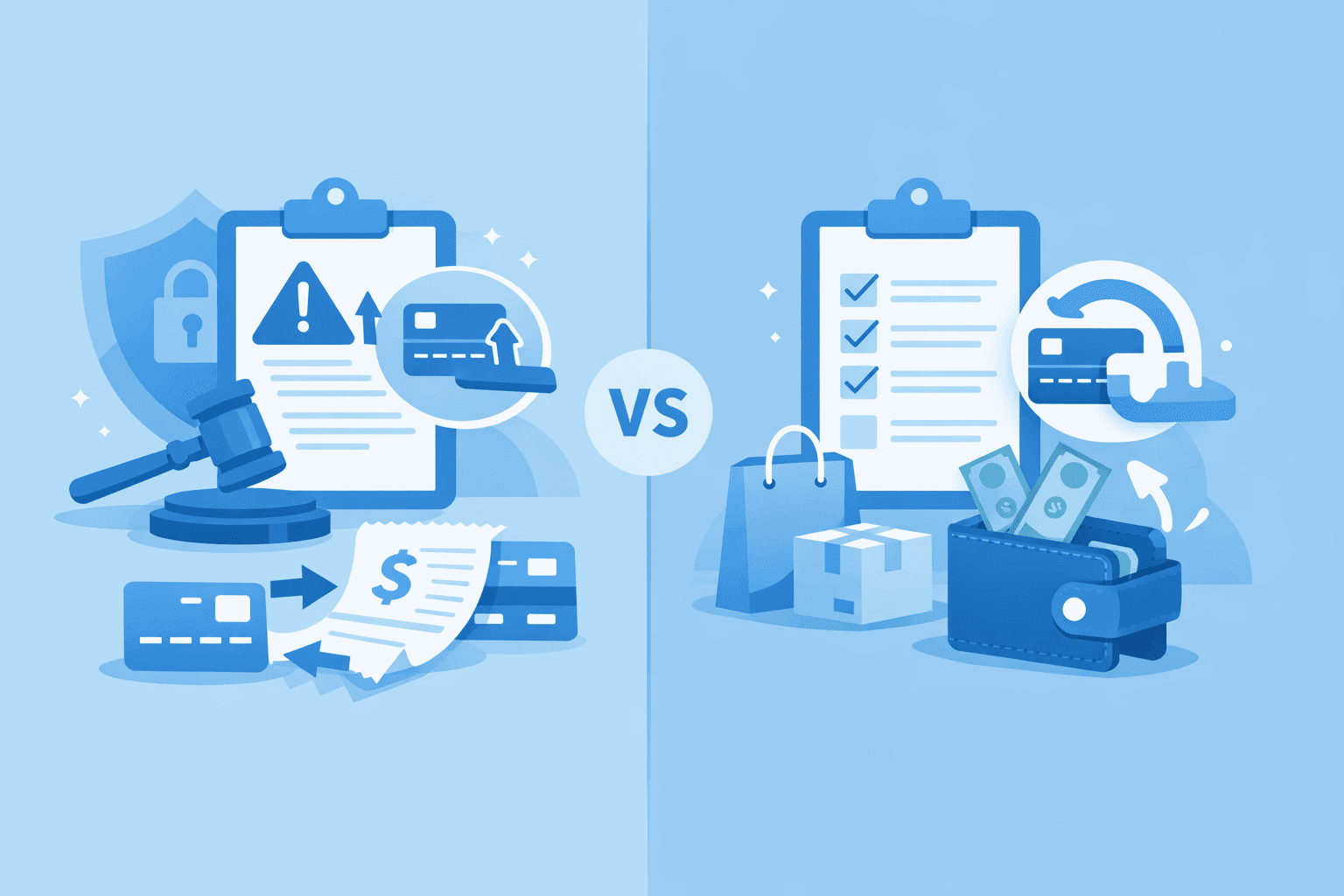
This guide flips that mindset: a clear refund policy is the cheapest trust advertising, well-handled refunds bring 30% of users back, and one mishandled chargeback can eat a month of profit. Covers three-tier policy design with copy-ready templates, Stripe Dashboard vs API refunds, a charge.refunded webhook closed loop, a save-vs-refund decision tree, the chargeback evidence playbook, Radar anti-fraud rules, and cross-border tax notes for MoR platforms.