Codex Learns to Jump the Gun: Composer Predictions Suggests Your Next Instruction, Tab to Keep Working
Codex desktop beta adds Composer predictions: after each response, a suggested next sentence appears in the input box. Tab to accept, review, then send. Free during beta and on by default, it shifts the cognitive load from wording intent to verifying it — but a suggestion is never an instruction.
From Completing Code to Completing Intent
Anyone who writes code already has the Tab key in muscle memory. The cursor sits at the end of a half-written function, a ghosted code suggestion appears, one tap of Tab, and dozens of lines land — GitHub Copilot trained that motion into all of us. This time, OpenAI has pushed Tab's territory one step further: no longer completing code, but completing the sentence you haven't quite organized in your head yet.
In the early hours of October 10 (Beijing time), OpenAI shipped an unassuming but thought-provoking beta feature in its release notes: Composer predictions. After Codex finishes responding, a suggested "next sentence" may appear in the message box. Press Tab to accept it, tweak it, and send only when you're satisfied. Note this detail: accepting is not sending — a human must review first. That is the single most important line in the whole feature.
From the history of interaction design, this is a late but inevitable evolution. Search engines have search suggestions, phone keyboards have next-word prediction, email clients have smart replies — every scenario where "a human types into a box" eventually grew a prediction layer. AI coding assistants were the last to catch up: for the past two years, all the intelligence went into "how the model responds," and nobody seriously thought about "what the human wants to say next." Composer predictions brings prediction to the prompt side, completing not code tokens but intent itself.
How It Works: What Exactly Is Being Predicted
According to the official release notes, predictions are suggested "based on the conversation in your current Codex thread." In other words, this isn't a generic "guess the next action" widget — it's a continuation writer that has read the full context: you just had Codex refactor the login module, and it might suggest "now add unit tests for the refactored module"; you just fixed a bug, and it might suggest "run the full test suite to confirm no regressions."
The interaction flow is deliberately restrained — three steps:
- Appear: after Codex responds, a suggestion may appear in the message box. Note the official wording — "may appear." Not every turn gets one; the model only speaks up when it's confident.
- Accept: press Tab, and the text drops into the input box. At this point it's just an editable draft.
- Send: you review, edit, and send it manually. Accepting a suggestion never sends it automatically — a hard guarantee written into the release notes.
This three-step design quietly answers a key question: what if the prediction is wrong? The answer — just edit it, or ignore it. The prediction's status is deliberately kept low: it's a draft, not a decision. OpenAI has clearly learned from the early disasters of "AI auto-execute" features, keeping the final call firmly in human hands.
One more wording choice worth noticing: the official text says a suggestion "may appear" — not that one appears every turn. That implies a confidence threshold inside the prediction layer: the model only speaks up when it's quite sure, and stays silent when it isn't. This "better silent than wrong" strategy is the right one: a prediction box that's often wrong only trains users to ignore it, while one that appears occasionally and nails it every time can genuinely enter the workflow. The first lesson of prediction features isn't "guess often" — it's "guess right." For users, that means when a suggestion does surface, it's worth a second look.
Eligibility and the Toggle: Check Whether You Qualify First
The beta's eligibility list is spelled out in fine detail. From the official text:
- Users: personal ChatGPT Pro users aged 18 and older, in all supported regions. Note the word "personal" — Enterprise and Edu plans are not in this beta.
- Client: the latest Codex desktop app. Web and CLI don't have it yet.
- Thread types: local and SSH threads. Cloud threads are not on the support list.
- Models: limited to GPT-6 Astra or GPT-6.1 Sol. Use another model and no predictions will appear.
The feature is on by default. To turn it off, go to Settings → General → Composer and disable Show predictions. The on-by-default choice is itself informative: OpenAI is confident enough in this feature's polish to expose it directly to every eligible Pro user, rather than hiding it behind an experimental flag waiting to be discovered.
Free During Beta — But Read the Billing Boundary Carefully
Pricing is where this kind of feature is most easily misunderstood, and the official wording this time is unambiguous, in two layers:
- Generating predictions costs nothing: during the beta, generating predictions doesn't count toward Codex usage limits and doesn't consume credits. The model thinking up your next sentence in the background is on the house.
- Messages you send are billed normally: once you hit send — including accepted predictions — normal Codex usage limits and billing apply.
This billing design is clever. It draws a financial line between "the AI's thinking" and "the human's decision": predictions are OpenAI's treat, because that's it proactively offering a service; sending is your action, so you pay. For users, the beta is a zero-cost trial; for OpenAI, it's trading free quota for real interaction data to refine prediction quality. When the beta ends, the cost of generating predictions will most likely be folded into overall pricing — the playbook is to build the habit first. A classic platform move.
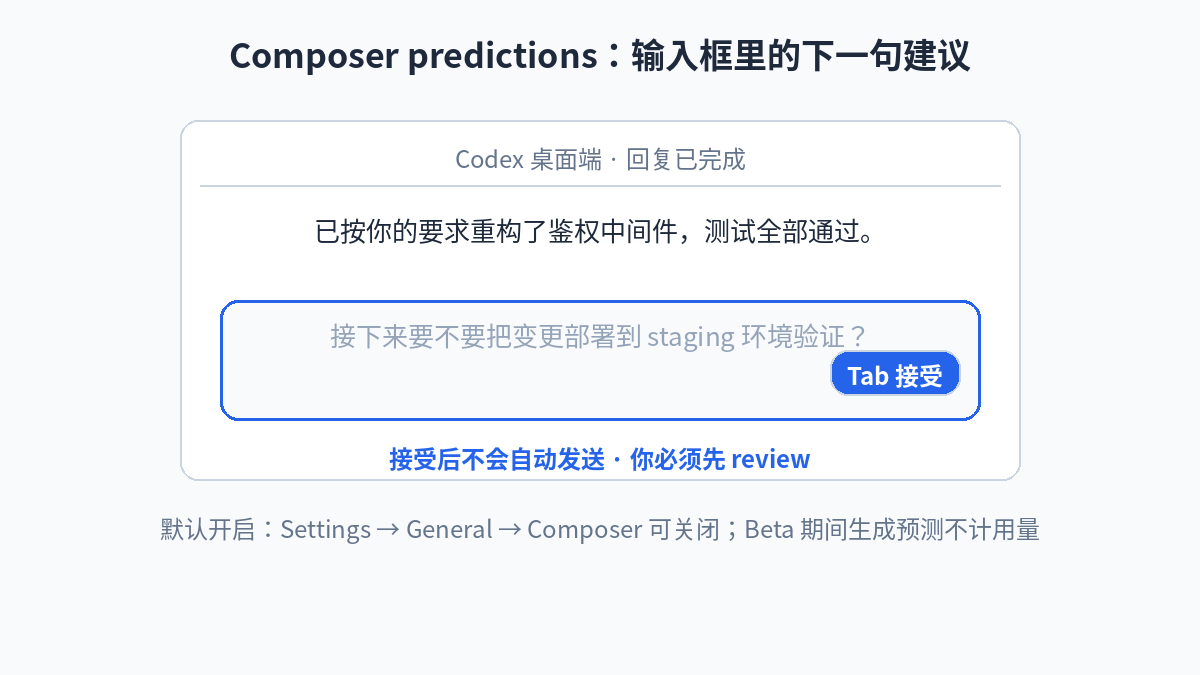 After Codex responds, a suggested next sentence appears in the input box — Tab to accept, review, then send
What It Means for Vibe Coders
The conclusion first: this feature may matter more to vibe coders than to professional programmers. The reason is simple — the bottleneck in vibe coding was never just "can the model write code," but "can you articulate your intent clearly."
Think about your real workflow with Codex (or any AI coding tool): a response finishes, you stare at the input box, and your brain is running three things at once — is the last result okay, what should happen next, and how do I phrase it so the model understands. The third one is the most invisible and the most draining: translating fuzzy intent into precise instructions is itself a cognitive burden. Many people don't realize how much energy they spend on "wording" every day — no less than reading code.
Composer predictions surgically removes that third task. When the model organizes your next sentence from full context, your job downgrades from "wording from scratch" to "judging whether this sentence is right and changing a few words." That's not saving a few seconds of typing — it's lowering the cognitive load from "generation" to "verification." And verification is precisely what humans are relatively good at and AI relatively bad at. That shift in the division of labor is the feature's real value.
But the other side of the coin deserves equal attention. A suggestion is not an instruction — worth nailing into your brain. The more the predicted text sounds like what you wanted to say, the easier it is to slide past review with a Tab+Enter combo. Experienced vibe coders know that the most expensive bugs in AI programming aren't the model writing something wrong — they're the human letting it continue without looking closely. The smoother predictions make "continue," the bigger that risk gets. My judgment: using Tab as a "typing shortcut" is fine; using it as "autopilot so I don't have to think" will eventually blow up in your face.
There's a deeper shift worth savoring. When predictions start speaking your "next step" for you, they're quietly shaping your workflow: you'll tend to take the suggested path, because it's the path of least resistance. Over the long run, this could homogenize how some people build — everyone drifting down the few "happy paths" the model is best at. That's good for efficiency, not necessarily for diversity. A vibe coder's core edge is precisely "weird ideas + fast validation," and if even "what to think about next" gets outsourced to predictions, that weirdness may get sanded down. Keeping a deliberate habit of "not listening" might be the most important discipline of the prediction era.
Seen Inside the "28 Days of Shipping": A Footnote to Moving Fast
This feature is one day's update in OpenAI's "28 days of shipping" streak. Compared with the new models and API updates on neighboring days, Composer predictions looks tiny — no new model, no new pricing, just a small suggestion in an input box. But that very smallness reveals the true character of the streak: it's not all moonshots; it includes this kind of everyday shipping that polishes interaction details.
From a product-history perspective, these "small features" often change daily habits more than big model launches do. However strong GPT-6 Astra is, you might only feel it on a few critical tasks each month; a Tab suggestion in an input box, you'll hit dozens of times a day. Change doesn't happen at the launch event — it happens in muscle memory. OpenAI clearly gets this: predictions on by default, free during beta, a toggle that's neither buried nor prominent — a standard habit-building combo.
Comparing with rivals is instructive too. Cursor's Tab completion and Copilot's next-edit suggestions both walk the "predict the code" road; OpenAI just jumped straight to "predict the intent," moving the battleground from inside the editor to the conversation layer. That implies a judgment: in OpenAI's product view, Codex's core interaction surface is the Composer conversation, not the code editor. Code is just a byproduct of conversation; intent is the main event. That positioning decides what Codex will grow into.
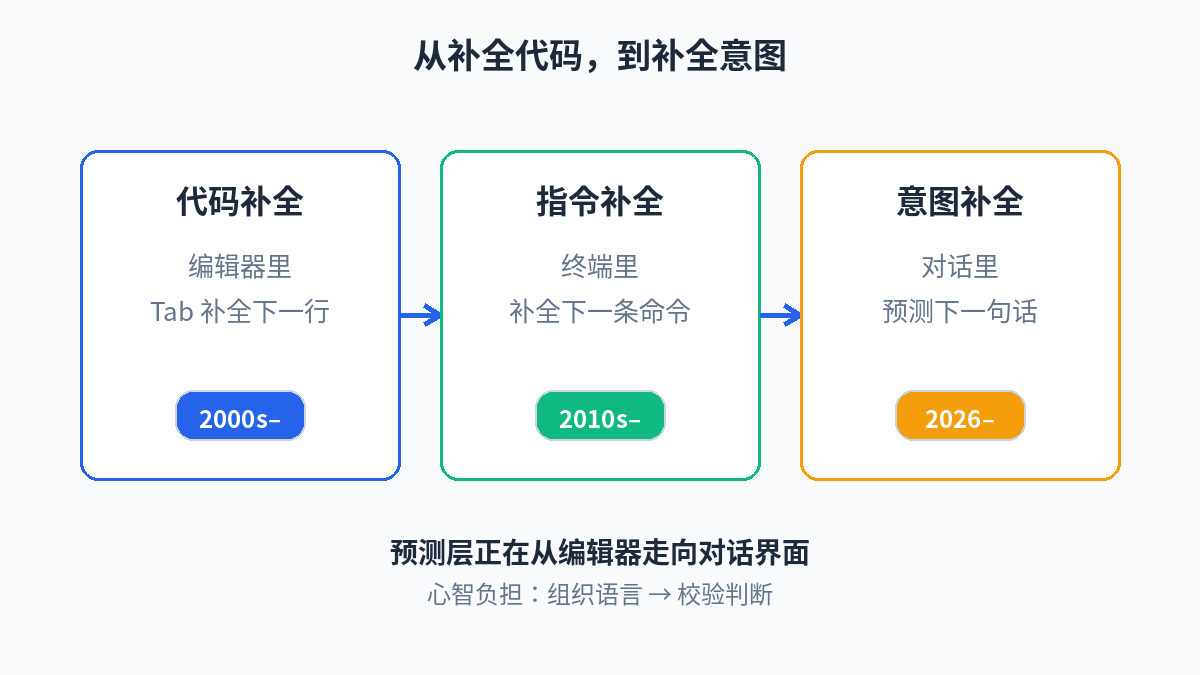 From completing code to completing intent: the prediction layer is moving from the editor to the conversation interface
What to Do Now: Three Practical Suggestions
First, eligible Pro users can just leave it on — zero cost during beta, no reason not to try. But set yourself one iron rule: after Tab, always glance at it before sending, even for three seconds. Make "review" a combo move bound to Tab, not an optional extra.
Second, watch when it guesses wrong. The variance in prediction quality is itself information: the directions where it consistently misfires reveal the leaps in your workflow the model can't follow — and those are exactly where your unique value as a human lives, and where your prompting most needs work.
Third, if you're not eligible, don't rush. The beta scope (personal Pro, desktop app, local/SSH threads, two specific models) signals early-stage validation. OpenAI's pattern is: once the beta runs smoothly, it expands to Plus, to the web app. For now, watch the field reports from Pro users and decide about upgrading when it goes GA.
Closing: The Second Half of the Tab Key
The first half of the Tab key was completing code; Codex's Composer predictions kicks off the second half: completing intent. It sounds like a small feature, but it marks a shift in what AI coding assistants compete on — from "whose generated code is better" to "who better understands what you want to do next." The latter is harder, and closer to the essence of pair programming: a good partner isn't just fast with their hands, but catches your train of thought, sometimes half a step ahead.
Of course, blurting out the answer first only works if the answer is right. However human the predicted text sounds, it's still just a suggestion. Tab away — but keep your brain on. That line has held true at every stage of AI programming, and never more than in the era when AI starts speaking for you.
One-line summary: Codex's Composer predictions brings next-sentence prediction into the prompt input box — free in beta, on by default, Tab to accept but you must send manually; what it saves isn't typing time but the mental effort of wording your intent — yet a suggestion is forever just a suggestion, and the review habit matters more than the feature itself.
Sources
Related articles
On October 8, 2026, Harness announced the acquisition of select Augment Code assets, with Cosmos becoming the 'Harness Cosmos Software Factory Agent.' This piece breaks down what was bought, how the software factory works, Harness's agent-to-agent loop, and what it means for vibe coders.

Google's Nano Banana 2.1 is GA: image output tokens halved to $30 per million ($0.0336 per 1K image), but input tripled to $1.50 per million. We run the monthly math for a typical vibe project generating 200 images a week — plus a migration checklist for the deprecated Nano Banana 2.
On October 8, 2026, Anthropic put Claude Dashboards and Claude Motion into beta: dashboards built from plain-language questions on live company data, and animations generated as editable code rather than video-model footage. Docs, Slides, and Design went GA on all plans, with 45M+ artifacts created to date.