Stop Hand-Writing SQL After Launch: Building an Admin Panel for Vibe Projects
A launched project without an admin panel sends you back to hand-writing SQL over ssh at the first support ticket. This guide starts from the day-1 MVP feature list: the admin feature matrix across users, orders, content, and config; three role tiers with three isolation layers; human-review double confirmation for dangerous actions; append-only tamper-proof audit logs; a time-limited-token impersonation safety chain; plus a Retool-vs-custom build comparison and an 8-item launch checklist.
Core thesis: the admin panel is not a "quick page you threw together" — it's the second product you'll use every day after launch
In the first week after a vibe project launches, three things almost always happen: a user says "I paid but my credits never arrived"; a fraud account is farming your free quota; you want to manually extend a membership for an early user by a month. Without an admin panel, all three have the same solution: ssh into the server, open psql, and hand-write SQL.
Hand-writing SQL has two fatal problems. First, it's irreversible and unrecorded: one UPDATE missing its WHERE clause affects the whole table, and when you later ask "what exactly did I just change," all you have is memory. Second, it can't be handed off: are you really going to give your first support hire and your first ops hire the production database password?
So this guide takes a clear stance: the admin panel is not a nice-to-have — it's a productivity tool as important as the production database itself. It passes the bar when it meets three criteria: non-technical people can safely perform operational tasks; every dangerous action leaves a trace; and the panel itself doesn't become a new attack surface. Below, we build it item by item, in "day 1 after launch" order.
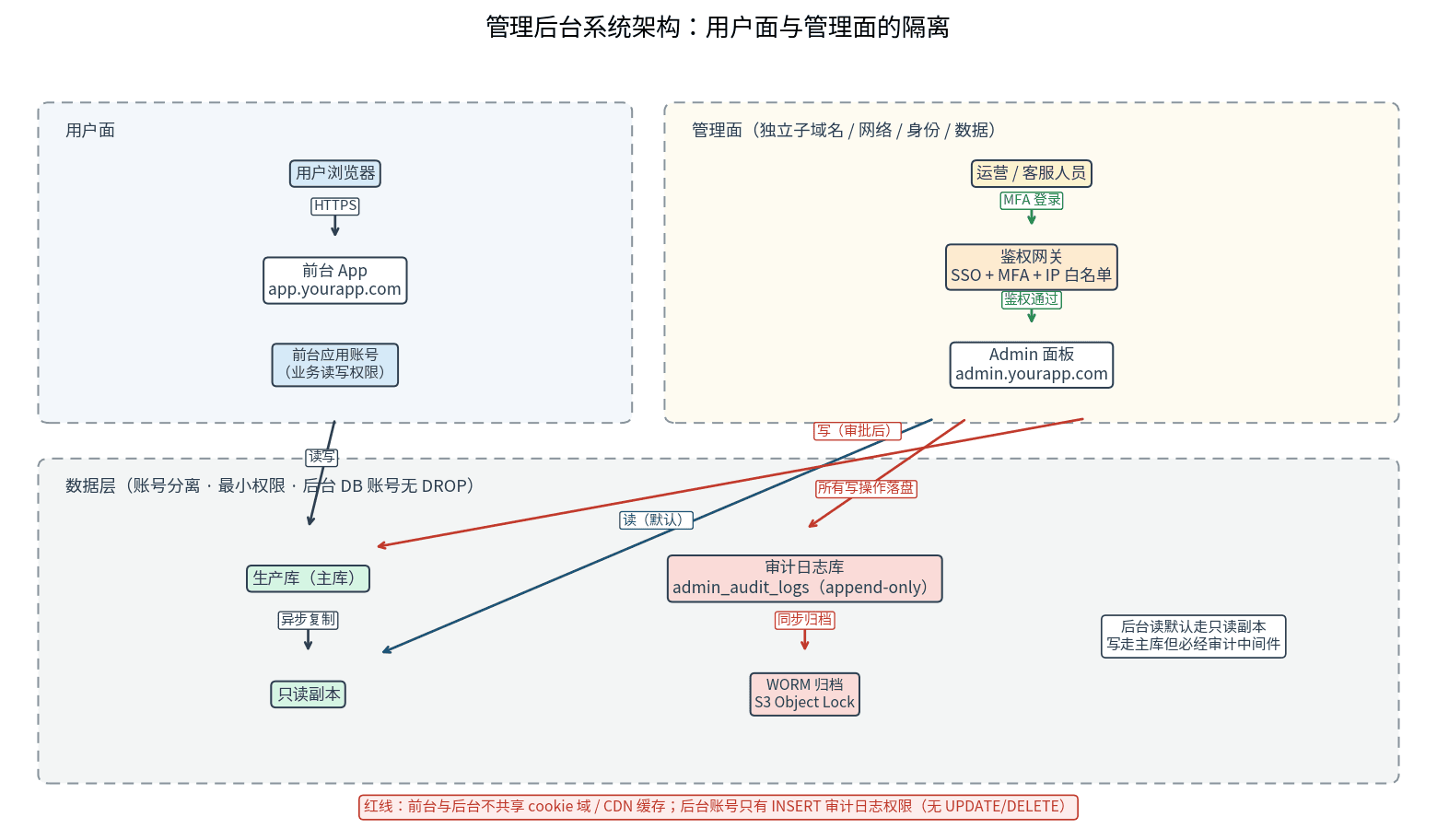
" alt="Admin panel system architecture: isolation between the user-facing app, admin panel, auth gateway, audit log store, and production database">Figure 1: Admin panel system architecture. The user-facing app and the admin panel are fully separated: separate subdomain, separate auth gateway (SSO + MFA + IP allowlist). Admin reads go to a read replica; writes go to the primary only after approval, and every write is persisted to a dedicated audit log store.
1. Feature matrix: the MVP list sorted by "day 1 after launch"
The most common failure mode of admin panels is "big and complete": the AI generates 40 pages for you overnight, and three months after launch you've only ever used 3 of them. In reality, the features you need on day 1 are few. Sorted by four entity types — starred items are day-1 must-haves:
| Entity | Day-1 must-haves | Add in week 2 |
|---|---|---|
| Users | Exact search by email/ID; user profile page (signup time, subscription status, credits balance, last login IP); manual credits adjustment (must go through approval, see section 3) ★; ban/unban accounts (dangerous, see section 3) ★ | User activity timeline; bulk tagging; churned-user export |
| Orders | Order list (filter by status/time); order detail (payment provider's original order number, amount, refund status) ★; initiate refund (dangerous approval) ★; reconciliation CSV export | Subscription renewal management; bulk coupon generation; automatic channel statement reconciliation |
| Content | List and full-text search of user-generated content; takedown/restore (soft delete, so it can be recovered) ★; bulk moderation (multi-select approve/takedown) | Moderation queue assignment; sensitive-word list management; content appeal workflow |
| Config | Feature flag read/write ★; announcement/banner copy publishing; pricing and plan config (changes go through approval + audit) ★ | Gradual rollout rules; A/B experiment group config |
Two cross-cutting capabilities run through every entity: bulk operations and exports. Bulk operations must include a "preview affected row count" step — first tell the operator "this will affect 1,247 users," and only execute after confirmation. It's the cheapest insurance against slip-of-the-hand mistakes. Exports must be masked: emails partially hidden, phone numbers truncated — and the export itself is recorded in the audit log (who exported how many rows, when).
The MVP test is a single question: if this feature were missing, would you be forced back to hand-writing SQL? Yes means MVP; no means week 2. By that standard, the first version of the panel is really just four pages: user search, order refunds (with approval), content takedown, and audit log search.
2. Permissions and isolation: three role tiers + three isolation layers
Roles first. Admin users are not your product's users — they're a separate identity system, and three tiers are enough; more than that becomes unmanageable:
super_admin: you (plus a technical co-founder, max 2 people). The only ones who can change admin roles, change pricing config, and approve impersonation. Login for this account must be the strictest: passkey or hardware key + IP allowlist, both required.
operator: ops teammates. Day-to-day CRUD, content takedowns, initiating refund requests — but refund execution and account bans need a second confirmation (see section 3). They can see user data but not the audit-log admin page — audit log query rights go to super_admin only, so nobody gets to be both player and referee.
support: customer support. Read-mostly: look up users, look up orders, read logs; their only write permissions are replying to tickets and tagging. Impersonation requires a request plus a time limit (see section 5). Freeze a support account the day they leave — the most-forgotten item on every checklist.
For the general methodology of role modeling (how to design RBAC, how permissions inherit), our site's RBAC permission modeling guide covers it thoroughly — that guide is about permission models between people and roles within one tenant, so we won't repeat it here. This section is only about the three isolation layers for the admin panel as its own product surface:
Layer 1: network isolation. Put the admin panel on its own subdomain, admin.yourapp.com — not a yourapp.com/admin path. A path-level panel shares the cookie domain and CDN cache rules with the storefront, and there is real history of "the storefront cache served an admin page to the public" privilege-escalation incidents. Put an IP allowlist in front of the auth gateway (office egress IPs + VPN); anyone off the list gets a TCP refusal before they even see a login page — the cheapest, most effective first door.
Layer 2: identity isolation. Admin login requires SSO + MFA — no "admin-only password" weak backdoors; sessions expire after 4 hours; any dangerous action defined in section 3 triggers step-up re-verification (MFA prompt again) before execution. Remember: the blast radius of a stolen admin account is every user's data on the site. The ROI math needs no spreadsheet.
Layer 3: data isolation. Admin reads default to a read replica; writes go to the primary but always pass through the audit middleware; the database account used by the admin service is separate from the storefront app's account, following least privilege — if the admin account doesn't need DROP, don't grant it.
One classic AI-generated-code pitfall deserves its own callout: it loves putting admin routes and normal routes in the same router, guarded by a single if user.is_admin check. The moment someone adds a new endpoint and forgets that check, you have unauthenticated access. The right approach is physical isolation: a separate route module, a separate auth middleware, a separate deployable unit. The code-review checkpoint is equally simple: grep every admin endpoint and confirm each one passes through the admin auth middleware, no exceptions.
3. Double confirmation for dangerous actions: the human-review mode
Refunds, account bans, data deletion, pricing changes — these four share one trait: a mistake can't be undone with one click, and the damage lands directly on users or money. For these, the panel runs in "human review" mode:
Two-person confirmation. The initiator files a ticket (reason required, must reference a support ticket or task ID); a second person approves before anything executes; initiator and approver can't be the same person — enforced by the system, not by policy. Solo team? The initiator is you, and the approver can be "you 12 hours later" — the system supports "delayed execution + cooling-off withdrawal," which is exactly what the next point is for.
Cooling-off period. Account bans and bulk takedowns execute 5 minutes after approval, with a one-click revoke available in the panel during the window. Don't underestimate those 5 minutes: in the real world, more than half of all mistaken operations are discovered within 60 seconds of hitting confirm.
Pre-execution snapshot. Before a refund, record the order's current state and the user's balance; before a ban, record a summary of the user's recent behavior; deletions always go through soft delete (we have a dedicated soft-delete and trash guide on the site). Snapshots go into the audit log as diffs — traceable afterward, partially reversible.
A boundary note with our site's other human-approval workflows guide: that guide is about approving risky Agent operations (the AI asks a human before dropping a database); this guide is about human-to-human operation approval (ops asks another human before issuing a refund). Different subjects, same philosophy: in front of an irreversible operation, there should never be just one pair of hands on the keyboard.
4. Audit trails: the operation log schema + append-only tamper-proofing
An audit log answers one question: "who did what to what, when, and what did it look like before and after." Copy this schema directly:
CREATE TABLE admin_audit_logs (
  id            BIGSERIAL PRIMARY KEY,
  created_at    TIMESTAMPTZ NOT NULL DEFAULT now(),
  actor_id      UUID NOT NULL,          -- operator (admin account)
  actor_role    TEXT NOT NULL,          -- role snapshot at operation time
  action        TEXT NOT NULL,          -- e.g. 'user.ban', 'order.refund'
  target_type   TEXT NOT NULL,          -- e.g. 'user', 'order'
  target_id     TEXT NOT NULL,
  diff          JSONB NOT NULL,         -- {before: {...}, after: {...}}
  reason        TEXT,                   -- review ticket / support ticket, required
  ip            INET NOT NULL,
  user_agent    TEXT,
  request_id    TEXT                    -- ties to one HTTP request
);
CREATE INDEX ON admin_audit_logs (target_type, target_id, created_at DESC);
CREATE INDEX ON admin_audit_logs (actor_id, created_at DESC);
Three design points, each bought with real pain:
First, store full before/after snapshots in diff — not just "which field changed." During a postmortem you need "the world as it looked at the time," not a vague change record. The JSONB storage cost is nothing next to the value of an incident review.
Second, snapshot actor_role. People's roles change; audits need to show "what role they held at the moment of the operation." Likewise, when an operator leaves, don't hard-delete the user row behind actor_id — keep it as "frozen," or the audit chain breaks.
Third, tamper-proofing in three layers. At the database layer: REVOKE UPDATE/DELETE on this table from the admin account, leaving only INSERT; plus a trigger that throws on any UPDATE/DELETE — guarding against "someone with superuser rights slipping." Ship logs within the retention window to WORM storage (S3 Object Lock) or an append-only log service — guarding against "the audit trail being deleted along with the database." This is the same thinking as the immutable ledger in our site's credits billing guide: money and permissions are both things you append to, never rewrite.
One more thing: the audit log's search page is itself an admin MVP — search by user, by operator, by time range. It's your highest-frequency entry point for handling complaints and internal reviews: "who performed that ban last Wednesday" should take three seconds to answer.
5. The impersonation safety chain: how "log in as the user" stops being a backdoor
Support's most common request: "a user says their page is broken — can I log in as them and take a look?" That's what impersonation is for: support clicks once, enters the storefront as the user, and reproduces the problem. It's also the most dangerous feature in the panel — a badly designed impersonation hands every support agent a master key to every user's home.
The safety chain has five steps (see the Figure 2 sequence diagram — the status enum matches the code below exactly):
Step 1: request (requested). Support clicks "impersonate" in the panel and must fill in the ticket number and reason — both required. The system creates an impersonation_sessions record with status requested.
Step 2: approval (approved). A super_admin or the on-duty lead approves in the panel. Small teams can configure "auto-approve but mandatory after-the-fact review," but manual approval is the default recommendation — impersonation is the panel's only "legitimate" privilege escalation, and the approver is the gate. Status becomes approved, and a time-limited token is issued.
Step 3: active (active). The token lives 10 minutes by default, is single-use, and is bound to the support agent's account + the target user + the source IP — any mismatch means instant rejection. The impersonated session is read-only by default: order, refund, and profile-edit buttons are all disabled; write access needs a separate elevation request that goes through the section-3 human review. Status is active.
Step 4: full audit. Every page view and every API call during the impersonation is written to the audit log with an impersonated_by field, kept distinct from normal operations. The next time the target user logs in, their "security center" shows a notice: "Support agent XXX viewed your account at [time] (ticket #123)" — users have a right to know who looked at their account, and this notice can't be turned off.
Step 5: termination. Three terminal states: the token auto-expires after 10 minutes (expired); a super_admin can force-revoke it any time (revoked) — say, when spotting anomalous behavior in the session; support clicking "exit impersonation" is recorded as completed. All three terminal states trigger the user-side notification.
from enum import Enum

class ImpersonationStatus(str, Enum):
    REQUESTED = "requested"    # requested by support, pending approval
    APPROVED  = "approved"     # approved, token to be issued
    ACTIVE    = "active"       # token live, impersonation in progress
    EXPIRED   = "expired"      # auto-expired when TTL ran out
    REVOKED   = "revoked"      # force-revoked by an administrator
    COMPLETED = "completed"    # support exited the session voluntarily

# Hard constraints at issuance (pseudocode, copy-pasteable)
def issue_impersonation_token(*, staff_id, target_user_id, ticket_id, ip):
    assert ticket_id, "a ticket number is required"
    return sign_jwt({
        "sub": target_user_id,
        "impersonated_by": staff_id,
        "ticket_id": ticket_id,
        "bound_ip": ip,                 # bound to source IP
        "read_only": True,              # read-only by default
        "exp": now() + timedelta(minutes=10),  # 10-minute TTL
        "jti": uuid4(),                 # single-use: server-side denylist prevents replay
    })
Three red lines — don't ship if any is violated: first, impersonation must never equal "getting the user's password" — support should see a restricted simulated view, not the user's real credentials; second, all money movement is forbidden in impersonated sessions — hide the order/refund/withdraw buttons entirely instead of disabling them (visible-but-disabled invites curiosity); third, the user-side notification can't be turned off — this is a trust issue, not a feature issue.
" alt="Impersonation safety chain sequence diagram: request, approval, time-limited token issuance, read-only viewing, full audit, auto-expiry, and user notification">Figure 2: the impersonation safety chain. Support requests (requested) → approval granted (approved) → 10-minute time-limited token issued → read-only viewing as the user (active) → every action written to the audit log as impersonated_by → auto-expiry (expired) or voluntary exit (completed), with the user notified; an admin can force-revoke (revoked) at any time.
6. Low-code options compared + the launch checklist
Should a solo team build its own panel? Three routes compared:
| Route | Examples | Fits when | Cost | Risk |
|---|---|---|---|---|
| Hosted low-code | Retool / Appsmith Cloud | 80% is "look up a row, change a field" | $10–50 per seat/month | Data flows through a third party; deep customization ends up slower than building |
| Self-hosted low-code | Refine / self-hosted Appsmith | Want to save money, need basic customization | One server | Auth gateway, append-only audit, and the impersonation chain are all on you (sections 2, 4, 5 of this guide) |
| Fully custom | Next.js + component library, hand-built | Complex approval flows, impersonation, lots of diff views | Your time (the most expensive line item) | AI-generated admin routes are the easiest place to miss auth — physical isolation per section 2 is mandatory |
The decision rule is simple: if 80% of your panel is "look up a row, change a field," use Retool; if more than half is "approval flows, impersonation, complex diff views," build it yourself. Note that low-code tools ship with neither the append-only audit of section 4 nor the impersonation safety chain of section 5 — you wire those in yourself. The tool saves UI time, not security-design time; do that math honestly.
One more frequently missed point: whichever route you pick, give the panel its own database credentials. When Retool connects straight to production, hand it a read-only account with only SELECT plus INSERT on specific tables; anything that writes goes through your own API, not through the low-code platform writing directly. That's the key to "I use a third-party tool, but I still own the blast radius."
The launch checklist (8 items — check every box before opening the panel to ops):
1. The panel is on its own subdomain with the IP allowlist live: from another network, the admin domain won't even show a login page.
2. MFA is on for every admin account; a weak-password login attempt is confirmed rejected.
3. Create a test support account and click through every page: buttons they shouldn't touch are either invisible or inert.
4. Run one full test refund: initiate → approve → execute → the diff and the approver are findable in the audit log.
5. Ban a test account: confirm the 5-minute cooling-off window allows revocation, and the account is fully restored afterward.
6. Walk through impersonation once: the token dies after 10 minutes; the target test account's security center shows the notice.
7. Connect to the database directly and run UPDATE/DELETE against admin_audit_logs — confirm they're rejected.
8. Export a user CSV: confirm emails/phone numbers are masked, and the export itself landed in the audit log.
Closing: the panel is written for "you three months from now"
An admin panel's ROI is delayed: in week one you think "hand-writing SQL is fast enough"; in month three — your first support hire, your first bulk refund, the first time someone asks "who performed that ban last Wednesday" — you'll be grateful for every audit log row. More concretely: in investor due diligence, compliance inquiries, and escalated complaints, the first question is always "where are your operation trails."
So don't file the panel under "build when there's time" backlog. Like the production database, it's something that should exist on day 1 — the only difference is that version one can be just four pages: user search, order refunds (with approval), content takedown, and audit log search. Add the rest following this guide's matrix. First make "never hand-write SQL again" true; then worry about whether the panel is pleasant to use.
Comments (0)
Related articles
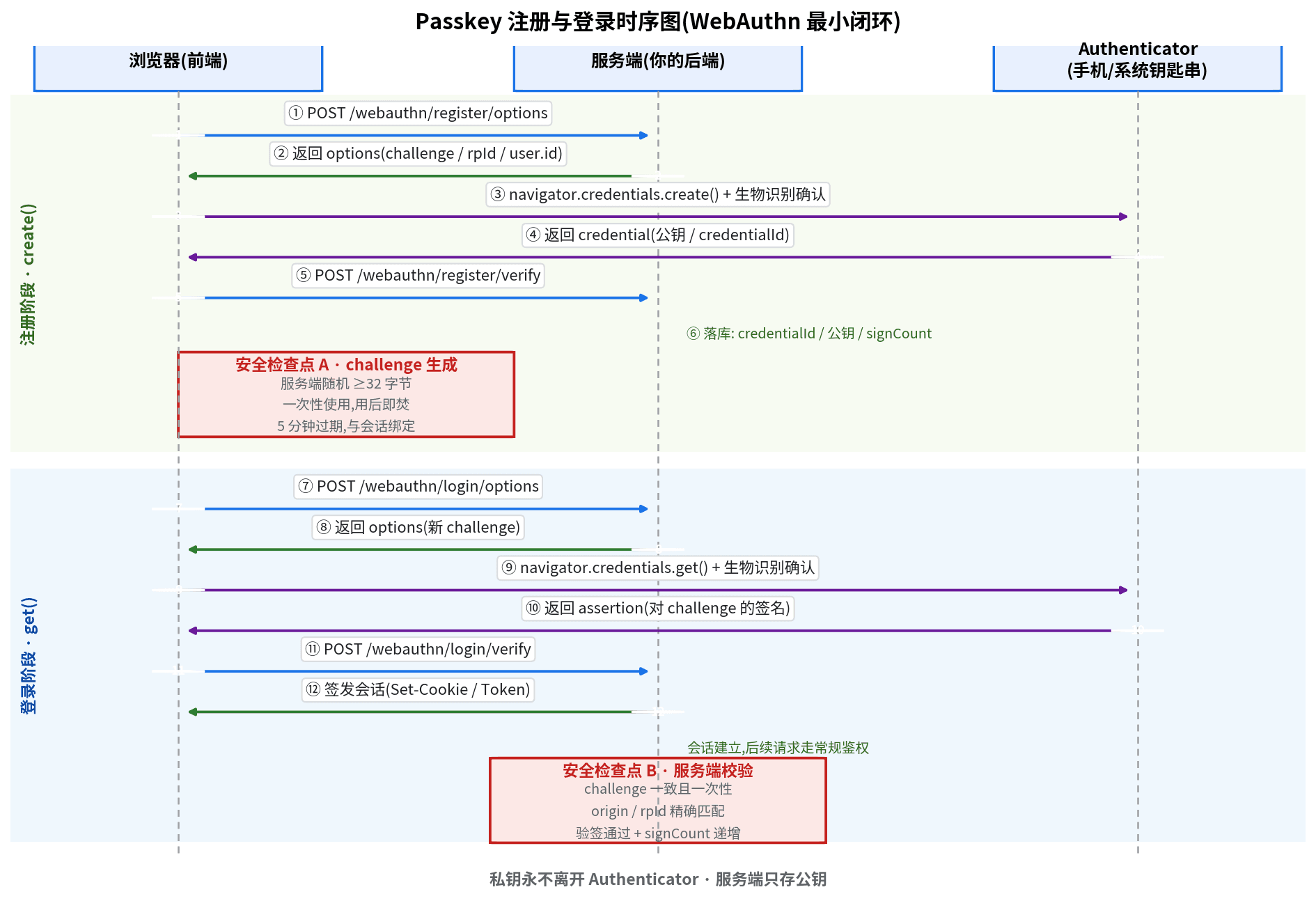
SMS codes burn money per message and still get intercepted. Passkey (WebAuthn) replaces SMS with device-side private-key signatures: the 7-step minimal loop, 5 security red lines, plus multi-device management, a loss-recovery playbook, and an 8-item launch checklist — zeroing out both login cost and entire attack classes.
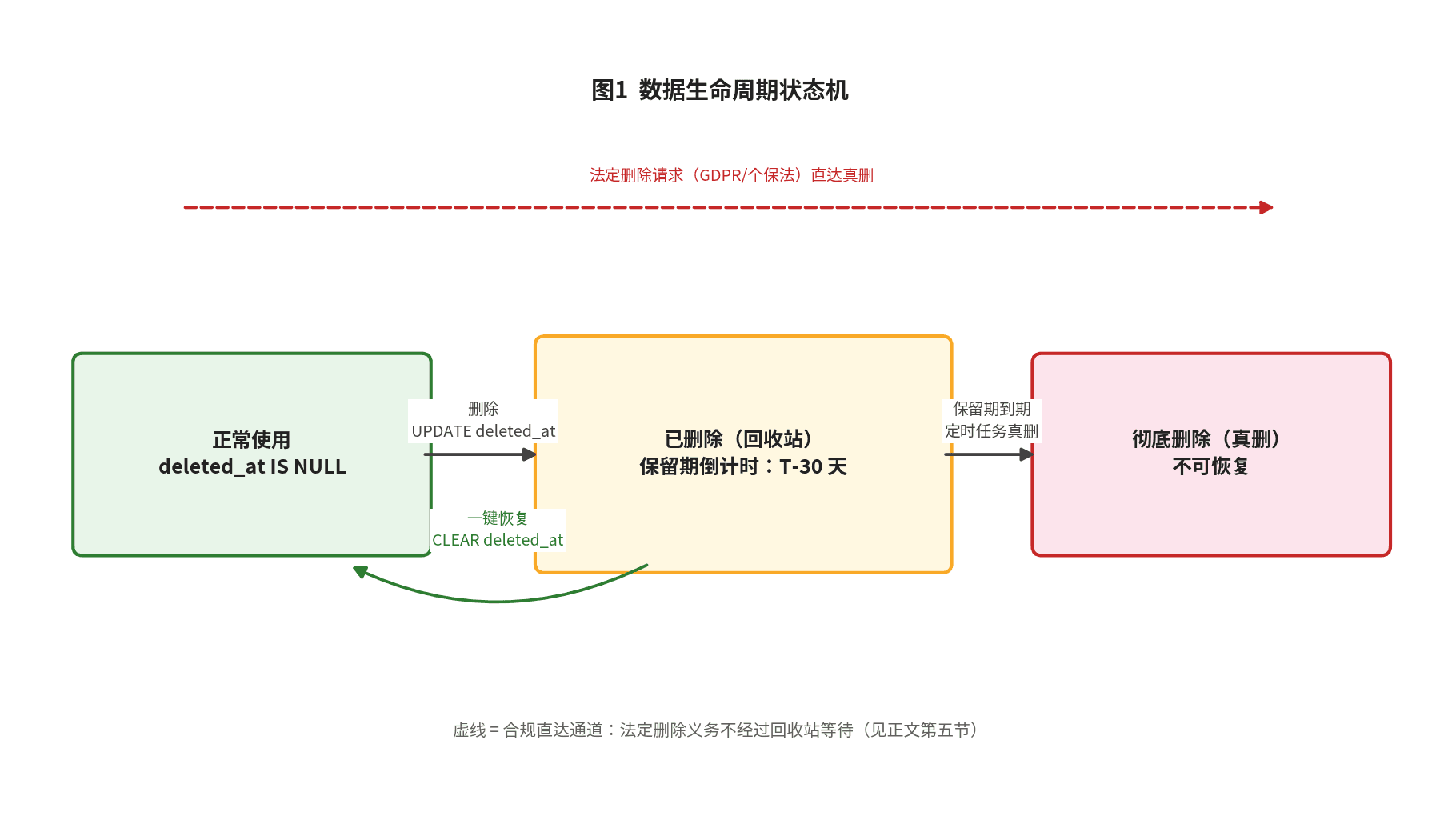
Backups are the last line of defense; the trash bin is the first. This hands-on guide covers the three delete semantics, deleted_at data modeling, partial unique indexes, Prisma query-layer guards, tiered trash-bin retention, GDPR/PIPL erasure reconciliation, and an 8-item launch checklist.

User emails and login tokens sitting in your console.log? This guide gives solo teams a complete log-redaction playbook shippable in a day: a four-tier PII classification table, copy-paste TypeScript redaction trio, minimal console.log-to-pino migration, request-logging middleware templates, Sentry beforeSend config, tiered retention and cost math — plus 8 real-world pitfalls.