Launch Is Just the Start: Native Mobile Push (APNs/FCM) for Vibe Projects
Shipping is just the entry ticket. This guide covers native push end to end: APNs token vs certificate auth, FCM HTTP v1, the Expo shortcut, the device token pipeline, iOS permission copy, four push forms, server-side sending, deliverability and compliance, plus a 12-item launch checklist.
This guide is about native push, with a clear division of labor among three related guides on this site: vibe-project-web-push-code-guide (Web Push in practice) covers "browser push: one VAPID setup for everything", while this guide covers "native push: two systems, APNs + FCM" — different channels that together form the complete push landscape; vibe-project-mobile-app-store-launch-guide (mobile app store launch) covers "passing review", this guide is "user re-engagement after launch" — a direct sequel; vibe-project-mobile-experience-checklist (mobile experience checklist) covers "experience quality", this guide covers "reach".
Launch day tempts many solo teams to pop the champagne. Too early: shipping is just the entry ticket. Whether users remember to open your app the next day depends entirely on your post-launch re-engagement — and the number-one re-engagement channel on mobile is not SMS or email, but native push: free, straight to the lock screen, with click-through rates an order of magnitude above email.
The catch: native push is the part of a vibe coding project most likely to "look done while hiding landmines". AI-generated code can get one successful send working, but it won't warn you about dead-token cleanup, iOS's one-shot permission prompt, sandbox-vs-production mixups, or OEMs killing background processes. This guide covers it end to end: the two channel systems, the token pipeline, permission copy, the four message forms, server-side sending, deliverability, compliance, and a 12-item launch checklist.
1. The two systems in one sentence each: APNs vs FCM
There are exactly two native push channels. Nothing else. APNs (Apple Push Notification service) serves iOS / iPadOS / macOS / watchOS; FCM (Firebase Cloud Messaging) serves Android. Your server talks to both — unless you take the shortcut (more on Expo below).
APNs: proving "who you are" to Apple, two ways
APNs offers token-based and certificate-based server authentication. Picking wrong is a ticking time bomb:
- Token-based (recommended): generate a .p8 signing key in your Apple Developer account, grab the Key ID + Team ID, and sign a JWT (ES256) per request. One key covers multiple apps under your team, works for both development and production, and never expires (it can be revoked).
- Certificate-based (legacy): .p12 / .pem certificates — one per app per environment, expiring every year, requiring annual regeneration and redeployment.
The call is simple: new projects in 2026 should use token-based auth, no debate. Certificates are legacy tech debt, relevant only when inheriting an old project whose infra is still wired to them. If an AI-generated tutorial tells you to export a .p12, scroll past it.
Two more APNs hard facts: server endpoints are split into api.push.apple.com (production) and api.sandbox.push.apple.com (development), and the topic is your bundle ID; since iOS 13 every request must carry an apns-push-type header (alert / background / …) — a missing header on silent pushes is one of the most common "sent but never arrived" causes in the deliverability section below.
FCM: HTTP v1 is the only door, service-account auth
FCM is simpler: the HTTP v1 API is the only sending interface — the legacy HTTP API was shut down in June 2024. Authentication uses a service account (the JSON key pointed to by GOOGLE_APPLICATION_CREDENTIALS), not the old server key.
One notable change in the Firebase docs as of 2026-10-16: FID (Firebase Installation ID) is now marked Recommended as the send target, while the registration token is marked Deprecated. Tokens still work, so don't panic if AI-generated code uses them — but new projects should follow the FID pattern to avoid rework a year from now. Multicast sends to up to 500 targets per call, with the response array matching request order so you can reconcile per-target failures.
Expo Push: the solo-team shortcut, and when it's enough
On Expo / React Native there's a third path: Expo Push Service. The client calls getExpoPushTokenAsync() for an ExpoPushToken, and your server hits one Expo HTTP API (up to 100 messages per request) — Expo forwards to APNs / FCM for you. It's free, with server SDKs in many languages (the Node one is maintained by Expo itself).
When is it enough? Three conditions: an Expo-based project, sub-10k DAU, push as a supporting feature (transactional notifications + light re-engagement). When isn't it? The official docs list three themselves: no SLA, an extra hop of latency and failure surface, and "for finer-grained control, integrate with APNs/FCM directly". Translation: peak-season marketing pushes, push as a core re-engagement lever, or any need for fine parameters like apns-push-type — don't cheap out, wire both channels directly.
One-line summary: Expo Push is the best way to get running; direct dual-channel integration is the necessary path to running reliably. They're stages, not rivals.
2. The device token pipeline: register → store → prune
The part of a push system actually worth writing code for isn't "sending" — sending is two HTTP calls. What decides life or death is the device token pipeline: obtain it, store it correctly, kill it when it dies. AI-generated code almost always does only the first step.
 Illustration of a smartphone displaying a push notification banner with a red badge
Register: obtaining the token
On iOS call registerForRemoteNotifications and the system hands you a deviceToken in the callback; on Android the Firebase SDK mints a token at install and reports changes via onNewToken; with Expo it's one line: getExpoPushTokenAsync(). The common thread: tokens change — reinstalls, major OS upgrades, backup restores, and data wipes all invalidate them.
Store: report-and-overwrite on every launch
So never treat a token as "registered once, valid forever". Minimum viable schema: user_id, platform(ios/android), token, app_version, updated_at, enabled. Iron rule: the app reports its current token on every cold start, and the server upserts/overwrites. Skip this and half your table is zombie tokens within three months, poisoning every deliverability denominator.
Prune: the part AI always forgets
When a user uninstalls, Apple/Google tell you — as error codes. On these responses, delete the token immediately. No retry, no hesitation:
- APNs: HTTP
410 Gone+reason=Unregistered. Apple's authoritative death signal. - FCM: HTTP
404+errorCode=UNREGISTERED. Same treatment. - Expo: check push receipts;
details.error=DeviceNotRegisteredmeans delete. The docs recommend checking receipts ~15 minutes after sending; receipts are kept for 24 hours.
One detail that can save you: APNs BadDeviceToken does not mean a dead token. A production token sent to the sandbox host (or vice versa) returns the same error. Teams have wiped their entire iOS device table treating BadDeviceToken as a death signal — unrecoverable after one misconfigured deploy. Remember: only 410 / Unregistered deletes; BadDeviceToken means check your environment first. Same logic for retries: exponential backoff on 429 / 5xx, never retry 4xx.
# Minimal response-handling pattern after sending (pseudocode)
resp = apns_send(device_token, payload)
if resp.status == 410 and resp.reason == "Unregistered":
    db.delete_token(device_token)          # dead token, delete
elif resp.status == 400 and resp.reason == "BadDeviceToken":
    alert("Check APNs environment config: sandbox/production mixup?")  # check env, don't wipe
elif resp.status in (429, 500, 502, 503):
    queue.retry_later(job, backoff="exponential")  # backoff and retry
3. Permission copy: iOS gives you one real shot
Channels wired up, users still not receiving? The likeliest cause isn't technical — the user never granted permission. And iOS's permission model forgives no mistakes.
iOS: after a denial, the system prompt never returns
The requestAuthorization system dialog effectively gets one shot. If the user taps "Don't Allow", later calls won't show anything — the API just returns denied. The only recovery is guiding the user to enable it manually in Settings → Notifications, with the conversion rate you'd expect.
A real failure: a utility app popped the system permission dialog three seconds into first launch, before users even understood what the app did. 60%+ tapped deny. Every re-engagement push after that was dead on arrival, and two releases of "settings引导" work recovered under 5%. Permission timing has higher ROI than push copy itself.
Soft ask: ask with your own UI first
The standard pattern is a pre-permission "soft ask": before touching the system API, show your own explainer screen. Only when the user taps "Sure, enable it" do you call the system prompt; "Not now" gets recorded and re-asked in context two weeks later (e.g., at their first order). Three required elements in the copy:
- Concrete scenarios: "shipping updates, price drops, reply alerts" — never vague "stay up to date";
- A frequency promise: "only important updates, max 2 per week" — gives users safety;
- How to turn it off: "disable anytime in Me → Settings" — lowers the decision cost.
Android: don't apply iOS instincts
Android plays by different rules: notifications are on by default below Android 13; 13+ requires the POST_NOTIFICATIONS runtime permission; notification channels are mandatory since Android 8, and a channel's importance level can't be changed by code after creation — channel names and descriptions are user-facing product copy, so don't ship channel_1 unless you want users staring at gibberish in system settings. Keep your permission rationale consistent with what you submitted for app store review — reviewers read it.
4. Four push forms: title/body, badge, silent — wrong form equals spam
The same message sent in the wrong form turns "service" into "harassment". Four forms, each with a clear job:
- Form 1 · Visible (title + body): banners and lock-screen alerts. APNs
alert, FCMnotificationpayload. Strongest user impact — and every extra one raises unsubscribe risk. - Form 2 · Badge: the red dot count on the app icon. Note APNs badge is overwrite, not increment: sending
"badge": 5displays 5, not +5. Your server must maintain each user's unread count, or you'll ship haunted numbers. Clear it when the user opens the app — table stakes from the experience checklist. - Form 3 · Silent push: wakes the app without disturbing the user. APNs
content-available: 1(must pair withapns-push-type: background+ low priority); FCM data-only messages. iOS grants ~30 seconds of background execution, throttled further in Low Power Mode — don't use it for anything time-critical. - Form 4 · Interactive / rich: action buttons ("View" / "Dismiss" without opening the app) and image attachments (iOS UNNotificationAttachment, Android BigPictureStyle). Higher tap rates, higher production cost — reserve for your most important campaigns.
The decision table — transactional, marketing, and sync each get their own playbook:
- Transactional (order status, payment success, OTP codes): visible form, high priority, must arrive. Users expect these — the highest-ROI push category there is.
- Marketing re-engagement (features, flash sales, content updates): visible form at normal priority + deep link to the relevant screen, with a hard frequency cap (≤2/week suggested). Clickbait and "tap for a surprise" are unsubscribe accelerators.
- Data sync (list refreshes, prefetching, badge reconciliation): silent push. Invisible to users; failures are invisible too, and retries are cheap.
One red line: disguising marketing as transactional ("You have an important account message" → opens to a coupon) is the fastest way to self-destruct — unsubscribes, complaints, and takedown risk in one package. App Store Review Guideline 4.5.4 is explicit: no advertising, promotions, or direct marketing via push without user consent.
5. Server-side sending in practice: queues, preferences, timezones, retries
 Illustration of a smartphone displaying a push notification banner with a red badge
The pipeline looks like this: business events → push job queue → push gateway → APNs / FCM senders → devices. The only part worth serious code is the "push gateway" in the middle — preference filtering, timezone scheduling, batching, template rendering, and receipt pruning all live there. The channels themselves are just two wrapped HTTP calls.
Queue for peak-shaving: never loop HTTP calls in a request thread
Blasting 100k marketing pushes with a for-loop over FCM inside a request handler means timeouts at best and a downed service at worst. Standard practice: business events enqueue one job (BullMQ / Redis / your cloud's queue), workers drain it slowly. The queue also buys you three things for free: delayed sends (scheduled campaigns), failure retries, and peak-shaving (Expo's own docs recommend capping concurrent connections).
Preference gates + timezone scheduling: two gates before any blast
Before sending, the gateway checks two tables. First, the user preference table: marketing / transactional / system toggles per user — if the user turned marketing off, the coupon job dies at the gateway. That's the technical landing point of Section 7's one-tap unsubscribe. Second, the timezone table: batch by user.timezone so "9 AM push" means 9 AM local, not 9 AM UTC. Failure story: an app blasted globally on a single UTC schedule and woke its UTC+8 users at 3 AM with a "flash sale" — unsubscribe rate spiked 4× that day and the store reviews turned into a war zone.
Retries: only retry what's worth retrying
A correct retry policy fits in three lines: 429 / 5xx / network timeouts → exponential backoff (1s, 2s, 4s…); 4xx → drop and log; 410 / UNREGISTERED → delete the token (back to Section 2). Expo's official retry guidance matches. Never write "retry 3 times on any failure" — retrying a dead token three times just burns quota three times.
// BullMQ worker skeleton: the gateway orchestrates, channels are function calls
worker("push", async (job) => {
  const { userId, template, data } = job.data;
  if (!(await prefs.allowMarketing(userId, template.kind))) return; // preference gate
  const slot = await schedule.byTimezone(userId);                    // timezone scheduling
  if (slot.isFuture) { await job.moveToDelayed(slot.at); return; }
  const tokens = await db.tokensFor(userId);
  const results = await sender.sendBatch(tokens, render(template, data)); // APNs/FCM
  await receipts.pruneDeadTokens(results);                           // receipt pruning
}, { concurrency: 20 });
6. Deliverability in practice: why Android got it and iOS didn't
"Why did Android receive it but not iOS" (or vice versa) is the most-asked question in push systems. Don't guess — walk this checklist top-down; 90% of issues are in the first three:
- Wrong environment: a TestFlight/AdHoc build's token sent to the sandbox host, or the reverse. The #1 cause of iOS silence — the BadDeviceToken trap from Section 2.
- Missing apns-push-type: silent pushes on iOS 13+ without the
backgroundheader vanish — send logs look fine, nothing arrives. - Permission revoked: the user disabled notifications in system settings. The channel returns 200 (Apple accepts everything) but the device never displays. "Sent successfully ≠ user saw it" — Expo's docs stress the same: a receipt
okonly means the channel accepted it. - Android power saving: in Doze mode, normal-priority FCM messages wait for maintenance windows; high-priority messages go straight through but draw from a quota. Transactional = high priority, marketing = normal — reversing them wastes quota.
- OEM ROMs killing background apps: aggressive process killing on Chinese OEM ROMs is an open secret. "Delayed push after the app is killed" is expected behavior — document it in your FAQ rather than trying to fix the unfixable.
Mainland China: a second system FCM can't cover
Worth its own callout: on devices without GMS in mainland China, FCM is effectively unavailable — one FCM setup does not rule them all. The real-world answer is OEM channels: Xiaomi, Huawei, OPPO, and vivo each run their own push SDKs and consoles. That's a separate credential/auth system beyond FCM — budget schedule and headcount for it. "Launch is just the start" hits especially hard in the mainland market.
The solo team's minimum viable deliverability observability
Don't buy third-party attribution on day one — three tables suffice: a send log (message_id, user_id, platform, sent_at, provider_code) for channel acceptance rate = 2xx / total sends; dead-token rate = Unregistered / total sends — above 5% means Section 2's pruning isn't working; and one client-side "notification actually displayed" event for display rate. Judgment call: 100% deliverability is a myth; acceptance rate stable above 95% with a sane display rate for your product type is healthy. Being able to observe steadily matters far more than a pretty number.
7. Compliance & unsubscribe: marketing and transactional are two tracks
Push compliance has one guiding principle: marketing pushes and transactional pushes are different things — mixing them ends badly.
- Transactional (orders, billing, security codes): users expect them; they're part of the service; on by default, rightfully.
- Marketing (promotions, features, content nudges): require explicit opt-in, with one-tap unsubscribe in-app (a master "marketing notifications" switch) that takes effect within 24 hours and lands in the preference table — the table Section 5's gateway gate reads.
Memorize App Store Review Guideline 4.5.4's three red lines: push must not be required for the app to function; no advertising, promotions, or direct marketing without user consent; no sensitive personal or confidential information. Google Play is equally strict — spammy marketing pushes are a classic takedown trigger. Two more details: tokens are device identifiers, so your privacy policy must state what's collected and why; and no marketing pushes after 10 PM user-local time — not law, just the common sense of not getting blocked.
8. Launch checklist: 12 items, check each before release
- 1. Real devices, both platforms: at least one physical iOS and one Android device each (simulators don't receive real pushes); iOS on a release OS build, Android on 13+ to exercise the runtime permission.
- 2. Both environments verified: sandbox and production APNs configs each send successfully; TestFlight builds go to production — environment mixups are the #1 failure mode.
- 3. Token refresh verified: after uninstall-reinstall, report-overwrite leaves exactly one latest token per user_id.
- 4. Denial path works: after tapping "Don't Allow", the app offers a settings entry point with a deep link to system settings.
- 5. Dead-token deletion unit-tested: mock 410/Unregistered and 404/UNREGISTERED, confirm deletion fires; mock BadDeviceToken, confirm no deletion — alert only.
- 6. Silent push verified on device: apns-push-type: background + low priority arrives in background without disturbing.
- 7. Badge reset: opening the app clears the badge; client counting matches the server.
- 8. Timezone scheduling: two test accounts in different timezones confirm "9 AM local" actually lands at 9 AM local.
- 9. Marketing canary: first blast to 1% of users; watch unsubscribe rate and complaints before going full.
- 10. Retry policy: exponential backoff on 429/5xx, no retry on 4xx, retries observable in the queue.
- 11. One-tap unsubscribe: marketing pushes stop within 24 hours of toggling off, preference table updated.
- 12. Copy consistency: permission rationale, privacy policy, and review submission materials all say the same thing.
All twelve green — now pop the champagne. Push is the craft that starts after launch: get the token pipeline and permission copy right first, then talk deliverability optimization; stick with Expo while it's enough, and don't forget receipt pruning after going direct. The channels are just HTTP calls — the real engineering is always in the gateway and the pipeline. That's also the part AI is least likely to fill in for you. Writing it yourself, once, is worth it.
Comments (0)
Related articles
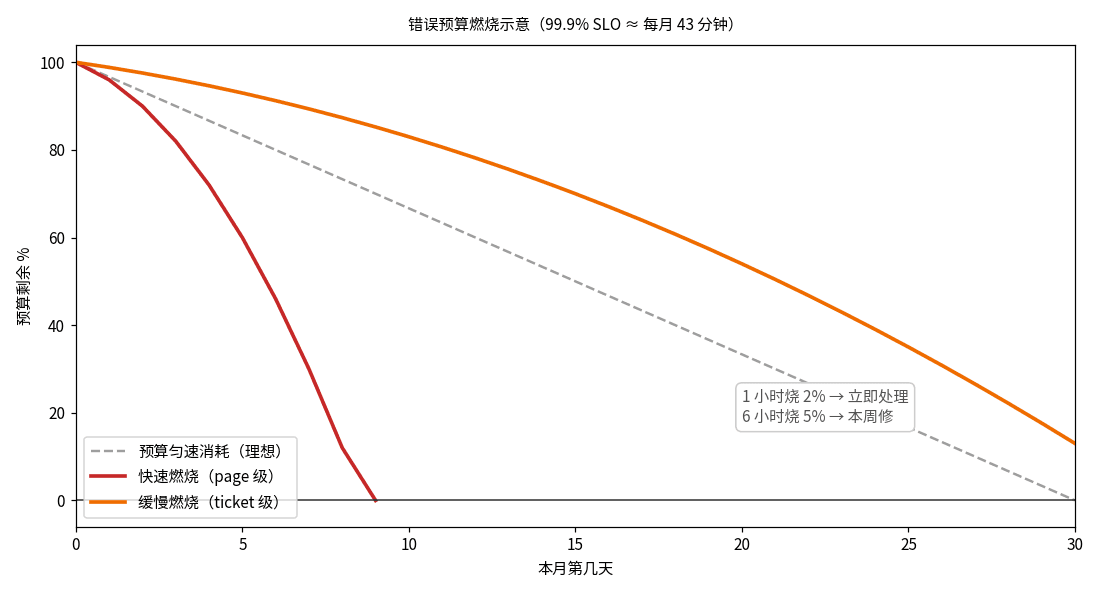
AI-generated code has no concept of reliability — everything is 'feels fast.' This guide gives solo teams the SRE decision layer: SLI/SLO/error-budget in plain terms, two-tier burn-rate alerting, and a minimal implementation (one SQL + one cron + one status-page line) plus the 'budget gone, releases freeze' discipline.
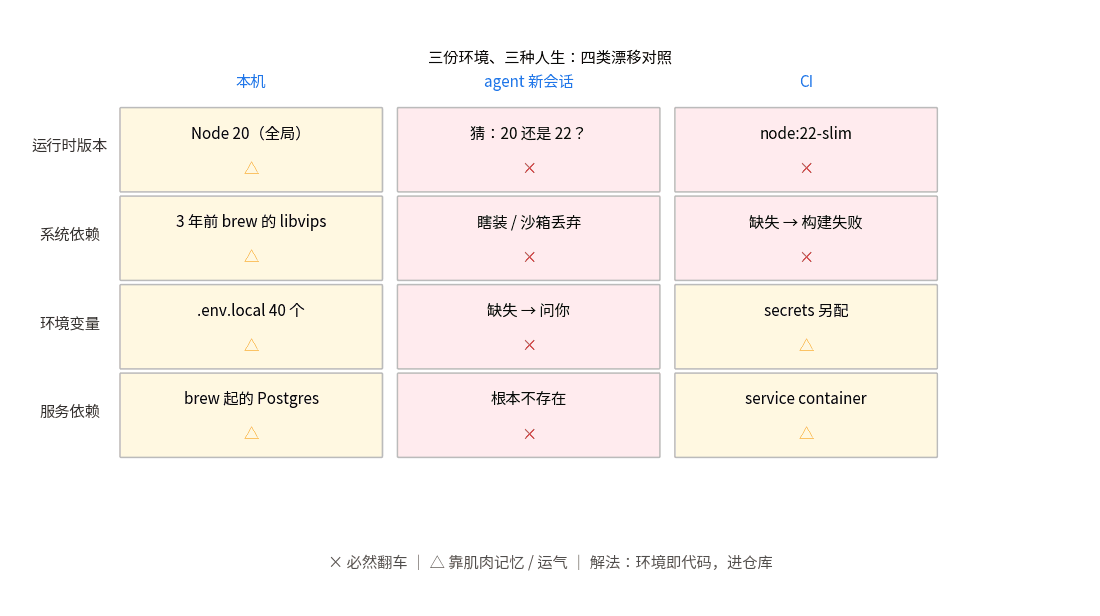
Your code runs in three different environments: your laptop, a fresh agent session, and CI — and they disagree. This guide standardizes the dev environment for vibe projects: a full devcontainer.json template (Node+Postgres), the nix-flakes endgame, and a 15-minute minimum viable version.
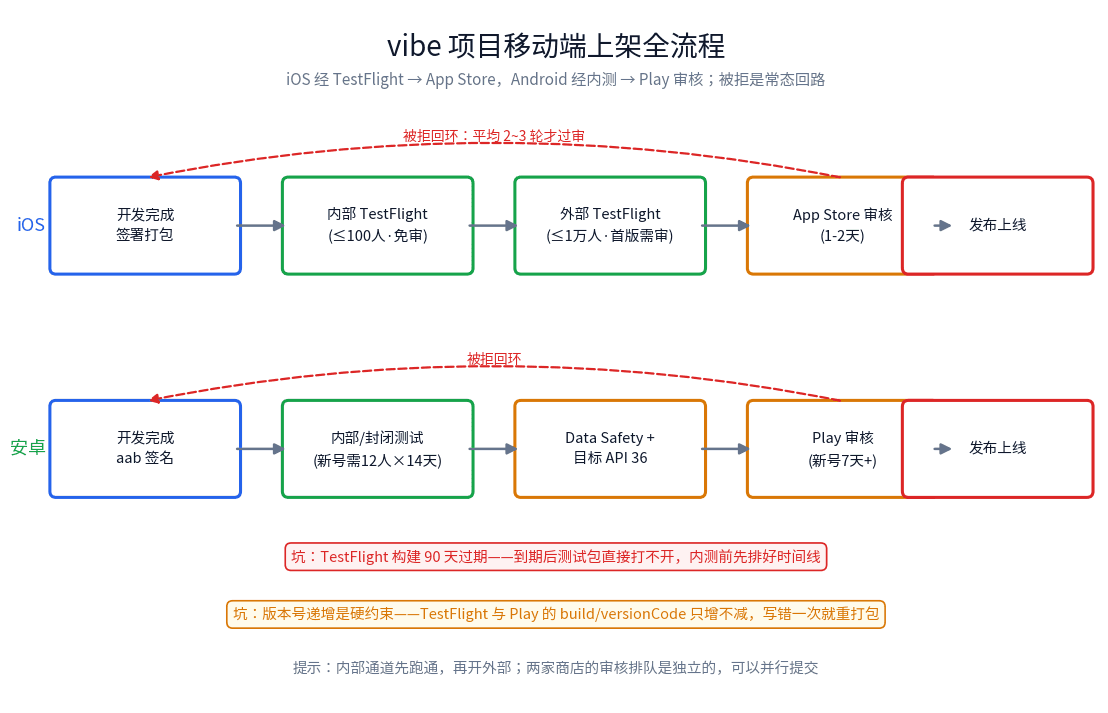
From TestFlight to App Store review: a solo-team field guide to shipping vibe-coded mobile apps. The 14-item pre-submission checklist, the three most common Apple rejection codes (5.2.1, 4.2, 2.1) and their typical failure shapes, privacy label traps with third-party SDKs, the in-app account deletion mandate, TestFlight SOPs, Google Play's 12-tester 14-day rule and API 36 gate, plus a rejection first-aid kit with appeal templates and expedited review.