Give Your Product a Voice: Voice Feature Integration for Vibe Projects
Voice demos are easy; shippable voice features are pipeline engineering. This guide covers picking the right of three shapes (STT/TTS/realtime), the 400ms latency budget split across capture→STT→LLM→TTS→playback, Whisper vs streaming STT, the TTS quality/latency/cost triangle, interruption and turn state machines, five browser pitfalls, cost modeling with anti-abuse, and a 10-item launch checklist.
First, a boundary line: our message-native-apps design guide covers the product shape of text chat — bubbles, read receipts, typing indicators. This guide covers audio pipeline engineering — where every millisecond goes between the microphone and the speaker. Both are "conversation," but one is an interface problem and the other is an engineering problem, and their solutions don't transfer.
2026 is the breakout year for voice agents: Sesame's voice assistant got a major October update (coverage), and Tavus's realtime video interaction fooled nearly half of testers into thinking the AI was human (coverage). Vibe coders everywhere want to give their products a voice, but the blocker is almost never model capability — it's engineering detail. AI-generated voice demos are all "record the whole clip, then call the API." Real products face a different set of gates.
This guide breaks voice integration into 8 practical problems: picking the right of three shapes, splitting the 400ms latency budget, choosing STT/TTS, handling interruption in realtime dialogue, five browser pitfalls, doing the cost math, and a launch checklist. One goal: get it right the first time, no rewrites.
1. Three shapes: pick yours before you pick anything else
"Add voice to the product" means at least three completely different things, an order of magnitude apart in engineering difficulty. Before building, answer: which one does your product actually need?
- Transcription (STT): audio in, text out. Meeting notes, voice search, subtitles, voice input boxes. Users don't expect "conversation," they expect "heard correctly."
- Synthesis (TTS): text in, audio out. Announcements, read-aloud, voice notifications, audio content. Users don't expect "interaction," they expect "pleasant and on time."
- Realtime dialogue: two-way, interruptible. Voice assistants, AI phone agents, speaking coaches. Users expect "talking to a person." This is hell mode.
The most important judgment call first: 90% of vibe projects only need the first two. Realtime dialogue is the nuclear option — only worth it when "interruption" is a core interaction. Its engineering effort and cost are 5–10x a chained pipeline. Ask yourself: do users really need to interrupt the AI? Or is "say a chunk, wait for a reply" enough? If the latter, the "voice message" shape (STT → LLM → TTS, chained) feels perfectly fine at a fraction of the cost and complexity. Many teams charge straight at "realtime dialogue" and only discover afterward that their users were basically leaving voicemails.
A few worked examples to build intuition: a notes app's "voice input" → transcription, batch Whisper is fine; a podcast tool's "generate subtitles" → transcription, offline is faster and cheaper; an app's "voice announcements" → synthesis, pre-synthesize and cache; an AI English speaking coach → this is genuinely realtime dialogue, because students will absolutely interrupt the teacher. The litmus test: rephrase "will users interrupt?" as "if users interrupt and the product handles it dumbly, is that embarrassing?" — only a yes means realtime dialogue.
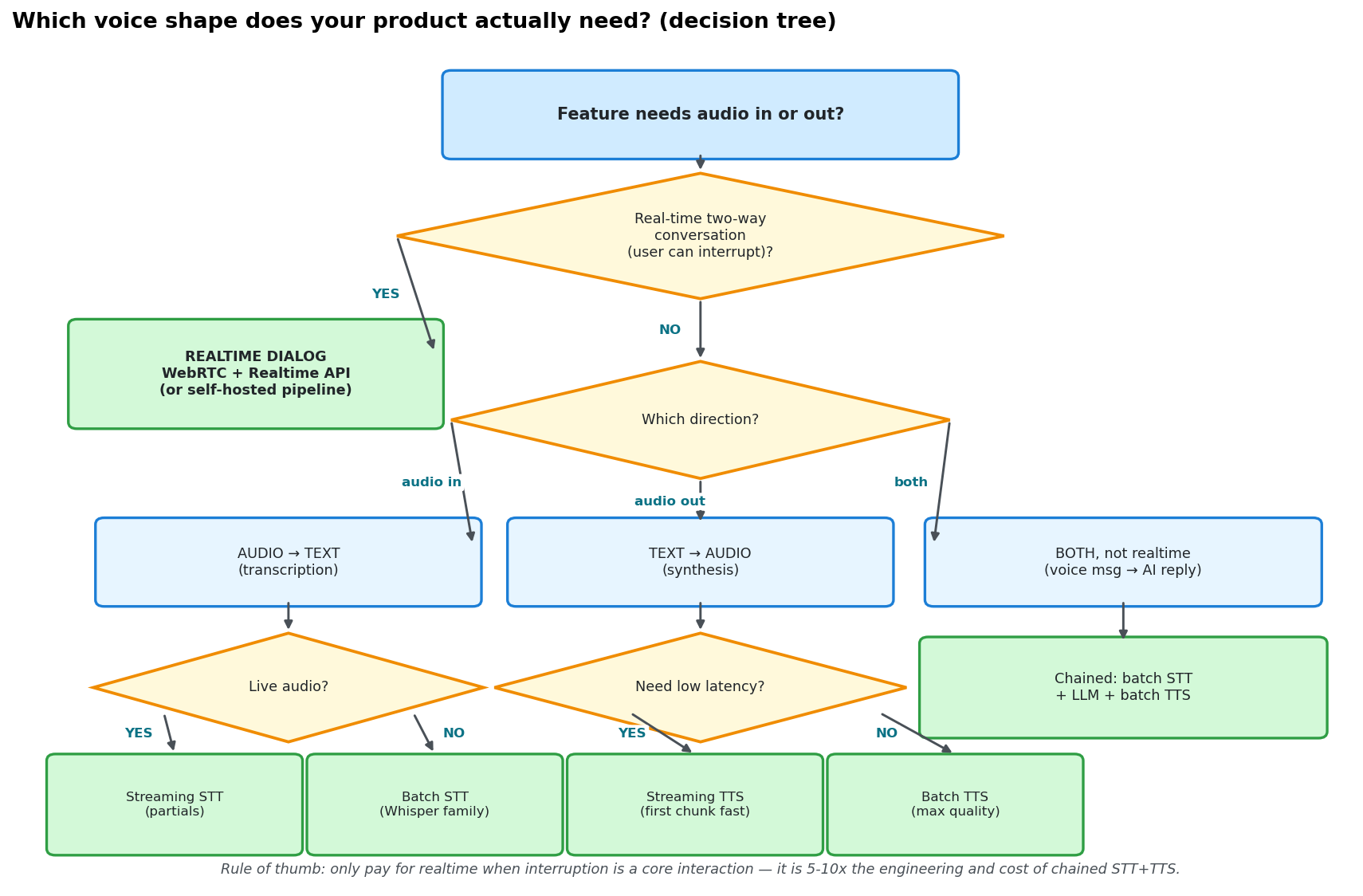 Decision tree: only take the realtime dialogue path when you need realtime two-way conversation with user interruption; everything else starts with a cheaper shape. Rule of thumb — before paying for interruption, confirm interruption is genuinely the core interaction.
2. The 400ms deadline: splitting the latency budget end to end
Human tolerance for conversational delay is a hard number: on a phone call, a pause longer than 400ms feels "laggy" and the other side starts saying "hello? hello?" For voice products, the latency budget starts not at "user taps the button" but at "user finishes their last word", and ends at "user hears the AI's first word." Measure from the wrong points and everything downstream is wrong.
Why do AI-generated voice demos always feel "workable but not shippable"? Look at the pipeline: wait for the full utterance → batch STT on the whole clip (~1.8s) → wait for the LLM's complete reply (~1.2s) → synthesize the full audio (~1.5s) → play. Total: ~4.6 seconds. It felt "okay" in the demo because you were demonstrating and expected the wait; a real user starts doubting at second 2 and has closed the tab by second 4.
Streaming is the only way out, and the key insight is: the stages overlap in time — they are not serial. STT emits partial hypotheses while the user is still talking; VAD confirms end-of-turn in ~100ms; LLM first token in ~150ms; TTS first audio chunk in ~100ms; playback buffering ~30ms; capture overhead ~20ms. The "user finished → reply heard" window only covers the second half — STT did most of its work while the user was speaking — so end-to-end can land around 400ms.
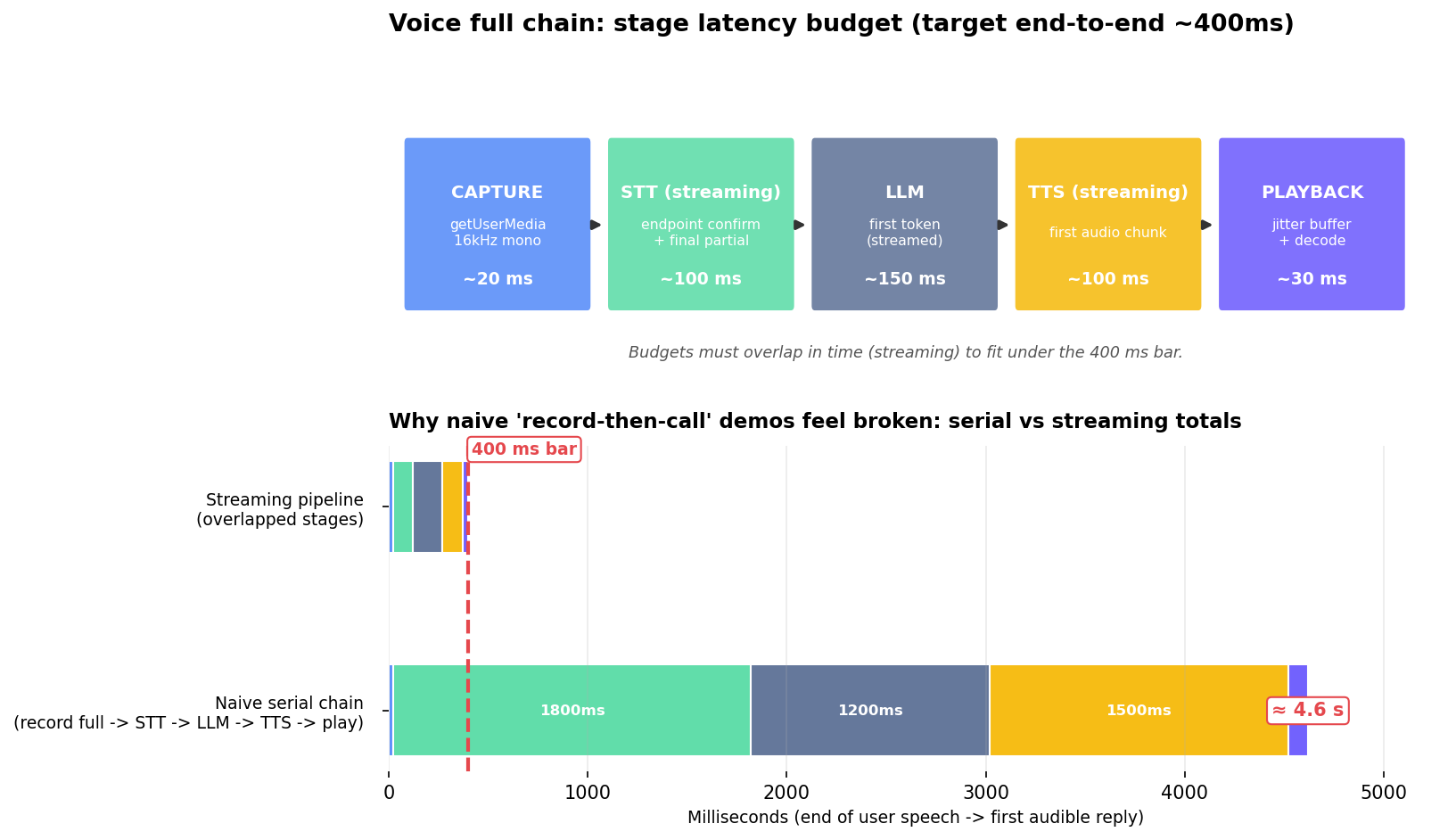 Top: per-stage latency budgets (total ~400ms). Bottom: serial demo (~4.6s) vs streaming pipeline (~400ms) against the 400ms interactivity bar. Nine out of ten over-budget voice demos are a serial-pipeline problem, not a slow-model problem.
Two practical judgments: first, when latency is over budget, check the pipeline before tuning the model — switching serial to streaming cuts 80% of latency in one move; conversely, no model swap saves a serial pipeline. Second, first-word latency and full-reply latency are two different metrics, and users only perceive the former. The faster the AI starts speaking, the "smarter" it feels, even if the rest comes a beat later. So every optimization should target "get the first word out earlier": stream LLM output, use TTS's fastest first-chunk mode, and don't wait for the playback buffer to fill.
3. STT selection: Whisper family vs streaming recognition
This is the easiest choice to get wrong without noticing for a long time, because both sound similar in a demo.
The Whisper family (offline/batch transcription): accurate — good multilingual and accent tolerance; cheap, API around $0.006/min; self-hostable (faster-whisper runs locally, a lifesaver for privacy-sensitive audio). The fatal flaw: it's not streaming. It needs the whole clip, which adds 1–2 seconds of delay to realtime dialogue. Perfect for meeting notes, video subtitles, voice-message transcription — everything "not in a hurry."
Streaming STT (Deepgram, AssemblyAI, Azure Speech and the like): emits words as they're spoken, low latency. The price is per-minute billing an order of magnitude above Whisper, plus partials that "change their mind" — earlier words can be revised as more audio arrives.
Four practical judgments:
- Partial "flip-flopping" is the most underestimated pitfall. If the frontend renders partials as final text, users watch words twitch. The right pattern: partials are display-only (grey them out), and only final results get persisted and sent to the LLM.
- Don't expect punctuation in partials. Whisper's punctuation is added in post-processing; in realtime, partials are basically unpunctuated. If you need sentence breaks, split on silence duration yourself instead of waiting for the model.
- Speaker diarization is usually a separate line item. For meeting-notes scenarios, don't assume it's free — ask about it explicitly during selection.
- For Chinese, test on real recordings. Test on your actual users' audio — in the subway, with accents, over background music — not on studio-mandarin demo clips. Accuracy under accent and noise can differ by 20 percentage points.
- Self-host vs API depends on volume and privacy. faster-whisper on a single consumer GPU can handle multiple realtime streams, an order of magnitude cheaper than API at scale — but high concurrency turns GPU scheduling and VRAM into a new ops job. The dividing line is clear: self-host when daily transcription exceeds thousands of minutes or the audio is sensitive (medical, interviews); otherwise start with API and spend your energy on the pipeline.
4. TTS selection: the impossible triangle of quality, latency, and cost
TTS has three corners: quality (naturalness, emotion, voice cloning), latency (how long until the first audio chunk), and cost (per-character billing, roughly $15 per million characters — watch out for character-based billing in Chinese). You get two at most; for realtime dialogue the ranking should be latency > cost > quality.
Why latency first? In voice dialogue, a "good enough" voice that starts in 200ms beats a "perfect" voice that starts in 2 seconds. Latency is a 0-or-1 problem — past the deadline, users churn; quality is an 80-vs-95 problem — users hear the difference but won't quit over it. So streaming TTS is mandatory for realtime, and the metric to compare is "first audio chunk latency," not "full synthesis time."
Three money-saving judgments:
- Pre-synthesize + cache high-frequency short phrases — the highest-ROI move in cost optimization. "Got it," "one moment please," "sorry, could you repeat that" — synthesize once, cache, and every later play is zero-latency and zero-cost. In a mature voice assistant, 30%+ of playback can come from cache.
- Voice cloning has a compliance red line. Cloning a real person's voice (especially the user's own) needs a clear authorization chain; the easiest trap for vibe projects is "using an influencer's voice as the default" — don't touch it, the legal risk dwarfs the novelty.
- Test mixed Chinese-English reading separately. Many TTS engines read Chinese beautifully and fall apart on English words; your users will absolutely mix languages, so mixed-reading cases belong in the selection test set.
One deeply hidden engineering point: streaming TTS eats sentence-chunked text, but LLMs emit token streams. You need a sentence buffer in between — accumulate until a sentence boundary (period, question mark, newline) then hand it to TTS; don't wait for the full generation. Skip this layer and every first-chunk optimization upstream is wasted. Put text preprocessing in the same layer: convert digits to spoken form, expand English abbreviations letter by letter, strip URLs and emoji — TTS will literally read out "smiling face emoji." Don't ask how I know.
5. Realtime dialogue: interruption, the turn state machine, and "don't talk over people"
Interruption is the soul of realtime dialogue. "Realtime dialogue" without interruption is just voice messaging with lower latency — not worth 5–10x the cost.
The core mechanism is a trio:
- VAD (voice activity detection): decides WHEN the user starts/stops speaking. A simple energy threshold works in the browser for prototyping; production wants a model-based VAD (Silero-class). The key parameter is the silence-detection threshold — 500–800ms is a good starting range. Too short and the AI treats thinking pauses as "done" (it starts talking over people); too long and the conversation drags. There is no silver bullet; tune it on real user recordings.
- Echo cancellation: decides whether the AI interrupts itself. While the AI speaks, the mic hears the speaker. Beyond enabling the browser's echoCancellation, gate the VAD on playback state — raise the VAD trigger threshold or ignore it entirely while AI audio is playing. Otherwise the AI gets "interrupted" by its own voice and enters infinite self-excitation: the most comical and most common failure mode.
- The turn state machine: turn = USER / AI / IDLE. Exactly two rules, no more: VAD decides when a turn ends; the state machine decides who owns the turn. Interruption is not "pause" — it is "cancel the AI's synthesis and playback + hand the turn to the user."
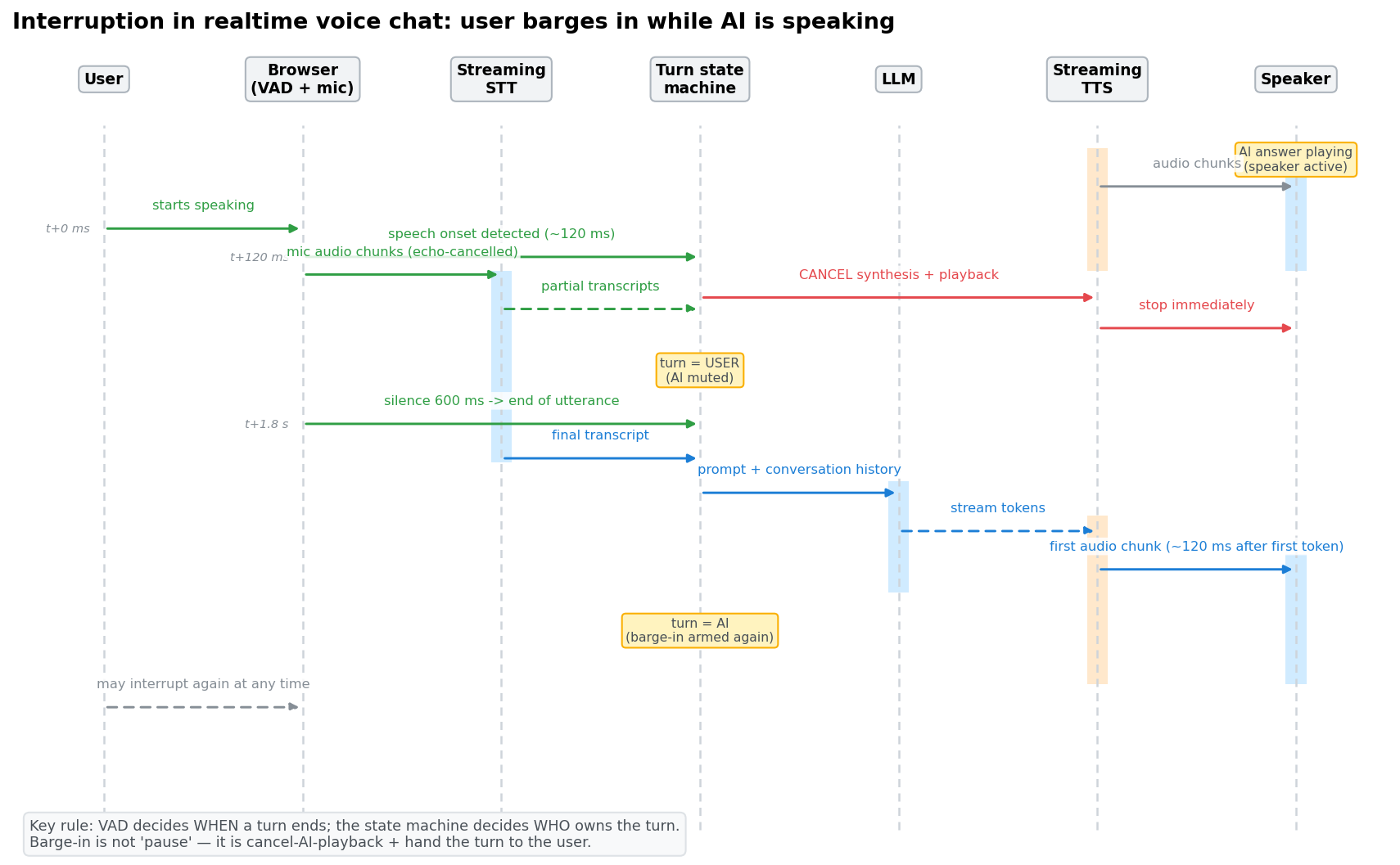 Interruption sequence: VAD detects speech onset ~120ms after the user starts → state machine cancels AI synthesis/playback and hands the turn to the user → 600ms silence confirms end of utterance → streamed LLM output → TTS first audio chunk ~120ms after first token. Remember: interruption = cancel AI playback + hand over the turn, not pause.
Finally, "don't talk over people" — the most annoying trait of AI in vibe projects. Two concrete practices: after the AI finishes, don't jump straight into "waiting for interruption"; leave a 300–500ms turn-handover window. And don't start judging the mic the instant the user stops; give the VAD silence threshold its full time. Human conversation has ~200ms of natural handover gap — fighting it makes the AI feel "pushy." A voice assistant that feels comfortable owes it to these deliberately-slow details, not to the model.
One more post-interruption context trap: when the AI is cut off mid-sentence, how much did the user actually hear? TTS plays in chunks; at interruption time the last chunk may be half-played. If you stuff the "complete reply text" into conversation history as-is, the next turn's AI assumes the user heard everything — and contradicts itself. The fix: record the actually-played text (down to the chunk) and only write "what the user actually heard" into history. This is the biggest difference from text chat: a text message is either sent or not; speech can be "half sent."
6. Five browser pitfalls
Ninety percent of voice-feature production incidents live in the browser, not the server. AI-generated code fills exactly zero of these five pits:
Pit 1: Autoplay policy. Chrome/Safari block audio playback without a user gesture. Your product's "start conversation" button has one real job: unlocking the AudioContext. For AI-speaks-first scenarios (outbound calls, greetings), the first sentence can only play after a user click. The pit within the pit: on iOS an AudioContext can be suspended again by the OS even after resume() — add retry logic and never assume one unlock lasts forever.
Pit 2: Microphone permission. HTTPS is required (localhost excepted); once denied, there's no second prompt — you must guide users to re-enable it in browser settings, with a "test your microphone" self-check page. The classic vibe-project mistake: requesting permission on page load, the confused user hits deny, and the whole feature is permanently bricked. The right pattern: request it when the user explicitly taps "start speaking" — intent is clear and grant rates are far higher.
Pit 3: Echo. See section 5. Two additions: headphones fix 90% of echo, but you can't require users to wear them; in engineering terms, enable echoCancellation, noiseSuppression, and autoGainControl in your getUserMedia constraints, and discard the first 200ms of mic data when AI playback starts (speaker startup transients leak the most).
Pit 4: Sample rate. Browsers typically hand you 48kHz; STT models want 16kHz mono. Don't resample with ScriptProcessor on the main thread (deprecated and janky) — use AudioWorklet on a dedicated thread. Remember: 16kHz mono is STT's standard input; sending 48kHz stereo just burns bandwidth and money, accuracy won't improve.
Pit 5: Mobile backgrounding. On iOS Safari, switching apps or locking the screen kills audio capture; Android is more forgiving. For "chat on the go" scenarios, manage expectations: when page visibility changes, tell the user explicitly ("paused — tap to continue") instead of silently disconnecting and letting them talk to thin air for three minutes.
7. The cost math: per-minute vs per-character, plus anti-abuse
Know the three billing models first: STT bills per audio minute (Whisper ~$0.006/min, streaming an order of magnitude more), TTS bills per character (~$15 per million characters — character-based billing bites harder in Chinese), and Realtime APIs bill per minute plus per token — the most expensive. The modeling formula is one line: monthly cost = DAU × voice minutes per user × unit price × 30.
A sobering worked example: 1,000 DAU, 3 minutes per user per day, streaming STT (~$0.02/min) + TTS → 1,000 × 3 × 0.02 × 30 = $1,800/month, before LLM tokens. That's why "pick your shape first" is section one — the wrong shape costs an order of magnitude more; the same 1,000 DAU on the voice-message shape might cost a tenth.
Voice endpoints are a billing-disaster zone, so build anti-abuse in up front:
- All voice calls go through server-side auth; the frontend only holds short-lived tokens. A bare API key in the browser is a wallet on the sidewalk — anyone who scrapes it can batch-transcribe on your dime.
- Per-user rate limits: cap voice minutes per user per day, stricter for new accounts. Normal users don't talk 30 minutes a day; block first, investigate later.
- Anomaly alerts: a single user/IP burning 2 hours of usage in 10 minutes triggers circuit-break + alert. Don't wait for the month-end bill.
- Cap single recordings: 60–120 seconds max, so nobody uses your endpoint as a free file host / transcription service.
- Cap TTS text length + filter sensitive content: don't let anyone batch-generate content in your voice — it's your money burned and your liability.
- Roll out to 5% with a daily budget breaker: new voice features start at 5% of users with a daily budget cap; exceeding it auto-degrades to text mode and pages you. Voice cost curves are linear with no cache to save you (beyond that 30% pre-synthesis), so launching at full blast in week one is flying naked.
8. Launch checklist: 10 items, on real networks
Don't validate voice features on office Wi-Fi. Take a phone and run these 10:
- Ride the subway: VAD doesn't false-trigger or swallow words in background noise.
- Ride the elevator: after weak-signal/reconnect, the turn state machine recovers instead of deadlocking.
- Interrupt 5 times in a row: the AI shuts up within 300ms every time, no audio tail.
- One round of mixed Chinese-English: STT doesn't flip languages mid-sentence, TTS doesn't change tone.
- A 3-minute monologue: partials don't twitch, the final transcript lands complete, punctuation mostly usable.
- Full flow on iOS Safari: permission request, playback unlock, background-then-return.
- The permission-denied path: produces guidance a human can follow, not a blank screen or infinite spinner.
- Cost smoke test: 10 test users for a day, then reconcile the bill against your model — off by 2x+ means the model is wrong.
- 20 people talking at once: the server doesn't drop streams or cross audio; tenants' streams stay strictly isolated.
- A regression clip: record the "AI interrupts itself" audio; re-run it every time you touch VAD parameters — echo self-excitation is the most relapse-prone bug there is.
One line to close: voice is pipeline engineering, not model engineering. Models set the floor (how accurately it hears, how nicely it speaks); the pipeline sets the ceiling (whether it feels like talking to a person). Vibe coders build fast but think in pipelines weakly — these 8 sections are that missing class: pick the shape, budget the latency, then selection, interruption, browser pits, and the cost math. Walk them in this order and you'll get it right the first time.
Comments (0)
Related articles

AI loves setInterval polling for "realtime" — and it brings exploding bills, baked-in latency, and stale data. This playbook covers realtime done right for vibe projects: the polling/SSE/WebSocket/WebRTC decision table, channel auth, reconnect with message resume, presence, multi-instance pub/sub scaling, a connection-count cost model, and an 8-item launch checklist. With Supabase, PartyKit, and self-built WebSocket integration code.

When results stall, the first instinct is 'let's fine-tune a model' — but 90% of the time, RAG or prompt engineering is cheaper, faster, and better. This decision guide gives you the three-way tree (task type × data volume × latency/cost), data-volume thresholds, the full cost formula, LoRA vs full fine-tuning, eval gate rules, and the 'don't fine-tune' anti-pattern list — so you spend the training budget only when it pays.
Opening up your API means issuing keys to users — and most solo teams get it wrong: plaintext storage, one god-key for everything, no revocation, no usage attribution. This guide gives you a copy-paste-ready system: key format design, hash-only storage, scope permission models, rotation/revocation SOPs, and per-key rate limiting with usage attribution — with TypeScript templates, Prisma schemas, and a one-week rollout checklist.